
How-to | Twitter
A Little Birdy Told Me
An easy and effective way to bring in new readers
If you’re not already on Twitter, you should run over there and open a new account! Not because Twitter is all that and a bag o’ chips, but because if you’re not on Twitter, you’re missing out on a chance to grow your readership on Medium.
First Things First
Be sure to set your account name carefully. New accounts, by default, will have a string of random numbers tacked onto the end, and many twits (my semi-affectionate name for Twitter users!) think that all of those accounts are bots or trolls. They may well be; bots and trolls usually don’t know how, or won’t take the time, to change their account names and usernames, and will simply accept the defaults offered by Twitter on sign-up.
In the sidebar, you’ll see More. Click that to display these options and select Settings and privacy:
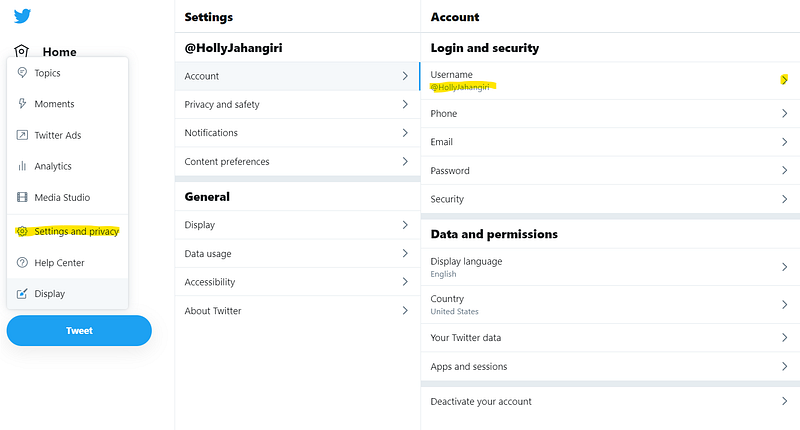
Click Username. Twitter will display some suggested alternatives to your default name, but you can set this to anything that isn’t already taken.
Caution: If you are a long-time Twitter user, you may not want to play with this option — your fans may struggle figuring this out!
Explore the other options here, like Security (four options below Username). I highly recommend adding two-factor authentication or password reset protect.
Next, make sure that your Profile is working for you. Use a good head shot (don’t be coy, no one believes you look like a cat or a cartoon character or a sexy celebrity!) and an attractive background/header photo. You have a very limited number of characters available to you in each field, so use them effectively: Name, Bio (very brief — make it count!), and Location. If you have your own Website, add the link! If not, use your Medium profile URL. You don’t have to add your Birth date, but if you do, you can control who is able to see month/day, and separately, year.
K. L. Wightman makes a compelling case for why you should avoid using hashtags in your personal bio. She’s convinced me: I just now removed the few I was using!
Connect Your Social Media Accounts to Medium
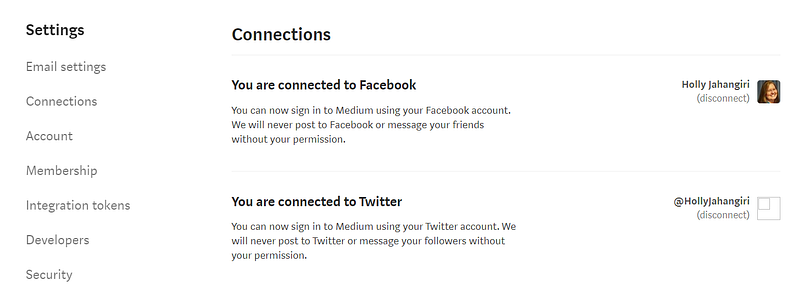
Once you do that, you’ll get notified (tagged on Twitter) when someone shares your stories using the Twitter share button, or uses Medium’s built-in highlight and tweet function.
Worried about linking Twitter and Medium? Remember that Ev Williams founded or co-founded Blogger (Pyra Labs — you know, back before Google bought it); Twitter; and Medium. Just do it.

Now Share!
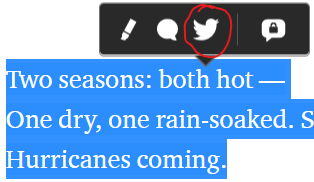
To use the highlight and tweet feature, just highlight a short passage from a story that particularly resonates with you. Medium displays a little pop-up dialog that lets you do one or more of the following (left to right, above): Highlight, Comment, Tweet, or Private Note. Click the bird.
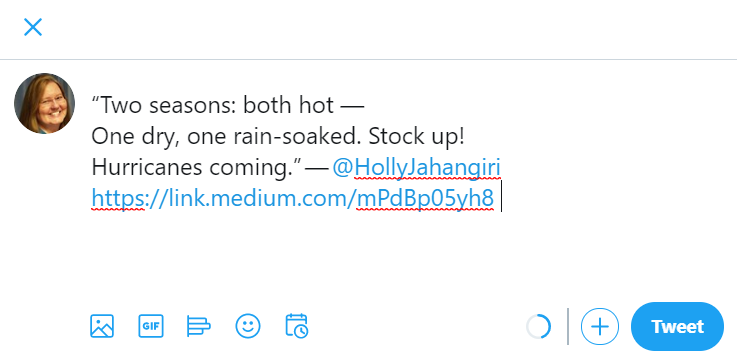
Just click Tweet when you’re happy with it.
Free Reads?
One thing to note: All stories shared via Twitter will bypass the 3 free stories a month limit behind the Medium paywall. This does not mean that writers won’t get paid — they’ll still earn a share of the revenue from paid Medium members who read the story. But they’ll also be helping to bring in new readers— people who will be pleased, we can hope, to join up as paid members and contribute their $5/month for unlimited reading material here on Medium. That helps us all. Let’s show ’em it’s worth it!
Holly Jahangiri is the author of Trockle; A Puppy, Not a Guppy; and A New Leaf for Lyle. She draws inspiration from her family, from her own childhood adventures (some of which only happened in her overactive imagination), and from readers both young and young at heart. She lives in Houston, Texas, with her husband, J.J., whose love and encouragement make writing books twice the fun.
If you are reading this on any site other than Medium or on jahangiri.us, the content may have been stolen.


