
A Herd Of Turtles In Python Turtle
Various shapes with Leonardo, Michelangelo, Donatello and Raphael
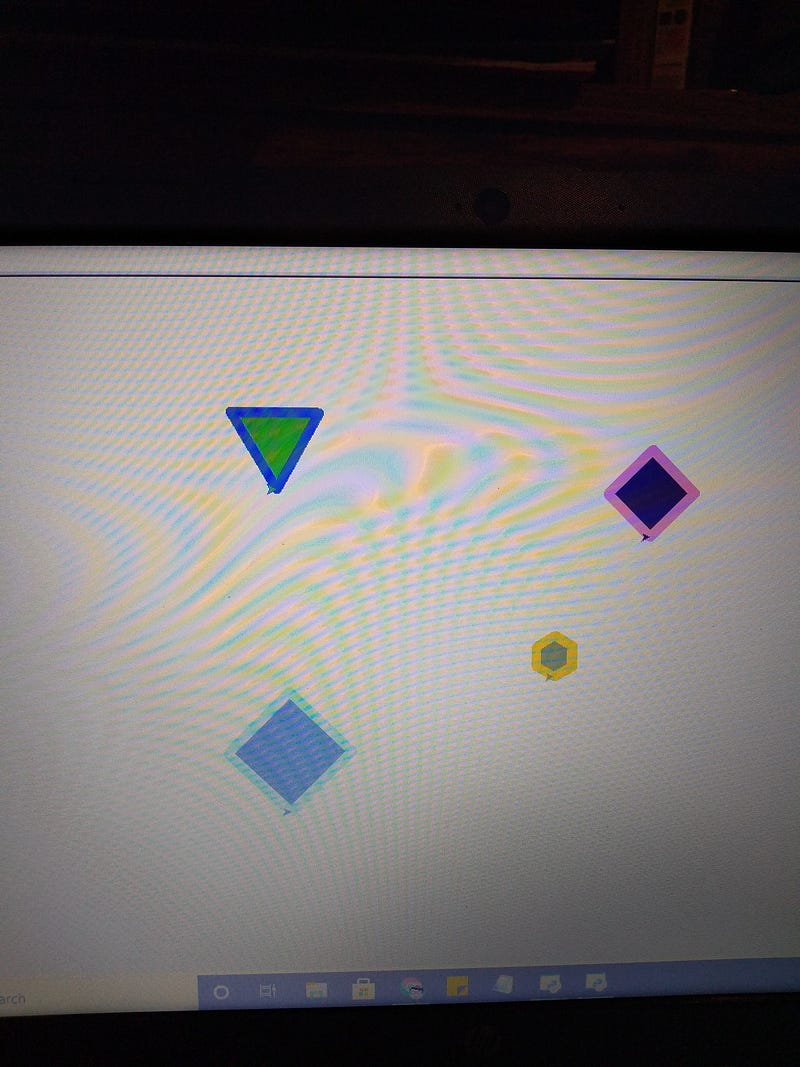
In this article we have 4 turtles creating different shapes in the 4 quadrants, each turtle with its own color and attributes.
Here is the code:
import turtle as T
import randomT.color ("white")Leonardo = T.Turtle()
Leonardo.color ("hot pink")
Leonardo.width (10)
R = random.randrange(256)
G = random.randrange(256)
B = random.randrange(256)
T.colormode (255)
Leonardo.fillcolor (R,G,B)T.colormode (1.0)
Michelangelo = T.Turtle ()
Michelangelo.color ("blue")
Michelangelo.width (10)
R = random.randrange(256)
G = random.randrange(256)
B = random.randrange(256)
T.colormode (255)
Michelangelo.fillcolor (R,G,B)T.colormode (1.0)
Donatello = T.Turtle ()
Donatello.color ("yellow")
Donatello.width (10)
R = random.randrange(256)
G = random.randrange(256)
B = random.randrange(256)
T.colormode (255)
Donatello.fillcolor (R,G,B)T.colormode (1.0)
Donatello = T.Turtle ()
Donatello.color ("yellow")
Donatello.width (10)
R = random.randrange(256)
G = random.randrange(256)
B = random.randrange(256)
T.colormode (255)
Donatello.fillcolor (R,G,B)T.colormode (1.0)
Raphael = T.Turtle ()
Raphael.color ("aquamarine")
Raphael.width (10)
R = random.randrange(256)
G = random.randrange(256)
B = random.randrange(256)
T.colormode (255)
Raphael.fillcolor (R,G,B)T.color ("white")x = random.randrange(100,200)
y = random.randrange(100,200)
fig = random.randrange (3,7)
siz = random.randrange (20,80)
Leonardo.penup()
Leonardo.goto (x,y)
Leonardo.pendown()
Leonardo.begin_fill()
Leonardo.circle (siz,360,fig)
Leonardo.end_fill()x = random.randrange(-250,100)
y = random.randrange(150,200)
fig = random.randrange (3,7)
siz = random.randrange (20,80)
Michelangelo.penup()
Michelangelo.goto (x,y)
Michelangelo.pendown()
Michelangelo.begin_fill()
Michelangelo.circle (siz,360,fig)
Michelangelo.end_fill()x = random.randrange(50,75)
y = random.randrange(-200,50)
fig = random.randrange (3,7)
siz = random.randrange (20,80)
Donatello.penup()
Donatello.goto (x,y)
Donatello.pendown()
Donatello.begin_fill()
Donatello.circle (siz,360,fig)
Donatello.end_fill()x = random.randrange(-200,0)
y = random.randrange(-200,0)
fig = random.randrange (3,7)
siz = random.randrange (20,80)
Raphael.penup()
Raphael.goto (x,y)
Raphael.pendown()
Raphael.begin_fill()
Raphael.circle (siz,360,fig)
Raphael.end_fill()After importing turtle and random, we create individual turtles with the Turtle command. If we were not using T it would be turtle.Turtle. The color command creates both pencolor and fillcolor.
We could have used pencolor instead of color but there is no need. Color and fillcolor works just fine. Notice that we don’t need to set the initial colormode for Leonardo but we do for subsequent turtles.
T.color = ("white")We need this line because the original turtle is still active and after we set things up. The program will begin running with a turtle at home() or position 0,0. If we did not put this line in we would begin with an aquamarine turtle in the center of the screen.
We then set it up so that each turtle will draw a figure: a triangle, a square, pentagon or hexagon. It will not draw a heptagon because a range never includes the last number. Remember range 10 will give numbers from 0 to 9.
The turtles will go to random locations within their quadrants. We need to include a penup() and a pendown() so that the turtle does not draw a line as it moves to the location.
We also need to remember to put in a begin_fill() and an end_fill(), when we draw the shapes using the circle command.
Jim McAulay🍁 “The secret to a clean kitchen is simple. Never cook. Ever!”

62–61
30–32