
Angular
A Guide to Managing Loading State for Angular App API Requests
This tutorial walks you through how to track the status of API requests in your Angular app and displaying the loading UI.

In this article, I will share one of the best ways to manage loading state during API calls in an Angular application. The article will be broken into these sections:
- Overview
- Create a loading service by using Subject in RxJS
- Create a loading interceptor
- Create an independent loading component
- Apply the interceptor to the whole project
For more content like this, check out https://betterfullstack.com
Overview
We want to be able to manage the loading state of our application in a simple and centralized location.
There are a few ways we can manage the loading state.
One way is to create a loading variable on the component that calls the API and set the variable to true. Then call a service and subscribe to it and set the variable to false after API responded. This all happens within each component.
Another way is using state management with a loading$ selector and in the root view component, I will subscribe to the loading$ from the state selector to show or hide the loading component at the root container component. So every time we dispatch an action, I have to dispatch the loading action to set loading status to true and false. This causes duplication in code for actions changing the loading value.
I finally arrived at a more simple solution by using the event bus to emit the loading event and set the value to true or false. The loading component will listen to a loading event to show or hide loading on the screen. This will work well without state management also. But, I still have to emit the loading event every single time that I call APIs.
All solutions above have one thing in common — they duplicate code a lot. So I settled on a final solution by using an angular interceptor to handle loading.
Create loading service by using Subject RxJS
If you do not know what a Subject is, you can read about it RxJS Subjects Explained with Examples.
A
Subjectis like anObservable, but can multicast to manyObservers.Subjectsare likeEventEmitters: they maintain a registry of many listeners.
The idea here is:
- Create one service named
LoadingService. I prefer usingng g service loadingto create the service file. - Having a
loading$subject which will send the latest loading status to their observers. - Have 2 methods:
startLoadingandstopLoading. These methods will set thetrueandfalsevalue toloading$.
Create a loading interceptor
An interceptor is a technique to react to or decorate all HTTP requests. Angular will see the outgoing and incoming HTTP requests globally and we can hook into this to build functionality around it.
- Intercept the HTTP request and add the
startLoadingandstopLoadingmethods from loading service. - Checking for the case of multiple requests.
Create an independent loading component
The loading component will do 3 main things:
- Include HTML that will show loading on the screen
- Listen to
loading$from loading service - Add style to show and hide depending on the status value
- Remove the subscription when the life cycle
OnDestroyhappens
For the UI, you can use a spinner from Angular material, Bootstrap, or customize one yourself.
On the life cycle AfterViewInit you will subscribe to loading$ from the loading service to check the loading status and change style for your component by using the element ref.
Remember that unsubscribe when the life cycle Destroy happens.
Apply interceptor to whole project
To apply the loading listener to the whole project, just add the loading interceptor into the provider in the app module.
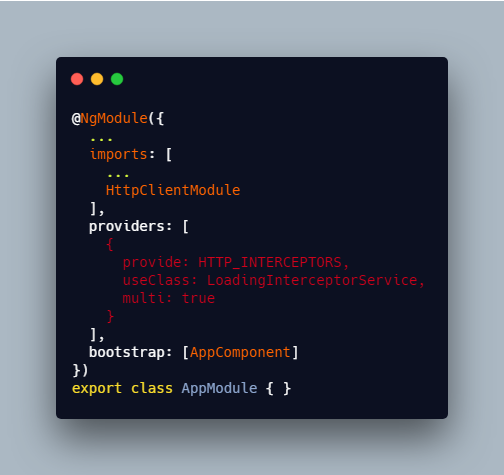
Remember, we must import HttpClientModule to use HTTP_INTERCEPTORS.
Summary
This article provided a good solution for adding loading status to the screen in an Angular application.
To do this, we just need:
- A service with a
loading$subject - An Angular interceptor to call the method from the service
- A loading component that subscribes to the
loading$subject from the service
I hope you found this article useful! You can follow me on Medium. I am also on Twitter. Feel free to leave any questions in the comments below. I’ll be glad to help out!


