
Multi-Threaded Android: Handler, Thread, Looper, and Message Queue
What are they and how can we use them properly?

Multi-threading is one of the most valued concepts in any programming language. Making adept use of threads on Android can help you boost your app’s performance.
When a user opens an application, Android creates its own Linux process. Besides this, the system creates a thread of execution for that application called the main thread or UI thread.
The main thread is nothing but a handler thread. The main thread is responsible for handling events from all over the app like callbacks associated with the lifecycle information or callbacks from input events or handling events from other apps, etc.
Any block of code that needs to be run is pushed into a work queue and then serviced by the main thread. As the main thread does so much work, it’s better to offer longer work to other threads, so as not to disturb the UI thread from its rendering duties.
It is essential to avoid using the main thread to perform any operation that may end up keeping it blocked.
Network operations or database calls or loading of certain components are some examples that may cause blocking of the main thread when they are being executed on the main thread.
They are executed synchronously, which means that the UI will remain completely unresponsive until the task gets completed.
To avoid this situation, they are usually executed in separate threads, which avoids blocking the UI while the tasks are being performed. That means they are executed asynchronously from the UI.
Android provides many ways of creating and managing threads, and there are many third-party libraries that make thread management a lot easier. Each threaded class is intended for a specific purpose; however, picking the right one that suits our needs is very important.
In this article, let’s explore thread, handler, looper, and message queue.
Thread
A thread can be defined as the path followed when executing a program. The Java virtual machine allows an application to have multiple threads of execution running concurrently.
Concurrency means running multiple tasks in parallel, it is one of the main reasons that we use threads. As Android is a single-threaded model, we need to create different threads to perform our task and post the result to the main thread where the UI gets updated.
We can create threads in two ways.
- By extending the
Threadclass.
2. By implementing a Runnable interface.
The Runnable interface should be implemented by any class whose instances are intended to be executed by a thread. The class must define a method of no arguments called run.
Every thread is created and controlled by the java.lang.Thread class.
We need to call the start method on the thread to start the execution:
new Test.start()The thread has a lifecycle with different states like new, runnable, running, non-runnable (blocked), terminated.
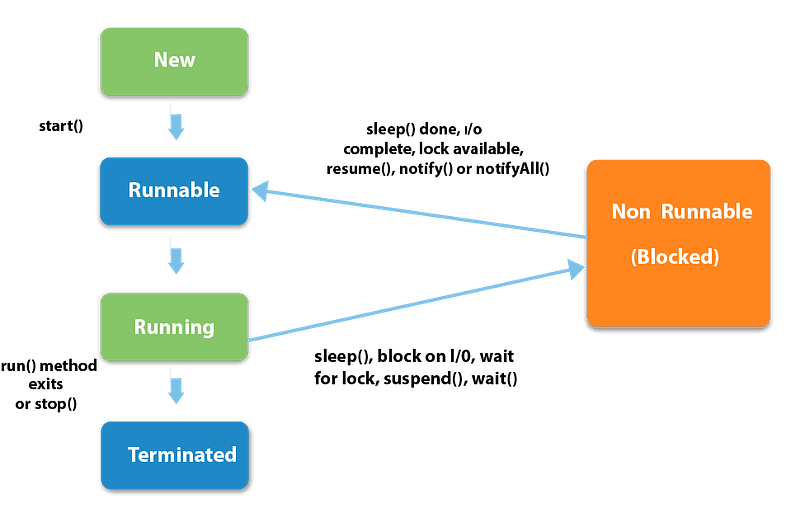
We can perform any kind of operation inside threads except updating the UI elements. To update a UI element from a thread, we need to use either the handler or the runOnUIThread method.
runOnUiThread() runs the specified action on the UI thread.
If the current thread is the UI thread, then the action is executed immediately. If the current thread is not the UI thread, the action is posted to the event queue of the UI thread.
Message, MessageQueue, Looper
The MessageQueue is a queue that has a list of tasks (messages, runnables) that will be executed in a certain thread. Android maintains a MessageQueue on the main thread.
Alongside looper and handler, MessageQueues are part of the building blocks of threading in Android and they are used virtually everywhere in the system.
This class holds the list of messages to be dispatched by the looper. You can just call Looper.myqueue() to get the list of messages.
As per documentation, it is a low-level class holding the list of messages to be dispatched by a looper. Messages are not added directly to a MessageQueue, but rather through handler objects associated with the looper.
We can retrieve the MessageQueue for the current thread with Looper.myQueue().
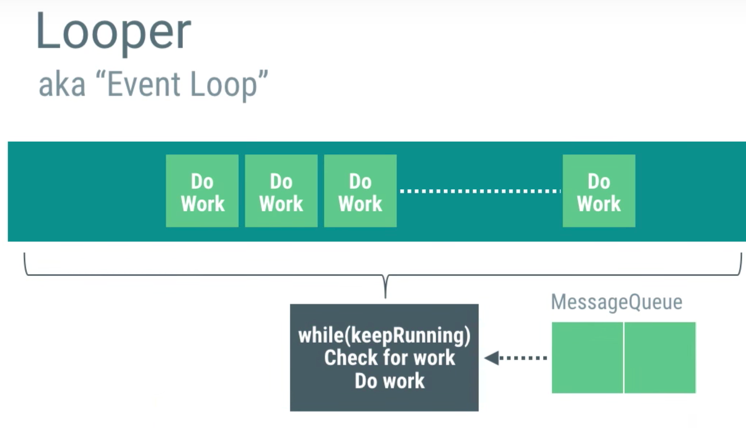
The looper is responsible for keeping the thread alive. It is a kind of worker that serves a MessageQueue for the current thread. Looper loops through a message queue and sends messages to corresponding threads to process.
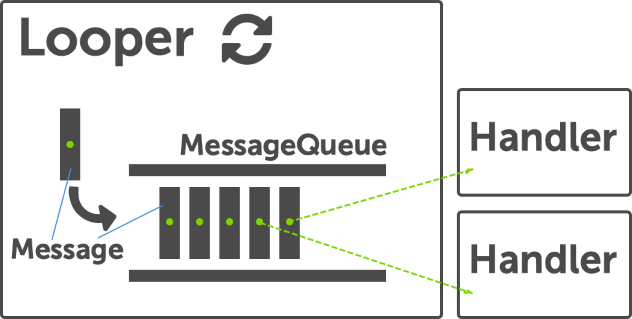
There will be only one unique looper per thread. That means only one MessageQueue per thread. There can be any number of handlers for one single thread. So, the looper is providing the thread with the facility to run in a loop with its own MessageQueue.
The message defines a message containing a description and arbitrary data object that can be sent to a handler.
This object contains two extra int fields and an extra object field that allow you to not do allocations in many cases. We can simply say that message is something like a bundle that is used for the transfer of data.
While the constructor of message is public, the best way to get one of these is to call Message.obtain() or one of the Handler.obtainMessage() methods, which will pull them from a pool of recycled objects.
There are different arguments that can be useful:
public int whatUser-defined message code so that the recipient can identify what this message is about. Each handler has its own name-space for message codes, so you do not need to worry about yours conflicting with other handlers.
public int arg1public int arg2arg1 and arg2 are lower-cost alternatives to using setData() if you only need to store a few integer values.
public Object objAn arbitrary object to send to the recipient. When using Messenger to send the message across processes, this can only non-null if it contains a Parcelable of a framework class (not one implemented by the application). For other data transfers, use setData.
There are a lot more arguments that you can go through in the documentation.
Handler
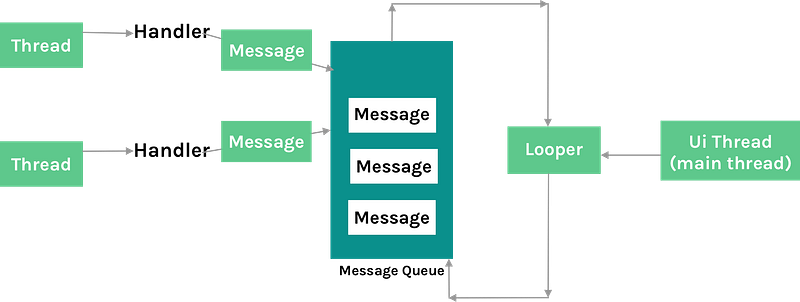
As there is only one thread that updates the UI, which is main thread, we use different other threads to do multiple tasks in the background but finally, to update the UI, we need to post the result to the main or UI thread.
It will be complicated to manage communication with all these threads if you are managing a large group of threads. So, Android has provided handlers to make the inter-process communication easier.
A handler allows you to send and process Message and Runnable objects associated with a thread's MessageQueue. Each handler instance is associated with a single thread and that thread’s message queue.
This class is responsible for enqueuing any task to the message queue and processing it.
When you create a new handler, it is bound to the thread/message queue of the thread that is creating it — from that point on, it will deliver messages and runnables to that message queue and executes them as they come out of the message queue.
In simple words, we can say that a handler is a component that can be attached to a thread and then made to perform an action on that thread via simple messages or Runnable tasks.
It works in conjunction with another component, looper, which is in charge of message processing in a particular thread.
When a handler is created, it can get a Looper object in the constructor, which indicates which thread the handler is attached to. If you want to use a handler attached to the main thread, you need to use the looper associated with the main thread by calling Looper.getMainLooper().
There are two main usages for a handler:
- To schedule messages and runnables to be executed at some point in the future.
- To enqueue an action to be performed on a different thread than your own.
How to schedule
Scheduling messages is accomplished with post(Runnable), postAtTime(Runnable, long), postDelayed(Runnable, long), sendEmptyMessage(int), sendMessage(Message), sendMessageAtTime(Message, long), and sendMessageDelayed(Message, long) methods.
The post versions allow you to enqueue Runnable objects to be called by the message queue when they are received.
The sendMessage versions allow you to enqueue a Message object containing a bundle of data that will be processed by the handler’s handleMessage(Message) method (requiring you to implement a subclass of Handler).
Difference between post() and sendMessage()
We use post() when we want to execute some code on the UI thread without knowing anything about our Handler object. It makes sense in many cases where arbitrary code needs to be executed on the UI thread.
For example, to update the UI from a background thread with some delay, here you can create a handler attached to the UI thread, and then post action as a Runnable.
But in some cases, if we want to organize what is being sent to the UI thread and have specific functions we want to execute, in that case you can use sendMessage().
Summary
A thread must be created to execute long-running jobs. A Handler is a very convenient object to communicate between two threads.
So, we don’t have the choice between handler and thread. Use a thread to do heavy jobs and use a handler if your background thread will trigger a job to be done in another thread — most of the time the UI thread.
With the use of MessageQueue, the execution is sequential so in the case of concurrent threads, this will avoid race conditions. Normally, the thread cannot be reused once its job is completed.
But thread with the help of the looper is kept alive until you call a quit method so you don’t need to create a new instance each time you want to run a job in the background.
Please let me know your suggestions and comments.
Thanks for reading.


