avatarPete Fison

Free AI web copilot to create summaries, insights and extended knowledge, download it at here

7191

Abstract

pples'</span>, <span class="hljs-string">'round'</span>), (<span class="hljs-string">'bananas'</span>, <span class="hljs-string">'curved'</span>)]</pre></div><p id="b6a4">You can also unpack variable-length <b><i>tuples</i></b> / <b><i>lists</i></b> / <b><i>sets </i></b>with a special use of the <code>*</code> character, meaning “<i>unpack into a list of zero or more values</i>”:</p><div id="1a23"><pre><span class="hljs-meta">>>> </span>fruits = [(<span class="hljs-string">"apples"</span>, <span class="hljs-string">"green"</span>), (<span class="hljs-string">"bananas"</span>, <span class="hljs-string">"yellow"</span>, <span class="hljs-string">"curved"</span>)]

<span class="hljs-meta">>>> </span>[<span class="hljs-string">f"<span class="hljs-subst">{x.title()}</span> are normally <span class="hljs-subst">{<span class="hljs-string">' and '</span>.join(y)}</span>"</span> <span class="hljs-keyword">for</span> x, *y <span class="hljs-keyword">in</span> fruits] [<span class="hljs-string">'Apples are normally green'</span>, <span class="hljs-string">'Bananas are normally yellow and curved'</span>]</pre></div><blockquote id="0ae7"><p>If the <code><i>f"…"</i></code> pattern in the second line (above) is a new syntax for you, it’s a great tool to add to your tool-kit. Just Google <code><i>f-strings in Python</i></code>.</p></blockquote><p id="531a">You’ll often see the following kinds of pattern used to unpack a Python dictionary:</p><div id="2642"><pre><span class="hljs-meta">>>> </span>fruits = {<span class="hljs-string">"apples"</span>: <span class="hljs-string">"green"</span>, <span class="hljs-string">"bananas"</span>: <span class="hljs-string">"yellow"</span>, <span class="hljs-string">"pears"</span>: <span class="hljs-string">"green"</span>}

<span class="hljs-meta">>>> </span>{<span class="hljs-string">f"<span class="hljs-subst">{k}</span> are <span class="hljs-subst">{v}</span>"</span> <span class="hljs-keyword">for</span> k,v <span class="hljs-keyword">in</span> fruits.items()} {<span class="hljs-string">'bananas are yellow'</span>, <span class="hljs-string">'apples are green'</span>, <span class="hljs-string">'pears are green'</span>}

<span class="hljs-meta">>>> </span><span class="hljs-built_in">list</span>(fruits) [<span class="hljs-string">'apples'</span>, <span class="hljs-string">'bananas'</span>, <span class="hljs-string">'pears'</span>] <span class="hljs-comment"># A list of (unmodified) dictionary keys</span>

<span class="hljs-meta">>>> </span>[k.title() <span class="hljs-keyword">for</span> k <span class="hljs-keyword">in</span> fruits]
[<span class="hljs-string">'Apples'</span>, <span class="hljs-string">'Bananas'</span>, <span class="hljs-string">'Pears'</span>] <span class="hljs-comment"># A list of (modified) dictionary keys</span>

<span class="hljs-meta">>>> </span>[v <span class="hljs-keyword">for</span> v <span class="hljs-keyword">in</span> fruits.values()] [<span class="hljs-string">'green'</span>, <span class="hljs-string">'yellow'</span>, <span class="hljs-string">'green'</span>] <span class="hljs-comment"># A list of dictionary values</span>

<span class="hljs-meta">>>> </span>{v <span class="hljs-keyword">for</span> v <span class="hljs-keyword">in</span> fruits.values()}
{<span class="hljs-string">'green'</span>, <span class="hljs-string">'yellow'</span>} <span class="hljs-comment"># A set of (unique) dictionary values</span></pre></div><h2 id="2852">Filtering Values</h2><p id="f380">You can filter your results by adding <code>if</code> followed by an expression:</p><div id="97f3"><pre><span class="hljs-meta">>>> </span>fruits = [<span class="hljs-string">"apples"</span>, <span class="hljs-string">"pears"</span>, <span class="hljs-string">"pears"</span>, <span class="hljs-string">""</span>, <span class="hljs-literal">None</span>, <span class="hljs-literal">False</span>, <span class="hljs-number">0</span>, [], {}, ()]

<span class="hljs-meta">>>> </span>{x.title(): fruits.count(x) <span class="hljs-keyword">for</span> x <span class="hljs-keyword">in</span> fruits <span class="hljs-keyword">if</span> x} {<span class="hljs-string">'Apples'</span>: <span class="hljs-number">1</span>, <span class="hljs-string">'Pears'</span>: <span class="hljs-number">2</span>}

<span class="hljs-meta">>>> </span>exclusions = <span class="hljs-string">"PEARS ORANGES MELONS"</span>.split() <span class="hljs-meta">>>> </span>{x.title() <span class="hljs-keyword">for</span> x <span class="hljs-keyword">in</span> fruits <span class="hljs-keyword">if</span> x <span class="hljs-keyword">and</span> <span class="hljs-keyword">not</span> x.upper() <span class="hljs-keyword">in</span> exclusions} {<span class="hljs-string">'Apples'</span>}</pre></div><blockquote id="553d"><p>The last few values in <code>fruits</code> are examples of so-called “falsey” expressions in Python. They’re considered to be <code>False</code> when it comes to evaluating <code>if x</code> , and this is a nice concise way of excluding them from your results.</p></blockquote><p id="4cf7">And finally, you can throw in the keyword <code>else</code> to assign alternative values in your <b><i>comprehension</i></b>, but notice the word order now needs to follow the pattern <code><value> if x else <other value></code> :</p><div id="e185"><pre><span class="hljs-meta">>>> </span>fruits = [<span class="hljs-string">"apples"</span>, <span class="hljs-string">"pears"</span>, <span class="hljs-string">"pears"</span>, <span class="hljs-string">""</span>, <span class="hljs-literal">None</span>, <span class="hljs-literal">False</span>, <span class="hljs-number">0</span>, [], {}, ()]

<span class="hljs-meta">>>> </span>{x.upper() <span class="hljs-keyword">if</span> x <span class="hljs-keyword">else</span> <span class="hljs-string">"<falsey>"</span> <span class="hljs-keyword">for</span> x <span class="hljs-keyword">in</span> fruits} {<span class="hljs-string">'APPLES'</span>, <span class="hljs-string">'<falsey>'</span>, <span class="hljs-string">'PEARS'</span>}</pre></div><blockquote id="cee3"><p>Notice in the final output that the order of items in a Python <b>set</b> doesn’t necessarily follow the order of the <b>list </b>it comes from, so don’t rely on it!</p></blockquote><h2 id="cf52">Nested Comprehensions</h2><p id="074d">Here’s a simple example of a <b><i>nested list</i></b> or “list of lists”:</p><div id="166b"><pre><span class="hljs-meta">>>> </span>nest1 = [<span class="hljs-string">'egg1'</span>, <span class="hljs-string">'egg2'</span>] <span class="hljs-meta">>>> </span>nest2 = [<span class="hljs-string">'egg3'</span>, <span class="hljs-string">'egg4'</span>, <span class="hljs-string">'egg5'</span>] <span class="hljs-meta">>>> </span>trees = [nest1, nest2] <span class="hljs-meta">>>> </span>trees [[<span class="hljs-string">'egg1'</span>, <span class="hljs-string">'egg2'</span>], [<span class="hljs-string">'egg3'</span>, <span class="hljs-string">'egg4'</span>, <span class="hljs-string"

Options

'egg5'</span>]]</pre></div><p id="02a1">A common task is to extract all the lowest order elements from a <b><i>nested list </i></b>like this, or in other words, to “flatten” it. We can do this easily and succinctly with a<b><i> nested list comprehension</i></b>:</p><div id="f4bc"><pre><span class="hljs-meta">>>> </span>[x <span class="hljs-keyword">for</span> y <span class="hljs-keyword">in</span> trees <span class="hljs-keyword">for</span> x <span class="hljs-keyword">in</span> y] [<span class="hljs-string">'egg1'</span>, <span class="hljs-string">'egg2'</span>, <span class="hljs-string">'egg3'</span>, <span class="hljs-string">'egg4'</span>, <span class="hljs-string">'egg5'</span>]</pre></div><p id="d5aa">What about flattening a <b><i>nested dictionary</i></b> using a <b><i>dictionary comprehension</i></b>? Let’s use some dog breeds as an example this time:</p><div id="30de"><pre><span class="hljs-meta">>>> </span>dog_breeds = { <span class="hljs-meta">... </span> <span class="hljs-string">"Terrier"</span>: [<span class="hljs-string">"Paterdale"</span>, <span class="hljs-string">"Border"</span>], <span class="hljs-meta">... </span> <span class="hljs-string">"Other"</span>: [<span class="hljs-string">"Dalmation"</span>, <span class="hljs-string">"Poodle"</span>, <span class="hljs-string">"Whippet"</span>], <span class="hljs-meta">... </span>}</pre></div><p id="e183">Did you work it out on your own?</p><div id="d25c"><pre><span class="hljs-meta">>>> </span>[dog <span class="hljs-keyword">for</span> breed <span class="hljs-keyword">in</span> dog_breeds.values() <span class="hljs-keyword">for</span> dog <span class="hljs-keyword">in</span> breed] [<span class="hljs-string">'Paterdale'</span>, <span class="hljs-string">'Border'</span>, <span class="hljs-string">'Dalmation'</span>, <span class="hljs-string">'Poodle'</span>, <span class="hljs-string">'Whippet'</span>]</pre></div><h2 id="3fc4">Confession Time…</h2><p id="c560">I hope you’ll agree these examples not only look elegant and concise, but they’re pretty easy to read and understand what’s going on. Language teachers call this “passive translation” i.e. from a foreign language like Python into your native language or thoughts. The real challenge comes when you try to reconstruct the correct word order and syntax several weeks from now while staring at a blank screen (especially if you forget to bookmark this article or follow me!). Translating something from your native language or thoughts into a foreign language is called “active translation”, and is considerably harder.</p><p id="69a7">I’ve been coding professionally for several years and I’m not ashamed to admit it’s taken me <b><i>ages </i></b>to truly master <b><i>nested comprehensions </i></b>in the “active” sense and it’s only recently that I’ve started being able to write them without deliberate thought. For a long time I relied on code snippets in my IDE but it still it didn’t come naturally and I found myself back in StackOverflow time and time again…</p><p id="0c2c">Now the penny’s finally dropped for me, I’ve created a short animation to hopefully help others construct these mighty one-liners. Basically you just have to visualise what the traditional way of writing <code>for</code> loops would look like, then slide the lines into the right position between square brackets. A picture speaks a thousand words, and a moving picture speaks a million, so here it is:</p><figure id="4450"><img src="https://cdn-images-1.readmedium.com/v2/resize:fit:800/1*B5Xfw7Gq9AZeptJ1d0jh4A.gif"><figcaption>How to remember nested comprehensions. Video by author.</figcaption></figure><h2 id="86fd">Final Points to Ponder</h2><p id="6012">It’s easy to get over-enthused about <b>comprehensions </b>and <b>generators</b>, and as a general rule I’d suggest that if you’re starting to spill over into two or more lines, your code is becoming unreadable and you might like to consider:</p><ol><li>Going back to using a traditional <code>for</code> loop where you can write each step or transformation on a separate (shorter) line.</li><li>Defining a function that contains each step or transformation on a separate line, then use: <code>[my_function(x) for x in my_iterable]</code></li><li>Split your comprehension into separate lines for the sections starting with <code>for</code> and <code>if</code> like this:</li></ol><div id="88e1"><pre><span class="hljs-meta prompt_">>>></span> <span class="language-python">terrier = {</span> <span class="hljs-meta prompt_">...</span> <span class="language-python"> dictionary_keys.casefold(): dictionary_keys.encode(<span class="hljs-string">'utf-8'</span>)</span> <span class="hljs-meta prompt_">...</span> <span class="language-python"> <span class="hljs-keyword">for</span> dictionary_keys, dictionary_values <span class="hljs-keyword">in</span> dog_breeds.items()</span> <span class="hljs-meta prompt_">...</span> <span class="language-python"> <span class="hljs-keyword">if</span> dictionary_keys.startswith(<span class="hljs-string">"Terrier"</span>)</span> <span class="hljs-meta prompt_">...</span> <span class="language-python">}</span> <span class="hljs-meta prompt_">>>></span> <span class="language-python">terrier</span> {'terrier': b'Terrier'}</pre></div><p id="266f">Opinions vary on these next suggestions, but it’s difficult coming up with meaningful variable names at the best of times, let alone for a one-line <b><i>comprehension</i></b>, so I tend to go with as short a name as possible based on one of the following approaches:</p><ol><li>Simple ‘algebraic’ names e.g. <code>[(x, y) for x, y in coordinates]</code></li><li>Matching singular/plural names e.g. <code>[tree for tree in trees]</code></li><li>Short, general-purpose names like <b><i>index</i></b>, <b><i>count</i></b>, <b><i>item</i></b>, <b><i>key</i></b>, <b><i>value</i></b>, <b><i>element, sublist, group, result, text, word, prefix, suffix, body, row, column, field, cell, line, page, sheet, book, tag, match, first, last, nth </i></b>e.g.: <code>{index: item for index, item in enumerate(my_iterable)}</code></li></ol><h2 id="a118">Test Your Mastery</h2><p id="42e5">You only get so far by (passively) reading an article like this, so I’ll finish with a challenge for you… Well two challenges actually:</p><p id="fca0"><b>CHALLENGE 1:</b> Actively reinforce your learning by copying each of the code snippets from this article into your Python IDE, and let me know if you find any typos or errors?</p><p id="c8d8"><b>CHALLENGE 2:</b> Now you have the <b><i>nested comprehensions</i></b> animation firmly in your mind, try writing and testing a one-liner for flattening a <b><i>list of lists of lists</i></b> or in other words a 3-level deep nested list?</p><p id="1833"><i>I hope this article has shown you some of the powerful ways you can build on Python’s basic <b>list comprehension</b> pattern to do some pretty useful things with very little code or hard work.</i></p><p id="84f5"><i>Good luck with the challenges, and please let me know if you have any handy examples of your own to share in the comments below.</i></p></article></body>

A crash course in Python “comprehensions” and “generators”

Master them in 20 minutes. Use them every day.

Photo by Kelly Sikkema on Unsplash

I love Python’s list comprehensions and generators.

They keep my code concise. They’re great one-liners for exploring and “munging” data. They’re intuitive, and once you know what you’re looking at, very easy to read.

Haven’t heard of them? Read on! Think you know all the variations of this popular Python construct already? Read on…

Spoiler Alert: There’s a great little video at the end of this article designed to help intermediate level coders with nested list comprehensions

So… what are “comprehensions” exactly?

The best way of explaining these little beauties is to show you what they’re intended to replace and improve on. Instead of this traditional for loop:

>>> fruits = ["apples", "bananas", "pears", "pears"]
>>> new_words = []
>>> for word in fruits:
...     new_words.append(word.title())
... 
>>> new_words
['Apples', 'Bananas', 'Pears', 'Pears']

You can just write:

>>> [word.title() for word in fruits]
['Apples', 'Bananas', 'Pears', 'Pears']

This, dear reader, is a list comprehension. Beautiful isn’t it?

No indentation or colon to remember. No empty list to define then build up. Just the same familiar brackets you already know and love for indicating a list (or as you’ll see shortly, a dictionary or set).

Generators

Change the square brackets to regular brackets and you create something called a generator. These are like list comprehensions but they’re described as “lazy” because they don’t evaluate what’s inside them until the very last minute when they’re actually needed. They’re great for improving the speed of your code and minimising memory use, especially when you’re dealing with real data and large files, not these toy tutorial examples:

>>> (word.title() for word in fruits) 
<generator object <genexpr> at 0x000001A2A97D20A0>
>>> generator = _  # In a REPL session, "_" means "the previous output"
>>> next(generator)
'Apples'
>>> list(generator)  # Notice that 'Apples' has already been removed
['Bananas', 'Pears', 'Pears']

There are subtle differences between generators, iterators and iterables in Python which you might like to Google, but this article is intended as a practical crash-course to get you using the tools, even if you can’t precisely categorise or define them. So let’s move on…

Set Comprehensions

Change the square brackets to curly ones and you have yourself a set comprehension which is a great way of filtering out duplicates or finding the differences or overlaps with other sets of data:

>>> {word.title() for word in fruits}
{'Apples', 'Bananas', 'Pears'}  # 'Pears' only appears once. Nice!

Dictionary Comprehensions

You can create dictionary comprehensions using curly brackets and starting off with the pattern {key: value for… }:

>>> {x.title(): fruits.count(x) for x in fruits} 
{'Apples': 1, 'Bananas': 1, 'Pears': 2}

Unpacking Values

You can extract or “unpack” more than one item (e.g. keys and values from a dictionary, or multiple values from a list of tuples) into any type of comprehension or generator using one of these patterns:

[… for x, y, z in your_iterable]
{… for x, y, z in your_iterable}
(… for x, y, z in your_iterable)
{…: … for x, y, z in your_iterable}

For example:

>>> fruits = [("apples", "2", "round"), ("bananas", "8", "curved")]

>>> [(x,z) for x,y,z in fruits]     
[('apples', 'round'), ('bananas', 'curved')]

You can also unpack variable-length tuples / lists / sets with a special use of the * character, meaning “unpack into a list of zero or more values”:

>>> fruits = [("apples", "green"), ("bananas", "yellow", "curved")]

>>> [f"{x.title()} are normally {' and '.join(y)}" for x, *y in fruits]
['Apples are normally green', 'Bananas are normally yellow and curved']

If the f"…" pattern in the second line (above) is a new syntax for you, it’s a great tool to add to your tool-kit. Just Google f-strings in Python.

You’ll often see the following kinds of pattern used to unpack a Python dictionary:

>>> fruits = {"apples": "green", "bananas": "yellow", "pears": "green"}

>>> {f"{k} are {v}" for k,v in fruits.items()}
{'bananas are yellow', 'apples are green', 'pears are green'}

>>> list(fruits)
['apples', 'bananas', 'pears']  # A list of (unmodified) dictionary keys

>>> [k.title() for k in fruits]                
['Apples', 'Bananas', 'Pears']  # A list of (modified) dictionary keys

>>> [v for v in fruits.values()] 
['green', 'yellow', 'green']  # A list of dictionary values

>>> {v for v in fruits.values()}  
{'green', 'yellow'}  # A set of (unique) dictionary values

Filtering Values

You can filter your results by adding if followed by an expression:

>>> fruits = ["apples", "pears", "pears", "", None, False, 0, [], {}, ()] 

>>> {x.title(): fruits.count(x) for x in fruits if x}
{'Apples': 1, 'Pears': 2}

>>> exclusions = "PEARS ORANGES MELONS".split()
>>> {x.title() for x in fruits if x and not x.upper() in exclusions}
{'Apples'}

The last few values in fruits are examples of so-called “falsey” expressions in Python. They’re considered to be False when it comes to evaluating if x , and this is a nice concise way of excluding them from your results.

And finally, you can throw in the keyword else to assign alternative values in your comprehension, but notice the word order now needs to follow the pattern <value> if x else <other value> :

>>> fruits = ["apples", "pears", "pears", "", None, False, 0, [], {}, ()] 

>>> {x.upper() if x else "<falsey>" for x in fruits}
{'APPLES', '<falsey>', 'PEARS'}

Notice in the final output that the order of items in a Python set doesn’t necessarily follow the order of the list it comes from, so don’t rely on it!

Nested Comprehensions

Here’s a simple example of a nested list or “list of lists”:

>>> nest1 = ['egg1', 'egg2']
>>> nest2 = ['egg3', 'egg4', 'egg5']
>>> trees = [nest1, nest2]
>>> trees
[['egg1', 'egg2'], ['egg3', 'egg4', 'egg5']]

A common task is to extract all the lowest order elements from a nested list like this, or in other words, to “flatten” it. We can do this easily and succinctly with a nested list comprehension:

>>> [x for y in trees for x in y]
['egg1', 'egg2', 'egg3', 'egg4', 'egg5']

What about flattening a nested dictionary using a dictionary comprehension? Let’s use some dog breeds as an example this time:

>>> dog_breeds = {
...     "Terrier": ["Paterdale", "Border"],
...     "Other": ["Dalmation", "Poodle", "Whippet"],
... }

Did you work it out on your own?

>>> [dog for breed in dog_breeds.values() for dog in breed]
['Paterdale', 'Border', 'Dalmation', 'Poodle', 'Whippet']

Confession Time…

I hope you’ll agree these examples not only look elegant and concise, but they’re pretty easy to read and understand what’s going on. Language teachers call this “passive translation” i.e. from a foreign language like Python into your native language or thoughts. The real challenge comes when you try to reconstruct the correct word order and syntax several weeks from now while staring at a blank screen (especially if you forget to bookmark this article or follow me!). Translating something from your native language or thoughts into a foreign language is called “active translation”, and is considerably harder.

I’ve been coding professionally for several years and I’m not ashamed to admit it’s taken me ages to truly master nested comprehensions in the “active” sense and it’s only recently that I’ve started being able to write them without deliberate thought. For a long time I relied on code snippets in my IDE but it still it didn’t come naturally and I found myself back in StackOverflow time and time again…

Now the penny’s finally dropped for me, I’ve created a short animation to hopefully help others construct these mighty one-liners. Basically you just have to visualise what the traditional way of writing for loops would look like, then slide the lines into the right position between square brackets. A picture speaks a thousand words, and a moving picture speaks a million, so here it is:
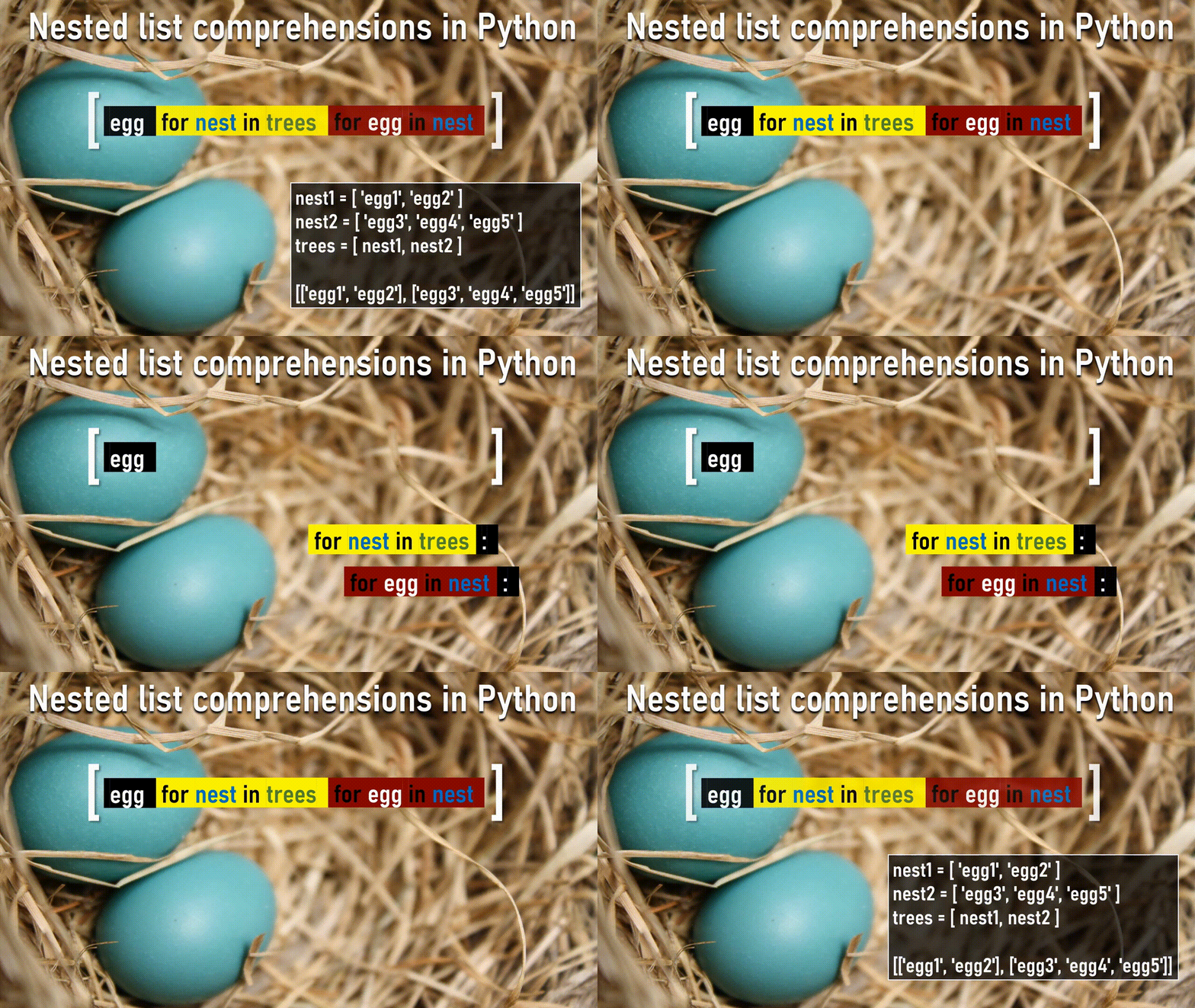
How to remember nested comprehensions. Video by author.

Final Points to Ponder

It’s easy to get over-enthused about comprehensions and generators, and as a general rule I’d suggest that if you’re starting to spill over into two or more lines, your code is becoming unreadable and you might like to consider:

  1. Going back to using a traditional for loop where you can write each step or transformation on a separate (shorter) line.
  2. Defining a function that contains each step or transformation on a separate line, then use: [my_function(x) for x in my_iterable]
  3. Split your comprehension into separate lines for the sections starting with for and if like this:
>>> terrier = {
...     dictionary_keys.casefold(): dictionary_keys.encode('utf-8')
...     for dictionary_keys, dictionary_values in dog_breeds.items()
...     if dictionary_keys.startswith("Terrier")
... }
>>> terrier
{'terrier': b'Terrier'}

Opinions vary on these next suggestions, but it’s difficult coming up with meaningful variable names at the best of times, let alone for a one-line comprehension, so I tend to go with as short a name as possible based on one of the following approaches:

  1. Simple ‘algebraic’ names e.g. [(x, y) for x, y in coordinates]
  2. Matching singular/plural names e.g. [tree for tree in trees]
  3. Short, general-purpose names like index, count, item, key, value, element, sublist, group, result, text, word, prefix, suffix, body, row, column, field, cell, line, page, sheet, book, tag, match, first, last, nth e.g.: {index: item for index, item in enumerate(my_iterable)}

Test Your Mastery

You only get so far by (passively) reading an article like this, so I’ll finish with a challenge for you… Well two challenges actually:

CHALLENGE 1: Actively reinforce your learning by copying each of the code snippets from this article into your Python IDE, and let me know if you find any typos or errors?

CHALLENGE 2: Now you have the nested comprehensions animation firmly in your mind, try writing and testing a one-liner for flattening a list of lists of lists or in other words a 3-level deep nested list?

I hope this article has shown you some of the powerful ways you can build on Python’s basic list comprehension pattern to do some pretty useful things with very little code or hard work.

Good luck with the challenges, and please let me know if you have any handy examples of your own to share in the comments below.

Python
Data Science
Data
Programming
Recommended from ReadMedium