
How to Bypass CORS on HTTP requests
A way to whitelist http requests to your web server from certain locations
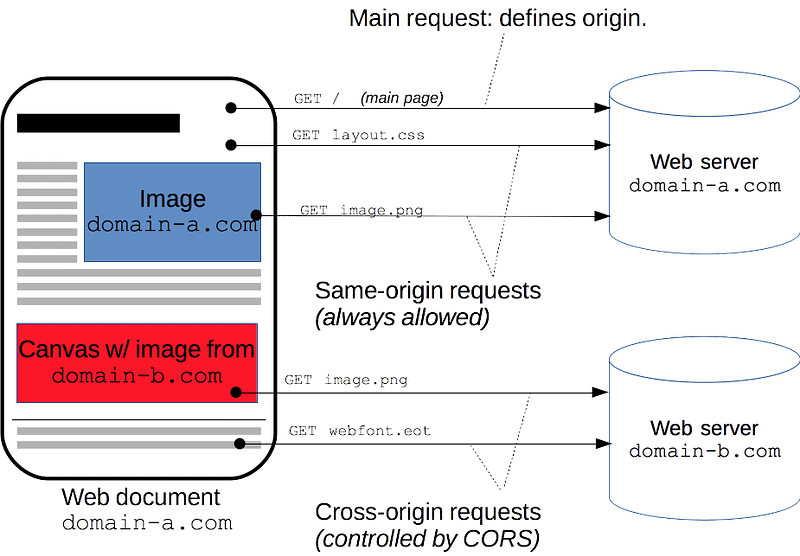
Background
As a security policy, web browsers do not allow AJAX requests to web servers other than the site you are visiting by default. This is called Same-Origin Policy (SOP).
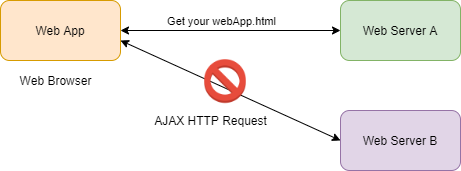
SOP policy enforced the web page to access to data which sits on the same host. Without this security rule, any web page can access the DOM of any other pages. This would allow to it to access the sensitive data of other pages potentially as well as perform actions without user’s consent.
Let us say you were tricked somehow to visit a bad website “www.your-bank-bad-site.com” which there is an iframe where loads the real “www.your-bank.com” website. And you proceeded to login your bank credentials into the site in the iframe. In a world without SOP policy, the bad site could access the “bank_balance” node of the iframe’s DOM and get its value. This even be extended with forging browser calls to send your money to elsewhere.
What is CORS?
CORS represents “Cross-Origin Resource Sharing”. As an HTTP-header based mechanism, it allows the web server to indicate any other origins other than from its own that whether a browser should permit the loading of the resources.
By using CORS headers from the backend server, we can inform a browser that if the resources from another origin have the rights to access resources on your page or not.
Simple Requests
For instance, we suppose web page (https://foo.example.com) wishes to get some content from https://other.example.com.
A header send from the browser:
GET / HTTP/1.1
Host: https://foo.example.com
(...)
Origin: https://other.example.com
In response, the server that supports CORS would send back an Access-Control-Allow-Origin response header:
HTTP/1.1 200 OK
(...)
Access-Control-Allow-Origin: https://other.example.com
Keep-Alive: timeout=2, max=100
Connection: Keep-Alive
Transfer-Encoding: chunked
Content-Type: application/xml[...JsonData]The Access-Control-Allow-Origin value means that it allows the resource from there to access the web page and then the browser would allow the resources to be loaded into this web app page.
In the above simple get request, the browser considers it as a “simple” and safe request which it sends out the request to the server to get the data directly.
Preflight Requests
Unlike the above “simple” request, some requests like PUT, DELETE, POST etc. The browser usually sends a preflight HTTP request using the OPTIONS method to check with the server if the following request (eg: POST) is safe or not.
A preflight request with OPTIONS method CORS header to check if the server allows a post request from this origin.
OPTIONS / HTTP/1.1
Host: https://foo.example.com
(...)
Origin: https://other.example.com
Access-Control-Request-Method: POST
Access-Control-Request-Headers: X-CUSTOM, Content-Type
A response from the server that indicate the browser that whether it accepts the header, what methods are allowed and even how long is the preflight would be expired etc.
HTTP/1.1 204 No Content (...)
Access-Control-Allow-Origin: https://other.example.com
Access-Control-Allow-Methods: POST, GET, OPTIONS
Access-Control-Allow-Headers: X-CUSTOM, Content-Type
Access-Control-Max-Age: 86400
With the preflight response header, the header would make a decision on whether to send the regular requests with the CORS header.
CORS errors
As one of the very famous browser error. I believe many developers might encounter or at least saw or known it.

Cross-Origin Request Blocked: The Same Origin Policy disallows reading the remote resource at https://some-url-here. (Reason: additional information here).
Solution
People who encounter these errors often just search on google for a solution without understanding what it is and how it works and potentially just copy-and-paste the famous line of code Access-Control-Allow-Origin: * which definitely creates a security hole. In other words, it allows anyone to access the API.
The key points to always keep in mind are that:
- CORS is a mechanism build inside the web browsers. It’s not a UI code issue
- All modern browsers enforce the CORS mechanism to prevent CSRF attack
- We need to fix the CORS problem on the web server side rather than on the client
For example, enable CORS in a dotnet WEBAPI project:
public class Startup
{
    public void ConfigureServices(IServiceCollection services)
    {
        services.AddCors(options =>
        {
            options.AddDefaultPolicy(
                builder =>
                {
                    builder.WithOrigins("http://example.com",
                                        "http://www.contoso.com");
                });
        });
    }
public void Configure(IApplicationBuilder app, IWebHostEnvironment env){
app.UseCors();
}Conclusion
The CORS policy is implemented and enforced by the browser.
However, we should fix this browser issue on the web server which tells the browser explicitly that if it allows or disallows the resources from the indicated origins to its web page. The server couldn’t do anything on the whether the browser would enforce the CORS policy or not. Disabling the CORS policy on the browser can well prove this principle.
Besides, that it is not surprised to see the CORS error on browser but not on the Postman or any other API-testing tools as they are not a browser and are not limited by the CORS policy.
More content at plainenglish.io


