
Data Analysis
A complete Data Analysis workflow in Python and scikit-learn
A ready-to-run code including preprocessing, parameters tuning and model running and evaluation.

In this short tutorial I illustrate a complete data analysis process which exploits the scikit-learn Python library. The process includes
- preprocessing, which includes features selection, normalization and balancing
- model selection with parameters tuning
- model evaluation
The code of this tutorial can be downloaded from my Github Repository.
Load Dataset
Firstly, I load the dataset through the Python pandas library. I exploit the heart.csv dataset, provided by the Kaggle repository.
import pandas as pddf = pd.read_csv('source/heart.csv')
df.head()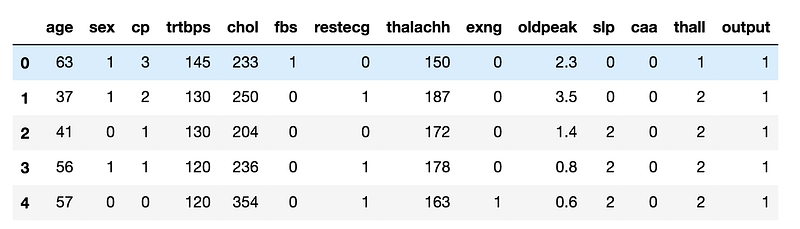
I calculate the number of records and the number of columns in the dataset:
df.shapewhich gives the following output:
(303, 14)Features selection
Now, I split the columns of the dataset in input (X) and output (Y). I use all the columns but output as input features.
features = []
for column in df.columns:
    if column != 'output':
        features.append(column)
X = df[features]
Y = df['output']
In order to select the minimum set of input features, I calculate the Pearson correlation coefficient among features, through corr() function, provided by a pandas dataframe.
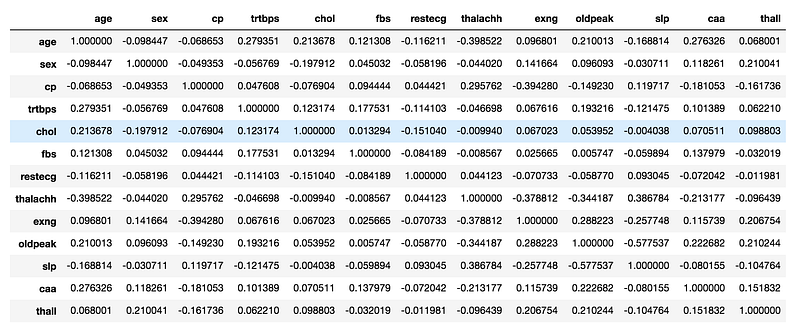
I note that all the features have a low correlation, thus I can keep all of them as input features.
Data Normalization
Data Normalization scales all the features in the same interval. I exploit the MinMaxScaler() provided by the scikit-learn library. I dealt with Data Normalization in scikit-learn in my previous article, while I this article I described the general process of Data Normalization without scikit-learn.
X.describe()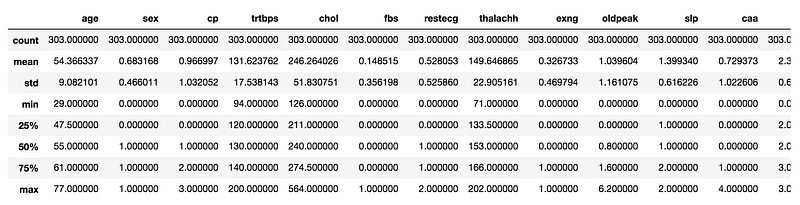
Looking at the minimum and maximum value for each feature, I note that there are many features out the range [0,1], thus I need to scale them.
For each input feature I calculate the MinMaxScaler() and I store the result in the same X column. The MinMaxScaler() must be fitted firstly through the fit() function and then can be applied for a transformation through the transform() function. Note that I must reshape every feature in the format (-1,1) in order to be passed as input parameter of the scaler. For example, Reshape(-1,1) transforms the array [0,1,2,3,5] into [[0],[1],[2],[3],[5]].
from sklearn.preprocessing import MinMaxScalerfor column in X.columns:
feature = np.array(X[column]).reshape(-1,1)
scaler = MinMaxScaler()
scaler.fit(feature)
feature_scaled = scaler.transform(feature)
X[column] = feature_scaled.reshape(1,-1)[0]Split the dataset in Training and Test
Now I split the dataset into two parts: training and testset. The test set size is 20% of the whole dataset. I exploit the scikit-learn function train_test_split(). I will use the training set to train the model and the testset to test the performance of the model.
import numpy as np
from sklearn.model_selection import train_test_split
X_train, X_test, y_train, y_test = train_test_split( X, Y, test_size=0.20, random_state=42)Balancing
I check whether the dataset is balanced or not, i.e. if the output classes in the training set are equally represented. I can use the value_counts() function to calculate the number of records in each output class.
y_train.value_counts()which gives the following output:
1    133
0    109
The output classes are not balanced, thus I can balance it. I can exploit the imblearn library, to perform balancing. I try both oversampling the minority class and undersampling the majority class. More details related to the Imbalanced Learn library can be found here. Firstly, I perform over sampling through the RandomOverSampler(). I create the model and then I fit with the training set. The fit_resample() function returns the balanced training set.
from imblearn.over_sampling import RandomOverSampler
over_sampler = RandomOverSampler(random_state=42)
X_bal_over, y_bal_over = over_sampler.fit_resample(X_train, y_train)
I calculate the number of records in each class through the value_counts() function and I note that now the dataset is balanced.
y_bal_over.value_counts()which gives the following output:
1    133
0    133
Secondly, I perform under sampling through the RandomUnderSampler() model.
from imblearn.under_sampling import RandomUnderSamplerunder_sampler = RandomUnderSampler(random_state=42)
X_bal_under, y_bal_under = under_sampler.fit_resample(X_train, y_train)Model Selection and Training
Now, I’m ready to train the model. I choose a KNeighborsClassifier and firstly I train it with imbalanced data. I exploit the fit() function to train the model and then thepredict_proba() function to predict the values of the test set.
from sklearn.neighbors import KNeighborsClassifiermodel = KNeighborsClassifier(n_neighbors=3)
model.fit(X_train, y_train)
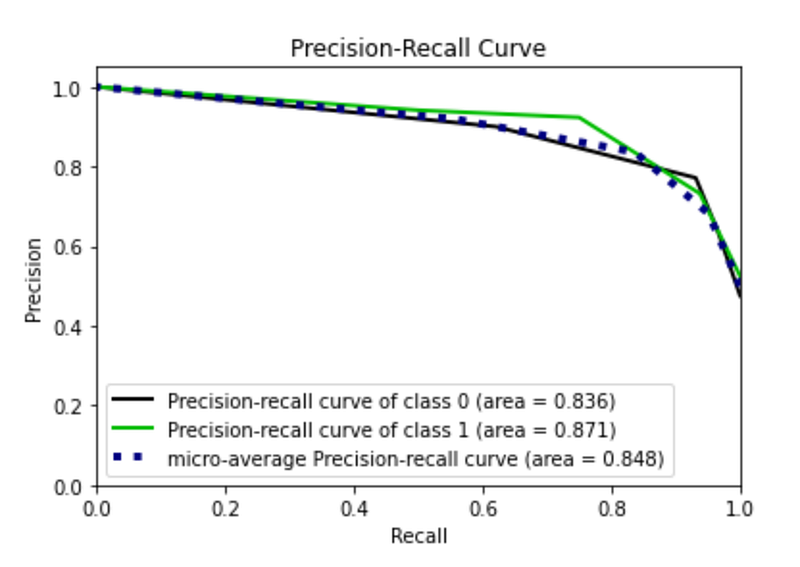
y_score = model.predict_proba(X_test)I calculate the performance of the model. In particular, I calculate the roc_curve() and the precision_recall() and then I plot them. I exploit the scikitplot library to plot curves.
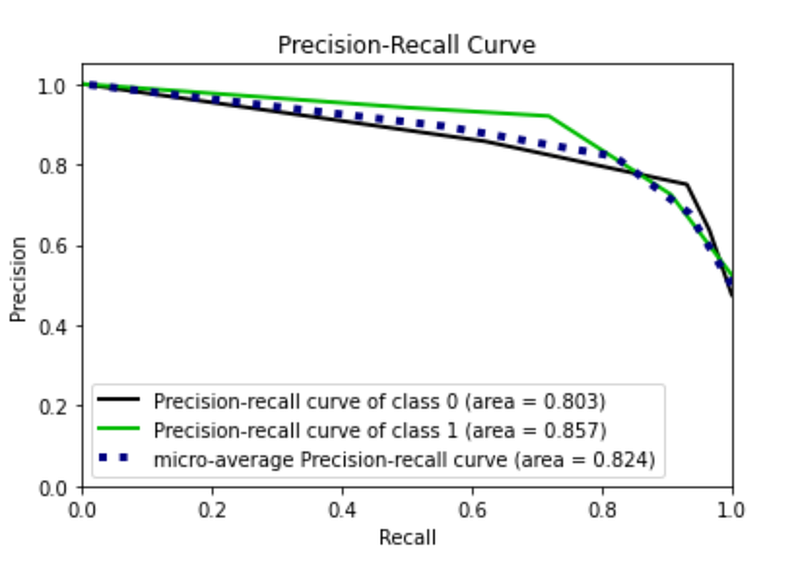
From the plot I note that there is a roc curve for each class. With respect to the precision recall curve, the class 1 works better than class 0, probably because it is represented by a greater number of samples.
import matplotlib.pyplot as plt
from sklearn.metrics import roc_curve
from scikitplot.metrics import plot_roc,auc
from scikitplot.metrics import plot_precision_recall
fpr0, tpr0, thresholds = roc_curve(y_test, y_score[:, 1])# Plot metrics
plot_roc(y_test, y_score)
plt.show()
plot_precision_recall(y_test, y_score)
plt.show()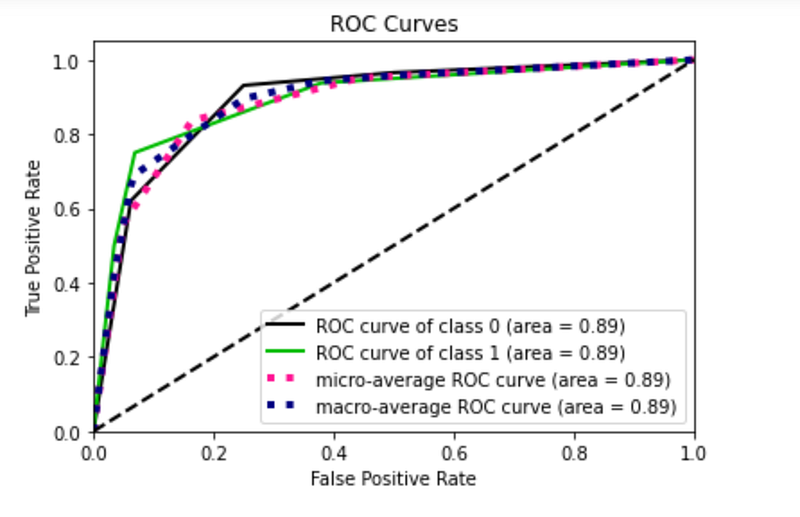
Now, I recalculate the same things with oversampling balancing. I note that the precision recall curve of class 0 increases, while that of class 1 decreases.
model = KNeighborsClassifier(n_neighbors=3)
model.fit(X_bal_over, y_bal_over)
y_score = model.predict_proba(X_test)
fpr0, tpr0, thresholds = roc_curve(y_test, y_score[:, 1])
# Plot metrics
plot_roc(y_test, y_score)
plt.show()
plot_precision_recall(y_test, y_score)
plt.show()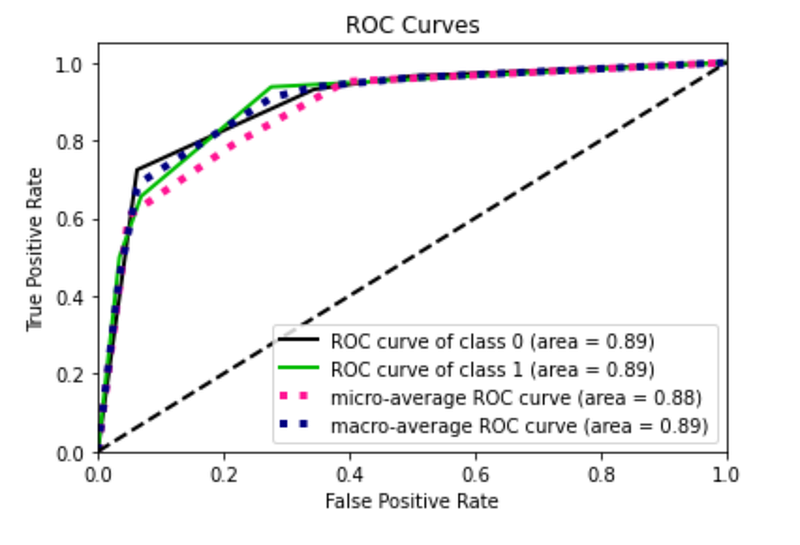
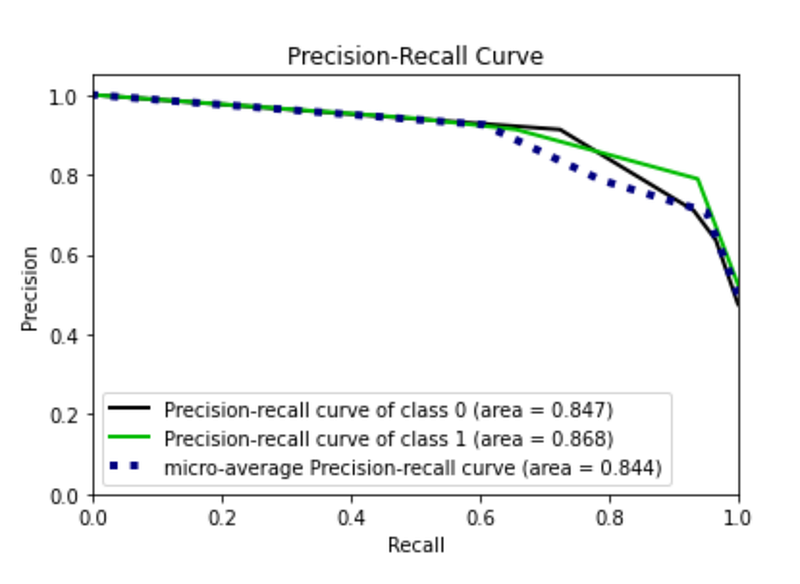
Finally, I train the model through under sampled data and I note a general deterioration of the performance.
model = KNeighborsClassifier(n_neighbors=3)
model.fit(X_bal_under, y_bal_under)
y_score = model.predict_proba(X_test)
fpr0, tpr0, thresholds = roc_curve(y_test, y_score[:, 1])
# Plot metrics
plot_roc(y_test, y_score)
plt.show()
plot_precision_recall(y_test, y_score)
plt.show()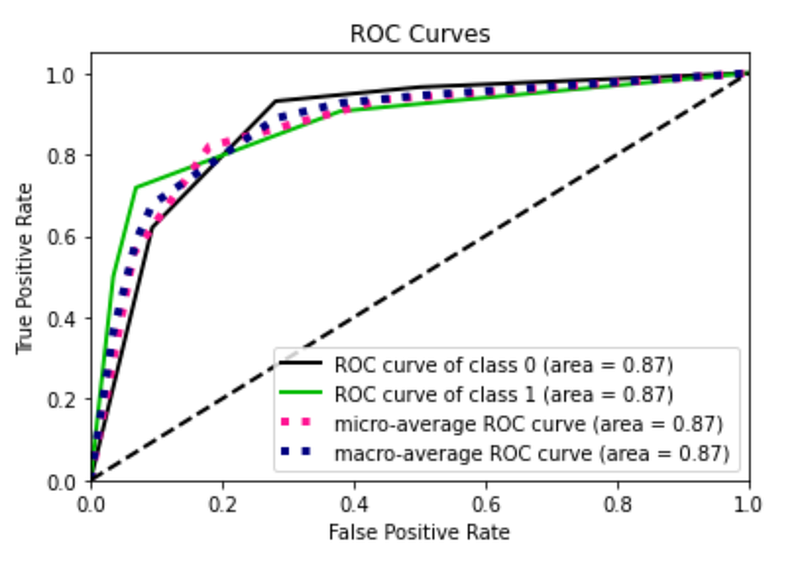
Parameters Tuning
In the last part of this tutorial, I try to improve the performance of the model by searching for best parameters for my model. I exploit the GridSearchCV mechanism provided by the scikit-learn library. I select a range of values for each parameter to be tested and I put them in the param_grid variable. I create a GridSearchCV() object, I fit with the training set and then I retrieve the best estimator, contained in the best_estimator_ variable.
from sklearn.model_selection import GridSearchCVmodel = KNeighborsClassifier()param_grid = {
'n_neighbors': np.arange(2,8),
'algorithm' : ['auto', 'ball_tree', 'kd_tree', 'brute'],
'metric' : ['euclidean','manhattan','chebyshev','minkowski']
}grid = GridSearchCV(model, param_grid = param_grid)
grid.fit(X_train, y_train)best_estimator = grid.best_estimator_I exploit the best estimator as model for my predictions and I calculate the performance of the algorithm.
best_estimator.fit(X_train, y_train)
y_score = best_estimator.predict_proba(X_test)
fpr0, tpr0, thresholds = roc_curve(y_test, y_score[:, 1])
# Plot metrics
plot_roc(y_test, y_score)
plt.show()
plot_precision_recall(y_test, y_score)
plt.show()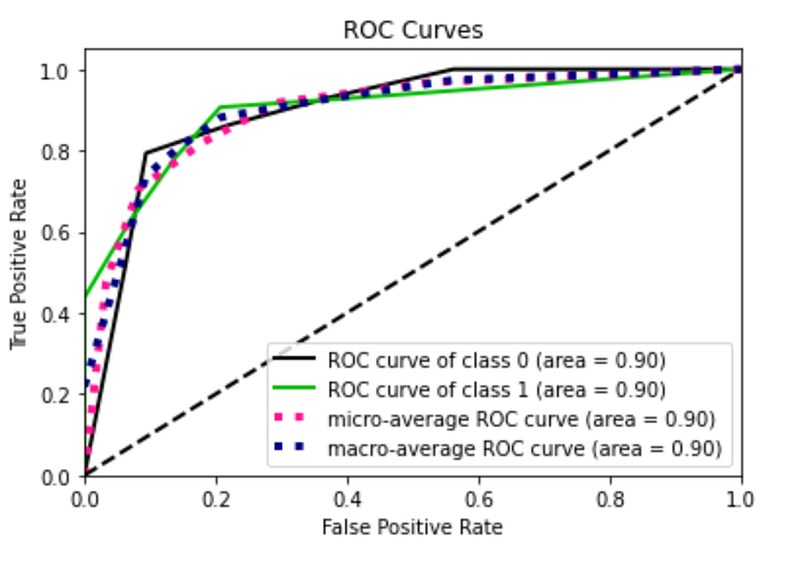
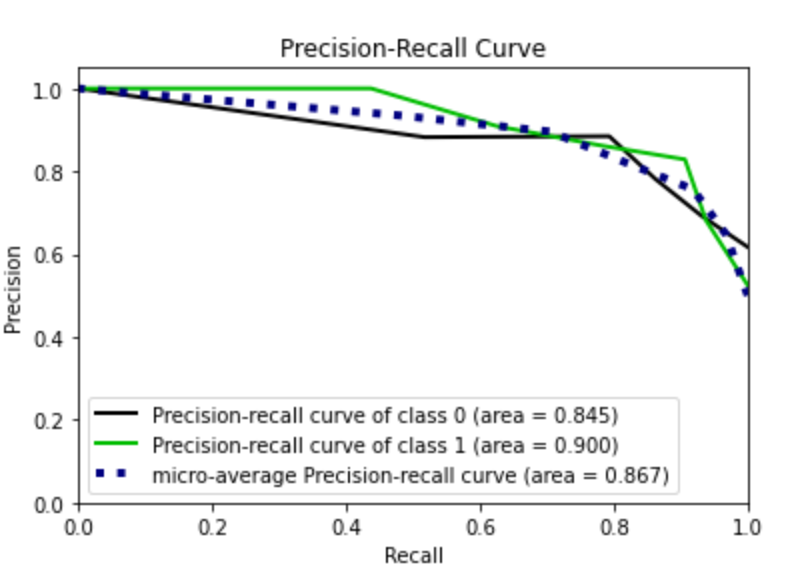
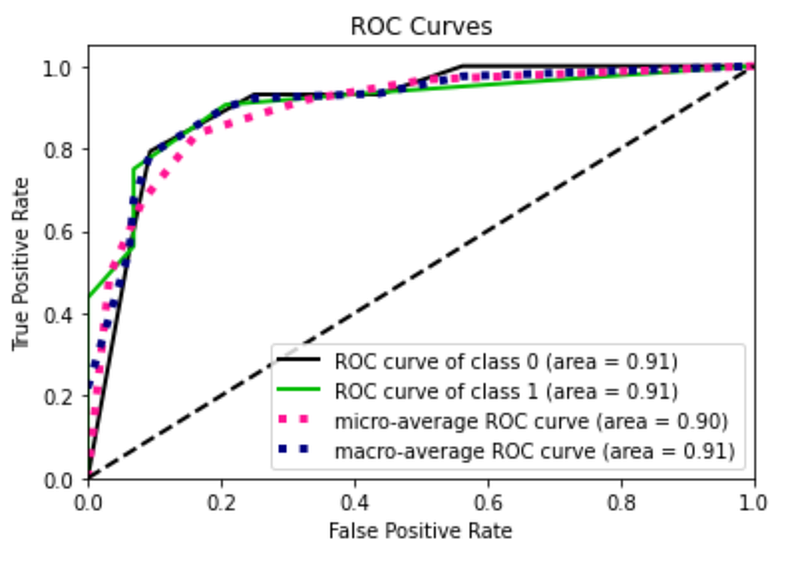
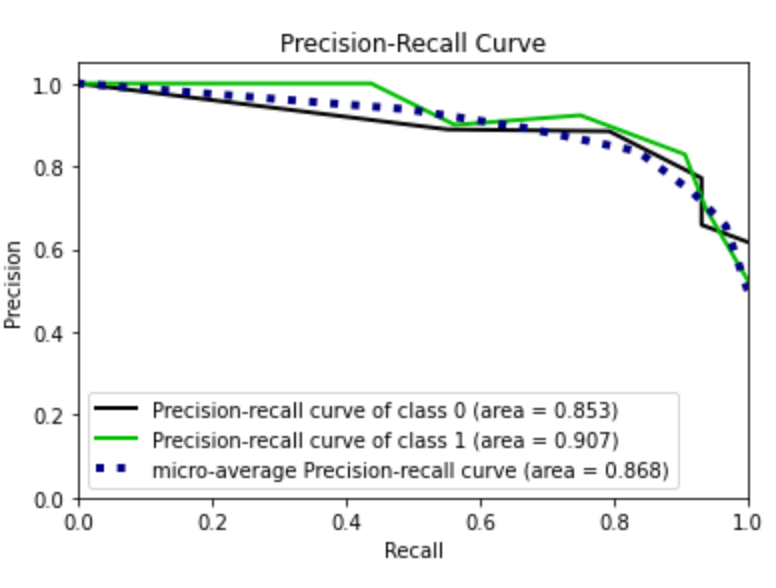
I note that the roc curve has improved. I try now with the over sampled training set. I omit the code because it is the same as before. In this case I obtain the best performance.
Summary
In this tutorial I have illustrated the full workflow to build a good model for data analysis. The workflow includes:
- data preprocessing, with features selection and balancing
- model selection and parameters tuning with Grid Search with Cross Validation
- model evaluation, through the ROC curve and the Precision Recall curve.
In this tutorial I have not dealt with Outliers Detection. If you want to learn something about this aspect, you can give a look to my previous article.
If you wanted to be updated on my research and other activities, you can follow me on Twitter, Youtube and and Github.


