
avatarRashida Nasrin Sucky

Free AI web copilot to create summaries, insights and extended knowledge, download it at here

10763

Abstract

n. It is hard to avoid bar plots while doing data storytelling. Here is a simple bar plot of the mean car price for each brand. In the later plot, we will improve it. I put the original numbers on each bar to make it more clear.</p><div id="16ea"><pre><span class="hljs-attr">d2</span> = d1[:<span class="hljs-number">10</span>]</pre></div><div id="2cec"><pre><span class="hljs-attribute">plt</span>.figure(figsize=(<span class="hljs-number">20</span>, <span class="hljs-number">10</span>))</pre></div><div id="1f78"><pre>plt<span class="hljs-selector-class">.bar</span>(d2<span class="hljs-selector-attr">[<span class="hljs-string">'brand'</span>]</span>, d2<span class="hljs-selector-attr">[<span class="hljs-string">'mean_price'</span>]</span>, <span class="hljs-attribute">width</span>=<span class="hljs-number">0.3</span>) <span class="hljs-keyword">for</span> <span class="hljs-selector-tag">i</span>, val <span class="hljs-keyword">in</span> <span class="hljs-built_in">enumerate</span>(d2<span class="hljs-selector-attr">[<span class="hljs-string">'mean_price'</span>]</span>.values): plt<span class="hljs-selector-class">.text</span>(<span class="hljs-selector-tag">i</span>, val, <span class="hljs-built_in">round</span>(<span class="hljs-attribute">float</span>(val)), horizontalalignment=<span class="hljs-string">'center'</span>, verticalalignment=<span class="hljs-string">'bottom'</span>, fontdict={<span class="hljs-string">'fontweight'</span>:<span class="hljs-number">500</span>, <span class="hljs-string">'size'</span>: <span class="hljs-number">16</span>})

plt<span class="hljs-selector-class">.gca</span>()<span class="hljs-selector-class">.set_xticklabels</span>(d2<span class="hljs-selector-attr">[<span class="hljs-string">'brand'</span>]</span>, fontdict={<span class="hljs-string">'size'</span>: <span class="hljs-number">14</span>}) plt<span class="hljs-selector-class">.title</span>(<span class="hljs-string">"mean Price for Each Brand"</span>, fontsize=<span class="hljs-number">22</span>) plt<span class="hljs-selector-class">.ylabel</span>(<span class="hljs-string">"Brand"</span>, fontsize=<span class="hljs-number">16</span>) plt<span class="hljs-selector-class">.show</span>()</pre></div><figure id="2a1d"><img src="https://cdn-images-1.readmedium.com/v2/resize:fit:800/1*A9qc-fIfv5LPaLhvsLA2bQ.png"><figcaption></figcaption></figure><p id="43d5">Here is an improved version of the bar plot. That serves the same purpose. But in my eyes, it looks nicer and cleaner.</p><div id="6e86"><pre>fig, ax = plt.subplots(figsize=(28, 10)) ax.vlines(<span class="hljs-attribute">x</span>=d1.index, <span class="hljs-attribute">ymin</span>=0, <span class="hljs-attribute">ymax</span>=d1.mean_price, color= <span class="hljs-string">'coral'</span>, <span class="hljs-attribute">alpha</span>=0.7, <span class="hljs-attribute">linewidth</span>=2) ax.scatter(<span class="hljs-attribute">x</span>=d1.index, <span class="hljs-attribute">y</span>=d1.mean_price, s = 75, <span class="hljs-attribute">color</span>=<span class="hljs-string">'firebrick'</span>, alpha = 0.7 )</pre></div><div id="43c4"><pre>ax.set_title<span class="hljs-comment">("Barchat for Average Car Price by Brand")</span></pre></div><div id="49bd"><pre>ax<span class="hljs-selector-class">.set_ylabel</span>(<span class="hljs-string">"Mean Car Price by Brand"</span>, fontsize=<span class="hljs-number">16</span>) ax<span class="hljs-selector-class">.set_xticks</span>(d1.index) ax<span class="hljs-selector-class">.set_xticklabels</span>(d1<span class="hljs-selector-class">.brand</span><span class="hljs-selector-class">.str</span><span class="hljs-selector-class">.upper</span>(), rotation=<span class="hljs-number">60</span>, fontdict={<span class="hljs-string">'horizontalalignment'</span>: <span class="hljs-string">'right'</span>, <span class="hljs-string">'size'</span>:<span class="hljs-number">14</span>})</pre></div><div id="2b1a"><pre><span class="hljs-keyword">for</span> <span class="hljs-keyword">row</span> <span class="hljs-keyword">in</span> d1.itertuples(): ax.text(<span class="hljs-keyword">row</span>.<span class="hljs-keyword">Index</span>, <span class="hljs-keyword">row</span>.mean_price+<span class="hljs-number">700</span>, s=round(<span class="hljs-keyword">row</span>.mean_price), horizontalalignment = <span class="hljs-string">'center'</span>, verticalalignment=<span class="hljs-string">'bottom'</span>, fontsize=<span class="hljs-number">14</span>) plt.<span class="hljs-keyword">show</span>()</pre></div><figure id="299e"><img src="https://cdn-images-1.readmedium.com/v2/resize:fit:800/1*SssQLDtOxAmzoNRQvXqaDg.png"><figcaption></figcaption></figure><p id="72e8">This dataset is very simple. But what if we have a bigger dataset, many categorical variables such as the NHANES dataset. I will import the NHANES dataset for the later plots. Here is the link to this dataset:</p><div id="0f99" class="link-block"> <a href="https://github.com/rashida048/Datasets/blob/master/nhanes_2015_2016.csv"> <div> <div> <h2>rashida048/Datasets</h2> <div><h3>Contribute to rashida048/Datasets development by creating an account on GitHub.</h3></div> <div><p>github.com</p></div> </div> <div> <div style="background-image: url(https://miro.readmedium.com/v2/resize:fit:320/0*WRAcjLj7S8jpQ_nB)"></div> </div> </div> </a> </div><div id="ecdb"><pre>d = pd.read_csv('nhanes_<span class="hljs-number">2015</span>_<span class="hljs-number">2016</span>.csv')</pre></div><p id="9793">This dataset is too big. So I cannot show a screenshot like the previous one. Here are the columns:</p><div id="e8ef"><pre>d.<span class="hljs-built_in">columns</span></pre></div><p id="d2c0">Output:</p><div id="0439"><pre><span class="hljs-function"><span class="hljs-title">Index</span><span class="hljs-params">([<span class="hljs-string">'SEQN'</span>, <span class="hljs-string">'ALQ101'</span>, <span class="hljs-string">'ALQ110'</span>, <span class="hljs-string">'ALQ130'</span>, <span class="hljs-string">'SMQ020'</span>, <span class="hljs-string">'RIAGENDR'</span>, <span class="hljs-string">'RIDAGEYR'</span>, <span class="hljs-string">'RIDRETH1'</span>, <span class="hljs-string">'DMDCITZN'</span>, <span class="hljs-string">'DMDEDUC2'</span>, <span class="hljs-string">'DMDMARTL'</span>, <span class="hljs-string">'DMDHHSIZ'</span>, <span class="hljs-string">'WTINT2YR'</span>, <span class="hljs-string">'SDMVPSU'</span>, <span class="hljs-string">'SDMVSTRA'</span>, <span class="hljs-string">'INDFMPIR'</span>, <span class="hljs-string">'BPXSY1'</span>, <span class="hljs-string">'BPXDI1'</span>, <span class="hljs-string">'BPXSY2'</span>, <span class="hljs-string">'BPXDI2'</span>, <span class="hljs-string">'BMXWT'</span>, <span class="hljs-string">'BMXHT'</span>, <span class="hljs-string">'BMXBMI'</span>, <span class="hljs-string">'BMXLEG'</span>, <span class="hljs-string">'BMXARML'</span>, <span class="hljs-string">'BMXARMC'</span>, <span class="hljs-string">'BMXWAIST'</span>, <span class="hljs-string">'HIQ210'</span>], dtype=<span class="hljs-string">'object'</span>)</span></span></pre></div><p id="9c16">The column ‘DMDEDUC2’ shows the education level of the population and ‘RIDRETH1’ shows the ethnic origin of the population. Both are categorical variables. The next plot will plot the number of each ethnic origin for each education level.</p><div id="2b9c"><pre>sns.catplot(<span class="hljs-string">"RIDRETH1"</span>, col= <span class="hljs-string">"DMDEDUC2"</span>, col_wrap = 4, <span class="hljs-attribute">data</span>=d[d.DMDEDUC2.notnull()], <span class="hljs-attribute">kind</span>=<span class="hljs-string">"count"</span>, <span class="hljs-attribute">height</span>=3.5, <span class="hljs-attribute">aspect</span>=.8, <span class="hljs-attribute">palette</span>=<span class="hljs-string">'tab20'</span>) plt.show()</pre></div><figure id="112c"><img src="https://cdn-images-1.readmedium.com/v2/resize:fit:800/1*VJU2kHT8G7931mZbZVGWpA.png"><figcaption></figcaption></figure><p id="5e79">Each single bar plot shows the number of people in each ethnic group for a single education level. But when they are all side by side, it gives a comparative picture.</p><blockquote id="76c2"><p><b>What if both the variable is not categorical?</b></p></blockquote><p id="36d2">In that case, a segregated violin plot will be more appropriate. We will show how to use violin plots for different numbers of variables. First, let’s plot the distribution of age for each education level.</p><div id="7ad7"><pre>plt<span class="hljs-selector-class">.figure</span>(figsize=(<span class="hljs-number">12</span>, <span class="hljs-number">4</span>)) <span class="hljs-selector-tag">a</span> = sns<span class="hljs-selector-class">.violinplot</span>(d<span class="hljs-selector-class">.DMDEDUC2</span>, d.RIDAGEYR)</pre></div><figure id="b88e"><img src="https://cdn-images-1.readmedium.com/v2/resize:fit:800/1*5shnhA7vI3lAP49tLUIM3g.png"><figcaption></figcaption></figure><p id="3080">It shows the distribution of age for each education level. For example, in education level 1, we find more people above 60. In education level 5, you will find more people around 30.</p><p id="b04f">It will be even more efficient to see the distribution of age of males and females separately.</p><div id="fb5c"><pre>d<span class="hljs-selector-attr">[<span class="hljs-string">'RIAGENDRx'</span>]</span> = d<span class="hljs-selector-class">.RIAGENDR</span><span class="hljs-selector-class">.replace</span>({<span class="hljs-number">1</span>: <span class="hljs-string">"Male"</span>, <span class="hljs-number">2</span>: <span class="hljs-string">"Female"</span>})</pre></div><div id="595d"><pre>plt<span class="hljs-selector-class">.figure</span>(figsize=(<span class="hljs-number">12</span>, <span class="hljs-number">4</span>)) <span class="hljs-selector-tag">a</span> = sns<span class="hljs-selector-class">.violinplot</span>(d<span class="hljs-selector-class">.DMDEDUC2</span>, d<span class="hljs-selector-class">.RIDAGEYR</span>, hue=d<span class="hljs-selector-class">.RIAGENDRx</span>, split=True)</pre></div><figure id="ac0a"><img src="https://cdn-images-1.readmedium.com/v2/resize:fit:800/1*bBRH8-0nJ6KguXatgTryVg.png"><figcaption></figcaption></figure><p id="e99b">You have the distribution of age for males and females of each education level.</p><p id="f606">Let’s add one more variable to it. What if I want the same information as the previous plot for each ethnic group.</p><div id="4993"><pre>sns.catplot(<span class="hljs-

Options

attribute">x</span>=<span class="hljs-string">'RIDAGEYR'</span>, <span class="hljs-attribute">y</span>=<span class="hljs-string">"DMDEDUC2"</span>, <span class="hljs-attribute">hue</span>=<span class="hljs-string">'RIAGENDR'</span>, <span class="hljs-attribute">col</span>=<span class="hljs-string">"RIDRETH1"</span>,split=True, data = d[d.DMDEDUC2.notnull()], <span class="hljs-attribute">col_wrap</span>=3, <span class="hljs-attribute">orient</span>=<span class="hljs-string">"h"</span>, <span class="hljs-attribute">height</span>=5, <span class="hljs-attribute">aspect</span>=1, <span class="hljs-attribute">palette</span>=<span class="hljs-string">'tab10'</span>, <span class="hljs-attribute">kind</span>=<span class="hljs-string">'violin'</span>, <span class="hljs-attribute">didge</span>=<span class="hljs-literal">True</span>, <span class="hljs-attribute">cut</span>=0, <span class="hljs-attribute">bw</span>=.2)</pre></div><figure id="a1b8"><img src="https://cdn-images-1.readmedium.com/v2/resize:fit:800/1*ZX02UfXyJlO5v6r5GAamiQ.png"><figcaption></figcaption></figure><p id="31c7">Look, how much information is packed in this one plot!</p><p id="095b">The last one for this article is not as informative as the previous few plots. But it looks nice in a report. Plus provides a very clear vision about the distribution of a categorical variable. That is a waffle chart.</p><p id="0c32">For this demonstration, I will make a waffle chart that will show the count of people at each education level. We worked a lot with the education level of people in this article. But we never checked the proportion of the population in each education level.</p><p id="0e04">You may have to install ‘pywaffle’ for this.</p><div id="b402"><pre>d11 = d<span class="hljs-selector-class">.groupby</span>(<span class="hljs-string">'DMDEDUC2'</span>)<span class="hljs-selector-class">.size</span>()<span class="hljs-selector-class">.reset_index</span>(name=<span class="hljs-string">'count'</span>)</pre></div><div id="6619"><pre><span class="hljs-keyword">from</span> pywaffle <span class="hljs-keyword">import</span> Waffle</pre></div><div id="f3dd"><pre><span class="hljs-attr">n_categories</span> = d11.shape[<span class="hljs-number">0</span>] <span class="hljs-attr">colors</span>=[plt.cm.inferno_r(i/float(n_categories)) for i in range(n_categories)]</pre></div><div id="7b75"><pre>fig = plt<span class="hljs-selector-class">.figure</span>(FigureClass=Waffle, plots={ <span class="hljs-string">'111'</span>:{ <span class="hljs-string">'values'</span>: d11<span class="hljs-selector-attr">[<span class="hljs-string">'count'</span>]</span>, <span class="hljs-string">'labels'</span>: <span class="hljs-selector-attr">[<span class="hljs-string">"{0} ({1})"</span>.format(n[0]</span>, n<span class="hljs-selector-attr">[1]</span>) <span class="hljs-keyword">for</span> n <span class="hljs-keyword">in</span> d11<span class="hljs-selector-attr">[[<span class="hljs-string">'DMDEDUC2'</span>, <span class="hljs-string">'count'</span>]</span>]<span class="hljs-selector-class">.itertuples</span>()], <span class="hljs-string">'legend'</span>: {<span class="hljs-string">'loc'</span>: <span class="hljs-string">'upper left'</span>, <span class="hljs-string">'bbox_to_anchor'</span>: (<span class="hljs-number">1.05</span>, <span class="hljs-number">1</span>), <span class="hljs-string">'fontsize'</span>: <span class="hljs-number">12</span>}, <span class="hljs-string">'title'</span>: {<span class="hljs-string">'label'</span>: <span class="hljs-string">'Number of People in Each Education Level'</span>, <span class="hljs-string">'loc'</span>: <span class="hljs-string">'center'</span>, <span class="hljs-string">'fontsize'</span>: <span class="hljs-number">18</span>}, }, }, rows = <span class="hljs-number">15</span>, <span class="hljs-attribute">columns</span> = <span class="hljs-number">60</span>, colors=colors, figsize=(<span class="hljs-number">30</span>, <span class="hljs-number">12</span>) )</pre></div><figure id="c0ee"><img src="https://cdn-images-1.readmedium.com/v2/resize:fit:800/1*fDBJjCJ1gdN_aRMskeEkxQ.png"><figcaption></figcaption></figure><p id="e629">It gives a very clear vision about the proportion of the population in each education level. Though the bar plot can do this as well. But it’s just another interesting choice. Waffle charts can also be developed without ‘pywaffle’.</p><div id="3b58" class="link-block"> <a href="https://towardsdatascience.com/waffle-charts-using-pythons-matplotlib-94252689a701"> <div> <div> <h2>Waffle Charts Using Python’s Matplotlib</h2> <div><h3>How to draw a waffle chart in Python using the Matplotlib library</h3></div> <div><p>towardsdatascience.com</p></div> </div> <div> <div style="background-image: url(https://miro.readmedium.com/v2/resize:fit:320/1*rndu9ryFktG-jzJc46y4Vg.jpeg)"></div> </div> </div> </a> </div><h2 id="19aa">Conclusion</h2><p id="5d46">I hope all these visualization techniques provide you with some more choices for better and efficient storytelling. There are numerous numbers of visualization techniques in python. Please look at my other visualization tutorials (links below) for some more options.</p><p id="09ad">Feel free to follow me on <a href="https://twitter.com/rashida048">Twitter</a> and like my <a href="https://www.facebook.com/rashida.smith.161">Facebook</a> page.</p><h2 id="5faa">More Reading:</h2><div id="d3dd" class="link-block"> <a href="https://towardsdatascience.com/a-collection-of-advanced-visualization-in-matplotlib-and-seaborn-with-examples-2150e6c3f323"> <div> <div> <h2>A Collection of Advanced Visualization in Matplotlib and Seaborn with Examples</h2> <div><h3>Enriching the Visualization Techniques and Skills</h3></div> <div><p>towardsdatascience.com</p></div> </div> <div> <div style="background-image: url(https://miro.readmedium.com/v2/resize:fit:320/0*eRfFzflTjUgwslk5)"></div> </div> </div> </a> </div><div id="b9ae" class="link-block"> <a href="https://towardsdatascience.com/a-complete-guide-to-time-series-data-visualization-in-python-da0ddd2cfb01"> <div> <div> <h2>A Complete Guide to Time Series Data Visualization in Python</h2> <div><h3>This Should Give You Enough Resources to Make Great Visuals with Time Series Data</h3></div> <div><p>towardsdatascience.com</p></div> </div> <div> <div style="background-image: url(https://miro.readmedium.com/v2/resize:fit:320/0*MXT9lUSE3_Mod_F0)"></div> </div> </div> </a> </div><div id="b73b" class="link-block"> <a href="https://towardsdatascience.com/an-ultimate-cheat-sheet-for-data-visualization-in-pandas-4010e1b16b5c"> <div> <div> <h2>An Ultimate Cheat Sheet for Data Visualization in Pandas</h2> <div><h3>All the Basic Types of Visualization That Is Available in Pandas and Some Advanced Visualization That Is Extremely…</h3></div> <div><p>towardsdatascience.com</p></div> </div> <div> <div style="background-image: url(https://miro.readmedium.com/v2/resize:fit:320/0*l_zfjU9IKMa47tfy)"></div> </div> </div> </a> </div><div id="7e3b" class="link-block"> <a href="https://towardsdatascience.com/an-ultimate-guide-to-time-series-analysis-in-pandas-76a0433621f3"> <div> <div> <h2>An Ultimate Guide to Time Series Analysis in Pandas</h2> <div><h3>All the Pandas Function You Need to Perform Time Series Analysis in Pandas. You Can Use This as a Cheat Sheet as Well.</h3></div> <div><p>towardsdatascience.com</p></div> </div> <div> <div style="background-image: url(https://miro.readmedium.com/v2/resize:fit:320/0*92hj9af6UE1u-zxH)"></div> </div> </div> </a> </div><div id="5f54" class="link-block"> <a href="https://towardsdatascience.com/a-full-length-machine-learning-course-in-python-for-free-f2732954f35f"> <div> <div> <h2>A Full-Length Machine Learning Course in Python for Free</h2> <div><h3>Andrew Ng’s Machine Learning Course in Python</h3></div> <div><p>towardsdatascience.com</p></div> </div> <div> <div style="background-image: url(https://miro.readmedium.com/v2/resize:fit:320/0*GJcf4eNnR5f_5FEO)"></div> </div> </div> </a> </div><div id="1f49" class="link-block"> <a href="https://towardsdatascience.com/all-the-datasets-you-need-to-practice-data-science-skills-and-make-a-great-portfolio-857a348883b5"> <div> <div> <h2>All the Datasets You Need to Practice Data Science Skills and Make a Great Portfolio</h2> <div><h3>Some Interesting Datasets to Upscale You Skills and Portfolio</h3></div> <div><p>towardsdatascience.com</p></div> </div> <div> <div style="background-image: url(https://miro.readmedium.com/v2/resize:fit:320/0*CeYdLDN3bcnozgRH)"></div> </div> </div> </a> </div><div id="13ed" class="link-block"> <a href="https://towardsdatascience.com/a-complete-guide-to-confidence-interval-and-examples-in-python-ff417c5cb593"> <div> <div> <h2>A Complete Guide to Confidence Interval, and Examples in Python</h2> <div><h3>Deep Understanding of Confidence Interval and Its Calculation, a Very Popular Parameter in Statistics</h3></div> <div><p>towardsdatascience.com</p></div> </div> <div> <div style="background-image: url(https://miro.readmedium.com/v2/resize:fit:320/0*f3rRqBSL-A7mQbRL)"></div> </div> </div> </a> </div></article></body>

Photo by ALICE POLLET on Unsplash

A Collection of Advanced Data Visualization in Matplotlib and Seaborn

Make Your Storytelling More Interesting

Python has a few data visualization library. Arguably matplotlib is the most popular and widely used library. I have several tutorial articles on matplotlib before. This article will focus on some advanced visualization techniques. These plots and charts will provide you with some extra tools to make your reports or presentations of data in a more efficient and interesting way.

I am assuming that you already have learned the basic plots and charts in Matplotlib. If you need a refresher on some of them, please go through this article first:

I will use several different datasets for this article because different kind of plots works for different types of data. But I will try to stick to the same dataset as much as I can.

Let’s dive in!

Import the dataset first. Feel free to download this dataset for your practice:

import pandas as pd
import matplotlib.pyplot as plt
import seaborn as sns
d = pd.read_csv("USA_cars_datasets.csv")
d.head()

The dataset contains the brand of cars, price, model, year, mileage, and some other information. For the plots in this article, brand and price will be the focus.

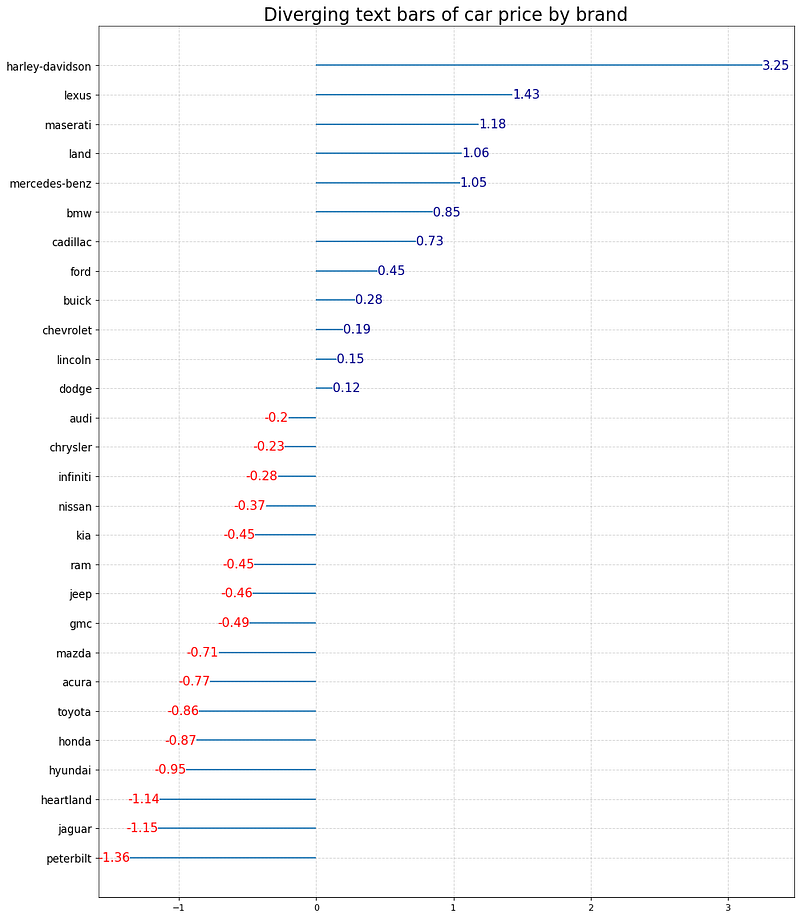
Diverging bars with texts

This plot will show the diverging bars and the value of each bar. We will plot the mean price for each brand. First, find the mean price for each brand using the pandas groupby function:

import numpy as np
d1 = d.groupby('brand')['price'].agg([np.mean])
d1.columns = ['mean_price']
d1.head()
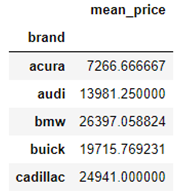
The data frame d1 contains the mean price for each brand. It requires the normalized values for a diverging plot. We will normalize the mean price and put it in a new column named ‘price_z’ in the d1 data frame:

x = d1.loc[:, ['mean_price']]
d1['price_z'] = (x - x.mean()) / x.std()
d1.sort_values('price_z', inplace=True)
d1.reset_index(inplace=True)

To plot the text plot we need x and y values as usual. But also an extra parameter that is the text that is to be plotted.

plt.figure(figsize=(14, 18), dpi=80)
plt.hlines(y=d1.index, xmin=0, xmax=d1.price_z)
for x, y, tex in zip(d1.price_z, d1.index, d1.price_z):
    t = plt.text(x, y, round(tex, 2), horizontalalignment='right' if x < 0 else 'left', verticalalignment='center', fontdict={'color': 'red' if x < 0 else 'darkblue', 'size': 14})
plt.yticks(d1.index, d1.brand, fontsize=12)
plt.title("Diverging text bars of car price by brand", fontdict={"size": 20})
plt.grid(linestyle = '--', alpha=0.5)
plt.show()
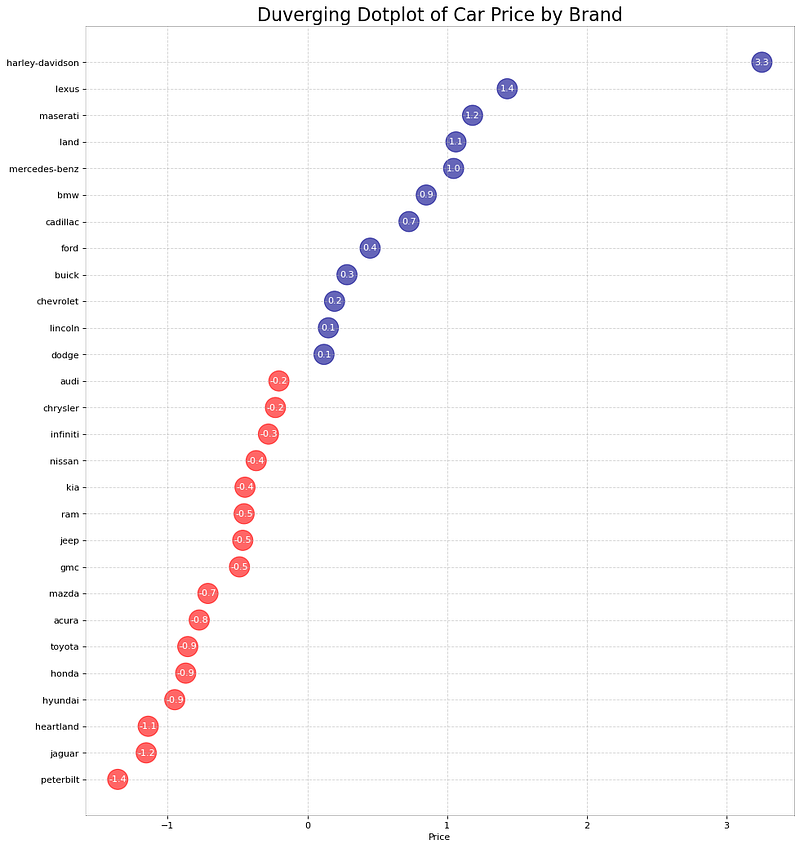
It can be further modified. Instead of using the lines, you can only put the numbers in bubbles.

d1['color'] = ['red' if x < 0 else 'darkblue' for x in d1['price_z']]
plt.figure(figsize=(14, 16), dpi=80)
plt.scatter(d1.price_z, d1.index, s = 500, alpha=0.6, color=d1.color)
for x, y, tex in zip(d1.price_z, d1.index, d1.price_z):
    t = plt.text(x, y, round(tex, 1), horizontalalignment='center', verticalalignment='center',
                fontdict={'color':'white'})
    
plt.gca().spines['top'].set_alpha(0.3)
plt.gca().spines['bottom'].set_alpha(0.3)
plt.gca().spines["right"].set_alpha(0.3)
plt.gca().spines["left"].set_alpha(0.3)
plt.yticks(d1.index, d1.brand)
plt.title("Duverging Dotplot of Car Price by Brand", fontdict={'size':20})
plt.xlabel("Price")
plt.grid(linestyle='--', alpha=0.5)
plt.show()
Types of Bar Plots

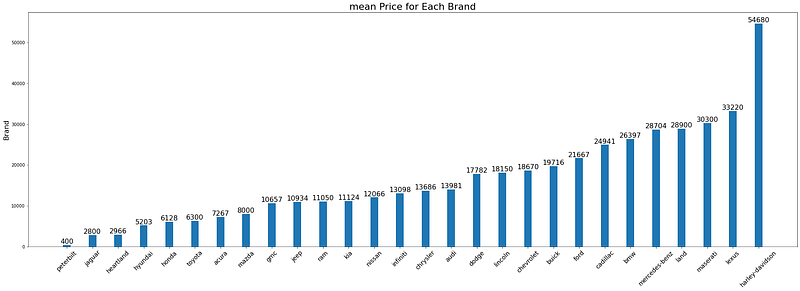
Bar plot is very common. It is hard to avoid bar plots while doing data storytelling. Here is a simple bar plot of the mean car price for each brand. In the later plot, we will improve it. I put the original numbers on each bar to make it more clear.

d2 = d1[:10]
plt.figure(figsize=(20, 10))
plt.bar(d2['brand'], d2['mean_price'], width=0.3)
for i, val in enumerate(d2['mean_price'].values):
    plt.text(i, val, round(float(val)), horizontalalignment='center', 
             verticalalignment='bottom', fontdict={'fontweight':500, 'size': 16})
    
plt.gca().set_xticklabels(d2['brand'], fontdict={'size': 14})
plt.title("mean Price for Each Brand", fontsize=22)
plt.ylabel("Brand", fontsize=16)
plt.show()
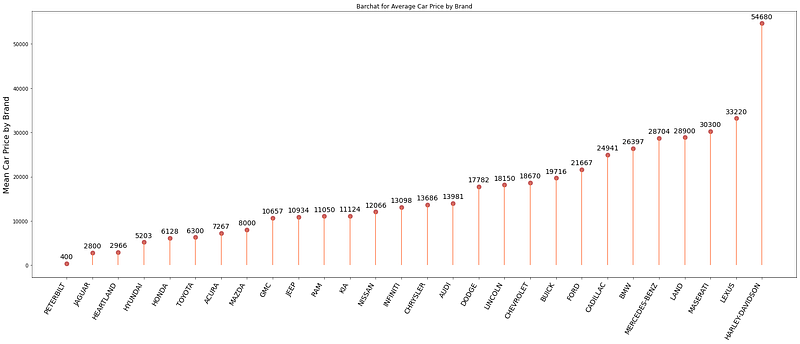
Here is an improved version of the bar plot. That serves the same purpose. But in my eyes, it looks nicer and cleaner.

fig, ax = plt.subplots(figsize=(28, 10))
ax.vlines(x=d1.index, ymin=0, ymax=d1.mean_price, color= 'coral', alpha=0.7, linewidth=2)
ax.scatter(x=d1.index, y=d1.mean_price, s = 75, color='firebrick', alpha = 0.7 )
ax.set_title("Barchat for Average Car Price by Brand")
ax.set_ylabel("Mean Car Price by Brand", fontsize=16)
ax.set_xticks(d1.index)
ax.set_xticklabels(d1.brand.str.upper(), rotation=60, fontdict={'horizontalalignment': 'right', 'size':14})
for row in d1.itertuples():
    ax.text(row.Index, row.mean_price+700, s=round(row.mean_price), horizontalalignment = 'center', verticalalignment='bottom', fontsize=14)
plt.show()
This dataset is very simple. But what if we have a bigger dataset, many categorical variables such as the NHANES dataset. I will import the NHANES dataset for the later plots. Here is the link to this dataset:

d = pd.read_csv('nhanes_2015_2016.csv')

This dataset is too big. So I cannot show a screenshot like the previous one. Here are the columns:

d.columns

Output:

Index(['SEQN', 'ALQ101', 'ALQ110', 'ALQ130', 'SMQ020', 'RIAGENDR', 'RIDAGEYR', 'RIDRETH1', 'DMDCITZN', 'DMDEDUC2', 'DMDMARTL', 'DMDHHSIZ', 'WTINT2YR', 'SDMVPSU', 'SDMVSTRA', 'INDFMPIR', 'BPXSY1', 'BPXDI1', 'BPXSY2', 'BPXDI2', 'BMXWT', 'BMXHT', 'BMXBMI', 'BMXLEG', 'BMXARML', 'BMXARMC', 'BMXWAIST', 'HIQ210'], dtype='object')

The column ‘DMDEDUC2’ shows the education level of the population and ‘RIDRETH1’ shows the ethnic origin of the population. Both are categorical variables. The next plot will plot the number of each ethnic origin for each education level.

sns.catplot("RIDRETH1", col= "DMDEDUC2", col_wrap = 4,
               data=d[d.DMDEDUC2.notnull()],
               kind="count", height=3.5, aspect=.8,
               palette='tab20')
plt.show()
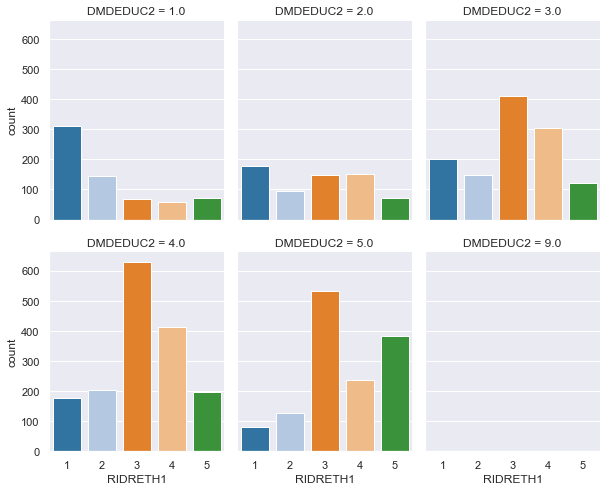
Each single bar plot shows the number of people in each ethnic group for a single education level. But when they are all side by side, it gives a comparative picture.

What if both the variable is not categorical?

In that case, a segregated violin plot will be more appropriate. We will show how to use violin plots for different numbers of variables. First, let’s plot the distribution of age for each education level.

plt.figure(figsize=(12, 4))
a = sns.violinplot(d.DMDEDUC2, d.RIDAGEYR)
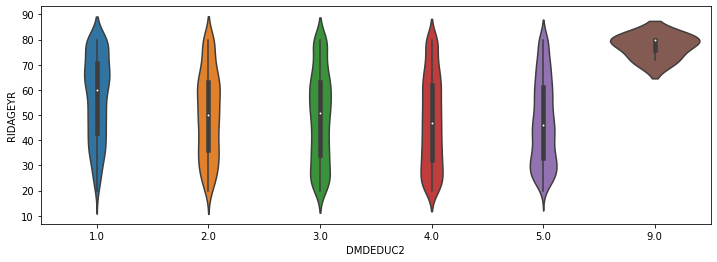
It shows the distribution of age for each education level. For example, in education level 1, we find more people above 60. In education level 5, you will find more people around 30.

It will be even more efficient to see the distribution of age of males and females separately.

d['RIAGENDRx'] = d.RIAGENDR.replace({1: "Male", 2: "Female"})
plt.figure(figsize=(12, 4))
a = sns.violinplot(d.DMDEDUC2, d.RIDAGEYR, hue=d.RIAGENDRx, split=True)
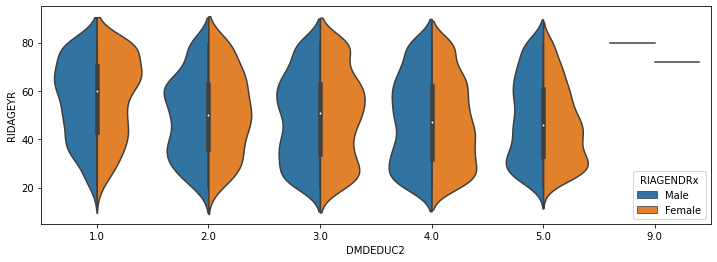
You have the distribution of age for males and females of each education level.

Let’s add one more variable to it. What if I want the same information as the previous plot for each ethnic group.

sns.catplot(x='RIDAGEYR', y="DMDEDUC2", hue='RIAGENDR', col="RIDRETH1",split=True,
           data = d[d.DMDEDUC2.notnull()], col_wrap=3,
           orient="h", height=5, aspect=1, palette='tab10', 
           kind='violin', didge=True, cut=0, bw=.2)
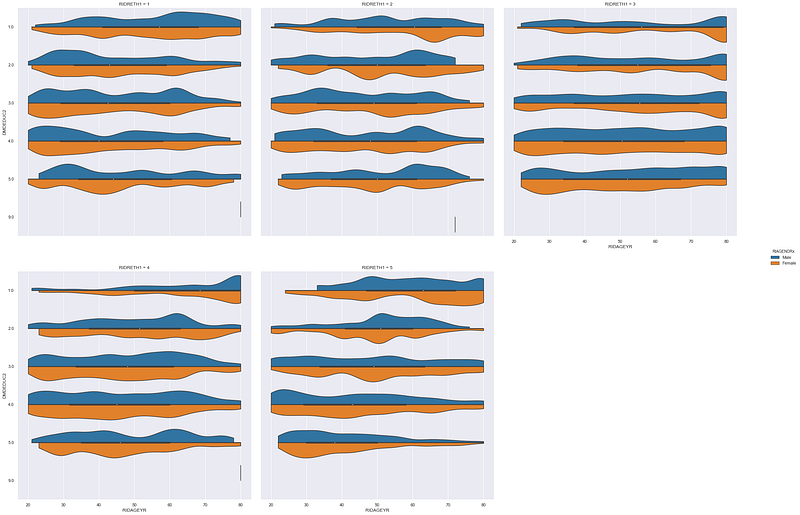
Look, how much information is packed in this one plot!

The last one for this article is not as informative as the previous few plots. But it looks nice in a report. Plus provides a very clear vision about the distribution of a categorical variable. That is a waffle chart.

For this demonstration, I will make a waffle chart that will show the count of people at each education level. We worked a lot with the education level of people in this article. But we never checked the proportion of the population in each education level.

You may have to install ‘pywaffle’ for this.

d11 = d.groupby('DMDEDUC2').size().reset_index(name='count')
from pywaffle import Waffle
n_categories = d11.shape[0]
colors=[plt.cm.inferno_r(i/float(n_categories)) for i in range(n_categories)]
fig = plt.figure(FigureClass=Waffle,
                plots={
                    '111':{
                    'values': d11['count'],
                    'labels': ["{0} ({1})".format(n[0], n[1]) for n in d11[['DMDEDUC2', 'count']].itertuples()],
                    'legend': {'loc': 'upper left', 'bbox_to_anchor': (1.05, 1), 'fontsize': 12},
                    'title': {'label': 'Number of People in Each Education Level', 'loc': 'center', 'fontsize': 18},
                },
                },
                 rows = 15,
                 columns = 60,
                 colors=colors,
                 figsize=(30, 12)
                )

It gives a very clear vision about the proportion of the population in each education level. Though the bar plot can do this as well. But it’s just another interesting choice. Waffle charts can also be developed without ‘pywaffle’.

Conclusion

I hope all these visualization techniques provide you with some more choices for better and efficient storytelling. There are numerous numbers of visualization techniques in python. Please look at my other visualization tutorials (links below) for some more options.

Feel free to follow me on Twitter and like my Facebook page.

More Reading:

Data Science
Machine Learning
Data Visualization
Programming
Data Analysis
Recommended from ReadMedium