
A Brief Guide to GitLab CI Runners and Executors
If you wish to create your own infrastructure for running GitLab CI jobs, you need to host your own GitLab Runners. But which executor to select? Shell, SSH, or Docker? Or something else?
GitLab CI employs a different architecture, compared to the default installation of more traditional CI servers, like Jenkins. In a nutshell, the GitLab server will always delegate the work of actually running a job to a GitLab Runner, which will sit somewhere on a different server.
Here are the most important concepts you need to understand:
- GitLab Job: the smallest component of a pipeline, which contains one or more commands that need to be executed.
- GitLab Runner: this is an agent installed on a different server from the GitLab server. The GitLab Runner receives instructions from the GitLab server in regards to which jobs to run. Each runner must be registered with the GitLab server.
- Runner Executor: each Runner will define at least one executor. An executor is essentially the environment where the job will be executed.
With GitLab, you can use different executors, depending on your needs:
- Shell
- SSH
- VirtualBox
- Parallels
- Docker
- Docker Machine
- Kubernetes
There is no such thing as “the best executor”. Every executor has its own typical uses case. It is best to be familiar with all of them, to understand which one works best for you.
How do I know which runner I am currently using?
Many people are using GitLab CI but don't know exactly what happens behind the scenes. If you don’t know where your jobs are running and which types of executors you are using here is what you need to do.
Go to GitLab and open any project with a pipeline. Inspect the pipeline and click on any pipeline stage and select a job.
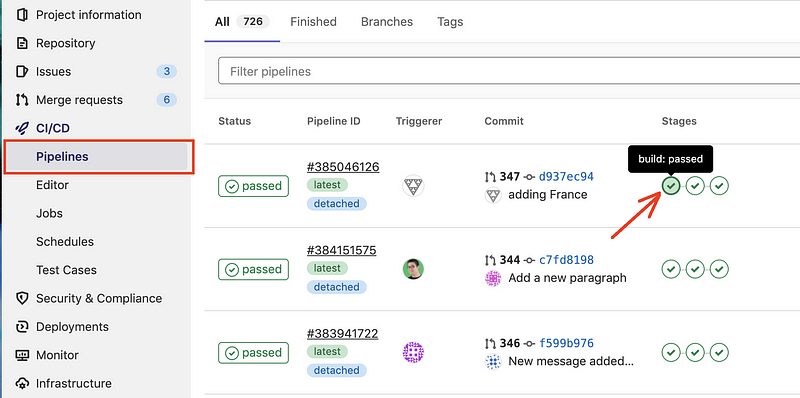
In the next step, you will see the logs for that job. The first part of the logs will give you what you are looking for, even if it may seem very cryptical.
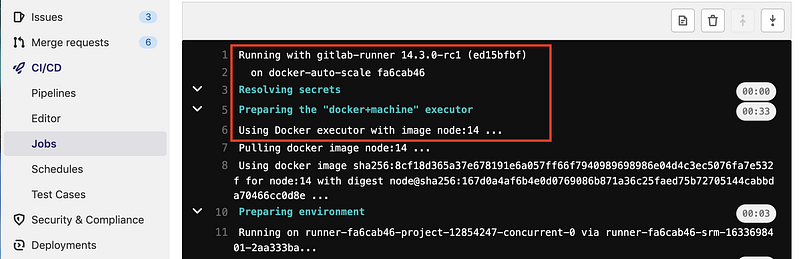
From the screenshot above, I want you to notice:
- the version of the runner (
14.3.0-rc1) - where it is running (
docker-auto-scale) - which executor is being used (
docker+machine)
Shell executor
This executor is running the jobs directly on the machine where the runner has been installed. It is as simple as it sounds. This is more or less similar to how Jenkins would run a job by default.
If you specify a Docker image in your job configuration, a shell executor will ignore it, even if Docker is installed.
This means that the server needs to have all the required dependencies installed. For example, if you need Node.js to run a job, this needs to be installed on the machine where the runner is installed.
Since everything needed is already available on runtime, the jobs are executed very fast. The Git repository is also available, so only the latest changes are fetched.
When to use it:
- When you really need a native-run environment (for example, you need to ensure that your software runs on a specific OS or hardware).
What to consider
- The environment is not clearly documented (like which versions are being used). When you later which to move the job to a different infrastructure, you need to figure out which dependencies it needs and in which version.
- There are “left-overs” from previous jobs, no clean build environment.
- It may be harder to manage dependencies if two different versions are required (for example one project needs PHP v7 and another PHP v8).
- You need to fully trust the other jobs running on this runner, as they can have access to other projects and their secrets.
SSH executor
The SSH executor allows you to send commands over SSH to a machine. This executor is very similar in principle to the Shell executor. However, it works only for Bash scripts.
Due to the fact that the commands are sent over SSH, this allows a higher level of security compared to the Shell executor, as the commands won’t have access to the entire file system.
When to use it:
- When the only way to connect to the machine running the GitLab Runner is over SSH.
- When you don’t want or can’t have the GitLab Runner installed on the machine running the jobs.
What to consider
- The environment is not clearly documented (like which versions are being used). When you later which to move the job to a different infrastructure, you need to figure out which dependencies it needs and in which version.
- There are “left-overs” from previous jobs, no clean build environment.
- It may be harder to manage dependencies if two different versions are required (for example one project needs PHP v7 and another PHP v8).
- Uploading job artifacts may need additional configuration/troubleshooting.
Creating well-researched and to-the-point content requires a lot of time and energy. If this was helpful and you wish to support me, please leave a comment, share, and press that 👏 a few times (up to 50 times). And consider subscribing to Medium.
VirtualBox/Parallels executor
Both VirtualBox/Parallels are virtualization tools. They allow you to start a fully working OS in a virtualized manner.
In the context of GitLab CI pipelines, every job will start a virtualized environment.
When to use it:
- When only by using virtualization you can have the required build environment (for example, you need to test against different operating systems).
- When Docker is not fully adopted and understood in the organization.
- When the VirtualBox/Parallels are better understood and already used for another purpose (like dev environments).
What to consider
- You have the overhead of starting an operating system before you can run your job.
- When your jobs fail, it is hard to debug them.
- as the connection to the virtualized environment happens over SSH, you may encounter connection issues ( example: ERROR: Job failed (system failure): ssh Dial() error: ssh: handshake failed: read tcp 127.0.0.1:49401->127.0.0.1:42655: read: connection reset by peer).
- Uploading job artifacts may need additional configuration/troubleshooting.
Docker executor
The Docker container to be used will be defined in the pipeline. This allows for a very simple run environment. This works fine on essentially any operating system, including Windows (with the docker-windows executor).
Multiple jobs can run on a system without any interference (apart from performance issues).
You should try to use a Docker environment for most projects. I know very few scenarios where using Docker does not make sense. All dependencies are defined in the Docker image and in the pipeline configuration.
When to use it:
- When you need a clean environment for every job.
- When you need to ensure that the projects run independently from each other.
What to consider
- The overhead of pulling (aka downloading) a Docker image for every job execution.
Docker Machine executor
In terms of how jobs are executed, the Docker Machine executor is not that much different from the Docker executor. The focus on this executor type is in the autoscaling capability.
Docker Machine is a tool created by Docker. They explain Docker Machine as follows: “Machine lets you create Docker hosts on your computer, on cloud providers, and inside your own data center. It creates servers, installs Docker on them, then configures the Docker client to talk to them.”
This is the executor that GitLab.com offers are a shared runner.
However, this technology has been deprecated and now GitLab is looking for an alternative solution to this.
When to use it:
- when you need to scale your build infrastructure
What to consider
- prepare yourself for a replacement, as Docker Machine is now deprecated.
Kubernetes executor
Using this executor makes sense if you already are using Kubernetes and understand its implications.
In the context of GitLab CI jobs, the GitLab Runner will run the jobs on a Kubernetes cluster. In this way, each job will have its own pod.
When to use it:
- When you need to scale your build infrastructure.
- When you have an existing Kubernetes cluster.
Creating well-researched and to-the-point content requires a lot of time and energy. If this was helpful and you wish to support me, please leave a comment, share, and press that 👏 a few times (up to 50 times). And consider subscribing to Medium.
Conclusion
I hope this overview helped you get an idea of which GitLab executor you need. I have composed this based on my own experiences and research.
I always encourage critical thinking and please leave a comment in the section below if you have any questions or if you feel that the information provided is inaccurate. I would love to hear from you!
Thank you for sticking with this article until the end. If you enjoyed it, please leave a comment, share, and press that 👏 a few times (up to 50 times). It will help others discover this information and maybe it will help someone else as well.
Follow me on Medium and YouTube if you’re interested in more tutorials like this one.


