
A beginner’s guide to Turbo Drive and Turbo Frames in Rails with examples!
Hotwire is a client-side toolkit created by the Basecamp team to power the Hey email application. The primary goal is to facilitate dynamic interactions by making HTTP requests to the server, receiving HTML responses, and updating the page without complex client-side code.
- Server sends rendered HTML, not raw data, to the client.
- Business logic resides on the server, minimizing client-side responsibilities.
- Client logic is limited to non-essential interface items.
- Server-side HTML retrieval handles client logic where possible.
- CSS classes addition/removal manages some client logic.
- Custom JavaScript addresses features beyond server-side capabilities.
The Hotwire team claims that:
- Approximately 80% of client interaction is managed via “HTML over the wire.”
- A significant portion of client-side code involves manipulating CSS.
- Hotwire complements Rails conventions, especially with partial-view and ActiveRecord naming practices.
Installing Turbo
Turbo’s Role:
- Successor to Turbolinks.
- Simplifies directing user actions into server requests.
- Parses requests, inserts HTML results into the corresponding page or section.
This gem is automatically configured for applications made with Rails 7+ (unless — skip-hotwire is passed to the generator). But if you’re on Rails 6, you can install it manually:
- Add the `
turbo-rails` gem to your Gemfile:`gem ‘turbo-rails’` - Run
`bundle install` - Run
`rails turbo:install` - Run
`rails turbo:install:redis`to change the development Action Cable adapter from Async (the default one) to Redis.
Turbo Drive Overview
What is Turbo Drive?
- Formerly known as Turbolinks.
- Captures clicked links or form submissions, retrieves responses in the background.
- Extracts HTML body and replaces the existing page body with the new response.
- Enhances page navigation speed by avoiding full page reloads and reducing flicker.
- Downsides include potential interference with other JavaScript libraries due to the absence of traditional page-load events.
- Turbo Drive improves actual and perceived navigation speed.
- It may interfere with other JavaScript libraries relying on page-loaded or DOM-loaded events.
- While beneficial, Turbo Drive alone is insufficient for building an exciting application; additional components like Turbo Frames and Turbo Streams are needed.
In a Rails application, you don’t have to do anything if you have the gem installed. Each navigation request will retrieve the response and replace the existing page with a new one.
Adding Interactivity with Turbo Frames
A Turbo Frame is like a special container on our webpage, marked with `<turbo-frame>`. It’s responsible for handling clicks on links or form submissions. When something happens in this container, it talks to the server and gets a response. If the response contains another Turbo Frame with the same ID, only that specific part of our webpage inside the Turbo Frame gets updated. To put it simply, Turbo Frames allow a small part of our webpage to update itself without refreshing the entire page, similar to how Turbo Drive works for the whole page.
Implementation
- Wrap the display and edit partials with Turbo Frames. — Use `<%= turbo_frame_tag(dom_id(model)) do %>` and `<% end %>` for both. — Same DOM ID in different frames won’t cause issues as they won’t be on the page simultaneously.
- Update `ModelController` to render only the partial on a successful update:
 # users_controller.rb
  def update
    if @user.update(user_params)
      render(@user)
    else
      render :edit
    end
  end
This is what my views look like:
 <%# users/show.html.erb %>
 <div
  class="relative max-w-md mx-auto md:max-w-2xl min-w-0 break-words bg-black w-full shadow-lg rounded-xl my-[250px]">
  <div class="px-6">
    <div class="flex flex-wrap justify-center">
      <div class="w-full flex justify-center">
        <div class="relative">
          <img
            src="https://avatars.githubusercontent.com/u/51298227?v=4"
            class="shadow-xl rounded-full align-middle border-none absolute -mt-16 max-w-[150px] translate-x-[-50%]" />
        </div>
      </div>
    </div>
    <%= render current_user, user: current_user %>
  </div>
</div>
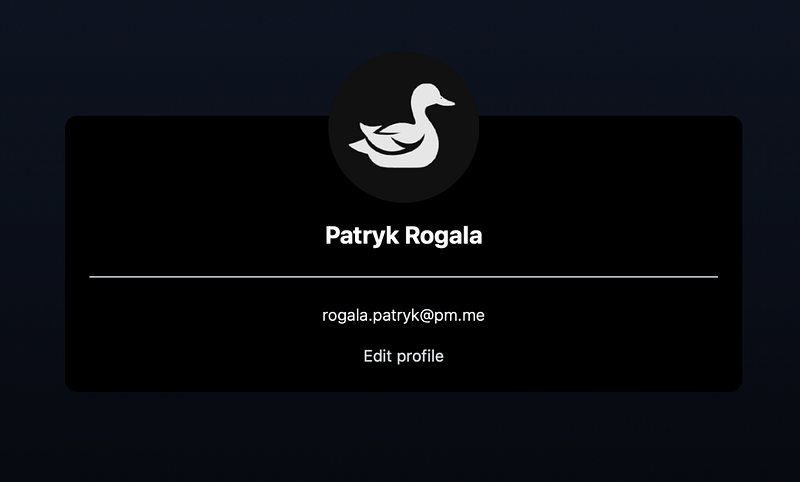
Here I have my show template that uses some Tailwindcss classes and renders my `_user` partial.
<%# users/_user.html.erb %>

<%= turbo_frame_tag dom_id(user) do %>
  <div class="text-center mt-[100px]">
    <h3 class="text-2xl text-white font-bold leading-normal mb-1"><%= user.fullname %></h3>
  </div>
  <div class="mt-6 py-6 border-t border-slate-200 text-center">
    <div class="flex flex-wrap justify-center">
        <div class="w-full px-4">
          <p class="font-light leading-relaxed text-slate-100 mb-4"><%= user.email %></p>
          <%= link_to 'Edit profile', edit_profile_path, class: "font-normal text-gray-300 hover:text-white hover:underline" %>
        </div>
    </div>
  </div>
<% end %>
My partial is wrapped in a `turbo_frame_tag` with the `dom_id` of the currently rendered user, this frame will be replaced with an edit template if we click `Edit profile`.
Our `edit.html.erb` file looks as follows:
<%# users/edit.html.erb %>

<%= turbo_frame_tag dom_id(current_user) do %>
  <%= form_for @user do |f| %>
    <div class="text-center mt-[100px]">
      <%= f.text_field :fullname, class: "text-2xl text-white font-bold leading-normal mb-1 bg-transparent border rounded h-[40px] px-2 outline-none font-Poppins text-center" %>
    </div>

    <div class="mt-6 py-6 border-t border-slate-200 text-center">
      <div class="flex flex-wrap justify-center">
          <div class="w-full px-4">
            <%= f.email_field :email, class: "bg-transparent border rounded h-[40px] px-2 outline-none font-Poppins text-center" %>
          </div>
      </div>
    </div>

    <div class="mt-5 flex justify-center">
      <%= f.submit "Update", class: "py-3 px-6 px-10 rounded-full cursor-pointer bg-[#2190ff] min-h-[45px] text-[16px] font-Poppins font-semibold" %>
    </div>
  <% end %>

  <div class="mt-5 pb-5 text-center">
    <%= link_to "Cancel", profile_path, class: "hover:underline" %>
  </div>
<% end %>
Our edit template is wrapped with another turbo_frame_tag with the same dom ID, just like in our user part. If we click the `Edit` link, only that part of our page will be replaced.
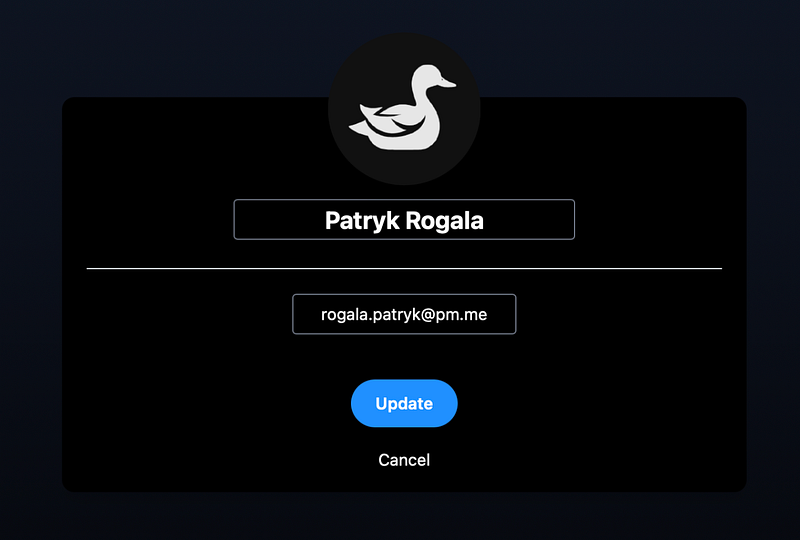
Our profile information has changed into input, so we can update our profile. Now thanks to our controller changes, if we click `Update`. Only our user partial will be rendered (so only this turbo_frame will be replaced). Without any redirects or loading times.
Behind the Scenes
- Turbo controls both server requests and responses within Turbo Frames.
- Ordinary Rails requests are enhanced by Turbo’s handling.
- Turbo Frames facilitate partial updates, optimizing performance.


