
OCR based Intelligent Document Extraction (IDE): Exploring PaddleOCR
Key information extraction (KIE)/Intelligent Document extraction (IDE) /Intelligent Document Processing (IDP) etc. are all just difference names for the same thing. The purpose of it is to extract key information or key fields from the documents such as invoice, receipts etc. Document could be in the form of pdf/image and again the it can be a scanned pdf/image as well.
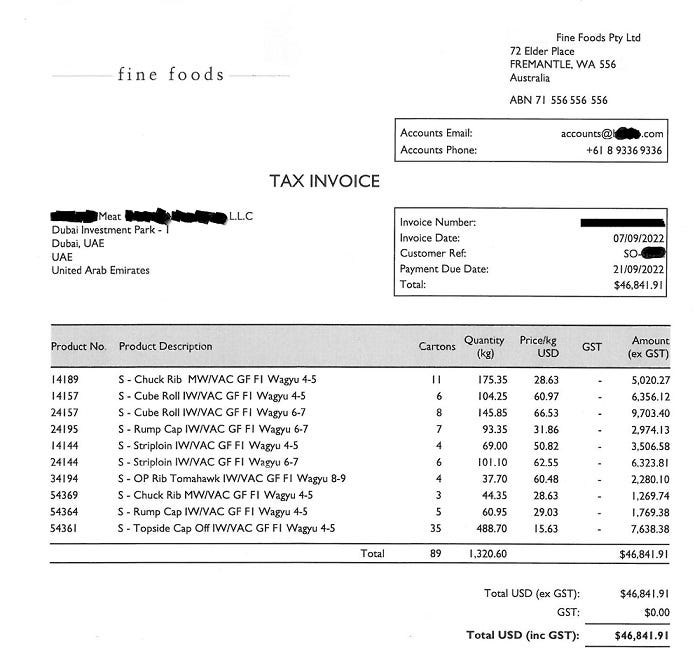
If this is my input document, KIE refers to extraction of important fields like Account Email, Account Phone, Invoice Number, Invoice Date, Payment Due date etc. from the above invoice.
KIE can be done in various ways and there are a bunch of open source pretrained models available which can be used directly or with some fine tuning and customization. Typically there are 2 types of models : OCR based and non-OCR based. 1. OCR based: First perform the optical character recognition (OCR) on the document which will give raw text and bounding box (coordinates of text) and then perform KIE on raw text using bounding box info. Ex: PaddleOCR by paddle, document-ai by Google, azure cognitinve service by Microsoft, textract by Amazon etc.
2. non-OCR based: This approach takes document image as input and a set of questions/fields we want to extract from the document and directly provide the answers/value of those fields from the document without performing OCR. Ex: donut by huggingface, ernie by Paddle etc. In this article our focus in PaddleOCR (an ocr based method). so let’s begin step by step.
Microsoft had developed a series of models including layoutLM, layoutLMv2, …, layoutXLM etc. The layout XLM model was designed to perform KIE task, it was trained on more than 15M documents of different languages including English, Chinese etc. Paddle by Baidu made some changes in LayoutXLM model and improved it by removing the visual backbone network module and introducing the text line order and the pretrained model is open source so far. This change has resulted faster execution of training and higher performance.
PaddleOCR It performs IDE using mainly three models · OCR (optical character recognition) — input: document, output: text token with bounding box. The output looks like below
bounding_box           Text
[1912, 332, 2292, 387] Fine Foods Pty Ltd
[1819, 391, 2056, 431] 72 Elder Place
[1812, 435, 2222, 482] FREMANTLE,WA 556
[413, 460, 805, 523]   fine foods
[1810, 474, 1973, 534] Australia
[1816, 563, 2170, 610] ABN 7I 556 556 556
· SER (Semantic Entity Relation) — SER classifies each text token into Header/Question/Answer/Other class. It takes text tokens with bounding box as input and provides labeling (Question/Answer/Header/Other) for each token as output. The output looks like below
[{“Account Email", "bbox": [1425, 683, 1690, 724] , "pred": “Question“},
 {“Account Phone", "bbox": [1421, 738, 1709, 789], "pred": “Question“},
 {“Invoice Number", "bbox": [1417, 998, 1709, 1045], "pred": “Question“},
 {“Invoice Date", "bbox": [1421, 1056, 1646, 1096], "pred": “Question“},
 {“accounts@h****o.com", "bbox": [1997, 683, 2373, 731], "pred": “Answer“},
 {"+61 8 9336 9336", "bbox": [2082, 734, 2372, 793], "pred": "Answer"},
   …
]
· RE (Relationship Extraction) — RE takes the list of question and answers and does the linking/mapping/matching. The output looks like below
[{“Account Email", "pred": “Question”}, {“accounts@h****o.com", "pred": “Answer“}]
 {“Account Phone", "pred": “Question”}, {“+61 8 9336 9336", "pred": “Answer“},
   ….
]
Training & Finetuning To prepare training and validation data, you can use the images of your domain and convert it into the required format of PaddleOCR. Run OCR using below code on all the images one by one or write a loop
from paddleocr import PaddleOCR
ocr_model = PaddleOCR(lang='en', use_gpu=True)
ocr_model = PaddleOCR(lang='en', use_gpu=use_gpu)
img_path = 'location of your image'
#if input is document, convert into image using pdf2image, pymupdf etc.
result = ocr_model.ocr(img_path)[0]
boxes = [res[0] for res in result] #boundign box
texts = [res[1][0] for res in result] #raw text
Once we get the bounding box and text from OCR, we need to manually add label and linking into it to make it ready for finetuning. PaddleOCR takes a json file as input along with the image files. The format of json should look like this
xyz.jpg [{"transcription": "fine foods", "label": "header",
"points": [[1912, 332], [2292, 332], [2292, 387], [1912, 387]], "linking": [],
"id": 0}, ...
{"transcription": "Accounts Phone:", "label": "question",
"points": [[1421, 738], [1709, 738], [1709, 789], [1421, 789]],
"linking": [[9, 10]], "id": 9},
{"transcription": "+61 8 9336 9336", "label": "answer",
"points": [[2082, 734], [2372, 734], [2372, 793], [2082, 793]],
"linking": [[9, 10]], "id": 10},.... }]
pqr.jpg [{"transcription": "Enterprise", "label": "header",
"points": [[18, 20], [48, 20], [48, 30], [18, 30]], "linking": [],
"id": 0]
...
The text which is labelled as header/other doesn’t have any linking but the text which is labelled as question/answer has linking which shows that a text (as question) is linked with another text (as answer). We need to prepare two json files, one for training data another for validation. Download the pretrained model and refer paddleocr guide for training steps. They have explained all the steps very clearly. Once the finetuning is done you can use the finetuned model to perform key information extraction on new/unseen document/image.
System Config We can train and use the model with or without GPU (according to Paddle) but it takes enormous time in finetuning. Inference also take ~1 min/image on Intel core i7, 16GB RAM. Hence, I decided to finetune the model using GPU. The system I used for finetuning has the config (8 core CPU with 16GB RAM, 8 core GPU with 16GB mem) and for inference purpose (4 core CPU with 16GB RAM, 4 core GPU with 16GB mem)
Dependencies I am listing the version I installed for my use, you may try other if you want python==3.7.10 libgl1 cuda==11.4 torch==1.10.1+cu111 torchvision==0.11.2+cu111 paddlepaddle-gpu==2.3.2.post111 paddleocr==2.6.1 paddlenlp==2.5.2
Typically these dependencies should be enough for running paddleocr but depending on the environment you may have to install few more, for ex: in aws-sagemaker or local laptop you may have to install cuda and/or it’s dependencies separately. On aws-sagemaker which had cuda 11.4 pre-installed, I had to install libcublas and libcudnn separately.
* Download Local Installer for Linux x86_64 (Tar) from Download cuDNN v8.7.0 (November 28th, 2022), for CUDA 11.x [you may have to signup on the nvidia website]
#libgl
!apt-get update && apt-get install -y build-essential
!apt install -y libgl1

# torch, torchvision, torchaudio with cuda-11.1 support
!pip install torch==1.10.1+cu111 torchvision==0.11.2+cu111 torchaudio==0.10.1 -f https://download.pytorch.org/whl/cu111/torch_stable.html

#Paddle2.3.2 with cuda-11.1 support
!python -m pip install paddlepaddle-gpu==2.3.2.post111 -f https://www.paddlepaddle.org.cn/whl/linux/mkl/avx/stable.html

# Install paddle OCR and paddle NLP
!pip install paddleocr
!pip install paddlenlp

# Clone paddle OCR repo and install dependencies
!git clone https://github.com/PaddlePaddle/PaddleOCR
%cd /PaddleOCR
! pip install -r requirements.txt

# if you need libcudnn, download and copy the libs into /usr/lib
!cp -P ~/cudnn-linux-x86_64-8.7.0.84_cuda11-archive/lib/libcudnn* /usr/lib/
!chmod a+r /usr/lib/libcudnn*

# if you need libcublas, download and copy the libs into /usr/lib
! wget https://developer.download.nvidia.com/hpc-sdk/22.11/nvhpc_2022_2211_Linux_x86_64_cuda_11.8.tar.gz
! tar xpzf nvhpc_2022_2211_Linux_x86_64_cuda_11.8.tar.gz
!cp -P ~/nvhpc_2022_2211_Linux_x86_64_cuda_11.8/install_components/Linux_x86_64/22.11/math_libs/11.8/targets/x86_64-linux/lib/libcublas* /usr/lib/
!chmod a+r /usr/lib/libcublas*
I have installed all the dependencies with cuda 11.1 support because they are not available for cuda 11.4 except libcublas which was used with cuda-11.8 support.
I had researched a lot and tried paddle ernie, donut, detectron, layoutlm, mmocr, tesseract etc. for fetching important fields from invoices and so far PaddleOCR has outperformed all other models.
**Comment below if you find any difficulty while using this solution. More articles coming along. This is just 20% of entire IDE product solution. Reach out to Crimsonlogic sales team for sale inquiries and demo. Thanks for reading! Cheers!


