
Death to typewriters
Automatic replacement and clean-up
This is a very specific technical addition to the article about details of Medium typography. If you haven’t read that one, you should start there.
This is a technical supplement explaining in detail the typography substitutions and clean-up done by Medium as you write, or when you publish.
❦
On key presses, locally where the new character is added
On inserting hyphen
If the previous character is a hyphen, and the one before that is a less-than (<), turn them all into a left arrow glyph (←).
If the previous character is a hyphen, simulate inserting an em dash (see below).
On inserting an em dash
If the previous character is a space or there’s no previous character, insert an em dash and a space.
Otherwise, insert three characters: [space][em dash][space] (will be replaced by [hair space][em dash][hair space] later).
On inserting a space
If the previous character is a space or a non-breakable space, don’t insert a new one. This prevents two spaces from happening (specifically, two spaces after a full stop).
If the previous character is a hyphen (-) or an en dash (–), and the one before is a space (or non-breakable space), replace with an em dash.
On inserting a digit
Note: Digit is defined to be 0, 1, 2, 3, 4, 5, 6, 7, 8, 9, but also ½, ¼, and ¾.
If the previous character is a hyphen, and the one before that is a digit, we change the hyphen to be an en dash. E.g. typing [1][hyphen][5] results in 1–5.
If the previous character is a space, the one before is an em dash, the one before is a space, and the one before that a digit, we change the [space][em dash][space] combination to an en dash. E.g. typing [1][space][hyphen][space][5] results in 1–5.
The summary:
- hyphens are allowed inside-words
- en dashes are used in between numbers 1–5, 6–10
- em dashes are used in — between — words, as pauses, and surrounded by hair spaces
On inserting a digit 3
If the previous character was a less-than sign (<), it is removed and heart (❤) is inserted instead.
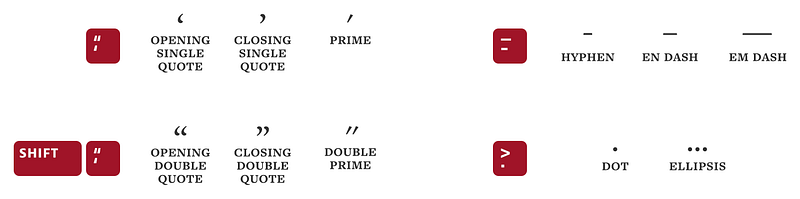
On inserting a single quote (′)
If the previous character is empty (doesn’t exist), (, [, {, space, or non-breakable space, we insert an opening quote (‘).
If the previous character is a digit, keep the original double quote/prime (= feet).
Otherwise, use a closing quote (’).
On inserting a double quote (″)
If the previous character is empty (doesn’t exist), (, [, {, space, or non-breakable space, we insert an opening quote (“).
If the previous character is a digit, keep the original double quote/prime (= inches).
Otherwise, use a closing quote (”).
On inserting a period
If the two characters before were also periods, they are removed, and ellipsis (…) is inserted instead.
On inserting a right paren
If the previous character is a colon ( : ), it’s removed, and a smiley face (☺) is inserted instead.
On inserting a left paren
If the previous character is a colon ( : ), it’s removed, and a frowny face (☹) is inserted instead.
On inserting greater-than
If the previous character is the em dash (substituted from two hyphens), then it’s removed and a right arrow (→) is inserted instead.
On Enter
Two consecutive Shift-Enters (line breaks) are converted into a paragraph break (
), except inside code blocks.
Inside code blocks, Enter is treated as if Shift-Enter was pressed.
On rendering paragraphs within text
[space][em dash][space] is changed to [hair space][em dash][hair space].
[space][‘][digit][digit] is replaced with [space][’][digit][digit] for proper formatting of year shorthand… (“This was a year ’90.”)
[space][punctuation] is replaced by [non-breakable space][punctuation] for those languages (e.g. French) that put space before punctuation . This change , weird as it is , prevents punctuation from traveling alone to the next line . For this feature, punctuation is defined as: ! ? : ; . , ‽ »
[punctuation][space] is replaced by [punctuation][non-breakable space] for the same reasons. For this feature, punctuation is defined as: « ¿ ¡
On publishing (or re-publishing)
Any single or more heading or trailing spaces in any paragraph are removed.
Any two or more spaces in any paragraph are collapsed into one space.
Any empty trailing paragraphs or trailing HRs (horizontal rules) are removed.


