
9 New Must-Have macOS Productivity Apps For Daily Usage
How did you manage all these days without these apps?

Most people probably don’t realize how much of a powerhouse their Mac actually is.
While you might think you are utilizing macOS efficiently, the reality is, you are nowhere close to unlocking its full potential.
So, in this post, I will share with you 12 new macOS apps that are a must-have for anyone looking to squeeze every drop of efficiency from their day.
These apps will transform your daily routine and improve the capabilities of your Mac. Let’s get started, shall we?
#1 Camo — Look better in your meetings 📸
While a lot of the population has gone back to the office, a ton of people still work from home and do not have a proper webcam setup or a professional-looking environment to attend their truly important meetings.
Well, Camo is a unique app that aims to solve this problem by allowing you to basically use any camera device, including your phone, DSLR, GoPro, or even an external webcam as a webcam with your Mac and enhances your video quality with a ton of intuitive features built into the app.
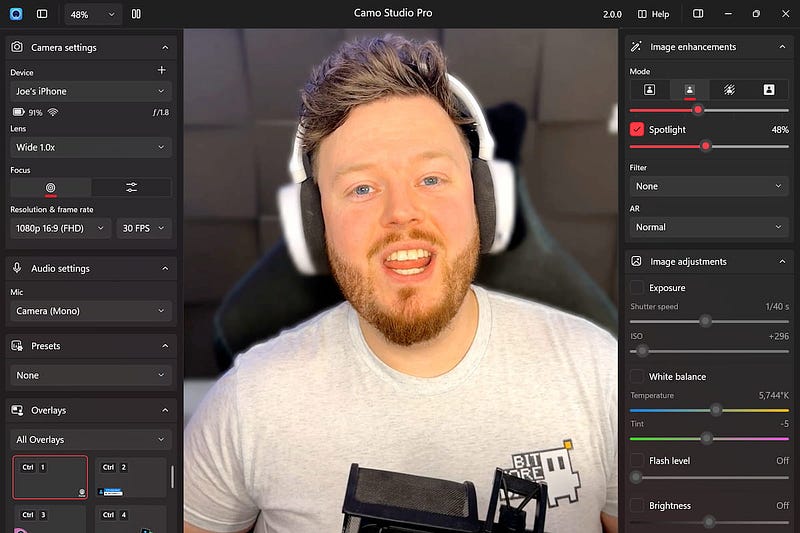
The app allows you to apply granular controls to your webcam output, like increasing the brightness, changing the exposure, applying color grading, using preset filters, and even adding overlays to your screen to represent your brand or present any message throughout the video call.
There is even a Spotlight feature that can brighten you against your background, allowing your audience to focus on you better. Camo also supports auto framing that uses face tracking to ensure you remain centered in the frame.
Why should you install Camo? (TLDR)
Camo is an app that lets you use any of the camera devices you have, like your phone, DSLR, or action camera, as a webcam for your Mac. You can change your blurry webcam videos into professional-quality videos for meetings, presentations, video tutorials, and more. It can significantly enhance your video communication, making it a must-have tool if your work or personal life involves a ton of video calls and recordings.
#2 Charmstone — Little drops make an ocean 🧙♀️
According to a recent, totally legit survey, millions of Mac users worldwide are annoyed daily by a seemingly harmless task — switching apps.
Most people don’t even realize how much time and cognitive energy they actually end up spending on this chore. Do not worry; Charmstone, a quick app switcher for macOS, is here to save the day.
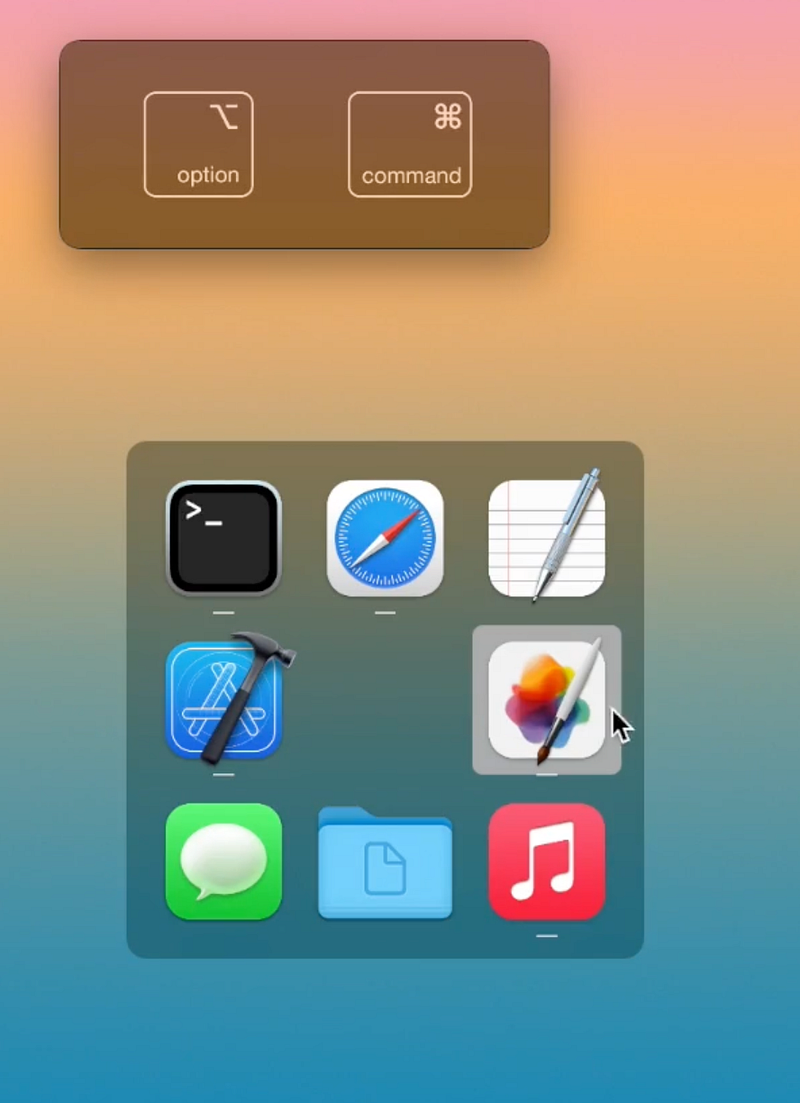
The app aims to replace your frequent trips to the dock or cmd tab with just one modifier combo that relies on your spatial memory to switch focus to your desired app quickly.
Simply use the modifier combo ctrl + cmd and move your cursor towards the app you want to open to quickly switch to it. While this might not seem like you are saving a ton of time, over time, these small actions add up, and before you realize it, your productivity has been drastically improved.
Why should you install Charmstone? (TLDR)
Charmstone is a productivity app that aims to improve the efficiency of your daily workflow by providing you with a solution to quickly switch between apps with a simple shortcut combination and a trackpad gesture rather than having to constantly interact with the dock or the cmd + tab keys all day long. It helps you save precious seconds wherever possible, adding up to a tremendous boost to your overall daily productivity.
#3 Godspeed — Create tasks faster than you can finish them 🗒️
Most people who like to stay organized and keep track of their daily tasks use some feature-rich task management app.
However, the problem with most of these apps is that they often go overboard with features and functionalities, so you spend more time organizing your to-do lists than ticking them off.
Well, Godspeed is a powerful app that aims to solve this problem by making it, you guessed it, as quick and easy as possible to create and manage your to-do list items.
According to the app’s developers, any action on the app takes less than 50ms to make, and every single feature and function of the app can be used with only your keyboard, saving you tons of time switching between your trackpad and your keyboard.
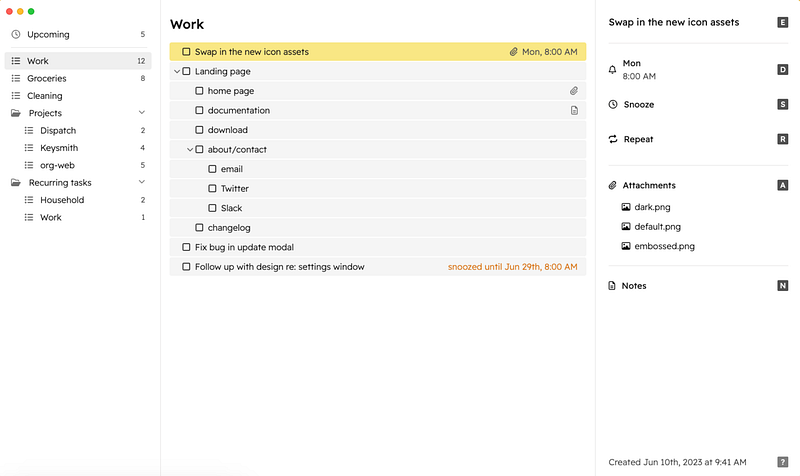
However, this does not mean the app lacks in any area, as it includes all the features you would typically expect from a task manager app, including recurring reminders, nested items, options to add notes and URLs to your tasks, and even an NLP based date picker that saves you from interacting with the annoying calendar and time picker normally found in such apps.
You can instantly get access to all the keyboard shortcuts in Godspeed with the hotkey combination cmd + K from anywhere on the app.
Why should you install Godspeed? (TLDR)
If you are looking for a to-do list app that lets you quickly and effectively manage all your pending tasks instead of spending more time creating and organizing them, then you will feel at home in Godspeed. The app has a global hotkey CMD + K that lets you access any functionality of the app with a keyboard shortcut allowing you to create tasks, set reminders, add notes, and more, all without taking your hands off the keyboard.
#4 Grain — Never pay attention to meetings again 👔
I know most of us think the meetings we attend on a regular basis are a waste of time. I mean, most hour-long meetings barely have a couple of minutes of helpful information relevant to you.
Luckily, in the era of constantly evolving AI technologies, you no longer have to sit through an entire meeting to note down a couple of essential points pertaining to you, as AI will now do that for you.
All you have to do is to integrate an AI app, like Grain, with the favorite communication apps you use at work, and it will take care of the rest.

Grain is an AI-powered meeting recording app that automatically records all your meetings, takes intelligent notes, summarises the meeting content, and even highlights the key points discussed with respect to the speaker.
The best part is Grain has native integration with popular apps like Slack, Notion, and Zapier, so you can quickly share notes and insights about the meetings with your coworkers and stakeholders.
Grain also transcribes your meetings in real-time, and its powerful search and tagging functionality allows you to quickly search for anything that anyone has said during a meeting and even clip that part of the meeting to share with others easily.
Why should you install Grain? (TLDR)
If you are tired of constantly sitting through hour-long meetings only to end up getting 2 points that are relevant to you, then you should definitely start integrating Grain into the meeting apps you use at work. Grain is an AI-powered meeting recording app that records and transcribes all your meetings, automatically takes intelligent notes, and even highlights key points based on who said them and makes them readily shareable.
#5 In Your Face — Makes it impossible to miss your meetings ⏰
If you are someone who is known around the office for often being late to or entirely missing out on meetings, even though you have tried to convince your coworkers numerous times that it was not intentional, then this app is definitely built for people like you.
Most of the time, you get a calendar alert a few minutes before your meetings start; it is pretty easy to miss them if you are already knee-deep in some other task or are watching a funny YouTube video.

Well, In Your Face is here to save you some embarrassment as it blocks your entire screen with an alert for your upcoming meeting, making it impossible to miss it, as long as you are actually looking at your laptop and are not watching TikToks on your phone.
You can also snooze the alerts if you are genuinely busy with something or create custom reminders based on your meetings. The alert also includes the meeting link allowing you to jump on board with a single click directly.
Why should you install In Your Face? (TLDR)
Install the In Your Face app that displays full-screen alerts for your upcoming meetings blocking out your entire screen and making it impossible to miss any of your important meetings.
#6 Presenting — Add pizazz to your presentations 🥳
If you ever had to present something in any of your important meetings and were unfortunate enough to receive the feedback that your presentation was boring, then you need to start using the Presenting app to silence the naysayers in your office or school.
The Presenting app allows you to easily create intuitive and captivating presentations by adding animations to your screen recordings and presentation materials.
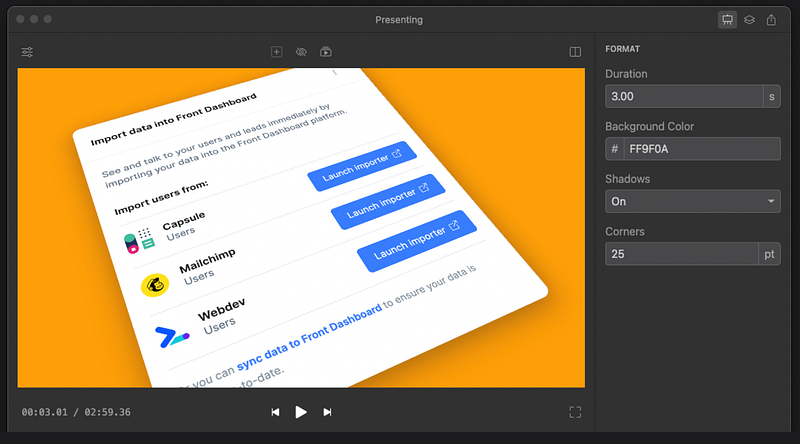
The app has an easy-to-use interface that allows you to quickly add effects to your presentations, including adding backgrounds to your screen recordings, including shadows, editing the corners, changing the overlay colors, and more.
You can simply drag and drop animations onto your videos, add images or texts, and export the output in 4K resolution to create eye-catching presentations in a matter of minutes with minimal effort.
Why should you install Presenting? (TLDR)
If you want to spice up your serious and boring presentations with quick and easy-to-add animations, background effects, and text overlays, look no further than Presenting. The app’s straightforward interface and drag-and-drop controls allow you to create intuitive and captivating presentations in no time that are sure to dazzle your audience.
#7 Quick Draft — Take notes from anywhere at anytime ✍🏼
Try to recollect the number of times in the last week you wanted to note down something quickly and were looking for your Notes app or trying to find a place to paste something you copied.
If the answer is more than 10, then now is the time you need to install the Quick Draft app on your Mac.

Quick Draft is a simple app; you can probably guess what it does from its name (kudos to the developer). The app allows you to create a quick draft of anything you want by clicking on the app icon from the menu bar from anywhere on your Mac.
The app automatically syncs all of your notes to iCloud, and it also offers markdown support if you want to create to-do lists or apply some minimal formatting to your drafts.
#8 Shortwave — Let AI handle your mails 📨
Shortwave is a powerful email management app that is built from the ground up with AI integrated into every part along the way.
If you have been struggling to manage your emails and get back to them on time recently, you couldn’t have come across Shortwave at a better time.
For starters, the Shortwave summarises all of your emails by highlighting the key points, so you no longer have to spend your precious morning minutes going through pointless arguments or lengthy discussions between your coworkers in an email thread.
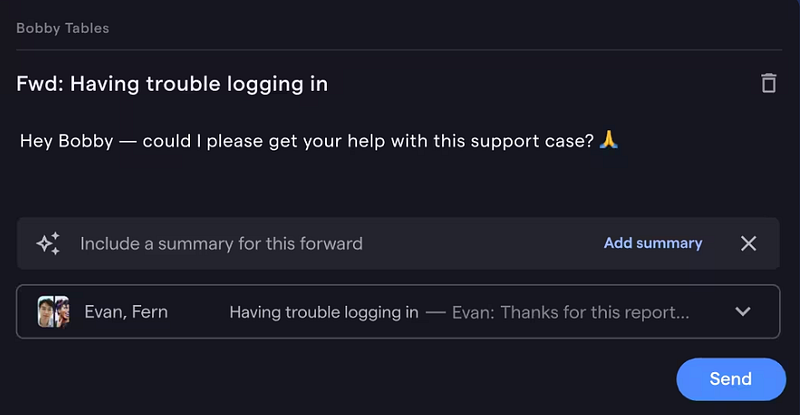
You can also attach summaries of your emails when you send them to people, so they can quickly catch up as well. The app also automatically sorts and prioritizes your emails based on your reply and reading patterns to help you easily achieve inbox zero.
Shortwave also automatically organizes your inbox by applying predefined labels for popular use cases like promotions, finances, newsletters, events, etc. It even groups emails together by default, making it easier to process them in batches to move or delete multiple emails at once.
Why should you install Shortwave? (TLDR)
If you are looking for an email app that is actually intelligent and useful and helps you save a ton of time by automatically summarising, organizing, and batching your emails, then Shortwave is the one for you. It uses AI to create summaries for both incoming and outgoing emails, blocks any trackers in the emails you receive, uses auto labels to categorize your emails, and so much more.
#9 Textpal — Add lightning-fast emojis anywhere 😄😁
If you are someone who uses a lot of emojis whenever you get the chance, be it your blogs, your professional emails, social media posts, or during a group text, then the Textpal app should definitely be in your app arsenal.
Mimicking the emoji picker in Slack, Textpal allows you to invoke an emoji picker in any app you want by simply typing \ followed by the description of the emoji you want to use.
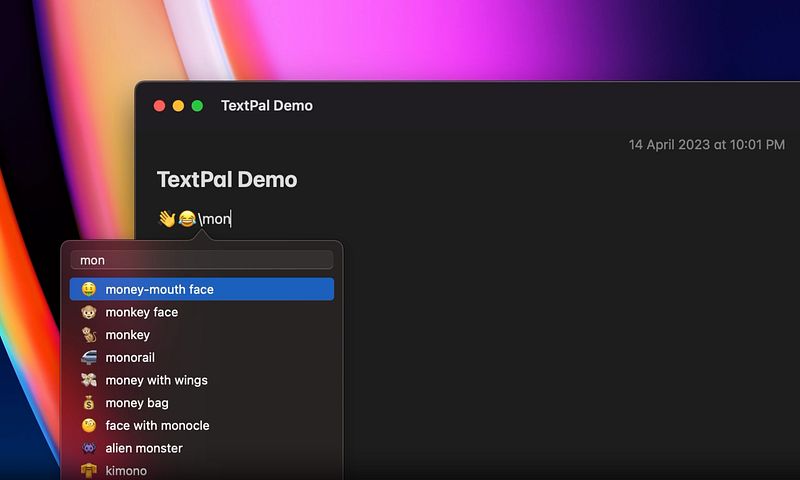
You can also switch the emoji picker to a grid-style layout, add multiple emojis at once, and even limit the shortcut from working in certain apps.
Subscribe to Medium and support The Useful Tech!
Join the Medium membership program to access unlimited articles across Medium on topics like Tech, Business, and Productivity, and support The Useful Tech and all of your favorite authors for only $5 a month!
If you like discovering and using new apps to enhance your experience on your iPhone and Mac, you should definitely check out Setapp, an app store that has a massive library of 250+ apps, and for just $9.99/month, you can get access to all of these apps, and I would say it is well worth its price.
The best part is if you Sign Up to Setapp using my affiliate link below, you can try out all 250+ apps in Setapp completely for free for 30 days. Use the code ‘usefultech’ to avail this exclusive offer. Also, you would be supporting me directly. So, if you ask me, it is a win-win situation.


