
9 macOS Apps I Always Have in My Menu Bar and You Should Too
Give the empty space on your menu bar a purpose
In this post, I am going to share with you 10 macOS apps that have earned a permanent spot in my menu bar, and I have a hunch they will find a home in yours too.
These apps have helped me tremendously improve my productivity, saved me a ton of time, simplified complex tasks, and have ultimately helped me to get the most out of my Mac.
I hope you would find some or all of these apps to be interesting and useful and would them to your menu bar too. Let’s get started.
CheatSheet — Your Shortcut to Efficiency 📝
CheatSheet is an absolute gem that’s all about efficiency. If you are anything like me, you probably forget keyboard shortcuts more often than you would like to admit. That is where CheatSheet comes in.
This nifty little app is like having a cheat sheet (hence the name) for all your keyboard shortcuts. Just hold down the Command key, and a list of all the keyboard shortcuts for the active app pops up. It is that simple.
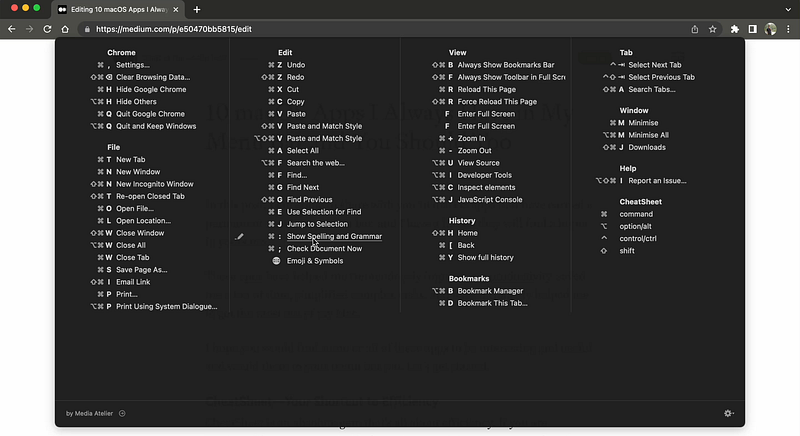
CheatSheet is a game-changer for productivity. It saves you from the tedious task of navigating through menus or trying to remember that elusive shortcut. Plus, it’s a great way to discover new shortcuts and boost your efficiency.
I have found CheatSheet to be an invaluable tool in my daily workflow. It’s like having a personal assistant who’s always ready to remind you of the shortcuts you need.
Why you should add CheatSheet to your menu bar? (TLDR)
CheatSheet provides a list of all keyboard shortcuts for the active application when you trigger a shortcut. It is a great tool for increasing productivity and efficiency by allowing you to use shortcuts you don’t even know existed to quickly perform common actions in an app and save time.
Hand Mirror — A Quick Glance at Your Best 🪞
Hand Mirror is a simple yet incredibly useful tool that has found a permanent home in my menu bar. This app turns your Mac’s camera into a one-click mirror, perfect for those last-minute appearance checks before a video call or an important meeting.
Hand Mirror is as straightforward as it gets. Click on the app’s icon in the menu bar, and your camera turns on, showing you a preview of what others will see in your video call. It’s a quick and easy way to make sure you’re looking your best before you hit that ‘Join’ button.
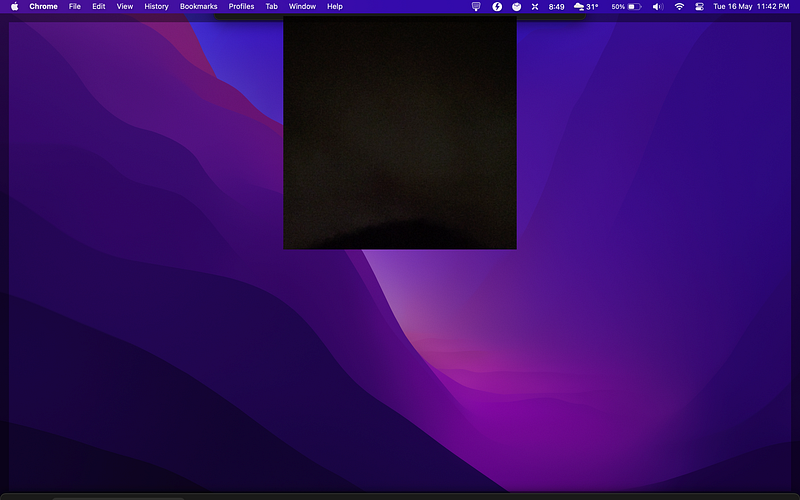
But it’s not just about vanity. Hand Mirror is also a practical tool for checking your surroundings, ensuring your background is professional and distraction-free. After all, it’s a small detail that can make a big difference in your online interactions.
In this era of remote work and virtual meetings, Hand Mirro is a handy tool to ensure you are always video-ready. It’s simple and practical, and it’s one click away from giving you the confidence to face your online engagements.
Why should you add Hand Mirror to your Menu bar? (TLDR)
Hand Mirror is a one-click mirror that uses your Mac’s camera and it is perfect for pre-video call appearance checks. It is a must-have in the era of remote work and virtual meetings to make sure you and your surroundings look the best.
Hidden Bar — Declutter your menu bar 🔍
Hidden Bar is a lifesaver for anyone who, like me, loves a clean and organized workspace. The app does exactly what its name suggests — it helps you hide the icons in your menu bar that you do not use frequently. And with so many apps in my menu bar at all times, Hidden Bar is a must have app for me.
With a simple drag and drop, you can move less frequently used icons into the Hidden Bar. When you need to access these, just click on the Hidden Bar icon in your menu bar, and they will appear. It is a simple yet effective way to keep your menu bar tidy and distraction-free.
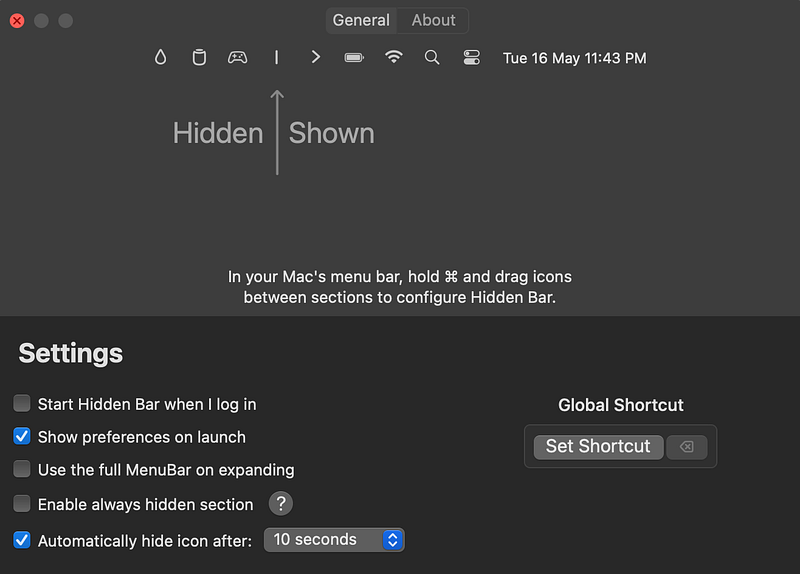
Hidden Bar is not just about aesthetics. It is also about improving your focus and productivity. By hiding unnecessary distractions, you can concentrate on the task at hand. It is a small change that can make a big difference in your work routine.
Why should you add Hidden Bar to your menu bar? (TLDR)
Hidden Bar is a must-have for those who value a clean and organized workspace. It helps you hide less frequently used icons in your menu bar, reducing distractions and improving focus. If you are all about productivity, organisation, and efficiency, Hidden Bar is the app for you.
MenubarX — Your Mini Web Browser 🛠️
MenubarX is basically like a mini browser that lives in your menu bar. You can add web apps like Twitter, YouTube, and Amazon, add ad blockers, simulate user agents like iPhone, iPad, and Kindle, and even add your bookmarks and open multiple tabs just like a normal browser.
The app also allows you to resize the windows, rearrange them according to your usage preferences, and even set up auto-refresh for sites you want to get regular updates from like Gmail. MenubarX is also highly customizable and even allows you to create custom icons for all the apps.
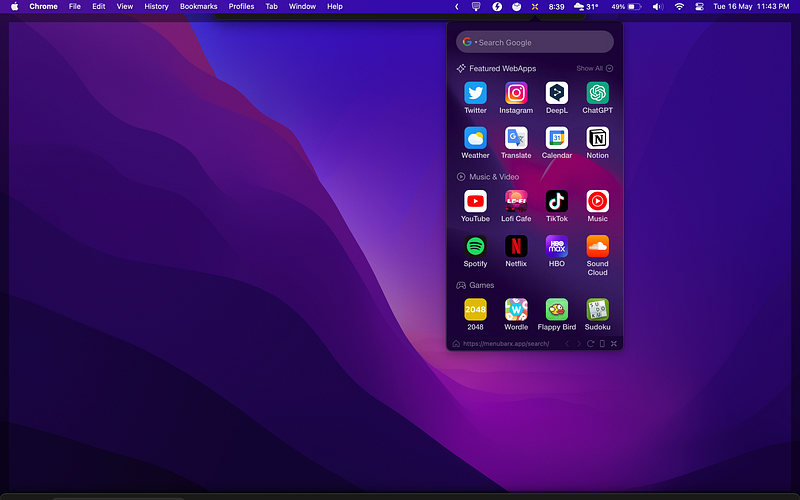
Not only is MenubarX perfect for accessing your favourite websites and apps from anywhere on your Mac whenever you want, but it is also extremely lightweight compared to other resource-hungry browsers. With the option to switch between user agents, you can even use mobile-first apps like TikTok or Instagram right from your menu bar.
Why should you add MenubarX to your menu bar? (TLDR)
MenubarX is like a mini web browser that you can add to your Mac’s menu bar. It allows you to access any sites you can access from a normal browser right from a popup window on your menu bar. You can bookmark your favourite sites, use an ad blocker, customise the site icons, open multiple tabs, and even get notifications from these mini browser windows.
MonoSnap — Capture, Annotate, Share 📸
MonoSnap is a screenshot and screen recording tool that I have found to be incredibly useful in my day-to-day tasks. Whether I am troubleshooting a problem, explaining a process, or simply sharing a snippet of my screen, MonoSnap is my go-to tool.
Personally, I use MonoSnap to capture screenshots of any technical issues I encounter and annotate them with notes or arrows. This makes it easier to communicate the problem. I also use it to record tutorials or demonstrations, which I can easily share with others.
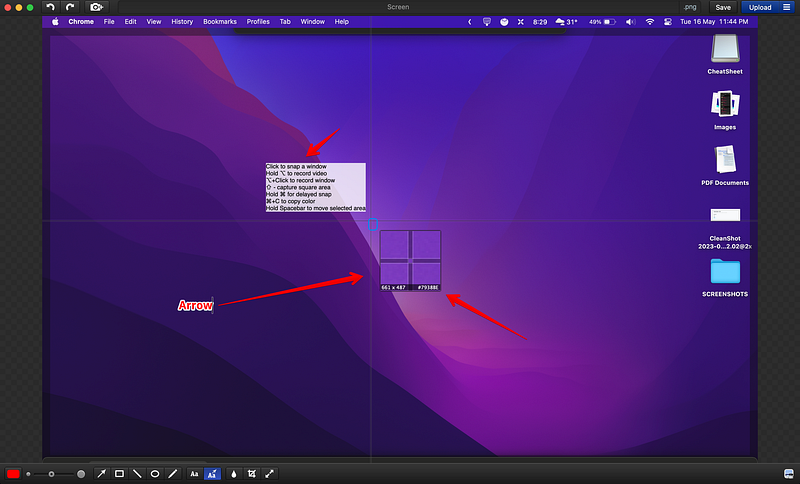
You can also use MonoSnap to capture and annotate screenshots, record video tutorials, or even just share a funny meme you found online. The possibilities are endless.
MonoSnap comes with easy-to-use annotation tools, high-quality screen recording, and seamless sharing options. One of the highlights of MonoSnap is its ability to upload your screenshots or recordings directly to your cloud storage service of choice, making sharing even easier.
Why should you add MonoSnap to your menu bar? (TLDR)
MonoSnap is a versatile tool that can enhance your communication and productivity. Whether you need to capture a screenshot, record a video, or share your screen, MonoSnap makes it easy. If you value clear and effective communication, MonoSnap is a must-have.
Noizio — Your Productivity Soundtrack 🎧
Noizio is an ambient sound app that I absolutely adore. It allows you to create your own mix of background noise to improve focus and productivity, or simply to relax.
I often use Noizio when I am working on a project that requires deep concentration. I select a mix of sounds — perhaps a little rain, a touch of thunder, and some coffee shop noise — and find myself instantly transported to my own personal productivity zone.
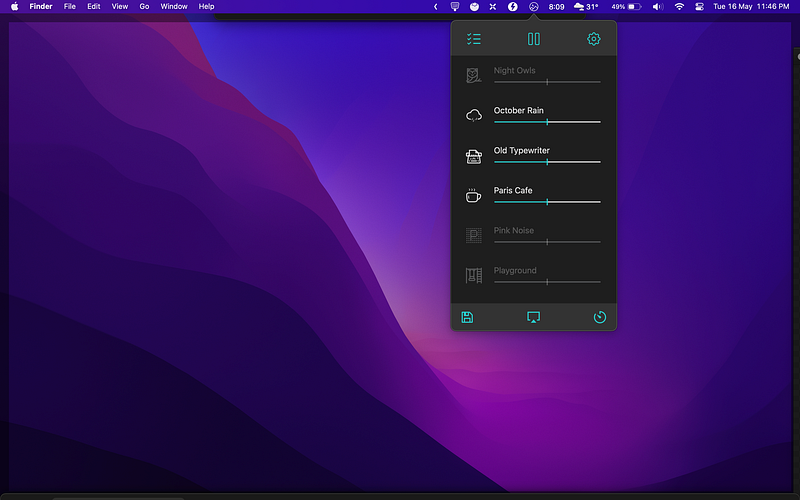
Whether you need to drown out distracting noises, create a relaxing atmosphere, or just enjoy some pleasant background noise, Noizio has you covered. It can help improve focus, reduce stress, and even improve sleep if you choose to use it as a sleep aid.
Noizio offers a wide range of high-quality ambient sounds, from natural sounds like rain and ocean waves to city noises like coffee shops and train rides and even office environment sounds like keyboard or typewriter sounds. The highlight of Noizio is its ability to mix and match sounds to create your perfect ambient soundtrack.
Why should you add Noizio to your menu bar? (TLDR)
Noizio is a fantastic tool for creating your own ambient sound environment. Whether you need to focus, relax, or just enjoy some pleasant background noise, Noizio can help. If you value your productivity and peace of mind, Noizio is a must-have.
Numi — The Only Calculator You Need 🧮
Numi is a calculator app that is so much more than a normal calculator. It’s like the Swiss Army knife of calculators if that Swiss Army knife also did your taxes and told you the time in any place in the world.
I use Numi for all sorts of calculations, from the mundane (like figuring out how much to tip on a restaurant bill) to the complex (like calculating the exact number of seconds until the weekend). And let me tell you, it handles both with equal grace. Numi’s features include basic and complex calculations, unit conversions, currency conversions, and even date and time calculations.
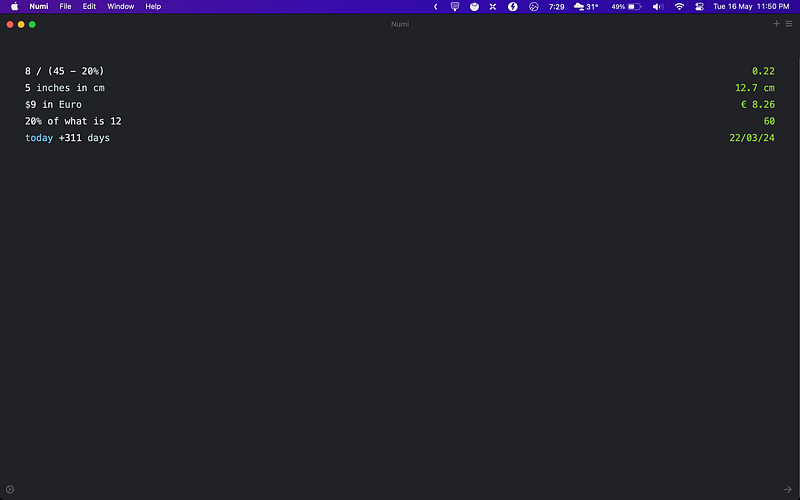
But the real highlight of Numi is its ability to understand natural language. You can type in something like 50 dollars in euros or days until December 25, and Numi will give you the answer. It’s like having a conversation with a very mathematically inclined friend.
Why should you add Numi to your menu bar? (TLDR)
Numi is a powerful and versatile calculator that can handle a wide range of calculations and conversions. It’s like having a math genius living in your menu bar, ready to help you out whenever you need it. If you have ever found yourself needing to do a calculation or conversion, Numi is the app for you.
Rectangle — The Window Manager You Didn’t Know You Needed 🔲
If you have ever spent more time arranging your windows than actually working, Rectangle is the app you need.
I use Rectangle to quickly and easily organize my windows. With a simple shortcut or a click on the menu bar icon, I can make a window take up half the screen, a quarter of the screen, or even make it go full screen.
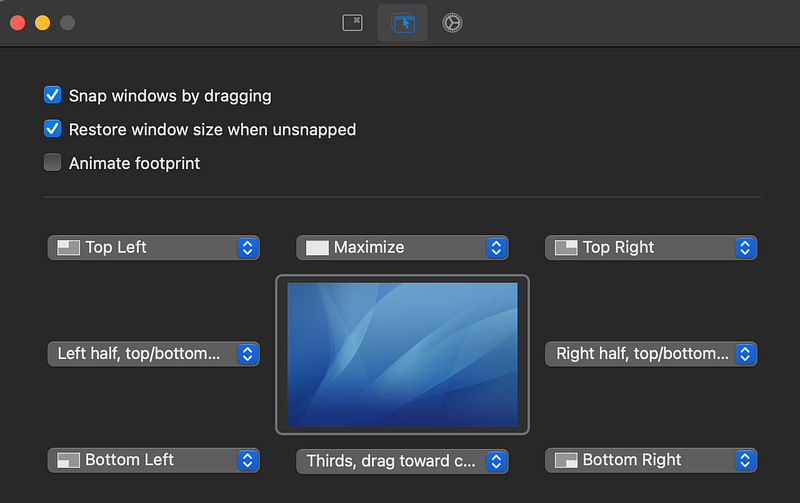
Whether you are working on a single monitor or juggling multiple screens, Rectangle can help you keep your windows organized and your workflow smooth. Rectangle also includes customizable shortcuts, a variety of window sizes and positions, and even multi-monitor support.
Why should you add Rectangle to your menu bar? (TLDR)
Rectangle is a powerful window manager that can significantly improve your productivity by keeping your windows organized. If you have ever found yourself struggling with window management, you should immediately add Rectangle to your menu bar.
TomatoBar — Productivity Booster 🍅
TomatoBar is a productivity app that uses the Pomodoro Technique to help you stay focused and productive. If you are not familiar with the Pomodoro Technique, it is a time management method that encourages you to work in focused bursts (usually 25 minutes), followed by short breaks.
I use TomatoBar to break my work into manageable chunks. I set the timer for 25 minutes, focus on a single task, and then take a 5-minute break when the timer goes off. It is a simple yet effective way to manage my time and maintain my focus.
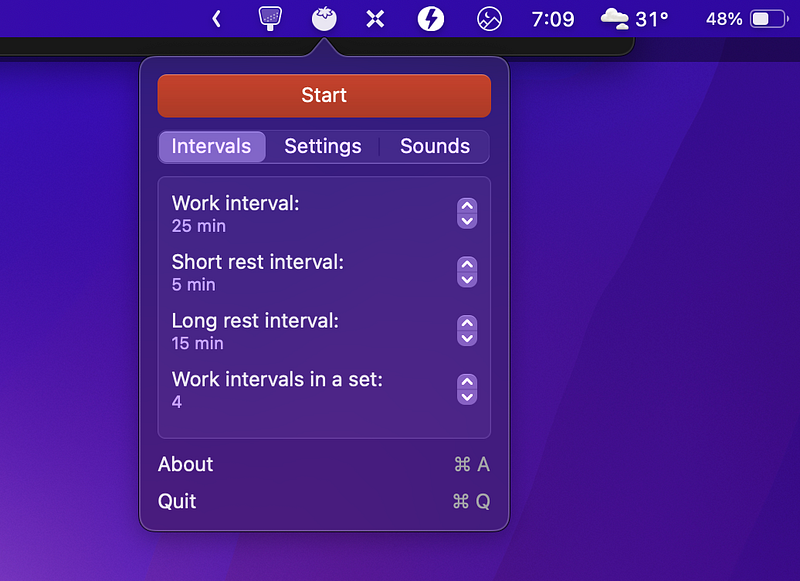
Whether you are working on a big project, studying for an exam, or just trying to manage your time more effectively, TomatoBar can help. The app also includes a customizable timer, automatic break reminders, and a simple, unobtrusive interface.
Why should you add TomatoBar to your menu bar? (TLDR)
TomatoBar is a powerful tool that can help you manage your time and boost your productivity using the Pomodoro technique. If you have ever found yourself struggling to stay focused or manage your time effectively, add TomatoBar to your menu bar and watch yourself turn into a productivity beast.
Subscribe to Medium and support The Useful Tech!
Join the Medium membership program to access unlimited articles across Medium on topics like Tech, Business, and Productivity, and support The Useful Tech and all of your favourite authors for only $5 a month!
Disclaimer: There are 3 Setapp affiliate links in this post. If you are clicking on a link to an app in Setapp, you will get a 1-month free trial if you use the code theusefultech and can try out over 250 amazing premium apps in the Setapp library completely for free! Thank you for supporting me and I hope you enjoy using Setapp as much as I do!


