
Shallow Copy and Deep Copy: Python OOP Complete Course — Part 9

Before we start let me tell you that:
- This article is a part of The Complete Course in Object Oriented Programming in Python which you can find it here.
- All resources are available in the “Resources” section below.
- This article is also available as a YouTube video here.
Introduction
Now let us get started, let us assume the following scenario:
- You have defined an object from a class and its name obj1.
- Then you have defined another variable which is obj2, and you have assigned obj1 to obj2.
obj2 = obj1What will happen to obj2 if the value of obj1 has been updated?
- Will obj2 be updated also?
- OR, will obj2 keep the old value?
If you are unsure about the right answer, then keep reading this article to get the correct answer.
This article will cover the following outlines:
1. Shallow Copy
Assume you have a class, and its name is DummyClass as the following:
obj1 = DummyClass()
obj2 = obj1
In this case, what happens in Python is that obj2 will be a reference to the same location in the memory that obj1 refers to. In other words, obj2 is not a stand-alone object. Refer to Figure 1.
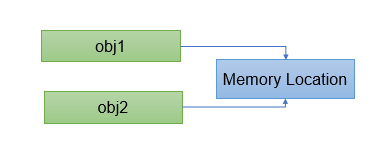
From this point, you can understand that using just an assignment operator (= sign) will create a reference to the same location in the memory. So, if you change the value of obj1, the value of obj2 will be changed also and vice versa. As a programmer, you should be careful because sometimes you could assume that you have created a stand-alone object copy when you assign one object to another, but this is not the case in Python. And this is what we called Shallow Copy.

To make the idea clearer with a code example:
- Create a Dummy Class with only one instance attribute dummy_value.
- Assign any value to your instance attribute, 5 for example.
- Define a class object its name obj1.
- Assign the value of obj1 to obj2.
- Run your code.
Solution Input:
class DummyClass:
    def __init__(self):
        self.dummy_value = 5
obj1 = DummyClass()
obj2 = obj1Good, now you have a class object obj1 and a shallow copy of it obj2. You can print your objects’ instance attributes to test if everything is OK.
Solution Input:
print('Before Update')
print(obj1.dummy_value)
print(obj2.dummy_value)
Output
Before Update
5
5
As it is expected you got the same value of the dummy_value instance attribute.
Now, update the dummy_value from the object obj1, then reprint both objects’ dummy_value what do you get?
Solution Input:
obj1.dummy_value = 10print('After Update')
print(obj1.dummy_value)
print(obj2.dummy_value)Output
After Update
10
10
Again, you got the same instance attribute value for both objects, That’s it Shallow Copy.
Then how to create a stand-alone copy from an object? let us see…
2. Deep Copy
Assume again that you have a class its name DummyClass and an object from that class obj1. To create a stand-alone copy from this object, which is called a deep copy, deepcopy() function is used. deepcopy() is a function from the built-in copy module.
import copy
obj1 = DummyClass()
obj2 = copy.deepcopy(obj1)
In this case, what happens in Python is that obj1 refers to a memory location and obj2 refers to another memory location. Refer to Figure 2.
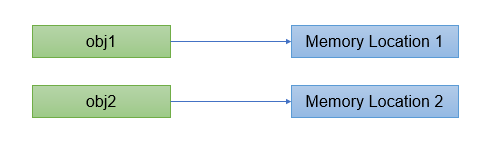
To conclude, in this case, obj2 will not be affected if obj1 will be updated and vice versa.
Back to the previous example let us create a deep copy of obj1 instead of the shallow copy and try the same changes that you have done before.
Solution Input:
import copyobj1 = DummyClass()
obj2 = copy.deepcopy(obj1)print('Before Update')
print(obj1.dummy_value)
print(obj2.dummy_value)obj1.dummy_value = 10print('After Update')
print(obj1.dummy_value)
print(obj2.dummy_value)Output
Before Update
5
5
After Update
10
5As is expected after you updated the obj1 instance attribute dummy_value, the obj2 instance attribute has not been affected.

The previous two examples were simple but what if you have a complex script with two different objects in the script obj1 and obj2 and you are not sure if obj2 is a shallow copy or deep copy to obj1.
So, to be 100% sure about what is the status of both objects, Identity Operator is used.
3. Identity Operator
The keyword that represents this operator in Python is (is). This operator is used to compare two variables. The comparison here means checking if they are referring to the same memory location, not checking if they are equal from a value perspective.
- If the operator gives True, this means obj2 is a shallow copy of obj1.
- If the operator gives False, this means obj2 is a deep copy of obj1.
Python Identity Operator details are:
- Number of Operands: This operator takes two operands, which means it will compare one object to another.
- Operands Data Type: It is an object, which means the objects of any class can be compared using the identity operator.
- The Final Result Data Type: It is a number (Boolean) because the operator will give True(shallow copy) or False (deep coy).
Now, let us see how the identity operator works with a shallow copy object.
Solution Input:
class DummyClass:
    def __init__(self):
        self.dummy_value = 5
obj1 = DummyClass()
obj2 = obj1print(obj1 is obj2)Output
TrueIt gave True because both obj1 and obj2 refer to the same memory location.
Let us see another example for the deep copy.
Solution Input:
class DummyClass:
    def __init__(self):
        self.dummy_value = 5
obj1 = DummyClass()
obj2 = copy.deepcopy(obj1)print(obj1 is obj2)Output
FalseIt gave False because obj2 is a deep copy of obj1. They refer to two different locations inside the memory.
To conclude, the identity operator “is” will help you to discriminate between the shallow copy and deep copy.
Now, let us summarize what we have learned in this article:

In this article you have learned:
- When you assign one object to another, you create a reference to the same object in the memory, a Shallow copy.
- You can create a stand-alone copy, a deep copy, for an object by using the function deepcopy() from the built-in module copy.
- When you assign one object to another, you create a new object equal to the other object, but it’s a stand-alone copy inside the memory in which changing one will not affect the other, a Deep copy.
- Identity operator (is): is used to check if one object is a shallow copy or deep copy of another object.
P.S.: A million thanks for your time reading my story. Before you leave let me mention quickly two points:
- First, to get my posts in your inbox directly, would you please subscribe here, and you can follow me here.
- Second, writers made thousands of $$ on Medium. To get unlimited access to Medium stories and start earning, sign up now for Medium membership which only costs $5 per month. By signing up with this link, you can directly support me at no extra cost to you.
To get back to the previous article, you can use the following link:
Part 8:Abstraction and Encapsulation
To move on to the next article, you can use the following link:
Resources:
- GitHub here.


