
8+ things you need to know when you want to use Spring @Async really well
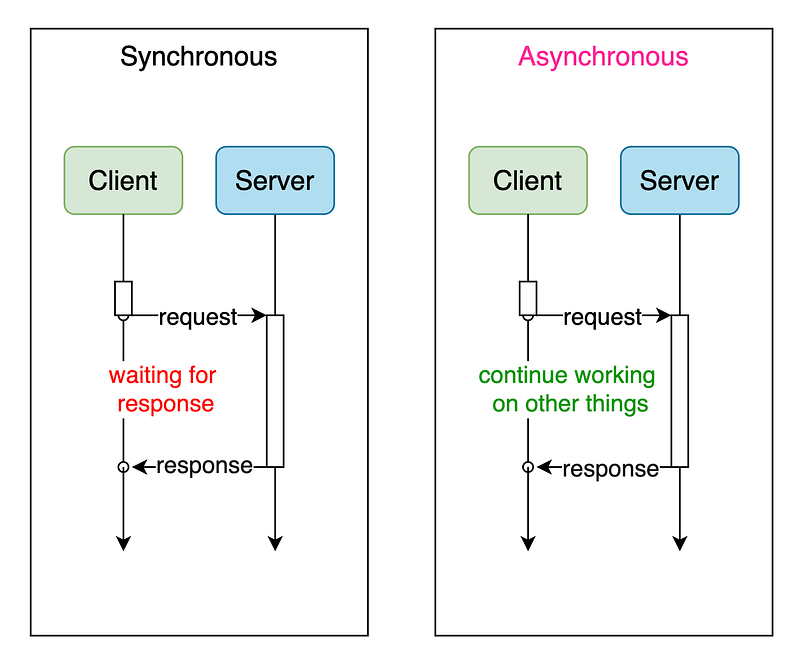
As an excellent Java Developer or Architect. we have to master the two core concepts of concurrency and asynchrony which will be a great help to us in designing and optimizing the system.
Spring annotations Series of articles you may be interested in:
Spring @Transactional
Spring Cache
Spring @Retryable
In this article. I will talk about how to use spring annotation @Async well on asynchronous processing. and you could find some good examples take away after reading.

1. We need to understand when to use it and why to use it.
Scenario 1. Interaction data between services, there is no requirement for sequential processing
The order data transmitted by the order service to the supply chain service, such as order A and order B, the timing of their transmission to the supply chain system does not affect the supply chain service processing process and has no impact on the final business results.
Scenario 2. Mail/Message distribution.
In message processing, a message needs to be distributed to multiple users, if it is synchronous processing, it needs to be sent one by one, but because it is a message distribution scenario, no need for sequential processing, so we can optimize the synchronous processing one by one into asynchronous concurrent processing. That is, at the same time each user allocates a separate thread to handle the message delivery.
For example, if we need to send a message to 20 users, it takes 2s to send a message to one user.
Synchronous: it would take 40s+ to process a message one by one,
Asynchronous concurrency: it only takes 2s+ to complete the process.
This greatly improves the efficiency of message processing.
Scenario3. Middleware consumption.
In the use of message middleware, when you consume a message, there is often a consumption processing time limit, if the time is too long will trigger the middleware to mark the consumer as an exception, and kick out of the consumer group and other situations. So we then need to optimize and improve the time and efficiency of each message consumption. However, asynchronous is not required to wait for the completion of processing and can immediately return, so here you can use asynchronous processing to improve the response and shorten the return time.
Scenario 4. IO operations or time-consuming operations that require a lot of calculations
For websites or transaction systems, it is worthwhile to consume data or execution latency in exchange for user latency because the user experience will be improved as a result. Activity tracking, bill payment, and report processing should obviously be background activities, and many steps can be partially solved as asynchronous operations, and anything that can be done later should be done later
Ok. After we understand when and why we need to use it. then let's go to how to use it.
2. How to use it?
just simply adding the @Async to the method you want to be async.
3. How to use it well?
To put it to good use we need to know what conditions will cause it to fail (still run as sync way. async does not work)
1. If you use the SpringBoot framework must add @EnableAsync annotation in the startup class.
2. The tagged methods use static, private modifications. [It must be applied to public methods only.]
3. The class where the asynchronous method is located does not use the @Component annotation (or other annotations) so spring cannot scan for asynchronous classes
4. The tagged method cannot be in the same class as the asynchronous method to be called (The reason is: when spring scans the bean, it scans whether the method contains the @Async annotation, and if it does, spring dynamically generates a subclass (i.e., a proxy class, proxy) for the bean, which inherits from the original bean. At this point, when the annotated method is invoked, it is actually invoked by the proxy class, which adds asynchrony to the invocation. However, if the annotated method is called by another method in the same class, then the method is not called through the proxy class, but directly through the original bean, so it does not add asynchronous effects, and we see the phenomenon that the @Async annotation is invalid.
The recommended way is to extract the asynchronous method to the corresponding bean in accordance with the business, inject the bean when the external needs to use it, and then call the asynchronous method in the bean.
5. The class needs to use @Autowired or @Resource and other annotations automatically injected, you can not manually new objects [Self-invocation — won’t work.]
because it bypasses the proxy and calls the underlying method directly.
6. The marked method can only return void or Future
7. It is not working to mark @Transactional on @Async methods.
You can place methods that require transaction management operations inside asynchronous methods by adding @Transactional to the method being called internally.
Example. Method A, which uses @Async/@Transactional for annotation, cannot produce transaction control purposes.
Method B, which is marked with @Async, calls C and D in B, and C/D are marked with @Transactional respectively, then the purpose of transaction control can be achieved.
8. The @Async annotation causes spring cyclic dependencies to fail
Suppose serviceA and serviceB objects depend on each other. In that case, one of serviceA and serviceB will always be instantiated first, and if the @Async annotation is used inside serviceA or serviceB, it will lead to a circular dependency exception:
org.springframework.beans.factory BeanCurrentlyInCreationException

In springboot, the above error is caught and the exception thrown is: 'The dependencies of some of the beans in the application context form a cycle'
Cause: As we know, the spring three-level cache solves the cycle dependency problem to some extent by adding the ObjectFactory to the three-level cache before
populateBean(beanName, mbd, instanceWrapper)
It is executed after the instantiation of the A object, thus enabling the assignment of properties from the B object after instantiation. During the assignment process, the ObjectFactory can be obtained from the tertiary cache and the getObject() method can be called to get the reference of A. B can then be successfully initialized and added to the IOC container. At this point, after the A object completes the assignment of properties, it will execute the
initializeBean(beanName, exposedObject, mbd)
The focus is on the processing of @Async annotations done here, the corresponding post-processor AsyncAnnotationBeanPostProcessor, in the postProcessAfterInitialization method will return the proxy object, this proxy object and the A object reference held in B is different, resulting in the above error.
Take aways
- Basic Use Cases
@Slf4j
@RestController
@RequestMapping(value = "/v1")
public class AsyncController {

    @Autowired
    public AsyncService asyncService;

    @GetMapping("/async/work")
    public HttpStatus work() {

        log.info("in Controller");
        asyncService.step1();
        asyncService.step2();
        asyncService.step3();
        return HttpStatus.OK;
    }
}


@Slf4j
@Service
public class AsyncService {

    @Async
    public void step1(){
        log.info("step 1");
    }

    @Async("asyncExecutor")
    public void step2(){
        log.info("step 2");
    }

    @Async("fixedThreadPool")
    public void step3(){
        log.info("step 3");
    }
}- Calling asynchronous methods in the same class
@Slf4j
@RestController
@RequestMapping(value = "/v1")
public class AsyncController {

    @Autowired
    public AsyncService asyncService;

    @GetMapping("/async/work/methodsInSameClass")
    public HttpStatus work1() {

        log.info("test async working method in same class");
        asyncService.allInSameClass();
        return HttpStatus.OK;
    }

    @GetMapping("/async/fail/methodsInSameClass")
    public HttpStatus fail1() {

        log.info("test async not working");
        asyncService.all();
        return HttpStatus.OK;
    }
}


@Slf4j
@Service
public class AsyncService {

    @Autowired
    public AnotherAsyncService anotherAsyncService;

    public void all(){
        /**
         * As step1() step2() step3() in same class as all().
         * which will make those 3 steps called by same caller as all() not the proxy caller. then async fail
         */
        step1();
        step2();
        step3();
        /**
         * But as step4() step5() step6() in different class. then 4,5,6 will do async way.
         */
        anotherAsyncService.step4();
        anotherAsyncService.step5();
        anotherAsyncService.step6();
    }

    public void allInSameClass(){
        /**
         *  Methods in the same class need to get the proxy object first, manually get the object
         */
        AsyncService bean = ApplicationContextUtil.getBean(AsyncService.class);
        bean.step1();
        bean.step2();
        bean.step3();
    }
}- Handling the return value of Future
@Slf4j
@RestController
@RequestMapping(value = "/v1")
public class AsyncController {

    @Autowired
    public AsyncService asyncService;

    @GetMapping("/async/workWithFutureReturn")
    public HttpStatus workWithFutureReturn() {

        log.info("in workWithFutureReturn");
        Future<String> stringFuture = asyncService.asyncInvokeReturnFuture(5);

        while (true) {
            if (stringFuture.isDone() && !stringFuture.isCancelled()) {
                try {
                    log.info("Get Future Value {}", stringFuture.get());
                } catch (InterruptedException | ExecutionException e) {
                    e.printStackTrace();
                }
                break;
            }
        }
        return HttpStatus.OK;
    }
}

@Slf4j
@Service
public class AsyncService {

    @Async
    public Future<String> asyncInvokeReturnFuture(int i) {
        log.info("asyncInvokeReturnFuture, parementer={}", i);
        Future<String> future;
        try {
            Thread.sleep(1000 * 1);
            future = new AsyncResult<String>("success:" + i);
        } catch (InterruptedException e) {
            future = new AsyncResult<String>("error");
        }
        return future;
    }
}- Custom thread pools, multiple asynchronous executors
@Slf4j
@Configuration
public class BaseAsyncConfigurer implements AsyncConfigurer {

    /**
     * replace default Async Executor with Customize One.
     */

    @Override
    public Executor getAsyncExecutor() {
        ThreadPoolTaskExecutor executor = new ThreadPoolTaskExecutor();
        executor.setCorePoolSize(Runtime.getRuntime().availableProcessors());
        executor.setMaxPoolSize(Runtime.getRuntime().availableProcessors()*5);
        executor.setQueueCapacity(Runtime.getRuntime().availableProcessors()*10);
        executor.setThreadNamePrefix("replacedAsync-");
        executor.setRejectedExecutionHandler(new ThreadPoolExecutor.CallerRunsPolicy());
        executor.initialize();
        return executor;
    }

    ...

}
//two customize asyncExecutors
@Configuration
public class AsyncConfig {
private static final int MAX_POOL_SIZE = 50;
public static final int CORE_POOL_SIZE = 20;
/**
* customize async Executor threadpool.
* @return
*/
@Bean("asyncExecutor")
public AsyncTaskExecutor asyncTaskExecutor() {
ThreadPoolTaskExecutor async = new ThreadPoolTaskExecutor();
async.setMaxPoolSize(MAX_POOL_SIZE);
async.setCorePoolSize(CORE_POOL_SIZE);
async.setThreadNamePrefix("async-threads-");
async.setWaitForTasksToCompleteOnShutdown(false);
async.setQueueCapacity(100);
async.setRejectedExecutionHandler(new ThreadPoolExecutor.CallerRunsPolicy());
return async;
}
/**
* use juc newFixedThreadPool
* @return
*/
@Bean("fixedThreadPool")
public ExecutorService myFixedThreadPool() {
int processors = Runtime.getRuntime().availableProcessors();
return Executors.newFixedThreadPool(processors * 5);
}
}
@Slf4j
@Service
public class AsyncService {
@Async
public void step1(){
log.info("step 1");
}
@Async("asyncExecutor")
public void step2(){
log.info("step 2");
}
@Async("fixedThreadPool")
public void step3(){
log.info("step 3");
}
}- The way exceptions are handled
@Slf4j
@Configuration
public class BaseAsyncConfigurer implements AsyncConfigurer {

    ...

    /**
     * override the getAsyncUncaughtExceptionHandler() method to return our custom asynchronous exception handler:
     * !!! All the exception happened in @async will been handler here.
     */
    @Override
    public AsyncUncaughtExceptionHandler getAsyncUncaughtExceptionHandler() {
        return (Throwable ex, Method method, Object... params)->{

            try {
                log.error("\n\n[Exception-Async-Handler] Class-Name: {}-{}\nType: {}\nException: {}\n\n",
                        method.getDeclaringClass().getName(),method.getName(),
                        ex.getClass().getName(),
                        ex.getMessage());
            } catch (Throwable nex) {
                log.error("catch Async Exception: {}", nex);
            }
        };
    }

}- Transaction handling mechanism in @Async calls
@Slf4j
@Service
public class AsyncService {

    @Autowired
    public DataService dataService;

    @Async
    public void dbOperate(){
        log.info("some logic here first");
        dataService.allStep();
        log.info("some logic later");
    }

}

@Slf4j
@Service
public class DataService {

    @Transactional
    public void allStep(){
        saveObj();
        updateObj();
    }

    public void saveObj(){
      log.info("Some data saved");
    }

    public void updateObj(){
        log.info("Some another data updated");
    }
}
That’s it.
Thanks for reading! If you like it or feel it helped pls click Applaud :)
Happy coding. See you next time :)


