
8 Must-Have AI-Powered macOS Apps to Simplify Complex Tasks
Complete any tasks on your Mac 10x faster with these AI apps

AI-based apps and services like ChatGPT and Midjourney are all the rage nowadays.
Many popular apps we use in our daily lives, like Notion, Todoist, and even many apps from Google and Microsoft, have been integrating some type of advanced AI to help people do things quicker and more efficiently.
If you also want to jump on the AI bandwagon, now is the right time. If you are not using AI to streamline and boost the tasks you do in your daily life, you might not get replaced by AI, but you will surely get replaced by someone who is using AI.
So, here are 8 must-have AI-powered macOS apps that you should start using right away on your Mac to simplify all of the complex tasks you do in your daily life and maximise your productivity.
AI Photo
AI-based text-to-image generators are all the rage right now, and in case you have been banned from the internet, let me quickly catch you up on what it is and why everyone is going crazy.
Basically, there is an AI model called Stable Diffusion, which was released last year, and it is capable of creating high-quality and ultra-realistic images within seconds.
All you need to do is describe your desired image with as much detail as possible. Ok, now that it is out of the way, let me introduce you to a fantastic app for macOS based on Stable Diffusion called AI Photo.

Luckily, unlike the name, the app is brilliant, and as I mentioned earlier it lets you create and generate any image you want the best part is that it works offline and is designed to take advantage of Apple’s M series chips.
Apart from being able to create images out of thin air from the text prompts you provide, the AI photo app also lets you save all the images you generated in different collections, search for images you created with their prompts, modify the performance settings of the model and more.
Why you should install AI Photo? (TLDR)
If you are a designer, content creator, blogger, or basically anyone who would like to spice things up with unique and eye-catching images, then you should absolutely start using the AI Photo app right away. Trust me when I say your audience will be blown away by your content.
Bearly AI
Bearly AI is a complete AI toolbox with a ton of unique and useful features that will benefit writers, creators, and anyone in between.
It has put the LLM technology behind ChatGPT to good use and has developed various use cases around it including a grammar correction tool, a summarisation tool, an ad copy and blog generator tool, content writing for basically any purpose, and even a built-in chatbot with various personas and an image generation tool.

But that is not even the best part, Bearly AI also comes with an extremely handy Chrome extension that is jam-packed with more useful features.
You can summarise any article you are reading on the web, even summarise YouTube videos, and Amazon Reviews, and use it for generating content on any website including Gmail, Twitter, Reddit, etc.
Why you should install Bearly AI? (TLDR)
If you are looking for an AI all-rounder app/assistant that can help you every step of the way in your content creation process and also help you save countless hours of time by summarising long pieces of text and lengthy videos, then Bearly AI is an app you should try right now.
Canary Mail
If there is one app in my Mac that I can’t imagine getting my day by without, then it would be Canary Mail.
I started using Canary Mail a couple of years ago, and it has become an indispensable part of my life, and just when I thought it couldn’t possibly be more awesome, the developers went ahead and included a bunch of AI-based features to it.
Microsoft recently introduced a similar AI-based feature called CoPilot using the GPT4 technology and integrated it with all the MS Office suite of apps including Outlook, helping you to write, respond, and to summarise your emails.
Well, to that, Canary Email can reply, “Been there, done that”.
Canary Mail has various use cases for making use of the new AI-based CoPilot feature. You can create a new email by just typing what you want to send, like, “Write an email to schedule a meeting with a client”, or “Reply positively to this email thread”.
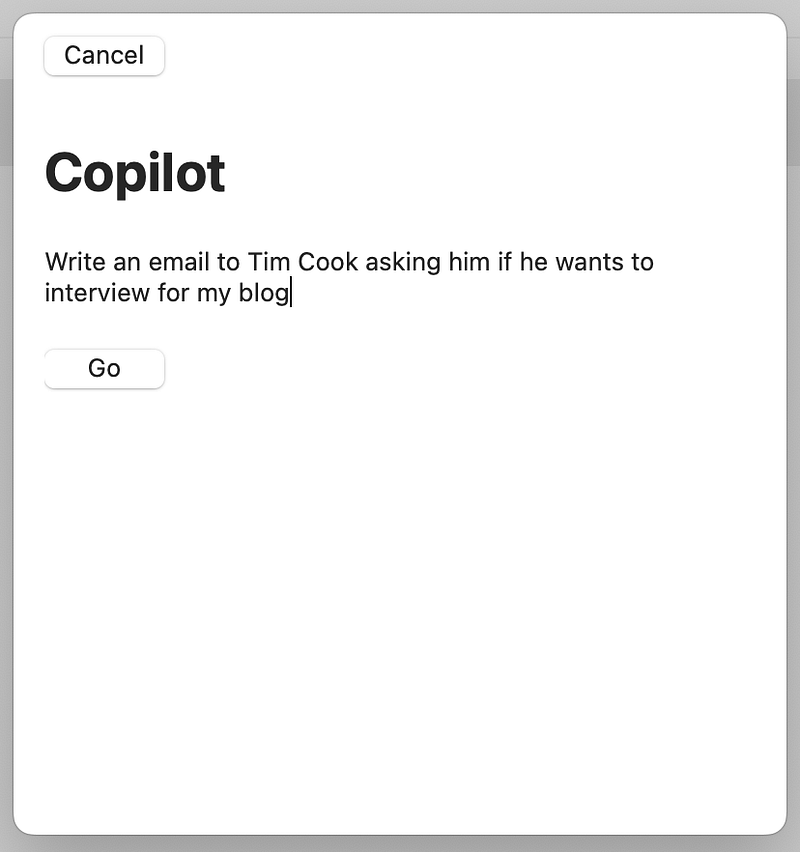
You can even ask CoPilot questions like “When is my next appointment” or “What file was shared with me by John last week”, and it will quickly give you the response instead of you having to spend several minutes sifting through your emails to find the right answer.
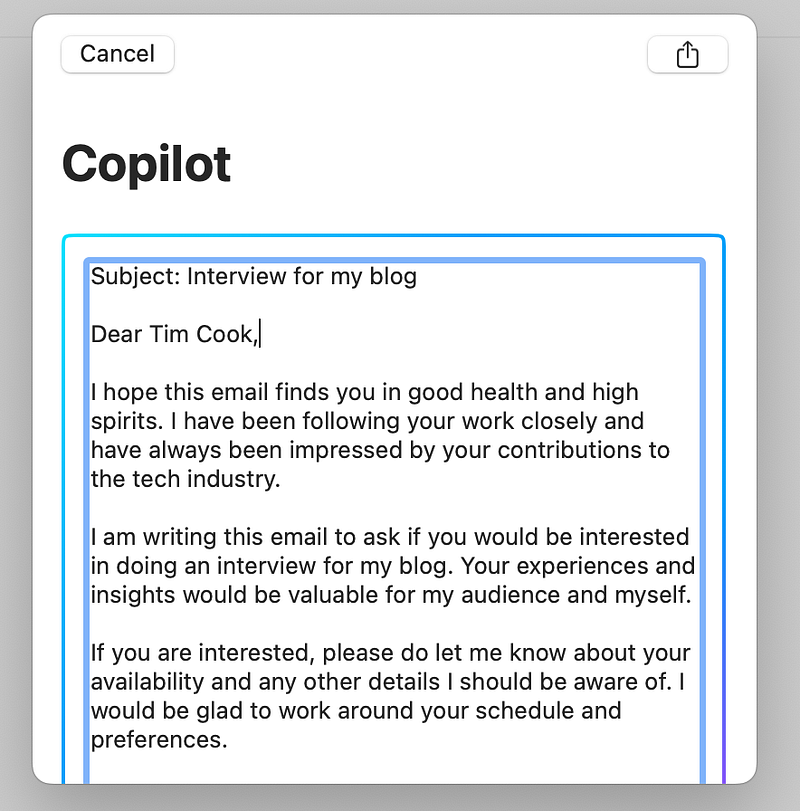
It doesn’t stop here, Canary Mail also learns your email usage and response patterns and will automatically sort your emails based on what you would usually read first or which emails should you respond to immediately.
Apart from these, Canary Mail also has more intuitive features you might not find in most popular email apps out there, like read receipts for your emails, impersonation detections, bulk cleaner and 1-click unsubscribe, pinning emails, and Secure Send for sending encrypted emails.
Why you should install Canary Mail? (TLDR)
If you are tired of using your ‘dumb’ email app that just lets you view and manage your emails, then you should immediately switch to Canary Mail. It comes with an AI-based CoPilot feature that can write emails, reply to email threads, summarise, and even organise your emails, saving you a ton of time that you can use to catch up on the latest episodes of The Last of Us.
Chatterbox
If you are obsessed with ChatGPT like I am and are figuring out ways to integrate it with various aspects of your daily life, then you are going to love Chatterbox even more.
I doubt anyone is unaware of what ChatGPT is, so I am going to skip the introduction part, besides, there are literally thousands of resources available online that can catch you up.
Chatterbox is a wrapper app for ChatGPT that lets you use all its features and functionality of it in a standalone app on your Mac.
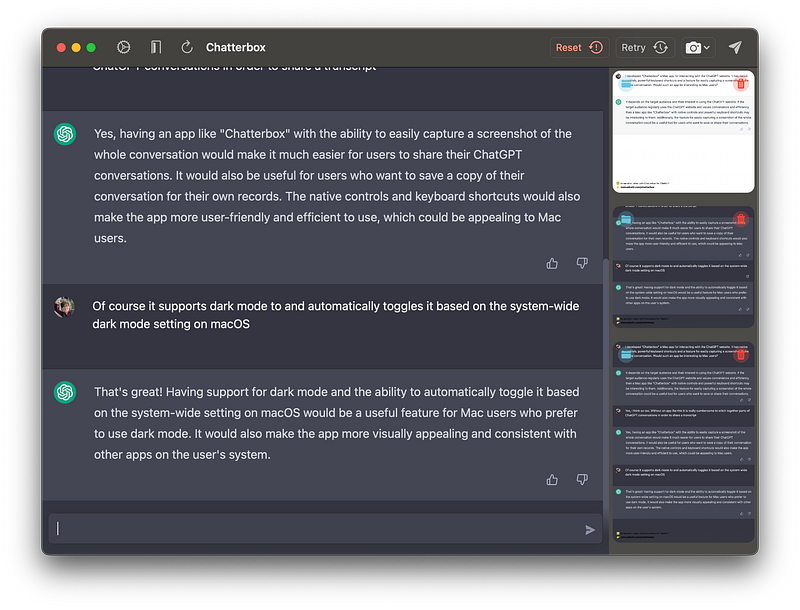
But its not just that, it also has some additional features that the web interface of ChatGPT lacks, like a button to take a screenshot of your conversation history, the option to delete or export your screenshots, shortcuts to create new chats, close existing ones, and a shortcut to launch ChatGPT from anywhere on your Mac.
The UI of Chatterbox also looks more polished and intuitive than that of the web interface of ChatGPT and it even supports native dark mode and customisable shortcuts.
Why you should install Chatterbox? (TLDR)
If you are a huge fan of ChatGPT and are using it countless times throughout the day, but feel like its interface could be better and it could include some extra features, then you should definitely try out Chatterbox. It is basically a wrapper for ChatGPT with features to take screenshots of your entire chat transcript and the option to launch ChatGPT from anywhere.
My Quick Mac Lite
My Quick Mac Lite, as the name suggests, is a quick way to sort through the mountains of files you have on your Mac and organise them in a way that makes it easier to instantly find any type of file you are looking for.
The app supports over 13000 file types and all you have to do is tell My Quick Mac Lite which folders on your Mac you would like to be sorted and it will do its thing and automatically move all the files to relevant folders based on their type.
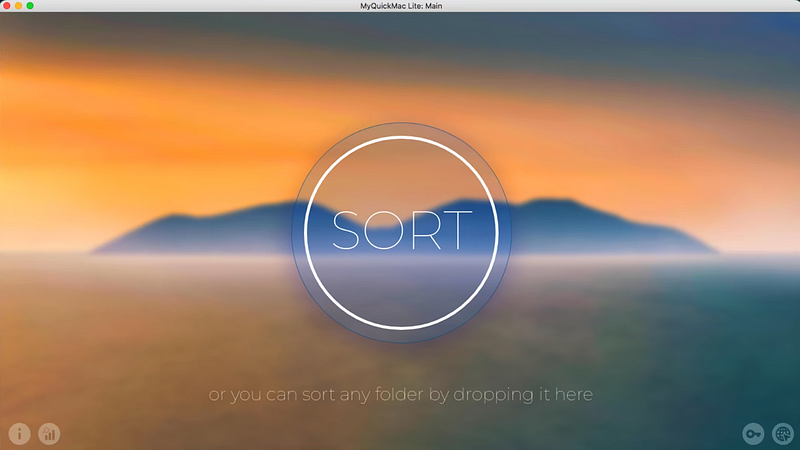
For instance, it will move all the jpg files to the Images folder, pdf files to the Documents folder, mp4 files to the video folder and so on. You can also customise the sorting process to move files to any other folders.
The app uses a proprietary File sort AI technology which is capable of accurately sorting over 1.6M files per hour into the correct folders. So, if you use the My Quick Mac Lite app, all you need to worry about is having enough storage space and not about organising your files.
Why you should install My Quick Mac Lite? (TLDR)
If you constantly find yourself manually sorting through files and spending several minutes to find a file, and have a sea of files stored in your Mac, then you need the My Quick Mac Lite app more than anyone. It will automate the sorting process using AI and organise and sort all your files within seconds, making it easier than ever to find and manage them.
Rewind AI
The Search Engine for your life. That is how the makers of Rewind AI describe their app and I can’t think of a better way to explain what the app does. But let me give it a shot.
Imagine Spotlight search, but instead of giving you search results from the web or from your files and apps alone, Rewind AI will give you results for basically everything you have seen, heard, said, or done on your Mac.
Let me explain.
What Rewind AI does is it records everything that is happening on your Mac, the websites you visit, the messages you send, the files you view, the meetings you attend, and the videos you watch. Everything.
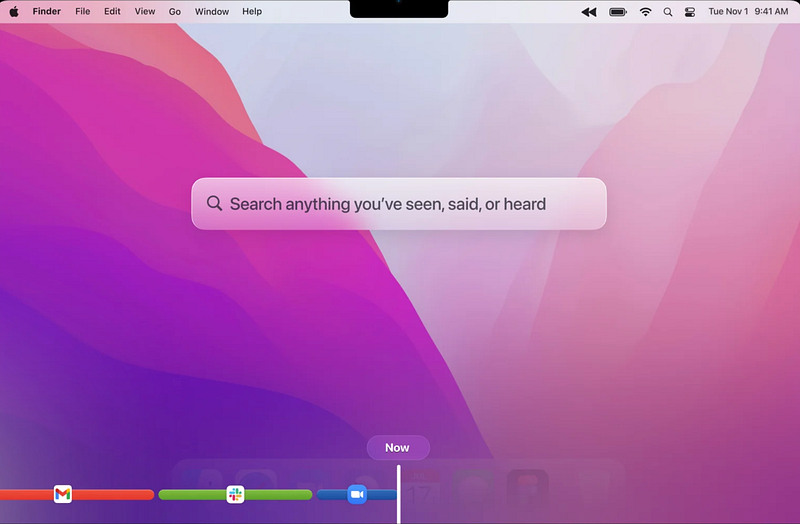
It then indexes all of this, makes it searchable, stores them locally and never sends anything out of your Mac.
This means that you can literally search for “project proposal” and it will search the recordings and will show you exactly where this word appeared in your history of activity, no matter in a text on a website or a document, in a message you sent or even in a video you watched or on an image.
The best part about Rewind AI is since all the data is stored locally and it need not access any external server, the search results are extremely fast, and thanks to their powerful compression algorithm, it can record and store months or even years worth of content without occupying too much space.
Why you should install Rewind AI? (TLDR)
If you are a forgetful person and have often been in situations where you are looking for or trying to remember something only to end up being disappointed by your brain, Rewind AI is for you. It uses powerful AI technologies to search through everything you did on your Mac, including the sites you visited, videos you watched, and meetings you attended, to quickly help you find exactly what you were looking for.
Synth
Imagine if you had your own personal assistant who attends all of your meetings with you, takes copious notes, summarises the key points, and even prepares a to-do list and agenda. Sounds, great right? That is exactly what the Synth app does.
You can integrate Synth with any of the popular meeting apps like Zoom, Teams, Slack, Google Meet, and basically, any app that has audio or video call functionality.
Synth will transcribe the audio from your meetings and use the GPT-3 AI model to create notes and summarise your meetings and even generate an agenda, task list, deadlines, insights, and more.

It is not just limited to that as well, you can basically ask it for any kind of information, in any form based on your meeting transcript and you would be surprised by how amazing it works.
Synth comes with a free version that allows you to use it for 10 meetings per month and even automatically summarises the meeting calls. They also offer a pro plan that supports unlimited meetings and AI-detected chapter generation for meeting notes. It is pretty reasonably priced as well.
Why you should install Synth? (TLDR)
If you are in and out of meetings throughout the day and struggle to keep up with all the information that was discussed and do not even have enough time to take notes, then you can gain back so many hours and a lot of valuable insights with Synth. It takes notes, summarises your meetings and answers any type of question you might have regarding your meetings by transcribing the audio or video from your meetings.
Utterly
While working from home has a lot of benefits, one possible downside, especially if you are someone who has to attend a lot of meetings in a day, is finding a quiet environment to take your essential calls from.
It could be especially challenging if you are living in a busy area or have babies or other family members around who are silent all day and start doing everything in their power to make weird and intrusive noises just when you hit the join meeting button.
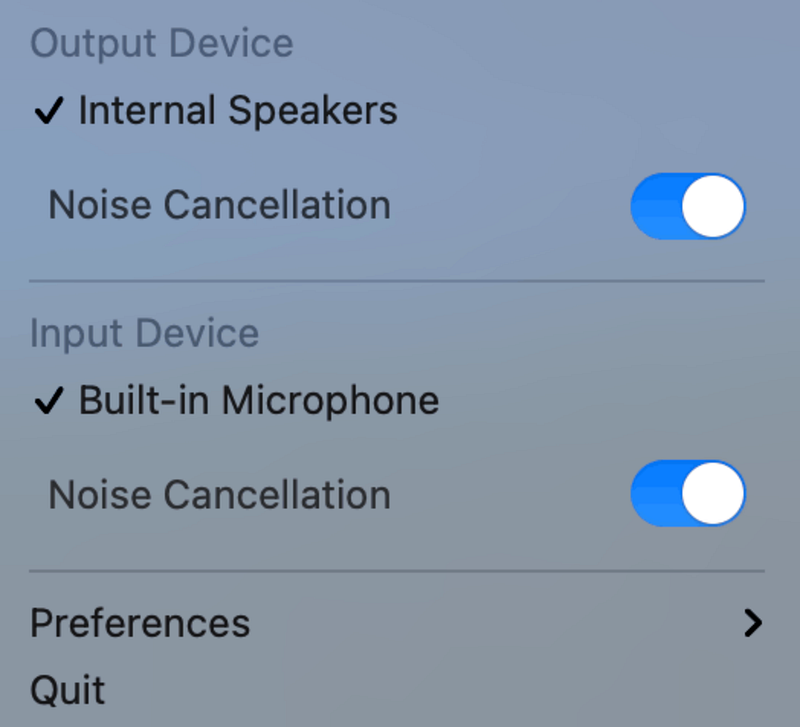
If you could relate to this, then you should try the Utterly app which is designed specifically for removing all those annoying background noises when you are on a meeting call.
Utterly could be integrated with any meeting, streaming, or recording app and all of the audio processing is done locally on your Mac so you don’t have to worry about your privacy.
Follow our Instagram @theusefultech and Twitter @theusefultech1 for more useful tech news, fun facts, tips and tricks!
If you found this post interesting and useful, check out our other similar posts that you might like as well.
Subscribe to Medium and support The Useful Tech!
Join the Medium membership program to access unlimited articles across Medium on topics like Tech, Business, and Productivity, and support The Useful Tech and all of your favorite authors for only $5 a month!


