
8 Examples to Master SQL Rank, Dense Rank, and Row Number Functions
They’re both different and similar.

SQL window functions are quite useful in many cases and provide an easy way to relate rows based on an attribute.
A window function performs a calculation across a set of table rows that are somehow related to the current row. This set can be the entire table or rows that belong to a particular group.
In this article, we’ll solve 8 examples to obtain a comprehensive understanding of the three frequently used window functions, which are:
ROW_NUMBERRANKDENSE_RANK
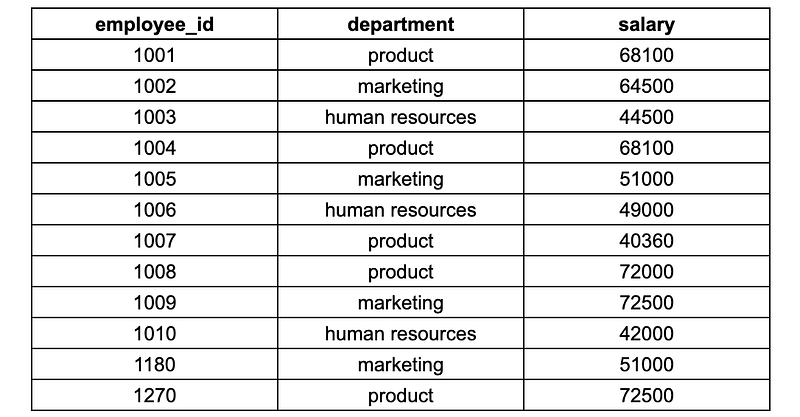
In the examples, we’ll be using the employees table shown below:
Example 1 — ROW_NUMBER
The ROW_NUMBER function assigns a sequential integer to each row in a result set.
In the following query, a row number is assigned to each row based on the values in the salary column. By default, values are ordered in ascending order so the lowest salary is assigned a row number of 1.
SELECT
  employee_id,
  department,
  salary,
  ROW_NUMBER() OVER (ORDER BY salary)
FROM employees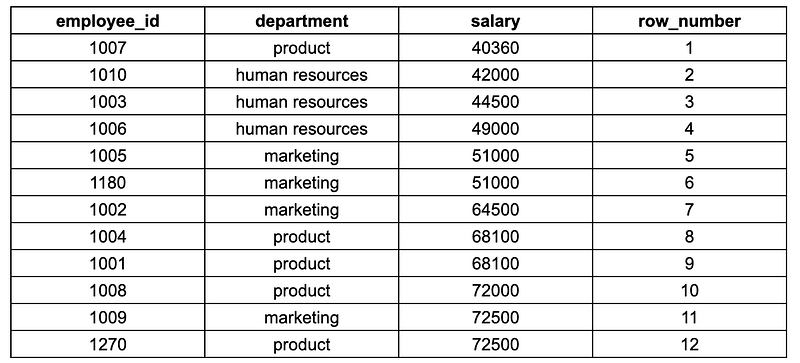
In the case of equality, row numbers are still incremented by 1 so we might have same values with consecutive row numbers in the result set.
The window is the result set in which the window functions operate. The window is the entire table in this query. We can use the PARTITION BY clause to create multiple windows by partitioning the rows. We’ll see that in the following examples.
Example 2 — DESC
In the first example, row numbers are assigned based on increasing salary values. We can use the DESC keyword for assigning row numbers based on the values sorted in descending order (i.e. highest value gets row number 1).
SELECT
  employee_id,
  department,
  salary,
  ROW_NUMBER() OVER (ORDER BY salary DESC)
FROM employees
Example 3 — PARTITION BY
Let’s say we want to assign row numbers separately within each department. It can be achieved by partitioning the rows by the department column, which creates a separate window for each department value.
SELECT
  employee_id,
  department,
  salary,
  ROW_NUMBER() OVER (PARTITION BY department ORDER BY salary)
FROM employees
The lowest salary in each department gets row number 1. If we also use the DESC keyword, the highest salary in each department gets row number 1.
Example 4 — RANK
We mentioned that rows numbers are incremented by 1 even if the values are the same. This is not the desired behavior in some cases. The RANK function provides a solution for this. The syntax is the same as the syntax of the ROW_NUMBER function.
SELECT
  employee_id,
  department,
  salary,
  RANK() OVER (ORDER BY salary) AS salary_rank
FROM employees
Take a look at the fifth and sixth rows. The salary values are 51000 and both are assigned rank 5. The next value after these are assigned rank 7 because there are two of the same value.
If we had three salary values of 51000, all of them would be assigned rank 5 and the next value that comes after them would get rank 8.
Example 5 — RANK with PARTITION BY
We can use the RANK function with PARTITION BY clause as well. The following query assigns a rank based on the salary column within each department separately.
SELECT
  employee_id,
  department,
  salary,
  RANK() OVER (PARTITION BY department ORDER BY salary) AS salary_rank
FROM employees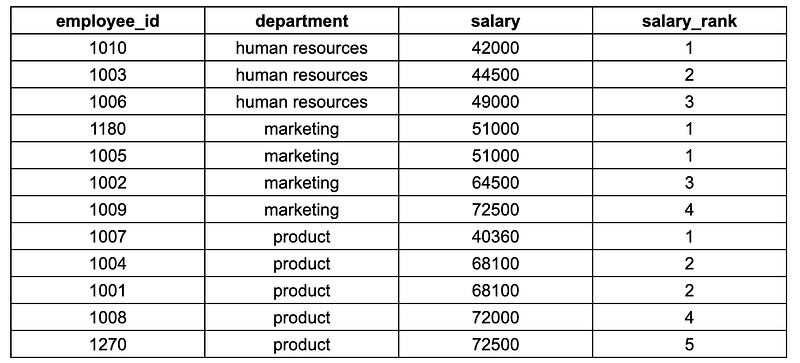
Example 6 — DENSE_RANK
The DENSE_RANK function is quite similar to the RANK function with only one difference.
- The
RANKfunction does not return consecutive values in the case of having multiple occurrences of the same value. - The
DENSE_RANKfunction always returns consecutive values. The same values are assigned the same rank and the value that comes after gets the next value.

Example 7 — RANK and DENSE_RANK
We can use both these functions in the same query. It’ll be a useful example to better understand the difference between RANK and DENSE_RANK .
SELECT
  employee_id,
  department,
  salary,
  RANK() OVER (ORDER BY salary) AS salary_rank,
  DENSE_RANK() OVER (ORDER BY salary) AS salary_dense_rank
FROM employees
You can observe the difference between the RANK and DENSE_RANK functions by comparing the values in the salary_rank and salary_dense_rank columns.
Example 8— Find the employees with highest salaries
Let’s say we want to find the employee with the highest salary for each department. It can be done by using a common table expression (CTE) with a window function.
WITH salary_ranks AS (
   SELECT
      employee_id,
      department,
      salary,
      RANK() OVER (
         PARTITION BY department
         ORDER BY salary DESC
      ) AS salary_rank
   FROM
   employees
)
SELECT
 *
FROM salary_ranks
WHERE salary_rank = 1
The CTE creates a table called salary_ranks which includes the employee information along with a rank assigned based on the salaries. Then, we select employees with rank 1.
Final words
SQL RANK, DENSE_RANK, and ROW_NUMBER functions are quite useful in many cases. They can be used for sorting and ranking data in various ways. The 8 examples we covered in this article illustrate how these functions can be used in real-world cases.
You can become a Medium member to unlock full access to my writing, plus the rest of Medium. If you already are, don’t forget to subscribe if you’d like to get an email whenever I publish a new article.
Thank you for reading. Please let me know if you have any feedback.


