

Text Preprocessing to Prepare for Machine Learning in Python — Natural Language Processing
Some Commonly Used Text Preprocessing Techniques in Python With Examples
In this age of social media and online business era, text data are coming from everywhere. However, dealing with text data is tricky. Because raw text may come in with all types of impurities, unnecessary noises, spelling mistakes, and more. So, it is necessary to go through proper preprocessing before diving into any modeling with text data.
In this article, we will work on some common text preprocessing techniques to prepare text data for machine learning.
Removing Numbers
Numbers in text can be deceiving for machine learning models. Because anyway, the text needs to be converted as numbers. Each text gets converted as a number. If the text contains numbers again, that may interfere with those numbers unnecessarily. So, removing numbers can be helpful.
Here I used regular expressions to remove numbers. So, I needed to import ‘re’ first.
import re
text = "Class A has 35 students, class B has 29 students and all of them are good at math"
res = re.sub(r'\d+', '', text)
res
Output:
'Class A has students, class B has students and all of them are good at math'All the numbers are gone from the text.
Removing Extra Space
This is another funny problem. Sometimes, at the beginning and at the end, an extra space may come in the raw data that does not seem to be a problem. But it can cause problems. If there is an extra space, the same word may appear as two different words. For example, if we add an extra space at the beginning of the word ‘ song’ while developing a model, this will be considered as a different word than ‘song’ only because of the space, which may be bad for the model performance.
st = " result was great "
st.strip()
Output:
'result was great'The spaces at the beginning and at the end are gone.
I used twitter.csv data from Kaggle for the next exercises.
This dataset has an Attribute 4.0 International License. Please feel free to download the dataset from this link to follow along:
Create a data frame using this dataset here:
import pandas as pd
df = pd.read_csv('twitter.csv')
df.head()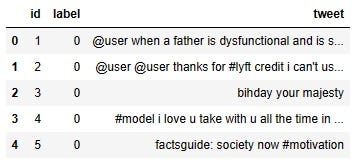
The tweet column of the DataFrame is the focus for today. Each row contains a tweet. The goal of today’s work will be to make these tweets as clean as possible for a machine-learning model to find the trend easily.
Remove Punctuation
To begin with, at first glance, it shows all the punctuations like ‘@’, ‘#’, and ‘:’ in the tweets. The function below removes punctuation from texts.
import string

def remove_punctuation(text):
    return ''.join([i for i in text if i not in string.punctuation])
Applying this function to each row of the tweet and creating a new column ‘tweet_clean’, free from punctuations
df['tweet_clean'] = df['tweet'].apply(lambda x: remove_punctuation(x))
df.head()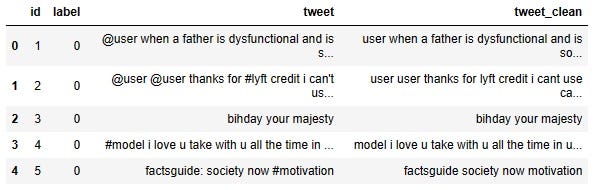
Look, tweet_clean does not have any of those punctuations anymore!
Tokenization
To perform the next cleaning process, we need words to be separated. Because they will be applied to individual words, not to sentences. So in the next code block function ‘tokenize’ is defined to split the sentences into words and then this function is applied to the newly created column ‘tweet_clean’.
import re
def tokenize(text):
    return text.split(' ')

df['tweet_tokenized'] = df['tweet_clean'].apply(lambda x: tokenize(x))
df.head()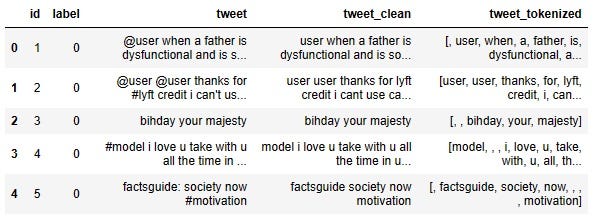
The new column ‘tweet_tokenized’ includes the list of words in each row. We can deal with the words now.
Stemming
Stemming is applied to the words to bring the words to their base form. For example, the word ‘talk’ may come in all these forms:
talk
talks
talked
talking
Stemming will bring any of these forms to simple ‘talk’. Here we need to: import the ‘PoterStemmer’ from ‘nltk’ library
Initialize the PorterStemmer
Define a function ‘stemm’ that stems the words in a sentence and
Then apply the function to the ‘tweet_tokenized’ column to stem the words:
from nltk.stem.porter import PorterStemmer

stemmer = PorterStemmer()
def stemm(text):
    return [stemmer.stem(word) for word in text]

df['tweet_stemmed'] = df['tweet_tokenized'].apply(lambda x: stemm(x))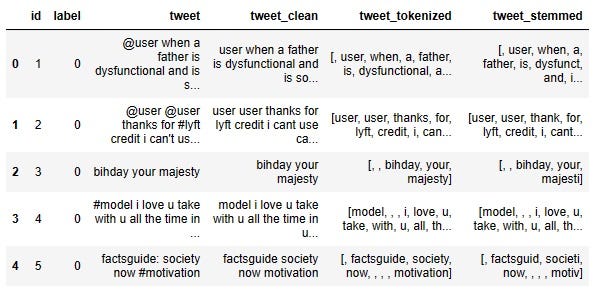
Look at the first row. The word ‘dysfunctional’ in the tweet_tokenized column becomes ‘dysfunct’ in the tweet_stemmed column. In the second row, the word ‘thanks’ in the ‘tweet_tokenized’ column becomes ‘thank’ in the ‘tweet_stemmed’ column.
Lemmatization
Lemmatization is also another way of bringing the words to their base form. In the stemming section, some words may lose their meaning. For example, ‘Dysfunctional’ becoming ‘dysfunct’ may not be meaningful to the sentence. Lemmatization gives you a little more control over which part of the sentence to change. In this example, we will lemmatize only the verbs.
In the following code block:
Import Lemmatizer first
Then download ‘wordnet’ and ‘omw-1.4’
Initialize Lemmatizer
Define the function Lemmatization that stems only verbs.
Apply the function to the tweet_tokenized column
import nltk
from nltk.stem import WordNetLemmatizer
nltk.download("wordnet")
nltk.download("omw-1.4")
# Initialize wordnet lemmatizer
wnl = WordNetLemmatizer()
def lemmatization(text):
    return [wnl.lemmatize(w, pos='v') for w in text]

df['tweet_lemmatized'] = df['tweet_tokenized'].apply(lambda x: lemmatization(x))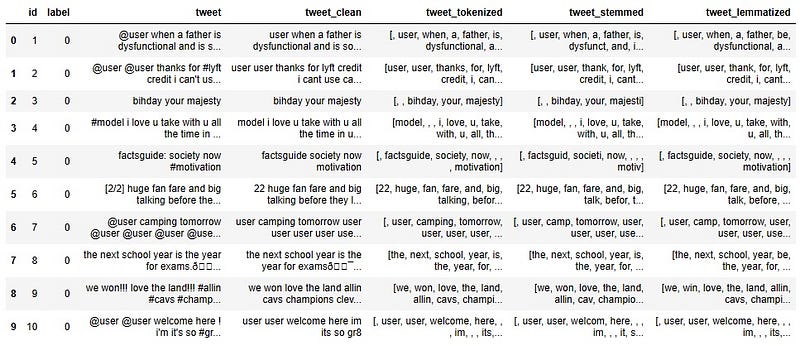
As you can see, this time, we stemmed only the verbs. So, in the first row, ‘dysfunctional’ stays as ‘dysfunctional’ after lemmatization. But ‘thanks’ becomes ‘thank’ in the second row ‘talking’ becomes ‘talk’ in the sixth row and ‘camping’ becomes ‘camp’ in the seventh row.
Conclusion
There is more text processing out there. But these are just some very commonly used preprocessing for the modeling. Not all of them need to be used all the time. Some of them can be used based on your needs.
There are some more very commonly used processes that can be found in most articles on this topic like making the words lowercase and removing stop_words. But I didn't use it because we definitely have to vectorize the text before modeling and most popular vectorizer methods can take care of making the words lowercase and removing stop_words. So we don’t need to do that in text-preprocessing steps.
Feel free to follow me on Twitter and like my Facebook page.
The video version of this tutorial:


