
7 Ways to Break up with Your Phone and Get Your Life Back
How to end device addiction — even while self-isolating

If you own a smartphone in 2020, you check it about 50 times per day for 5 hours, on average. And now that millions are working or studying from home under quarantine, that figure is likely to skyrocket. Under the current state of global emergency and news hysteria, dialing back on your device usage and social media exposure is more important than ever.
Staring at screens has never been good for mental health, and young people are especially vulnerable. Well before the Coronavirus pandemic shattered our modern paradigm, the American Psychological Association found that “serious psychological distress and suicidal thoughts” among adolescents and young adults may be correlated with the rise of smartphones and digital media.
Either way, you’re probably spending too much time on your device. 82% of us underestimate our screen time. But it’s not your fault. Our lizard brains are no match for the billions of dollars tech companies spend on research each year to ensure we stay distracted and hooked. Then, there’s the army of digital marketers and cat videos to contend with.
The good news is, there’s a way out of this mess. But you need a strategy. So here’s what you do, and what you don’t, to sever your device addiction once and for all.
How to Achieve Phone Freedom

Before I tell you what works, here’s what doesn’t — willpower. We all have a limited amount of it per day, and it’s the least reliable way to kick a bad habit. According to productivity guru, Benjamin Hardy, relying on willpower is an outdated approach to success. In his aptly-titled book, Willpower Doesn’t Work, he explains that,
“Ironically, the future of self-help will not be focused on ‘the self,’ but rather, it will be focused on the environment that shapes the self. At the core of this new thrust will be the installment of enriched environments.”
Your environment can either support or detract from your goals. You wouldn’t bring your laptop to a nightclub, so why try to work or study with your phone on your desk? That’s just setting yourself up to fail.
Luckily, you can edit your environment to automate your behavior. Rather than shoring up willpower, outsource your efforts by installing a few forcing functions. Such parameters “literally force you to act and achieve what you intend,” says Ben, helping to eliminate the possibility of self-sabotage.
For example, if you want to quit your nightly cookie habit, but your pantry is stocked with Chips Deluxe, good luck with that. However, if you don’t have cookies in your house, you’ll have to drive to the store or order Postmates to get them. Adding a layer of friction between you and the habit you want to avoid determines if you’ll ultimately cave to your craving.
Likewise, with the right forcing function in place, your phone problem will take care of itself. IE: If you don’t have any notifications on your phone, you can’t check them in real-time. As James Clear writes in Atomic Habits, new habits should be obvious, attractive, and easy, while bad habits should be difficult. Essentially, you want to eliminate bad habits by replacing the cues that trigger them. To avoid the temptation to check your phone first thing in the morning, don’t use it as your alarm clock.
Here are seven more ways to use forcing functions to dissolve your device addiction. Start with one and add more, if necessary.
7 Ways to Break Up with Your Phone
1. Install a timeline blocker extension
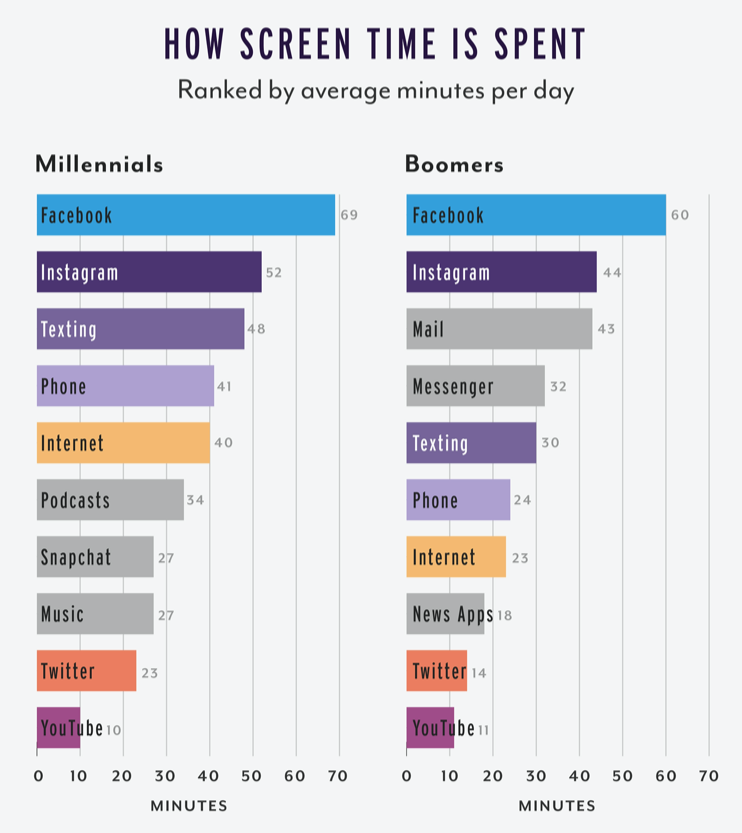
If you get distracted by your newsfeed every time you open Facebook, this one’s for you. A Chrome extension called News Feed Eradicator replaces your feed with an inspirational or custom quote. Even though it’s built for your desktop rather than your phone, blocking your newsfeed will help you start to chip away at your Facebook habit, which will carry over to your device. Plus, Facebook is the biggest culprit when it comes to screen time, with people across demographics spending upwards of an hour or more on the app daily.
As the old saying goes, “out of sight, out of mind.” Installing this timeline blocker extension on my PC back in 2016 helped me avoid getting dragged into the election cycle drama and became the foundation for my next six strategies.
2. Use the Freedom app
Once you have the News Feed Eradicator in place, take things to the next level by installing Freedom on your desktop and phone. The way it works is simple. You turn it on and block as many websites or apps as you want for a set amount of time. You can even turn off your Internet connection. But you’ll still need a plan of when you’ll use it, in line with the advice from Clear and Hardy. For example, set a time to turn on Freedom every morning when you wake up or when you open your laptop. That way, you can work on your most important tasks of the day before getting interrupted.
3. Set a nightly no-phone time
Alternatively, you can set a nightly cut-off time for phone use. I racked up a pretty toxic nightly Twitter habit over the years, but finally overcame it by turning on Freedom every night at 8pm. On the nights that I don’t do this, I can easily find myself scrolling from the couch until 2am. Again, don’t rely on willpower. If your phone is off or in Airplane Mode, your brain will eventually forget about it, leaving space for better things.
4. Never bring your phone into the bedroom
If the stories about people looking at their phones during sex don’t scare you, possibly nothing will. Join entrepreneurs like Ariana Huffington and Ryan Holiday by leaving your phone outside your room to charge overnight. You’ll sleep better and use your phone less by default.
5. Go phone-free at work
A University of Texas study found that “the mere presence” of your phone — even if it’s out of eyesight, impairs cognitive ability. An easy fix is to zip your phone away in your bag, car, or a different room. Your subconscious will accept that it’s inaccessible, allowing you to focus better on the task at hand.
If your clients, boss, coworkers, or kids need to reach you urgently, set an alternative method of contact. Use a landline or buy a “dumb phone” without apps that only receives calls and text messages.
6. Uninstall distracting apps
It sounds simple, but deleting apps from your phone works — especially if you can’t easily re-install them. Again, we’ll apply the concept of forcing functions here.
First, change all your social media passwords to long, anonymized sets of random numbers and letters and don’t save them in your keychain or password manager.
Then, log out of everything and uninstall each app so that to log back in, you would have to reset your passwords. Alternatively, have a friend or family member change your iCloud password so you can’t re-install apps without asking them. The second option adds both friction and social accountability.
For a while, you’ll experience phantom, Pavlovian urges to post to your Instagram story throughout the day before realizing you can’t, but this too shall pass.
7. Buy a second cell phone
If you can’t permanently eliminate destructive apps from your life for some reason, consider buying a second phone that’s only for social media and games. During the day or work week, use your primary “dumb phone” for communication purposes. Leave your distracting tablet or other device at home — ideally turned off — and only take it out on the weekends or in your spare time.
What to Do with Your New Free Time
What would you do with hundreds or thousands of extra hours per year?
Reducing your phone usage by one hour per day frees up 365 hours per year, equivalent to one month of your life (based on a 12-hour day).
Saving three hours per day = 1,095 extra hours per year, or three months back.
For those of you spending more than five hours per day on your phone, it’s time for a reality check. You’re spending half of your waking life on your phone, plus any time you spend watching Netflix or TV.
Being stuck at home for weeks (or months) is an opportunity to change up your routine and start building healthy, new habits. Practice limiting your screen time now so that the behavior sticks once you emerge from coronavirus lockdown.
With an extra 500+ hours per year, you could:
- Read 100 books.
- Make $10,000 by freelancing for $20/hour.
- Become an expert in a new skillset.
- Create 5–10 digital products that can generate passive income for you.
- Complete 18 credits of college courses.
- Improve your daily quality of life, mood, sleep, and the course of your future.
What To Do When You Mess Up

Everyone with a phone is vulnerable to device addiction, but there are things you can do to end it. Take charge now and claw back the precious time you have left on this planet. These seven strategies have helped me cut my daily screen time by 90% over the past four years. At least one of them will work for you.
Like most toxic relationships, breaking up with your phone is a process. You’ll likely slip up on occasion. You may go backward before you go forward. But aim for small gains and marginal improvements.
Bookmark this article. Come back to it when you need a reminder or a jolt of motivation. Send it to someone who needs help breaking up with their phone, and let us know in the comments what has worked for you!
Kristin Wilson is the host of Badass Digital Nomads, a podcast about remote work, productivity, lifestyle design, and travel.


