
7 Uses of grep Commands in Linux
A super tool for string searching

To say the grep command is a useful tool for Linux administrators is still an understatement. The grep command is a must-know command for all backend developers.
To feel how beautiful it is, let’s start from an interesting tech interview question:
For a software project, which is the easiest way to find the
main()function in its source code?
There are many possible answers for this question, such as searching the “main” string directly on VSCode. But how to do it if you are handling it on a remote server without GUI?
Of course you need to enter the corresponding directory firstly. After that, a cool and neat answer is just one line of command:
grep -r main .1. Searching a String in a File
As the starter shows, the grep command, whose full name is Global Regular Expression Print, is used as a tool to search specific strings inside files.
The basic syntax of it includes 3 parts:
grep string file_nameFor example, if I have a file named “test1.txt” and it contains the following 3 lines:
Yang is a man.
Who is him?
Yang is handsome.
Now, let’s try to search the string “Yang”, which is a big name on Medium by the way, with the help of the grep command:

As shown above, the grep command worked successfully. By the way, it’s a case sensitive command, if we change it as follows, nothing will be printed:
grep yang test1.txt2. Searching a String in Multiple Files
To search a string in multiple files, all you need to do is just adding more file names:
grep string file1 file2 file3
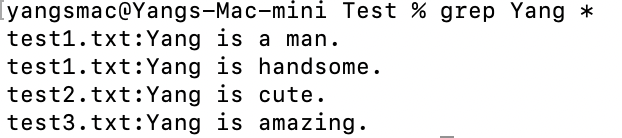
As the above screenshot shows, I searched the big name “Yang” in three different files and the command can print expected results.
Sometimes, inputting all names of files is boring and unnecessary. In my case, all the 3 files are under the same directory and this directory only contains them. So the easier way is using one asterisk:
3. Inverse Searches in a File
Is that possible to search the lines of a file which don’t have a specific string?
Of course, we just need to add a -v option:

As its name implies, the -v option can help us make an inverse search.
4. Searching a Whole Word Only
The grep function is not really searching for the exact word by default.
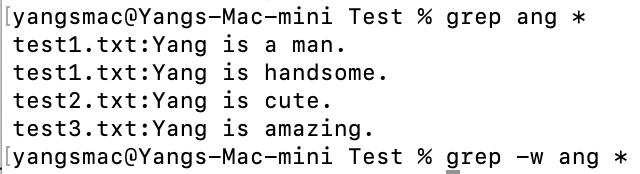
As demonstrated above, if we search the string “ang”, every word that contains the “ang” will be considered as a match. (“Yang” in this case)
But if we add a -w option, it means searching for the whole word. Since there is no word “ang” in all my files, there is no output.
5. Ignoring Case for Searches
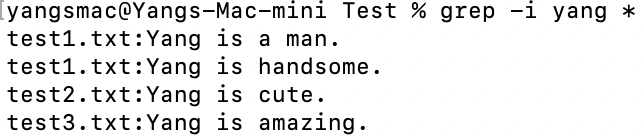
Sometimes, the case sensitive nature of the grep command is not necessary. To ignore case, we can add the -i option as follows:
6. Searching in a File Based on Regular Expressions
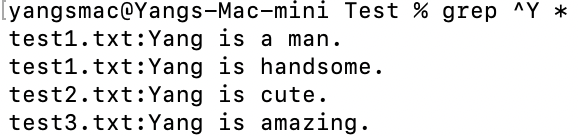
If we can’t write regular expressions in the grep command, we probably shouldn’t say it’s a powerful tool. But this post is not to help you master regular expressions, let’s just check out a simple example. The following screenshot shows how to search all lines that start from “Y”:
7. Combining grep With Other Commands
No man is an island. So as Linux commands. The grep command can be used in combination with lots of other commands. For instance, if we would like to find the expected files firstly and then search a specific string in them, we can merge the power of the find and grep commands:
find . -name "test*" -exec grep ^Y {} \;The above command will find the files whose name starts from “test” at first, and then search all lines of these files that start from “Y”.

Thanks for reading. If you like it, please follow me and join as a Medium member to enjoy more great articles.
Relative posts:


