
7 Useful Ways To Use the Zip() Function in Python
Learn how the zip() function can make your life easier

Python has useful built-in functions that can make your life easier and save some lines of code without sacrificing quality.
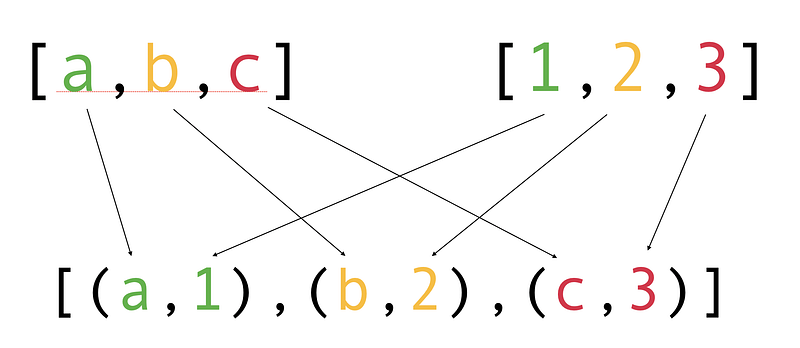
Today, you are going to learn how to use the zip() function. The zip() function can be used to aggregate data from multiple iterables, such as lists. Here is an illustration:
What Is the zip() Function?
Before jumping into the use cases, let’s briefly introduce the zip() function.
The zip() function aggregates elements from iterables, such as two lists. It returns an iterator object.
For instance, let’s zip players and player numbers together:
Result:
[(7, 'Cristiano Ronaldo'), (9, 'Gareth Bale'), (10, 'Lionel Messi')]The zip() function creates tuples from the nth elements of both lists. All in all, the working principle is similar to that of a physical zipper.

You now know the basics of zip() function. Let’s see what you can do with it.
1. Zip Any Number of Iterables
You are not restricted to zipping just two iterables.
For example, let’s zip three lists:
Output:
[(7, 'Cristiano Ronaldo', 'Juventus'), (9, 'Gareth Bale', 'Real Madrid'), (10, 'Lionel Messi', 'FC Barcelona')]2. Combine Lists of Different Sizes
The zipped lists do not need to have equal lengths.
For instance:
Output:
[(7, 'Cristiano Ronaldo'), (9, 'Gareth Bale')]When you combine lists of different lengths, the zip() function ignores everything that passes the shortest list.
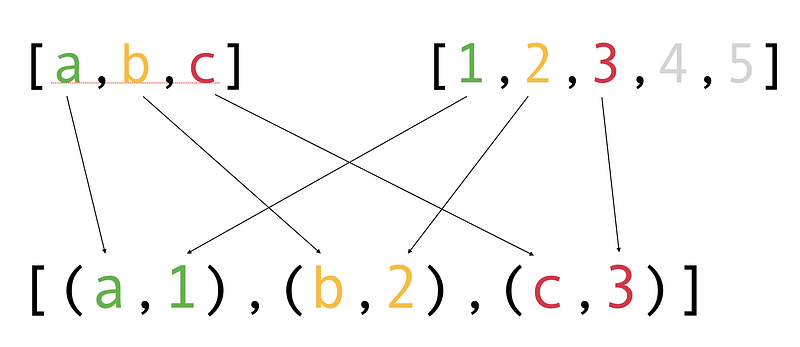
If you don’t want the last values to be ignored, you can use the zip_longest() function. This function is part of the Itertools module, so make sure to import it.
For instance:
Output:
[(7, 'Cristiano Ronaldo'), (9, 'Gareth Bale'), (None, 'Lionel Messi')]This function replaces the missing value pair with None by default. This can be changed too. If you want to show 0 instead of None, you can define the optional fillvalue argument:
player_data = zip_longest(player_numbers, player_names, fillvalue=0)3. Unzip
There’s no built-in unzip() function in Python. Instead, you can use the zip() function “in reverse” to tear apart zipped data. In this case, you also need to use the asterisk (*).
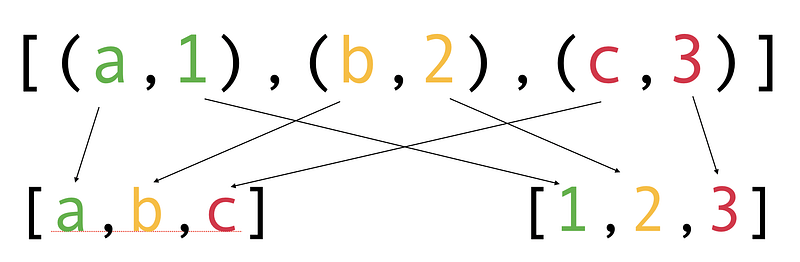
For instance:
Output:
(7, 9, 10)
('Cristiano Ronaldo', 'Gareth Bale', 'Lionel Messi')
4. Convert Two Lists into a Dictionary
There are two elegant ways to convert two lists into a dictionary without using a for loop.
The first approach uses:
- Dictionary comprehension, which is a shorthand for a
forloop. - And the
zip()function.
The second approach zips the two lists and converts the result to a dictionary.
5. Zip in for Loops
If you want to handle multiple lists in the same for loop, use zip().
For example:
6. Work With Consecutive Elements
Zipping can also be useful when working with a single list if you want to perform some action on consecutive elements.
For instance, given a list of coordinates, let’s calculate distances to the neighboring coordinates like this:

Output:
[1.4142135623730951, 1.4142135623730951, 3.605551275463989]7. Matrix Transpose
In maths, the matrix transpose is an operation that flips the matrix over its diagonal.
In Python, you can calculate the transpose of a matrix by unzipping the matrix (a list of lists).
For example, let’s calculate the transpose of a matrix:
Unzipping works the same way regardless of whether you unzip a list or a tuple. In this case, unzipping the matrix groups the first values, second values, and third values of the lists.
Conclusion
In Python, the built-in zip() function can be used to aggregate data from multiple iterables, such as lists. It works similarly to a physical zipper.
Thanks for reading. Happy coding!


