avatarFarhan Tanvir

Free AI web copilot to create summaries, insights and extended knowledge, download it at here

3539

Abstract

mg src="https://cdn-images-1.readmedium.com/v2/resize:fit:800/1*OgBD0gx8oqoQ1RKj2YsZnw.gif"><figcaption></figcaption></figure><p id="e8d0">With the help of this extension, you can quickly convert your Jupyter Notebooks into a slideshow. Change from a Jupyter notebook to a live reveal. js-based slideshow without the need for out-of-band conversion. Single keystroke to launch a js-based slideshow and return. This extension has more than 3k stars on GitHub.</p><div id="28d3" class="link-block"> <a href="https://github.com/damianavila/RISE"> <div> <div> <h2>GitHub - damianavila/RISE: RISE: "Live" Reveal.js Jupyter/IPython Slideshow Extension</h2> <div><h3>RISE allows you to instantly turn your Jupyter Notebooks into a slideshow. No out-of-band conversion is needed, switch…</h3></div> <div><p>github.com</p></div> </div> <div> <div style="background-image: url(https://miro.readmedium.com/v2/resize:fit:320/0*nnH7p2omlKmjLds0)"></div> </div> </div> </a> </div><h1 id="b63f">4. bokeh</h1><figure id="2826"><img src="https://cdn-images-1.readmedium.com/v2/resize:fit:800/1*skxoT5pNmPfc3kSa7x_3xg.png"><figcaption></figcaption></figure><p id="2e14">This is one of the most starred libraries with more than 16.5k stars on GitHub. This is an interactive visualization library for modern web browsers. It enables high-performance interactivity over large or streaming datasets and offers elegant, concise construction of versatile graphics. Anyone who wants to create interactive plots, dashboards, and data applications quickly and simply can use this library.</p><div id="efb5" class="link-block"> <a href="https://github.com/bokeh/bokeh"> <div> <div> <h2>GitHub — bokeh/bokeh: Interactive Data Visualization in the browser, from Python</h2> <div><h3>Bokeh is an interactive visualization library for modern web browsers. It provides elegant, concise construction of…</h3></div> <div><p>github.com</p></div> </div> <div> <div style="background-image: url(https://miro.readmedium.com/v2/resize:fit:320/0*p8p4v9LbmbXV8z03)"></div> </div> </div> </a> </div><h1 id="71df">5. nbgrader</h1><figure id="a965"><img src="https://cdn-images-1.readmedium.com/v2/resize:fit:800/1*apqtMnPMoBql8XXbIQOpYA.gif"><figcaption></figcaption></figure><p id="1980">This tool will be most useful if you are the teacher. This is a tool that facilitates creating and grading assignments in the Jupyter notebook. It allows instructors to easily create notebook-based assignments that include both coding exercises and written free responses. It then also provides a streamlined interface for quickly grading completed assignments. It has more than 1k stars on GitHub.</p><div id="aea8" class="link-block"> <a href="https://github.com/jupyter/nbgrader"> <div> <div> <h2>GitHub - jupyter/nbgrader: A system for assigning and grading notebooks</h2> <div><h3>Build: Forum: Coverage: Cite: A system for assigning and grading Jupyter notebooks. Documentation can be found on Read…</h3></div> <div><p>github.com</p></div> </div> <div> <div style="background-image: url(https://miro.readmedium.com/v

Options

2/resize:fit:320/0*JdiEUDmSRqBg-vUk)"></div> </div> </div> </a> </div><h1 id="7d33">6. jupytext</h1><figure id="cbdf"><img src="https://cdn-images-1.readmedium.com/v2/resize:fit:800/1*ev64nKPBxG1sxkK_JlOu9A.png"><figcaption></figcaption></figure><p id="662c">Have you ever wished that Jupyter notebooks were simply texted files? wished your preferred IDE could be used to edit them. And when performing version control, get precise and insightful diffs? Then you might find the tool useful. This plugin can save Jupyter notebooks as either Markdown files or Scripts in many languages like Python, Julia, R, etc. It has more than 5.5k stars on GitHub.</p><div id="a23f" class="link-block"> <a href="https://github.com/mwouts/jupytext"> <div> <div> <h2>GitHub — mwouts/jupytext: Jupyter Notebooks as Markdown Documents, Julia, Python or R scripts</h2> <div><h3>Have you always wished Jupyter notebooks were plain text documents? Wished you could edit them in your favorite IDE…</h3></div> <div><p>github.com</p></div> </div> <div> <div style="background-image: url(https://miro.readmedium.com/v2/resize:fit:320/0*LmW1h4YQdjOYEIpz)"></div> </div> </div> </a> </div><h1 id="ba90">7. jupyterlab-git</h1><figure id="c4d6"><img src="https://cdn-images-1.readmedium.com/v2/resize:fit:800/1*gd3DN2S1nK1bP4DC2JZhIA.gif"><figcaption></figcaption></figure><p id="3c64">I believe it is hard to find a developer who does not use Git. As the name suggests this is a JupyterLab extension for version control using Git. It has more than 1k stars on GitHub.</p><div id="5d19" class="link-block"> <a href="https://github.com/jupyterlab/jupyterlab-git"> <div> <div> <h2>GitHub - jupyterlab/jupyterlab-git: A Git extension for JupyterLab</h2> <div><h3>A JupyterLab extension for version control using Git To see the extension in action, open the example notebook included…</h3></div> <div><p>github.com</p></div> </div> <div> <div style="background-image: url(https://miro.readmedium.com/v2/resize:fit:320/0*_76CmGcMtphsfWJA)"></div> </div> </div> </a> </div><p id="eeb3">That’s all for today. I believe these extensions will help you a lot in your development journey.</p><p id="0c16">If you know of any other beautiful extensions, please share them in the comments. Until we meet again…Cheers!</p><div id="7a1f"><pre>Want <span class="hljs-keyword">to</span> <span class="hljs-keyword">Connect</span>?. <span class="hljs-keyword">If</span> you want <span class="hljs-keyword">to</span>,you can <span class="hljs-keyword">connect</span> <span class="hljs-keyword">with</span> me <span class="hljs-keyword">on</span> Twitter</pre></div><p id="7e0a"><i>More content at <a href="https://plainenglish.io/"><b>PlainEnglish.io</b></a>. Sign up for our <a href="http://newsletter.plainenglish.io/"><b>free weekly newsletter</b></a>. Follow us on <a href="https://twitter.com/inPlainEngHQ"><b>Twitter</b></a></i>, <a href="https://www.linkedin.com/company/inplainenglish/"><b><i>LinkedIn</i></b></a><i>, <a href="https://www.youtube.com/channel/UCtipWUghju290NWcn8jhyAw"><b>YouTube</b></a>, and <a href="https://discord.gg/GtDtUAvyhW"><b>Discord</b></a>.</i></p></article></body>

7 Useful Jupyter Extensions to Make Life Easier

Power Up Your Weapon

Photo by ThisisEngineering RAEng on Unsplash

A soldier loves his weapon more than anything. Developers are soldiers and the tools used for development is a weapon. Jupyter is an open-source web application for creating and sharing computational documents. Developers can configure and arrange workflows in data science, scientific computing, computational journalism, and machine learning using this weapon. Here I have compiled a list of 7 extensions that will help you in your development journey.

1. voila
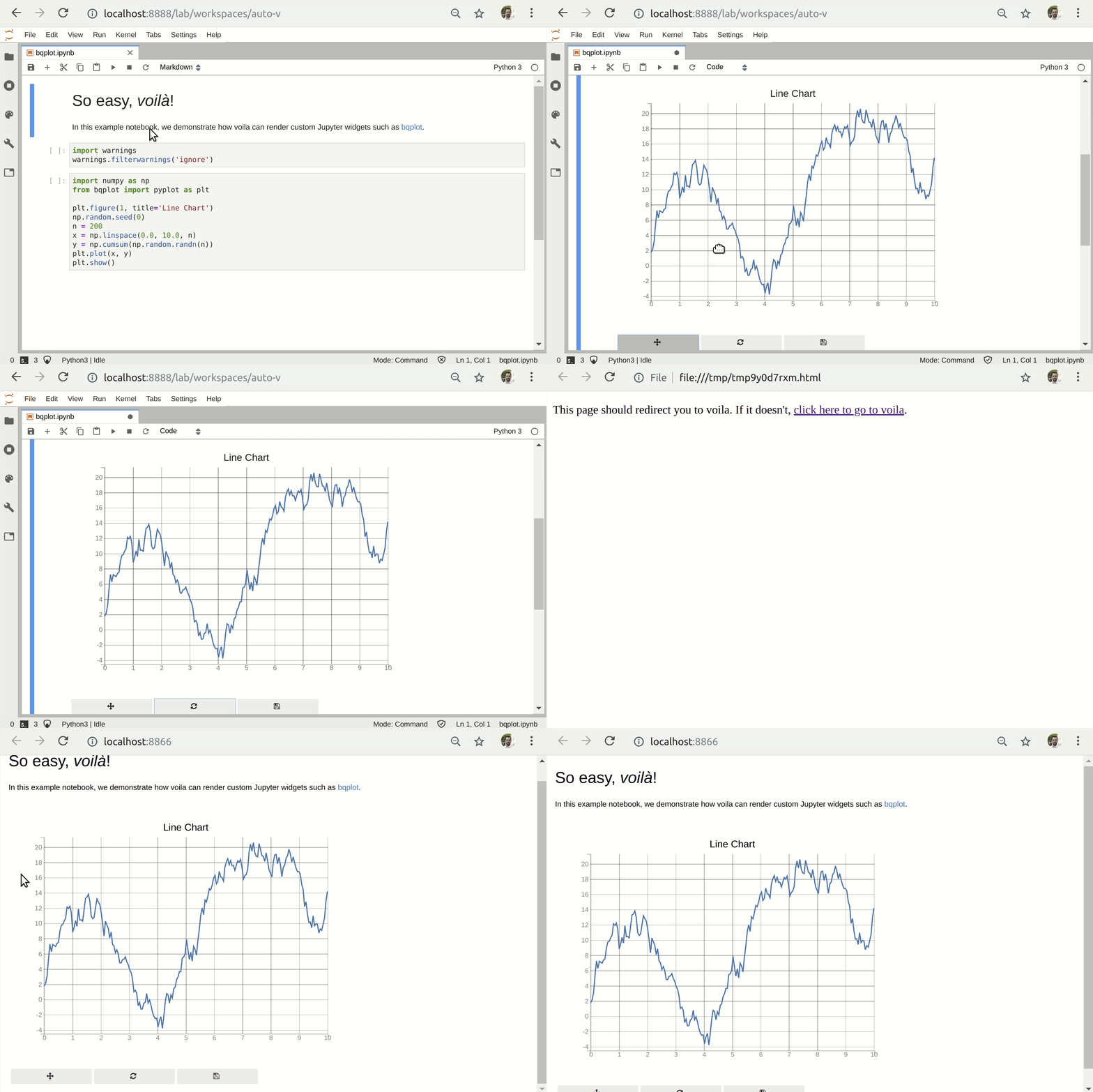
This extension will render live Jupyter notebooks with interactive widgets. It turns Jupyter notebooks into standalone web applications. Unlike the usual HTML-converted notebooks, each user connecting to the Voilà tornado application gets a dedicated Jupyter kernel which can execute the callbacks to changes in Jupyter interactive widgets. This extension has more than 4k stars on GitHub.

2. nbdime
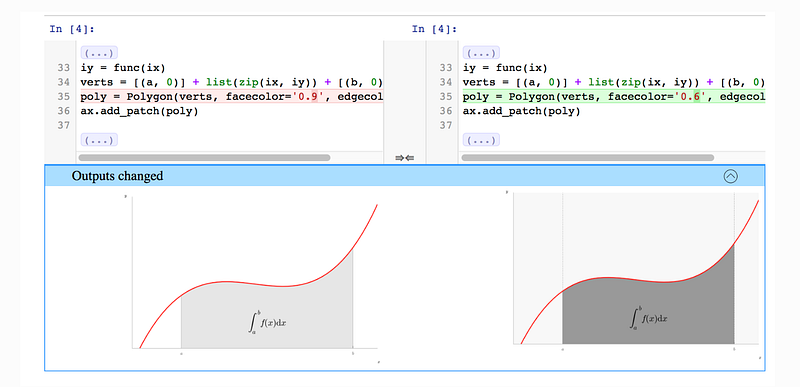
Version controlling Jupyter notebooks can sometimes be difficult. This extension provides “content-aware” diffing and merging of Jupyter notebooks. It understands the structure of notebook documents. Therefore, it can make intelligent decisions when diffing and merging notebooks. This extension has more than 2k stars on GitHub.

3. RISE
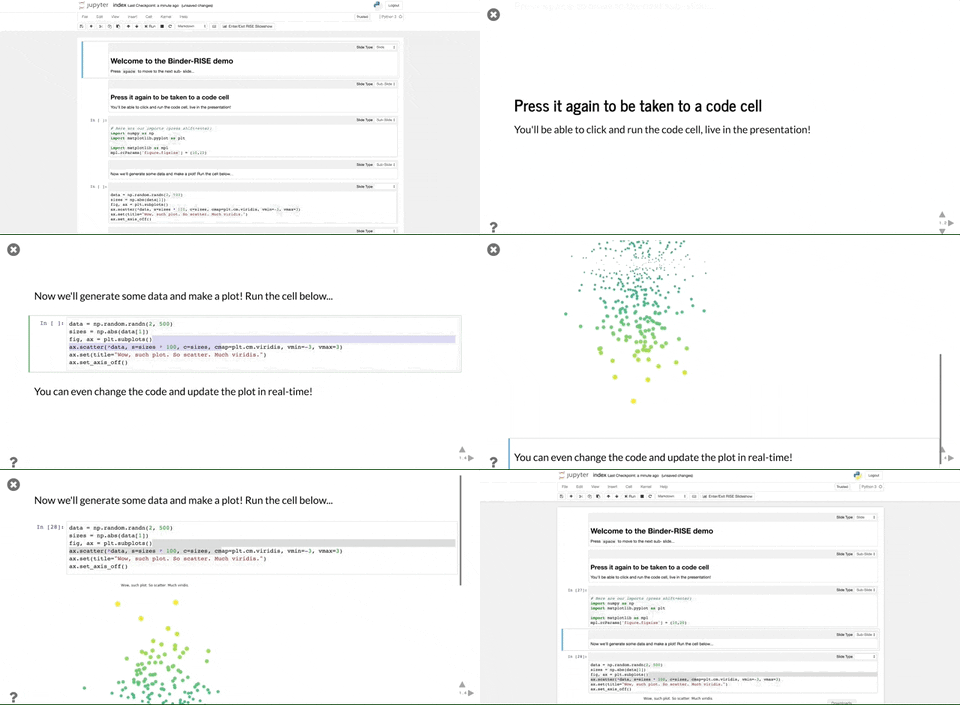
With the help of this extension, you can quickly convert your Jupyter Notebooks into a slideshow. Change from a Jupyter notebook to a live reveal. js-based slideshow without the need for out-of-band conversion. Single keystroke to launch a js-based slideshow and return. This extension has more than 3k stars on GitHub.

4. bokeh
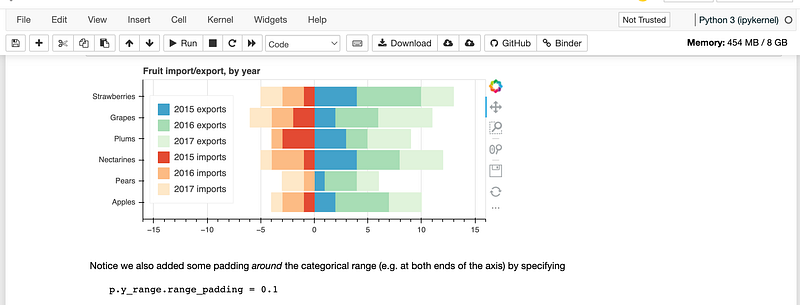
This is one of the most starred libraries with more than 16.5k stars on GitHub. This is an interactive visualization library for modern web browsers. It enables high-performance interactivity over large or streaming datasets and offers elegant, concise construction of versatile graphics. Anyone who wants to create interactive plots, dashboards, and data applications quickly and simply can use this library.

5. nbgrader
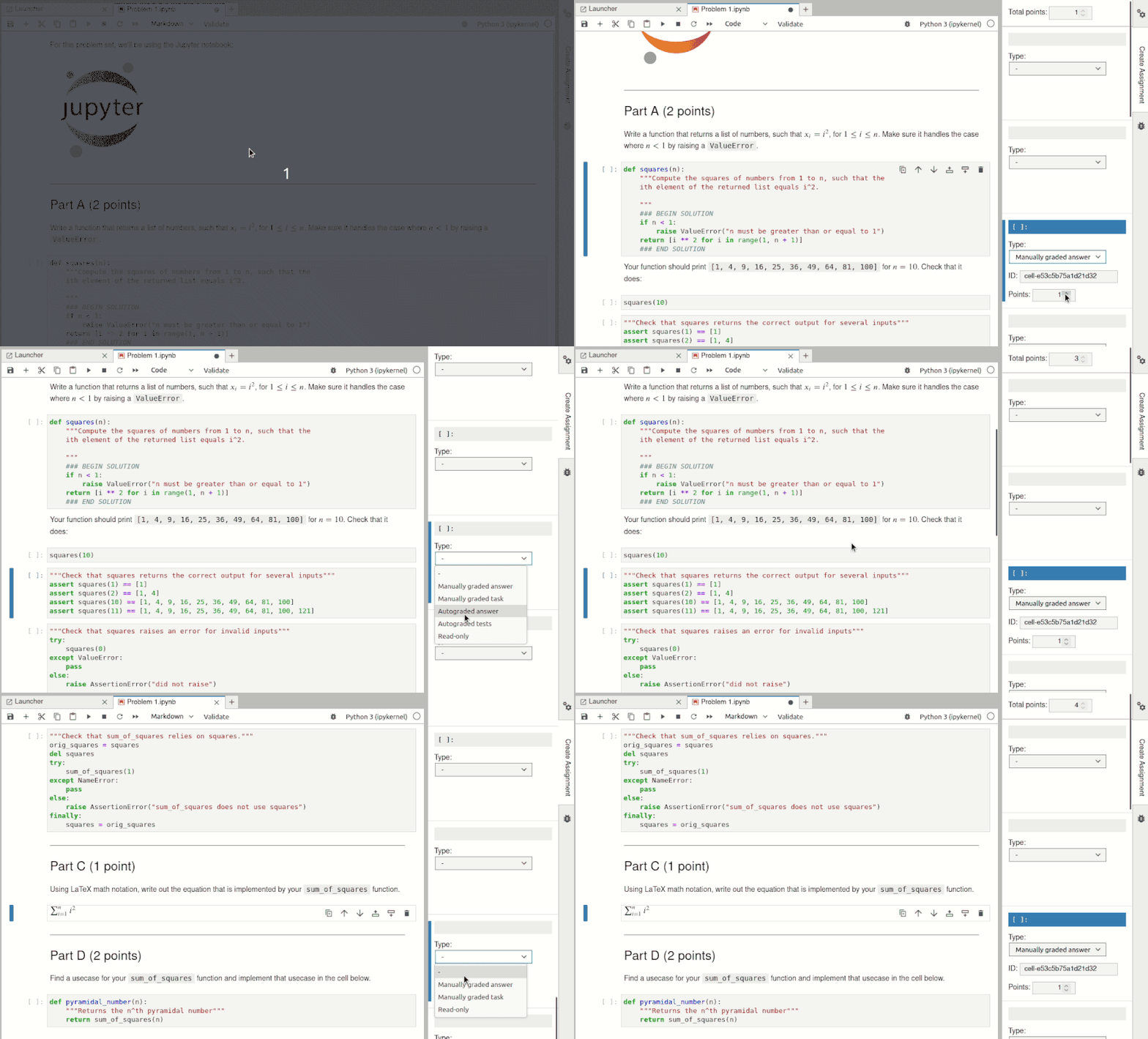
This tool will be most useful if you are the teacher. This is a tool that facilitates creating and grading assignments in the Jupyter notebook. It allows instructors to easily create notebook-based assignments that include both coding exercises and written free responses. It then also provides a streamlined interface for quickly grading completed assignments. It has more than 1k stars on GitHub.

6. jupytext
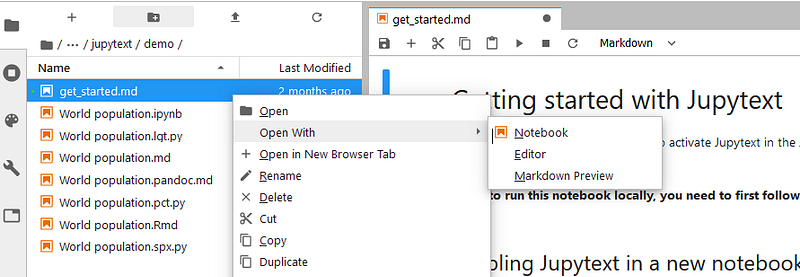
Have you ever wished that Jupyter notebooks were simply texted files? wished your preferred IDE could be used to edit them. And when performing version control, get precise and insightful diffs? Then you might find the tool useful. This plugin can save Jupyter notebooks as either Markdown files or Scripts in many languages like Python, Julia, R, etc. It has more than 5.5k stars on GitHub.

7. jupyterlab-git
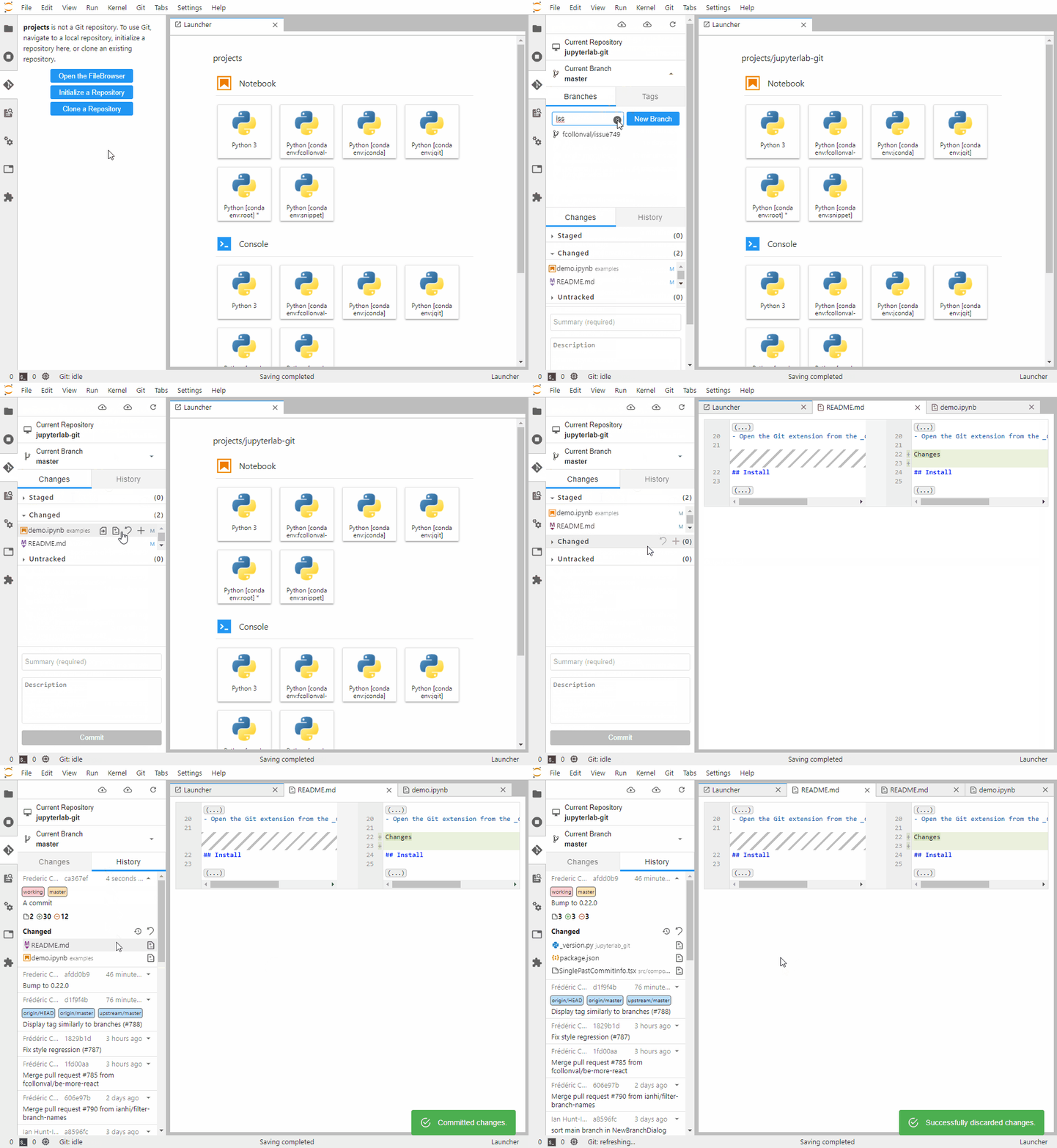
I believe it is hard to find a developer who does not use Git. As the name suggests this is a JupyterLab extension for version control using Git. It has more than 1k stars on GitHub.

That’s all for today. I believe these extensions will help you a lot in your development journey.

If you know of any other beautiful extensions, please share them in the comments. Until we meet again…Cheers!

Want to Connect?. If you want to,you can connect with me on Twitter

More content at PlainEnglish.io. Sign up for our free weekly newsletter. Follow us on Twitter, LinkedIn, YouTube, and Discord.

Python
Data Science
Machine Learning
Programming
Software Development
Recommended from ReadMedium