
7 Proven Ways to Immediately Improve Your Writing
Learn how people read online to master keeping their attention
When you write to suit your readers, they’ll read more of your content. You’ll build stronger relationships. Be found on search engines. Convert. Sell. Inform. Educate. Boost credibility.
We’re bombarded with information every day. Posts. Emails. Notifications. Like a screaming baby, they’re all crying out for our attention. To be read. To have us comment. Share. Sign up. Buy up.
Yet many don’t grab our attention — or hold our attention long enough.
Like a deliciously decadent mud cake that hasn’t been beautifully decorated, our writing needs to be pleasing to our eyes for our minds to fully appreciate the goodness within.
How do you feel when articles take too much effort to read?
What makes it easier for us to read online?
You see, when we understand how people read online, we can use specific web writing techniques to help our readers glide through our writing.
How Do You Read Online?
Be aware of how you read this post. You may find yourself unconsciously doing one or more of these:
- Flicking through subheadings
- Reading bolded text
- Checking text that stands out
- Scanning dot points
- Reading the first sentence of paragraphs
- Scanning links
- Reading only the introduction and/or the conclusion
- Doing a once-over then bookmarking it for future reference
Why We Read the Way We Read
Reading on the web is different from reading print. Why?
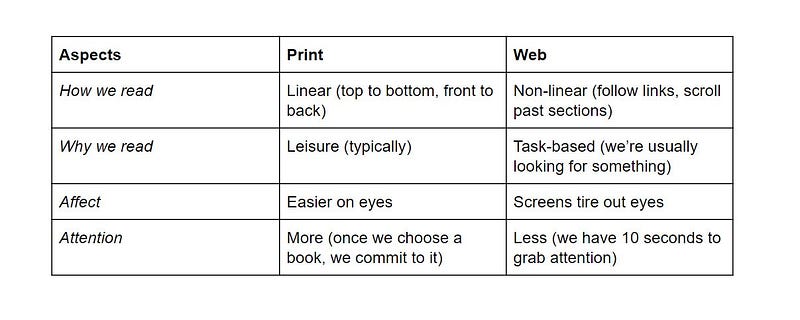
What this table shows is the differences between how we read in print compared to how we read on the web.
While we read from top to bottom, front to back in print (for example, a book or magazine), we have a lot less patience online.
It’s much easier to get distracted when reading online — web pages only have 10 seconds to grab our attention.
Usually, we read printed materials for leisure. And we go online to get something done; for example, to look up a cafe, or to learn how to get red wine stains off the carpet.
Screens tire out eyes much more than print, and we tend to be more committed when we read printed material.
How We Actually Read Online: What Research Shows
Over the years, there have been many studies run to see how readers actually read content online. One type of study is eyeball tracking.
This is where a person’s eyes are tracked to see where they focus on a webpage.
One of the first and most widely referred to eyeball tracking study was run in 2006 by Nielsen Norman Group. They found that people read web content in an F-shaped pattern.
First, they scan the page from left to right. Then they return to the left side of the page and scan downwards. Then, they’ll follow a second horizontal movement, return to the left, and keep scrolling down. Here’s how it looks:
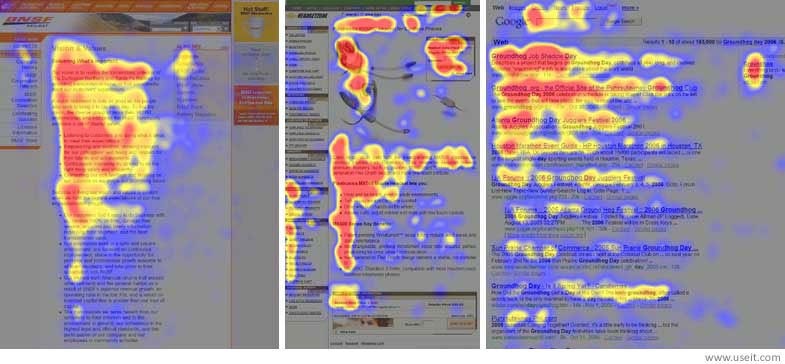
The photo shows heatmaps from user eye-tracking studies of three different websites. Red shows the areas where users looked the most. The yellow areas indicate fewer views. Blue areas were least viewed. Gray areas weren’t fixated on at all.
Nielsen Norman Group reviewed their eye-tracking research more than ten years after the original. In 2017, they published the findings of their follow-up eye-tracking research.
They confirmed that people still scan web pages and phone screens in an F-shaped pattern. They also scan in other patterns:
- Layer-cake pattern: scan heading and subheadings.
- Spotted pattern: scan for something specific such as a link, numbers, or a word.
- Marking pattern: eyes focus on one place as mouse scrolls or finger swipes the page.
- Bypassing pattern: the first few words of a line are skipped when multiple lines start with the same words.
- Commitment pattern: fixating on almost everything on the page (doesn’t happen frequently).
The study found that:
“People tend to minimize interaction cost and maximize the benefit they get from the work they do. For their eyes, this translates to spending few fixations, while still gleaning the information they need; being productive, engaged, and successful with what they take in from those fixations. Economizing on time means fewer fixations — looking at fewer words.”
By ignoring the way people read (or more often, scan) online, we blow our chances of connecting with our reader.
“In some cases, people will get bored or fatigued as they scan text. Other times, the words they read offer only a weak information scent, which may be enough gratification to continue scanning, but not enough to read more of the text.”
This approach of writing to suit the way our web visitor reads is part of a wider concept called ‘user-centred design’. We focus on understanding, and on giving our readers what they need, in the way they look for it.
Common Mistakes Writers Make
- Passive voice
- Long paragraphs
- Burying important information
- Complicated words and sentences
- Ignoring keywords
So the challenge is:
How do we write in a way that helps people get the information they’re looking for — quickly — in a way that keeps them from getting bored or tired?
After more than ten years of experience working in online communications, I’ve learned a few valuable web writing techniques that consistently help readers — and Google. I’d love to share them with you.
7 Ways to Help Your Readers Glide Through Your Writing
- Active voice
- Inverted pyramid
- Front-load keywords
- Microcontent
- Chunk
- Plain English
- Enticing headlines
1. Active Voice
“If it sounds like writing, I rewrite it.” — Elmore Leonard (American novelist, short-story writer, and screenwriter)
One of the greatest opportunities for writers online is the ability to speak to readers directly. So don’t waste it by speaking in a drab, text-book style. Write like you’re having a conversation with one person.
How to use the active voice
Instead of: “Your call will be returned in 4 hours.”
Say: “I’ll call you in 4 hours.”
Instead of: “It’s important that the crime scene is not disturbed.”
Say: “Don’t disturb the crime scene.”
Warning: Writing conversationally can mean you break writing rules you learned in school. But what’s really important — to stick to rules that turn off your reader? Or to connect deeply with your reader by daring to break a few writing rules?
Jakob Nielsen tells us the exception to the passive voice on the web is when front-loading keywords in headings, blurbs, and lead sentences. In these instances, passive voice can help readers scan better and improve the searchability of your content. We’ll look at front-loading keywords in point 3.
2. Inverted Pyramid
The inverted pyramid is a way of writing which addresses important questions quickly so that the reader understands the basic story immediately.
These are followed by secondary information, such as quotes, statistics, and other supporting details.
The inverted pyramid was invented for journalists. It’s also useful in certain types of writing when you need to give people information quickly.
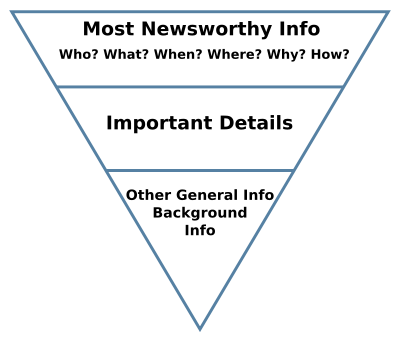
Writing with the inverted pyramid in mind helps us to be more selective with our words — and where we put them.
How to use the inverted pyramid
Say you hear of a plane that’s landed in the ocean.
Which description, A or B, helps you understand what happened faster?
Description A
Air Niugini is PNG’s national carrier which services domestic network and international routes across Australia, Asia, and the Pacific.
“So far, we don’t know why they went down,” Chuuk airport manager Jimmy Emilio told Pacific Daily News.
Air Niugini flight 73 is believed to have overshot the runway at Weno airport in Chuuk, Micronesia, where it was stopping over on the way from Pohnpei to Port Moresby.
All 36 passengers and 11 crew were rescued.
The plane was traveling from the Federated States of Micronesia to Papua New Guinea and has landed in water after overshooting a runway on Friday morning.
OR
Description B
An Air Niugini plane traveling from the Federated States of Micronesia to Papua New Guinea has landed in water after overshooting a runway on Friday morning.
Air Niugini flight 73 is believed to have overshot the runway at Weno airport in Chuuk, Micronesia, where it was stopping over on the way from Pohnpei to Port Moresby.
All 36 passengers and 11 crew were rescued.
“So far, we don’t know why they went down,” Chuuk airport manager Jimmy Emilio told Pacific Daily News.
Air Niugini is PNG’s national carrier which services domestic network and international routes across Australia, Asia, and the Pacific.
Which option did you choose?
It’s likely you wanted to know upfront:
What plane? Where did it happen? When? Who was on it? How did it happen? Why did it happen? Then:
What’s going on now? What happened to the people? What happened before it landed on the water? Who else was involved? What are people saying?
How you use this technique also depends on what channel you’re using and the format of your writing.
For example, in a news article, you’d want that information pretty quickly.
In a blog, you may be more willing to be led into tips with a short story. But you still want to be able to find important information quickly and easily.
Remember, online, we’re usually focused on a task so good design helps us scan more efficiently. The inverted pyramid can help a reader complete their task quickly.
3. Front-Load Keywords
The F-pattern study found that we often read from left to right, and down the left side of the page (especially if the content hasn’t been formatted for scanning well). People spend more time on the left half of a web page than the right half.
It’s also been found people who look at blurbs on news websites often read only the left one-third of the blurb. They’ll only keep reading if those few words are engaging.
Layer cake pattern readers scan headings and sub-headings.
So to capture a reader’s attention, front-load your keywords:
Placing important words at the beginning of a heading, subheading, or a sentence will make it more likely the reader will go on. If you don’t do this, you risk your reader missing out on important information.
For businesses, it could mean a lost lead or conversion.
For government, it means people may not understand — and they won’t follow new laws or guidelines, or take notice of community notices.
For bloggers, it means your message hasn’t fully been heard by your reader and you miss your chance to connect with them.
How to front-load keywords
News websites are great examples of how to front-load keywords.
Volkswagen dumps jailed Audi CEO
Health officials ‘very worried’ as African swine fever spreads
F1 driver suffered ‘really, really scary’ debris hit at Grand Prix
Notice these headlines place the who of the story at the start. Followed by what has happened.
In the articles, you can be sure the when, where, why, how, what, and who will be addressed.
Note about front-loading and the active voice
In point 2, we learned about why the active voice is better for the web. The exception to the passive voice on the web is when front-loading keywords.
Active voice: It was ‘really really scary’ when the debris hit me at the Grand Prix
Passive voice: F1 driver suffered ‘really, really scary’ debris hit at Grand Prix
We would use the headline with the passive voice as it quickly helps the reader understand WHO was involved. This can also make it easier for a reader to find the article.
4. Chunk
Breaking large pieces into smaller ones is called “chunking”. It’s a concept from cognitive psychology to help memorize and understand information.
With writing, chunking can help readers skim, understand, and remember it better than if the content was presented as a wall of text.
How to chunk
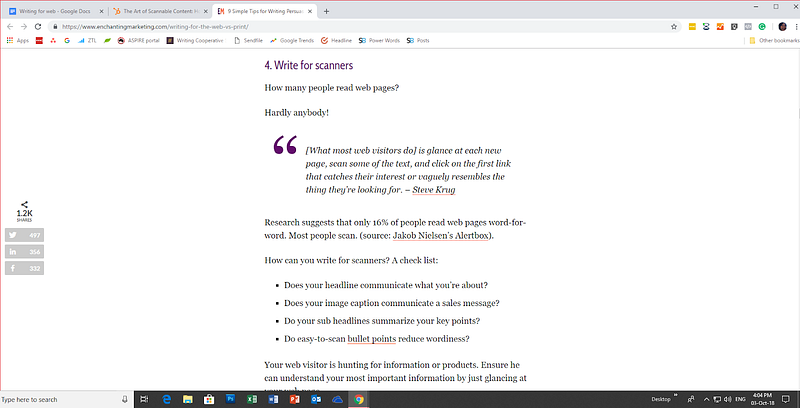
Consider these two pieces of content. At a glance, which looks like it will be easier to read? (Ignore the size of the text)
Option 1
Option 2
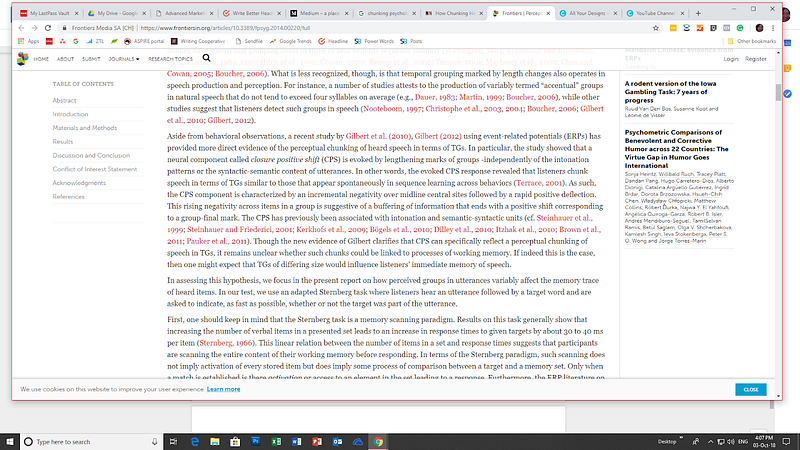
You may not be able to read the actual text, but a brief glimpse is all you need to see that Option 1 looks much easier to read than Option 2. It shows what an impact chunking can have on web content.
So cut your paragraphs and include white space. Shorten sentences.
Chunking itself helps readability. It works even better with our next point: Micro-content (content within content).
5. Micro-content
People don’t read every word on a web page. Usability research finds 79% of people scan web pages — they pick out words and sentences.
Micro-content, or content within the content, is a great way to format web content.
How to create micro-content
Use:
- Lists
- Italics
- Bold
- Link
- Meaningful subheadings
- Summary paragraphs for longer sections of text
- Quotes
Formatting your content this way helps readers quickly and easily pick out important information. Check out Medium’s Format text guide to make your writing reader-friendly.
6. Plain English
How do we write when we believe our readers are college-educated and want to sound smart, credible, and professional?
We “utilize unnecessarily sophisticated vernacular.” Which is to say, “we use big words we don’t need.’”
It’s a common mistake. Understandable, really. After all, we’re writing for a smart audience, and we want to sound smart, too. We want to make a good impression.
Yet it’s been found that professionals — and experts — prefer simple language!
When you write simply, you make it easy for them to quickly find what they need. You show respect for your reader’s time.
And when readers read more of your content, you have the opportunity to build stronger relationships. Be found on search engines. Convert. Sell. Inform. Educate. Boost credibility.
So if you want to sound intelligent, use simple English. Because no one will ever complain about writing that’s too easy to understand.
How to write in plain English
Write at a lower reading level
The recommendation that’s been proven to boost comprehension:
- Write up to an 8th-grade level for a general audience.
- Write up to a 12th-grade level for a college-educated audience or a specialized B2B audience.
Use the readability test tool to check the reading level of your writing.
Choose simple words over complex words
- Instead of ‘facilitate: use ‘help’
- Instead of ‘amendment’: use ‘change’
- Instead of ‘communicate’: use ‘tell us’, ‘let us know’
- Instead of ‘demonstrate’: use ‘show’
Look up the A-Z of alternative words to simplify your words.
“That’s been one of my mantras — focus & simplicity. Simple can be harder than complex; you have to work hard to get your thinking clean to make it simple.” — Steve Jobs
7. Headlines
As writers, when no one knows us, our headline is the open door that invites people to step in.
As a writer, you have insight and experiences no one else has. You think, feel, and speak like no one else. And no one else forms exactly the same beliefs, assumptions, and conclusions as you do.
You have ideas worth spreading — yet without a magnetic headline, your ideas will go unnoticed.
How to write magnetic headlines
- Use headline templates
- Understand of mass desires
- Carefully choose your words
- Capture readers with positivity
When you write great headlines, you make it easier for your readers to quickly decide how you’ll help them.
Summary
Avoid hiding your helpful words beneath a sloppy presentation. Transform indigestible content into content your reader will glide through — use the basic writing techniques experienced writers use:
- Active voice
- Inverted pyramid
- Front-load keywords
- Micro-content
- Chunk
- Plain English
- Enticing headlines
With a little practice, you’ll have your readers quickly devouring your content. And happily return for more.
“The biggest determinant for content usability is how users read online — and because people read differently, you have to write differently.” — Jakob Nielsen, Usability Advocate dubbed “the guru of Web page usability” by The New York Times