
7 New Safari Features in iOS 17 That Will Make You Want to Ditch Chrome
Say Goodbye to Chrome once and for all
iOS 17 brought in a lot of new and exciting changes to the table, and while most of it was about major changes to the Phone and the FaceTime apps, some of the other first-party apps got some major overhauls as well.
Safari is one of those apps, and in this post, I am going to tell you about all the new changes and features added to the Safari browser in iOS 17 that would make you want to ditch Chrome and use Safari as your default browser if you aren’t already.
These new changes are sure to improve Safari's ease of use, privacy, and security aspects and take web browsing to a whole new level.
Let’s get started.
#1 Create Multiple User Profiles 👥
One of the main reasons that most users, including me, often switch to Chrome from Safari is the lack of the option to create user profiles.
I mainly use Chrome on my work iPhone because I often switch between my personal and work user profiles, each of which has a different set of bookmarks, saved passwords, and history, which I do not want to mix.
Sadly, Safari did not offer this functionality, well until now.
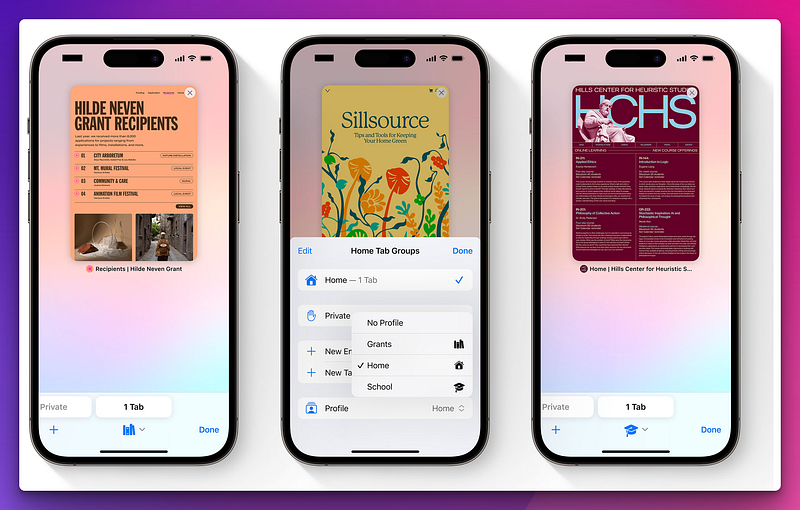
Starting from iOS 17, you can create multiple user profiles in Safari and configure them to match your different use cases.
You can instantly switch between different user profiles and separate the extensions, tab groups, and cookies from them, taking your browsing experience up a notch.
If browser profiles were the only reason you had to switch over to Chrome, I think it's time to jump back to Safari in iOS 17.
#2 Better and more relevant search suggestions 🔍
Another major issue in Safari, as reported by many users, is that sometimes it displays inconsistent or incomplete search results for your queries.
Especially if your search phrase is lengthy or involves detailed results, chrome, on the other hand, handles this flawlessly and displays complete suggestions to your queries and even displays a full preview of the search results.
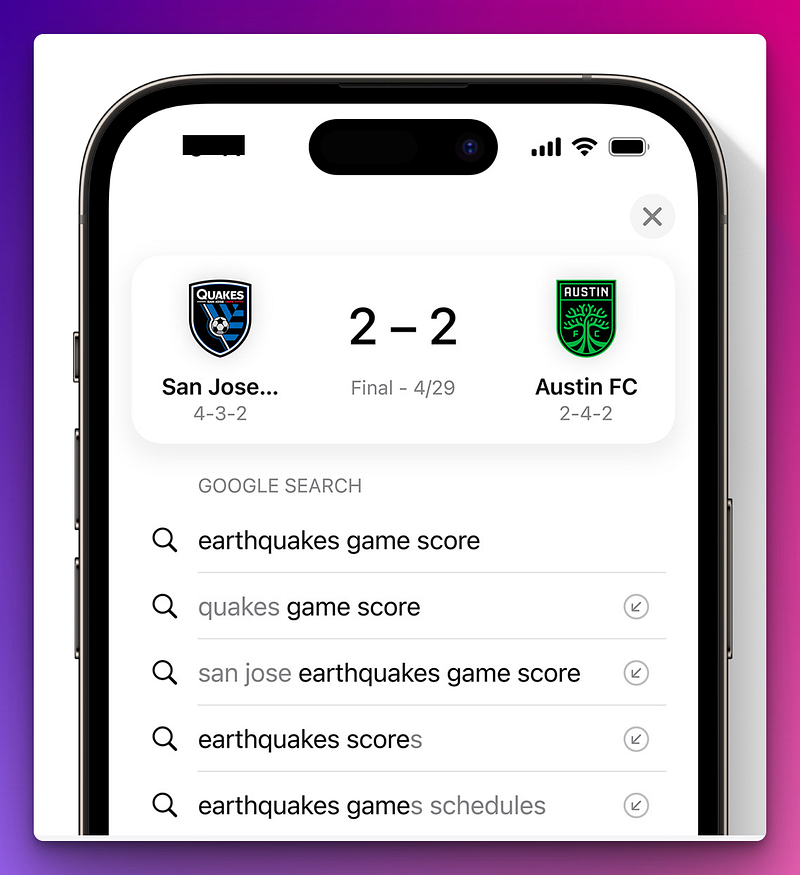
Apple has finally fixed this issue in the iOS 17 update and promises to display more relevant and easier-to-read suggestions in your search results and faster responses to your queries.
Couple this with Google as your default search engine of choice in Safari, and you have got the best of both worlds at your helm.
#3 Lock tabs in Private mode with Face ID
I think for us secret lurkers and privacy lovers; this would probably be the most favorite new feature added to Safari in iOS 17.
Apart from not logging your history, saving any browser cookies, or blocking extensions from working, the Safari private mode can also be locked with your Face ID, starting from iOS 17.
This would be especially helpful if you share your iPhone with your spouse or kids and do not want them to go snooping around in your private browsing window in Safari.
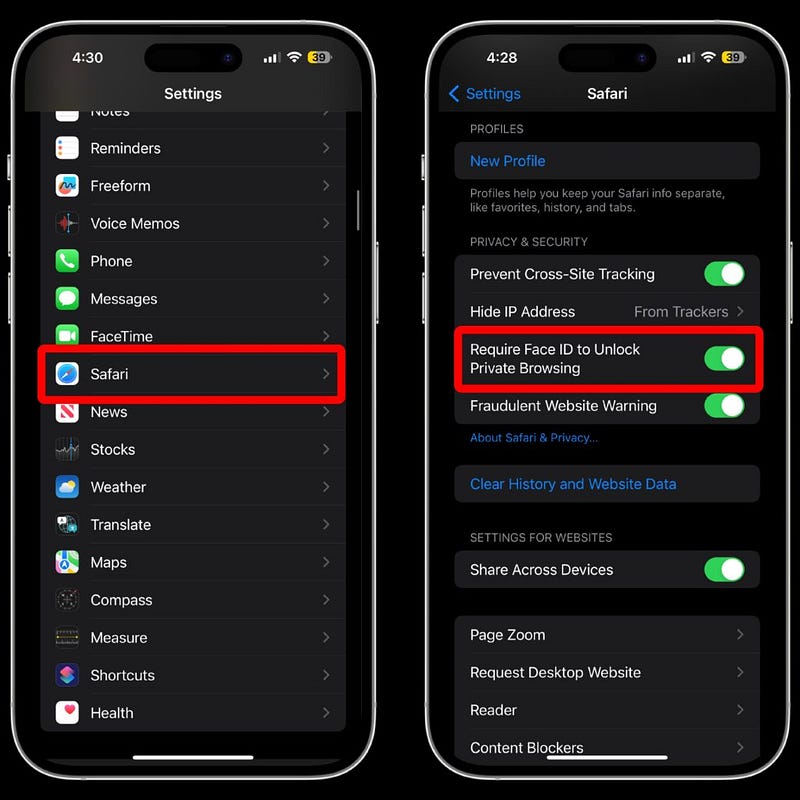
To enable and use this feature, simply enable the ‘Require FaceID to unlock private browsing’ option under the Security & Privacy section on the Safari settings page.
Once you enable this option, whenever you leave Safari with private browsing windows open, they will be automatically locked and can only be accessed again by unlocking them with FaceID.
If this doesn’t give you enough reason to set Safari as the default browser on your iPhone, I don’t know what will! 🤷🏼♂️
#4 Auto pause for GIFs
This might seem like a subtle change, but it contributes more to a better and smoother browsing experience than you might think.
Starting from iOS 17, you will get an option to stop GIFs from automatically playing and can choose which GIFs you actually want to play.
You can utilize this feature by disabling animated images from playing on the web and in other apps from the Motion settings under the Accessibility settings page.
You can also disable videos from auto-playing as well from the same page.
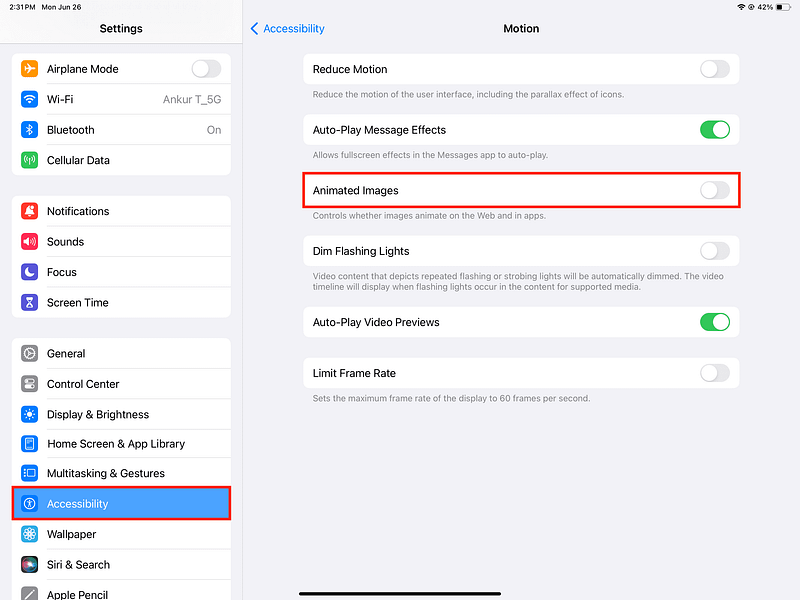
While at the surface, this might just seem like a feature that would benefit individuals with vision sensitivities or specific accessibility needs, it actually has other benefits as well.
For instance, it can reduce distractions by stopping auto-playing GIFs and help you focus better on the content of the website, improve page load times, lower your data usage, and even improve your battery life.
#5 Remove trackers from website links in Private Mode
While Safari, in previous versions of iOS, blocks trackers by default when you are in private browsing mode, there are some sneaky websites that might get away from this by adding a tracker to the actual hyperlink of a website you are visiting.
Apple seems to have found a solution for this, and starting from iOS 17, it will also automatically remove any URL tracking tags when browsing in the private mode in Safari.
Most advertisers embed these tracking tags at the end of a website’s URL to track and identify the source of the traffic to their site, mostly to target users with personalized ads or to determine which source is driving the most traffic to their sites.
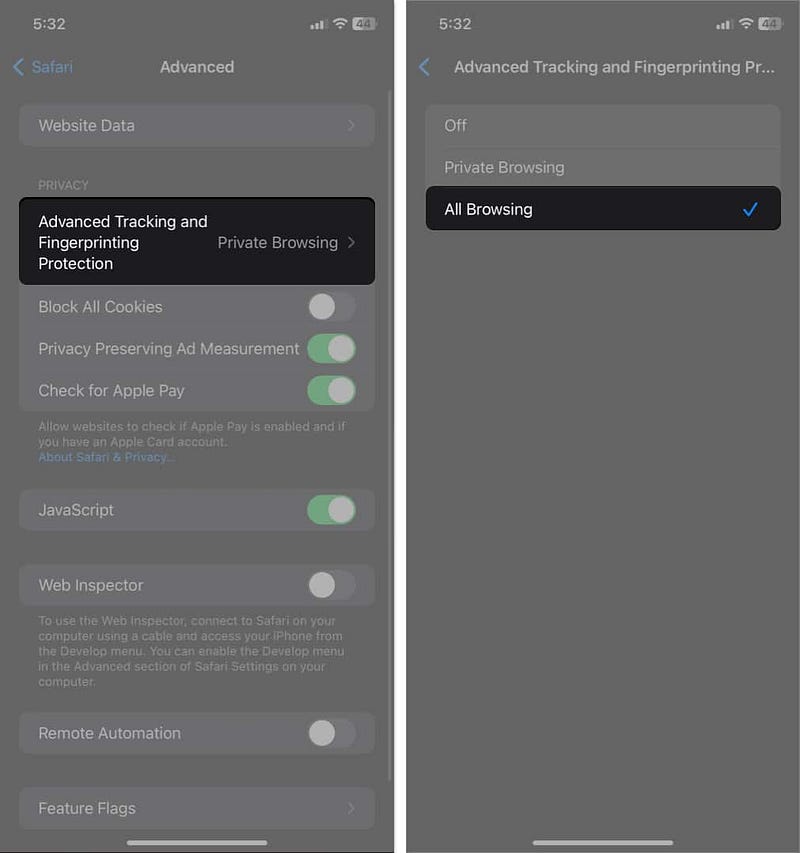
While this might sound like something harmless, it actually has a detrimental effect on your privacy and allows someone to track your online activity without your knowledge.
So, if you are on iOS 17, you no longer have to worry about the big brother following around the web, as long as you are using Safari and are browsing in private mode.
#6 Autofill verification codes received in Mail
For as long as I can remember, your iPhone has always supported autofill for the verification codes you receive in the Messages app to add to the relevant website you got it from automatically.
However, some websites tend to send these verification codes through emails for security reasons, and in those cases, you would have to manually enter the verification code by copying it from the Mail app until now.
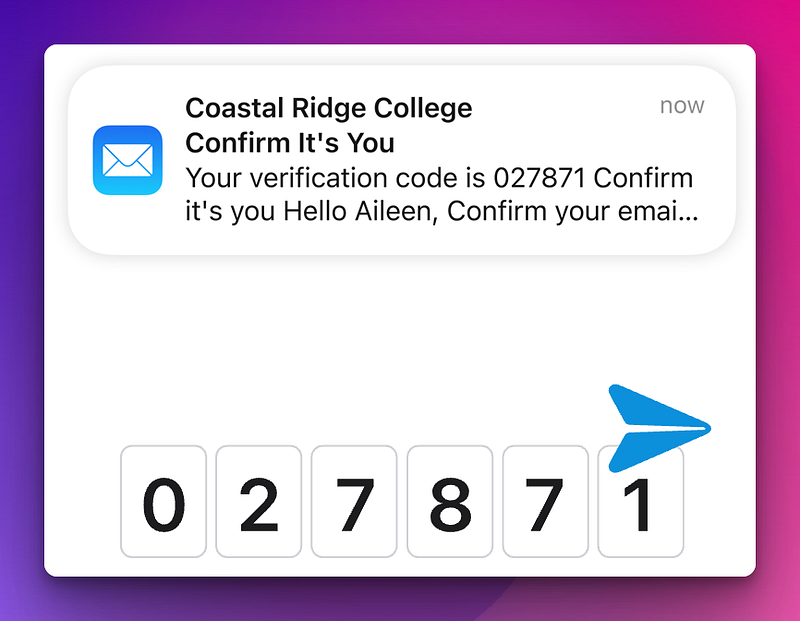
Starting from iOS 17, Safari will now automatically fill out the verification codes you got in the Mail app as well, eliminating the need to switch between apps and manually copy and enter the code.
#7 Strip metadata when uploading images
Another major security and privacy focussed feature added to the Safari browser in the iOS 17 update is that you can choose what metadata you want to include when you upload an image or a video to a website from your Photos app.
You can exclude details such as the location of the image or video and any caption added to the media.
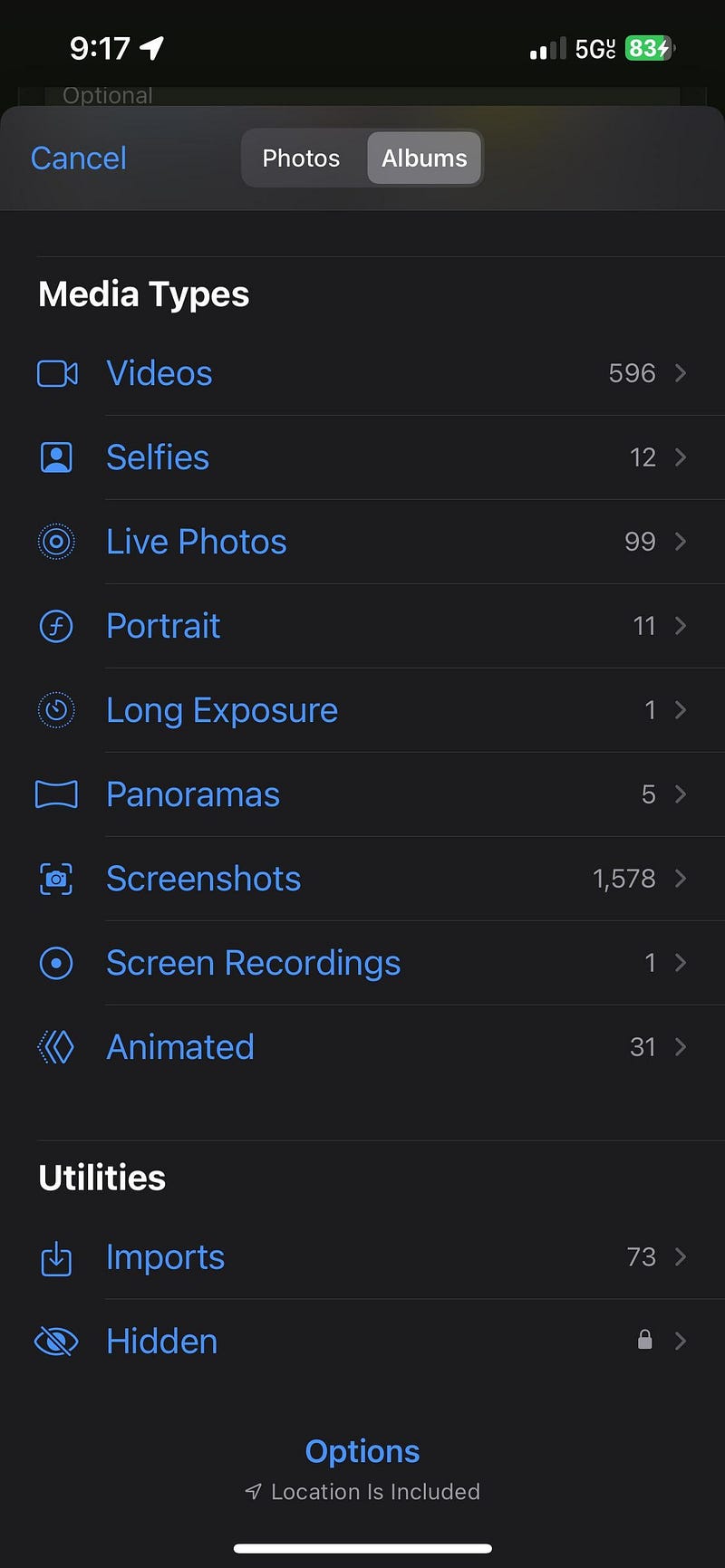
As an added bonus, you can choose the format you want to share the image, including the option to share it in a compatible format with the website you are uploading it.
It is hard to believe that we have been unknowingly offering our location information for free every time we upload an image or a video to websites all this time, isn’t it?
Well, these are the new features I have discovered that have been added to Safari in iOS 17. If you have encountered any other features besides those in this list, please share them with us in the comments section.
If you like discovering and using new apps to enhance your experience on your iPhone and Mac, you should definitely check out Setapp, an app store that has a massive library of 250+ apps, and for just $9.99/month, you can get access to all of these apps, and I would say it is well worth its price.
The best part is if you Sign Up to Setapp using my affiliate link below, you can try out all 250+ apps in Setapp completely for free for 30 days. Use the code ‘usefultech’ to avail this exclusive offer. Also, you would be supporting me directly. So, if you ask me, it is a win-win situation.
Subscribe to Medium and support The Useful Tech!
Join the Medium membership program to access unlimited articles across Medium on topics like Tech, Business, and Productivity, and support The Useful Tech and all of your favorite authors for only $5 a month!