avatarKurtis Pykes

Free AI web copilot to create summaries, insights and extended knowledge, download it at here

3603

Abstract

ill carry out for the next day.</p><p id="df29">Defining a set period to work ensures I don’t spend too long on any given task.</p><p id="394b">Scheduling what I want to do in my calendar ensures I drop everything and focus on one task at a time.</p><p id="a099">This practice leads to me getting more done since I’m forced to focus on one activity during the time it’s been allotted.</p><figure id="03cd"><img src="https://cdn-images-1.readmedium.com/v2/resize:fit:800/1*bPKPf2tXXP5lvirhdXru6w.png"><figcaption><b>My Google Calendar page with boxed schedule;</b> Image by Author.</figcaption></figure><h1 id="ed90">3. Toggl</h1><p id="bb36"><b>Description</b>: <i>Time tracking software.</i></p><p id="f9dc" type="7">“Measure what matters” — John Doerr</p><p id="aebc">The only way to know how much time an activity needs is to track it.</p><p id="e9ec">This allows me to make intelligent decisions about where I put my time to get the best return on investment.</p><p id="968b">For example, the data tells me it takes approximately four hours to plan, write, and edit a Medium article.</p><p id="d26f">Therefore, I know 20 hours is more than enough time to hit my target of four completed articles a week.</p><figure id="e2b5"><img src="https://cdn-images-1.readmedium.com/v2/resize:fit:800/1*74jCzzIEu8q7vnffE1jhkA.png"><figcaption><b>A Toggl Report from My Work Week;</b> Image by Author</figcaption></figure><h1 id="7994">6. Calendly</h1><p id="8a80"><b>Description: </b><i>Scheduling software.</i></p><p id="8e23" type="7">“Automation applied to an inefficient operation will magnify the inefficiency.” — Bill Gates</p><p id="0488">The most frustrating part about setting up a call with a prospect or client is determining one another's availability.</p><p id="979a">I can’t stand the back and forth.</p><p id="23e1">Calendly sets me free from the bondage.</p><p id="5ed3">All I have to do is send a link and inform them, “<i>I’ve attached my calendar; schedule a time that works for you.</i></p><p id="200f">The times I’ve allocated already work for me, and it’s automatically integrated into my Google Calendar when they set a time.</p><p id="d701">It’s a win-win.</p><figure id="a865"><img src="https://cdn-images-1.readmedium.com/v2/resize:fit:800/1*81jkQ9_xF_CMgHDqTKtfag.png"><figcaption><b>My Availability schedule on Calendly;</b> Image by Author.</figcaption></figure><h1 id="18da">5. Google Drive</h1><p id="545a"><b>Description:</b> <i>A file storage and synchronization service.</i></p><p id="a0fa">As a freelancer, you are responsible for filing your taxes, managing contracts with clients and your finances, and a whole leap of other admin tasks.</p><p id="a5fa">I prefer to do all of these activities in Google Drive; this is because I feel it’s more secure, and I get 15GB of free storage — more than enough for me.</p><figure id="88f8"><img src="https://cdn-images-1.readmedium.com/v2/resize:fit:800/1*G2pFVqGdPVkjXQ-jrtTTBQ.png"><figcaption><b>My Google Cloud;</b> Image By Author</figcaption></figure><h1 id="8da4">6. Medium Enhanced Stats</h1><p id="ba11"><b>Description:</b> <i>A chrome extension providing more in-depth Medium stats.</i></p><p id="6587" type="7">“Statistics are like a bikini. What they reveal is interesting. But what they hide is vital.” — Unknown.</p><p id="ad01">I consider writing to be my side hustle.</p><p id="bfea">Medium is the main driver of income I receive unrelated to freelancing, but it does a terrible job of informing you of key performance indicators.</p><p id="d130">The stats page you get with your profile is extremely basic.</p><p

Options

id="b260">Medium Enhance Stats goes into much more depth which helps me track my content metrics daily.</p><p id="aab6">It specifically tells me:</p><ul><li>Fans per reads ratio</li><li>Claps per views ratio</li><li>Claps per fan</li><li>Claps per day</li><li>etc.</li></ul><p id="b73d">This gives me a general understanding of what content resonates with my readers so I can double down in that area.</p><figure id="ddf7"><img src="https://cdn-images-1.readmedium.com/v2/resize:fit:800/1*7DVwo0o7-WXblNhPKMfV0g.png"><figcaption><b>An overview of my Medium enhanced stats;</b> Image by Author.</figcaption></figure><h1 id="c2ac">7. MozBar</h1><p id="16f1"><b>Description: </b><i>A SEO and research chrome extension.</i></p><p id="bdd1">MozBar helps me with my writing.</p><p id="6423">It allows me to do my SEO research while browsing.</p><p id="f1b1">This is the information I then use to optimize my articles for search engines.</p><p id="9565">Note I don’t try to optimize all of my articles for search engines because Medium has a pretty good way of distributing content.</p><p id="6144">With that said, some of my highest-earning articles are the ever-green ones that were optimized for search engines.</p><figure id="c141"><img src="https://cdn-images-1.readmedium.com/v2/resize:fit:800/1*bhUrEj4ztUslyI3q7NXUvg.png"><figcaption><b>Example link metrics of Medium;</b> Image by Author</figcaption></figure><h1 id="2af3">Final thoughts</h1><p id="431d">Tools are created to help you be more efficient and productive.</p><p id="0925">Selecting the right tool isn’t always about what’s the most expensive. Sometimes it’s just about what helps you get the job done seamlessly.</p><p id="229c"><b>Never </b>grow too attached to one tool either…</p><p id="6f6f">As a person seeking to better yourself, you will always be evolving, which means your needs may change.</p><p id="8faa">You may outgrow a tool you’ve come to know so well, but when it’s time to move on, you must let go.</p><p id="bf15"><i>Thanks for reading!</i></p><p id="9a2e"><a href="https://mailchi.mp/d514e77a4c78/freelance-with-kp"><b>Join 500+ digital freelancers for a weekly dose of wisdom on a Wednesday.</b></a><b> Connect with me:</b></p><ul><li><a href="https://twitter.com/KurtisPykes">Twitter</a></li><li><a href="https://www.linkedin.com/in/kurtispykes/">LinkedIn</a></li><li><a href="https://www.instagram.com/kurtispykes/">Instagram</a></li></ul><p id="d22e">If you enjoy reading stories like this and wish to support my writing, consider <a href="https://kurtispykes.medium.com/membership">becoming a Medium member</a>. With a $5 a month commitment, you unlock unlimited access to stories on Medium. If you use <a href="https://kurtispykes.medium.com/membership">my sign-up link</a>, I’ll receive a small commission.</p><p id="f564">Already a member? <a href="https://kurtispykes.medium.com/subscribe">Subscribe</a> to be notified when I publish.</p><div id="dfb5" class="link-block"> <a href="https://kurtispykes.medium.com/subscribe"> <div> <div> <h2>Get an email whenever Kurtis Pykes publishes.</h2> <div><h3>Get an email whenever Kurtis Pykes publishes. By signing up, you will create a Medium account if you don't already have…</h3></div> <div><p>kurtispykes.medium.com</p></div> </div> <div> <div style="background-image: url(https://miro.readmedium.com/v2/resize:fit:320/0*_lDmbPtLVvSgne3D)"></div> </div> </div> </a> </div></article></body>

7 Free Tools I’ve Used To Build A Successful Online Business

The Best Tools For You Don’t Always Have A Price

Photo by kerry rawlinson on Unsplash
Table of Contents
· 1. Notion
· 2. Google Calendar
· 3. Toggl
· 6. Calendly
· 5. Google Drive
· 6. Medium Enhanced Stats
· 7. MozBar
· Final thoughts

Building an online business is hard.

There’s so many people trying to do the same thing; it’s super easy for your products and services to get drowned out by the noise you find on the internet.

Then there’s the struggle of discipline…

No one will tell you what to do and when to do it.

You’re your own boss, and what you say goes.

This is not to put you off from building an online business but to inform you of the reality behind what it takes to build one that thrives.

I’ll be honest…

None of this would have been possible for me if it weren't for the tools I use to manage my life.

They may not directly put money in my pocket, but their presence has simplified my life in some way, shape, or form that has allowed me to put maximum effort into doing the activities that do drive revenue.

In this post, I will share seven of those tools I use for free…

Note: This is not sponsored by any of the products mentioned in this post. I’m only sharing tools I’ve benefitted from actively using.

1. Notion

Description: Freemium productivity and note-taking web application.

“Your professional success and quality of life depend directly on your ability to manage information effectively.” — Tiago Forte, Building A Second Brain

Notion is where I dump my brain.

You can call it my second brain if you will.

Everything I think concerning freelancing, content creation, entrepreneurship, and my personal goals goes into notion.

I do this for two main reasons:

  1. My ability to think clearly is significantly enhanced when it’s not loaded with unnecessary information.
  2. Articulating my thoughts also provides me with a greater sense of clarity and direction.
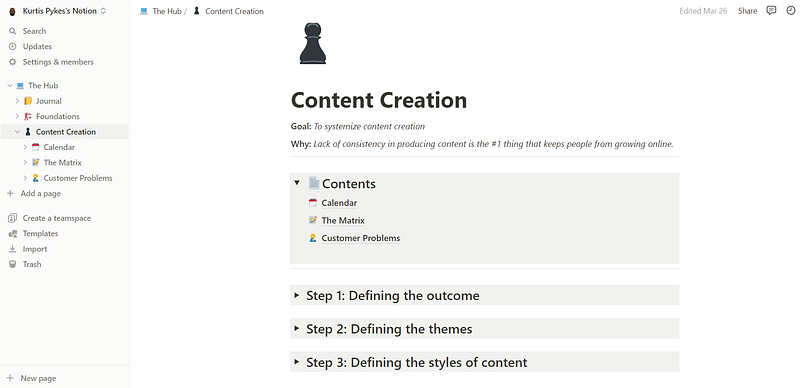
My Notion Page; Image by Author

2. Google Calendar

Description: A time-management and scheduling calendar service.

“If you fail to plan, you plan to fail.” — Benjamin Franklin

Thinking about what to do and when takes up too much brain juice…

Instead, I plan my day from the night before.

I do this by allocating blocks of time toward activities I will carry out for the next day.

Defining a set period to work ensures I don’t spend too long on any given task.

Scheduling what I want to do in my calendar ensures I drop everything and focus on one task at a time.

This practice leads to me getting more done since I’m forced to focus on one activity during the time it’s been allotted.
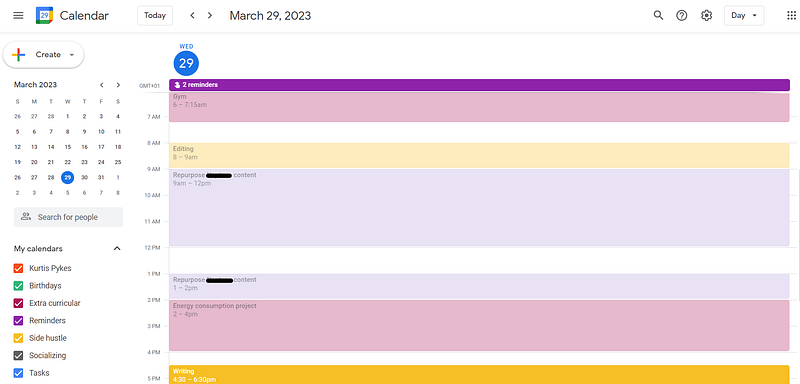
My Google Calendar page with boxed schedule; Image by Author.

3. Toggl

Description: Time tracking software.

“Measure what matters” — John Doerr

The only way to know how much time an activity needs is to track it.

This allows me to make intelligent decisions about where I put my time to get the best return on investment.

For example, the data tells me it takes approximately four hours to plan, write, and edit a Medium article.

Therefore, I know 20 hours is more than enough time to hit my target of four completed articles a week.
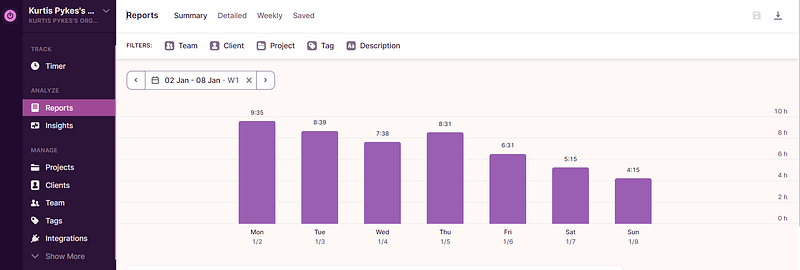
A Toggl Report from My Work Week; Image by Author

6. Calendly

Description: Scheduling software.

“Automation applied to an inefficient operation will magnify the inefficiency.” — Bill Gates

The most frustrating part about setting up a call with a prospect or client is determining one another's availability.

I can’t stand the back and forth.

Calendly sets me free from the bondage.

All I have to do is send a link and inform them, “I’ve attached my calendar; schedule a time that works for you.

The times I’ve allocated already work for me, and it’s automatically integrated into my Google Calendar when they set a time.

It’s a win-win.
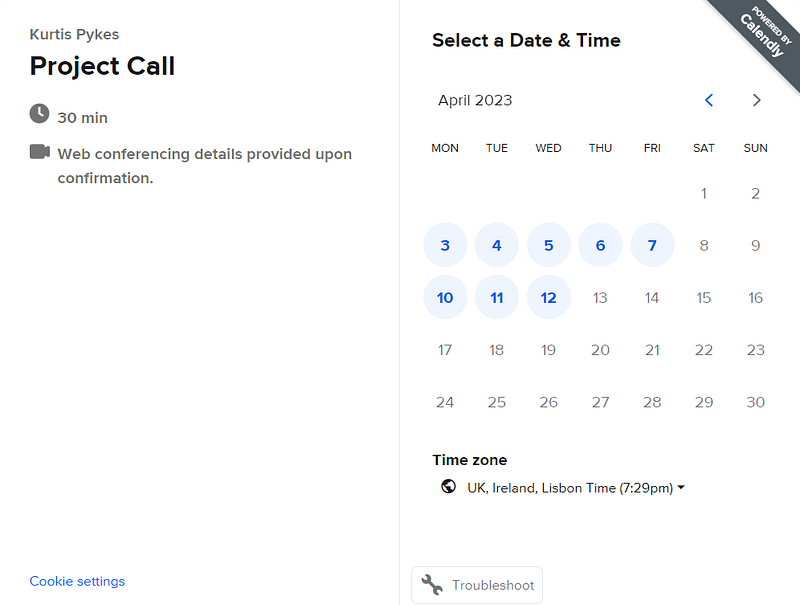
My Availability schedule on Calendly; Image by Author.

5. Google Drive

Description: A file storage and synchronization service.

As a freelancer, you are responsible for filing your taxes, managing contracts with clients and your finances, and a whole leap of other admin tasks.

I prefer to do all of these activities in Google Drive; this is because I feel it’s more secure, and I get 15GB of free storage — more than enough for me.
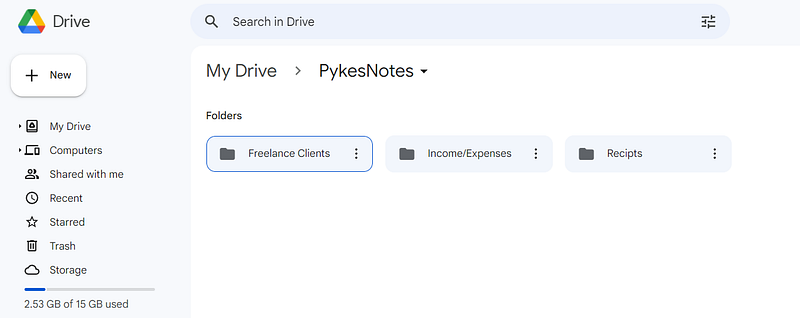
My Google Cloud; Image By Author

6. Medium Enhanced Stats

Description: A chrome extension providing more in-depth Medium stats.

“Statistics are like a bikini. What they reveal is interesting. But what they hide is vital.” — Unknown.

I consider writing to be my side hustle.

Medium is the main driver of income I receive unrelated to freelancing, but it does a terrible job of informing you of key performance indicators.

The stats page you get with your profile is extremely basic.

Medium Enhance Stats goes into much more depth which helps me track my content metrics daily.

It specifically tells me:

  • Fans per reads ratio
  • Claps per views ratio
  • Claps per fan
  • Claps per day
  • etc.

This gives me a general understanding of what content resonates with my readers so I can double down in that area.
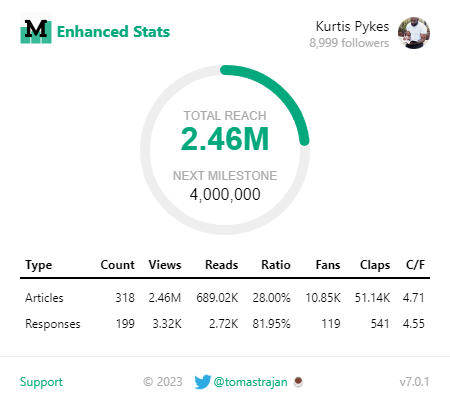
An overview of my Medium enhanced stats; Image by Author.

7. MozBar

Description: A SEO and research chrome extension.

MozBar helps me with my writing.

It allows me to do my SEO research while browsing.

This is the information I then use to optimize my articles for search engines.

Note I don’t try to optimize all of my articles for search engines because Medium has a pretty good way of distributing content.

With that said, some of my highest-earning articles are the ever-green ones that were optimized for search engines.
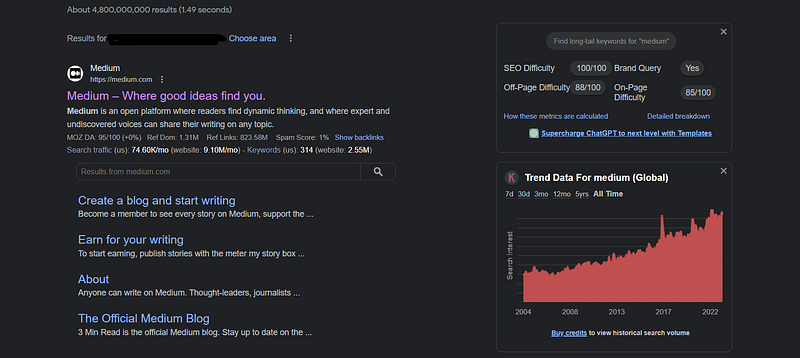
Example link metrics of Medium; Image by Author

Final thoughts

Tools are created to help you be more efficient and productive.

Selecting the right tool isn’t always about what’s the most expensive. Sometimes it’s just about what helps you get the job done seamlessly.

Never grow too attached to one tool either…

As a person seeking to better yourself, you will always be evolving, which means your needs may change.

You may outgrow a tool you’ve come to know so well, but when it’s time to move on, you must let go.

Thanks for reading!

Join 500+ digital freelancers for a weekly dose of wisdom on a Wednesday. Connect with me:

If you enjoy reading stories like this and wish to support my writing, consider becoming a Medium member. With a $5 a month commitment, you unlock unlimited access to stories on Medium. If you use my sign-up link, I’ll receive a small commission.

Already a member? Subscribe to be notified when I publish.

Productivity
Business
Self Improvement
Entrepreneurship
Careers
Recommended from ReadMedium