avatarCaleb

Free AI web copilot to create summaries, insights and extended knowledge, download it at here

3776

Abstract

k servers, it’s an API developer’s Swiss Army Knife. And there’s a VisualStudio Code extension if you prefer.</p><h1 id="badb">7. Docker</h1><p id="e5b7">Last but not least, Docker. With Docker, you can build, share, and run applications in isolated environments called containers. Docker can help developers avoid the notorious “but it works on my machine” problem, as it ensures consistency across multiple development and release cycles.</p><h1 id="f9ae">8. Bonus — AI: A Double-Edged Sword</h1><p id="b7ef">As we delve deeper into the realm of magic, beyond the tangible tools we’ve discussed, we stumble upon the ethereal entities of artificial intelligence: GitHub Copilot and ChatGPT.</p><p id="fbc8">These AI-powered assistants have been hailed as revolutionary, promising to supercharge developers’ workflows and make coding almost… effortless.</p><ul><li><b>GitHub Copilot:</b> This is an AI pair programmer powered by OpenAI’s Codex. Think of it as a helpful familiar perched on your shoulder, suggesting entire lines or blocks of code as you type. It’s been trained on countless public code repositories and claims to understand a multitude of programming languages.</li><li><b>ChatGPT:</b> An offspring of the same mystical AI line, ChatGPT is an interactive chatbot model. While primarily designed for conversation, it can also assist developers by providing code snippets, answering queries, and even brainstorming solutions.</li></ul><p id="5285">However, a word of caution: While these AI entities can provide valuable insights and automate coding to some extent, they are not foolproof. And for beginners, there’s a potential pitfall. By leaning too heavily on AI suggestions, new developers might find themselves in a passive learning state, accepting the machine’s wisdom without truly understanding the underlying logic.</p><p id="2617">For those just starting their journey into the world of development, writing code from scratch, making mistakes, and troubleshooting are pivotal rites of passage. It’s through these hands-on experiences that the foundational skills and understanding are built.</p><p id="ef6d">In summary, while the allure of AI-driven coding is undeniable, it’s essential to use these tools judiciously. Allow them to augment your skills, not overshadow them. And for those just beginning, tread lightly, for as in all things magical, with great power comes great responsibility.</p><p id="1719">These tools, while lesser-known, are the secret weapons behind many efficient developers. They help enforce code quality, maintain consistency, increase efficiency, and make debugging a breeze. As with learning any new tool, there’s an initial learning curve, but the productivity gains are well worth the investment. So, take your coding to the next level with these seven magical artifacts of the developer world. Magic might not be real, but with tools like these, we can come pretty close.</p><p id="57e1">So, to echo Arthur C. Clarke:</p><blockquote id="d13a"><p>Any sufficiently advanced technology (or tool) is indistinguishable from magic.</p></blockquote><p id="c676">Let’s keep creating magic.</p><p id="b60c"><i>Thank you for reading until the end. Please consider following the writer and this publication. Visit <a href="https://stackademic.com/">Stackademic</a> to find out more about how we are democratizing free programming education around the world.</i></p><ol><li><b><i>ESLint:</i></b><i> Start your journey with ESLint at their official documentation <a href="https://eslint.org/docs/user-guide/getting-started">here</a>.</i></li><li><b><i>Prettier: </i></b><i>You can learn more about setting up Prettier in your codebase on their official website <a href="https://prettier.io/docs/en/install.html">here</a>.</i></li>

Options

<li><b><i>GitLens:</i></b><i> Explore the superpowers that GitLens can bring to your VS Code editor <a href="https://marketplace.visualstudio.com/items?itemName=eamodio.gitlens">here</a>.</i></li><li><b><i>Webpack Bundle Analyzer: </i></b><i>To visualize your project with the Webpack Bundle Analyzer, follow this <a href="https://www.npmjs.com/package/webpack-bundle-analyzer">guide</a>.</i></li><li><b><i>JSONView:</i></b><i> To start viewing JSON files in a friendly format, install JSONView from the Chrome Web Store <a href="https://chrome.google.com/webstore/detail/jsonview/chklaanhfefbnpoihckbnefhakgolnmc">here</a>.</i></li><li><b><i>Postman:</i></b><i> To dive into all the features that Postman has to offer, check out their official <a href="https://learning.postman.com/">learning center</a>.</i></li><li><b><i>Docker:</i></b><i> To embark on your journey with Docker, you can start with their getting started guide <a href="https://docs.docker.com/get-started/">here</a>.</i></li><li><a href="https://lab.cccb.org/en/arthur-c-clarke-any-sufficiently-advanced-technology-is-indistinguishable-from-magic/"><i>Any sufficiently advanced technology is indistinguishable from magic.</i></a></li></ol><div id="e201" class="link-block"> <a href="https://medium.com/@calebpr/subscribe"> <div> <div> <h2>Get an email whenever Caleb publishes.</h2> <div><h3>Get an email whenever Caleb publishes. By signing up, you will create a Medium account if you don’t already have one…</h3></div> <div><p>medium.com</p></div> </div> <div> <div style="background-image: url(https://miro.readmedium.com/v2/resize:fit:320/0*pPSGj3ORvqLvuBYg)"></div> </div> </div> </a> </div><p id="91bd"><i>Enjoyed the read? For more on Web Development, JavaScript, Next.js, Cybersecurity, and Blockchain, check out my other articles here:</i></p><div id="7e3a" class="link-block"> <a href="https://readmedium.com/a-roadmap-to-my-medium-writings-fd04e14cffd7"> <div> <div> <h2>A Roadmap to My Medium Writings</h2> <div><h3>undefined</h3></div> <div><p>undefined</p></div> </div> <div> <div style="background-image: url(https://miro.readmedium.com/v2/resize:fit:320/1*FO4S90VIpPA05s9cP-gFPQ.png)"></div> </div> </div> </a> </div><p id="8496"><i>If you have questions or feedback, don’t hesitate to reach out at [email protected] or in the comments section.</i></p><p id="c73a"><i>[Disclosure: Every article I pen is a fusion of my ideas and the supportive capabilities of artificial intelligence. While AI assists in refining and elaborating, the core thoughts and concepts stem from my perspective and knowledge. <a href="https://readmedium.com/how-does-ai-help-me-write-my-articles-5df265d16527">To know more about my creative process, read this article.</a>]</i></p><div id="a005" class="link-block"> <a href="https://readmedium.com/how-does-ai-help-me-write-my-articles-5df265d16527"> <div> <div> <h2>How Does AI Help Me Write My Articles?</h2> <div><h3>The Medium landscape has seen a transformation, with an increasing number of articles appearing to have the distinct…</h3></div> <div><p>medium.com</p></div> </div> <div> <div style="background-image: url(https://miro.readmedium.com/v2/resize:fit:320/1*sURudlO3SS5ntthELFumcg.jpeg)"></div> </div> </div> </a> </div></article></body>

7 Essential Developer Tools and Extensions for Boosting Your Productivity

You might think magic is merely the stuff of children’s fairy tales or David Copperfield’s Las Vegas shows. As developers, though, we know the real magic lies in writing a neat line of code, solving a complex problem, or simply making a webpage load faster. But what if I told you that the real sorcery, the real “abracadabra,” lies in the tools we use every day?

Let’s jump into our magical mystery tour of seven essential developer tools and extensions designed to sprinkle a little enchantment on your coding journey.

1. ESLint

ESLint is a pluggable and configurable linter tool for identifying and reporting on patterns found in ECMAScript/JavaScript code. By keeping your code consistent and catching errors before runtime, ESLint can save you from countless headaches.

For example, consider you accidentally define a variable but never use it, ESLint will flag it as defined but never used.

2. Prettier

Prettier is an opinionated code formatter that enforces a consistent style across your codebase. It integrates with most editors and works out of the box with zero configuration.

Here’s an example of a code snippet before and after Prettier:

Before:

function HelloWorld({greeting="hello", greeted="World", silent=false, onMouseOver,}){

}

After Prettier:

function HelloWorld({ greeting = "hello", greeted = "World", silent = false, onMouseOver }) {}

3. GitLens

GitLens supercharges the Git capabilities of Visual Studio Code. It helps you to visualize code authorship at a glance via Git blame annotations and code lens, explore Git logs, and gain valuable insights via powerful comparison commands.

Imagine being able to step back in time and understand why a piece of code was written the way it was, right from your editor. GitLens is like your very own time machine.

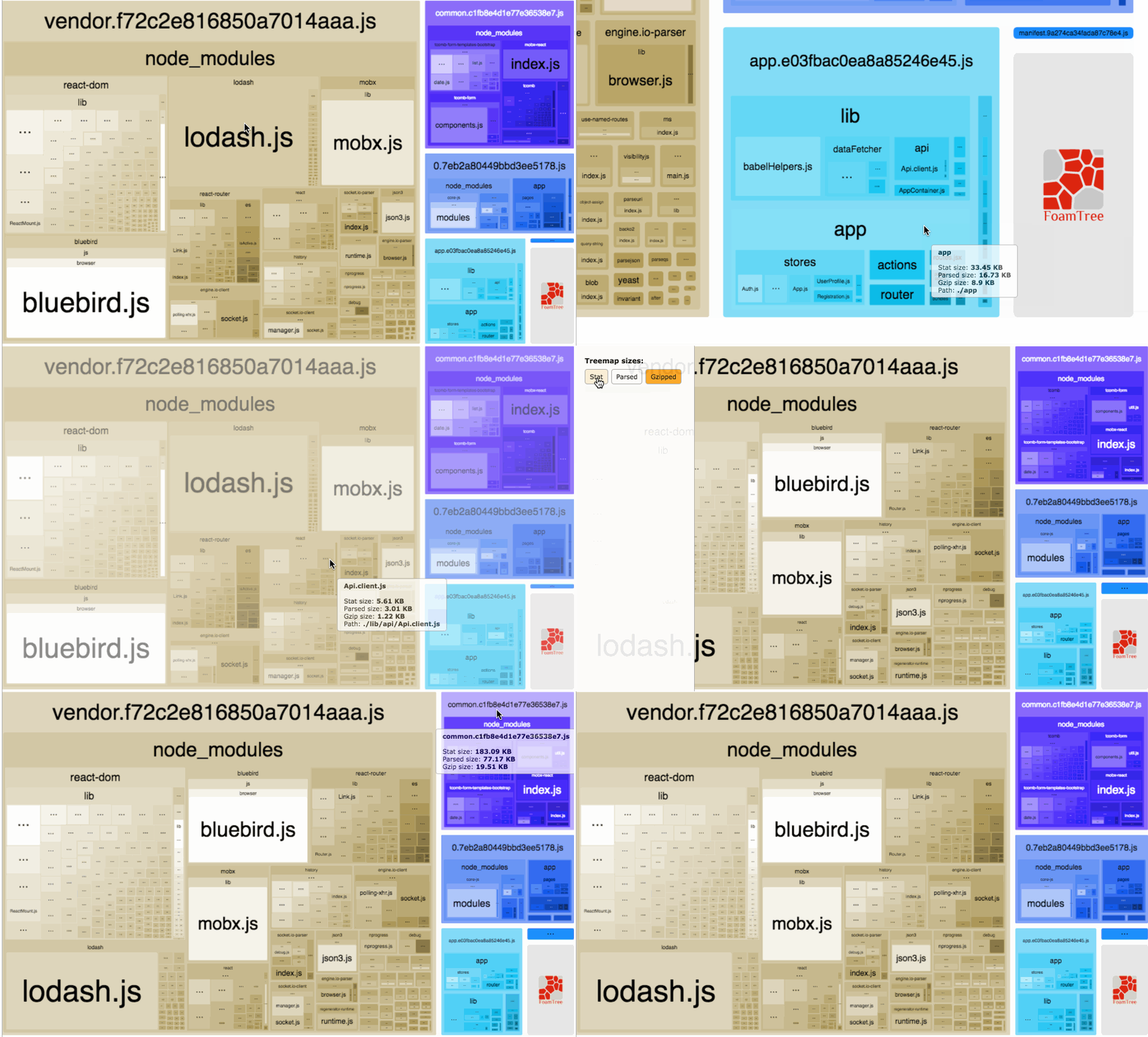
4. Webpack Bundle Analyzer

Webpack Bundle Analyzer is a plugin for Webpack that visualizes the size of your bundles with an interactive zoomable treemap. It’s like having a bird’s eye view of your code, helping you understand where all the weight comes from and keeping your app lean and fast.
5. JSONView

JSONView is a Chrome extension that helps to view JSON documents in the browser. Instead of prompt to download or rendering it as text, it gives a clean, easy-to-read tree view format of any JSON data you’re viewing. It’s a lifesaver when you need to quickly parse JSON data from an API.

6. Postman

While not entirely under the radar, Postman’s capabilities extend way beyond just sending HTTP requests. With features like variable scopes, pre-request scripts, tests, and built-in mock servers, it’s an API developer’s Swiss Army Knife. And there’s a VisualStudio Code extension if you prefer.

7. Docker

Last but not least, Docker. With Docker, you can build, share, and run applications in isolated environments called containers. Docker can help developers avoid the notorious “but it works on my machine” problem, as it ensures consistency across multiple development and release cycles.

8. Bonus — AI: A Double-Edged Sword

As we delve deeper into the realm of magic, beyond the tangible tools we’ve discussed, we stumble upon the ethereal entities of artificial intelligence: GitHub Copilot and ChatGPT.

These AI-powered assistants have been hailed as revolutionary, promising to supercharge developers’ workflows and make coding almost… effortless.

  • GitHub Copilot: This is an AI pair programmer powered by OpenAI’s Codex. Think of it as a helpful familiar perched on your shoulder, suggesting entire lines or blocks of code as you type. It’s been trained on countless public code repositories and claims to understand a multitude of programming languages.
  • ChatGPT: An offspring of the same mystical AI line, ChatGPT is an interactive chatbot model. While primarily designed for conversation, it can also assist developers by providing code snippets, answering queries, and even brainstorming solutions.

However, a word of caution: While these AI entities can provide valuable insights and automate coding to some extent, they are not foolproof. And for beginners, there’s a potential pitfall. By leaning too heavily on AI suggestions, new developers might find themselves in a passive learning state, accepting the machine’s wisdom without truly understanding the underlying logic.

For those just starting their journey into the world of development, writing code from scratch, making mistakes, and troubleshooting are pivotal rites of passage. It’s through these hands-on experiences that the foundational skills and understanding are built.

In summary, while the allure of AI-driven coding is undeniable, it’s essential to use these tools judiciously. Allow them to augment your skills, not overshadow them. And for those just beginning, tread lightly, for as in all things magical, with great power comes great responsibility.

These tools, while lesser-known, are the secret weapons behind many efficient developers. They help enforce code quality, maintain consistency, increase efficiency, and make debugging a breeze. As with learning any new tool, there’s an initial learning curve, but the productivity gains are well worth the investment. So, take your coding to the next level with these seven magical artifacts of the developer world. Magic might not be real, but with tools like these, we can come pretty close.

So, to echo Arthur C. Clarke:

Any sufficiently advanced technology (or tool) is indistinguishable from magic.

Let’s keep creating magic.

Thank you for reading until the end. Please consider following the writer and this publication. Visit Stackademic to find out more about how we are democratizing free programming education around the world.

  1. ESLint: Start your journey with ESLint at their official documentation here.
  2. Prettier: You can learn more about setting up Prettier in your codebase on their official website here.
  3. GitLens: Explore the superpowers that GitLens can bring to your VS Code editor here.
  4. Webpack Bundle Analyzer: To visualize your project with the Webpack Bundle Analyzer, follow this guide.
  5. JSONView: To start viewing JSON files in a friendly format, install JSONView from the Chrome Web Store here.
  6. Postman: To dive into all the features that Postman has to offer, check out their official learning center.
  7. Docker: To embark on your journey with Docker, you can start with their getting started guide here.
  8. Any sufficiently advanced technology is indistinguishable from magic.

Enjoyed the read? For more on Web Development, JavaScript, Next.js, Cybersecurity, and Blockchain, check out my other articles here:

If you have questions or feedback, don’t hesitate to reach out at [email protected] or in the comments section.

[Disclosure: Every article I pen is a fusion of my ideas and the supportive capabilities of artificial intelligence. While AI assists in refining and elaborating, the core thoughts and concepts stem from my perspective and knowledge. To know more about my creative process, read this article.]

Programming
JavaScript
Learning To Code
Technology
AI
Recommended from ReadMedium