
7 Easy Steps To Switch From Pandas to Lightning Fast Polars And Never Return
A cheat sheet of the most common Pandas operations translated into Polars

Time for goodbyes!
Pandas can do anything. Virtually anything. But (and this is an I-wish-a-million-times-it-was-any-other-way but) it lacks speed. Pandas just can't keep up with the pace at which the size and complexity of today's datasets are growing.
Pandas author, Wes McKinney, states that when he wrote Pandas, he had this rule of thumb in mind for his library:
Have 5 to 10 times as much RAM as the size of your dataset.
Maybe you could've snoozed past this rule when the Iris dataset was first introduced, but it is different today. You simply can't load a 100GB dataset (already common in modern times) when your RAM is resolutely stuck at 64 GBs.
Sure, there are great alternatives like Dask. But Dask doesn’t implement new functionality. It stretches existing Pandas syntax over multiple processes (threads) and ignores the underlying performance and memory issues.
It treats Pandas as a black box. Forgive me for saying this, but it is almost like putting lipstick on a pig.
Polars, the focus of our article, was written in Rust from the ground up to fix all the shortcomings of Pandas. In my last article, we've seen how it is already faster than the upcoming Pandas 2.0 with PyArrow backend.
While that article focused on speed advantages, this one focuses more on the syntax and functionality and shows you how to switch from Pandas to Polars in seven easy steps and, maybe, never switch back.
0. Reading/writing data
Even though it is painfully slow, CSV is still one of the most popular file formats to store data. So, let's start with the read_csv function of Polars.
Apart from the apparent speed benefits, it only differs from its Pandas namesake in terms of the number of parameters (Pandas read_csv has 49. Yep, I counted) and syntax.
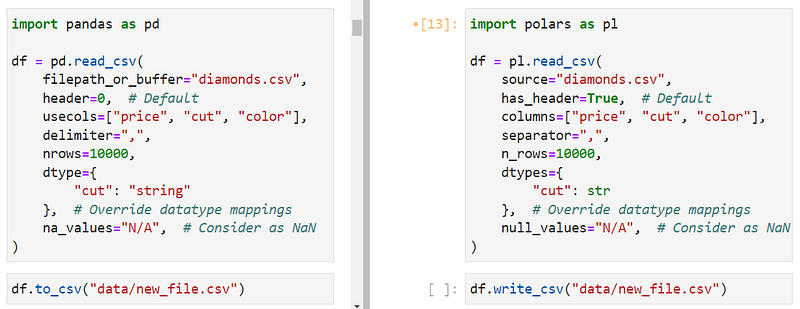
The confusing parameter names shouldn't be a problem as most modern IDEs have tab-completion or pop-up documentation features (Shift + Tab on JupyterLab, thank you 🙏).
If you were unaware, the dtype parameter prevents Pandas from setting automatic datatypes and allows the user to set custom ones like string type for cut or datetime for date-type columns.
You can use the same behavior in Polars with dtypes (mind the ‘s’) though it doesn’t allow the types to be set via strings. You have to provide either Python built-in types or through Polars’, like pl.Boolean, pl.Categorical, pl.DateTime, pl.Int64 or pl.Null for missing values. You can see the complete list by calling dir(pl).
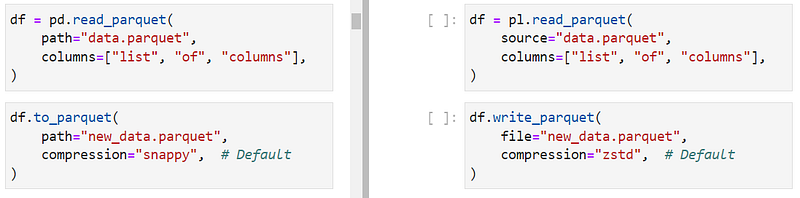
Reading and writing Parquet files, which are much faster and more memory-efficient than CSVs, are also supported in Polars through read_parquet and write_parquet functions.
1. Creating Series and DataFrames
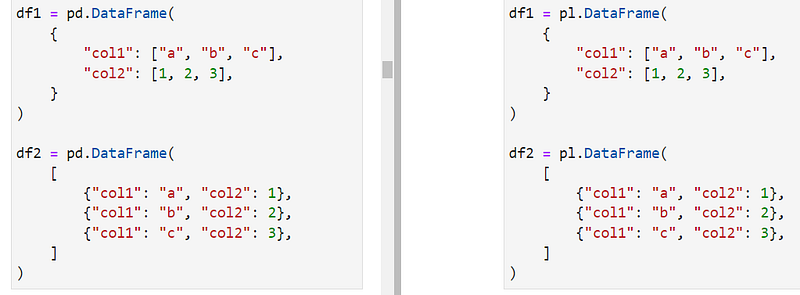
You don't always read data from files. Like in Pandas, you can create DataFrames and Series from scratch, and the syntaxes are almost identical:

There are also many name and behavior-(almost)-identical methods of Polars DataFrames to Pandas. Say hello to:
apply - Apply custom user-defined functions on each row of the DataFramecorr - correlation matrixdescribe - Summary statistics, 5-number summarydrop - Remove columns from a DataFrameexplode - Unpacking the given column to long format (when cells contain multiple values like[1, 2, 3])head,tail andsample(n) - get different views of the DataFrame (top, bottom, random)iter_rows - returns an iterator of DataFrame rows of Python-native valuesmax,mean,median,sum,stdand the usual gang of common math and statistical functions.
and so on. Check out this page of the docs for the full list of DataFrame methods in Polars.
2. Understanding expressions in Polars

At the core of Polars is its query engine, which runs user-defined expressions. The query engine and expressions are two critical components for Polars' blazing fast and, as the Polars user guide puts it, "embarrassingly parallel" performance.
You may be shocked at how closely Polars expressions resemble SQL while keeping firm ties to the familiar Pandas syntax.
Like SQL queries, you can write expressions for:
- Creating new columns from existing ones
- Getting views of the data after some transformation
- Summary statistics
- Processing and cleaning data
- Groupby statements
and so on.
df.filter(pl.col('column') == 'some_value')In the query above, the expression is pl.col('column)' == 'some_value', which, as you guess, filters the DataFrame for rows where column is equal to some_value.
When you run the expression on its own, you won't get a boolean Series as you would in Pandas:
type(pl.col("column") == "some_value")polars.expr.expr.ExprThat's because expressions are only evaluated under contexts. There are three broad contexts in Polars:
- Selecting data — in the
selectcontext, expressions are applied over columns and must produce columns of the same length in the result. This behavior must be familiar from your SQL days. Thefilterfunction is also tied into this context. - Grouping data — in the
groupbycontext, expressions work on groups, and the results may have any length as a group can have many members. - Adding new columns — in this context, expressions are used to create new columns from scratch or existing ones.
Let's see each context in detail.
3. Selecting data
The Pandas' brackets notation gives way to expressions in Polars for selecting columns.
To select a single column, you can use their literal names inside select or use the recommended pl.col function to reference columns.
To select multiple, you can list the column names with commas inside pl.col or as a list of pl.col references inside select. We will see the differences between these syntaxes in a bit.
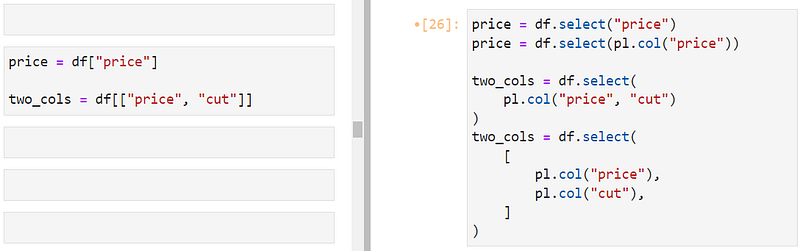
Polars includes certain functionality not fully available in Pandas for selecting data. For example, you can exclude columns in your selection with exclude:
df.select(pl.exclude("price")).head()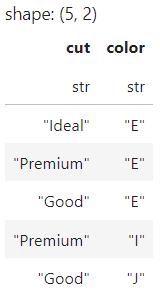
Or use regular expressions between ^ and $ characters. Below, we are choosing all columns that start with the letter c:
df.select(pl.col("^c.+$")).head()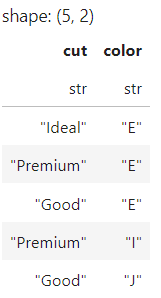
You can also subset the DataFrame based on data type, which might remind you of select_dtypes of Pandas (on the left):
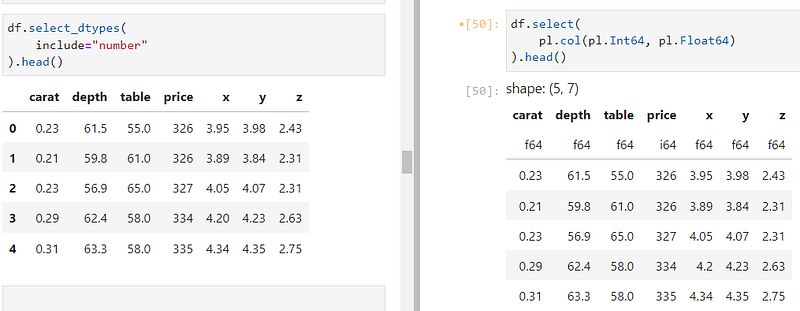
To select all numeric columns, we are using both Int64 and Float64 types inside pl.col.
4. Filtering data
You can use the filter function to subset DataFrames with boolean indexing. For example, using is_between function on a column creates an expression to filter numeric columns within a range.
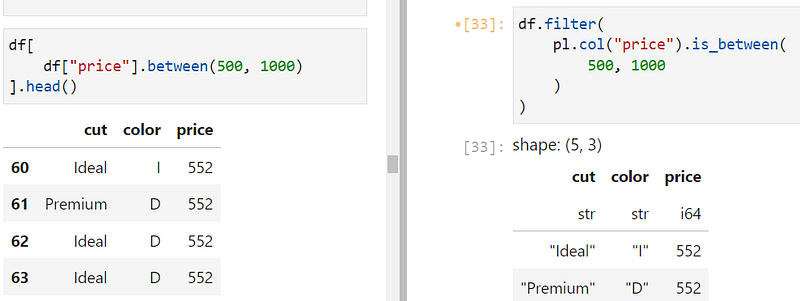
You can combine multiple conditional expressions with the familiar boolean operators & (AND), | (OR). In the example below, we are choosing rows where the color column is either 'E' or 'J' AND the price of diamonds are below 500:
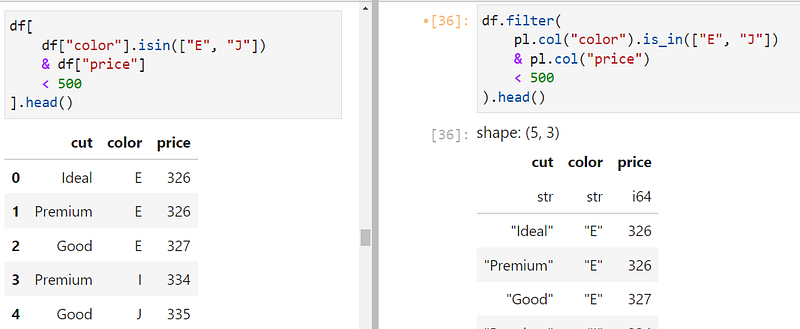
Also, notice how we are using is_in in Polars on the right.
5. Creating new columns
You can create new columns under the with_columns context. In the example below, new_col is defined using pl.col('price') ** 2 and aliased to give the new column a name, just like as keyword in SQL.
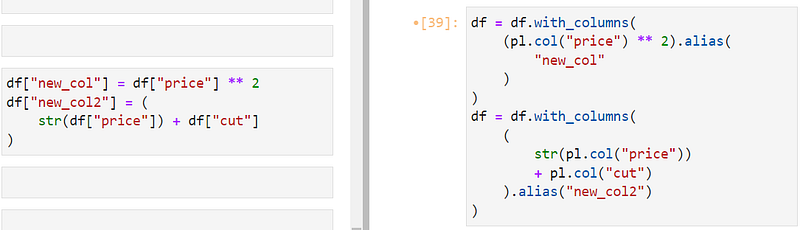
In the second example, we combine two columns (even though it doesn't make sense), demonstrating how integer and string columns can be combined with Polars. You can use any native Python or third-party function and operator on columns referenced with pl.col.
If you want the new column to be inserted into the DataFrame, you have to override the original df variable.
While we are at it, string columns in Polars have the familiar
.strinterface for special text manipulation functions likecontainsorlengths. See the full list here. There are also.cat,.dt and.arr interfaces for specialized categorical, temporal and array functions.
6. Groupby
I don't think we can leave without mentioning Groupby operations:
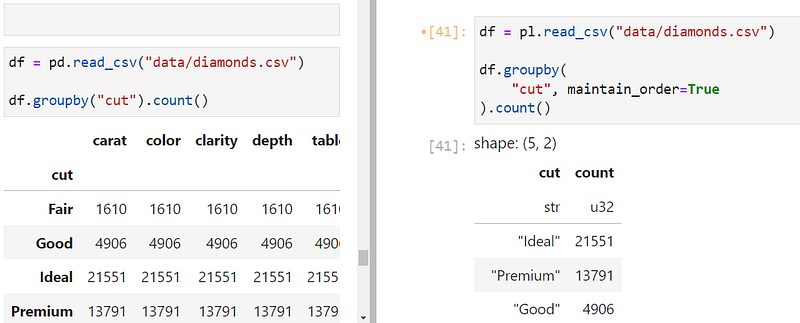
When using the groupby function in Polars, be sure to include maintain_order=True so that groups are not displayed randomly. Also, unlike Pandas, groupby(col_name) expression only works on the given column. To group all columns based on col_name, you have to use an aggregation context. Here is its syntax:
df.groupby(
    "cut", maintain_order=True
).agg(pl.col("*").count())
After the groupby context, you chain the aggregation context and specify which columns the context affects. And chain any function on the result like count.
Here is another example that groups by the diamond cut quality and returns the average numeric value for each group:
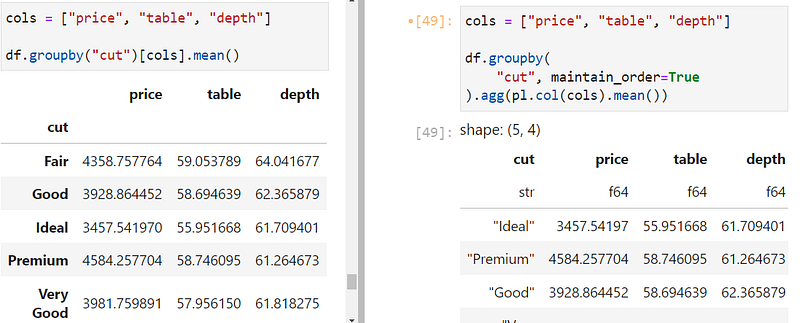
To learn more advanced groupby expressions in Polars, read here.
7. The lazy API in Polars
One of the best features of Polars is its lazy API. In it, queries aren't run line-by-line but processed end-to-end by the query engine.
This is where query optimization and the embarrassingly parallel magic happen. You can turn any expression written in eager mode into the lazy mode with only two keywords:
import polars as pl

df = pl.read_csv("data/diamonds.csv")

query = df.lazy().filter(
    pl.col("cut") == "Ideal"
)

type(query)polars.lazyframe.frame.LazyFrameWhen you add the lazy() function before an expression is chained, the DataFrame becomes a LazyFrame. At this point, the query isn't executed, and you can chain more expressions. Once ready, you call collect() to get the result:
query.collect().head()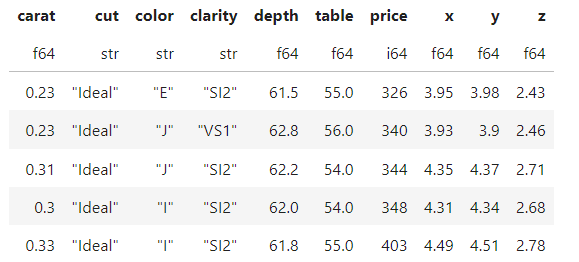
While it is already fast in eager mode, the lazy mode adds exxxtra (yes, triple x) fuel to the query engine.
If you want to make the lazy API your default, you can use scan_* functions when reading data instead of read_*:
df = pl.scan_csv("data/diamonds.csv")

q1 = df.filter(
    pl.col("cut") == "Ideal"
)

q1.collect().head()
This way, you avoid writing the lazy() function every time.
If you are dealing with datasets that are intimidating to your RAM, you can use streaming so that Polars processes your data in batches. This feature is enabled in the lazy API by setting streaming=True inside collect. Find out more about this excellent feature from this page.
Conclusion
Polars might be new (I mean, it is fresh out of its crib), but it is already very popular. In the open-source standards, it is a rock star. Just look at its competitors:
- Pandas, released in 2011, has 37.5k GitHub stars.
- Apache Spark, released in 2014, has 26.8k stars.
- Vaex, released in 2017, has 7.9k GitHub stars.
- Dask, released in 2015, has 10.9k stars.
- Apache Arrow, released in 2016, has 11.4k stars.
In comparison, Polars was released in 2020 and already amassed 15.9k stars, halfway to its long-standing top competitors.
This should give you a rough picture of where the wind is blowing. Things might change when Pandas 2.0 is released, but I think Polars is already giving Pandas a run for its money.
Loved this article and, let’s face it, its bizarre writing style? Imagine having access to dozens more just like it, all written by a brilliant, charming, witty author (that’s me, by the way :).
For only 4.99$ membership, you will get access to not just my stories, but a treasure trove of knowledge from the best and brightest minds on Medium. And if you use my referral link, you will earn my supernova of gratitude and a virtual high-five for supporting my work.


