
7 Concrete Ways to Improve Collaboration in Remote or Distributed Scrum Teams

Co-location was once a pre-requisite for success with agile approaches like Scrum. This is no longer the case: Remote Working, Distributed Teams and Satellite Workers are the New Normal.
For better or worse, the world of work is globalised: we are no longer obliged to work in the same location as our colleagues. We can be WFH, digital nomads and remote first, if we want to be…
This post is about ways to improve your vernacular on this topic and help your team to become more ‘remote aware.’ This will help you and your team to succeed with Scrum.
Distributed and Remote are the ‘New Normal’
The 13th Version One State of Agile Survey in Spring 2019 revealed some pretty remarkable numbers to illustrate that the majority of respondents worked with remote or distributed teams:
“78% of respondents said their organization practices agile with team members distributed (not co-located). 68% of respondents said their organization practices agile with multiple co-located teams, collaborating across geographic boundaries.” (13th Version One State of Agile Report)
In addition to international organisations, the rise and prevalence of flexible working policies mean it is now quite normal for our team-mates to work from home from time to time.
Is Co-Location a Pre-Requisite for Success with Scrum?
No it isn’t. The Scrum Guide does not mention co-location remote working or distributed teams.
In the guide, there is advice for Scrum Teams to be right-sized, cross-functional and self-organising, but Schwaber and Sutherland remain quiet on the topic of co-location. In theory, distributed and remote Scrum teams could be just as successful as fully co-located teams. At the very least, Scrum does not require co-location.
Speaking the Language of Remote Working
In my own experience as a Scrum Master, and given the increasing prevalence of remote and distributed teams, learning the vernacular of remote working is becoming more important if teams want to be successful with Scrum.
In January 2019, James Shore interviewed Bjorn Freeman-Benson on this topic. Freeman-Benson is an experienced software development leader and has led different kinds of teams during his career, from fully co-located to fully distributed. In his experience with remote and distributed teams:
“communication friction didn’t necessarily affect productivity, but it did affect creativity.” (Source: James Shore)
Scrum Teams work on complex adaptive problems: any friction in the creative or communication process needs to be relentlessly improved.
This post is about some ways to do that. There are 7 ideas here. Let’s get started.
1. Build Face-to-Face Interactions into the routine
“The most efficient and effective method of conveying information to and within a development team is face-to-face conversation.” (Agile Manifesto Principle)
People collaborate better when we have face-to-face interactions.
If you can’t get in the same physical space and meet your remote or distributed team-mates face to face at least once a year, you might want to investigate what is impeding that. This is a pre-requisite to building relationships and relationships are the glue of collaboration.
If you are not already doing this, then you need to find a way to make time for it and factor the costs for it into your normal way of working. Once a year might be enough. Once a quarter would be better though, right?
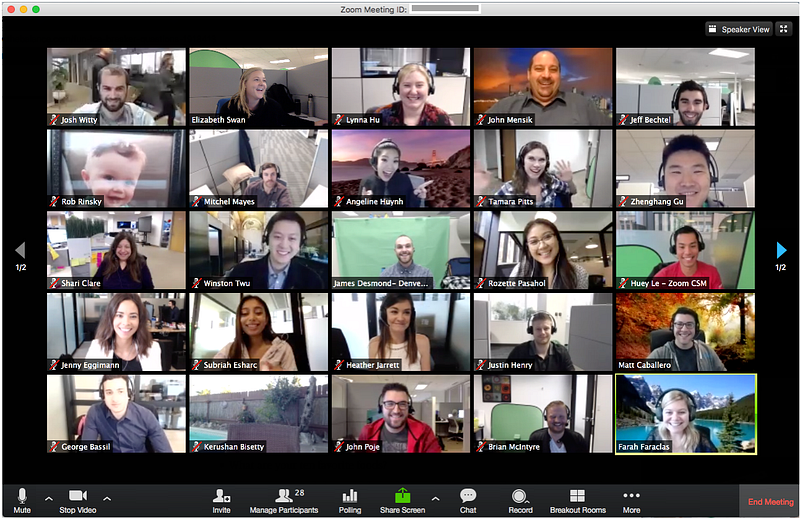
Here’s another point: this travel doesn’t always have to be in the same direction. We can always negotiate on how frequently we each travel to other locations.
Another way of adding face-to-face interactions in communication with distributed people: switch your cameras on from time to time.
I get it, people don’t want to do it for every meeting and nor should this be mandatory, but for example in a retrospective, face to face communication is very important. Also, in one to one conversations, we should make it a habit.
2. Learn the language that describes your situation
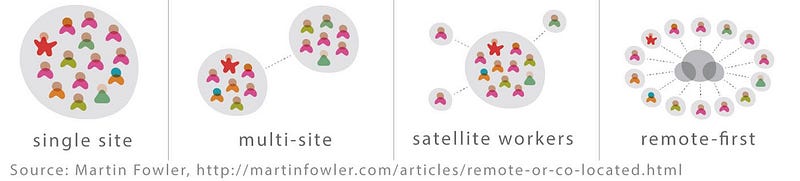
Martin Fowler’s excellent 2015 post on Remote Working is a great guide to the different setups possible when we look at distributed ways of working.
Distributed teams are in more than one location. Fully remote teams work together in one location, but require collaboration with another. Satellite workers are individuals in locations separate to the majority of a team.
Using Fowler’s language, my own working situation is multi-site with satellite workers. This is a hybrid of the second and third images above. Complex!
(As an aside, I always felt the term ‘remote’ was a little pejorative. Remote is relative… remember: you are remote too)
3. Quantify the Cost of Remote ‘Faff’
There is a wonderful word to describe the toil we all go through to set up a conference call or AV equipment: faff. It describes those lost minutes at the start of every call with people in other locations. Sound issues. WiFi strength. Background noise. Passwords. Lack of response…
For those who are ready and waiting for the meeting to start, this is ‘faff’.
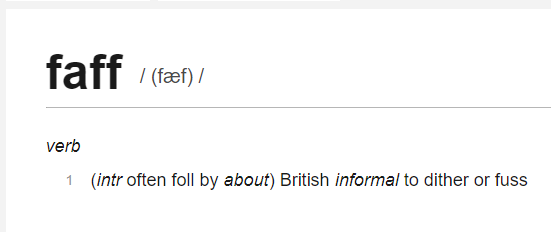
At a recent meet-up on Remote Working and Remote Facilitation, I heard a great suggestion to get investment in tools to support remote working: build a business case based on the Cost of Faff (CoF).
I would estimate around five minutes is typically lost at the start of many meetings just to get started. Just to get to agenda point one…
Can you quantify the cost of that time for your team in a Sprint? How about in a year? Now multiply that cost by the number of Scrum Teams in your organisation. It adds up pretty fast.

Now factor in the individual micro-frictions caused by small delays with people on the team simply getting in touch.
Co-located folks can just turn around to a colleague and ask a question. Distributed team members rely much more on effective use of tools and technology. Creative discussions be delayed or entirely lost simply because a message is not seen: can we quantify the cost of delay there too?
By estimating the cost of this, it should become relatively straight-forward to justify a small investment in tools to support remote working. At the very least, we should be able to experiment at a team level.
Happily, some suggested experiments are the next point!
4. Experiment on a Small Scale
For Creativity and Collaboration, you might want to consider online whiteboarding tools. Miro is awesome. http://www.miro.com
There are also peripherals that can help with drawing and real time design. Are your teams holding back on suggesting we use these ‘toys’ at risk of being considered frivolous? On the other hand, if a design peripheral costs $100 and could speed up creative thinking in your team, isn’t that an experiment worth trying?
For 1–2–1 communication, experiments with enabling video should definitely be considered.
For Team Meetings, you should consider experiments to boost WiFi quality so that camera can be enabled without derailing everything. On the tooling side, I’m looking at Zoom for ad-hoc and scheduled calls, and Slack for IM. Miro is great for collaboration.
For team meetings where more than one person is in a different location, why not go fully remote? That puts everyone on an equal footing at least.
How about larger scale events? If you have a company wide meeting and 100 people are not in the same room, how would you facilitate their participation? I believe we consistently underestimate the effort involved in this.

5. Remote Working Agreements
A Team Remote Working Agreement should answer the following questions:
- How do we contact each other on a 1–2–1 basis?
- How do we schedule conversations?
- How do we indicate availability to communicate (or a lack of it?)
- How do we collaborate on design activities?
- How do we do team meetings?
- How do we handle Kanban boards (digital or physical)?
6. Develop Your Remote Facilitation Skills
Remote Facilitation is a whole book in itself. Scrum Masters in particular need to be mindful of remote participants in all meetings, and how to include them on an equal footing. By becoming more remote aware with the ideas above, your remote facilitation skills will naturally develop.
7. Start a Remote Working Community of Practice
Communities of practice are a great way to tackle cross-cutting concerns like remote and distributed working tools and techniques.
If your organisation has folks in distributed or remote teams or in satellite locations, they will have great insights on this topic. Involve them in experiments and brainstorming solutions to these issues and you will tap into a whole range of ideas.
Even by demonstrating commitment to incrementally improve in this area, you will be better involving people in remote locations.
I hope you can tap into some of the ideas in this post to enable more effective interactions between the individuals in your Scrum Teams, regardless of where in the world they are.
And this will help you and your team be more successful with Scrum.



