
7 Best UI Graphics Tools For Python Developers With Starter Codes
The seven best UI graphics tools available in Python for developing cool user interface technologies
Python is such a versatile language that it can accomplish most tasks that different programming languages are meant to achieve. Although Python is used more frequently for applications and projects related to artificial intelligence, data science, data visualizations, data analytics, and other similar operations, we are by no means limited to these boundaries. You can perform web development, build games, construct numerous GUI tools, and so much more as a developer with Python.
The Graphics User Interface (GUI) built with Python are extremely useful for a variety of projects. You can use these technologies to make your projects unique, aesthetically pleasing, visually appealing, highly interactive environment, and provide users with other similar wonderful features. You can even use these tools for developing artificial intelligence projects with machine learning or deep learning models to make them stand out from other such project ideas.
In this article, we will objectively look at some of the best GUI tools that are available to the developers with the help of Python coding. We will explore seven such libraries that give users the best aim of implementing their desired GUI applications. To follow along with this article and implement all your codes accordingly, I would suggest the viewers pick the editor of their favorite choice and get their hands dirty with some code.
I am personally using Visual Studio Code for my programming, but you can feel free to use your preferred choices. However, if you are having a tough time choosing the best option for you, the following link on the list of over ten awesome Python editors with pros and cons will help you decide the best-suited editor for your coding.
1. Tkinter:
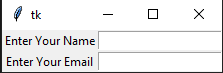
The Tkinter package that is available in Python is one of the best tools for most graphics-related applications. It is available for both Windows and Linux platforms with a simple pip installation. The Tkinter library allows the users to develop high-quality graphic interfaces with the help of the numerous options it contains.
Tkinter has various options for providing a valuable structure to your desired application with the help of frames, buttons, and check buttons for creating interactive selections, displaying information with labels, draw data and statistical information with Canvas, and so much more. The starter code The code reference for the following starter code is taken from this link. Check it out for more advanced codes and further information.
Starter Code:
from tkinter import *master = Tk()Label(master, text='Enter Your Name').grid(row=0)
Label(master, text='Enter Your Email').grid(row=1)e1 = Entry(master)
e2 = Entry(master)e1.grid(row=0, column=1)
e2.grid(row=1, column=1)mainloop()In the following code block shown above, we are creating a simple program with which we are creating two simple grid boxes that will register the name and email of a particular individual. Feel free to explore the library further and construct more complex projects.
2. PyQt5:
The Qt is a set of cross-platform C++ libraries that implement high-level APIs for accessing many aspects of modern desktop and mobile systems. The Qt platform offers developers a wide variety of unique solutions to develop numerous applications and solve a humungous array of complex tasks. With a simple pip install command, you can start with the following GUI application.
The development of GUI applications with the help of Python and the PyQt5 library is rather simple and can be completed with a few lines of code. Below is a code block demonstration of how we can generate interactive GUI interfaces with this package.
Starter Code:
import sys
from PyQt5.QtCore import *
from PyQt5.QtGui import *
from PyQt5.QtWidgets import *
def window():
app = QApplication(sys.argv)
w = QWidget()
b = QLabel(w)
b.setText("Welcome!")
w.setGeometry(100,100,200,50)
b.move(50,20)
w.setWindowTitle("PyQt5")
w.show()
sys.exit(app.exec_())if __name__ == '__main__':
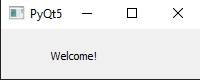
window()The following code block will display a graphical user interface with a Welcome command. Further advanced widgets and elements can be added to make the code more appealing. The code reference for the following starter code is taken from this link. Check it out for more advanced codes and further information.
3. Pygame:
Unlike the two previously discussed GUI tools, Pygame is slightly different in comparison. With Pygame, you can construct and build Python games from scratch. While their performance and graphics might not be the best in comparison to some other programming languages like C# and some elite game designing software’s it is still a great way for most beginners to get started due to the ease of coding procedures.
One of the main advantages of working with Pygame, apart from building games, is the GUI capabilities that it has. It allows the developers to create a GUI interface with which numerous actions can be controlled. There are a lot of options available in Pygame to develop entities (like widgets or icons) in the user interface and control some desirable actions. Below is some starter code to get more experience with this module for developing more projects from scratch.
Starter Code:
#imports the pygame library module
import pygame
# initilize the pygame module
pygame.init()# Setting your screen size with a tuple of the screen width and screen height
display_screen = pygame.display.set_mode((800,600))# Setting a random caption title for your pygame graphical window.
pygame.display.set_caption("pygame test")# Update your screen when required
pygame.display.update()# quit the pygame initialization and module
pygame.quit()# End the program
quit()In the above coding section, we have discussed some starter code for creating a graphical window of a particular size with Pygame. There are tons more applications and games that you can build with the help of this Python library. To understand five reasons why every developer should invest their time developing a game with Python and AI, check out one of my previous articles on five reasons why you should do so.
4. Open-CV:

Open-CV is one of the best libraries for computer vision tasks and image processing. This library offers fantastic utility for performing a wide array of tasks. With the help of Open-CV, it is also possible to construct GUI applications as well with a customizable interface. While the options that are available for Open for GUI are not as vast as the other options, there is a vast amount of technical stuff you can build.
Save the above image in your desktop (or download it from the mentioned link) as Lena, and ensure that is in a .png format. Below is the starter code for some of the actions that you can perform with the Open-CV library.
Starter Code:
# Importing the opencv module
import cv2
# Read The Image
image = cv2.imread("lena.png")# Frame Title with the image to be displayed
cv2.imshow("Picture", image)
cv2.waitKey(0)# Convert the color image to grayscale image
gray = cv2.cvtColor(image, cv2.COLOR_BGR2GRAY)# Display Grayscale image
cv2.imshow("Gray Picture", gray)
cv2.waitKey(0)The above starter code explores the basic implementation of some of the functionalities of the Open-CV library. If you are interested to dwell further into exploring more about this particular library and understand more about computer vision, check out one of my previous articles that covers the complete beginner’s guide on getting started with Open-CV from the following link provided below.
5. Kivy:
Another fantastic open-source package that allows users to create some high-quality graphical user interfaces is Kivy. It can be installed with the pip installation for Python. It offers developers one of the best business-friendly cross-development platforms with the addition of GPU accelerated support for most applications.
Apart from providing these fabulous features, it also allows the developers to implement their codes across devices like the Raspberry Pi. Below is a simple code block demonstrating a working example of Kivy in action. The code reference for the following starter code is taken from this link. Check it out for more advanced codes and further information.
Starter Code:
from kivy.app import App
from kivy.uix.widget import Widget
from kivy.graphics import Color, Ellipse


class MyPaintWidget(Widget):

    def on_touch_down(self, touch):
        with self.canvas:
            Color(1, 1, 0)
            d = 30.
            Ellipse(pos=(touch.x - d / 2, touch.y - d / 2), size=(d, d))


class MyPaintApp(App):

    def build(self):
        return MyPaintWidget()


if __name__ == '__main__':
    MyPaintApp().run()
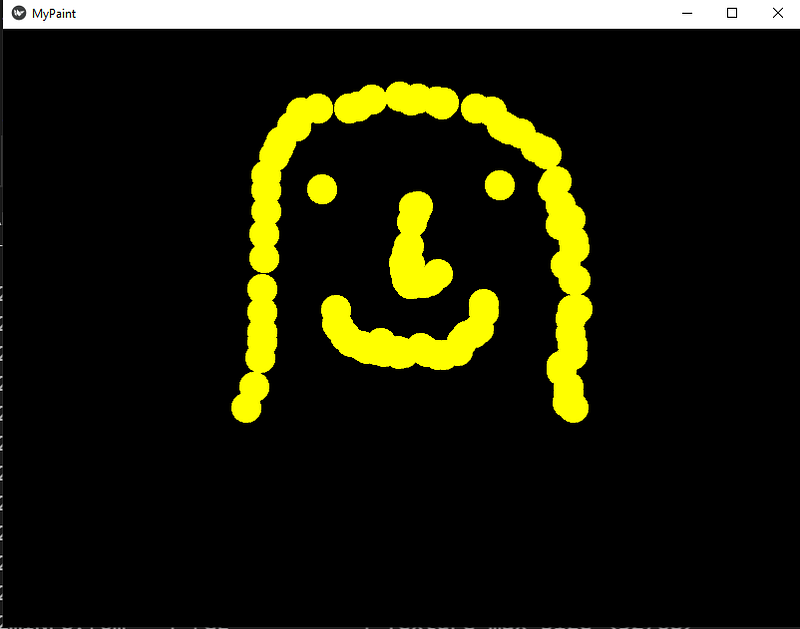
The GUI interface designed in the above code block will help you to draw an ellipse-shaped object with the help of each click. I decided to draw a random face with the following option, and this function is noticeable in the above image posted. Have fun and make your own innovative designs, as well as check out further options for the Kivy package.
6. wxPython:
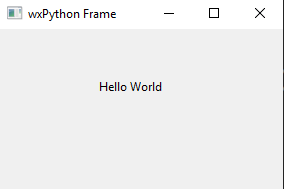
The wxPython is easy to install with a simple pip install command and can be used to create amazing GUI frameworks. They are basically an extension of the wrapper class in Python for creating numerous applications. It is a great cross-platform alternative for some of the other GUI options mentioned in this article to create some simple projects.
This package is extremely easy to use and creates GUI interfaces. Due to its simplicity, we can create windows, panels, labels, and other features with ease. The below code block is a representation of how you can construct a GUI to display some labels. The code reference for the following starter code is taken from this link. Check it out for more advanced codes and further information.
Starter Code:
import wx

app = wx.App()
window = wx.Frame(None, title = "wxPython Frame", size = (300,200))

panel = wx.Panel(window)
label = wx.StaticText(panel, label = "Hello World", pos = (100,50))

window.Show(True)
app.MainLoop()
7. Flask / Django:

While the other sections in this article have extensively covered the working procedures of different types of Graphical User Interfaces (GUI) on the desktop, we will look at two web development tools for constructing web-based GUI’s. Flask and Django are two Python libraries that will help to perform numerous actions and operations to create a web-based GUI network.
In the below section, we have discussed some simple code blocks for both Flask and Django. These codes are just for beginners to explore the high amount of potential they have. The Flask code will enable you to run the desired print command in the local desktop host that is provided to you after you run the program. In future articles, we will explore both Flask and Django separately and understood how to code machine learning projects with them as well. Some applications are AI video surveillance on the web.
Starter Code for Flask:
from flask import Flask, render_template, redirect, url_forapp = Flask(__name__)@app.route("/")
@app.route("/home")
def home():
# return "<h1>HELLO!</h1>This is the home page "
return render_template("home.html") # Render the home.html in the templates folderif __name__ == "__main__":
app.run(debug=True) #Debugable mode
# app.run() # Normal RunStarter Code for Django:
from django.http import HttpResponsedef index(request):
return HttpResponse('Hello, World!')Conclusion:

“Design is everywhere. From the dress you’re wearing to the smartphone you’re holding, it’s design.” — Samadara Ginige
The Python programming language offers enormous potential to create fabulous graphics user interface tools for performing a variety of projects. Apart from adding visual and aesthetic appeal to numerous tasks, it also allows the developers to make their projects highly interactive. These GUI tools are highly effective for most practical applications, including software designing projects, AI projects, machine learning or deep learning models, web development, and so much more.
In this article, we explored some fantastic Graphics User Interface tools with which developers can implement some unique features. With the help of Python and the spectacular library options it offers the developers, we can construct a classic GUI framework with Tkinter or PyQt5. We can also construct more unique GUIs with Pygame or Open-CV for games and computer vision applications, respectively. Kivy and wxPython are two other fantastic desktop GUI options. Finally, we also explored Flask and Django, with which we can construct web-based GUI’s.
While we have explored seven fantastic GUI tools and libraries that are available in Python for the development of unique applications, there are still so many fabulous tools out there to explore. If you have any other cool suggestions, make sure to comment them down below.
If you have any queries related to the various points stated in this article, then feel free to let me know in the comments below. I will try to get back to you with a response as soon as possible.
Check out some of my other articles that you might enjoy reading!
Thank you all for sticking on till the end. I hope all of you enjoyed reading the article. Wish you all a wonderful day!


.png)