
7 Apps I Am Going to Use Every Day on My iPhone in 2024
2024 Is Going to Be Lit; I Can Feel It
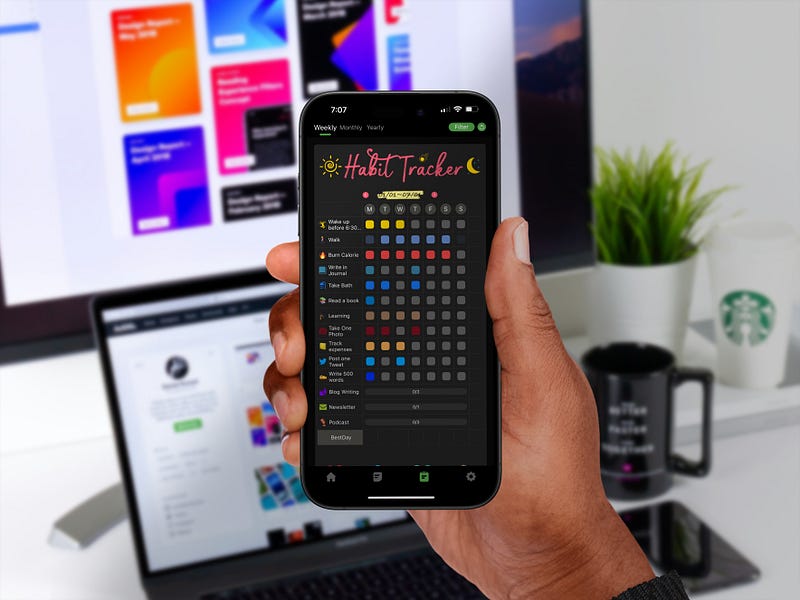
I want 2024 to be one of my best years yet, and where better to start planning that than on a device I use for multiple hours daily?
So, naturally, I selected seven unique apps on my iPhone that I will use every day in 2024 to help me lead a smarter, healthier, and more organized year and life.
Each one of the apps in this list serves as a helpful tool to help me become better, and in this post, I am going to share these apps with you and let you in on how I plan to use them to improve my life, and you can do it too!
Let’s get started!
Blinkist
Blinkist is a revolutionary app I discovered recently, and I immediately bought their annual subscription as I want to get as much value as possible from the app.
The app has a vast library of non-fiction books across various genres, summarising them into concise 15-minute reads or listens. Blinkist is an invaluable personal development and learning source ideal for busy, curious individuals.
By neatly summarising popular books into bite-sized posts or audiobooks, Blinkist provides accessible and digestible content that fits into any schedule.
Why I Will Use Blinkist Every Day
I want every day in 2024 to be a new opportunity to learn and grow, and Blinkist fits perfectly into this philosophy. One of my resolutions for this year is to commit to continuous learning and self-improvement, and Blinkist is the app I chose to make this a reality.
It allows me to consume the critical insights from a couple of different books during my commute, lunch break, or even when I am going for a walk.
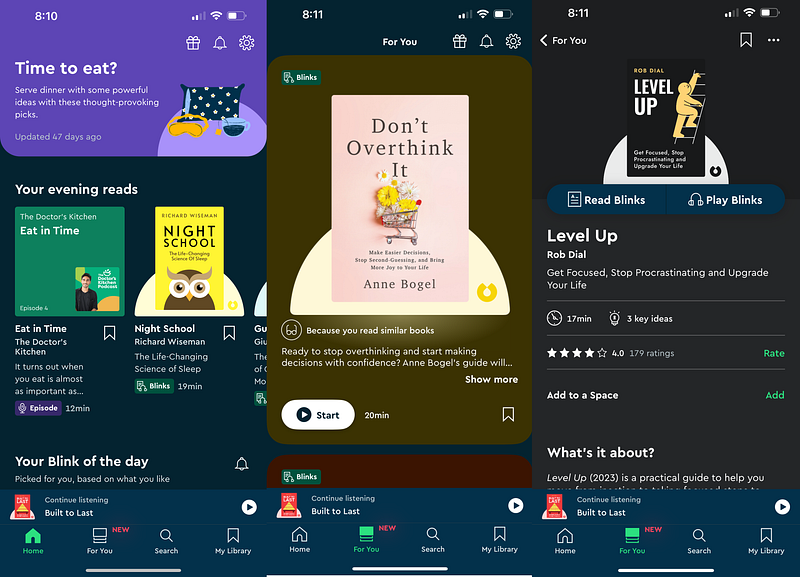
I am interested in various topics like business, personal health, history, psychology, and science, and I keep finding new and exciting books and audiobooks to explore these topics in Blinkist.
By integrating this app into my daily routine, I actively invest in a more knowledgeable, well-rounded self. And as a bonus, I would soon be much more intelligent than my friends.
How can you use Blinkist to enhance your life?
If you want to add Blinkist to your daily routine, you can start by identifying areas of interest or aspects of your life you wish to enhance.
It could be anything from boosting your productivity to exploring psychological theories; I am sure Blinkist has the content for you. Allocate a small portion of your day, during your commute or before going to bed, to engage with a blink.
You can even take this one step ahead by challenging yourself to apply one learning each day to your personal or work life. By consistently using Blinkist, you will accumulate more knowledge and develop the habit of learning and self-improvement.
Budget
Budget, an app that is pretty straightforward with its name, is a user-friendly app designed to help you take control of your finances with ease.
I recently discovered this app and have been using it to track my spending, create budgets, and get a comprehensive financial health overview with weekly and monthly breakdowns.
The app has an intuitive interface and presents your spending in visually appealing charts to soften the below. You can also add your income to the app to understand where your money comes from and goes.
Why I Will Use Budget Every Day
I have never been overly cautious or mindful of my spending, and I have known for a while that that is not the right way to live. Unfortunately, I never got around to fixing this, and I want that to change in 2024.
I plan to use the Budget app every day in 2024 to maintain a clear and real-time overview of my finances. I have some big plans for this year, and following financial mindfulness is more crucial than ever. This app serves as a daily reminder of that.
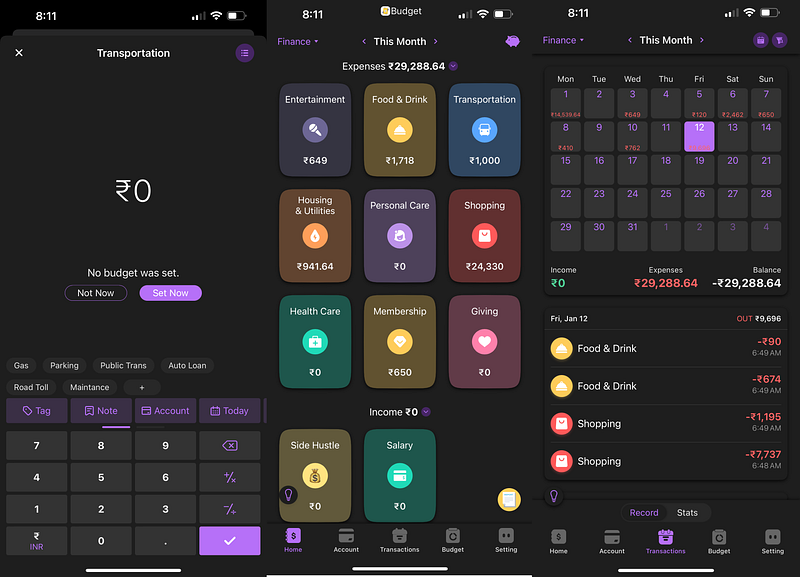
By regularly entering my expenses and monitoring my budget for different categories like entertainment, subscriptions, food, transportation, etc, I will stay on top of my spending, avoid unnecessary purchases, and save more effectively.
The Budget app has a neat visual representation of different spending categories, and it helped me identify that I have been spending way too much on subscriptions. I finally got around to canceling a few I no longer actively used.
I aim to transform my financial awareness and discipline in 2024 with the help of this app and hope to make more informed money decisions.
How can you use Budget to enhance your life?
If you are also looking to bring financial peace of mind into your life, the Budget app is a great place to start.
It is easier to reduce your spending and follow a strict budget if you work towards a goal, like saving money for a vacation or buying a new PS5.
As you consistently use the app daily, you will better understand your finances and how to control them. You can easily categorize your expenses, see where most of your money is going, and fix problems that are not too late.
Before you know it, you have saved enough money to buy yourself that brand-new standing desk or to go to one of the hundred concerts that will happen this year.
Craft
Craft is one of the best-looking note-taking apps for Apple devices, and it has a very well-organized interface to create and manage any kind of notes or documentation you want.
The app can act as a simple note-taking app to quickly jot down your thoughts and ideas and as a robust document and project management tool with powerful features like multiple workspaces, folders, AI assistant, workspace-wide searching, and more.
The aesthetically pleasing interface of Craft makes it enjoyable to create notes and go through them on any of your Apple devices.
Why I Will Use Craft Every Day
While the Notes app remains my primary go-to for quickly jotting down my thoughts, plans, and ideas, I needed an app with more robust features to manage some serious things like organizing my Podcast and YouTube video scripts, planning my upcoming projects, etc.
Craft satisfied this requirement, and I have been using it on my Mac as my primary professional note-taking and document management tool of choice for a while now. Even though the app is excellent on all my devices, my Mac is the best choice to create and edit documents.
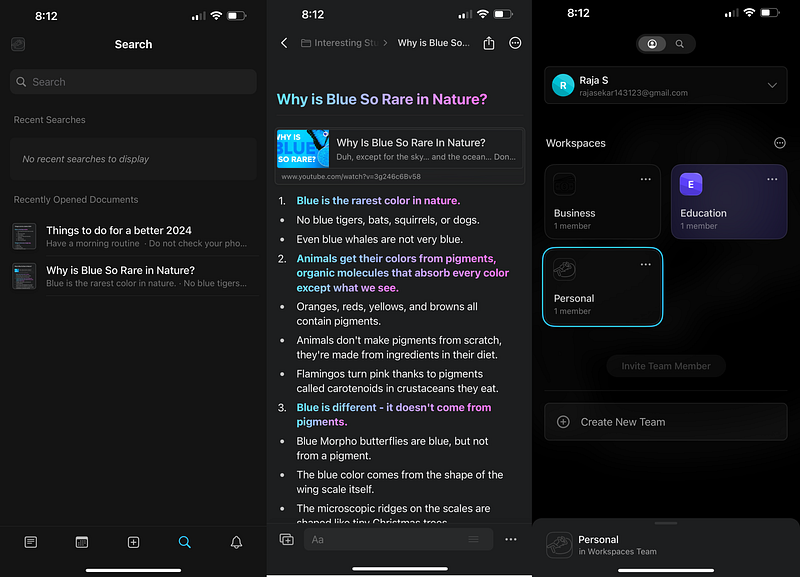
I would use Craft on my iPhone daily to review my notes and documents to plan for the day.
I have fully taken advantage of Craft's organizational features and have created separate workspaces to manage various aspects of my life like personal, business, side hustles, work, etc.
Whenever I add any new information to my Craft workspace from my Mac, be it my thoughts on an article I recently read, a video I watched, the outline of my next Podcast episode, or the plan for an upcoming project, I always go through it regularly from my iPhone while on the go.
This helps me stay on top of things in my life and significantly enhances my workflow and thought process daily.
How can you use Craft to enhance your life?
Suppose you are looking for a single app that is not only good-looking and intuitive but can also effortlessly handle your endless list of documents, notes, and projects. In that case, Craft is a strong contender to become your primary note-taking app.
The beauty of Craft is that you can use it for simple tasks like creating a to-do list for the day or use its powerful features to create nested, interconnected documents and folders filled with all the relevant information about any aspect of your work or personal life.
If you consistently start using Craft every day on your iPhone, it can help you enhance your workflow, better organize your work, track personal goals, and manage complex projects.
Besides helping you stay organized, Craft can inspire you to be more productive and creative. With the help of Craft AI assistant, you can quickly go through your lengthy documents, create outlines or summaries, and even write notes from scratch, helping you to spend more time bringing your ideas to life and less time trying to write them down.
Deepstash
Like Blinkist curates and summarises some of the best books, Deepstash curates high-quality information and ideas from any source, including articles, books, podcasts, videos, and online courses.
It is a user-curated platform where anyone can create a deep stream about exciting content. You can follow top curators and people who share insights on the topics you are interested in to get the most value out of the app.
All the ideas and information in Deepstash are neatly organized into easily digestible stashes across several topics, focusing on personal development, productivity, leadership, and more.
Why I Will Use Deepstash Every Day
Initially, I only used Deepstash daily to maintain my daily streak. Still, the app slowly pulled me in with its useful stashes that helped me learn many things that I never knew could be useful for my life.
I love the user-curated content in the app that saves me time by bringing together insightful ideas and actionable tips from various fields that I would never have thought to explore and read about, let alone know they exist.
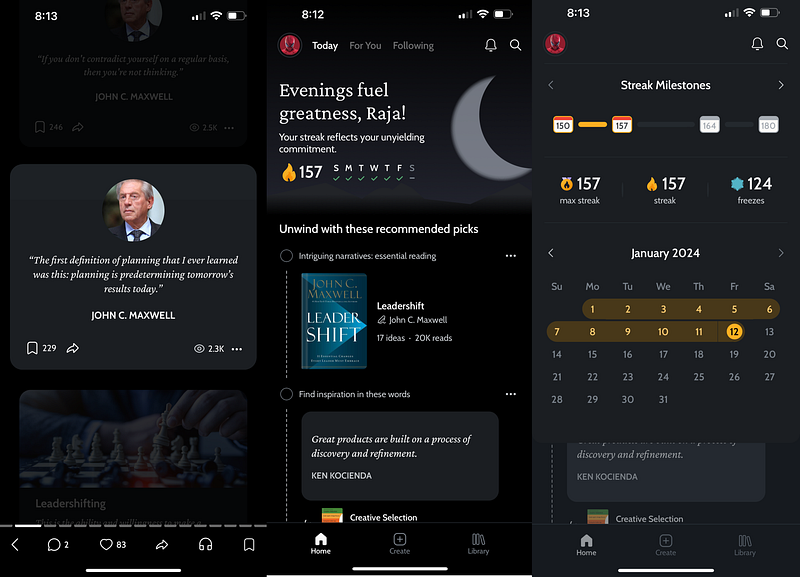
In the several weeks I have used the app, I have learned about diverse topics, from learning productivity hacks and understanding intuitive psychological concepts to getting inspired by leadership and motivational stories.
Using Deepstash every day is just an easy and effective way to ensure that by just spending a few minutes every day, you can improve a lot about yourself.
How can you use Deepstash to enhance your life?
If one of your goals in 2024 is to enrich various aspects of your life through continuous learning, begin your journey with Deepstash by exploring topics that resonate with your personal and professional needs.
All you have to do is maintain the streak and make it a daily habit to read through a few stashes whenever you get time. It is also essential to read and reflect on how these ideas apply to your personal or professional life and take notes on the insights you want to implement or explore further.
You can also save the ideas you like and share them with your friends, and over time, you will build a personalized repository of knowledge that broadens your perspective and empowers you to make informed decisions.
Trust me when I say that if you are consistent with this habit, 2024 will be one of your most productive, creative, and happiest years.
Habit
One of the first things I wanted to start doing in 2024 is to build and be consistent with good habits. I was looking for apps on my iPhone that could help me achieve that, and after trying out a few, I finally landed on an app called Habit; that is the name; that was precisely what I was looking for to help me achieve my goal.
Habit is a dynamic habit-tracking app designed to help you build and maintain positive life habits. The app has a simple interface that makes creating and tracking your daily habits engaging.
You can create customizable habit plans according to the habit you want to form, like reading a book, going for a walk, or even the ones you want to stop, like quitting smoking, and the app provides you with an intuitive way to track your progress and sends you motivational reminders to help you stay on track.
Why I Will Use Habit Every Day
I plan to use Habit daily to help my journey towards self-improvement and consistency. I often start many things but give up on them after only a few weeks, and I could improve at consistency.
So, in 2024, I finally decided to end this, and my focus is on cultivating habits that contribute to my overall well-being and professional growth.
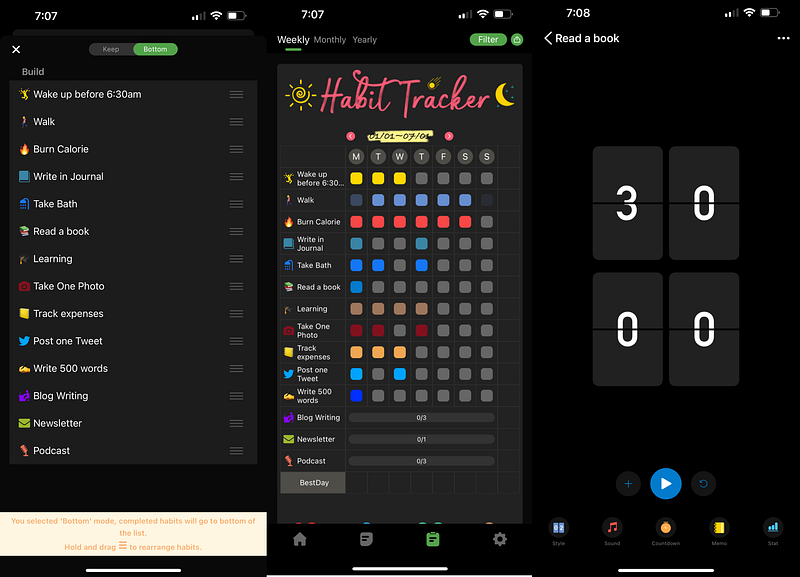
With Habit, I have created habits for everything I would like to do in 2024, like blogging consistently, reading more books, being active on social media, etc. I have configured the app to send me friendly daily reminders to ensure I follow through.
I am a sucker for maintaining streaks and visualizing my progress. I chose Habit over other apps because it offered precisely these features without any additional bells and whistles, helping me stay motivated and accountable.
How can you use Habit to enhance your life?
If you want to form good habits in 2024, you can start by identifying habits you want to develop or even those you want to break. It could be a small daily task like watering plants or a step towards a larger goal like saving enough money to buy a house. Habit can help you break it down into achievable daily actions.
You can customize the habit tracking to suit your lifestyle by configuring when and how often you need to be reminded and the frequency you would like to make a particular habit.
To stay motivated, you can use the visual progress tracker to visualize your weekly, monthly, or yearly progress. By incorporating Habit into your daily routine, you can gradually see the transformation in your life.
Journal
I have tried several journaling apps and methods over the years, and I was confident that I could only get into that habit once Apple released the Apple Journal app in the recent iOS 17.2.
The Apple Journal app revolutionizes the traditional journaling experience and has fixed the main thing that prevented me from getting into this habit: not knowing what to write about.
The app integrates AI-driven prompts and suggestions by intelligently curating information from your photos, videos, audio recordings, the songs you listened to, the people you spoke to, the places you visited, etc., to help you create rich and meaningful journal entries about your life.
Why I Will Use Journal Every Day
I plan to use Apple Journal daily as a tool for self-reflection, mindfulness, and a history book of sorts. It is easy to overlook the small yet significant moments in our busy lives. Apple Journal’s personalized prompts have helped me reflect on those moments and turn them into cherished memories.
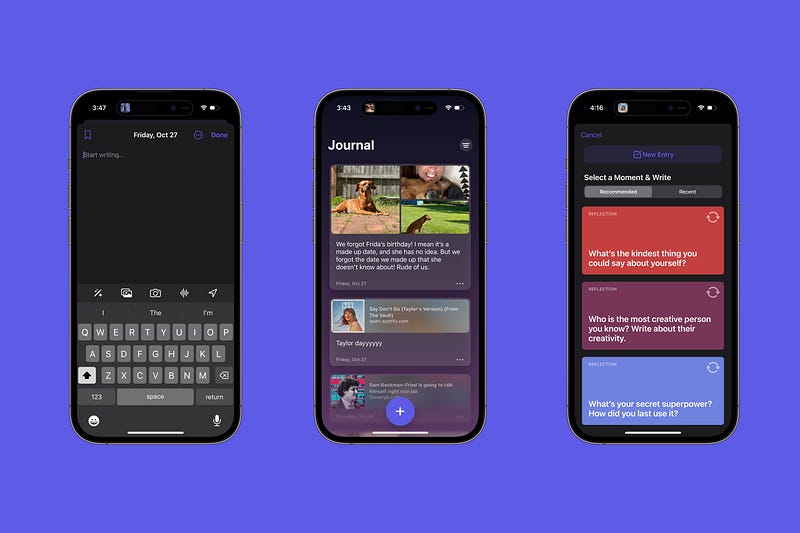
Journaling also has a lot of side benefits, like improving your mental well-being, forming a habit of introspection, and helping with your personal growth.
The app’s ability to suggest reflections based on my daily activities and experiences and give me relevant prompts to write about ensures that my journaling is meaningful and that I never suffer from writer’s block.
How can you use Journal to enhance your life?
You, too, can utilize Apple Journal to add depth and mindfulness to your daily routine by using the app to capture and reflect on the moments that matter in your life.
If you are stuck like me and don’t know what to write about, that is what the AI is there for, and the AI-driven prompts can guide you and help you understand your experiences more deeply.
By forming a journaling habit, you can increase your self-awareness, get a greater sense of gratitude, and improve your mental clarity. And the last I checked, all these are perfect things to have in your life.
As I mentioned earlier, chances are you are creating a valuable personal archive that tells your unique story, enriched with photos, videos, and other details about life, which could one day even be quoted in your biography.
Waterminder
Waterminder is a user-friendly app designed to help you maintain optimal hydration throughout the day. The app can be configured to provide personalized reminders based on your body weight and lifestyle.
The app lets you track your daily water intake with a simple interface and customizable settings, helping you easily reach your hydration goals. The app’s intuitive design and various characters and animations make staying hydrated engaging.
Why I Will Use Waterminder Every Day
In 2024, one of my commitments to myself is to stay healthy and active, and it involves staying adequately hydrated, which is why I plan to use Waterminder every day to track my water intake.
I am very forgetful, and if not for the app, I could quickly get by the entire day without ever realizing I had not even consumed one cup of water.
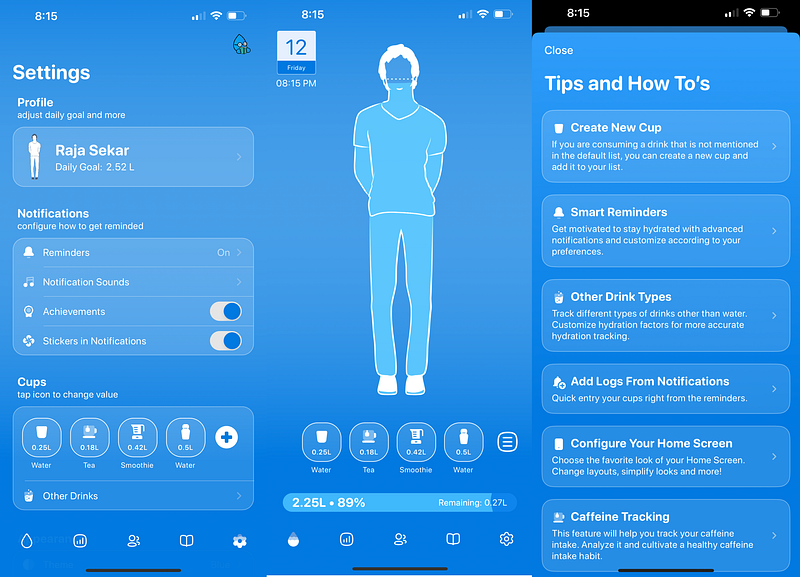
The Waterminder app reminds me to drink water regularly, helping me avoid dehydration and its adverse effects on my energy levels, brain function, and overall physical health.
By consistently tracking my water intake, I will have a clear view of my hydration patterns and can adjust as needed to meet my daily water goals. This daily practice will not only improve my overall physical health but can also help improve my focus, productivity, and mood.
How can you use Journal to enhance your life?
You can use the Waterminder app to ensure you get the hydration your body needs for optimal functioning. To begin with, set your personal hydration goal based on your individual needs, and configure the app to remind you throughout the day to take a water break.
This consistent reminder will help you develop the habit of regular water intake, which needs to be addressed in our busy lives. You can also track your progress and adjust the reminders or goals.
Using the Waterminder app, you can improve your health, energy levels, and even your cognitive function; all you have to do is drink water. It is a simple yet impactful step towards a healthier lifestyle, and Waterminder makes achieving this goal more accessible and enjoyable every day.
As I journey through 2024, integrating these handpicked apps into my daily routine will help me undergo a transformative experience. Reading this article will help you achieve the same.
From fueling your intellectual curiosity to keeping your finances in check and forming healthy habits, each app in this list plays a pivotal role in enhancing different aspects of your life.
Let’s make 2024 a year of remarkable change, one app, one day at a time.
If you like discovering and adding new and useful apps to your workflow, you will definitely like Setapp, a Mac and iPhone App Store with over 200+ premium apps that can be used with a single monthly fee of $9.99.
You can use my affiliate link below to try Setapp for free for 30 days! Use the code ‘usefultech’ to avail of the offer.
With the link below, you can use 200+ premium apps from Setapp for free for 30 days and also directly support my blog!


