Writers: Do You Know What Google is Saying About You and Your Stories?
Here’s a quick and easy way to tell them exactly what they should know.

Writers need to know what Google has to say about them and their stories, no matter what writing platform you write on.
The following information can help Medium writers specifically, be in control of what shows up in Google search results.
Standard Google Search Results
The standard Google search results for your story, or anything else will typically only display a brief sentence or two. Let’s stop for a minute and talk about how that works.
If you were to do a word count of my opening paragraph above, you would find it contains roughly 240 characters. I say roughly because that includes the spaces, and I like to err on the side of caution.
There is a valid point to me mentioning this information. Since Google typically displays just the first 140–155 characters in the search results, the entire opening sentence above will not be seen.
In fact, here are the words that Google cut off after the word “help”, so the remaining sentence WILL NOT be displayed in the search results:
“… Medium writers specifically, be in control of what shows up in Google search results.”
As you can see, these words would have been more persuasive in helping viewers decide on whether to visit this page and read this story.
So what are your options if you want Google to display the most relevant information about your stories?
Should you make sure all your opening paragraphs (or at least the first sentence or two) have as much relevant information as you can squeeze into 155 characters?
Controlling What Google Says
In answer to the above questions: Your two options are simple and they’re both quick and easy to execute.
Yes, you can get the job done by always monitoring your opening paragraph. Consider it as a “kicker” paragraph to all your stories.
Allow the sole function of the kicker paragraph to be a way for you to take control of what Google is saying about your stories. This is your chance to tell them exactly what you want them to know.
But of course, all of us are creatures of habit, and we may end up forgetting to create kicker paragraphs on a regular basis. Sometimes it can be easier to adopt a new habit than to break an old one.
And that’s the other solution, particularly for writers who have a problem breaking old habits, but at the same time are willing to create new ones. Keep reading and see what you need to do.
Adjust Your Story Settings
The option that will allow you to start controlling the information showing up in search results is right at your fingertips.
You can go directly to your “Story Settings” and type a brief 150 character kicker right there, without having to change the original opening paragraph.
So, to be clear, if you write a story like you normally do, and you forget to apply the most valuable information in the first 155 characters, don’t sweat it.
As long as you develop the new habit of going to your Story Settings and including an additional opening about the story, everything is still Guicci.
While we’re on the subject, please keep in mind the point of all this. Once you gain control, you need to optimize what you want to say. Don’t waste those 155 characters on irrelevant words. Use them wisely.
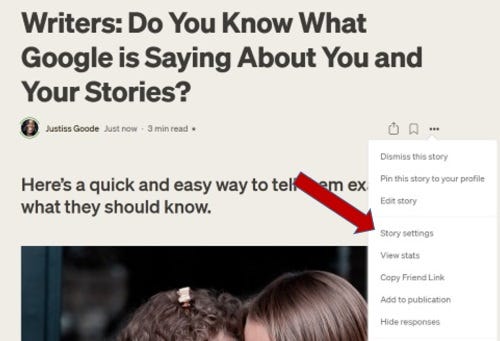
SCREEN SHOT #1: Here is where you’ll find the “Story Settings” tab, when you’re on your story, in edit mode.
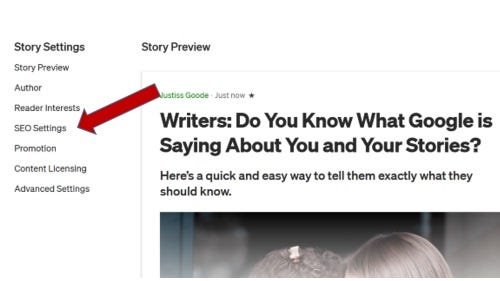
SCREEN SHOT #2: Here is where you’ll land, and you can find the “SEO Settings” tab, where you’ll be able to go take control.
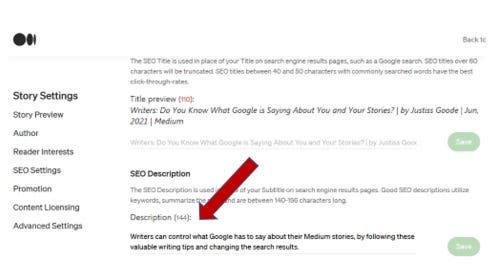
SCREEN SHOT #3: Here is where you get in the habit of typing an effective “kicker” as an alternate opening for Google viewers to see (155 char).
YOUR TAKEAWAY:
As you can see in the screenshots above, the steps are pretty simple and straightforward and it only takes a few seconds to do. I even went back to several of my existing stories, and implemented this helpful writing tip.
Use this valuable advice, whether you decide to go crazy, and double-back to take control of all your stories, or you simply take this lesson to heart and implement it from here on in.
If you want Google to provide the most effective details about your Medium stories and other online articles, start taking control and show Google who’s the boss of your stories!
Dear Readers — Did you enjoy this story?

Get Canva Pro | Sign Up for Medium | Join Fiverr