
2 Super Cool Writing Hacks that are Available When You Comment on a Story!
Are you taking advantage of these two incredible benefits when you read someone else’s stories?

All us writers in the online writing community are constantly looking for more and better ways to be productive in our writing lives. Writing tips about effective and strategic shortcuts are sometimes considered as writings hacks. Whatever you choose to call the advice that causes your productivity to increase is up to you.
What you call good advice is not as important as making sure you do what it takes to implement the good advice and writing tips you read and learn about. So before you go any further, ask yourself:
Are you prepared to do what it takes to learn and follow through on these two super cool writing hacks that relate to commenting?
If your answer is yes, prepare to learn some really simple tips to help increase your readership and get more eyes on your short stories and personal essays. And don’t be selfish; be sure to comment and pass these super cool hacks on to your readers and fellow writers.
1) Comments on Profile HACK
You can choose to have SPECIFIC comments you make on someone’s story, appear on your own Profile page. I think that’s a super cool writing hack, especially for writers who don’t write that many stories, or who don’t have a very large portfolio of stories just yet.
How is that a hack? It’s really a benefit or advantage that you earn, as a result of supporting another writer, however, it could actually be considered as a hack (as in a short cut or work around), until you begin to amass more stories.
Your lack of stories on your Profile page won’t seem so obvious, when you have a large variety of helpful, informative, and entertaining comments on display.
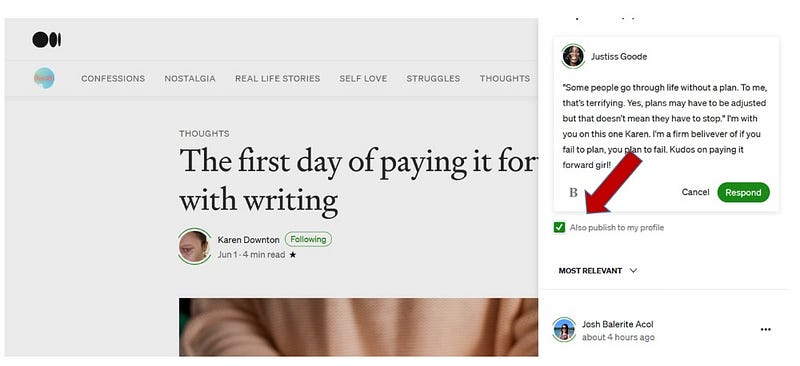
Here are the benefits of leaving comments, then ticking the box so the comment will show up on you Profile page:
- Help support other writers with your comments and feedback.
- Help other writers by enabling them to gain additional followers resulting from your comments.
- Help build your credibility and increase followers, by pointing them to other worthwhile stories.
- Gain more followers by building good relationships with other writers who see you interacting
2) Quote in the Comment HACK
Selecting a quote from a story you read, and inserting the quote in the comment FIRST is a great writing hack. Here’s how. Sometimes you read a story and find some great quotes you’d like to keep for one or more of your upcoming stories.
Perhaps you’re not even writing anything at the time, but you know the quote and maybe the entire story is definitely one you want to reference. With this writing hack, you don’t have to worry about saving a bunch of quotes, and the links to the writer and the story you read (I have personally misplaced lots of great stories and quotes this way).
Instead, you can leave a comment on the story, and start your comment off with the statement you’re quoting. If you put the quote in your comment first, (including quotation marks), you can continue to make your point, and make your response relevant to the quote. Before you click “Respond” and submit the comment, you can choose whether you want it to display on your Profile page or not (just like above).
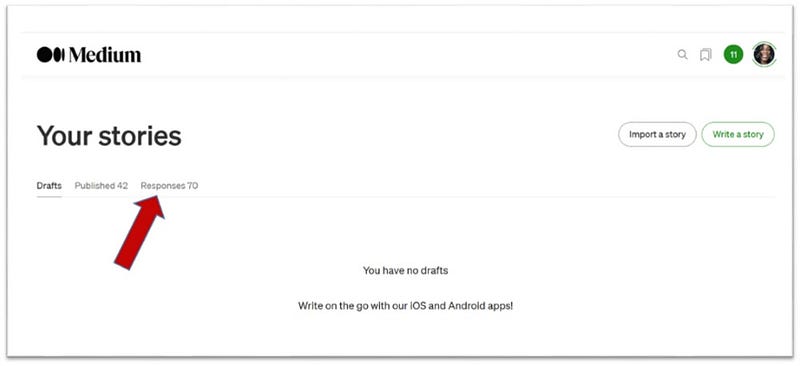
Now, here’s the thing I think is really super cool: If you go to your “Stories” page (where a list of all your drafts normally show up), notice the 3 category options available towards the top. They are: Drafts, Published, and Responses (like you see in the screenshot above). The “Responses” link is where you click to read all those awesome comments you’ve left!
That means, if you’re looking for a specific quote to put in one of your stories, just pop over to those responses, and locate it in the list. Since the quote is the first thing you wrote in the comment, it will jump out at you with ease, so you can just scan the page and find it quickly.
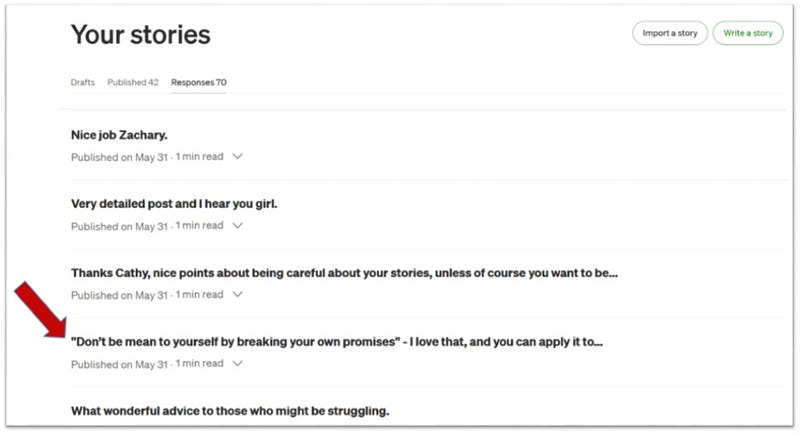
You also have the entire story and the writer who wrote it, all at your fingertips.
NOTE: For an additional hack, if you have an exceptionally long list of responses, you can still find the quote you want pretty quickly.
As long as you know a prominent word or phrase in the quote, all you have to do is press the “Control” key AND the “F” key (stands for “find”) on your computer, simultaneously. When you look on the bottom of your screen, to the left, a little box displays so you can type what you’re trying to find.
This will locate and highlight every instance on the page that the word or phrase you’re looking for is found.
FYI: Visit to promote your Medium Stories here.
CONCLUSION
My point was to make this short and sweet, and hopefully I’ve done both. So, in conclusion, let me just mention how much fun I’m having, and joy I’m getting from reading stories now, since I began taking the time to comment. It feels great to hear back from fellow writers and have an interchange of thoughts.
But this great feeling is just the icing on the cake, because as you can see from the above information, there is much more to be gained when you start benefiting from these super cool writing hacks, all because you left a comment on a story.
Dear Readers — Did you enjoy this story? If so, you can show your satisfaction by responding with a RETWEET, and help me gain desperately needed FOLLOWERS. Thank You ;-)


