
Testing Strategy — toward Agility
Concepts and components of testing strategy in an Agile environment
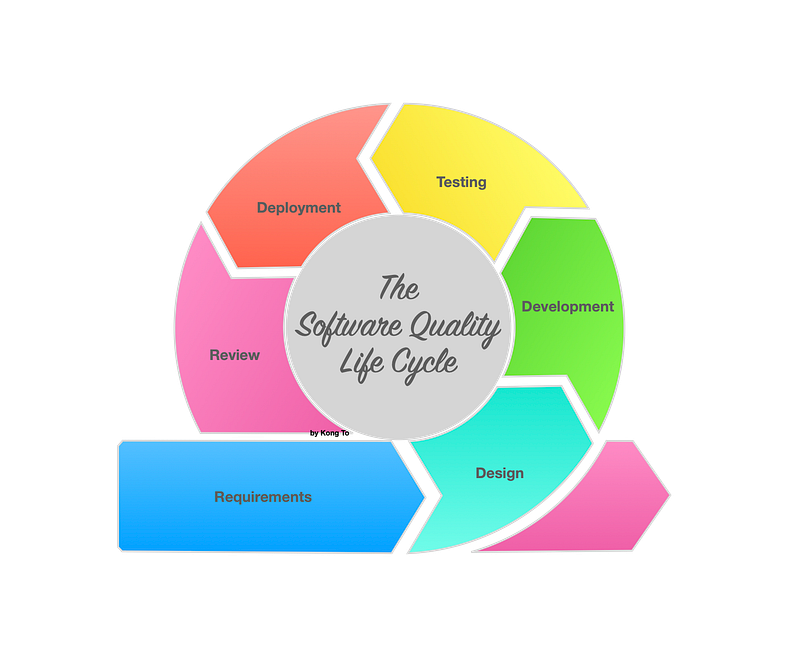
Nowadays, the majority of team are working in an agile environment, where we work in short sprints, and an iterations of 2 to 4 months, each sprint is focused on only a few user stories. One of the drawback — and fortunately — is to have less extensive documentation and less extensive test plan. Still we do require a high-level agile testing strategy as a guideline for the agile teams. Its purpose is to draw a structure that the teams can follow.
Related articles :
- Testing Terminology, testing vocabularies and definitions reference
Testing Strategy
A testing strategy usually has a mission statement which could be focused on the software being built or may be related to the wider business goals and objectives. A typical mission statement could be:
To constantly deliver Working Software that meets customer’s requirements by preaching the concept of ‘providing fast feedbacks’ and ‘favouring defect prevention’ rather than ‘defect detection’.
That statement reflects a few but not exhaustive values and principles of the agile manifesto.
And to support that statement, we may apply to some best practices and we may use these four rules:
- No code may be written for a story until we first define its acceptance criteria/tests. This is the entry condition of the developer’s space, as part of the definition of ready (DoR).
- A story may not be considered completed until all its unit tests and integration tests pass, the code has been reviewed by peers. This is the exit condition of the developer’s space, as part of the definition of done (DoD).
- A story may not be considered completed until all its acceptance tests pass. This is the exit condition of the development team’s space, as part of the definition of done (DoD). This includes automated and manuel tests.
- A product increment may not be considered delivered until all tests pass in the continuous integration pipeline. This shall also include manual exploratory tests, as part of the acceptance criteria. This is the definition of release and deployable (DoRD).
There are many other things we may want to add to the DoR and DoD and DoRD. Here we are not going to detail them all.
Besides, there is one thing that a few people misunderstand. What are the roles and responsibilities of a Quality Assurance Engineer ?
Quality Assurance
By all mean, Quality Assurance is not just about testing by testers :
- QA is a set of activities intended to ensure that products satisfy customer requirements in a product with a certain level of quality at every stage of the process aiming to deliver a software to production.
- In SCRUM, QA is the responsibility of everyone, not only the testers. QA is all the activities we do to ensure correct quality during the development of new products.
- There may be a dedicated member of the team to assume that QA role to ensure that the Testing Strategy is executed accordingly.
If we look at a higher level, a QA role should be implicated at every phase of a Software Development Life Cycle (SDLC). From the QA point of view, we could talk about Software Quality Life Cycle (SQLC).
The SQLC is another perspective to see the Software Development Life Cycle (SDLC), but with the quality focus. Here we notice there are many testing types being executed at every phase of the SDLC.
Software Development Life Cycle
SDLC is commonly known since decades now. In classic IT project, we go through several phases, from left to right, more likely in a cascade fashion. However, since the emergence of agility, we start to loop the circle with feedbacks, we can insure continuous improvement. Let’s have a closer look at the workflow.
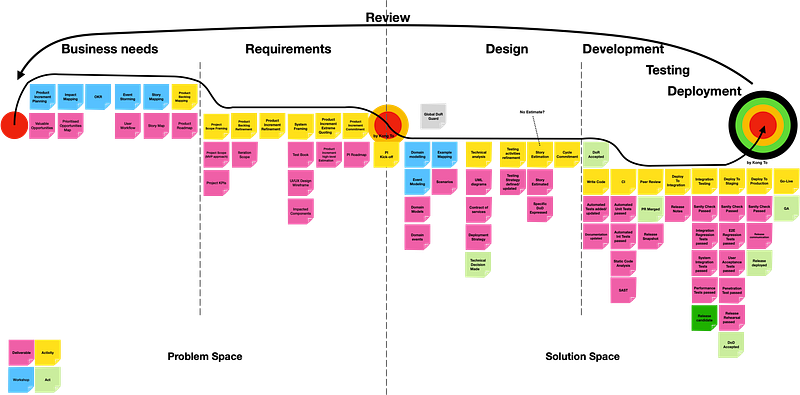
We can see that we always start by discovering the business needs and analysis them, by having a lot of discussions in order to come up with solutions aligned with the business needs.
Let’s now mapping testing activities to the SDLC to have another view with a testing perspective, called here Software Quality Life Cycle (SQLC).
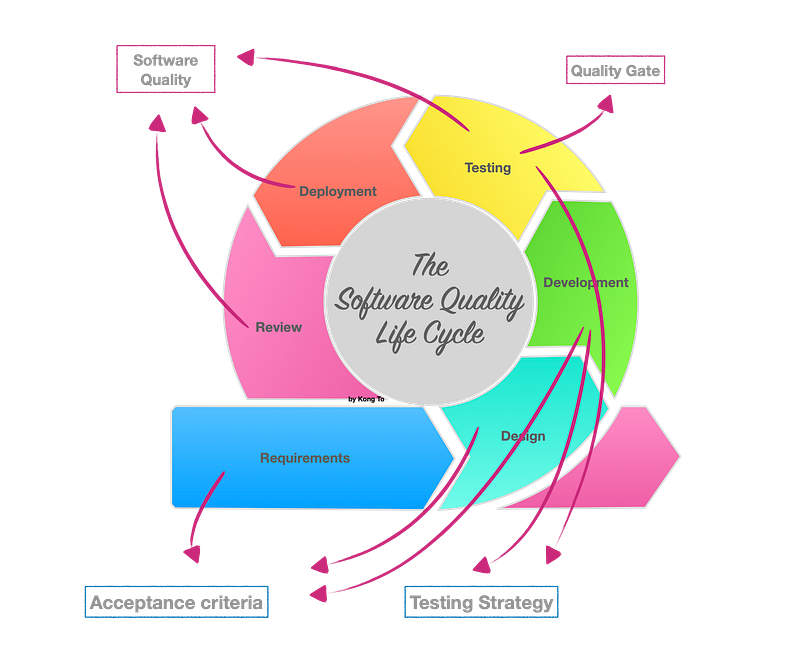
Thorough the process of software development workflow, we would have completed many tasks from business needs to go-live. And a few of them are related to Quality Assurance (QA), such as defined acceptance criteria, testing strategy, quality gates and testing activities. The aim of all QA related task are get metrics and feedbacks in order to improve the software quality and make sure we have meet all the technical and functional requirements.
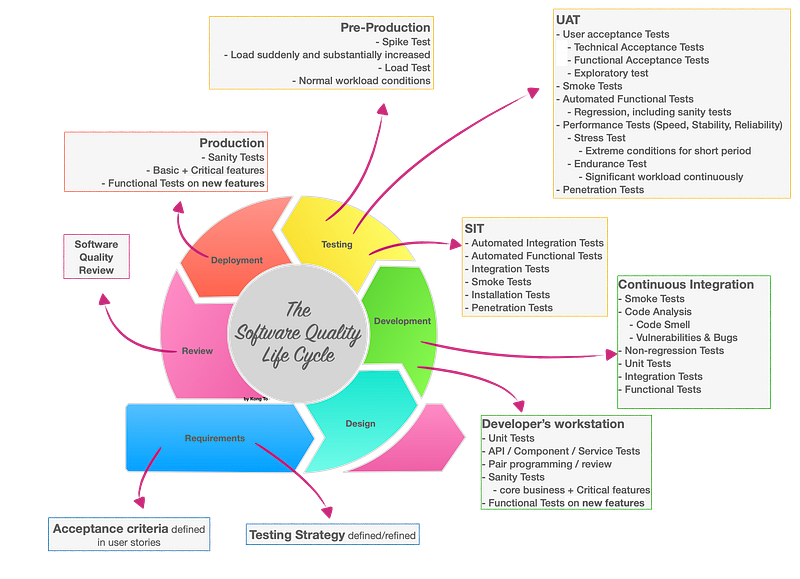
And in terms of testing, there are several testing activities that must me accomplished at different phases as shown above. The principle is to get to know as earliest as possible any quality issue relate, because simply if the issue is detected late, the cost is many folds.
Agile Testing Quadrants
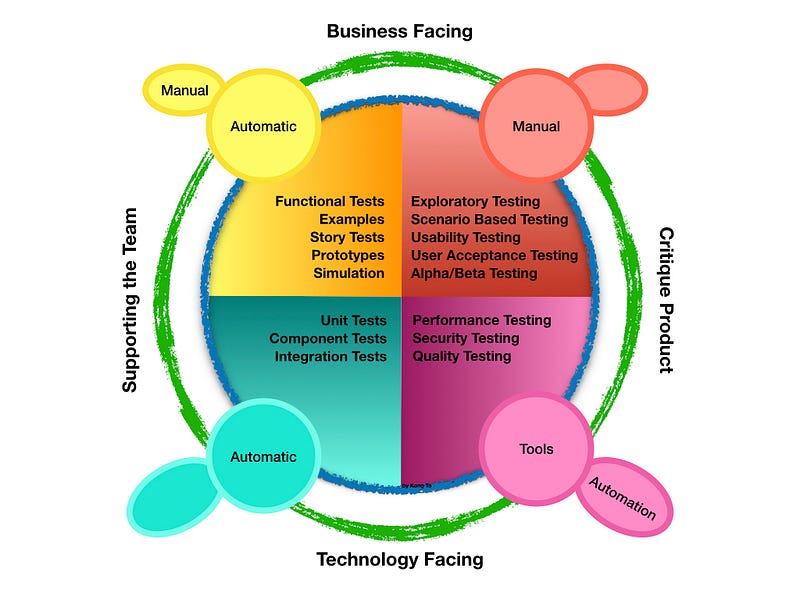
Agile Test Quadrants (introduced by Brian Marick and further worked upon by Lisa Crispin) try to understand the relationship between the various forms of tests using 4 different quadrants.
The Quadrants help to reach goals related to supporting the team, critiquing the product, meet the business and meet technological needs. We will use some tools and testing levels and types to serve the purpose in each quadrant.
- Quadrant 1: Technology facing tests that support the team
The quality of the code and the components is the main concern of the this quadrant. It requires the involvement of developers along with the implementation of the technologies and automation. In this quadrant, the team is using the technology to drive test cases, covering unit tests and component tests, at a unit level.
- Quadrant 2: Business facing tests that support the team
In the quadrant, we may see the business driven test cases are being implemented for supporting the team.
Basically, the main focus of this quadrant is the business requirements. Test cases associated with the requirements are implemented, usually by testers, for the supporting team. Generally, It involves the usage of both manual and automated testing, and consists testing types (such as functional testing, examples, story tests, prototypes and simulations) are executed, as a part of definition of done for a story.
- Quadrant 3: Business facing tests that critique the product
Here, feedbacks of user experience and feedbacks from other testing phases are gathered to serve for improvement of the software. Tests are often manual and are user-oriented, and they are mostly exploratory tests, usability tests, user acceptance tests, alpha tests, and beta test, at system or user acceptance level. This quadrant is mainly used to build and gain confidence in the usability of the product.
- Quadrant 4: Technology facing tests that critique the product
This quadrant involves the usage of the technology to automatically evaluate the software. It mainly focuses on non-functional requirements, at an operational acceptance level, such as reliability, security, compatibility, maintainability, interoperability, resiliency, robustness, etc.
In this quadrant, tests are often automated, and they are performance, load, stress, and scalability, security, maintainability, memory management, data migration, infrastructure, and recovery.
The Test Pyramid
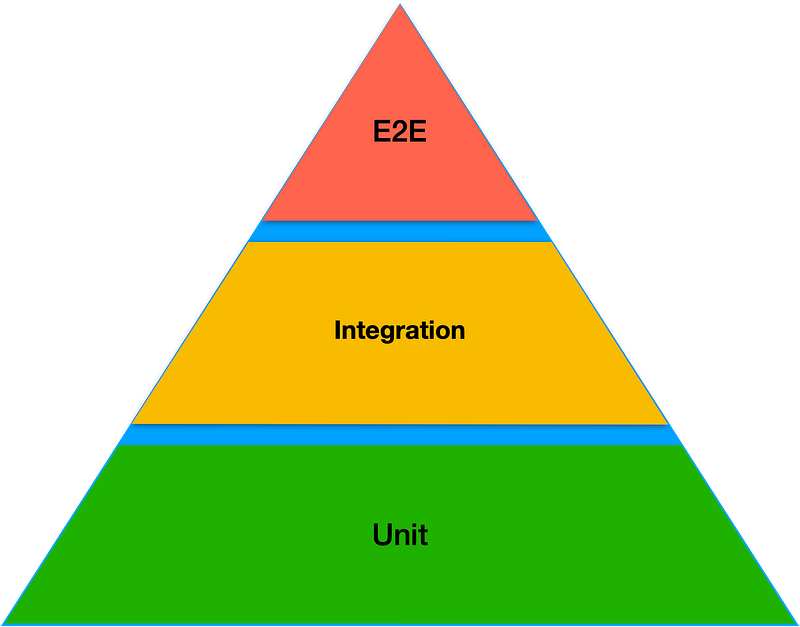
It delivers a graphical representation to show the proportion of:
- End-to-end Testing : this is the highest level, it should represent less than 10% of effort in testing and in terms volume of use cases covered.
- Integration Testing : this is the mid-level, it should represent around 20% of effort in testing and in terms volume of use cases covered.
- Unit Testing : this is the lowest level, it should represent around 70% of effort in testing and in terms volume of use cases covered.
Testing Levels
Through the SQLC, many test types are executed at different levelsThat’s what we call test levels, referring to the levels in the pyramid. But we can divide into four levels as shown in the diagram below :
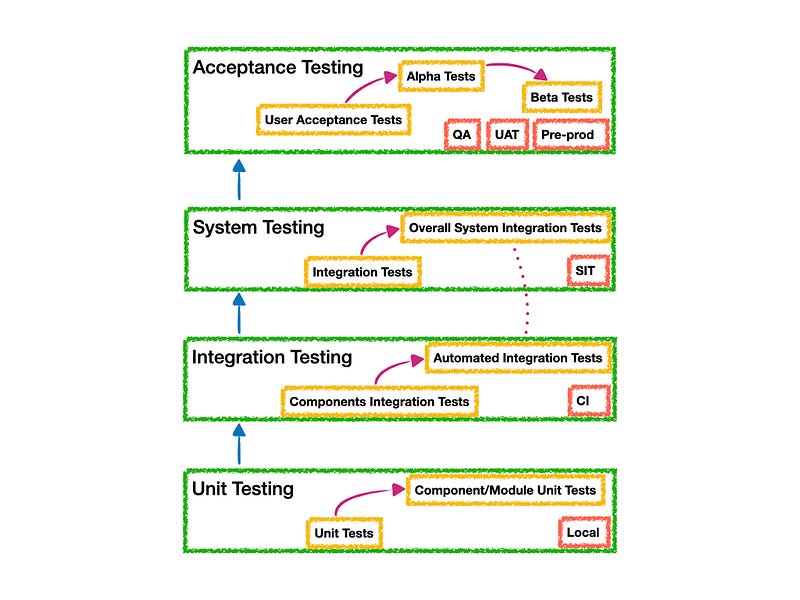
Testing levels are basically to identify missing areas and prevent overlap and repetition between the development life cycle phases. Hence there are various levels of testing:
- Unit Testing and Component testing
- Components Integration Testing
- System Integration Testing
- Acceptance Testing
These four testing levels cannot be applied randomly during development. There is a logical sequence that should be adhered to in order to minimise the risk of bugs cropping up just before the launch date.
By progressively testing the simpler components of the system and moving on the more complex groupings, the testers can rest assured they are thoroughly examining the software in the most efficient way possible.
The four levels of tests shouldn’t only be seen as a hierarchy that extends from simple to complex, but also as a sequence that spans the whole development process from the early to the later stages. Note however that later does not imply that acceptance testing is done only after say 6 months of development work. In a more agile approach, acceptance testing can be carried out as often as every 2–3 weeks, as a part of the sprint demo. In an organisation working more traditionally it is quite typical to have 3–4 releases per year, each following the cycle described here.
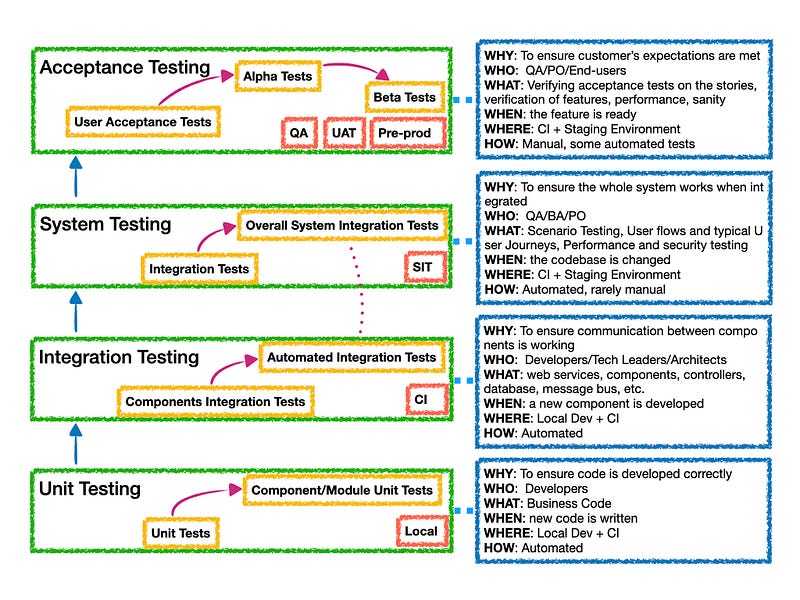
Testing Levels vs Testing Quadrants
Those four testing levels are not quite different from the four testing quadrants, except the order. It’s trivial to start with unit testing at the lower level, then climb up to the integration testing, then system testing and finally acceptance testing. By fitting the testing levels to the quadrants, we can draw a ’N’ flow.
Another thing to notice is that on the left side, we can apply to the ‘Test-First’ approach. Here we are referring typically to XP, TDD and BDD.
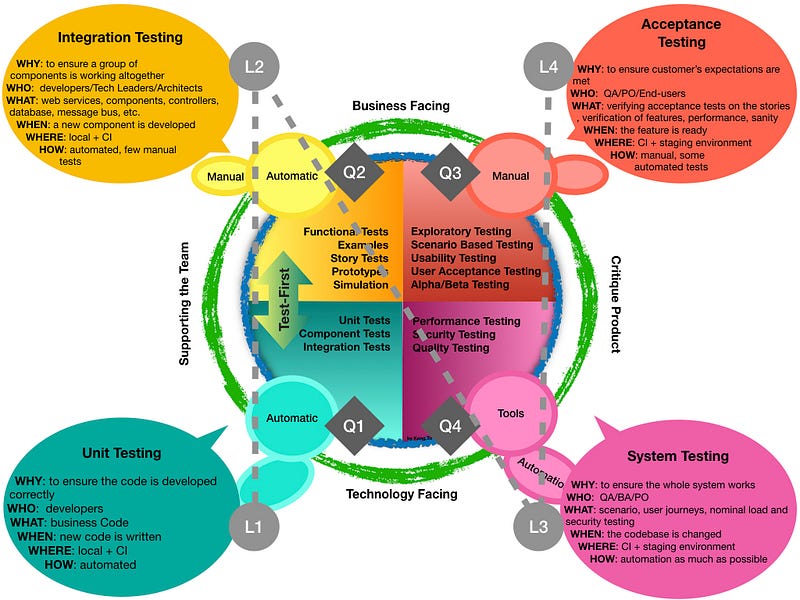
To help ourself in defining the strategy for testing our product, we can answer the to the why, who, what, when, where and how questions.
Unit Testing
Every development team member must ensure to write unit tests to ensure that pieces of code are working correctly. They may — and it is highly recommended — use TDD to drive the development of business functions by first writing test code.
At this level we may want to outline these 5WH questions:
- WHY: To ensure code is developed correctly
- WHO: Developers
- WHAT: Business Code
- WHEN: new code is written
- WHERE: Local Dev + CI
- HOW: Automated
Integration Testing
At this level we may want to outline these 5WH questions:
- WHY: To ensure a group of components is working together
- WHO: Developers/Tech Leaders/Architects
- WHAT: web services, components, controllers, database, message bus, etc.
- WHEN: a new component is developed
- WHERE: Local Dev + CI
- HOW: Automated
System Testing
At this level we may want to outline these 5WH questions:
- WHY: To ensure the whole system works
- WHO: QA/BA/PO
- WHAT: Scenario Testing, User flows and typical User Journeys, Performance and security testing
- WHEN: the codebase is changed
- WHERE: CI + Staging Environment
- HOW: Automated, less manual tests
Acceptance Testing
At this level we may want to outline these 5WH questions:
- WHY: To ensure customer’s expectations are met
- WHO: QA/PO/End-users
- WHAT: Verifying acceptance tests on the stories, verification of features, performance, sanity
- WHEN: the feature is ready
- WHERE: CI + Staging Environment
- HOW: Manual, some automated tests
In order to be able to define a testing strategy to cover these four levels, we have to know are are the types of tests we need.
Testing Strategy in SCRUM
Once we have an idea on how to testing our product, we may want to fit it into an Agile way. As an example, we are going to the fit this into the the most popular Agile methodology: the SCRUM framework. Here we are not aiming to dive into details of the SCRUM framework, so we are just getting right to the point. As we have described earlier about having a Testing Strategy with a mission and several rules, we would normally have a strategy that fits in the process of software development to ensure we meet the quality requirements. However, while diving into more details in the workflow, at some stage, we would refine the features and slice the task into multiple user stories, using the Story Mapping (or grooming) workshop.
Story Mapping
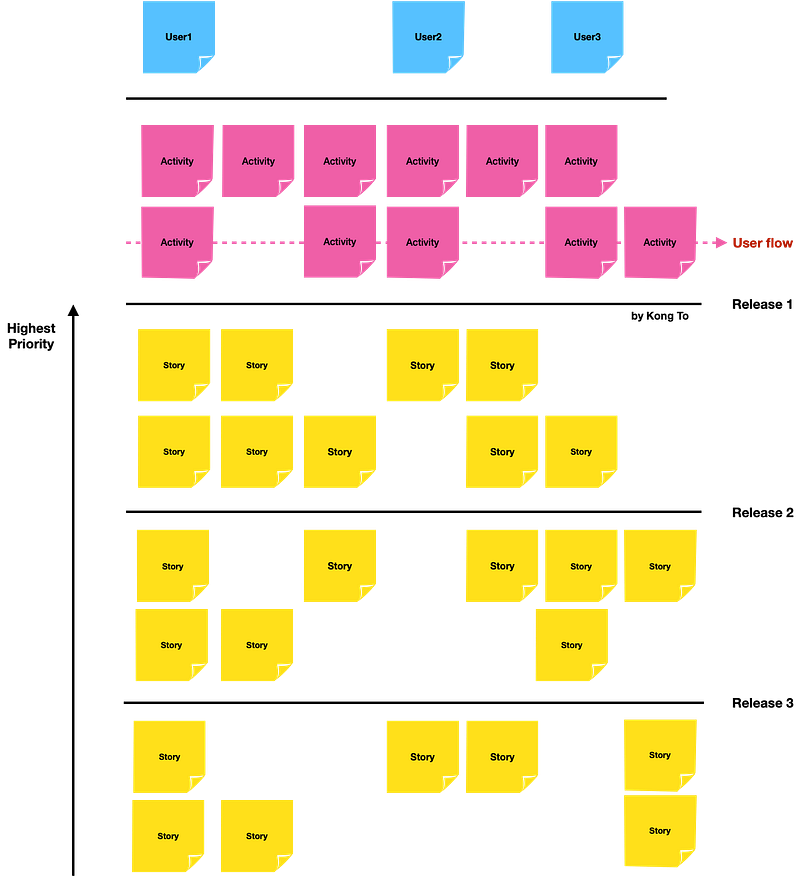
The Story Mapping is a workshop allows to identify user journey and its’ workflows so we can determine the functionalities, called user stories. The idea is to get relevant people (product owner, scrum master, quality assurance engineer and developers) involved so they discuss about “what is do” with a focus on the user experience. By doing so, we may from time to time come up with new ideas. It allows to have a better picture about all user stories to be worked on and dependencies between them. But more importantly, it allows to see clearly what stories to start with.
Of course, we should not forget about testing related to the feature as subject of the workshop. Here we would defined what are the level of tests and what types of tests that should be hold for the feature and for each user stories. Then we need to identify other testing activities, including design of tests, data preparation, exit conditions, execution, analysis and reporting. In short, the Testing Strategy should be taken into account at every stage of the development workflow, Agile or not.
It’s only when user stories are prioritised that we can talk about planning.
Sprint Planning
In each story Sprint Planning, everyone in the team learns about the details of the stories so developers and QA know the scope of the work. Everybody should have the same understanding of what the story is about. Developers should have a good understanding of the technical details that are involved in delivering the story, and QA should know how the story will be tested and if there are any impediments to test the stories.
User Story
Most common cause of software development failure is due to unclear requirements and different interpretation of requirements by different members of the team. User stories should be simple, concise and unambiguous. As a good guideline, it is best to follow the INVEST model for writing user stories.
A good user story should be:
- Independent (of all others)
- Negotiable (not a specific contract for features)
- Valuable (or vertical)
- Estimable (to a good approximation)
- Small (so as to fit within an iteration)
- Testable (in principle, even if there isn’t a test for it yet)
The following format should be used to write user stories :
As a [role] I want [feature] So that [benefit]
It is important not to forget the “Benefit” part, as everyone should be aware of what value they are adding by developing the story.
Acceptance Criteria
Each of the User stories must contain acceptance criteria. This is possibly the most important element which encourages communication with different members of the team. When a User Story is written, Acceptance criteria should be written at the same time as par of it. All acceptance criteria should be verifiable. Each Acceptance Criteria should have a number of Acceptance Tests presented as scenarios written in Gherkin format.
Scenario 1: Title Given [context] And [some more context]… When [event] Then [outcome] And [another outcome]…
In order to prevent defects, PO, BA, Dev, and QA must be involved in User Story refinements (during Sprint Planning, Planning Poker, or Stories Workshop) where User Stories are described, so acceptance criterions are explained. Scenarios should be written down in feature files, and they should be testable. Any corner cases should be thought of. Here we can take profit of QA’s expertise. Scenarios that will reveal defects when testing the product. And more importantly, they are behaviour focused, so the more effort and time spent on this activity, the best results at the end, because as we know the majority of defects are due to unclear and vague requirements.
Likewise, User Stories estimation should include the testing effort (manual or automated) as well and not just coding effort.
Development
When development starts, new production code and/or modification to legacy code should be backed by unit tests written by developers and peer-reviewed by another developer or a technical leader. Any commit to the code repository should trigger an execution of tests CI pipeline. This provides a fast feedback mechanism to the development team. Unit tests ensure that the system works at a technical level and that there are no errors in the logic.
Developer performing tests
As developers, we should behave as if we don’t have any QA in the team or organisation. It is true that QAs have different mindset but we should test to the best of our ability. “Ping-Pong” is a common phenomena we encounter in Software Development as we tend to quickly move on to the next story, but in reality when a defect is found, it takes longer have the User Story completed as per the Done Criteria. When there is a defect, most of the time we implicated more people in fixing the issue, then frustration come out of it. Any new code or modification to the existing code should have appropriate unit tests that will be part of the unit regression test.
Automated Acceptance Tests and Non-functional Testing
The automated acceptance tests include Integration Tests and Service Tests and UI tests which aim to prove the software works at a functional level and that it meets user’s requirements and specifications. Automated acceptance tests are usually written in Gherkin language and executed using a BDD tool such as cucumber.
Remember: Not all tests need to be automated! Because these tests typically require communication over HTTP, they need to be executed on a deployed application, rather than run as part of the build.
Non-functional tests (Performance and Security) tests are as equally important as functional tests, therefore they need to be executed on each deploy.
Performance Tests should check performance metrics on each deploy to ensure no performance degradation.
Security Tests should check for basic security vulnerabilities derived from OWASP. It is vital that this should be a completely automated process with very little maintenance to get the most benefit out of automated deployments. This means there should be no intermittent test failures, test script issues, and broken environment. Failures should only be due to genuine code defects rather than script issues, therefore any failing test which is not due to genuine failures should be fixed immediately or removed from the automation pack, to be able to get consistent results.
Regression Testing
Not expecting to find many defects. Their purpose is only to provide feedback that we haven’t broken major functionality. There should be a very little amount of manual regression testing.
Sanitary Checks — Should be no more than 15 mins
This pack contains only high-level functionality to make sure the application is stable enough for further development or testing. For example, for an eCommerce website, tests included in this pack could be:
- Product Search
- Product Review
- Purchase Item
- Account Creation / Account Login
Full regression pack — should be no more than 1 hour
This pack contains the full regression suite of tests and contains everything else which is not included in the smoke pack. Here, the goal is to get a quick feedback with a larger set of tests. If the feedback takes more than 1 hour, it is not quick. Either reduce the number of tests by using pairwise test technique, create test packs based on risk or run the tests in parallel.
UAT and Exploratory Testing
There is no reason why UAT and exploratory testing cannot run in parallel with the automated acceptance tests. After all, they are different activities and aim to find different issues. The aim of UAT is to ensure that the developed features make business sense and helpful to customers. PO (Product Owner) should run User Acceptance Tests or Business Acceptance Tests to confirm the built product is what was expected and that it meets user’s expectations. Exploratory testing should focus on user scenarios and should find bugs that automation misses. Exploratory testing should not find trivial bugs, rather it should find subtle issues.
Done Criteria
Once all the above activities are completed and no issues found, the story is Done! The above are some guidelines on what can be included in an Agile Test Strategy Document.
Terminology
- Testing Terminology, testing vocabularies and definitions reference