avatarRare Loot

Free AI web copilot to create summaries, insights and extended knowledge, download it at here

4241

Abstract

er models of your DualSense</h1><figure id="5991"><img src="https://cdn-images-1.readmedium.com/v2/resize:fit:800/0*iHYuGmZVDfR2wvji"><figcaption><a href="https://bestbuy.7tiv.net/b3vE7m">Check if PS5 is in stock at Best Buy</a></figcaption></figure><p id="8900">Stick drift issues predominantly impact the earlier versions of the PS5 controllers. You can check if your PS5 controller is eligible for return by checking these 3 things:</p><ul><li>T<a href="https://www.youtube.com/watch?v=u0iGwazuHxU&amp;ab_channel=JohnGlasscock">he Controller ID on the back of your controller</a> and if it says 1 on the end, you can return it. If it ends in A, then it should hold up a bit longer.</li><li>If you’re from the UK, you can look for the UK Conformity Assessed mark (UKCA) which is <a href="https://www.which.co.uk/news/article/government-reveals-uk-product-safety-mark-in-case-of-a-no-deal-brexit-aCwis0C2kBIR">a post-Brexit replacement for CE safety mark</a> on the back of the controller. If it’s there, your controller has the latest reliability improvements.</li><li>On the first line of text after “Wireless Controller” then “Model Number XXXXXX” there may be a shorter A. If that A exists you have a newer, more reliable version indicating that it’s a<a href="https://difference.guru/difference-between-bdm-010-and-bdm-020/"> BDM-020 model</a>. If you don’t then you might be due a replacement.</li></ul><p id="11d7">You should try to get ahead of the game and try to return your controller before your warranty expires (<a href="https://www.ign.com/wikis/playstation-5/What_To_Do_If_Your_PS5_DualSense_Controller_Drifts#:~:text=The%20PlayStation%205%20DualSense%20controller%20is%20under%20warranty%20for%20one%20year">one year</a>) but I’ll be lying if the process wasn’t straightforward and would mean you’re controller-less for a period of time.</p><p id="334d">The main steps to returning to exchange your current DualSense PS5 Controller are:</p><ul><li>Select <a href="https://repairs.playstation.com/s/?locale=en-gb&amp;language=en_GB">DualSense on the Playstation Repairs Page</a>.</li><li>Answer a few questions on why you’re returning your controller. You can just claim the drift issue since it’s so common.</li><li>You may have to call them at some point but this will be detailed in the instructions.</li><li>Eventually you’re given a reference number — keep this so <a href="https://repairs.playstation.com/s/?locale=en-gb&amp;language=en_GB">you can track your return here</a>.</li><li><a href="https://www.playstation.com/en-gb/support/hardware/returning-your-playstation-product/#accessories">Send your package to Sony Playstation</a></li><li><a href="https://www.reddit.com/r/PS5/comments/kwo3kq/got_my_ps5_controller_replacement_heres_the/">Wait about a week</a> and you’ll hopefully get a new controller.</li></ul><h1 id="b5b0">Proactively buy a second PS5 controller</h1><figure id="fdff"><img src="https://cdn-images-1.readmedium.com/v2/resize:fit:800/0*DYS81qJOLv1gRlZW"><figcaption>Pre-order the <a href="https://bestbuy.7tiv.net/Zd7N3q">God of War Ragnarök Launch Edition — PlayStation 5</a> at Best Buy</figcaption></figure><p id="1bff">The same way we buy multiple pairs of trainers so we’re not grinding them into dust too quickly, we might want to buy a second controller. With both controllers you can continue to switch between the two to extend the life of both of them. This tip is only really recommended for high frequency gamers who have experience going through multiple controllers.</p><p id="710b">On the other hand, the average person shouldn’t have to buy a second controller in the console’s lifetime. But if you do, there are advantages to buying the <a href="https://blog.playstation.com/2022/08/23/introducing-the-dualsense-edge-wireless-controller-the-ultra-customizable-controller-for-playstation-5/">premium DualSense Edge</a> (hopefully released by end of 2022) for those committed to your favourite pastime. Because let’s face it, we spend hundreds on fancy clothes and holidays so you can probably justify getting a premium priced controller for <a href="https://www.reddit.com/r/gaming/comments/8log5n/average_console_life_cycle/">a console that’ll last you 6 years minimum</a>.</p>

Options

<p id="f884">In case you’re unfamiliar with this product proposition, think of the DualSense Edge as Sony’s take on the <a href="https://bestbuy.7tiv.net/QO7b3P">Xbox Elite controller</a>. It’s for the most dedicated gamers who know how to take advantage of its extra features.</p><p id="9131">The practical in-game benefits of the PS5 DualSense Edge version are really about how to use the back buttons. Which are “<a href="https://blog.playstation.com/2022/08/23/introducing-the-dualsense-edge-wireless-controller-the-ultra-customizable-controller-for-playstation-5/#:~:text=The%20two%20swappable%20sets%20of%20back%20buttons%20(half%2Ddome%20and%20lever)%20can%20be%20configured%20to%20be%20any%20other%20button%20input%2C%20putting%20more%20essential%20controls%20at%20your%20fingertips.">The two swappable sets of back buttons (half-dome and lever) can be configured to be any other button input.</a>”.</p><p id="686f">Here are some examples of practical uses of back buttons on the PS5’s DualSense Edge:</p><ul><li>Extra back buttons (also known as Backpaddles) that are typically used to replace L3/R3 analogue sticks if you’re prone to pressing them in heat of the moment (meleeing by accident in a Apex Legends 1v1 encounter)</li><li>Any other game that requires the right stick to be used regularly can be enhanced with the back buttons. For example, you can sprint while moving your camera in <a href="https://bestbuy.7tiv.net/9WQo9Y">Elden Ring</a> for highly mobile bosses (yes you — Red Wolf of Radagon)</li><li>Shooting games like Call of Duty or Resident Evil where L2 = aim, R2 = shoot, R1/L1 for grenades. The R back button can be your new sprint button rather than the R3 joystick</li><li>Even party games like Rocket League for boosting and braking</li></ul><p id="2385">Outside of the back buttons, Playstation has attempted to alleviate the stick drift issue with replaceable stick modules and digital dead zone settings via its on-controller user interface. <a href="https://www.ifixit.com/Guide/DualSense+Joystick+Replacement/142488">Follow this guide to replace the joysticks on a Sony PlayStation 5 DualSense controller<i></i></a><i> </i>but as clearly outlined, it’s much more difficult and not for the light hearted.</p><p id="3d88">And since this controller is more expensive, extended warranty at Best Buy’s <a href="https://bestbuy.7tiv.net/x9YZDA">Geek Squad® Gaming Accessory Protection</a> highly recommended in case there’s accidental damage.</p><p id="3a08">There are already other premium controller options compatible on PS5 with similar features including the SCUF controller and the <a href="https://bestbuy.7tiv.net/yRYk6V">PDP — Victrix Pro BFG Wireless Controller for PS5</a>. <a href="https://www.pocket-lint.com/games/news/playstation/162523-dualsense-edge-controller-ps5-playstation-price-features">The biggest competitor on the market right now for the DualSense Edge is the Scuf Reflex</a> which is already available. Scuf’s controller has four back buttons, to Edge’s two, but only 2 are remappable.</p><h1 id="19dc">Remap your Controller Presets on your most played games</h1><figure id="a71d"><img src="https://cdn-images-1.readmedium.com/v2/resize:fit:800/0*AZFUQAaLpQj8AV4j"><figcaption><a href="https://bestbuy.7tiv.net/zaX7jx">Best Buy offers 2 Year Accidental Replacement Policy for 1/3rd of the cost</a></figcaption></figure><p id="682f">The action of pressing down on your analog sticks constantly puts too much pressure on them over time. This is partly why the joysticks drift but you never have issues with the back buttons(R/L) or the arrow/shape d-pad buttons. <a href="https://www.reddit.com/r/ApexConsole/comments/ud5aba/do_not_buy_the_new_ps5_controllers/">Games like Apex Legends</a> where pressing the joystick is needed to sprint leaves wearing down your controller much faster. In a high intensity, competitive game you’re most likely constantly sprinting (who purposely walks anywhere in video games if it’s not stealth?).</p><p id="4f3f">By intentionally changing the button mapping so you’re not using your joysticks for high frequency pressing actions, you’re massively mitigating the likelihood you need to replace your controller in the future.</p></article></body>

6 Ways to Make Your PS5 Controller Last Longer
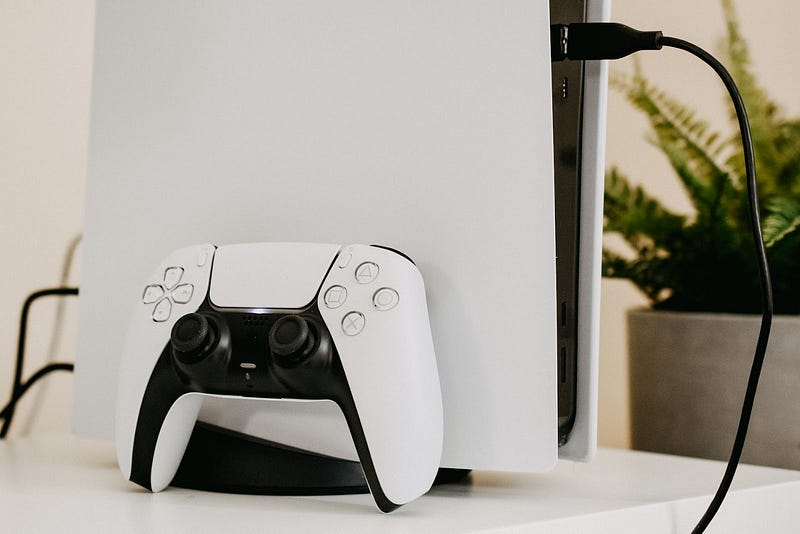
Check if PS5 is in stock at Best Buy

The PS5 DualSense Controller has had few issues like many controllers nowadays including, stick drift. Here are 6 hacks to make your PS5 controller last longer, thus extending the life cycle and saving you money in the long run.

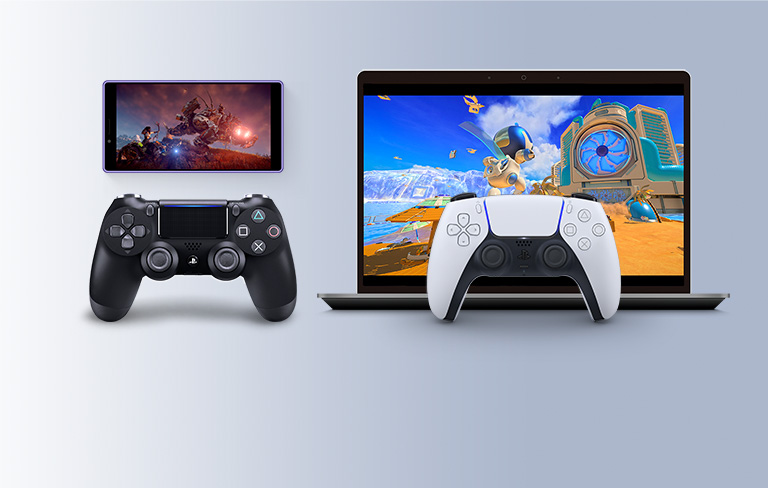
Use your PS4 controller on your PS5 via Remote Play
Check if PS5 is in stock at Best Buy

What’s that? You didn’t know you could use your PS4 controller. Well my friend there’s a workaround involving the use of Remote Play. Simply log into the Remote Play app on a compatible device (mobile device or PC), link your PS4 controller to that device then connect Remote Play back to your PS5 while using the PS4 controller. This tip will make players who have invested in the premium C40 TR controller which is still only compatible with the PS4 very happy.

This is probably recommended for longer gaming sessions since even though it takes 2 minutes to do. And if you’re worried about input lag, don’t worry. The fact that your PS5 and Remote Play device will be using the same internet connection makes it a seamless wi-fi experience. Although Sony has detailed how to improve the PS Remote Play streaming quality.

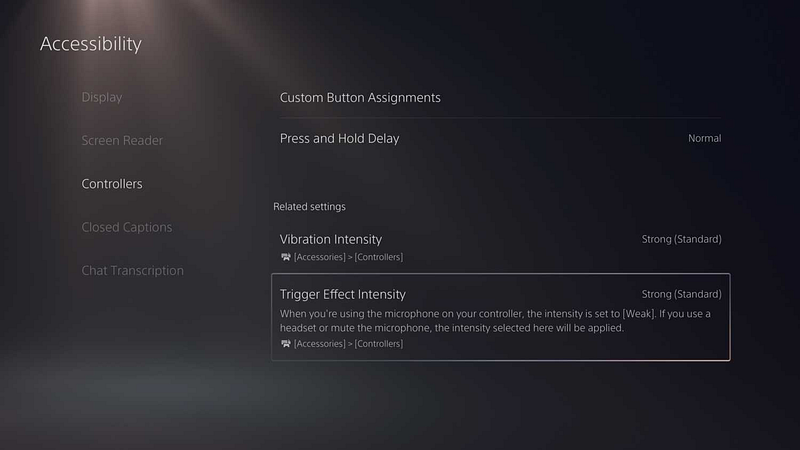
Turn off the haptic feedback vibration in the settings
Sometimes I sell gaming t-shirt if you’re curious

In your controller settings, you can adjust the vibration intensity. This is important because it’s been claimed the haptic feedback adds to the wear and tear of the PS5 controller reducing the shelf life significantly.

Even though more developers are taking advantage of haptic feedback in PS5 games there’s still more room for improvement to actually elevate the PS5 playing experience to another level.

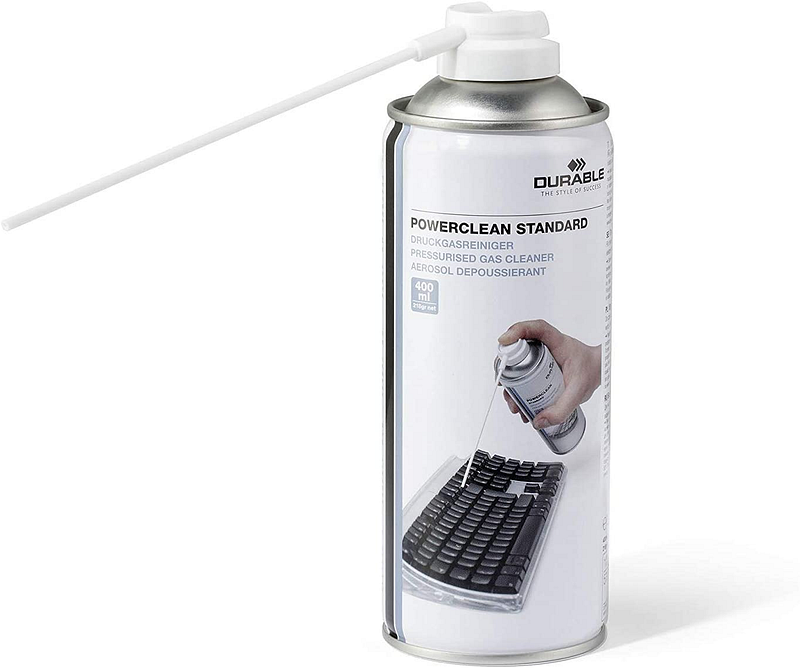
Regularly remove dust from your controller
DualSense Wireless Controller — God of War Ragnarök Limited Edition is now available on Best Buy

As well as the white casing easily getting dirty, dust can also get into your controller very easily. This means the machinery within your controller can get clogged up overtime leading to failed button presses, jammed circuits and other hardware issues. So as long as you know how to clean your controller safely, you may want to dedicate time to maintaining it.

Return old, earlier models of your DualSense
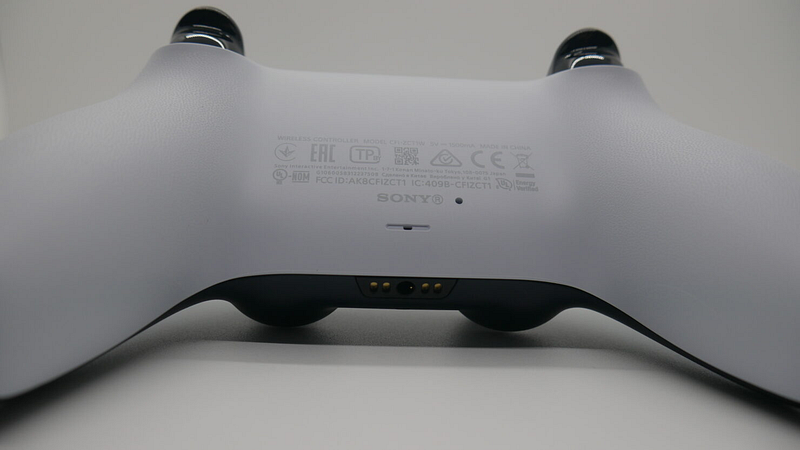
Check if PS5 is in stock at Best Buy

Stick drift issues predominantly impact the earlier versions of the PS5 controllers. You can check if your PS5 controller is eligible for return by checking these 3 things:

  • The Controller ID on the back of your controller and if it says 1 on the end, you can return it. If it ends in A, then it should hold up a bit longer.
  • If you’re from the UK, you can look for the UK Conformity Assessed mark (UKCA) which is a post-Brexit replacement for CE safety mark on the back of the controller. If it’s there, your controller has the latest reliability improvements.
  • On the first line of text after “Wireless Controller” then “Model Number XXXXXX” there may be a shorter A. If that A exists you have a newer, more reliable version indicating that it’s a BDM-020 model. If you don’t then you might be due a replacement.

You should try to get ahead of the game and try to return your controller before your warranty expires (one year) but I’ll be lying if the process wasn’t straightforward and would mean you’re controller-less for a period of time.

The main steps to returning to exchange your current DualSense PS5 Controller are:

Proactively buy a second PS5 controller
Pre-order the God of War Ragnarök Launch Edition — PlayStation 5 at Best Buy

The same way we buy multiple pairs of trainers so we’re not grinding them into dust too quickly, we might want to buy a second controller. With both controllers you can continue to switch between the two to extend the life of both of them. This tip is only really recommended for high frequency gamers who have experience going through multiple controllers.

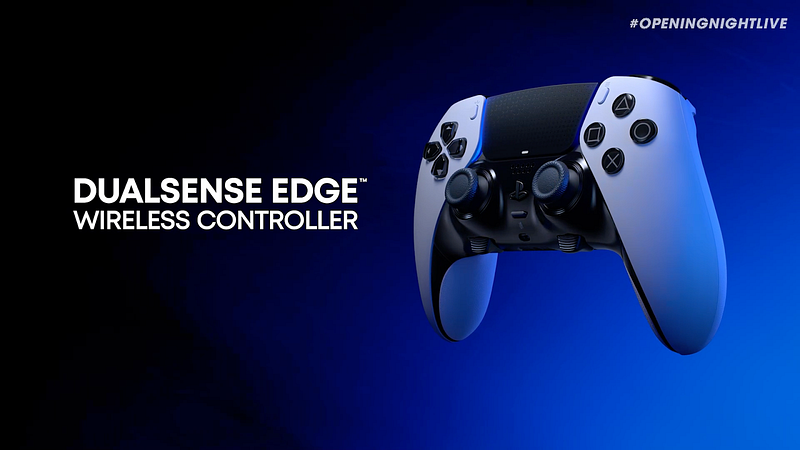
On the other hand, the average person shouldn’t have to buy a second controller in the console’s lifetime. But if you do, there are advantages to buying the premium DualSense Edge (hopefully released by end of 2022) for those committed to your favourite pastime. Because let’s face it, we spend hundreds on fancy clothes and holidays so you can probably justify getting a premium priced controller for a console that’ll last you 6 years minimum.

In case you’re unfamiliar with this product proposition, think of the DualSense Edge as Sony’s take on the Xbox Elite controller. It’s for the most dedicated gamers who know how to take advantage of its extra features.

The practical in-game benefits of the PS5 DualSense Edge version are really about how to use the back buttons. Which are “The two swappable sets of back buttons (half-dome and lever) can be configured to be any other button input.”.

Here are some examples of practical uses of back buttons on the PS5’s DualSense Edge:

  • Extra back buttons (also known as Backpaddles) that are typically used to replace L3/R3 analogue sticks if you’re prone to pressing them in heat of the moment (meleeing by accident in a Apex Legends 1v1 encounter)
  • Any other game that requires the right stick to be used regularly can be enhanced with the back buttons. For example, you can sprint while moving your camera in Elden Ring for highly mobile bosses (yes you — Red Wolf of Radagon)
  • Shooting games like Call of Duty or Resident Evil where L2 = aim, R2 = shoot, R1/L1 for grenades. The R back button can be your new sprint button rather than the R3 joystick
  • Even party games like Rocket League for boosting and braking

Outside of the back buttons, Playstation has attempted to alleviate the stick drift issue with replaceable stick modules and digital dead zone settings via its on-controller user interface. Follow this guide to replace the joysticks on a Sony PlayStation 5 DualSense controller but as clearly outlined, it’s much more difficult and not for the light hearted.

And since this controller is more expensive, extended warranty at Best Buy’s Geek Squad® Gaming Accessory Protection highly recommended in case there’s accidental damage.

There are already other premium controller options compatible on PS5 with similar features including the SCUF controller and the PDP — Victrix Pro BFG Wireless Controller for PS5. The biggest competitor on the market right now for the DualSense Edge is the Scuf Reflex which is already available. Scuf’s controller has four back buttons, to Edge’s two, but only 2 are remappable.

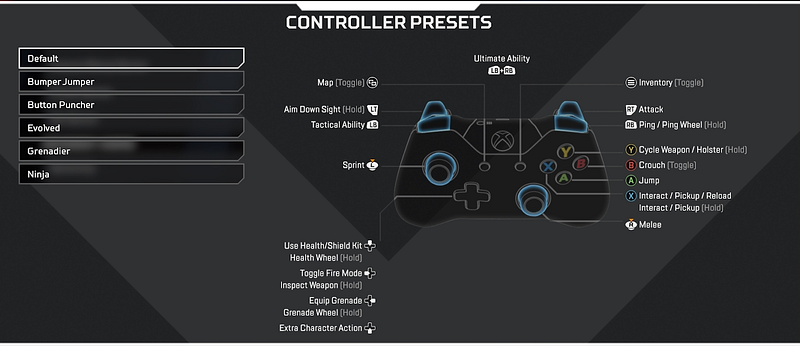
Remap your Controller Presets on your most played games
Best Buy offers 2 Year Accidental Replacement Policy for 1/3rd of the cost

The action of pressing down on your analog sticks constantly puts too much pressure on them over time. This is partly why the joysticks drift but you never have issues with the back buttons(R/L) or the arrow/shape d-pad buttons. Games like Apex Legends where pressing the joystick is needed to sprint leaves wearing down your controller much faster. In a high intensity, competitive game you’re most likely constantly sprinting (who purposely walks anywhere in video games if it’s not stealth?).

By intentionally changing the button mapping so you’re not using your joysticks for high frequency pressing actions, you’re massively mitigating the likelihood you need to replace your controller in the future.

Ps5
Gaming
Videogames
PlayStation
Gamer
Recommended from ReadMedium