
6 Tips to Make More Sales on Redbubble
How to land your first sale in just one month
I’ve been on Redbubble for years now! I love the beautiful, unique designs that people create on there but it was only recently that I decided to create my very own store!
This was one month ago and I can assure you I wasn’t expecting much at all. Many people complain that they make their first sale only after a year. That’s ludicrous. Why spend so many hours creating stunning designs and not reap the rewards? That’s why I’m going to share how I made my first 4 sales in just one month.
Yeah I know I thought it was a good idea to just wait it out at first as the potential of making money is there and after your initial efforts, the passive income can start building. I thought this way for the first two days of my shop being opened but then I had a massive mindset change!
Why not start that passive income chain fast! This is what led to me getting my first 4 sales in just 1 month of being on Redbubble! I’m driven by new ways to make money passively and I want to share this mindset with you too.
Step 1
Upload plenty of designs.

Art is subjective. This means people are entitled to love, like, dislike, and detest your artwork. It also means that this opinion is going to affect your sales. The more artwork you have uploaded the more chances of potential likes! Yay. No, I don’t mean the Redbubble likes. From my understanding of it, Redbubble doesn’t seem to do anything about your design having plenty of likes or not.
What they do take notice of is sales. That’s why you want people to like your designs enough to buy them. If you post more there’s more to choose from and plenty more chances of sales. It’s part of the whole creative sales ratio. I suggest posting at least 100 designs within your first month of Redbubble.
Step 2
Tag, tag, and tag some more!
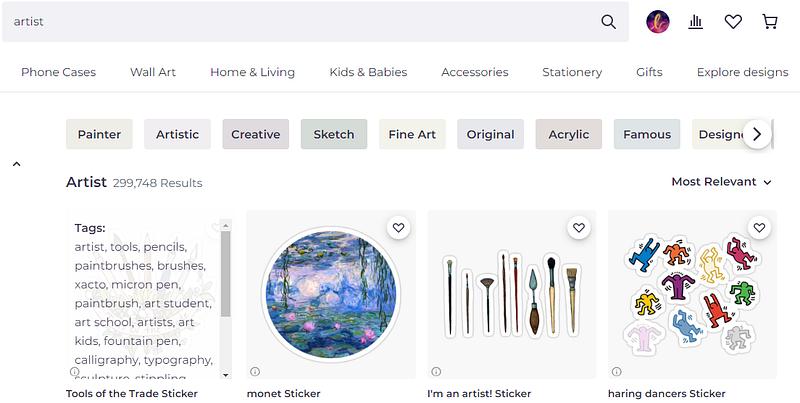
Now, this doesn’t mean you need to release the tagging diarrhea into Redbubble’s tag box, but what it does mean is that you need to tag your work in an educated manner. Redbubble suggests 15 tags minimum. How do you find these tags? By clicking on the little ‘i’ on other top-ranking designs in Redbubble that match your designs theme. This will show you the tags that were used for that design.
For example, you might want to publish something for artists. Type artists in the search box and view the ‘i’ in the bottom left corner of the first result as I’ve demonstrated in the picture below.

Another great tool for finding Redbubble tags is the Merch Titans Automation Tool.
DON’T JUST THROW IN ANY POPULAR TAGS THIS CAN HURT YOUR SHOP.
Step 3
Create stunning purchasable designs through cross niche-ing.
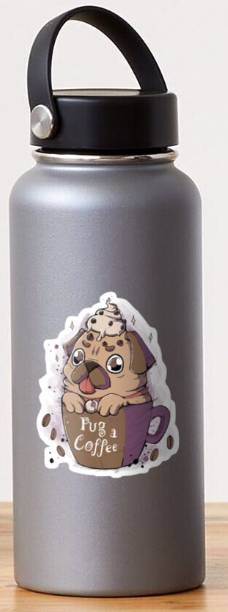
How do you do that? Find something you love and think about other people who love that same thing. What else do they usually tend to love? Books and rain? Coffee and pugs? Drawing and stars? Mix the two to create uniquely irresistible designs.
Here’s one such design I found on Redbubble that I find particularly cute and I think the designer did the whole cross-niche thing well.
Step 4
Consider your Redbubble pricing margins!
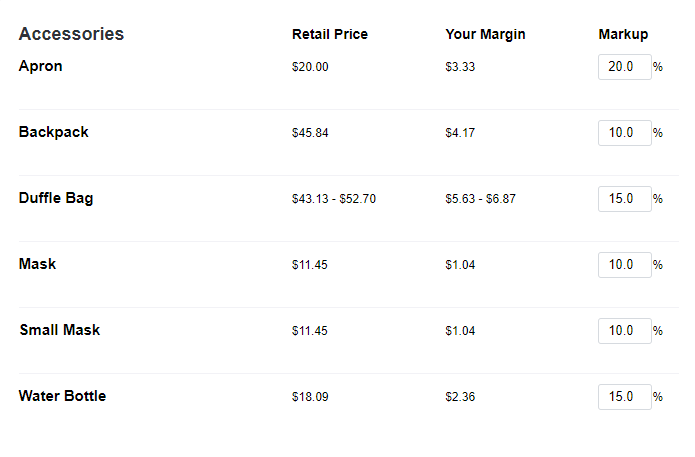
I can’t stress this enough. As a startup, you need sales to reach a top-ranking position in the search results. The best way to get more sales is to run some sales for a little. Drop your profit margins where you can. Redbubble masks can be dropped to 10% in the beginning to increase sales. Don’t forget to bump it back up after you’ve achieved your sales goal.
Your designs that aren’t selling well can be left on the lower percentage over time.
Stickers are going to make you lose money if you forget to push your percentages up to at least 60% as the profit margins are extremely low!
Step 5
Interact with the community.
Like as many posts as you possibly can. As long as you remain genuine about it and don’t forget to comment on the ones you’re super stoked about.
Step 6
Share
Share your shop link. Share your product links. Share your promotional images. Hello? Redbubble doesn’t provide promotional images just for fun. They’ve got a whole range of beautiful images to pick from that you can use to create the most eye-popping, click-worthy, sales-generating posts. UTILIZE IT!
Where? On Pinterest, Twitter, Tumblr, Facebook, Youtube, Instagram, Reddit, and anywhere that your social heart flutters.
Step 7 (BONUS)
Promote in person.
I have not tried this one out yet due to lockdown. Sigh. But it sounds very solid that’s why I’m sharing it here as a bonus tip. Everone suggests telling your friends and family. I don’t believe in that so that’s not the type of in-person promotion I’m talking about.
I’m talking about selling your products at markets, and pop-up shops. It’s one of the best ways to promote yourself. Buy some of your products from Redbubble and sell them at a fair. A sale is a sale none the less! If you’re serious about making money from print on demand this seems to be a legit way to do it without the ugly equipment costs.
I hope these tips help. Happy Redbubble designing and I hope you get your first sale soon!!!


