
6 Reasons Why You Should Stop Using Jupyter Notebooks

Introduction
Data science has experienced rapid growth and transformation in recent years, with professionals constantly seeking more efficient and effective tools to analyze and visualize data. While Jupyter Notebooks have been a popular choice among data scientists, it’s time to consider whether this tool is truly the best option for the job.
In this blog post, we will explore the limitations of Jupyter Notebooks and present compelling reasons why it may be beneficial to stop using them in favor of alternative solutions.

1. Limited scalability and performance
Jupyter Notebooks are known for their interactive and exploratory nature, making them ideal for small-scale data analysis. However, when it comes to handling large datasets or running computationally intensive tasks, Jupyter Notebooks fall short.
These notebooks load the entire dataset into memory, which can lead to performance issues and memory limitations. Additionally, executing code sequentially within a notebook can hinder parallel processing, making it inefficient for tasks that require substantial computing power.
Example
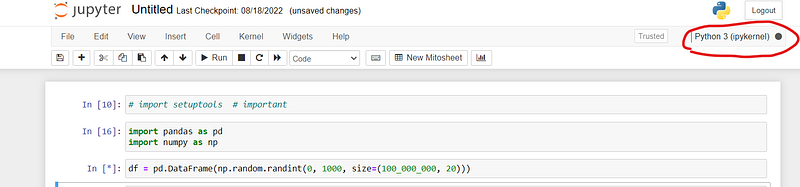
Imagine a data scientist working with a massive dataset containing millions of rows and columns. Loading this data into a Jupyter Notebook can cause significant memory limitations and slow down the analysis process, making it impractical for handling large-scale projects.
2. Lack of version control and collaboration
Collaboration is an essential aspect of data science projects, enabling team members to work together seamlessly. Unfortunately, Jupyter Notebooks are not designed with collaboration in mind. While they allow sharing of notebooks, version control becomes a challenge, leading to potential conflicts and difficulties in tracking changes.
Example
Consider a team of data scientists collaborating on a project using Jupyter Notebooks. With multiple team members making changes simultaneously, tracking and merging these changes becomes challenging, leading to conflicts and potential loss of work.
3. Reproducibility concerns
Reproducibility is a crucial aspect of data science, ensuring that experiments and analyses can be replicated for verification and validation purposes. Jupyter Notebooks, however, make it challenging to achieve reproducibility due to their dynamic and interactive nature.
Example
Suppose a data analyst needs to rerun a Jupyter Notebook after making changes to the code or data. However, due to hidden dependencies, the results obtained are inconsistent and difficult to replicate, jeopardizing the reproducibility of the analysis.
4. Debugging difficulties
Identifying and fixing errors in Jupyter Notebooks can be challenging. Debugging code within a notebook becomes cumbersome, especially when dealing with complex data science projects. The lack of robust debugging capabilities can significantly impact productivity.
5. Lack of code modularity
Jupyter Notebooks often encourage an ad-hoc approach to coding, making it challenging to develop modular and reusable code. This limitation can hinder code organization, maintainability, and the ability to build upon previous work effectively.
Example
Consider a data scientist developing a data pipeline in a Jupyter Notebook, where code components are intertwined and difficult to separate into reusable modules. This lack of modularity makes it challenging to maintain and update the pipeline efficiently.
6. Limited support for other programming languages
Although Jupyter Notebooks originated as a Python-based tool, efforts have been made to support other programming languages. However, the support for non-Python languages is often limited and less mature compared to the Python ecosystem.
Data scientists who work extensively with languages like R, Julia, or Scala may find themselves restricted in terms of available libraries, integrations, and community support when using Jupyter Notebooks.
What Alternatives do we have for enhanced productivity?
Thankfully, some alternatives address the limitations of Jupyter Notebooks. Integrated Development Environments (IDEs) like PyCharm, Visual Studio Code, or RStudio offer powerful features tailored specifically for data science tasks. These IDEs provide better support for version control, enhanced debugging capabilities, efficient project management, and seamless integration with popular data science libraries.
Furthermore, cloud-based platforms like Google Colab, Databricks, and Kaggle offer collaborative environments with robust scalability, integrated version control, and the ability to execute code on powerful hardware.
Do I suggest completely abandoning Jupyter Notebooks?
No, I don’t. I continue to utilize Jupyter Notebooks in specific scenarios, particularly when working with small-scale code and when the code doesn’t require deployment to production. Jupyter Notebooks remain my tool of choice for data exploration and visualization.
If you prefer a combination of approaches and find it more comfortable, you can utilize both scripts(.py) and Jupyter Notebooks for different purposes. For instance, you can develop classes and functions within scripts and then import them into the notebook to maintain a cleaner and more organized codebase.
Alternatively, some practitioners convert their Jupyter Notebooks into scripts after completing the notebook’s initial purpose. Personally, I am not inclined towards this approach as it often requires additional time and effort to restructure the code into functions, classes, and test functions within the script.
In my experience, I find that writing small functions and corresponding test functions separately proves to be a faster and safer approach. This way, if I need to optimize my code with a new Python library, I can rely on the existing test function to ensure that everything still functions as intended.
Conclusion
While Jupyter Notebooks have been a staple tool in data science, their limitations in terms of scalability, collaboration, reproducibility, and language support make it worth exploring alternative solutions. As the field of data science continues to evolve, embracing more robust tools and platforms will enable data scientists to enhance their productivity, improve collaboration, and overcome the challenges associated with Jupyter Notebooks.
Thank You!
If you find my blogs useful, then you can follow me to get direct notifications whenever I publish a story.
If you like to access all the amazing stories on Medium, consider supporting me and thousands of other writers by signing up for a membership. It only costs $5 per month, it supports us, writers, greatly.


