avatarAigner Loren Wilson

Free AI web copilot to create summaries, insights and extended knowledge, download it at here

4501

Abstract

/h2> <div><h3>Engage your readers with these subject lines.</h3></div> <div><p>medium.com</p></div> </div> <div> <div style="background-image: url(https://miro.readmedium.com/v2/resize:fit:320/1*2tlu2eysy8FawoiA4m5TLw.png)"></div> </div> </div> </a> </div><h2 id="887b">Add emojis by using a colon to pull up the index</h2><p id="8c86">Another secret that I myself don’t enjoy using, but it does have its merits, is emojis in articles. There are tons of articles out there that have a comprehensive list of emojis you can copy and paste into your profile. But if you don’t want to search them out, you can simply add them while you’re writing or editing right within the editor.</p><figure id="acf6"><img src="https://cdn-images-1.readmedium.com/v2/resize:fit:800/1*JKvHfVi0JJB3OxLSWJOgoA.png"><figcaption>Screenshot by the author</figcaption></figure><p id="a6ea">Place a colon (:) anywhere in your draft and use it like you would a simple emoji search on your phone. There is a wide range of emojis and images you can add to your article to create dynamic graphics and a unique viewing experience for your reader.</p><div id="099a" class="link-block"> <a href="https://readmedium.com/100-lessons-i-learned-writing-321-stories-46336caf8cd3"> <div> <div> <h2>100 Lessons I Learned Writing 321 Stories</h2> <div><h3>In 6 months, I’ve done a lot of writing, learning, and growing. I want to share some of that with you.</h3></div> <div><p>medium.com</p></div> </div> <div> <div style="background-image: url(https://miro.readmedium.com/v2/resize:fit:320/1*PYNhTsvgg_PN1zCc1zYaQQ.jpeg)"></div> </div> </div> </a> </div><h2 id="b150">Tag your informed comments so they appear in searches</h2><p id="cf92">Sometimes all you may leave in a comment is a simple thank you. Then there are the times when your comment takes on the life of an article. Often when this happens, I’ll actively make a separate post for the comment and publish it like an article. That’s a grander response that takes more time, though. You don’t have to do that if you tag your comments like they are articles.</p><p id="2c96">I will note that I have noticed that this (and everything) about the new Medium app does not function properly. So save tagging and publishing your comment to your profile for the actual website. Doing this helps build your expertise on particular topics. For me, I only tag and put published comments on my profile if they are related to writing and publishing. What topics are you an expert in? Find those articles and comment, leaving thoughtful and informed words that are properly tagged.</p><h2 id="926e">Hyperlink your images</h2><p id="d3ae">The image for this article is hyperlinked. If you click on it, it’ll take you to my official site. Why do this? Hyperlinking an image is something I’ll do if I write for a publication that decentralizes the writer for their own branding and marketing, like Better Marketing and such. These publications will strip away any links or branding to allow readers to follow you or read more of your work.</p><p id="1693">To get around that, I often hyperlink the images with links to more of my work. This helps my readers find out more about me and other articles if they are interested. And like with ALT texts, hyperlinking an image assigns information that search engines use to categorize the image. The one above will be logged with images associated with me, which is perfect since it is me. To hyperlink something, simply highlight or click on it, then press COMMAND+K for Macs or CRTL+K for Windows.</p><div id="7cb0" class="link-block"> <a href="https://readmedium.com/why-im-unfollowing-97-of-the-people-i-follow-907ff14b4b4f"> <div> <div> <h2>Why I’m Unfollowing 97% of the People I Follow</h2> <div><h3>And the world of difference it makes to my feed and reading experience.</h3></div> <div><p>medium.com</p></div> </div> <div> <div style="background-image: url(https://miro.readmedium.com/v2/resize:fit:320/1*XaStf4JpE7EDB3xq2aQErQ.png)"></div> </div> </div> </a> </div><h2 id="e5e5">U

Options

se all 3 of your titles</h2><p id="53e5">Did you know that you have 3 different titles for your articles? There’s the <i>article title</i> that is at the top of your article, the <i>display title</i>, and the <i>SEO title</i>. All of these titles perform different functions and help your readers find your stories. If you don’t change any of them, they all default to the <i>article title</i> at the top.</p><p id="69ce">The <i>article title </i>is helpful for providing a detailed idea to the reader of the type of article they are going to read. But your <i>display</i> and <i>SEO titles</i> are how your reader finds your articles. You can find both of these in more settings. The <i>SEO title</i> search engines use to recommend your story to readers when they search for particular subjects and topics. So, make the <i>SEO title</i> keyword heavy. The <i>display title</i> is how people find your article on Medium. Think of what words or phrases someone would use to find your article and work that into your title.</p><h1 id="149a">Using These Secrets for Success</h1><p id="0073">Success is personal. I can’t tell you what your definition of success is on this platform. What I can do, is give you some tips, tricks, and techniques that I and other top writers have found to work on Medium. Will it bring you the success you so desperately dream of?</p><p id="c3ca">Maybe.</p><p id="92f8">But first, you have to have a serious talk with yourself. Why do you write on Medium? Not the funny cool answer you give to friends and other writers on the site but the real and intentional answer behind why you’ve decided to spend time writing and/or reading on Medium. The talk may shock and disturb you.</p><p id="3ef7">That’s okay.</p><p id="4bd9">Success isn’t always pretty or nice. Sometimes it takes facing parts of yourself and your desires that you may not like. That’s a part of writing, of finding our way to success—whatever that may mean.</p><h1 id="0b87">Further Reading</h1><div id="ea2a" class="link-block"> <a href="https://readmedium.com/6-medium-myths-that-are-holding-you-back-d7e6f1c219f9"> <div> <div> <h2>6 Medium Myths That Are Holding You Back</h2> <div><h3>The lies you’ve been told are holding you back from achieving what you and I both know you can.</h3></div> <div><p>medium.com</p></div> </div> <div> <div style="background-image: url(https://miro.readmedium.com/v2/resize:fit:320/1*di37Yey1d_PrRsFBMfB4Ww.png)"></div> </div> </div> </a> </div><div id="6a24" class="link-block"> <a href="https://readmedium.com/guide-to-writing-smart-on-medium-30a64ff5c9e1"> <div> <div> <h2>Guide to Writing Smart on Medium</h2> <div><h3>Learn the in’s and out’s of Medium and work sustainably and smart</h3></div> <div><p>medium.com</p></div> </div> <div> <div style="background-image: url(https://miro.readmedium.com/v2/resize:fit:320/1*OsYAeXZwGjpvHw_94ny2KQ.png)"></div> </div> </div> </a> </div><div id="d1a9" class="link-block"> <a href="https://readmedium.com/how-i-achieved-a-stellar-100-curation-rate-3f6b0c43a935"> <div> <div> <h2>How I Achieved a Stellar 100% Curation Rate</h2> <div><h3>And why it doesn’t matter. Learn about the new curation policies and plan ahead to score big.</h3></div> <div><p>medium.com</p></div> </div> <div> <div style="background-image: url(https://miro.readmedium.com/v2/resize:fit:320/1*l3E-gBWTq3fYKVNJikXviA.png)"></div> </div> </div> </a> </div><p id="7fcb"><a href="https://three-crows.square.site/"><i>Aigner Loren Wilson</i></a><i> is a queer Black SFWA, HWA, and Codex writer. Her work has appeared in or is forthcoming from WIRED, The Writer, Tordotcom, Fiyah, and she is a Hugo Award finalist for her editing. Along with her writing roles, she is also the guest editor for Fireside Fiction and Apparition Literary summer and winter issues. <a href="https://mailchi.mp/d2ebcd43b182/q7mv72xipe">Subscribe for access </a>to masterclass courses in writing, editing, and making a living as a creative.</i></p></article></body>

6 Medium Secrets to Level Up Your Articles

Use the tools available, but hidden, to create memorable pieces, increase your SEO, and engage your reader.
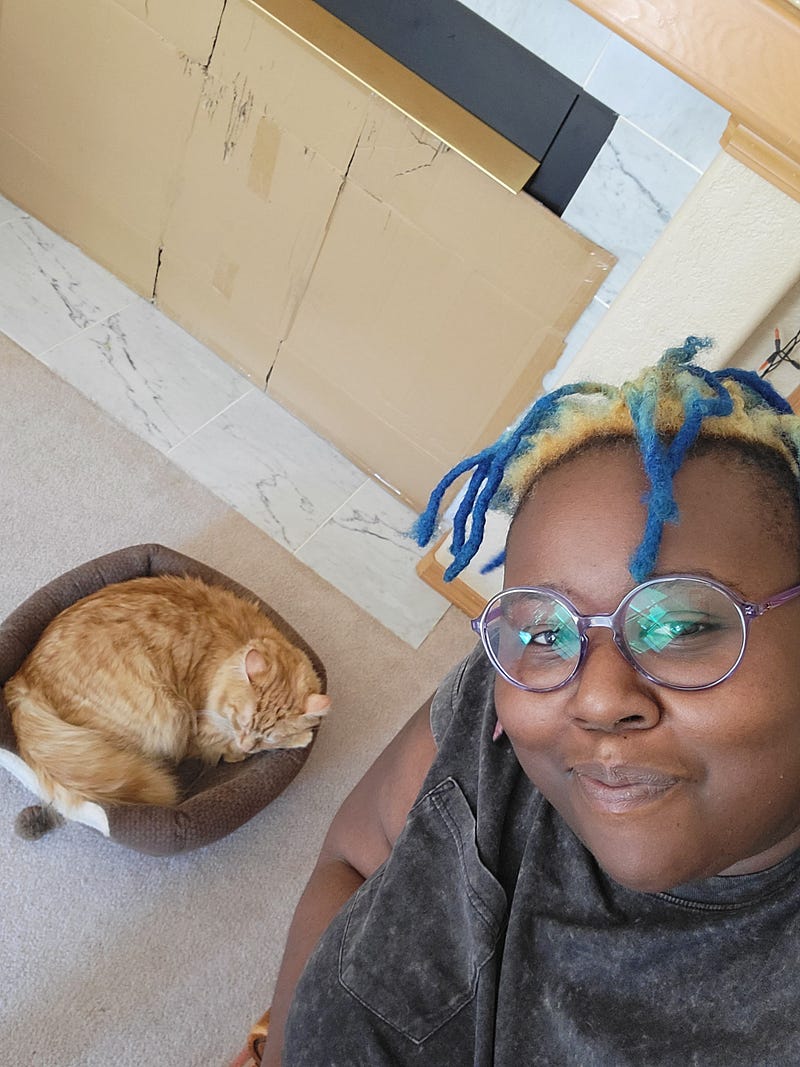
Image by author

Medium’s constantly changing and everyone thinks they know what it is that makes the site tick. That’s because Medium likes it that way. The company makes more money when writers all scramble to figure out how to do things right. While most of the information out there is geared toward content mill writers publishing 1–2 articles a day on the site, I like to focus on tactics that work for writers no matter their output.

So, these “secrets” are simply ways that you can level up your writing and articles to get more readers engaging with your stories. I call them secrets because when I talk to other Medium writers, many have no idea these features exist. Also, many of them aren’t outlined or listed in Medium’s publishing and user guides.

Add SEO descriptions in your ALT text along with your image description
Screenshot by author

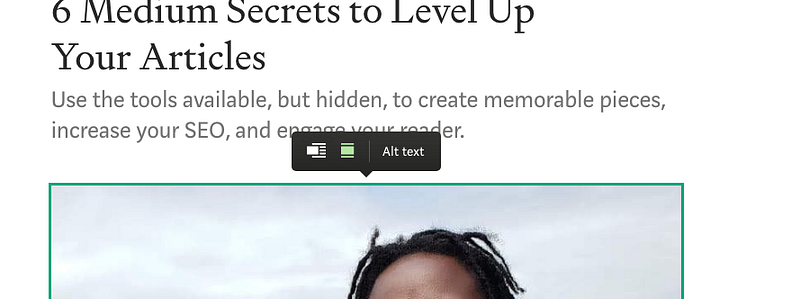
When you add an image to your story and right-click on it, a box pops up like pictured above. ALT text helps people using screen readers access all parts of your story. You should be using this whenever you post pictures to make your stories more accessible.

But there’s another great thing about ALT text. Google uses it to file your images. Writing about hard relationship conversations for lesbians? Use those keywords in your ALT text to help your readers find your article. All my article images have ALT text that includes:

  • the description of the picture
  • my name
  • the article’s SEO title
  • several SEO keywords and phrases

Automatically share to Twitter as soon as an article is published
Screenshots by author

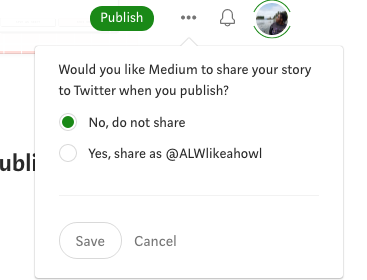
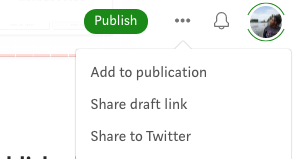
If you’re the type of writer who uses Twitter as a marketing platform for your Medium articles, did you know there’s a way to automatically share your articles once they’re published? If you click the three horizontal dots at the top of your Medium draft page, a menu drops down. This menu is filled with behind-the-scenes ways of leveling up your article. Click on share to Twitter before you’ve published the article, and Medium will ask if you’d like for your story to instantly be shared to Twitter upon publication.

I’m a career writer with publications and connections in the professional writing world. My Twitter friends are agents, editors, and other writers or creators that see Medium as a simple content mill site with some good writing. It doesn’t win any sort of recognition or rewards, so I don’t use this feature ever. However, tons of writers are building a Medium community on Twitter that has proven to do wonders for their writing and read times!

What doesn’t work for me, might be the missing key to your writing.

Add emojis by using a colon to pull up the index

Another secret that I myself don’t enjoy using, but it does have its merits, is emojis in articles. There are tons of articles out there that have a comprehensive list of emojis you can copy and paste into your profile. But if you don’t want to search them out, you can simply add them while you’re writing or editing right within the editor.
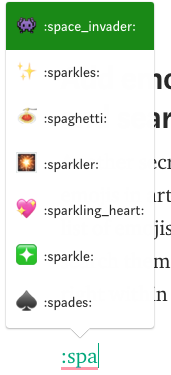
Screenshot by the author

Place a colon (:) anywhere in your draft and use it like you would a simple emoji search on your phone. There is a wide range of emojis and images you can add to your article to create dynamic graphics and a unique viewing experience for your reader.

Tag your informed comments so they appear in searches

Sometimes all you may leave in a comment is a simple thank you. Then there are the times when your comment takes on the life of an article. Often when this happens, I’ll actively make a separate post for the comment and publish it like an article. That’s a grander response that takes more time, though. You don’t have to do that if you tag your comments like they are articles.

I will note that I have noticed that this (and everything) about the new Medium app does not function properly. So save tagging and publishing your comment to your profile for the actual website. Doing this helps build your expertise on particular topics. For me, I only tag and put published comments on my profile if they are related to writing and publishing. What topics are you an expert in? Find those articles and comment, leaving thoughtful and informed words that are properly tagged.

Hyperlink your images

The image for this article is hyperlinked. If you click on it, it’ll take you to my official site. Why do this? Hyperlinking an image is something I’ll do if I write for a publication that decentralizes the writer for their own branding and marketing, like Better Marketing and such. These publications will strip away any links or branding to allow readers to follow you or read more of your work.

To get around that, I often hyperlink the images with links to more of my work. This helps my readers find out more about me and other articles if they are interested. And like with ALT texts, hyperlinking an image assigns information that search engines use to categorize the image. The one above will be logged with images associated with me, which is perfect since it is me. To hyperlink something, simply highlight or click on it, then press COMMAND+K for Macs or CRTL+K for Windows.

Use all 3 of your titles

Did you know that you have 3 different titles for your articles? There’s the article title that is at the top of your article, the display title, and the SEO title. All of these titles perform different functions and help your readers find your stories. If you don’t change any of them, they all default to the article title at the top.

The article title is helpful for providing a detailed idea to the reader of the type of article they are going to read. But your display and SEO titles are how your reader finds your articles. You can find both of these in more settings. The SEO title search engines use to recommend your story to readers when they search for particular subjects and topics. So, make the SEO title keyword heavy. The display title is how people find your article on Medium. Think of what words or phrases someone would use to find your article and work that into your title.

Using These Secrets for Success

Success is personal. I can’t tell you what your definition of success is on this platform. What I can do, is give you some tips, tricks, and techniques that I and other top writers have found to work on Medium. Will it bring you the success you so desperately dream of?

Maybe.

But first, you have to have a serious talk with yourself. Why do you write on Medium? Not the funny cool answer you give to friends and other writers on the site but the real and intentional answer behind why you’ve decided to spend time writing and/or reading on Medium. The talk may shock and disturb you.

That’s okay.

Success isn’t always pretty or nice. Sometimes it takes facing parts of yourself and your desires that you may not like. That’s a part of writing, of finding our way to success—whatever that may mean.

Further Reading

Aigner Loren Wilson is a queer Black SFWA, HWA, and Codex writer. Her work has appeared in or is forthcoming from WIRED, The Writer, Tordotcom, Fiyah, and she is a Hugo Award finalist for her editing. Along with her writing roles, she is also the guest editor for Fireside Fiction and Apparition Literary summer and winter issues. Subscribe for access to masterclass courses in writing, editing, and making a living as a creative.

Writing Tips
Writing
Medium
Publishing
Success
Recommended from ReadMedium