
$6,766.73 in 12 Months from 1 Book — No Writing Required
Not clickbait. Mini tutorial included.

When most people think about “writing a book,” they typically imagine a 100,000-word book that took months (or years) to write and edit.
Today, I want to challenge that idea.
What most people don’t know is that there are many different types of “books” that you can create, and some require little to no writing.
Now you might be thinking about the “blank notebooks” and “journals” trend that has been all over YouTube lately.
Nope.
About 12 months ago, I started creating a different type of “book” that requires “almost” no writing and then publishing them to Amazon and Barnes and Noble.
The first one that I published back in December 2022 has earned over $6,766 in the last 12 months on Amazon.
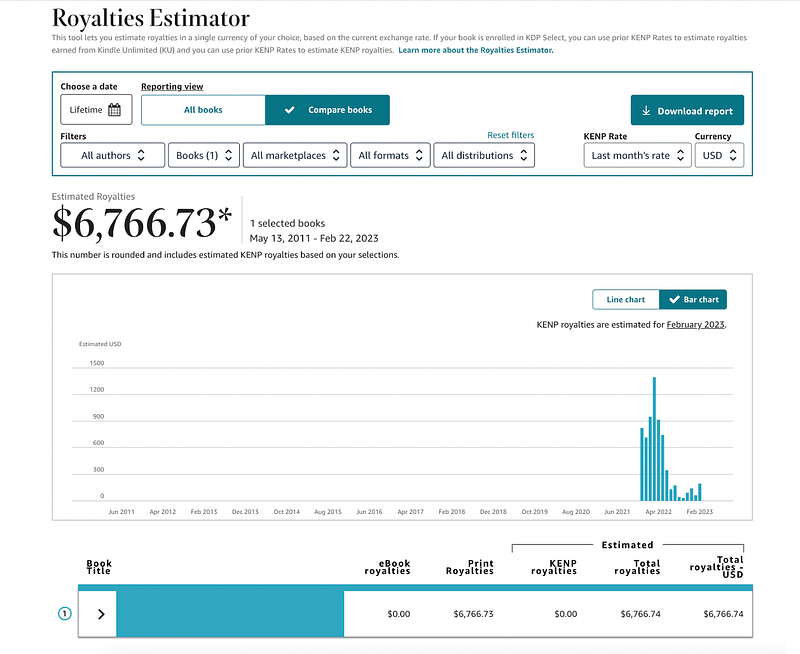
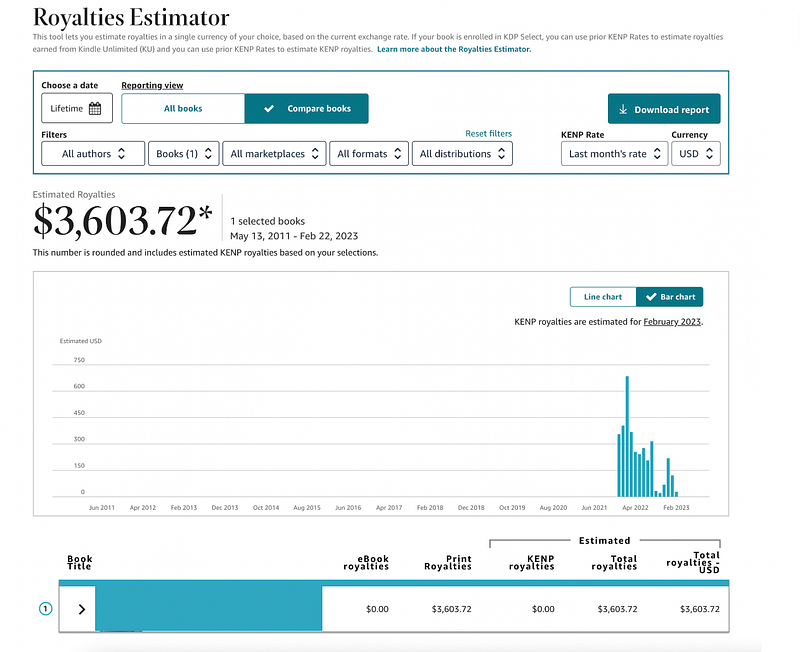
And just to show that this is not a fluke or a one-hit-wonder, here are the 12-month results from a similar book that I published around the same time:
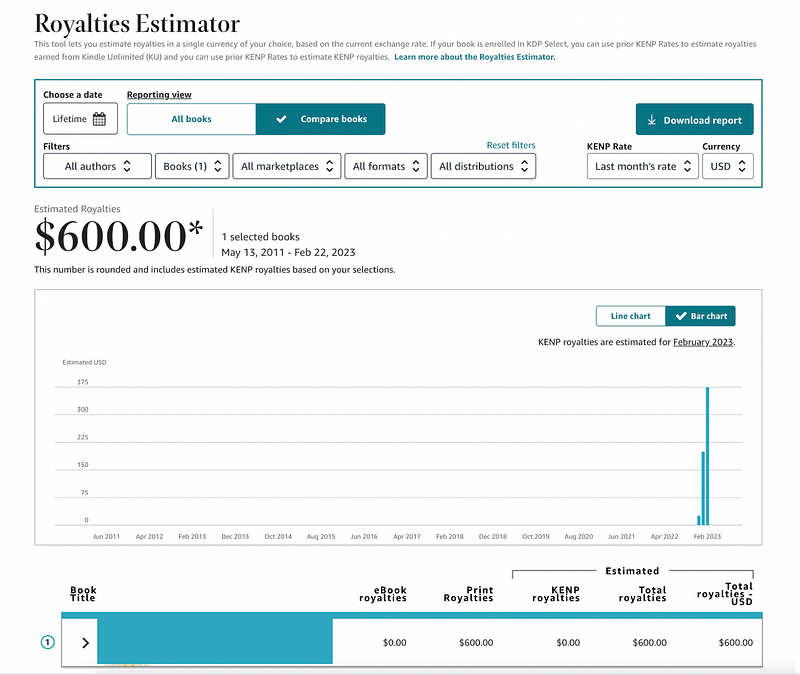
And for good measure, here are the results from a similar book that I published 3 months ago:
So what is this mystery book niche?
Adult activity books.
Adult activity books contain things like crossword puzzles, word scrambles, word search puzzles, sudoku puzzles, and more.
You can create adult activity books based on one specific type of puzzle, or you can create “variety” books with several different types included.
Unlike “no content” books, adult activity books are filled with unique puzzle content that provide real entertainment value to the end user.
They’re also a lot easier to create than you might think.
Is this niche saturated?
Before I get into how you can make these books yourself, I want to address this common question.
I’ll admit I was hesitant to create books in this niche because there are literally thousands of adult activity books on Amazon.
However, after testing the waters, I noticed a few promising things about this niche.
- This type of book is consumable. Once a puzzle book is complete, the user will need to buy more. Most people that consume these types of books buy several over the course of a year, so there is an opportunity for recurring sales if you have multiple books.
- Sales tend to peak (for me) around the 3–6 month mark, then slowly decline over time unless supported with ads (your mileage may vary.)
- These types of books tend to sell very well around the holidays because people like to give them as gifts.
So while there are a lot of competing books in this niche, there is still a lot of opportunity here, especially if you create a high-quality product.
How are these books made?
Adult activity books are actually quite easy to create.
I make my book interiors using an inexpensive tool called “Book Bolt.”
Book Bolt has templates for several different puzzle types, including:
- Crossword Puzzles
- Word Scrambles
- Missing Vowel Puzzles
- Word Searches
- Sudoku
- Kakuro
- MineFinder
- Mazes
- and more.
You can create books for any specific puzzle type or combine multiple puzzle types within a single book.
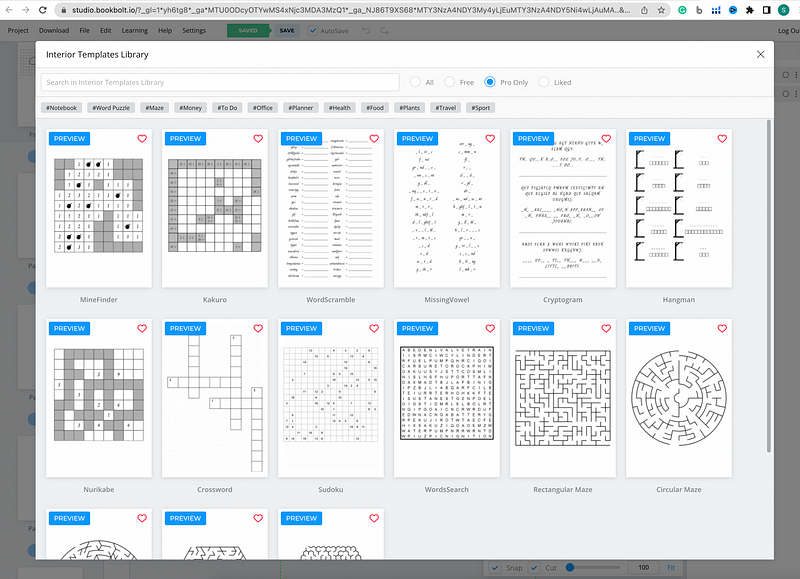
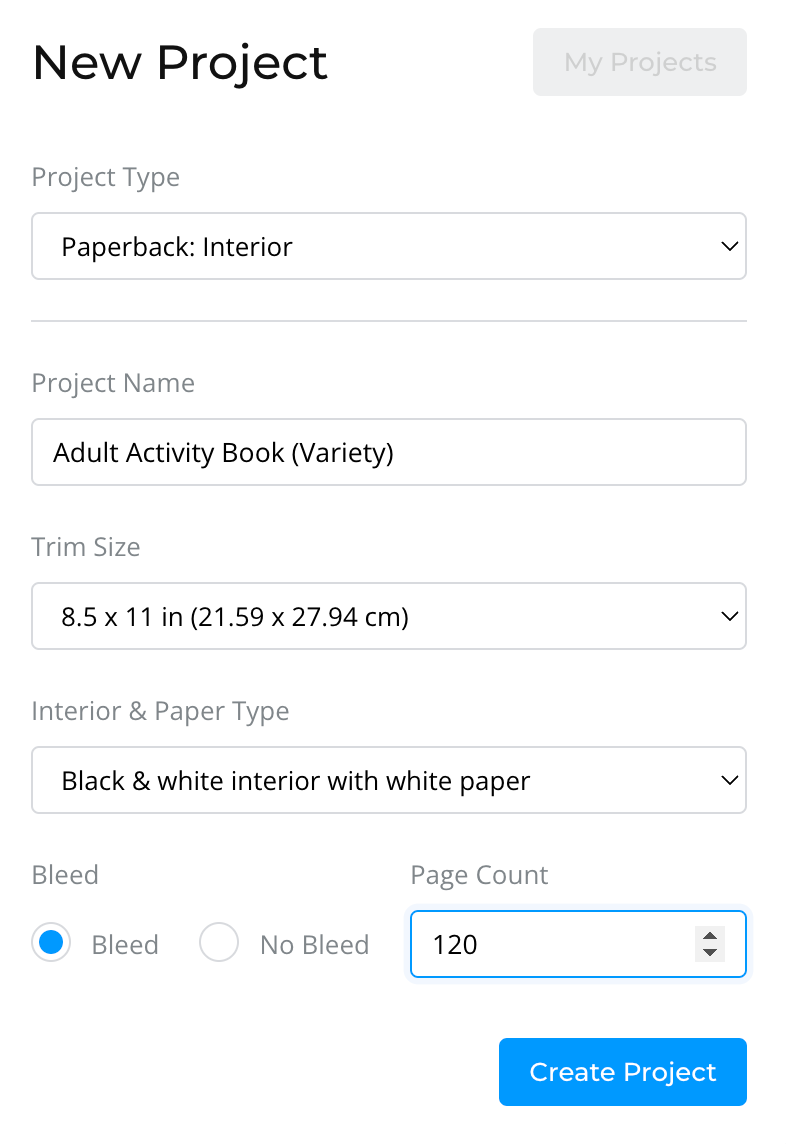
Setting up a new book project in Book Bolt is fairly easy.
Select the project type — here, I’ve chosen to create an interior for my book.
Give your project a name.
Pick the “trim size.”- I usually go with 8.5 x 11 or 6 x 9.
And choose your page count — most of my books have 80–150 pages.
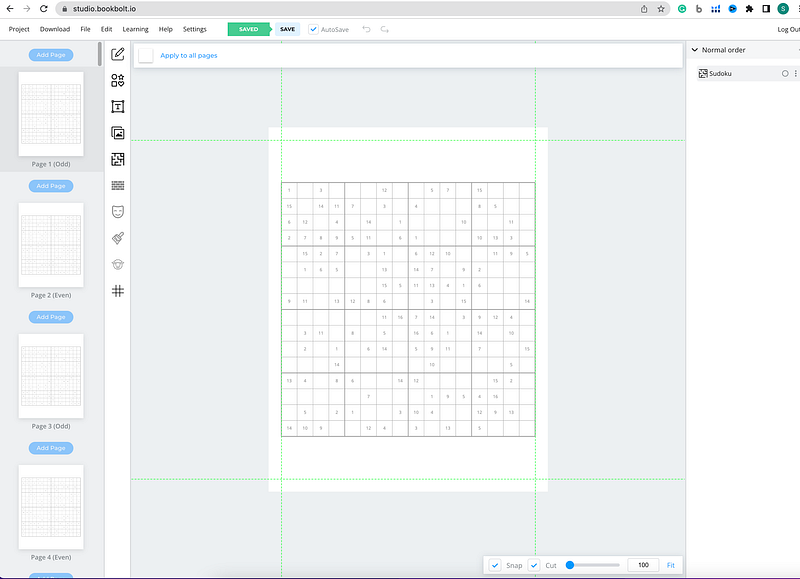
From there, you add puzzles to each page using Book Bolt’s templates or other designs that you create.
Note — For some puzzle types, you will need to supply a word list.
You can create these yourself by typing words into a spreadsheet.
However, I like to use the Jasper AI writing assistant to make themed word lists for my puzzles very quickly.
For example, I used Jasper’s “chat” function to create a list of 25 words related to food that I can use in a themed word search puzzle.
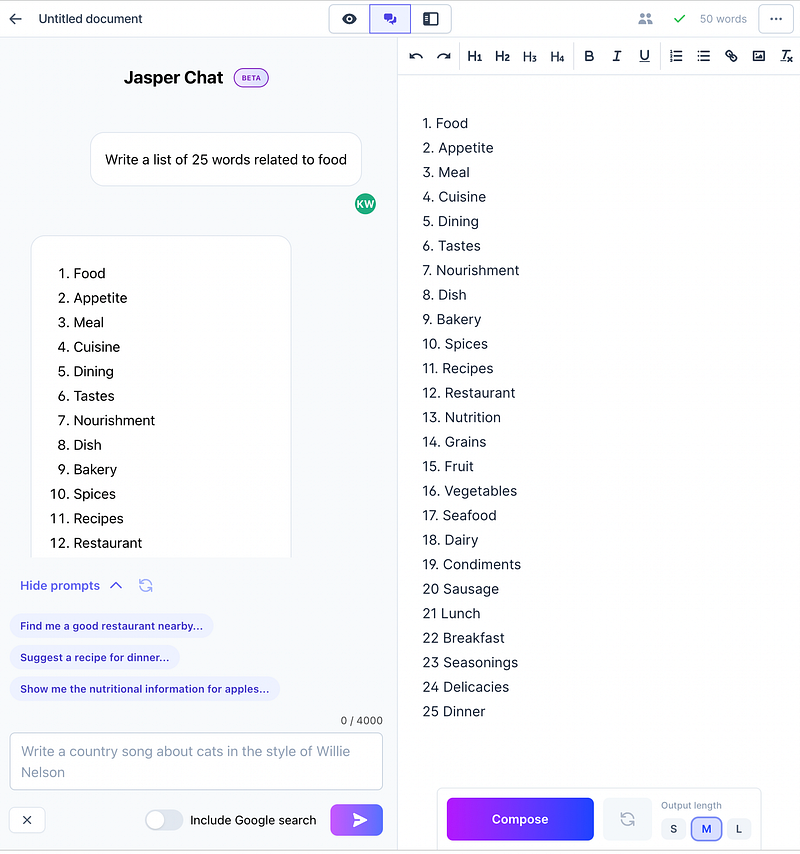
Then I pop these words into a spreadsheet, download the list as a .csv file, and upload it to Book Bolt.
I find creating these types of books to be really fun and enjoyable because you can get really creative with them.
Both Book Bolt and Jasper AI have free trials that you can get using my referral links below if you’d like to try this out for yourself:
Like most “free trials,” they will ask for a payment method when you sign up, but you won’t get changed until the trial ends. So, if you try it and it's not for you, just cancel to avoid getting charged.
Creating Your Cover
In order for your book to sell, it must have a good-looking cover.
You can create covers with Book Bolt.
However, I like to make mine using Canva, mostly because it’s a tool I’m familiar with. I do have the Pro version, so I have a license to use Canva’s design elements for commercial projects.
You could also use PhotoShop or any other design software that you like.
Also, be sure to use Amazon’s paperback cover calculator to get the correct dimensions for your book cover based on the number of pages it has.
Note — if you don’t feel confident in your cover-design skills, you can order decent-looking covers for a low cost on Fiverr.
Uploading to Amazon
Once you have created your book interior and cover, you’re going to export both independently as PDF files.
Then, to upload to Amazon, you’ll go to https://kdp.amazon.com/.
Once you create an account, you’ll be asked what type of book you’d like to create.
Choose “paperback.”
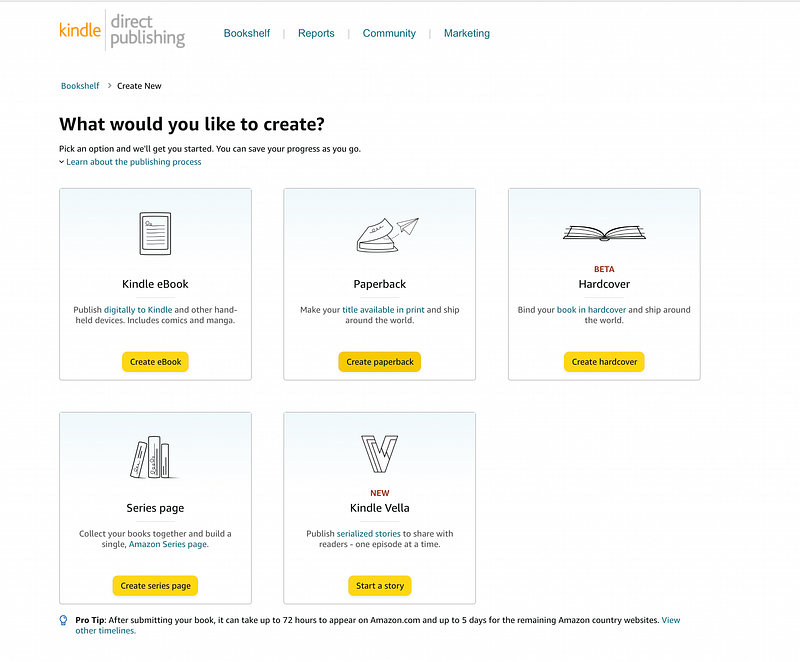
Then fill out the title, size, and description for your book.
Tip: I also use Jasper to write my book descriptions.
Upload your cover and interior files.
Select your price (I usually price mine between $6.99 and 15.99, depending on how many pages it has.)
Then submit.
It typically takes Amazon a few days to review and publish your book on their site.
Note: This type of book really only works as a paperback or hardcover. If you try to upload a “Kindle” version, it will likely get rejected (I’ve tried.)
You can also upload your books to Barnes and Noble through their self-publishing platform. The process is nearly identical.
I have made a few sales on B&N, but since Amazon gets so much traffic, I tend to get a lot more sales there.
I’ve also played around with the idea of selling these as “printables” on Etsy. I don’t have any data on that yet, so stay tuned.
What do you think of this idea?
I’d love to know your thoughts in the comments.
This tutorial includes my referral links for Book Bolt and Jasper AI.
If you click my link and end up purchasing one of these tools, I’ll receive a small commission at no additional cost to you. However, I only recommend tools that I personally use and love.


