avatarAnangsha Alammyan

Free AI web copilot to create summaries, insights and extended knowledge, download it at here

5474

Abstract

nly version, it tends to be the worst writing sample we could ever lay our hands on.</p><p id="7ef8">When I read the first draft of my poetry collection, I was convinced it’s worthless and there’s no point in publishing it. Only after multiple editing and beta reading rounds, did I finally garner the confidence to move on to the next step.</p><p id="52ec">A few tips to make the editing rounds easier:</p><ul><li>Give a gap of at least a month after the brain dump first draft to start reading.</li><li>The first round of editing should always involve you merely reading it and making notes on the sidelines about how to make it better.</li><li>Once you’ve completed highlighting and anonating the manuscript, sit with your computer and start making the edits.</li><li>Repeat this process for 3–4 times (or however many rounds it takes for you to feel confident).</li><li>Ask a few reader friends to beta read your manuscript. Incorporate whatever comments you feel are valuable and further modify your manuscript.</li></ul><figure id="e5fc"><img src="https://cdn-images-1.readmedium.com/v2/resize:fit:800/1*CdJk6hq3v6-UqDUm1zkC6g.png"><figcaption>A screenshot of the email I sent to my beta readers with a list of questions for them to answer. These helped me understand their perception of the book and get a neutral third-party point of view on the fruit of my labor.</figcaption></figure><p id="e136">Read about the detailed step-by-step of converting your first draft into a publish-worthy manuscript <a href="https://betterhumans.pub/the-complete-guide-to-going-from-first-draft-to-a-finished-novel-885d0db575dd"><i>here</i></a><i>.</i></p><div id="74b2" class="link-block"> <a href="https://betterhumans.pub/the-complete-guide-to-going-from-first-draft-to-a-finished-novel-885d0db575dd"> <div> <div> <h2>The Complete Guide to Going from First Draft to a Finished Novel</h2> <div><h3>Reading, editing, restructuring, re-writing, and everything else you need to do before sending your manuscript to a…</h3></div> <div><p>betterhumans.pub</p></div> </div> <div> <div style="background-image: url(https://miro.readmedium.com/v2/resize:fit:320/1*62N1FOwwcDD6rSr1EY-dvQ.jpeg)"></div> </div> </div> </a> </div><p id="022c">This is the stage where you can hire a developmental editor (if you have the budget). Otherwise, proofread it one final time and then we’re ready to head on to the next step.</p><h1 id="1fa3">Step three: Publishing</h1><p id="71b9">Amazon KDP (or <a href="https://kdp.amazon.com/en_US/">Kindle Direct Publishing</a>, for the uninitiated) makes the self-publishing process super easy. All you need to do is download the free <a href="https://www.amazon.com/Kindle-Create/b?node=18292298011">Kindle Create</a> software that lets you convert your manuscript into a format that’s ready to be read on Kindles and other e-reading devices.</p><figure id="c5d0"><img src="https://cdn-images-1.readmedium.com/v2/resize:fit:800/1*nKeboOtYBaMt_IdjokQVng.png"><figcaption>Screenshot from the <a href="https://www.amazon.com/Kindle-Create/b?node=18292298011">Kindle Create homepage</a> on Amazon.</figcaption></figure><p id="bd91">After Kindle Create is installed on your Windows or Mac device, click on “Create new” to upload the .doc version of your manuscript.</p><figure id="be5e"><img src="https://cdn-images-1.readmedium.com/v2/resize:fit:800/1*1BRaOp3kxE2c9HkVb9ouog.png"><figcaption>Screenshot by the author from Kindle Create.</figcaption></figure><p id="4fe5">Once the file is rendered, check the pagination, alignment, and sequence. You can make changes directly on the Kindle Create interface too.</p><figure id="2ed8"><img src="https://cdn-images-1.readmedium.com/v2/resize:fit:800/1*VzjyHiW_N4lBKVjSWDs-NA.png"><figcaption>Screenshot by the author from Kindle Create.</figcaption></figure><p id="8714">Once you’re satisfied with how your manuscript will look as an eBook, download it and save it on your computer. Then, head to the <a href="https://kdp.amazon.com/en_US/bookshelf">Amazon KDP bookshelf</a>, and click on “Create.”</p><figure id="d2b6"><img src="https://cdn-images-1.readmedium.com/v2/resize:fit:800/1*v2XBxakXvoqyTbBKVgLYDA.png"><figcaption>Screenshot by the author from <a href="https://kdp.amazon.com/en_US/bookshelf">Amazon KDP bookshelf</a>.</figcaption></figure><p id="dbf8">This will take you to a page where you can select what format you’d like your book to be in. Note that paperback and hardcover options are available in only a select few countries, but you can publish an ebook on Amazon at zero cost from anywhere in the world.</p><figure id="813f"><img src="https://cdn-images-1.readmedium.com/v2/resize:fit:800/1*JK8bDKfcSQcknkgkYgoUuw.png"><figcaption>Screenshot by the author from <a href="https://kdp.amazon.com/en_US/bookshelf">Amazon KDP bookshelf</a>.</figcaption></figure><p id="3f01">What follows is a three-step process where you have to add the following regarding your book:</p><h2 id="de17">1. Details</h2><p id="d5ee">This includes the title, tag line, name of author and co-authors, whether the book is part of a series, etc.</p><h2 id="2210">2. Content</h2><p id="8b34">Next, you have to upload the file you downloaded from Kindle Create in the “Content” section. This is the part where you’ll also have to upload a cover for your

Options

book. If you haven’t already designed a cover, you can use Amazon’s built in cover designer feature to get a professional-looking book cover.</p><h2 id="3ef8">3. Pricing</h2><p id="1757">The final step is the pricing where you decide how much you want to charge from your readers. For ebooks in India, Amazon KDP has two models:</p><ul><li>Charge your book INR 98 or lesser, and you’ll get 30% royalty on the selling price.</li><li>Charge your book INR 99 or higher, and you’ll get 70% royalty on the selling price.</li></ul><p id="5085">Check the pricing and royalty correlation in your country to get a better idea of how you want to price your book.</p><p id="3e0f">Next, Amazon will automatically convert the price you set in your native currency to prices in different markets around the world according to the exchange rates. You can keep these rates as is, or change them as per your discerning.</p><figure id="d7e0"><img src="https://cdn-images-1.readmedium.com/v2/resize:fit:800/1*hb3qKfnGYwKjnHIPQ67rpA.png"><figcaption>Screenshot by the author from <a href="https://kdp.amazon.com/en_US/bookshelf">Amazon KDP bookshelf</a>.</figcaption></figure><p id="961e">Once these details are filled in, you can submit the book for publishing. Amazon takes 24–48 hours to process the book before you’ll see the live link. You can also make your book available for pre-ordering to generate some buzz before the release date.</p><h2 id="59a3">How to publish a paperback if you’re not in the US?</h2><p id="d92e">For writers not based in the US, the Amazon KDP paperback printing services might not be available (They aren’t available in India). In that case, the best option is to look for a print-on-demand publication that will print paperbacks for you for free.</p><p id="4346">I went with <a href="https://www.ukiyoto.com/">Ukiyoto Publishing House</a> for both my paperbacks, and the model they follow is simple:</p><ul><li>Submit your manuscript and a synopsis on their <a href="https://www.ukiyoto.com/submission">submissions page</a>.</li><li>They’ll get back to you with an author contract.</li><li>They design a book cover for you and fix the book’s pagination.</li><li>Once you give the go-ahead, the books will be available as paperback on Amazon and all other leading book seller sites within 7–10 days.</li></ul><p id="763a">The idea is that the publishers don’t maintain an inventory. The books go for printing the minute someone orders them on Amazon. That’s why, there’s no upfront investment needed from you as a writer. You earn a share of the profits on every copy sold.</p><h1 id="67bc">Step four: The marketing</h1><p id="159a">It’s great to have a book out in the world and call yourself a published author. But what’s the point if no one knows your book is published? This is where marketing comes in.</p><p id="ba32">Here’s a brief overview on how you can go about marketing your book:</p><ol><li>Ask your friends and family to buy the book and leave reviews.</li><li>Share about it on social media.</li><li>Write about the book to your newsletter subscribers.</li><li>Create videos, reels, and shorts to promote your book on YouTube, Instagram, and TikTok.</li><li>Network with popular book reviewers in your niche and offer them a free copy in exchange of their honest review.</li></ol><p id="c74d">This is just a generalized process, but feel free to tweak it to suit your book promotion strategy. I’ve written about how I sold 10,000+ copies of my second book without spending a penny in <a href="https://www.anangsha.me/4-fail-safe-ways-to-promote-your-book-for-free/">this article</a>:</p><div id="e852" class="link-block"> <a href="https://www.anangsha.me/4-fail-safe-ways-to-promote-your-book-for-free/"> <div> <div> <h2>4 Fail-Safe Ways to Promote Your Book for Free</h2> <div><h3>How I sold 10,000+ copies without investing a single penny</h3></div> <div><p>www.anangsha.me</p></div> </div> <div> <div style="background-image: url(https://miro.readmedium.com/v2/resize:fit:320/0*1hA1Y39Yd4zoplVC)"></div> </div> </div> </a> </div><p id="cc01">The bottomline about running a successful book marketing campaign is: <b>The more noise you generate around your book, the better it will sell</b>. Be shameless in promoting and remember that if you don’t talk about your book, no one else will.</p><h1 id="d50a">Final words</h1><p id="de3a">Writing a book is a arduous process, but the rewards can be immense. It pushes you out of your comfort zone and forces you to do things you’d never have imagined yourself doing.</p><p id="95b1">But it also changes you as a person and teaches you things about yourself you didn’t know existed. You might leave the planet one day, but your book will remain forever. It’s a piece of your soul that you’re bequeathing to the universe, and it will always be special.</p><p id="3435">So if you have an idea that you want to work into a book, don’t hesitate to start writing. The excuses will never stop and the time will never be “perfect.” But you can start today, and trust me, a year later, you’ll thank yourself.</p><p id="c153">I hope this article equipped you with the necessary tools and motivation to start working on your book. If you have any doubts I can help you with, feel free to drop them in the comments.</p></article></body>

How I DIY-ed The Publication of My 4th Book

I also made my own art for the paperback.
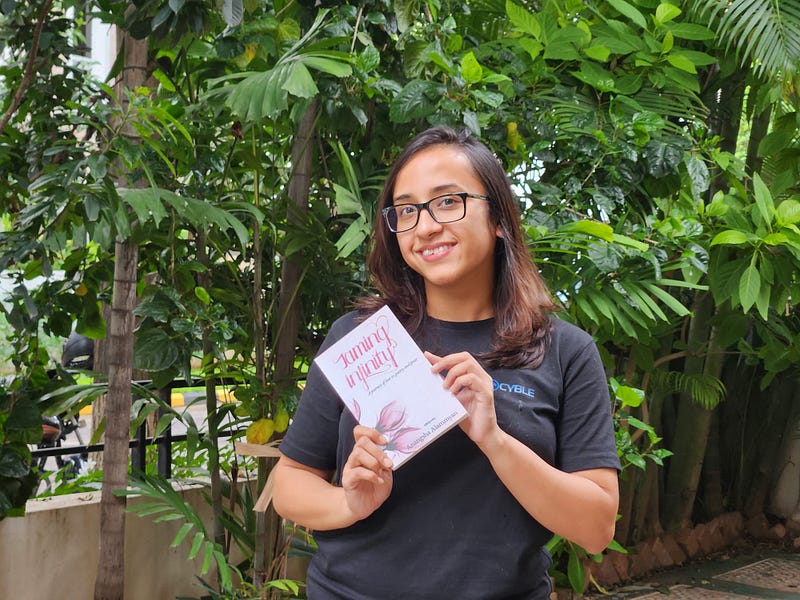
Photo of the author with her new book (Image from the author’s Instagram)

Poetry has always been my outlet, my way of self-expression, my best friend when I needed to vent my emotions.

As a kid, I resorted to poetry to bring my colorful imagination to life.

In my teenage, my poems got darker, talking about caged birds and angels with broken wings.

As I embraced adulthood, poetry became my crutch and my savior. It let me explore thoughts I couldn’t share with anyone else. Through my poems, I told stories I’d never dare say out loud.

My favorite poems are still the ones I’d never publish, but poetry was also the first way I put my writing out there in the world. In 2017, I pledged to publish a poem every day. The pledge lasted for 99 days, and gave me a place I could share my poetry with the world.

In 2018, when I was toying with the idea of being a published author as compared to being just a blogger, poetry came to my rescue. I compiled 100 of my best unpublished poems and put together my first book Stolen Reflections: Some stories are told in verse.

Since then, the book has opened up several doors for me. I’ve received messages from countless strangers on the internet who told me my words motivated them to write something of their own. The book landed at #1 on the Amazon India Poetry bestseller lists. My favorite actor, Priyanka Chopra recommended it in her list of “Must-read books by women writers” on International Women’s Day 2021.
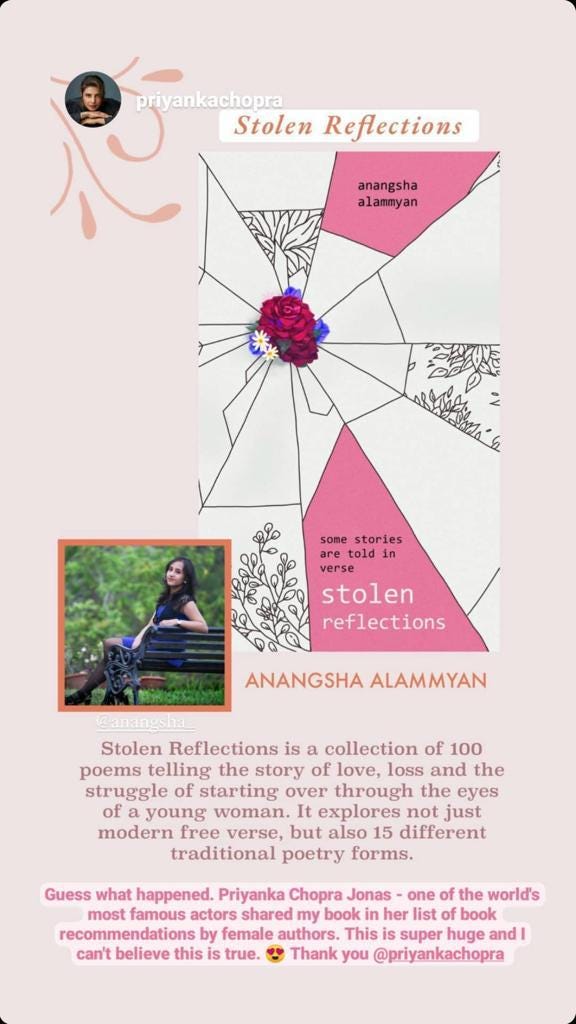
Screenshot of the story shared by Priyanka Chopra recommending “Stolen Reflections” on her Instagram story on International Women’s Day 2021.

Just a few months back, I published my second poetry collection, Taming Infinity: A journey of love in poetry and prose. I had to work hard to get this book out in the world, mostly because my inner self-talk almost convinced me publishing it was pointless. But now that the book’s out, I’ve been getting multiple messages from writers in different corners of the world about how to self-publish a poetry book.

In this article, I’m sharing a detailed step-by-step guide on how to self-publish your book on Amazon KDP. It applies to not just poetry, but any genre of book you have in mind.

Step one: The writing

The first part of publishing any book is writing it. You might feel intimidated by the prospect of churning out 60k or so words when you sit to write. Here are a few mindset shifts that helped me conquer this self-doubt:

  • Prepare an outline before you start writing.
  • Don’t think of writing a book. Divide it into sections, and think of writing a particular section of ~3000 words every day.
  • Focus on completing the first draft first. The editing will come later.
  • Know who you’re writing for and what your key goal with the book is, or else you’ll keep getting sidetracked.

For my poetry book, Taming Infinity, I even drew the illustrations myself. They’re far from perfect, but they show my perception of the poems, and this alone makes them special.
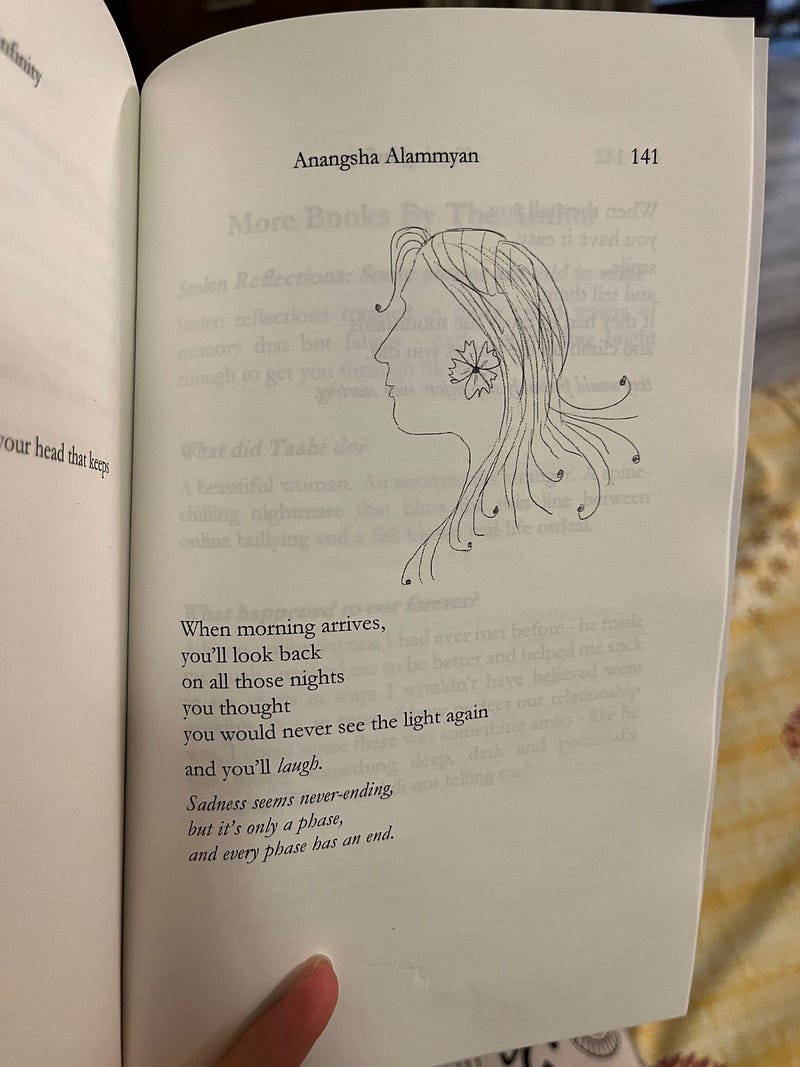
Some illustrations from my book Taming Infinity (Images by the author).

Once the first draft is ready, we will come to the next, which is arguably the most arduous step in the book writing process.

Step two: The editing

I call this the hardest step because when you sit to read your first draft, you’ll be horrified.

As writers, we tend to outgrow ourselves and keep doing better the more we write. And since the first draft is an unpolished, for-your-eyes-only version, it tends to be the worst writing sample we could ever lay our hands on.

When I read the first draft of my poetry collection, I was convinced it’s worthless and there’s no point in publishing it. Only after multiple editing and beta reading rounds, did I finally garner the confidence to move on to the next step.

A few tips to make the editing rounds easier:

  • Give a gap of at least a month after the brain dump first draft to start reading.
  • The first round of editing should always involve you merely reading it and making notes on the sidelines about how to make it better.
  • Once you’ve completed highlighting and anonating the manuscript, sit with your computer and start making the edits.
  • Repeat this process for 3–4 times (or however many rounds it takes for you to feel confident).
  • Ask a few reader friends to beta read your manuscript. Incorporate whatever comments you feel are valuable and further modify your manuscript.
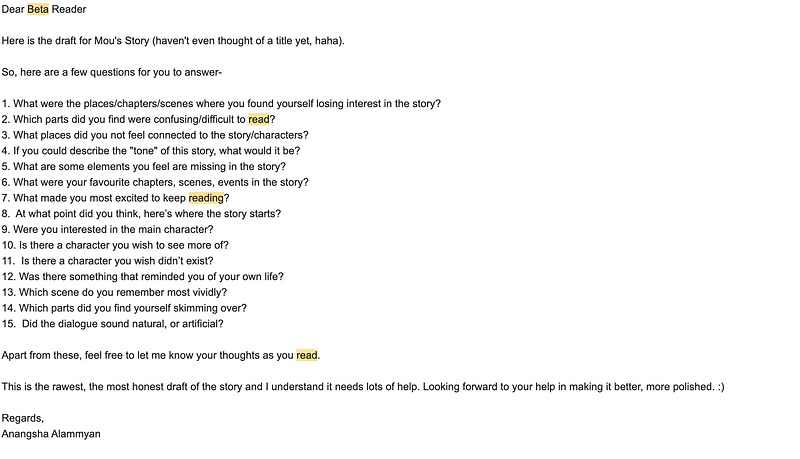
A screenshot of the email I sent to my beta readers with a list of questions for them to answer. These helped me understand their perception of the book and get a neutral third-party point of view on the fruit of my labor.

Read about the detailed step-by-step of converting your first draft into a publish-worthy manuscript here.

This is the stage where you can hire a developmental editor (if you have the budget). Otherwise, proofread it one final time and then we’re ready to head on to the next step.

Step three: Publishing

Amazon KDP (or Kindle Direct Publishing, for the uninitiated) makes the self-publishing process super easy. All you need to do is download the free Kindle Create software that lets you convert your manuscript into a format that’s ready to be read on Kindles and other e-reading devices.
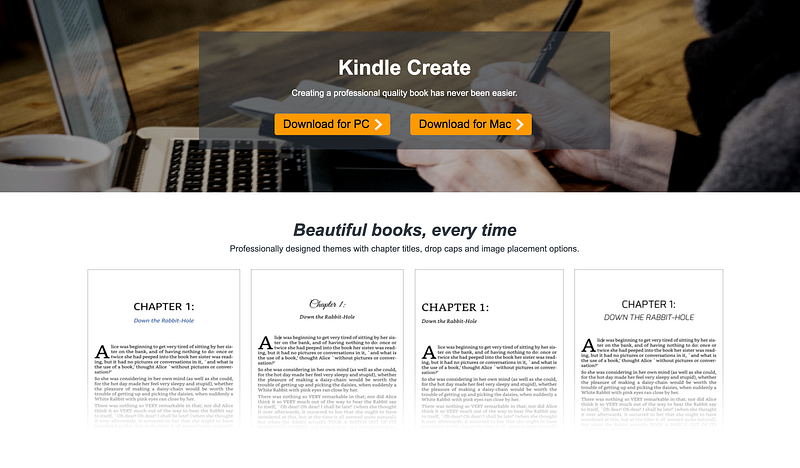
Screenshot from the Kindle Create homepage on Amazon.

After Kindle Create is installed on your Windows or Mac device, click on “Create new” to upload the .doc version of your manuscript.
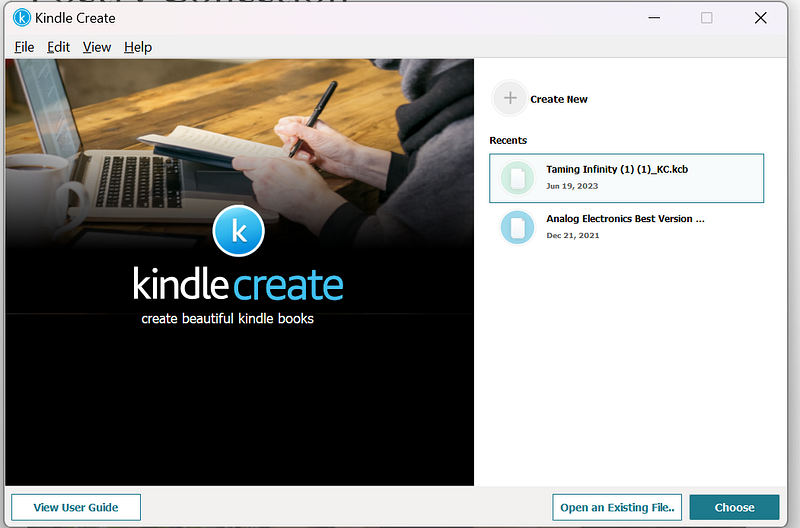
Screenshot by the author from Kindle Create.

Once the file is rendered, check the pagination, alignment, and sequence. You can make changes directly on the Kindle Create interface too.
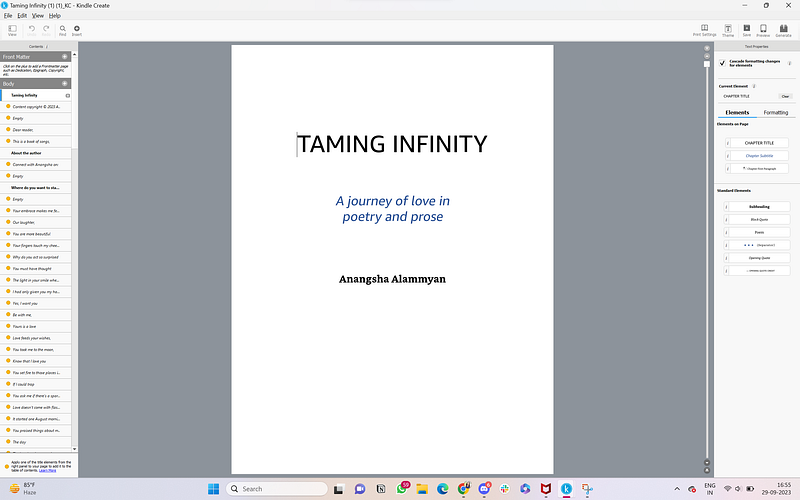
Screenshot by the author from Kindle Create.

Once you’re satisfied with how your manuscript will look as an eBook, download it and save it on your computer. Then, head to the Amazon KDP bookshelf, and click on “Create.”
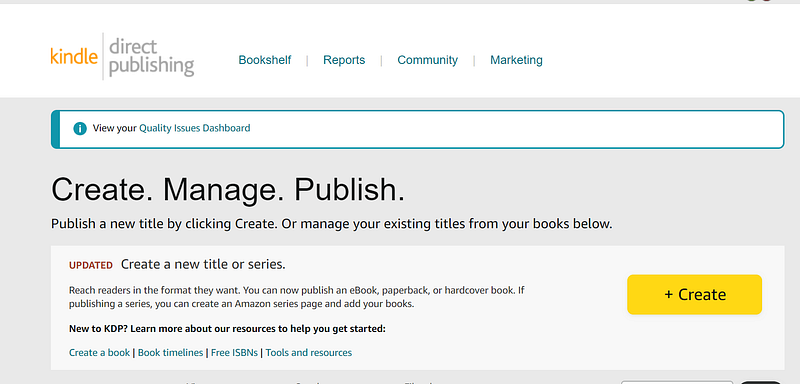
Screenshot by the author from Amazon KDP bookshelf.

This will take you to a page where you can select what format you’d like your book to be in. Note that paperback and hardcover options are available in only a select few countries, but you can publish an ebook on Amazon at zero cost from anywhere in the world.
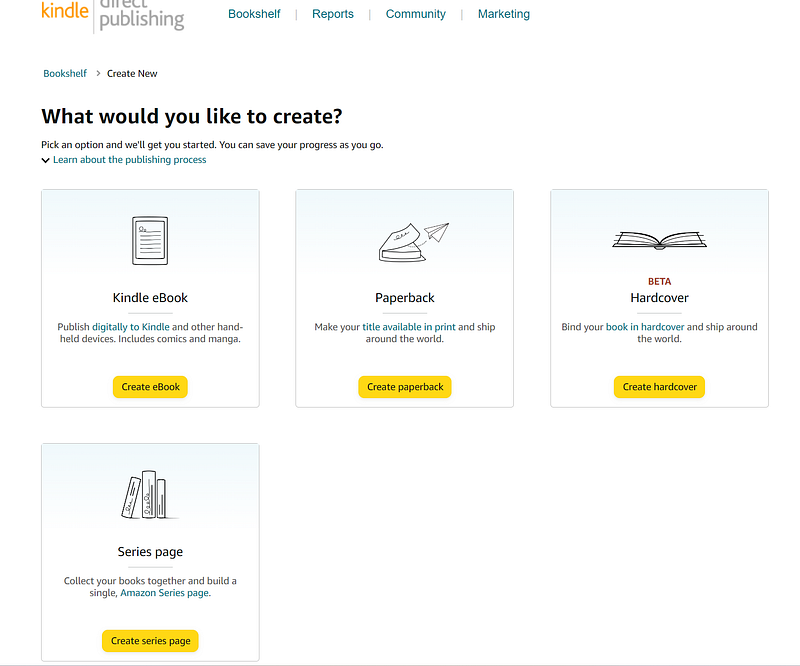
Screenshot by the author from Amazon KDP bookshelf.

What follows is a three-step process where you have to add the following regarding your book:

1. Details

This includes the title, tag line, name of author and co-authors, whether the book is part of a series, etc.

2. Content

Next, you have to upload the file you downloaded from Kindle Create in the “Content” section. This is the part where you’ll also have to upload a cover for your book. If you haven’t already designed a cover, you can use Amazon’s built in cover designer feature to get a professional-looking book cover.

3. Pricing

The final step is the pricing where you decide how much you want to charge from your readers. For ebooks in India, Amazon KDP has two models:

  • Charge your book INR 98 or lesser, and you’ll get 30% royalty on the selling price.
  • Charge your book INR 99 or higher, and you’ll get 70% royalty on the selling price.

Check the pricing and royalty correlation in your country to get a better idea of how you want to price your book.

Next, Amazon will automatically convert the price you set in your native currency to prices in different markets around the world according to the exchange rates. You can keep these rates as is, or change them as per your discerning.
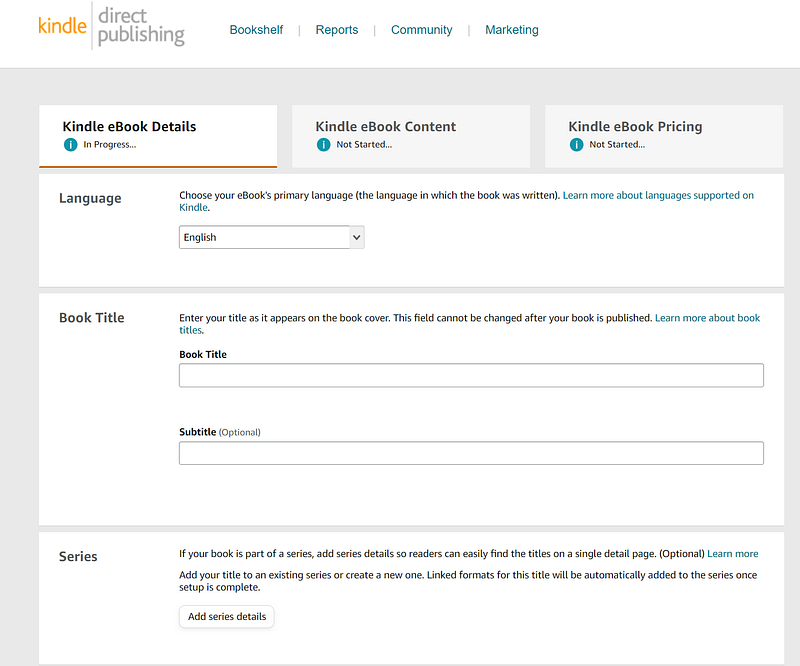
Screenshot by the author from Amazon KDP bookshelf.

Once these details are filled in, you can submit the book for publishing. Amazon takes 24–48 hours to process the book before you’ll see the live link. You can also make your book available for pre-ordering to generate some buzz before the release date.

How to publish a paperback if you’re not in the US?

For writers not based in the US, the Amazon KDP paperback printing services might not be available (They aren’t available in India). In that case, the best option is to look for a print-on-demand publication that will print paperbacks for you for free.

I went with Ukiyoto Publishing House for both my paperbacks, and the model they follow is simple:

  • Submit your manuscript and a synopsis on their submissions page.
  • They’ll get back to you with an author contract.
  • They design a book cover for you and fix the book’s pagination.
  • Once you give the go-ahead, the books will be available as paperback on Amazon and all other leading book seller sites within 7–10 days.

The idea is that the publishers don’t maintain an inventory. The books go for printing the minute someone orders them on Amazon. That’s why, there’s no upfront investment needed from you as a writer. You earn a share of the profits on every copy sold.

Step four: The marketing

It’s great to have a book out in the world and call yourself a published author. But what’s the point if no one knows your book is published? This is where marketing comes in.

Here’s a brief overview on how you can go about marketing your book:

  1. Ask your friends and family to buy the book and leave reviews.
  2. Share about it on social media.
  3. Write about the book to your newsletter subscribers.
  4. Create videos, reels, and shorts to promote your book on YouTube, Instagram, and TikTok.
  5. Network with popular book reviewers in your niche and offer them a free copy in exchange of their honest review.

This is just a generalized process, but feel free to tweak it to suit your book promotion strategy. I’ve written about how I sold 10,000+ copies of my second book without spending a penny in this article:

The bottomline about running a successful book marketing campaign is: The more noise you generate around your book, the better it will sell. Be shameless in promoting and remember that if you don’t talk about your book, no one else will.

Final words

Writing a book is a arduous process, but the rewards can be immense. It pushes you out of your comfort zone and forces you to do things you’d never have imagined yourself doing.

But it also changes you as a person and teaches you things about yourself you didn’t know existed. You might leave the planet one day, but your book will remain forever. It’s a piece of your soul that you’re bequeathing to the universe, and it will always be special.

So if you have an idea that you want to work into a book, don’t hesitate to start writing. The excuses will never stop and the time will never be “perfect.” But you can start today, and trust me, a year later, you’ll thank yourself.

I hope this article equipped you with the necessary tools and motivation to start working on your book. If you have any doubts I can help you with, feel free to drop them in the comments.

Authors
Books
Writing
Marketing
Self Improvement
Recommended from ReadMedium