
Python
5 Ways To Calculate the Execution Time of Your Python Programs
How fast is your Python code?

So, you wrote an elegant Python program and it worked as expected.
Congratulations! 🎉
But to be fair, it’s just the first step. 🙂
A bug-free program is not necessarily fast enough.
In reality, a Python developer should know a few tricks to evaluate the execution time of code. It will be super helpful, especially when comparing the performance of different algorithms or implementations.
This article will introduce 5 commonly-used methods to calculate the execution time of Python programs. After reading, it will be just a cup of tea to choose the proper one for your requirements. 🧋
1. Using the System Commands: Evaluating a Python Script’s Execution Time
Every operating system has its own command to calculate a program’s execution time.
Let’s say there is a simple Python file named “test.py”.
In Windows PowerShell, we can use the Measure-Command command to evaluate the execution time of it:
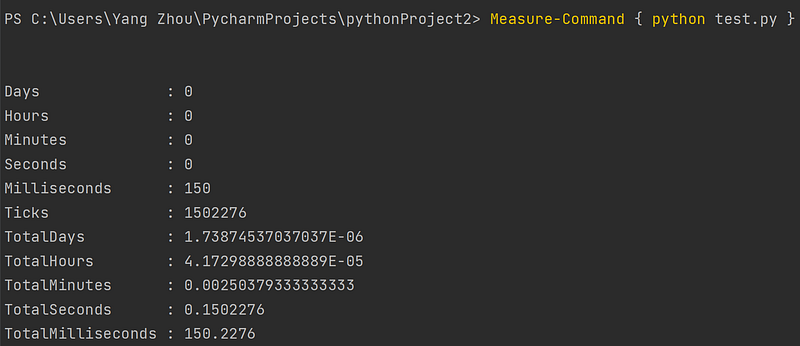
In Linux Shell, such as bash, the similar command is time, so the whole evaluation command should be:
time python test.py
However, it’s not necessarily that we always would like to evaluate a whole Python script.
Here are more options for more precise calculations.
2. Using the Magic Command of IPython: A Good Choice for Data Scientists
If you are a data scientist, you are probably using Jupyter Notebook or DataSpell. These tools use a common interactive Python shell — IPython.
IPython provides us with many convenient magic commands. One of them is timeit command.
Based on your using scenario, you can use it as a line-level command or cell-level command.
IPython line magic to measure execution time
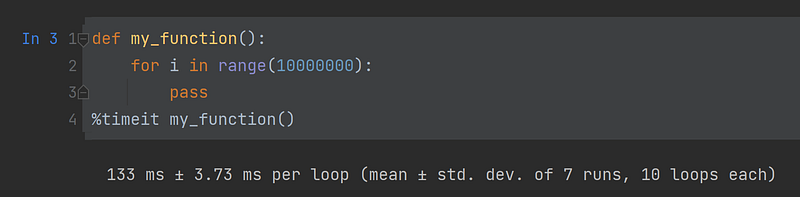
As the above example shows, we can use %timeit to measure the execution time of one line of Python code.
IPython cell magic to measure execution time
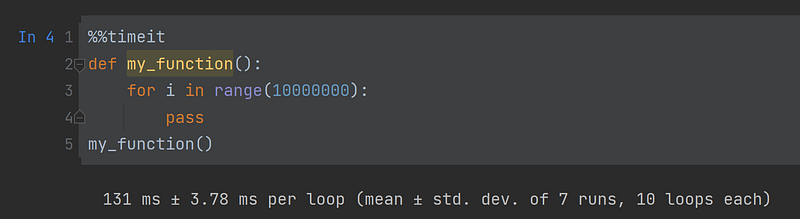
As the above instance demonstrated, we can use %%timeit to measure the execution time of a cell of Python code in IPython.
3. Using the timeit Module: Measuring the Execution Time of Small Python Snippets
If you’re not using IPython, no worries at all. There is a Python built-in module named timeit which provides a similar way to time small bits of Python code.
You can run it directly under a command line interface:
python -m timeit 'for i in range(10000000):pass'
# 2 loops, best of 5: 117 msec per loop
Or you can call it inside your Python programs:
import timeit

print(timeit.timeit('for i in range(10000000):pass', number=1))
# 0.1310928
For more complex situations, there are 3 arguments you need to consider when using the timeit.timeit() function:
stmt: The code snippet you want to measure. Its default value ispass.setup: To execute some prerequisites before running thestmt. Its default value is alsopass.number: The number of executions you’d like to run thestmt.
Let’s see a more complex example:
import timeit

# prerequisites before running the stmt
my_setup = "from math import sqrt"

# code snippet we would like to measure
my_code = '''
def my_function():
    for x in range(10000000):
        sqrt(x)
'''

print(timeit.timeit(setup=my_setup,
                    stmt=my_code,
                    number=1000))
# 6.260000000000293e-05
4. Using the time Module: Calculate the Execution Time as You Need
Python has another module called time that is also helpful for calculating the execution time of our code.
Basically, the idea is to capture the start and end timestamps before and after running a piece of code and then get the time difference:
import time

def my_function():
    for i in range(10000000):
        pass
start = time.perf_counter()
my_function()
print(time.perf_counter()-start)
# 0.1179838
The above example uses the time.perf_counter() to get the time. There are a few other options in the time module.
Therefore, a common question is which timer you should choose from the time module to calculate the execution.
Based on the specifics of every timer, the best practice is:
- If you need to print the current time, use
time.timer(). - If you need to calculate the execution time of a program, use
time.monotonic()(low resolution) ortime.perf_counter()(high resolution) - If you need to precisely calculate the CPU time of a process, use
time.process_time() - If you need to precisely calculate the CPU time of a thread, use
time.thread_time()
The following article will give you more in-depth explanations about them:
5. Writing a Decorator for Logging the Execution Time of a Python Function
It’s kind of annoying if the time.perf_counter() functions are everywhere on your programs.
If logging a function’s execution time is a common functionality of your software, you can make a Python decorator to do this:
import time


def log_execution_time(func):
    def wrapper(*args, **kwargs):
        start = time.perf_counter()
        res = func(*args, **kwargs)
        end = time.perf_counter()
        print(f'The execution of {func.__name__} used {end - start} seconds.')
        return res

    return wrapper


@log_execution_time
def my_function():
    for i in range(10000000):
        pass


my_function()
# The execution of my_function used 0.1156899 seconds.
As the above code shows, a decorator can make your code more elegant and clean. You can just add the log_execution_time decorator to the function that needs to calculate the elapsed time of its execution.
Thanks for reading. ❤️
Join Medium through my referral link to access millions of great articles and support me.


