
5 Types of Keywords I Use to Drive Traffic to My Website
Keyword categories that drive thousands of views per month

I use 5 types of keywords to drive traffic to my small website.
Each month, these keywords drive between 7–10K pageviews to my website, which is a decent amount of traffic for a website that I actively started to build only this year.
The bones of the website have been around for a while, so that might help or hurt, but the website is completely revamped — from domain name to theme. I’ve even replaced most of the old content.
So it definitely feels like a totally brand new website.
If you read my other article where I laid out my bold plan to earn six figures from content creation in the next three years, you know that I’m prepping to launch two new websites from scratch over the next few months.
To start strong, I’m already packing excel spreadsheets with the five types of keywords in this article. Keywords are words or phrases that people search on Google when looking for certain information related to your business, product, service, or niche.
These are keywords proven through my experience (and research) to be some of the most effective ways to increase online visibility.
Here are the 5 types of keywords.
Invisible Keywords
Invisible keywords are underserved keywords. These are keywords where there is no good answer available on Google. No one has written an answer to these questions yet.
We all know the importance of keywords and how they help your site rank higher in search engines, yet many people overlook some of the very best keywords.
How do you know when you find an invisible keyword? I know when I don’t find any clear and direct answers to the question.
Google will almost always provide search results to any query. When I’m looking for an invisible keyword, I ask myself, “Are any of these results directly addressing the exact question?”
If not, then I’ve found an invisible keyword.
For example, here are a few invisible keywords I dug up for this article:
- When are eulogies given?
- Do cats breathe faster than humans?
- Should I turn my leopard geckos light off at night?
If you want to rank fast and get traffic, provide quality answers to unanswered questions on Google (or any search engine).
Glossary Keywords
Glossary keywords are words and phrases used in a certain field or industry. You can use these keywords to write unlimited amounts of content related to your website niche.
You find glossary keywords by searching for them on Google (or other search engines, but Google is my favorite).
You simply type “Glossary of [Niche] terms” into the search bar. Once you hit “enter,” Google will give you a number of websites with A-Z lists of terms directly related to your niche.
You can then use these terms as keywords or as topics to find other keywords (I’ll show you how step-by-step at the end of this article).
If you run a gardening website, you would type in “Glossary of gardening terms.” The first result I got offers a motherlode of keywords.
Keywords like:
- Bolting
- Burpless cucumbers (I have no idea what this is but it sounds fun!)
- Companion planting
- Frost sensitive crops
- Successive sowing
You could write more than one article on any of these topics as long as you take a slightly different angle with the article.
For example, you could easily write these three articles about bolting:
- What is Bolting? (Explained for Beginners)
- How do I know if my cilantro is bolting?
- Can you harvest cilantro after it flowers?
Beginner Keywords
You might have noticed that all of my examples so far could quality as beginner questions. Beginners in any niche ask the most questions.
These beginner questions work very well for me as keywords.
Typically, I use the exact question as my keyword in the title of my blog posts to let Google (and web searchers) know that I have the answer to the question.
“What is Bolting? (Explained for Beginners)” is a perfect example of how I do it.
Recently, I’ve been writing answers to beginner questions on my writing website about Final Draft:
- Is Final Draft Easy To Use? (Fully Explained)
- Does Final Draft Work on Chromebook? (Solved)
- Is Final Draft a One-Time Purchase? (Fully Answered)
Final Draft is a screenwriting software. When budding screenwriters consider buying the program, they naturally turn to Google with their questions.
If you provide the best (and sometimes only) answer to their questions, Google almost always rewards you with a higher ranking and higher traffic.
If you Google “Is Final Draft easy to use?” you’ll see my article currently in the number four spot for that term. It’s very possible that my article will move up to the top three spots with time.
This article ranked in the top 10 surprisingly fast — within days.
Prebuying Keywords
This leads us to prebuying keywords. People who want to buy something often Google lots of questions.
Prebuying questions tend to get traffic and do well with display ad monetization. The reason is that each prebuying question is a potential conversion from someone who will make a purchase.
There is buying intent, something most advertisers love.
What are some common buyer intent keywords?
- Is [Name Brand] worth it?”
- [Name Brand] review [Current Year]
- Is [Name Brand] better than [Other Name Brand]?
- Price of [Name Brand] + [Product]
- [Name Brand] vs [Other Name Brand]
- Best [Product]
To hopefully make this keyword crystal clear, here are a few real examples:
- Is Final Draft easy to use?
- Best resume writing service
- Best writing podcats
- Price of Apple stock
5W+ Keywords
5W+ keywords are long-tail keywords with five or more words.
Longtail keywords are great for SEO because they are more specific and have less competition.
Longtail keywords usually make up a keyword phrase, so it is not just one word but instead includes two or three (or five) words that together make up the longtail keywords.
Longtail keyword examples:
- Why do avocados turn brown inside?
- When is the best time to eat popcorn?
- How to make money from creating a cryptocurrency?
How Do You Find Good Keywords?
These five types of keywords are only helpful if you know how to find them. The easiest way to find any of these keywords is through a Google search.
Some people call this the “Google Search” method or the “Alphabet Soup” method. Whatever you call it, this process works. It works because Google tracks popular search phrases.
When you start typing something into the search bar, Google will predict what you want to know. These predictions come from other search requests by people all around the world.
Here is how I use this method to find the five types of keywords:
- Log out of my personal Google account.
- Open an Incognito window (this is very important to get fresh search predictions not biased by your past activity online).
- Add a “seed keyword” (any word or term related to your niche or topic).
- Add words like “is, how, do, why, are, or best,” in front of the seed keyword.
- Google will usually offer predictions.
- Check each one of the predictions to see if anyone else has written a quality answer to the question or search phrase.
- Scroll down to the “People also ask” and “Related questions” on the search result page. Often there is keyword gold in these sections.
If you don’t find a good keyword with the initial predictions, you can start adding letters of the alphabet to the end of the seed keyword. Then you just rinse and repeat steps 6 and 7.
For example, let’s say your seed keyword is “cat paws”.
You log out of Google, open an incognito window, and type “cat paws” into the Google search bar. Odds are good that “cat paws” is a high competition keyword that will be very difficult to rank for, so we’ll add some of those little question words in front of it.
You might type, “are cat paws” or “do cat paws” into the search bar.
Here is what I got:
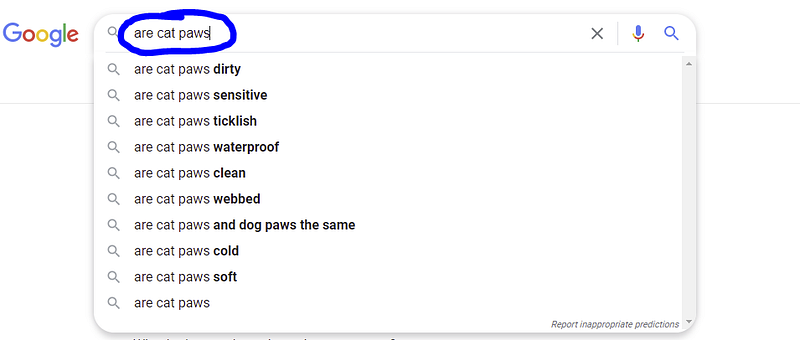
See all the predictions underneath my search phrase?
All of those are potential keywords. They are simple questions that you might be able to answer well in under 2,000 words.
Next, you would click on each of the predictions to analyze your competition. Hopefully, no one has answered the question at all. Or, if they have, they have answered it in under 600 words with terrible formatting.
I keep searching until I find really underserved topics.
If you don’t find anything with this initial search, start adding letters to the end of the search phrase. In our case, that means, “are cat paws a” or “are cat paws b”. You work your way through the entire alphabet checking potential keywords.
If this sounds like a time-consuming task, you are right.
Personally, I love searching for keywords. I get excited when I find a good one, even if isn’t in my niche (like most of the examples in this article).
Parting Thoughts
I love when I find a search phrase that meets the criteria for all five types of keywords.
Yes, you can find a longtail invisible keyword related to your topic (glossary type) that is also a beginner prebuying question. Those keywords can drive thousands of people to your website or content every month.
Typically, I collect a month’s worth of keywords at a time.
Once I find them, I use them to write the five types of content that scale my website.
Thanks for reading!
More from me: Christopher Kokoski


