
5 Things to Do to Repel Hackers From You
I apply these in my day-to-day life and you should too.
Would you like to show your private photos or your medical records to the public? Would you disclose your financial credentials?
Unfortunately, this isn’t all. The damages are way more critical when it comes to what cybercriminals can squeeze out of your data and when your privacy is invaded.
Interestingly, the internet is nowadays home for skilled and unskilled persons. And as they say ‘When a person with experience meets a person with money, the person with the experience ends up with money and the person with the money ends up with an experience’.
So, without delay, let’s see what you should do to protect yourself from getting preyed on in the digital jungle.
1. Strengthen your wireless internet security
You need to understand that both you and hackers are sharing the internet. So apart from getting malicious software (malware) from external storage devices, the internet is the traditional route for cybercriminals. Hence, Breaking into your wireless network is one of the main objects cyber-attackers would consider before searching for vulnerabilities to gain access to your electronic devices.
A great way to protect your wireless internet from intruders is by changing your Service Set Identifier (SSID) or you can configure your router to hide it from the public.
You could, also, change the pre-set access credentials of your browser router interface. Use it to monitor your home wireless network. Kick out intruders behind any unknown device.
Lastly, make sure to enable WPA2 protocol encryption as it is the safest encryption until WPA3 is released.
2. Create unique passwords:
I know you must have heard complex security passwords help reduce the odds of you being hacked.
You would say ‘If I create complex security passwords, I won’t be able to remember them all’. And, you’re right!
However, how would you feel if, overnight, you find yourself devoid of your Instagram account that you have been working on for ages? What will be your feelings when you wake up on $0 in your Paypal account?
I know friends who were unfortunate to experience these situations and they still regret their nonchalance when they had the chance to secure their accounts.
But, don’t worry you can bypass memory issues by using a Password Manager.
As the name suggests, Password Managers allow storing all your passwords and you only need to remember your master password to access your password vault. LastPass is a recognized Password Manager.
Now the question is how to create a strong password.
You must be aware that due to the huge advancement in electronics, hackers are now using Graphics Cards, which are capable of trying billions of passwords a second to finally stumble upon your passwords. That’s why experts suggest using passphrases instead. Passphrases should:
· Contain special characters like ! @ # $ % ^ & * ( ) …
· Be 25 characters and more
· Be a statement that you could easily remember
· Not be a common statement such as quotes, lyrics …
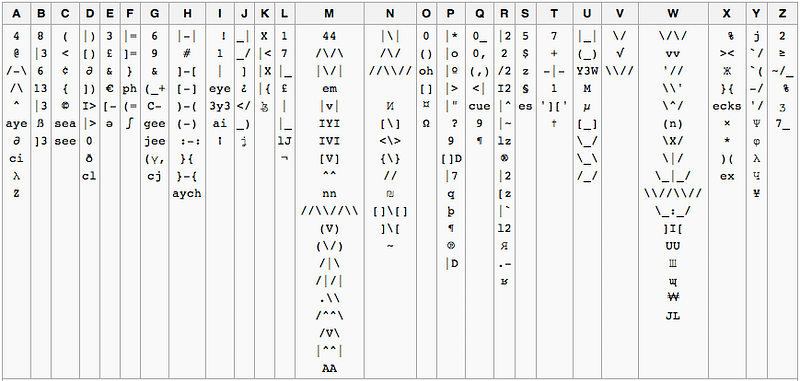
To help you comply with all these requirements at the same time you can use leet-speak letters in your passphrases.
3. Enable two-factor authentications
Services that carry your sensitive and confidential data should get an extra layer of security. A benefit of two-factor authentication is that it requires alongside your username and password a second token to reinforce your account security. Tokens can be:
Physical object: Mobile phone, credit card ….
Biometric scan: fingerprint, voice recognition ….
To find out all the services that use two-factor authentication, visit here
4. Avoid sharing vital information while using public Wi-Fi
Hackers can intercept your emails and messages. It is even much easier to do so on a public wireless internet because you and cybercriminals share the same network.
By using a VPN you protect yourself from these scenarios. But, again, sometimes you must be obliged to use public Wi-Fi. That’s why I would recommend you to at least avoid exchanging sensitive information in this case.
5. Use Open Authorization & Web Browsers Privacy
A good example of Open Authorization (OAuth) is when you try to log onto a service and you encounter the option of choosing to log on via other third-party services such as Facebook, LinkedIn, or Google… The advantage of this authentication method is that the secret tokens sent by third-party services to get data on your behalf, prevent malicious websites or apps from getting your data.
On the other hand, sometimes you might share a device with colleagues or relatives. These people can see the websites you visit using history, cache, or log files.
To reduce the odds of you being spied on it is recommended to use the private mode of your browser.
I find myself bound to re-emphasize keeping your private data safe. Bear in mind that cybercriminals have gone beyond using traditional methods to lay their hands on your information.
One group might request you to willingly give away your data on the pretext of seeking help or befriending, which cybersecurity experts call social engineering.
Another sends fraudulent e-mails that appear to be forwarded from legitimate sources in order to urge you to install malware or enter your credentials on a fake website.
Beware!


