5 Things I’ve Learned from Tracking my Freelance Time

The other week I was getting a little frustrated at how much time I spent on one particular client.
I thought the pay was quite good, but once you start adding in the emails back and forth, the quick touch-ups and the admin work, I realised perhaps this work was not quite as juicy as I first thought.
So, I decided to start tracking my time.
My tracking system
As a financial analyst, I live in Excel. So guess where my tracking took place?
Yup!
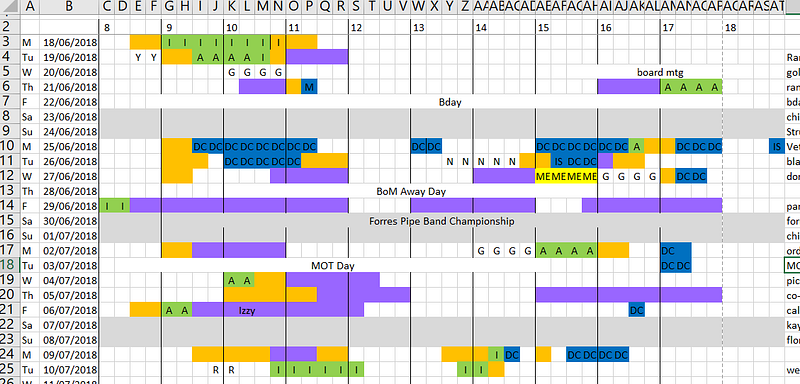
User notes
I won’t bore you with the details of how my tracking system works (unless you’re interested — leave me a comment!)
In general:
- coloured squares mean I was doing something work related, where each colour or letter relates to a particular project or client.
- white squares mean I was chilling, relaxing or doing something totally non-work related.
- at the end of each day, I wrote down the key highlights of what I did each day (column hidden to the right, sorry you nosy buggers!)
My goals of the tracker were to:
- see how much time I was actually spending on a client versus how much time I said it took me.
- easily figure out how much time to bill a client
- see where I was spending my time
So, here’s what I learned from the 4 weeks I’ve been doing this so far:
#1. I spend a lot of time doing general ‘email’ non-billable work
So the colour orange above is actually time that I didn’t spend on a particular client but I did feel like I was ‘working’ and was on my laptop the whole time.
This might include: responding to potential clients, submitting proposals, placing an order on Amazon for supplies…
Ok ok… some of this time is probably spent responding to personal emails too…
But notice A LOT of the image is orange!
Here’s a summary by sqaure of the past 16 work days:
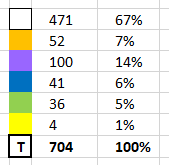
I spent 7% of my time on general emails — this is a lot. More time than I spent on my blue client.
It’s easy to ‘feel’ like you’re working when you’re just doing emails but be wary of spending too much time doing general admin work & email catch-ups — it certainly adds up.
#2. 67% of my time between 8am-6pm was spent not working!
Wowzers — that’s a shocker.
I would like to add in some caveats:
- My normal day is 9am — 5pm so I avoid working late or early if possible. This immediately removes 128 little white squares.
- This 3 week period included: a) my birthday, which I took off, b) a full-day volunteering strategy day for my board of management position for my local college, c) an afternoon board meeting, and d) a day wasted getting my car MOT tested (their fault, not mine..)
- I probably could’ve been a bit more rigorous with my tracking but generally left a space white if I wasn’t sure I could attribute it to a particular project.
- I’m not aiming for a full 5 day a week workstream, frankly. I get paid less but I work less. I’m OK with that. Therefore, some days I was a little lax on purpose, instead choosing to exercise, take photographs, socialise etc.
- ‘White space’ includes lunch breaks, networking coffees etc. Some of these could arguably be part of the work day.
Let’s re-adjust, considering just 9–5 and taking out the 3 full days mentioned:
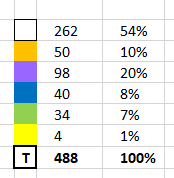
Again, this still includes lunchbreaks, an afternoon voluntary board meeting and other half-work things.
Still… 54% doesn’t look great, does it?
#3. A tracking system is as complicated as it needs to be
Frankly, my tracking system sucks.
Just by writing this post I can already pick out many of its flaws.
I think tracking time is really great, but not always necessary. I’m going to keep my tracking up until I get to the point I am comfortable with where I’m speding my time again.
If you’re comfortable with how busy you feel and are making enough money to justify how much you work, you don’t need to be tracking time!
If you feel you’re not making enough or are super busy all the time, maybe give tracking a go.
Make it as complicated as you need it, but no more.
I had big visions when starting my tracking system, but I now realise simple is better. I’m going to make some adjustments for the week ahead.
A tracking system is what you make of it, but don’t let it run you!
#4. Writing down key highlights has been insightful
I think one of the best parts of my tracker is looking back at what I’ve done over the weeks. I’ve actually done a lot of work, been to a lot of events and made some cool stuff.
It’s easy to look back over the past couple of weeks and think ‘ugh, I’ve not done much’.
Writing a couple of quick notes is a powerful method of reminding yourself of your progress.
Just a simple “met with my business mentor, finished project A, baked a cake” note will do the trick to jerk your memory.
It’s amazing what we forget about.

#5. Most importantly, I can see who my valuable clients are
The main reason I started tracking time was because I felt one client was sucking away all my time.
So the most important takeaway from my tracker has been seeing where I spend my time and calculating an hourly rate.
So let’s say this week I spent 14 little squares on my blue client for a particular project that they’re paying me $120 for.
14 squares = 3.5 hours
$120 / 3.5 hours = $34.29 per hour
Is that an hourly rate you’re happy with?
Use this to pitch to clients. Or when asking for more money.
“Hey, I know I said this would take me 2 hours per week, but on average it takes me 3.5 hours. Can we discuss our arrangement?”
Work always takes longer than you estimate so make sure to bake this into your price.
Work smarter. Not harder.
I hope you’ve found this useful.
I certianly have! It’s actually been easy to keep up because I’m curious to know the results.
Most of all it’s been helpful to assess how much time I spent doing work for a client versus how long it actually takes me. Including emails and communication.
Get this right and you’ll go a long way as a freelancer!