
5 Python Operations that Confuse Beginners
This article summarizes some highly similar Python operations that are easy to get mixed up with, especially for beginners.
Lambda Argument: Bounded during Definition vs Runtime Random Selection with/without Replacement Copy: Shallow vs Deep Equivalence vs Equality Searching for Substring
Lambda Argument: Bounded during Definition vs Runtime
ybounded during definition
func = lambda x, y=y: x + yybounded during runtime
func = lambda x: x + yExample: Assign y with value 10 and define the functions:
y = 10
func1 = lambda x: x + y
func2 = lambda x, y=y: x + ylist(map(func1, lst))
>>> [11, 12, 13, 14, 15]list(map(func2, lst))
>>> [11, 12, 13, 14, 15]Let’s then update the value of y , run the functions and see what happens.
y = 100
list(map(func1, lst))
>>> [101, 102, 103, 104, 105]list(map(func2, lst))
>>> [11, 12, 13, 14, 15]Clearly y in func1 now takes the new value of 100 while func2 is still using y = 10 , any update of y after the function definition has no effect on the argument it uses.
Random Selection with/without Replacement
- Selection with replacement:
random.choices(seq, k=1),kbeing the size for sample, 1 by default.
import randomrandom.choices(list(range(10)), k=8)
>>> [6, 3, 5, 5, 9, 4, 4, 2]- Selection without replacement:
random.sample(seq, k)
random.sample(list(range(10)), k=8)
>>> [1, 5, 3, 7, 2, 0, 8, 4]
Copy: Shallow vs Deep
- Shallow copy:
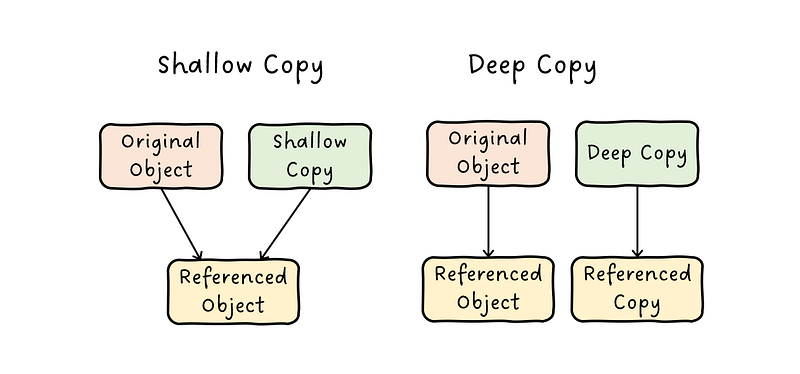
copy()copies reference of the objects in the original. Changes made to the original object are reflected in the shallow copy as well
import copya = [[1, 2], [3, 4]]
b = copy.copy(a); b
>>> [[1, 2], [3, 4]]a[1].append(5)
b
>>> [[1, 2], [3, 4, 5]]- Deep copy:
deepcopy()inserts copies of the objects found in the original. Changes made to the original object do not affect the deep copy.
a = tp_exit_ids_items = list()
c = copy.deepcopy(a); c
>>> [[1, 2], [3, 4]]a[1].append(5)
c
>>> [[1, 2], [3, 4]]Equivalence vs Equality
- Whether both have the same value:
==
a = [[1, 2], [3, 4]]
b = [[1, 2], [3, 4]]
c = a
# equivalent check
a == b
>>> True
a == c
>>> True- Whether both points to the same object:
is
# equality check
a is b
>>> False
a is c
>>> True
Searching for Substring
There are four ways to search for a substring within a string:
str.find(sub, start=None, end=None)andstr.rfind(...)str.index(sub, start=None, end=None)andstr.rindex(...)
The following operations all return a result of 4 as “on” is found at index 4:
"python".find("on")
"python".rfind("on")
"python".index("on")
"python".rindex("on")
The most importance difference is that find() and rfind() returns -1 if sub is not founded; index() and rindex() throws a ValueError instead:
"python".find("a")
>>> -1"python".index("a")
>>> ValueError: substring not found


