
5 Cool Libraries in Python You Might Have Missed (Part 2)
Luckily, I found these exciting libraries!

Introduction
I enjoy reading about new Python packages, and whenever I come across anything interesting, I feel inclined to write and share about it. I also once had an article sharing about this topic, which is 5 Interesting Python Libraries That You Might Have Missed.
Some days ago, I continued to uncover some more cool packages, which I believe will be helpful in many situations. That is why I have decided to continue the discussion in today's article.
Now, let’s see what we have today.
Pytrends
I am sure many of you have once heard about Google Trends. It is a free public platform that allows you to track interest in a topic or a search phrase. So, how do we integrate Google Trends into Python? How can we save time from manually searching and copying Google Trends?
Well, let’s meet Pytrends — an unofficial API for Google Trends to pull data from Google Trends. With Pytrends, you can easily fetch data of hourly interest, regional interest, top trending searches, and related topics or queries. More information can be found in this document.
Here are some outstanding API methods for this package.
Looking for trending searches
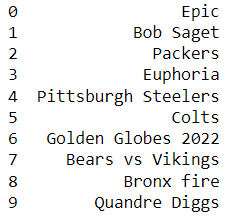
E.g., if we want to know what individuals have been interested in for the past several days, we can simply find out using pytrend.trending_searches.
The top 10 trending searches in the US are:
Searching for top historical chart
E.g., In another case, we can try to look for Google top chart in 2020 with top_charts attribute.
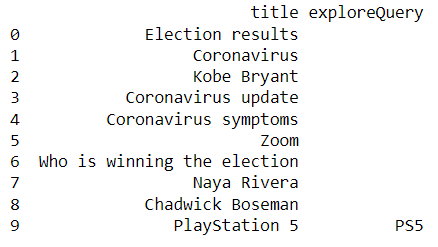
In the top_charts attribute, you can determine your host language hl , time-zone tz or location geo to generate the corresponding top charts.
Finding a regional trend of a topic
E.g., I am pretty curious about the trending of “Spider-Man: No way home” in each region in the past 3 months. So, I will look into people's interest in different countries with the help of interest_by_region as you can see in the code below:
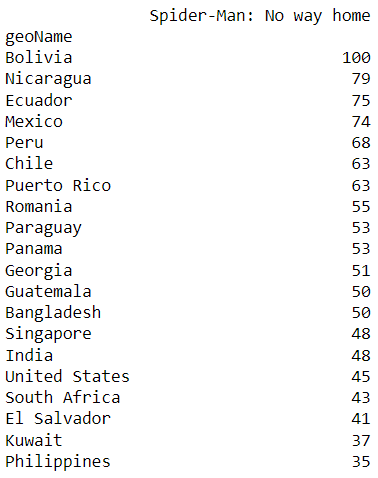
For Google Trends, values are determined on a scale of 0 to 100, with 100 representing the most popular location with the trend being on its peak and 0 specifying a location where the data for the selected term is insufficient. So, it is easy to see that the movie is trending at its peak in Bolivia.
Finding interest over time
E.g., I’m now more interested in tracking the popularity of “Spider-Man: No Way Home” from the beginning of December to the end of the month to see when the movie receives the greatest attention. How will I find the data with Pytrend?
It is very simple with get_historical_interest . In this component, you can specify the specific time range you want to look at.
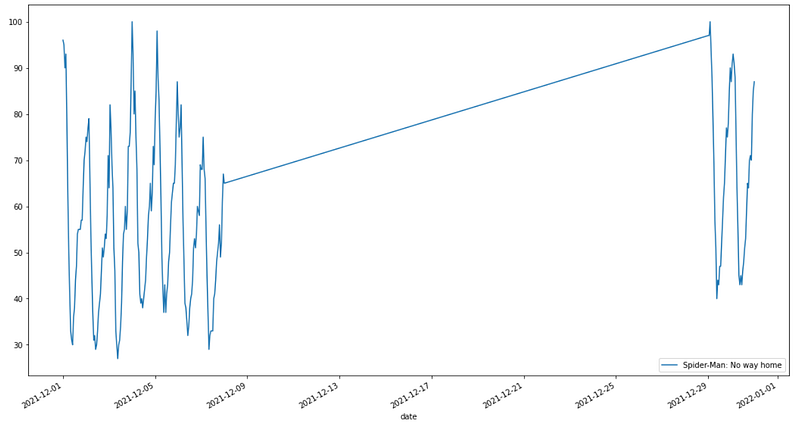
Well, as you can see in fig 4, the movie peaks are on 2021/12/29 and 2021/12/05. Simple, right?
Besides these searching methods in Pytrend, there are many more that you can dig into:
- Historical Hourly Interest: gives historical, hourly data from Google Trends’ Interest Over Time for the keyword searched.
- Suggestions: offers a list of extra suggested terms for refining a trend search.
- Related queries: users who looked up your phrase also looked up these terms.
nb_black
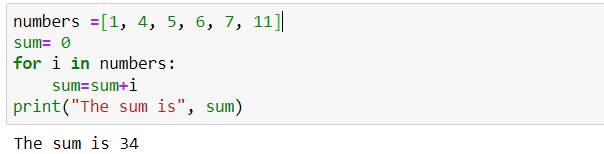
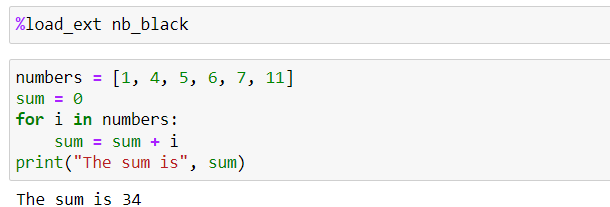
nb_black allows formatting your code if you are unsure about the Python format. The steps are straightforward. Here is all you have to do:
- Installing the package
- Loading the package at the beginning of your notebook, and let the package do all the work for you in formatting
!pip install nb_black
%load_ext nb_black
Figure 5,6 below shows how this package automatically corrects my code format.
Numerizer
The package helps to convert natural language numerics to numbers (integers and floats). For example, I want to translate “Twenty thousand one hundred and five” into number, Numerizer is used as follows:
The result after applying the function is 20105. Cool and easy, right?
OpenDataSets
We can use OpenDataSets to download a Kaggle dataset directly. It will make a folder in which the dataset will be saved. The dataset is saved under an unzipped file, which is convenient for usage.
All we have to do is install the package and choose the URL we want to download the dataset from. As you can see in Figure 7, the data “chocolate-bar-rating” is selected for download. After running the code, the unzipped data set immediately appears in the folder where my notebook is saved. Very simple and convenient.
PyAstro
Last, PyAstro — a very fun library to end the article. If you are a person who is interested in a zodiac sign, this library is for you to play with.
It provides a horoscope for each zodiac sign. You can know the prediction of a sign for that day, the sign’s lucky number, lucky hour, lucky color, and even sign compatibility.
Conclusion
I believe that selecting a suitable library to perform from thousands of PyPI libraries might be difficult, which is why I wrote this post. I hope that this post and my previous 5 Interesting Python Libraries That You Might Have Missed have given you some insight into a few interesting Python libraries that are available and how to perform them.
I know that some of them do not seem to be useful at the moment, but I believe they support you somehow in the future.
Thank you for taking the time to read.