avatarSamer Sallam

Free AI web copilot to create summaries, insights and extended knowledge, download it at here

11453

Abstract

span class="hljs-built_in">Exception</span>(<span class="hljs-string">'Invalid Age'</span>)</pre></div><div id="11fa"><pre> <span class="hljs-attr">self.classes</span> = []</pre></div><div id="085f"><pre> <span class="hljs-keyword">def</span> <span class="hljs-title function_">enrol</span>(<span class="hljs-params"><span class="hljs-variable language_">self</span>, class_name</span>): print(<span class="hljs-variable language_">self</span>.full_name) <span class="hljs-variable language_">self</span>.classes.append(class_name)</pre></div><p id="03e6">As you can see from the previous code snippet if the student's age does not belong to any of the <b>age ranges,</b> the code will raise an exception to tell you that this student's age is not valid.</p><p id="e661">Define a Student object:</p><div id="ef98"><pre><span class="hljs-attr">student1</span> = Student(<span class="hljs-number">1</span>, <span class="hljs-string">'Jack'</span>, <span class="hljs-string">'Ma'</span>, <span class="hljs-number">40</span>)</pre></div><p id="4243"><b>Output:</b></p><div id="1522"><pre><span class="hljs-keyword">Exception</span>: Invalid Age</pre></div><p id="8918">Now, let us test our code:</p><ol><li>Define two students' objects, one undergraduate student and the other is a postgraduate student.</li><li>To understand the results, print the number of undergraduate and postgraduate students before and after defining these two objects.</li></ol><p id="4b1b"><b>Solution Input:</b></p><div id="3baf"><pre><span class="hljs-function"><span class="hljs-title">print</span><span class="hljs-params">(Student.num_undergraduates)</span></span> <span class="hljs-function"><span class="hljs-title">print</span><span class="hljs-params">(Student.num_postgraduates)</span></span></pre></div><div id="6333"><pre><span class="hljs-attr">student1</span> = Student(<span class="hljs-number">1</span>, <span class="hljs-string">'Jack'</span>, <span class="hljs-string">'Ma'</span>, <span class="hljs-number">23</span>) <span class="hljs-attr">student2</span> = Student(<span class="hljs-number">19</span>, <span class="hljs-string">'John'</span>, <span class="hljs-string">'Doe'</span>, <span class="hljs-number">27</span>)</pre></div><div id="5527"><pre><span class="hljs-function"><span class="hljs-title">print</span><span class="hljs-params">(Student.num_undergraduates)</span></span> <span class="hljs-function"><span class="hljs-title">print</span><span class="hljs-params">(Student.num_postgraduates)</span></span></pre></div><p id="5e7b"><b>Output:</b></p><div id="69ec"><pre>0 0 1 1</pre></div><p id="0baa">You get “0, 0” because before you have Student objects, the counter value is just “0”. However, once you define one undergraduate and one postgraduate student, each counter will be increased by “1”.</p><p id="ffc1">In this case, the class attributes have been accessed via the class not via the object.</p><p id="c76e">Also, you can access the value of the class attributes using the object itself, as follows:</p><p id="8b82"><b>Solution Input:</b></p><div id="aae8"><pre>student1 = <span class="hljs-built_in">Student</span>(<span class="hljs-number">1</span>, <span class="hljs-string">'Jack'</span>, <span class="hljs-string">'Ma'</span>, <span class="hljs-number">23</span>) <span class="hljs-function"><span class="hljs-title">print</span><span class="hljs-params">(student1.num_undergraduates)</span></span></pre></div><p id="6611"><b>Output:</b></p><div id="a022"><pre>2</pre></div><p id="7de5">OK great, now you know how to define class attributes and how to access them. But, the question now is how to process these class attributes?</p><figure id="d8c8"><img src="https://cdn-images-1.readmedium.com/v2/resize:fit:800/1*vuHWaiG4fpMCPV3BscWNtQ.jpeg"><figcaption>Photo by <a href="https://unsplash.com/@timmossholder?utm_source=unsplash&amp;utm_medium=referral&amp;utm_content=creditCopyText">Tim Mossholder</a> on <a href="https://unsplash.com/collections/10699960/what%27s-next?utm_source=unsplash&amp;utm_medium=referral&amp;utm_content=creditCopyText">Unsplash</a></figcaption></figure><p id="0163">The answer is simple, we can do that using <b>class methods</b>.</p><h2 id="15ab">4. Class Methods</h2><p id="cf3d">Class Methods are the <b>methods</b> that have access to the class attributes, but they can’t access specific instance attributes.</p><p id="0219">In other words, these methods are used to <b>handle and process</b> class attributes. However, they are not used on the object level, they are used on the class level.</p><p id="81d8">Usually, the first parameter of any class method is <b>(cls)</b> and this name is a convention in the Python community where you can use any name, but it’s highly recommended to use the same name.</p><p id="2e95"><b>(cls)</b> represents a reference to the class <b>itself</b>. In short, when you define a class method, the first parameter <b>cls </b>will be passed automatically to the class method and it’s going to be a reference to your class.</p><p id="fe95">Next, how we can define a class method in Python?</p><figure id="5dd2"><img src="https://cdn-images-1.readmedium.com/v2/resize:fit:800/1*-BSzyChQlmQtB4tF2i2WGQ.jpeg"><figcaption>Photo by <a href="https://unsplash.com/@jontyson?utm_source=unsplash&amp;utm_medium=referral&amp;utm_content=creditCopyText">Jon Tyson</a> on <a href="https://unsplash.com/s/photos/question?utm_source=unsplash&amp;utm_medium=referral&amp;utm_content=creditCopyText">Unsplash</a></figcaption></figure><h2 id="211b">5. Class Methods Syntax</h2><p id="cc9d">To define class methods:</p><ol><li>Create the class and give it a name <b>ClassName.</b></li><li>Next add two class attributes <b>class_atrr1, class_atrr2 </b>and their values are<b> var1, var2</b>.</li><li>Then define the <b>class methods </b>by using the keyword <b>def </b>and give each class method a name for example <b>class_method1, class_method2, </b>and as usual, between brackets add the method’s parameters. The first parameter should be<b> cls </b>then different positional arguments and arbitrary arguments <b>arg1,.., argn </b>could be added like any other function in Python.</li></ol><blockquote id="b72e"><p><b>Important Note:</b> In order to make this method a class method, the decorator <b>@classmethod </b>should be used, without this decorator, the method will be a normal instance method. Even though there is (<b>cls) </b>as the first parameter, it will be considered as the object itself, not the class itself without the decorator.</p></blockquote><div id="ed85"><pre><span class="hljs-keyword">class</span> <span class="hljs-symbol">ClassName:</span></pre></div><div id="57d3"><pre> <span class="hljs-attr">class_atrr1</span> = var1 <span class="hljs-attr">class_atrr2</span> = var2</pre></div><div id="e64f"><pre> <span class="hljs-meta">@classmethod</span></pre></div><div id="0c88"><pre> <span class="hljs-keyword">def</span> <span class="hljs-title function_">class_method1</span>(<span class="hljs-params">cls, arg1,.., argn, *args, **kwargs</span>): <span class="hljs-comment"># do something related to class_attr1, class_attr2</span></pre></div><div id="3225"><pre> <span class="hljs-meta">@classmethod</span></pre></div><div id="da0e"><pre> <span class="hljs-keyword">def</span> <span class="hljs-title function_">class_method2</span>(<span class="hljs-params">cls, arg1,.., argn, *args, **kwargs</span>): <span class="hljs-comment"># do something related to class_attr1, class_attr2</span></pre></div><p id="7a8d">As usual, do not forget the <b>colon </b>when you define your functions. Otherwise, you will get a syntax error.</p><figure id="a95c"><img src="https://cdn-images-1.readmedium.com/v2/resize:fit:800/0*Nw1CJvDMaVka2wYg"><figcaption>Photo by <a href="https://www.pexels.com/@negativespace">Negative Space</a> on <a href="https://www.pexels.com/search/code/?size=medium">Pexles</a></figcaption></figure><p id="cb4a">Now, assume that we want to define a <b>class method</b> to calculate the percentage of the number of undergraduate students to the total number of students.</p><p id="d567"><b>Hint to help you:</b></p><p id="6f82">To access the class attribute inside the class method you can use <b>cls.class_attribute_name.</b></p><p id="d6d4"><b>Solution Input:</b></p><div id="e7d9"><pre><span class="hljs-keyword">class</span> <span class="hljs-symbol">Student:</span></pre></div><div id="06d1"><pre> <span class="hljs-attr">num_undergraduates</span> = <span class="hljs-number">0</span> <span class="hljs-attr">num_postgraduates</span> = <span class="hljs-number">0</span></pre></div><div id="b334"><pre> <span class="hljs-attribute">undergraduates_age_range</span> = range(<span class="hljs-number">19</span>, <span class="hljs-number">24</span>) <span class="hljs-attribute">postgraduates_age_range</span> = range(<span class="hljs-number">24</span>, <span class="hljs-number">30</span>)</pre></div><div id="b4e9"><pre> <span class="hljs-keyword">def</span> <span class="hljs-title function_">init</span>(<span class="hljs-params"><span class="hljs-variable language_">self</span>, _id, first_name, last_name, age</span>)<span class="hljs-symbol">:</span></pre></div><div id="e729"><pre> <span class="hljs-attr">self.id</span> = _id <span class="hljs-attr">self.first_name</span> = first_name <span class="hljs-attr">self.last_name</span> = last_name <span class="hljs-attr">self.full_name</span> = self.first_name + <span class="hljs-string">" "</span> + self.last_name <span class="hljs-attr">self.age</span> = age</pre></div><div id="87d0"><pre> <span class="hljs-keyword">if</span> self<span class="hljs-selector-class">.age</span> <span class="hljs-keyword">in</span> Student<span class="hljs-selector-class">.undergraduates_age_range</span>: Student<span class="hljs-selector-class">.num_undergraduates</span> += <span class="hljs-number">1</span></pre></div><div id="4b7e"><pre> elif self<span class="hljs-selector-class">.age</span> <span class="hljs-keyword">in</span> Student<span class="hljs-selector-class">.postgraduates_age_range</span>: Student<span class="hljs-selector-class">.num_postgraduates</span> += <span class="hljs-number">1</span></pre></div><div id="888a"><pre> <span class="hljs-keyword">else</span>: <span class="hljs-keyword">raise</span> <span class="hljs-keyword">Exception</span>(<span class="hljs-symbol">'Invalid</span> Age')</pre></div><div id="95ac"><pre> <span class="hljs-attr">self.classes</span> = []</pre></div><div id="60a7"><pre> <span class="hljs-keyword">def</span> <span class="hljs-title function_">enrol</span>(<span class="hljs-params"><span class="hljs-variable language_">self</span>, class_name</span>): print(<span class="hljs-variable language_">self</span>.full_name) <span class="hljs-variable language_">self</span>.classes.append(class_name)</pre></div><div id="4595"><pre> @classmethod def get_undergraduates_percentage(<span class="hljs-keyword">cls</span>): num_students = <span class="hljs-keyword">cls</span>.num_undergraduates + <span class="hljs-keyword">cls</span>.num_postgraduates</pre></div><div id="40a1"><pre> <span class="hljs-built_in">return</span> cls.num_undergraduates/num_students</pre></div><p id="33d3">Now, let us test the code by:</p><ol><li>D

Options

efine two <b>Student </b>objects (undergraduate student and postgraduate student).</li><li>Call the class method <b>get_undergraduates_percentage</b> using the class name.</li></ol><p id="9941"><b>Solution Input:</b></p><div id="088f"><pre><span class="hljs-attr">student1</span> = Student(<span class="hljs-number">1</span>, <span class="hljs-string">'Jack'</span>, <span class="hljs-string">'Ma'</span>, <span class="hljs-number">23</span>) <span class="hljs-attr">student2</span> = Student(<span class="hljs-number">19</span>, <span class="hljs-string">'John'</span>, <span class="hljs-string">'Doe'</span>, <span class="hljs-number">27</span>)</pre></div><div id="5a90"><pre>Student<span class="hljs-selector-class">.get_undergraduates_percentage</span>()</pre></div><p id="7057"><b>Output:</b></p><div id="3e22"><pre><span class="hljs-attribute">0</span>.<span class="hljs-number">5</span></pre></div><p id="b030">Note:</p><p id="7d55">Sometimes we can use the class method as what we call an alternative constructor.</p><figure id="8f41"><img src="https://cdn-images-1.readmedium.com/v2/resize:fit:800/1*un9wZD_JDz6Ul6UhEICRXA.jpeg"><figcaption>Photo by <a href="https://unsplash.com/@jannerboy62?utm_source=unsplash&amp;utm_medium=referral&amp;utm_content=creditCopyText">Nick Fewings</a> on <a href="https://unsplash.com/s/photos/new-idea?utm_source=unsplash&amp;utm_medium=referral&amp;utm_content=creditCopyText">Unsplash</a></figcaption></figure><p id="d0cb"><b>Alternative Constructor</b></p><p id="d853">Sometimes the input parameters to your<b> init</b> method could have a different shape from the expected one.</p><p id="38d9">Does it seem confusing? Do not worry, let us take the following use case to make things more clear:</p><p id="2e65">Assume we have an <b>age </b>instance attribute, but the student doesn’t want to enter his age, and he wants to enter his birthday instead. In other words, from his birthday, you can know his age. However, my class accepts age only. To solve this issue, you could define a class method that will take the birthday and it will transform it into the student age. Then the object will be defined and returned, refer to the last method in the class:</p><p id="ddf6"><b>Solution Input:</b></p><div id="d270"><pre><span class="hljs-keyword">from</span> datetime <span class="hljs-keyword">import</span> datetime</pre></div><div id="ddff"><pre><span class="hljs-keyword">class</span> <span class="hljs-symbol">Student:</span></pre></div><div id="00c1"><pre> num_undergraduates <span class="hljs-operator">=</span> <span class="hljs-number">0</span> num_ postgraduates <span class="hljs-operator">=</span> <span class="hljs-number">0</span></pre></div><div id="d750"><pre> <span class="hljs-attribute">undergraduates_age_range</span> = range(<span class="hljs-number">19</span>, <span class="hljs-number">24</span>) <span class="hljs-attribute">postgraduates_age_range</span> = range(<span class="hljs-number">24</span>, <span class="hljs-number">30</span>)</pre></div><div id="f882"><pre> <span class="hljs-keyword">def</span> <span class="hljs-title function_">init</span>(<span class="hljs-params"><span class="hljs-variable language_">self</span>, _id, first_name, last_name, age</span>)<span class="hljs-symbol">:</span></pre></div><div id="f379"><pre> <span class="hljs-attr">self.id</span> = _id <span class="hljs-attr">self.first_name</span> = first_name <span class="hljs-attr">self.last_name</span> = last_name <span class="hljs-attr">self.full_name</span> = self.first_name + <span class="hljs-string">" "</span> + self.last_name <span class="hljs-attr">self.age</span> = age</pre></div><div id="d547"><pre> <span class="hljs-keyword">if</span> self<span class="hljs-selector-class">.age</span> <span class="hljs-keyword">in</span> Student<span class="hljs-selector-class">.undergraduates_age_range</span>: Student<span class="hljs-selector-class">.num_undergraduates</span> += <span class="hljs-number">1</span></pre></div><div id="8436"><pre> elif self<span class="hljs-selector-class">.age</span> <span class="hljs-keyword">in</span> Student<span class="hljs-selector-class">.postgraduates_age_range</span>: Student<span class="hljs-selector-class">.num_postgraduates</span> += <span class="hljs-number">1</span></pre></div><div id="a2e9"><pre> <span class="hljs-keyword">else</span>: <span class="hljs-keyword">raise</span> <span class="hljs-keyword">Exception</span>(<span class="hljs-symbol">'Invalid</span> Age')</pre></div><div id="ec43"><pre> <span class="hljs-attr">self.classes</span> = []</pre></div><div id="0e50"><pre> <span class="hljs-keyword">def</span> <span class="hljs-title function_">enrol</span>(<span class="hljs-params"><span class="hljs-variable language_">self</span>, class_name</span>): print(<span class="hljs-variable language_">self</span>.full_name) <span class="hljs-variable language_">self</span>.classes.append(class_name)</pre></div><div id="afb7"><pre> @classmethod def get_undergraduates_percentage(<span class="hljs-keyword">cls</span>): num_students = <span class="hljs-keyword">cls</span>.num_undergraduates + <span class="hljs-keyword">cls</span>.num_postgraduates</pre></div><div id="76b4"><pre> <span class="hljs-keyword">return</span> cls.num_undergraduates / num_students</pre></div><div id="7149"><pre> <span class="hljs-variable">@classmethod</span> <span class="hljs-keyword">def</span> <span class="hljs-title function_">create_student_from_birthday</span>(<span class="hljs-params">cls, student_id, first_name, last_name,birthday</span>)<span class="hljs-symbol">:</span></pre></div><div id="a6c1"><pre> age = round((<span class="hljs-name">datetime</span>.now() - birthday).days / <span class="hljs-number">365</span>) return cls(<span class="hljs-name">student_id</span>, first_name, last_name, age)</pre></div><p id="4903">Why this will work, because <b>cls</b> is just a reference to your class, which means <b>cls </b>represents your class and here in our method <b>cls </b>is just a <b>Student </b>class<b>.</b></p><p id="befa">After we define the class method create_student_from_birthday, let us use it as an alternative constructor as follows:</p><p id="9cb8"><b>Solution Input:</b></p><div id="cad5"><pre><span class="hljs-attribute">student</span> = Student.create_student_from_birthday(<span class="hljs-number">1</span>, 'Jack', 'Ma', datetime(<span class="hljs-number">1992</span>, <span class="hljs-number">5</span>,<span class="hljs-number">30</span>))</pre></div><div id="9eb7"><pre><span class="hljs-function"><span class="hljs-title">print</span><span class="hljs-params">(type(student)</span></span>) <span class="hljs-function"><span class="hljs-title">print</span><span class="hljs-params">(student.full_name)</span></span> <span class="hljs-function"><span class="hljs-title">print</span><span class="hljs-params">()</span></span></pre></div><p id="e8bb">As you can see we don’t pass the age whereas we pass the birthday of our Student object. And to make sure everything goes well, let us print the type of that student object and his full name.</p><p id="b7eb"><b>Output:</b></p><div id="dd12"><pre><<span class="hljs-keyword">class</span> <span class="hljs-string">'main.Student'</span>></pre></div><div id="ae18"><pre><span class="hljs-attribute">Jack Ma</span></pre></div><p id="5369">Note: for more information about datetime module and how to deal with it, refer to the datetime module article (the link will be added once it is published)</p><h2 id="da8b">Now, let us summarize what we have learned in this article:</h2><figure id="643f"><img src="https://cdn-images-1.readmedium.com/v2/resize:fit:800/1*EORD1Dzoyk968fA4bZmCig.jpeg"><figcaption>Photo by <a href="https://www.pexels.com/@ann-h-45017/">Ann H</a> on <a href="https://www.pexels.com/">pexels</a></figcaption></figure><p id="89f1">In this article we have talked about:</p><ul><li><b>Class Attributes</b> are the attributes that belong to the class itself rather than a particular object.</li><li>Usually, we use class attributes to define the attributes that have a common value among all the objects inside the class.</li><li><b>Class Methods </b>are the methods that<b> </b>have access to the class attributes. They can process, handle and update these attributes but they can’t access specific instance attributes.</li><li>To define the class attributes, we list all the attributes below the class name, and these attributes belong to the class itself.</li><li>To define a class method, we define it as any normal method in Python, but we use the <b>decorator “@classmethod</b>” and usually, the first parameter that is passed to the class method is<b> cls</b>, which is a reference to the class itself. Refer to Figure 1.</li></ul><figure id="7b75"><img src="https://cdn-images-1.readmedium.com/v2/resize:fit:800/1*xmY_nQmApR-XaIeVlx07sQ.png"><figcaption>Figure 1: Class attributes and Class methods summary (Image By Author)</figcaption></figure><ul><li>You can use class methods as an alternative constructor.</li></ul><p id="01fb"><b><i>P.S.</i></b><i>: A million thanks for your time reading my story. Before you leave let me mention quickly two points:</i></p><ul><li><i>First, to get my posts in your inbox directly, would you please subscribe <a href="https://medium.com/@samersallam92/subscribe"><b>here</b></a></i>, <i>and you can follow me <a href="https://medium.com/@samersallam92"><b>here</b></a>.</i></li><li><i>Second, writers made thousands of <b>$$</b> on Medium. To get unlimited access to Medium stories and start earning,<a href="https://medium.com/@samersallam92/membership"><b> sign up now for Medium membership</b></a><b> </b>which<b> </b>only costs $5 per month. By signing up <a href="https://medium.com/@samersallam92/membership"><b>with this link</b></a>, you can directly support me at no extra cost to you.</i></li></ul><div id="6e28" class="link-block"> <a href="https://medium.com/@samersallam92/list/7b54126a7f4e"> <div> <div> <h2>The Complete Course in Object-Oriented Programming in Python</h2> <div><h3>undefined</h3></div> <div><p>undefined</p></div> </div> <div> <div style="background-image: url(https://miro.readmedium.com/v2/resize:fit:320/0*b6dafc214a69dfd2756a0318444115a37f9c154e.jpeg)"></div> </div> </div> </a> </div><p id="294c">To get back to the previous article, you can use the following link:</p><p id="ca98"><a href="https://readmedium.com/4-instance-attributes-and-instance-methods-in-python-oop-b850bd03b17c?source=your_stories_page----------------------------------------">Part 4:Instance Attributes and Instance Methods</a></p><p id="d78a">To move on to the next article, you can use the following link:</p><p id="f21f"><a href="https://readmedium.com/6-static-methods-5f41a1b18deb?source=your_stories_page----------------------------------------">Part 6:Static Methods</a></p><h2 id="76d7">Resources:</h2><ul><li>GitHub <a href="https://github.com/samersallam/The-Complete-Course-in-Object-Oriented-Programming-in-Python/tree/main/Class%20Attributes%20and%20Class%20Methods"><b>here.</b></a></li></ul></article></body>

Class Attributes and Class Methods: Python OOP Complete Course — Part 5

Photo by Pixabay on Pexles

Before we start let me tell you that:

  • This article is a part of The Complete Course in Object Oriented Programming in Python which you can find it here.
  • All resources are available in the “Resources” section below.
  • This article is also available as a YouTube video Part 1- Part 2- Part 3.

Introduction

So far, we have seen how we can create an instance attribute in which each object has its own value for this attribute. BUT, what if I have an attribute that has one and common value among all the class objects? For example, the bank name for bank accounts that belong to the same bank. In this case, the bank name would be the same for all the bank accounts.

So, is there a smarter way to define this attribute rather than copy and paste its value again and again for each object created for this Bank Account class?

So…

This article will cover the following outlines:

  1. Attributes Types and Methods Types Reminder.
  2. Class Attributes
  3. Class Attributes Syntax
  4. Class Methods
  5. Class Methods Syntax

1. Attributes Types and Methods Types Reminder

Photo by Pixabay on Pexles

We know that the class is the umbrella that has attributes and methods and for the attributes, we have two types:

  • Instance Attributes
  • Class Attributes

Whereas for the methods we have, three types which are:

  • Instance Methods
  • Class Methods
  • Static Methods

(If you like to remember the first type from the previous article, Just click here).

In this article, we will learn about the second type of attributes and methods.

2. Class Attributes

Class attributes are the attributes that belong to the class itself rather than to a particular object.

In other words, these attributes do not belong to a specific object, whereas it belongs to the class itself. Therefore, if one of the objects changes the value of this attribute, it will be changed for all the other objects.

The question now, is how we can create class attributes?

3. Class Attributes Syntax

To add class attributes to our class, first of all, we create the class itself and give it a name ClassName.

Next, we list all the class attributes that belong to the class.

class ClassName:
    class_atrr1 = var1
    class_atrr2 = var2

In the previous code snippet, we have two class attributes:class_atrr1, and class_atrr2 and their values are var1 and var2.

As we learned before, instance attributes have been defined within the constructor method, whereas in the case of class attributes, no need to do that, and directly they will be listed below the class name.

Going back to the Student example which has been implemented in the previous article:

class Student:
    def __init__(self, _id, first_name, last_name, age):
        self.id = _id
        self.first_name = first_name
        self.last_name = last_name
        self.full_name = self.first_name + " " + self.last_name
        self.age = age
        self.class = [ ]
   def enrol(self, class_name):
       print(self.full_name)
       self.classes.append(class_name)

Let us upgrade it by adding the following attributes:

  1. Define two counters:
  • num_undergraduates: to count the number of undergraduate students.
  • num_postgraduates: to count the number of postgraduates students.

2. Define two age ranges:

  • undergraduates_age_range = range(19, 24)
  • postgraduates_age_range = range(24, 30)

These age ranges will be used to figure out if the student is an undergraduate student or a postgraduate student.

Hint to help you:

  • These attributes belong to the class itself, so they should be defined as class attributes.
  • The initial values of the counters should be 0 when the class is defined.
  • To define a variable class attribute you should use small letters only. Otherwise, if there are more than two words, there should be an underscore between them.
class Student:
    num_undergraduates = 0
    num_postgraduates = 0
 
    undergraduates_age_range = range(19, 24)
    postgraduates_age_range = range(24, 30)
    def __init__(self, _id, first_name, last_name, age):
        self.id = _id
        self.first_name = first_name
        self.last_name = last_name
        self.full_name = self.first_name + " " + self.last_name
        self.age = age
        self.class = [ ]
   def enrol(self, class_name):
       print(self.full_name)
       self.classes.append(class_name)

So far, we have created four-class attributes.

Now, each time you define a new Student object, you should use its age to increase one of the predefined students’ counters, to solve this issue, you should add an if,elif, else statements to test the Student object’s age range and update the appropriate counter.

Note:

In case the student object age does not belong to any of the predefined age ranges you should raise an exception about an invalid age.

Hint to help you:

When you try to access the class attributes inside __init__, you should use the class name for this purpose.

Solution Input:

class Student:
    num_undergraduates = 0
    num_postgraduates = 0
    undergraduates_age_range = range(19, 24)
    postgraduates_age_range = range(24, 30)
    def __init__(self, _id, first_name, last_name, age):
        self.id = _id
        self.first_name = first_name
        self.last_name = last_name
        self.full_name = self.first_name + " " + self.last_name
        self.age = age
        if self.age in Student.undergraduates_age_range:
            Student.num_undergraduates += 1
        elif self.age in Student.postgraduates_age_range:
             Student.num_postgraduates += 1
 
        else:
            raise Exception('Invalid Age')
        self.classes = []
     def enrol(self, class_name):
         print(self.full_name)
         self.classes.append(class_name)

As you can see from the previous code snippet if the student's age does not belong to any of the age ranges, the code will raise an exception to tell you that this student's age is not valid.

Define a Student object:

student1 = Student(1, 'Jack', 'Ma', 40)

Output:

Exception: Invalid Age

Now, let us test our code:

  1. Define two students' objects, one undergraduate student and the other is a postgraduate student.
  2. To understand the results, print the number of undergraduate and postgraduate students before and after defining these two objects.

Solution Input:

print(Student.num_undergraduates)
print(Student.num_postgraduates)
student1 = Student(1, 'Jack', 'Ma', 23)
student2 = Student(19, 'John', 'Doe', 27)
print(Student.num_undergraduates)
print(Student.num_postgraduates)

Output:

0
0
1
1

You get “0, 0” because before you have Student objects, the counter value is just “0”. However, once you define one undergraduate and one postgraduate student, each counter will be increased by “1”.

In this case, the class attributes have been accessed via the class not via the object.

Also, you can access the value of the class attributes using the object itself, as follows:

Solution Input:

student1 = Student(1, 'Jack', 'Ma', 23)
print(student1.num_undergraduates)

Output:

2

OK great, now you know how to define class attributes and how to access them. But, the question now is how to process these class attributes?

Photo by Tim Mossholder on Unsplash

The answer is simple, we can do that using class methods.

4. Class Methods

Class Methods are the methods that have access to the class attributes, but they can’t access specific instance attributes.

In other words, these methods are used to handle and process class attributes. However, they are not used on the object level, they are used on the class level.

Usually, the first parameter of any class method is (cls) and this name is a convention in the Python community where you can use any name, but it’s highly recommended to use the same name.

(cls) represents a reference to the class itself. In short, when you define a class method, the first parameter cls will be passed automatically to the class method and it’s going to be a reference to your class.

Next, how we can define a class method in Python?

Photo by Jon Tyson on Unsplash

5. Class Methods Syntax

To define class methods:

  1. Create the class and give it a name ClassName.
  2. Next add two class attributes class_atrr1, class_atrr2 and their values are var1, var2.
  3. Then define the class methods by using the keyword def and give each class method a name for example class_method1, class_method2, and as usual, between brackets add the method’s parameters. The first parameter should be cls then different positional arguments and arbitrary arguments arg1,.., argn could be added like any other function in Python.

Important Note: In order to make this method a class method, the decorator @classmethod should be used, without this decorator, the method will be a normal instance method. Even though there is (cls) as the first parameter, it will be considered as the object itself, not the class itself without the decorator.

class ClassName:
   class_atrr1 = var1
   class_atrr2 = var2
   @classmethod
   def class_method1(cls, arg1,.., argn, *args, **kwargs):
       # do something related to class_attr1, class_attr2
   @classmethod
   def class_method2(cls, arg1,.., argn, *args, **kwargs):
       # do something related to class_attr1, class_attr2

As usual, do not forget the colon when you define your functions. Otherwise, you will get a syntax error.

Photo by Negative Space on Pexles

Now, assume that we want to define a class method to calculate the percentage of the number of undergraduate students to the total number of students.

Hint to help you:

To access the class attribute inside the class method you can use cls.class_attribute_name.

Solution Input:

class Student:
    num_undergraduates = 0
    num_postgraduates = 0
    undergraduates_age_range = range(19, 24)
    postgraduates_age_range = range(24, 30)
    def __init__(self, _id, first_name, last_name, age):
        self.id = _id
        self.first_name = first_name
        self.last_name = last_name
        self.full_name = self.first_name + " " + self.last_name
        self.age = age
        if self.age in Student.undergraduates_age_range:
           Student.num_undergraduates += 1
        elif self.age in Student.postgraduates_age_range:
             Student.num_postgraduates += 1
        else:
          raise Exception('Invalid Age')
        self.classes = []
   def enrol(self, class_name):
      print(self.full_name)
      self.classes.append(class_name)
   @classmethod
   def get_undergraduates_percentage(cls):
       num_students = cls.num_undergraduates + cls.num_postgraduates
       return cls.num_undergraduates/num_students

Now, let us test the code by:

  1. Define two Student objects (undergraduate student and postgraduate student).
  2. Call the class method get_undergraduates_percentage using the class name.

Solution Input:

student1 = Student(1, 'Jack', 'Ma', 23)
student2 = Student(19, 'John', 'Doe', 27)
Student.get_undergraduates_percentage()

Output:

0.5

Note:

Sometimes we can use the class method as what we call an alternative constructor.

Photo by Nick Fewings on Unsplash

Alternative Constructor

Sometimes the input parameters to your __init__ method could have a different shape from the expected one.

Does it seem confusing? Do not worry, let us take the following use case to make things more clear:

Assume we have an age instance attribute, but the student doesn’t want to enter his age, and he wants to enter his birthday instead. In other words, from his birthday, you can know his age. However, my class accepts age only. To solve this issue, you could define a class method that will take the birthday and it will transform it into the student age. Then the object will be defined and returned, refer to the last method in the class:

Solution Input:

from datetime import datetime
class Student:
    num_undergraduates = 0
    num_ postgraduates = 0
    undergraduates_age_range = range(19, 24)
    postgraduates_age_range = range(24, 30)
    def __init__(self, _id, first_name, last_name, age):
       self.id = _id
       self.first_name = first_name
       self.last_name = last_name
       self.full_name = self.first_name + " " + self.last_name
       self.age = age
       if self.age in Student.undergraduates_age_range:
          Student.num_undergraduates += 1
       elif self.age in Student.postgraduates_age_range:
            Student.num_postgraduates += 1
       else:
          raise Exception('Invalid Age')
       self.classes = []
    def enrol(self, class_name):
        print(self.full_name)
        self.classes.append(class_name)
    @classmethod
    def get_undergraduates_percentage(cls):
       num_students = cls.num_undergraduates + cls.num_postgraduates
       return cls.num_undergraduates / num_students
    @classmethod
    def create_student_from_birthday(cls, student_id, first_name,
        last_name,birthday):
        age = round((datetime.now() - birthday).days / 365)
        return cls(student_id, first_name, last_name, age)

Why this will work, because cls is just a reference to your class, which means cls represents your class and here in our method cls is just a Student class.

After we define the class method create_student_from_birthday, let us use it as an alternative constructor as follows:

Solution Input:

student = Student.create_student_from_birthday(1, 'Jack', 'Ma', datetime(1992, 5,30))
print(type(student))
print(student.full_name)
print()

As you can see we don’t pass the age whereas we pass the birthday of our Student object. And to make sure everything goes well, let us print the type of that student object and his full name.

Output:

<class '__main__.Student'>
Jack Ma

Note: for more information about datetime module and how to deal with it, refer to the datetime module article (the link will be added once it is published)

Now, let us summarize what we have learned in this article:

Photo by Ann H on pexels

In this article we have talked about:

  • Class Attributes are the attributes that belong to the class itself rather than a particular object.
  • Usually, we use class attributes to define the attributes that have a common value among all the objects inside the class.
  • Class Methods are the methods that have access to the class attributes. They can process, handle and update these attributes but they can’t access specific instance attributes.
  • To define the class attributes, we list all the attributes below the class name, and these attributes belong to the class itself.
  • To define a class method, we define it as any normal method in Python, but we use the decorator “@classmethod” and usually, the first parameter that is passed to the class method is cls, which is a reference to the class itself. Refer to Figure 1.
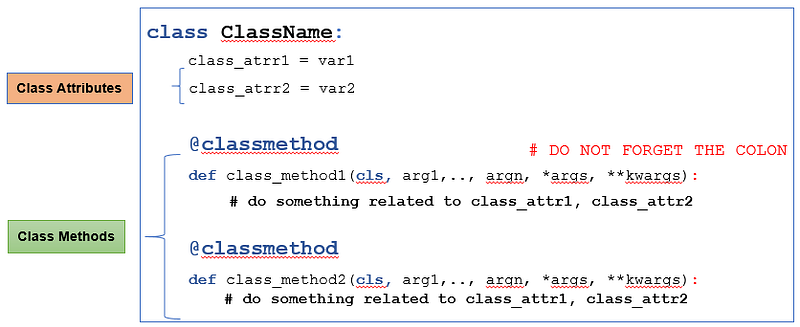
Figure 1: Class attributes and Class methods summary (Image By Author)
  • You can use class methods as an alternative constructor.

P.S.: A million thanks for your time reading my story. Before you leave let me mention quickly two points:

  • First, to get my posts in your inbox directly, would you please subscribe here, and you can follow me here.
  • Second, writers made thousands of $$ on Medium. To get unlimited access to Medium stories and start earning, sign up now for Medium membership which only costs $5 per month. By signing up with this link, you can directly support me at no extra cost to you.

To get back to the previous article, you can use the following link:

Part 4:Instance Attributes and Instance Methods

To move on to the next article, you can use the following link:

Part 6:Static Methods

Resources:

Object Oriented
Python
Programming
Class Attribute
Class Method
Recommended from ReadMedium