avatarAdam Ross Nelson

Free AI web copilot to create summaries, insights and extended knowledge, download it at here

12417

Abstract

<figcaption>Image Credit: Code From Author. Generated Via carbon.now.sh.</figcaption></figure><p id="2ebb">For the result:</p><figure id="615f"><img src="https://cdn-images-1.readmedium.com/v2/resize:fit:800/1*j-0Z58opq5QEvHhRT4Kokw.png"><figcaption>Image Credit: Author’s Illustration From This Article’s Code.</figcaption></figure><h1 id="3baf">15–18 Sports Data</h1><p id="730d">The world of sports is a rich source of data. Grabbing sports data for swift demonstrations, examples, training, and testing purposes is an easy way to go. Here we start with data from ESPN. This first sorts example shows stadium attendance by sports team in 2021. Who wants to cook up a figure that shows the Covid dip?</p><figure id="b0df"><img src="https://cdn-images-1.readmedium.com/v2/resize:fit:800/1*Ga3LQucgPnSgvXKZlvuWdw.png"><figcaption>Image Credit: Code From Author. Generated Via carbon.now.sh.</figcaption></figure><p id="ae85">For the result:</p><figure id="624c"><img src="https://cdn-images-1.readmedium.com/v2/resize:fit:800/1*26AyT2VMuLaSUUCi66HIlA.png"><figcaption>Image Credit: Author’s Illustration From This Article’s Code.</figcaption></figure><p id="32db">The next example also from ESPN shows the proportion of games played away for each NFL team.</p><figure id="13b3"><img src="https://cdn-images-1.readmedium.com/v2/resize:fit:800/1*P5Nw0iqQypV8ULQr_qyUwA.png"><figcaption>Image Credit: Code From Author. Generated Via carbon.now.sh.</figcaption></figure><p id="e8d4">For the result:</p><figure id="8e4c"><img src="https://cdn-images-1.readmedium.com/v2/resize:fit:800/1*RWFU0miV3gXW6K2jiDOEdg.png"><figcaption>Image Credit: Author’s Illustration From This Article’s Code.</figcaption></figure><p id="9d40">Could there be a correlation between average attendance at away games and the average attendance at home games? It seems no there is not.</p><figure id="64c3"><img src="https://cdn-images-1.readmedium.com/v2/resize:fit:800/1*E2MkOfWYi5H5vSMKtdc05A.png"><figcaption>Image Credit: Code From Author. Generated Via carbon.now.sh.</figcaption></figure><p id="63ae">For the result:</p><figure id="6254"><img src="https://cdn-images-1.readmedium.com/v2/resize:fit:800/1*sTEeq1GzjEfLF3wgF2MlpA.png"><figcaption>Image Credit: Author’s Illustration From This Article’s Code.</figcaption></figure><p id="7d78">On the other end of the analysis are teams with low attendance. Here we look at the ten teams with the lowest attendance rages in 2018.</p><figure id="e6ef"><img src="https://cdn-images-1.readmedium.com/v2/resize:fit:800/1*KR9P65WIQxSaSwsGzeJSRQ.png"><figcaption>Image Credit: Code From Author. Generated Via carbon.now.sh.</figcaption></figure><p id="61ea">For the result:</p><figure id="af0e"><img src="https://cdn-images-1.readmedium.com/v2/resize:fit:800/1*iD01q8B4qf4VDuIXdYGdaw.png"><figcaption>Image Credit: Author’s Illustration From This Article’s Code.</figcaption></figure><h1 id="5479">19–21 Politics Data</h1><p id="9ddd">This article wouldn’t be complete without some visuals from politics. Not unlike sports, politics provide a rich data source, too. Here we start with data from Tableau and visualize spending in presidential campaigns.</p><figure id="bdff"><img src="https://cdn-images-1.readmedium.com/v2/resize:fit:800/1*jdc8IwC_lq_zXvKWmLo67Q.png"><figcaption>Image Credit: Code From Author. Generated Via carbon.now.sh.</figcaption></figure><p id="714b">For the result:</p><figure id="d6b3"><img src="https://cdn-images-1.readmedium.com/v2/resize:fit:800/1*o0tPdKiIpxWvKp42MEnk6g.png"><figcaption>Image Credit: Author’s Illustration From This Article’s Code.</figcaption></figure><p id="d3b0">Under politics data I include a visual from U.S. Census data. This one is nice to have in the library because it shows how to do a kde plot as an area plot.</p><figure id="f39b"><img src="https://cdn-images-1.readmedium.com/v2/resize:fit:800/1*abeZQasLXGxElk-0UxBD9Q.png"><figcaption>Image Credit: Code From Author. Generated Via carbon.now.sh.</figcaption></figure><p id="85f7">For the result:</p><figure id="46f3"><img src="https://cdn-images-1.readmedium.com/v2/resize:fit:800/1*iD7fGALMySUEJMXWu7wIvw.png"><figcaption>Image Credit: Author’s Illustration From This Article’s Code.</figcaption></figure><p id="1994">How about a look at what age groups vote for which candidates. This simple bar chart does that for us.</p><figure id="44e6"><img src="https://cdn-images-1.readmedium.com/v2/resize:fit:800/1*c0na2WLwGnuDLT-f1v2KAw.png"><figcaption>Image Credit: Code From Author. Generated Via carbon.now.sh.</figcaption></figure><p id="bdf7">For the result:</p><figure id="6496"><img src="https://cdn-images-1.readmedium.com/v2/resize:fit:800/1*jmHMsNOJUeKu_6TWiRspqA.png"><figcaption>Image Credit: Author’s Illustration From This Article’s Code.</figcaption></figure><h1 id="56f0">22–29 Fake Bird &amp; Real Penguins Data Visualizations</h1><p id="b6f6">I’ve previously written about <a href="https://towardsdatascience.com/how-to-make-fictional-data-7a79ce86a350">making these fake birds data</a>. I also used these fake bird data to <a href="https://towardsdatascience.com/fake-birds-machine-learning-acc553312a8f">demonstrate k-nearest neighbors</a>. Here is another opportunity to explore the data more visually. Note: the relationships in these fake data are exaggerated (because it is fake data). First let us look at if there is a potential relationship between a bird’s weight and its wingspan.</p><figure id="ae22"><img src="https://cdn-images-1.readmedium.com/v2/resize:fit:800/1*lYOYwRct8KU7Gb40FQs_iA.png"><figcaption>Image Credit: Code From Author. Generated Via carbon.now.sh.</figcaption></figure><p id="565a">For the result:</p><figure id="3a51"><img src="https://cdn-images-1.readmedium.com/v2/resize:fit:800/1*lyIpwa56-OAU8MwRRdf-iw.png"><figcaption>Image Credit: Author’s Illustration From This Article’s Code.</figcaption></figure><p id="1688">Next we can see if birds differ in weight by region. I love love love a good categorical box plot, personally!</p><figure id="b744"><img src="https://cdn-images-1.readmedium.com/v2/resize:fit:800/1*hZiphyPYY0WqhkRq5-54Yw.png"><figcaption>Image Credit: Code From Author. Generated Via carbon.now.sh.</figcaption></figure><p id="ccab">For the result:</p><figure id="6237"><img src="https://cdn-images-1.readmedium.com/v2/resize:fit:800/1*RnLlUxCDY-E7S1Taoh3KAQ.png"><figcaption>Image Credit: Author’s Illustration From This Article’s Code.</figcaption></figure><p id="a927">This regional difference looks interesting. Are there other differences? Perhaps the distribution of variety differs by region, too?</p><figure id="6da6"><img src="https://cdn-images-1.readmedium.com/v2/resize:fit:800/1*uD1_cvlqgbwYBaAq51xFDA.png"><figcaption>Image Credit: Code From Author. Generated Via carbon.now.sh.</figcaption></figure><p id="100a">For the result:</p><figure id="3166"><img src="https://cdn-images-1.readmedium.com/v2/resize:fit:800/1*8556vFIJ5CiAFEz-uVkfCQ.png"><figcaption>Image Credit: Author’s Illustration From This Article’s Code.</figcaption></figure><p id="591a">Taking a closer look at the wingspan, it might be interesting to see if the wingspans differ by variety. Spoiler alert: I bet they do! Almost as much as a good horizontal box plot, I also love a good violin plot.</p><figure id="ab62"><img src="https://cdn-images-1.readmedium.com/v2/resize:fit:800/1*OujAVCQ0V021PH2rU5c7CQ.png"><figcaption>Image Credit: Code From Author. Generated Via carbon.now.sh.</figcaption></figure><p id="2acf">For the result:</p><figure id="bf0a"><img src="https://cdn-images-1.readmedium.com/v2/resize:fit:800/1*3mJHObu93p2PpJeMzOtldg.png"><figcaption>Image Credit: Author’s Illustration From This Article’s Code.</figcaption></figure><p id="e4da">The Seaborn Penguins is similar to the fake birds data. Both work well as testing data for classification problems. One of the first steps in classification machine learning or artificial intelligence is to examine a hued pair plot. First, a pairplot for the fake birds.</p><figure id="d9b3"><img src="https://cdn-images-1.readmedium.com/v2/resize:fit:800/1*hx4IaxfRbj-yiqwIm6S6hw.png"><figcaption>Image Credit: Code From Author. Generated Via carbon.now.sh.</figcaption></figure><p id="d892">For the result:</p><figure id="1e1e"><img src="https://cdn-images-1.readmedium.com/v2/resize:fit:800/1*yjFiB1sjaxeB8PcdHps1IQ.png"><figcaption>Image Credit: Author’s Illustration From This Article’s Code.</figcaption></figure><p id="2769">Next, as promised is the pairplot for the adorable penguins.</p><figure id="aa5b"><img src="https://cdn-images-1.readmedium.com/v2/resize:fit:800/1*k--XOhmRX6VfzVEHsrm4hg.png"><figcaption>Image Credit: Code From Author. Generated Via carbon.now.sh.</figcaption></figure><p id="0716">For the result:</p><figure id="75c3"><img src="https://cdn-images-1.readmedium.com/v2/resize:fit:800/1*0PJKHNpEXWPvJRGp-PeVEg.png"><figcaption>Image Credit: Author’s Illustration From This Article’s Code.</figcaption></figure><p id="00d7">For some more fun with the penguins we can also look at how their body weight may differ based on the island they call home.</p><figure id="dd1e"><img src="https://cdn-images-1.readmedium.com/v2/resize:fit:800/1*Qho7vC6HTLPaUPiK_bDwaw.png"><figcaption>Image Credit: Code From Author. Generated Via carbon.now.sh.</figcaption></figure><p id="bc84">For the result:</p><figure id="c328"><img src="https://cdn-images-1.readmedium.com/v2/resize:fit:800/1*BQ5h22CuO3v4Rh6aDAQNyA.png"><figcaption>Image Credit: Author’s Illustration From This Article’s Code.</figcaption></figure><p id="d473">The <code>orient = 'h'</code> option changes the orientation for the result:</p><figure id="7728"><img src="https://cdn-images-1.readmedium.com/v2/resize:fit:800/1*sVajqQX5MVf0sMICK_X90Q.png"><figcaption>Image Credit: Author’s Illustration From This Article’s Code.</figcaption></figure><h1 id="9e52">30–35 Air Travel &amp; Automobile Data</h1><p id="f80a">Before moving on to more extensive automobile examples below, here we look at a visual that examines how the number of passengers changes over the course of a year and also over the course of several years.</p><figure id="84e0"><img src="https://cdn-images-1.readmedium.com/v2/resize:fit:800/1*xL4qjmIV74beXbqxHtYFwA.png"><figcaption>Image Credit: Code From Author. Generated Via carbon.now.sh.</figcaption></figure><p id="7acf">For the result:</p><figure id="6dc5"><img src="https://cdn-images-1.readmedium.com/v2/resize:fit:800/1*YaGtF04yyTKi4jW730UwzQ.png"><figcaption></figcaption></figure><p id="21f3">For anyone who has studied statistics with me, one of my favorite data visualizations is to scatter vehicle weight and vehicle efficiency. Where we set vehicle efficiency as the outcome variable on the y-axis and vehicle weight as the input variable on the x-axis. The functional form of these data make sense to me (and I hope it makes sense to others). That makes a go-to for me when teaching many analytical techniques.</p><p id="e6d0">There are at least two data sources that can do this for us. First, I will show the result with Stata’s auto.dta data. Further below you can see the result with Seaborn’s mpg.csv data.</p><figure id="d91d"><img src="https://cdn-images-1.readmedium.com/v2/resize:fit:800/1*b3bxSRwvHyiw2D6zc71maw.png"><figcaption>Image Credit: Code From Author. Generated Via carbon.now.sh.</figcaption></figure><p id="2cb3">For the result:</p><figure id="8396"><img src="https://cdn-images-1.readmedium.com/v2/resize:fit:800/1*UHcLox972S8C_EMG7lohQw.png"><figcaption>Image Credit: Author’s Illustration From This Article’s Code.</figcaption></figure><p id="726f">Now with Seaborn instead.</p><figure id="ff9c"><img src="https://cdn-images-1.readmedium.com/v2/resize:fit:800/1*OGyZnKO6XH3JtiGVvyJWaA.png"><figcaption>Image Credit: Code From Author. Generated Via carbon.now.sh.</figcaption></figure><p id="5213">For the result:</p><figure id="5e5c"><img src="https://cdn-images-1.readmedium.com/v2/resize:fit:800/1*bn_vaIla2FZbiaWmJaHLiA.png"><figcaption>Image Credit: Author’s Illustration From This Article’s Code.</figcaption></figure><p id="eed3">Related, it makes sense that a vehicles horsepower would also relate to its weight. A vehicle will need more power as it gets heavier.</p><figure id="ff3e"><img src="https://cdn-images-1.readmedium.com/v2/resize:fit:800/1*l8CJ8APvxMUdhl3aV-j16w.png"><figcaption>Image Credit: Code From Author. Generated

Options

Via carbon.now.sh.</figcaption></figure><p id="094d">For the result:</p><figure id="0790"><img src="https://cdn-images-1.readmedium.com/v2/resize:fit:800/1*Vdv12r-LQuJIHJHZ0cS-GQ.png"><figcaption>Image Credit: Author’s Illustration From This Article’s Code.</figcaption></figure><p id="46a3">Another question could be whether efficiency has improved over time. It has.</p><figure id="5ea1"><img src="https://cdn-images-1.readmedium.com/v2/resize:fit:800/1*SY8dIlu402YaHUufV5_gzg.png"><figcaption>Image Credit: Code From Author. Generated Via carbon.now.sh.</figcaption></figure><p id="3a31">For the result:</p><figure id="cb95"><img src="https://cdn-images-1.readmedium.com/v2/resize:fit:800/1*1PpvhCv_0FPyIKMPDgbU_A.png"><figcaption>Image Credit: Author’s Illustration From This Article’s Code.</figcaption></figure><p id="9ae4">Before moving onto health data, just a bit more with autos. Here we look at how acceleration differs by source of manufacture.</p><figure id="9e1d"><img src="https://cdn-images-1.readmedium.com/v2/resize:fit:800/1*U-IRPcOKMvIu-eP5SR-DQQ.png"><figcaption>Image Credit: Code From Author. Generated Via carbon.now.sh.</figcaption></figure><p id="9fb0">For the result:</p><figure id="286c"><img src="https://cdn-images-1.readmedium.com/v2/resize:fit:800/1*Yx2ntjtsES-qIIy-Hhh6nw.png"><figcaption>Image Credit: Author’s Illustration From This Article’s Code.</figcaption></figure><h1 id="2e44">36–43 Health Data</h1><p id="b347">Health is a good place to go for demonstration, example, testing, and training data. Here we kick the health category off with blood pressure data. We use violin plots to look at blood pressure by age group and also by gender.</p><figure id="a3d1"><img src="https://cdn-images-1.readmedium.com/v2/resize:fit:800/1*qHjNMsI2UnB3lPqbkj7a0Q.png"><figcaption>Image Credit: Code From Author. Generated Via carbon.now.sh.</figcaption></figure><p id="6230">For the result:</p><figure id="97ed"><img src="https://cdn-images-1.readmedium.com/v2/resize:fit:800/1*TacFDIyxPg339ZNkexZrfg.png"><figcaption>Image Credit: Author’s Illustration From This Article’s Code.</figcaption></figure><p id="c48f">For those that prefer the horizontal orientation. I usually do prefer horizontal because I read left to right — just seems more intuitive to me. I also like horizontal because I think it fits better in documents and presentations.</p><p id="31e9">Do this by adding the <code>orient='horizontal'</code> argument.</p><figure id="518c"><img src="https://cdn-images-1.readmedium.com/v2/resize:fit:800/1*cwT2MbwJ24hilHtT345O4w.png"><figcaption>Image Credit: Code From Author. Generated Via carbon.now.sh.</figcaption></figure><p id="f0b1">For the result:</p><figure id="b8c1"><img src="https://cdn-images-1.readmedium.com/v2/resize:fit:800/1*8o1svKknl1bv-WHnqla9Ig.png"><figcaption>Image Credit: Author’s Illustration From This Article’s Code.</figcaption></figure><p id="6e97">Another way to look at blood pressure by age would be to do a margin plot. Sometimes this is called point plot. Essentially, in this plot we plot the average (with confidence intervals) of blood pressure by age and then connect it with a trend line.</p><figure id="40eb"><img src="https://cdn-images-1.readmedium.com/v2/resize:fit:800/1*BuI3wsYp7DJh46lYVjanag.png"><figcaption>Image Credit: Code From Author. Generated Via carbon.now.sh.</figcaption></figure><p id="1855">For the result:</p><figure id="d97b"><img src="https://cdn-images-1.readmedium.com/v2/resize:fit:800/1*NDnb3jSeS-hshVUEDzrfEA.png"><figcaption>Image Credit: Author’s Illustration From This Article’s Code.</figcaption></figure><p id="ee2d">Cancer patients by age (with the assist of a trusty histogram). That includes a kde density line.</p><figure id="a7c9"><img src="https://cdn-images-1.readmedium.com/v2/resize:fit:800/1*24iVHJYHP3_CS8nnBgCYpQ.png"><figcaption>Image Credit: Code From Author. Generated Via carbon.now.sh.</figcaption></figure><p id="9e35">For the result:</p><figure id="f07b"><img src="https://cdn-images-1.readmedium.com/v2/resize:fit:800/1*iVAIZav7YXzbfuOzTxVMzA.png"><figcaption>Image Credit: Author’s Illustration From This Article’s Code.</figcaption></figure><p id="7533">Add survival to the hue argument for a more nuanced analysis.</p><figure id="782e"><img src="https://cdn-images-1.readmedium.com/v2/resize:fit:800/1*2YVVBMz7MFmbTdtxZ8ziCg.png"><figcaption>Image Credit: Code From Author. Generated Via carbon.now.sh.</figcaption></figure><p id="08a2">For the result:</p><figure id="ed0b"><img src="https://cdn-images-1.readmedium.com/v2/resize:fit:800/1*oh6zxxhH_cmQhZXoezuM8A.png"><figcaption>Image Credit: Author’s Illustration From This Article’s Code.</figcaption></figure><p id="fb50">Another look at cardiovascular health could be to look over heart rates by diet types.</p><figure id="37b3"><img src="https://cdn-images-1.readmedium.com/v2/resize:fit:800/1*1dB5uxXe945Y_-fLkPNteA.png"><figcaption>Image Credit: Code From Author. Generated Via carbon.now.sh.</figcaption></figure><p id="347a">For the result (I’m going to start eating less fat):</p><figure id="c22e"><img src="https://cdn-images-1.readmedium.com/v2/resize:fit:800/1*uPsBmFJR-qK_-Dpk87UJqw.png"><figcaption>Image Credit: Author’s Illustration From This Article’s Code.</figcaption></figure><p id="6275">To continue with the health examples, this plot that looks at a state’s number of deaths and that state’s number of divorces. Misleading visual alert: Of course this visual shows a relationship — because as population increases in any state — so too will the number of deaths and divorces. Look below for a hacked up solution that produces a proper analysis.</p><figure id="ea71"><img src="https://cdn-images-1.readmedium.com/v2/resize:fit:800/1*8PFSM7Jwku_jjq_qqUOP8Q.png"><figcaption>Image Credit: Code From Author. Generated Via carbon.now.sh.</figcaption></figure><p id="9fad">For the result:</p><figure id="6adc"><img src="https://cdn-images-1.readmedium.com/v2/resize:fit:800/1*XvXHtVQttT4Eks4Ojl1gOg.png"><figcaption>Image Credit: Author’s Illustration From This Article’s Code.</figcaption></figure><p id="8111">For a proper analysis, we need death and divorce rates. We need to normalize the data by dividing by the state’s population. The following code example (not pretty — not good code) does the job in one line. This visual is probably this article’s best example of how not to code. In actual practice the coding techniques here have serious limitations. Its one (and really only) benefit is that it produces the visual in one line of code.</p><figure id="f8e0"><img src="https://cdn-images-1.readmedium.com/v2/resize:fit:800/1*DkdSjGpeo78ne98K-3dSTg.png"><figcaption>Image Credit: Code From Author. Generated Via carbon.now.sh.</figcaption></figure><figure id="2cf2"><img src="https://cdn-images-1.readmedium.com/v2/resize:fit:800/1*W3aNrAC4rQb6iUJPPYJMMA.png"><figcaption>Image Credit: Author’s Illustration From This Article’s Code.</figcaption></figure><h1 id="ac9d">44 Marriage Data</h1><p id="67f3">Moving a way from health data in the previous section, but making a connection to the divorce data that we compared with death rates, how about we look at marriages. Also returning to the census data introduced above in the sections on politics we look at the number of marriages U.S. States but by region.</p><figure id="b615"><img src="https://cdn-images-1.readmedium.com/v2/resize:fit:800/1*UBY1PMpvc4hRJCx50odf-Q.png"><figcaption>Image Credit: Code From Author. Generated Via carbon.now.sh.</figcaption></figure><p id="21da">For the result:</p><figure id="0cc5"><img src="https://cdn-images-1.readmedium.com/v2/resize:fit:800/1*1NLnnPOdKMrpw5Q8-Qr9Yg.png"><figcaption>Image Credit: Author’s Illustration From This Article’s Code.</figcaption></figure><h1 id="f5d2">45–47 Employment Data</h1><p id="764d">The popular National Longitudinal Survey of Women 1988 data provides a good source of data for a boxplot chart that helps examine how wages differ across industries.</p><figure id="2fc5"><img src="https://cdn-images-1.readmedium.com/v2/resize:fit:800/1*3uJAGFnHYwkMLuVA_h7mNQ.png"><figcaption>Image Credit: Code From Author. Generated Via carbon.now.sh.</figcaption></figure><p id="7bf1">For the result:</p><figure id="8339"><img src="https://cdn-images-1.readmedium.com/v2/resize:fit:800/1*eptCFxW4VS9MIPrrt7OMuQ.png"><figcaption>Image Credit: Author’s Illustration From This Article’s Code.</figcaption></figure><p id="d46f">Continuing with the employment data comes this article’s first look at a strip plot. Some find strip plots hard to understand. They’re not so tough. A strip plot is a scatter plot but where one of the two variables is categorical. I particularly find strip plots where the x variable is ordinal and the range of that ordinal is small (less than 15–20 points). For example:</p><figure id="2597"><img src="https://cdn-images-1.readmedium.com/v2/resize:fit:800/1*aEzGfjh7yJGQfo2ekvGg8w.png"><figcaption>Image Credit: Code From Author. Generated Via carbon.now.sh.</figcaption></figure><p id="b4bf">For the result:</p><figure id="9165"><img src="https://cdn-images-1.readmedium.com/v2/resize:fit:800/1*37OsopiAebxIIjnwtjJGDg.png"><figcaption>Image Credit: Author’s Illustration From This Article’s Code.</figcaption></figure><p id="472a">How about the distribution of wages, by race, and also by college graduation status?</p><figure id="2fd5"><img src="https://cdn-images-1.readmedium.com/v2/resize:fit:800/1*ajp8qn850UdMVI2lexp6cQ.png"><figcaption>Image Credit: Code From Author. Generated Via carbon.now.sh.</figcaption></figure><p id="3f69">For the result:</p><figure id="3e0a"><img src="https://cdn-images-1.readmedium.com/v2/resize:fit:800/1*MWfe_-1n51zuC40ycH7i4w.png"><figcaption>Image Credit: Author’s Illustration From This Article’s Code.</figcaption></figure><h1 id="34f7">48 Finance Data</h1><p id="c214">A library of data visualizations that didn’t include a reference to finance, economic, of stock data would be sad. Here is a look at S&P 500 index closing prices over time.</p><figure id="b04a"><img src="https://cdn-images-1.readmedium.com/v2/resize:fit:800/1*Tf6_kxDiyNzBRQl4zXDv3A.png"><figcaption>Image Credit: Code From Author. Generated Via carbon.now.sh.</figcaption></figure><p id="ec60">For the result:</p><figure id="2d16"><img src="https://cdn-images-1.readmedium.com/v2/resize:fit:800/1*IAjOgi1NiLHWwu78XmGsGw.png"><figcaption>Image Credit: Author’s Illustration From This Article’s Code.</figcaption></figure><h1 id="b836">Limitations</h1><p id="ccca">This article has a few limitations and caveats.</p><h2 id="bb52">Style</h2><p id="61db">The code examples in this article break many coding style conventions. Do not use this article as a model for style.</p><h2 id="b9a2">Line Continuation</h2><p id="ca63">For a few examples this article uses line continuation. In Python the backslash <code></code>accomplishes line continuation. Line wrap (or line continuation), for purposes of this article, does not count as a second line of code.</p><h2 id="4a7f">String Concatenation</h2><p id="c527">In order to make the code look good here on the Medium platform and to avoid odd line-wrapping the article also uses string concatenation in a few places.</p><h2 id="fd1c">Indexing Lists Tables Lists</h2><p id="65e3">As you can read in the documentation for <code>pd.read_html()</code>this code returns a list of Pandas data frames. The list index in square brackets following <code>pd.read_html()[i]</code>, here where <code>i</code> represents an index on the list is what finds the data frame of interest.</p><p id="a25d">This article also uses <code>requests.get().json()</code> or <code>requests.get().json()[data]</code> to grab and identify json data from online. In a few examples above, the square bracket notation isolates the data of interest.</p><h1 id="908f">Thanks For Reading</h1><p id="8330">Are you ready to learn more about careers in data science? I perform one-on-one career coaching and have a weekly email list that helps data professional job candidates. Contact me to learn more.</p><p id="8e9c">Send me your thoughts and ideas. You can write just to say hey. And if you really need to tell me how I got it wrong I look forward to chatting soon. Twitter: <a href="https://twitter.com/adamrossnelson">@adamrossnelson</a> LinkedIn: <a href="https://www.linkedin.com/in/arnelson/">Adam Ross Nelson</a>.</p></article></body>

48 Data Visualizations That Load In A Single Line of Code

How you can pull one of a few dozen example political, sporting, education, and other data visualizations on-the-fly.

TLDR: If you’re bored with the same old example data visualizations — bookmark this article. It’ll show you nearly 50 examples you may not have previously worked with. Each example loads in one line of code.

A library of code examples that load data, and produce a viz, in one line of code (if you can forgive line continuation).

Examples draw from politics, education, health, sports, technology, and also just for funsies. As a data scientist this is a library I’ve needed handy but didn’t have. So I wrote it for myself and others. Please enjoy.

Introduction

Programming languages and statistical computing can be a tricky business. Especially when working on-the-fly within teaching, training, demonstration, and testing scenario. Data sets are not always so easy to come by so quick… and even more work away is the code to quickly analyze data. Let these examples be a library and cookbook for you that partially solves those problems with teaching data analysis within programming languages.

For teaching, training, demonstration, and testing purposes it is often handy to have a chance to load a data visualization quickly. Most data visuals will require the raw data, which these code examples also load. Each example loads the raw data and produces the data visualization in one line of code.

Not easy to get much more handy than that.

Of all the data visualization tools available, this article focuses on providing examples with Seaborn and also the Pandas plotting methods. The focus is not on clean “Pythonic” PEP compliant code conventions. The focus is hacking out functional examples of data visualizations that work in a single line of cate.

Imports

The following imports support these visualizations.
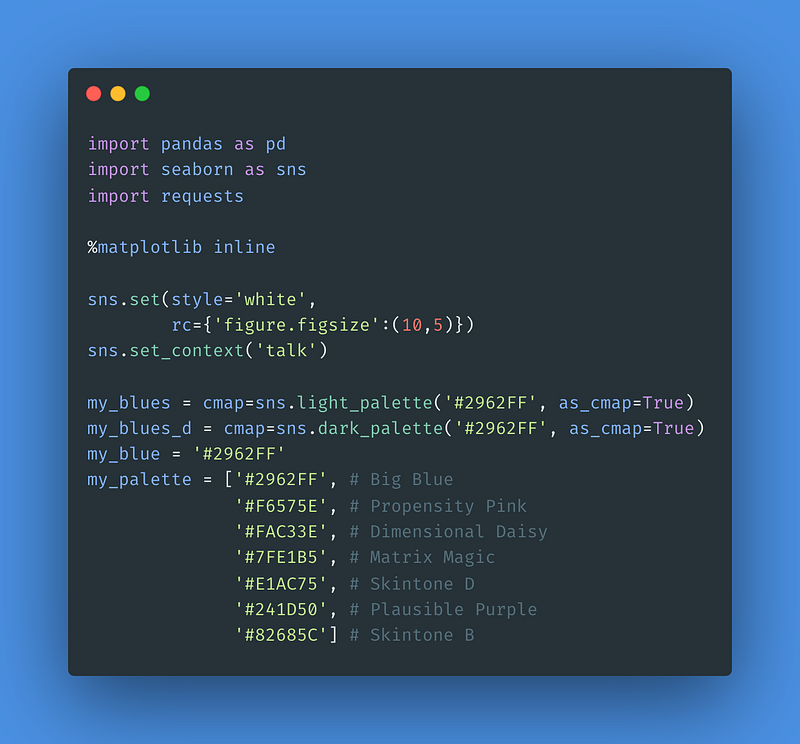
Image Credit: Code From Author. Generated Via carbon.now.sh.

In these imports are the usual suspects including pandas (popular for data science, statistical analysis, data processing, and analyzing data) — seaborn (a data visualization software) — and requests (which serves data acquisition).

The %matplotlib inline code may be optional depending in your environmental setup. Two of my favorite aspects of this set-up code is also the sns.set_context('talk') line that bumps up the size of default font options — I like the way these context results look in Medium articles.

This code also specifies a few palettes which match my own personal palette.

As you read further, keep in mind that this article is not about writing “good code.” It is about quick examples that can produce a data visualizations on-the-fly for teaching, training, demonstration, and testing purposes.

1 DinosaRus Data Set

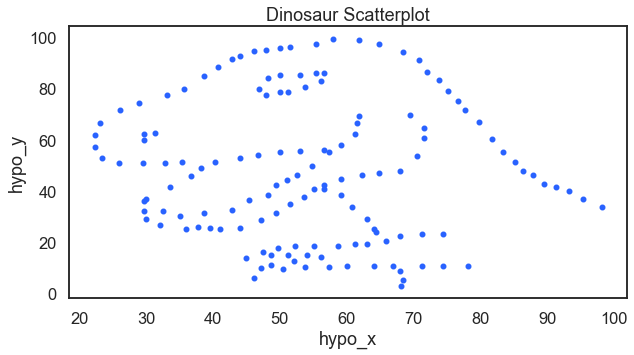
Here you will find a data visualization of a dinosaur. When teaching data analysis and data mining I like to ask students “is there a relationship here?” When looking at the correlation coefficient, the answer is no. But then, you see there is a relationship. The dinosaur relationship.
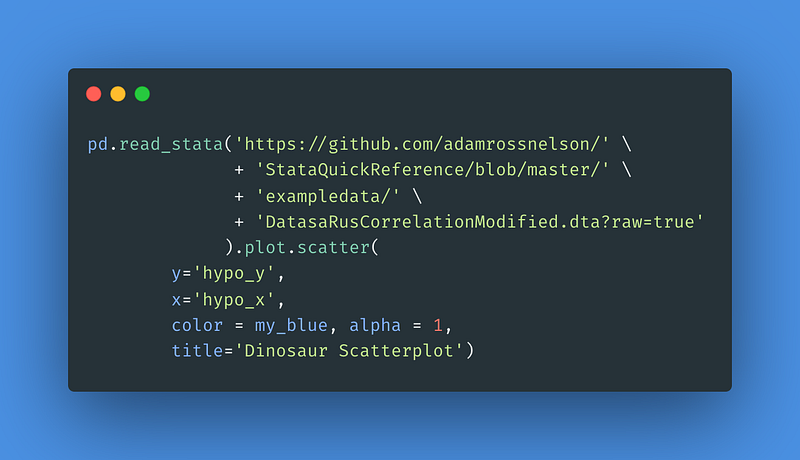
Image Credit: Code From Author. Generated Via carbon.now.sh.

For the result:

Image Credit: Author’s Illustration From This Article’s Code.

2 Book Popularity vs Readability

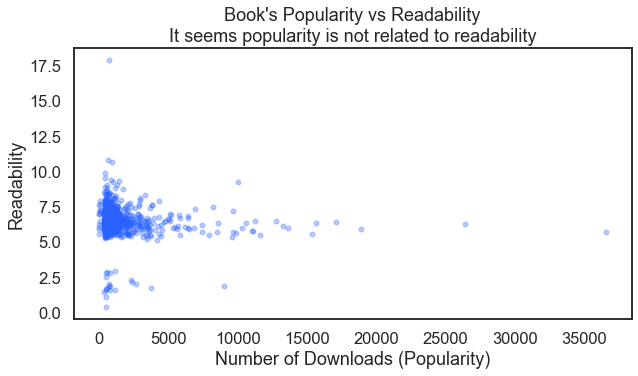
Is there a relationship between a book’s popularity and its readability? From a data set at Virginia Tech we can take a look at a scatter plot to find out. An important aspect of this code is the alpha = 3.0 option which gives a better understanding how dense the individual data points are.
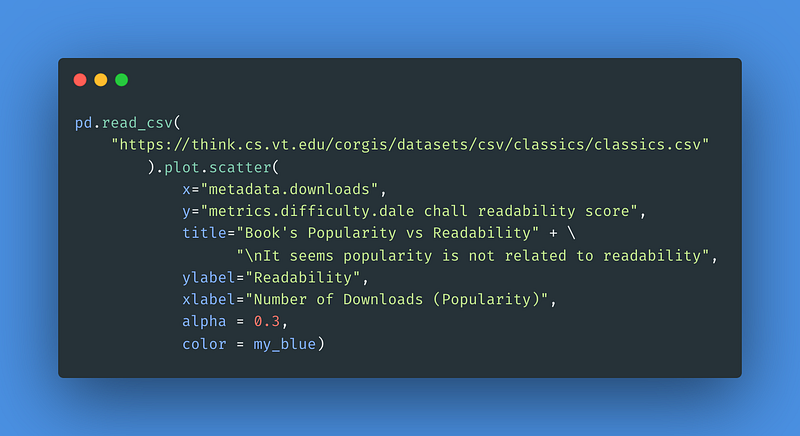
Image Credit: Code From Author. Generated Via carbon.now.sh.

For the result:

Image Credit: Author’s Illustration From This Article’s Code.

3–5 Billionaires Data Visualizations

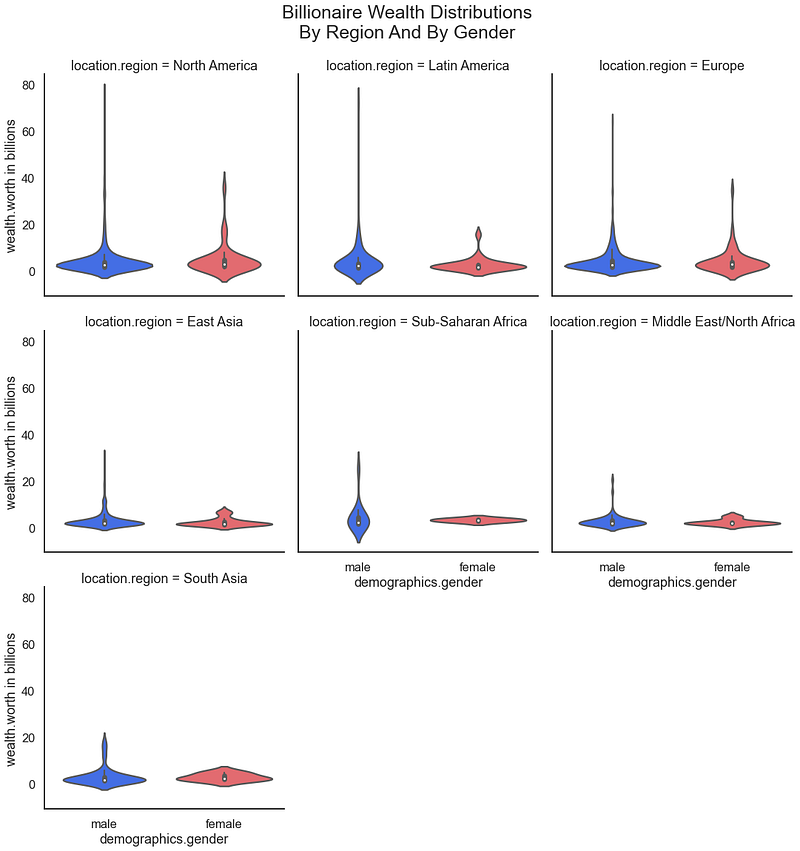
Again referencing data sets from Virginia Tech, we can review the distribution of wealth among billionaires broken out by gender and region.
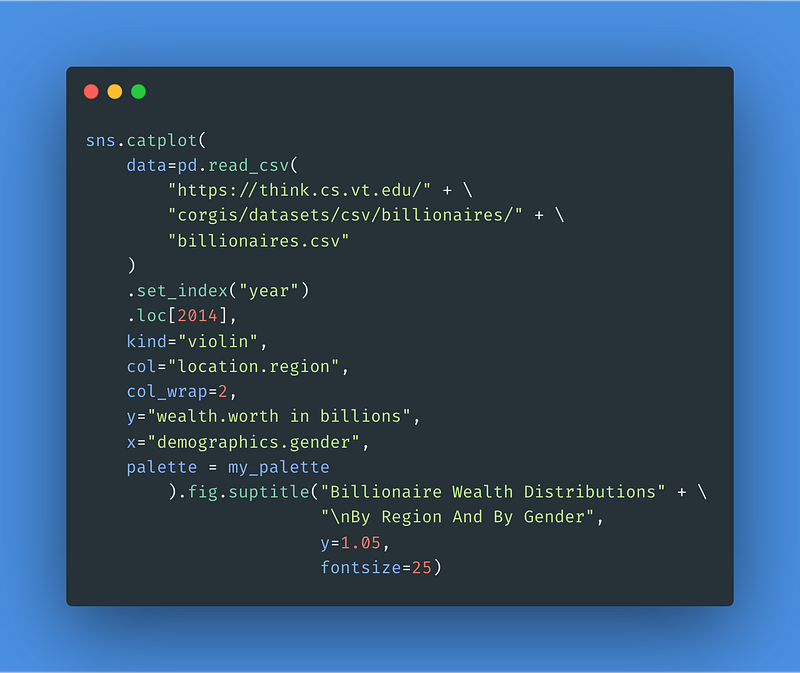
Image Credit: Code From Author. Generated Via carbon.now.sh.

For the result:

Image Credit: Author’s Illustration From This Article’s Code.

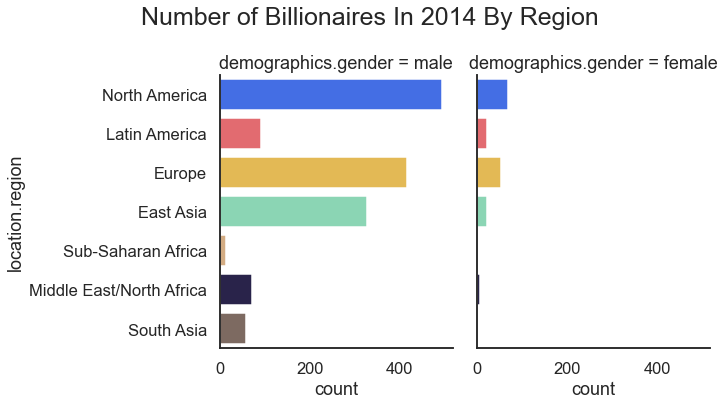
Another method of looking at these billionaire data would be to have a bar chart. Here we look to chart the number of billionaires by region and gender.
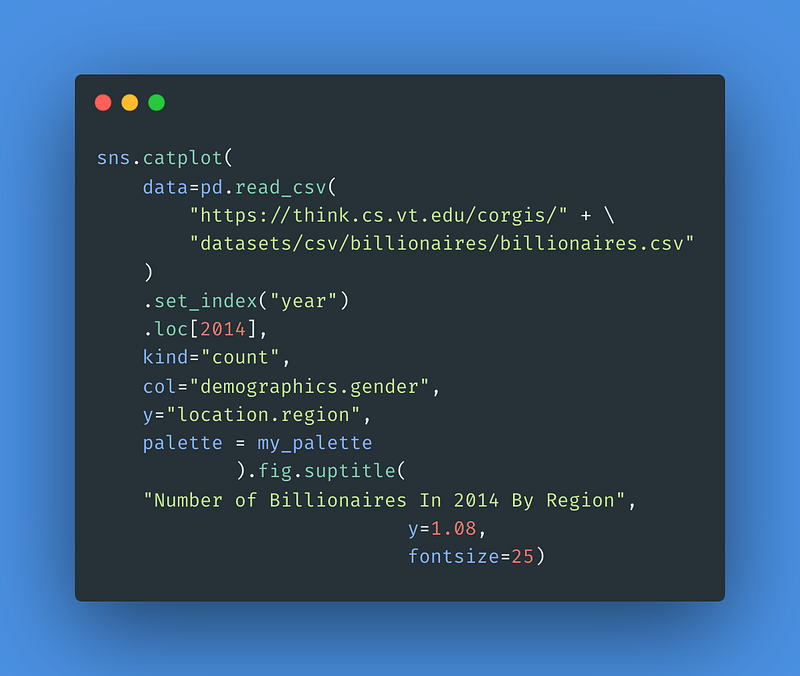
Image Credit: Code From Author. Generated Via carbon.now.sh.

For the result:

Image Credit: Author’s Illustration From This Article’s Code.

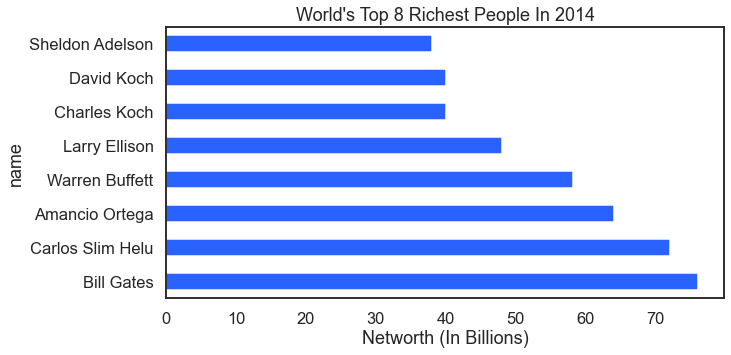
Nex in this data analysis how about a look at the top eight wealthiest billionaires?
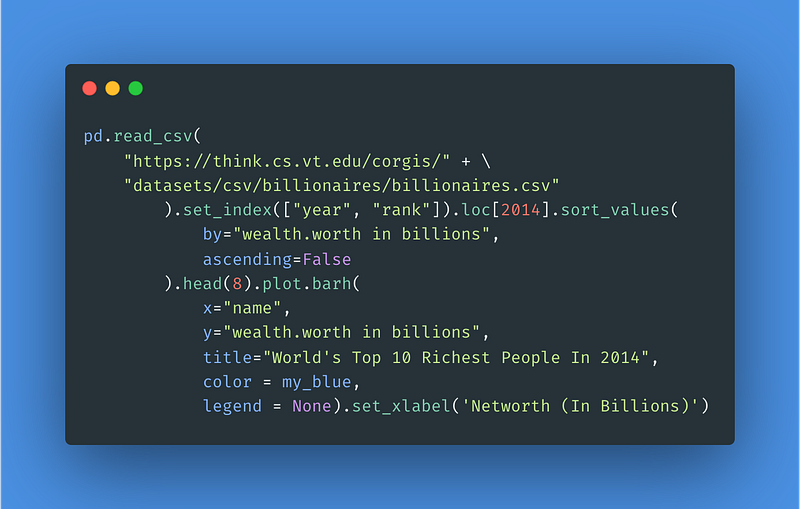
Image Credit: Code From Author. Generated Via carbon.now.sh.

For the result:

Image Credit: Author’s Illustration From This Article’s Code.

6–7 Food Data Visualizations

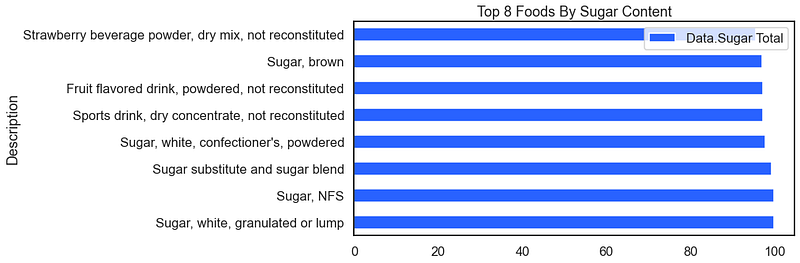
Moving on to a new type of data set but staying with the Virginia Tech data collection we can apply our visualization methods to to food data. Are you hungry yet? Here we look at the top ten foods that are most sugary.
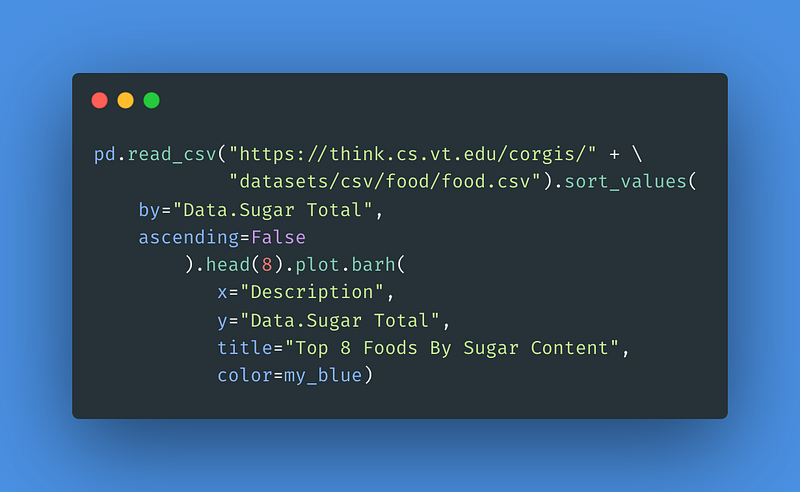
Image Credit: Code From Author. Generated Via carbon.now.sh.

For the result:

Image Credit: Author’s Illustration From This Article’s Code.

The above visual works because the data are already pre-sorted. A clever technique when exploring a data set on the fly is to use the pd.sample() method instead of the pd.head() method. When using the pd.sample(8) method instead you get a version of the following (your results will be different because we have disregarded the random seed).

For the result:
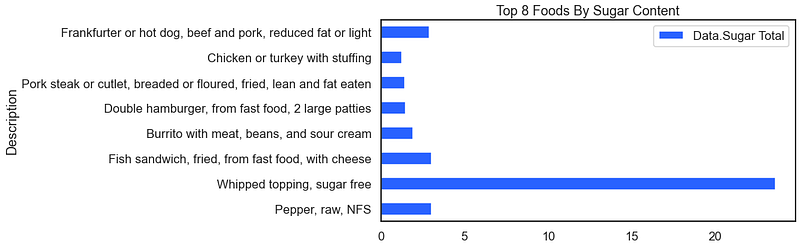
Image Credit: Author’s Illustration From This Article’s Code.

8–10 Fictional Grade Point Average

I’ve always been fascinated with the distribution of grade point averages GPAs. They tend to have spikes or modes at the whole and half numbers. You can see this distribution from the following code.
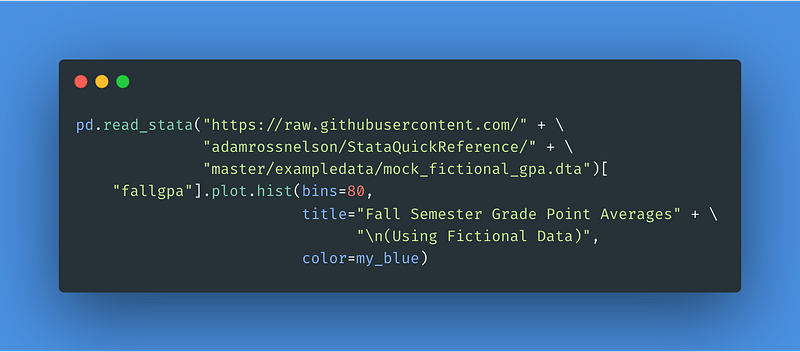
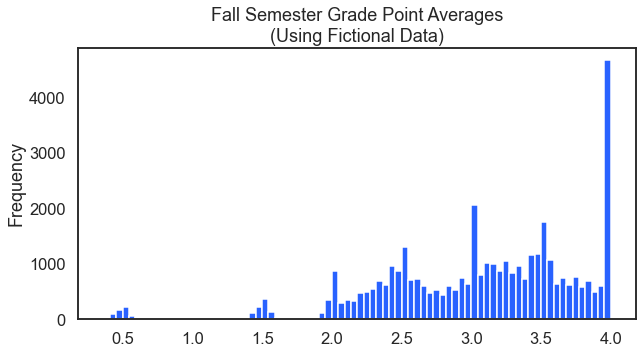
Image Credit: Code From Author. Generated Via carbon.now.sh.
Image Credit: Author’s Illustration From This Article’s Code.

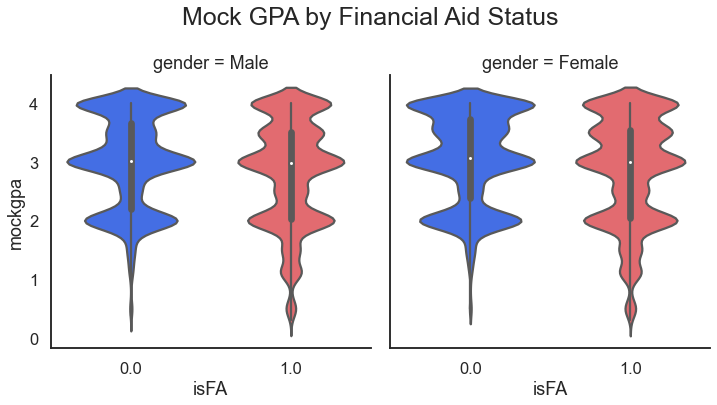
In preparation for a deeper statistical data analysis it would be smart to look at how the distribution might be different by gender and also whether that student receives financial aid.
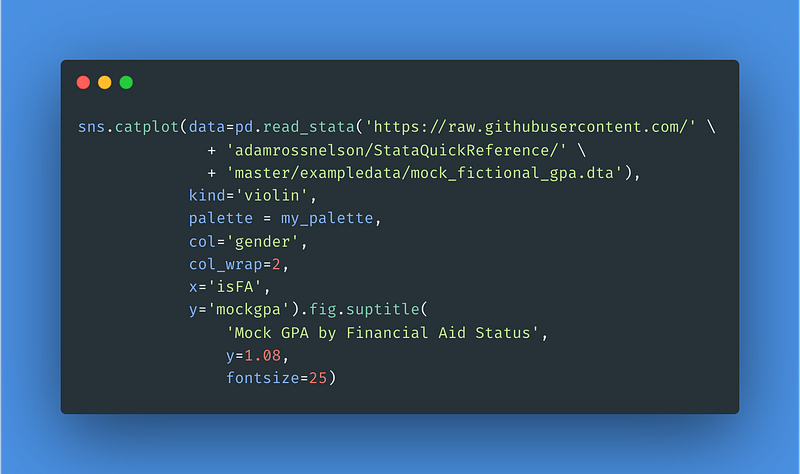
Image Credit: Code From Author. Generated Via carbon.now.sh.

For the result:

Image Credit: Author’s Illustration From This Article’s Code.

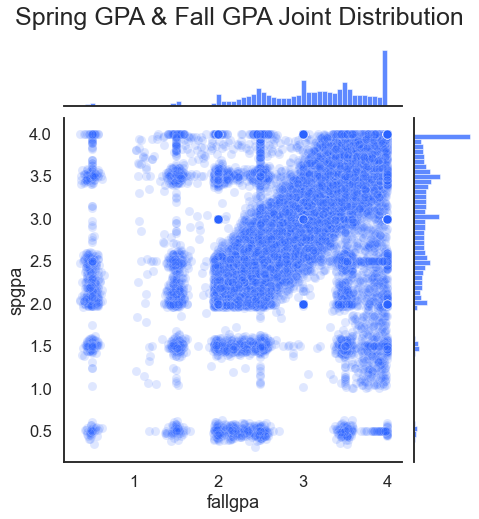
A related question might be if there is a relationship between fall and spring grade point averages. This data analysis asks if fall grade point average might predict spring grade point average (it does).
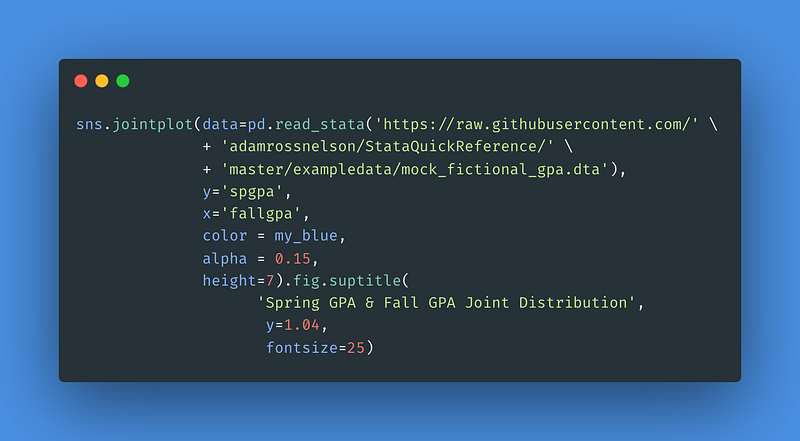
Image Credit: Code From Author. Generated Via carbon.now.sh.

For the result:

Image Credit: Author’s Illustration From This Article’s Code.

11 Emergency Service Calls In New Orleans

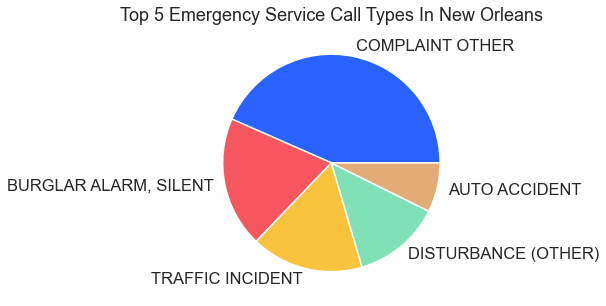
The city of New Orleans serves to the public municipal data for use by data scientists, data analysts, and other data professionals. These data provide excellent fodder for anyone interested in conducting training, testing, or demonstrations related to the data analysis process. The code here displays the top five emergency service call types in New Orleans as a pie chart.
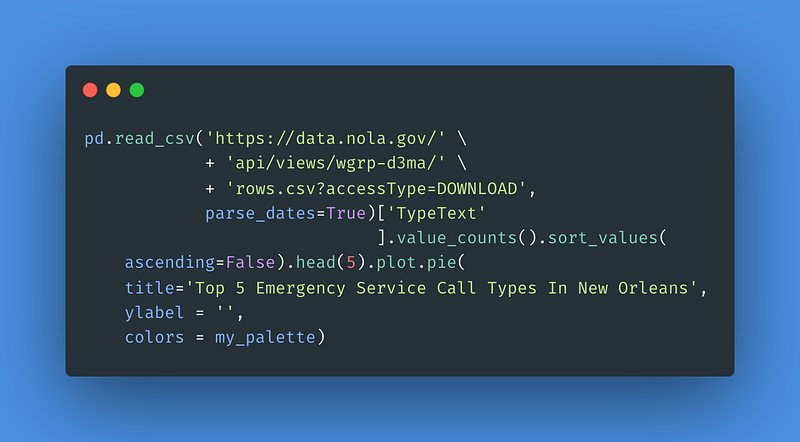
Image Credit: Code From Author. Generated Via carbon.now.sh.

For the result:

Image Credit: Author’s Illustration From This Article’s Code.

12–14 Coronavirus Data

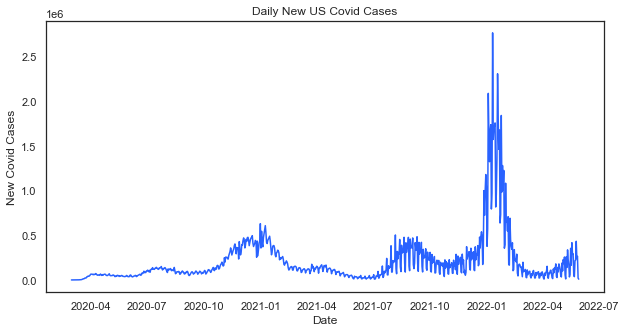
Daily New Covid Cases In The U.S. — One of the most requested data visualization themes from clients recently has been Covid-related trends. Here is one that loads in a single line of code using data from datausa.io.
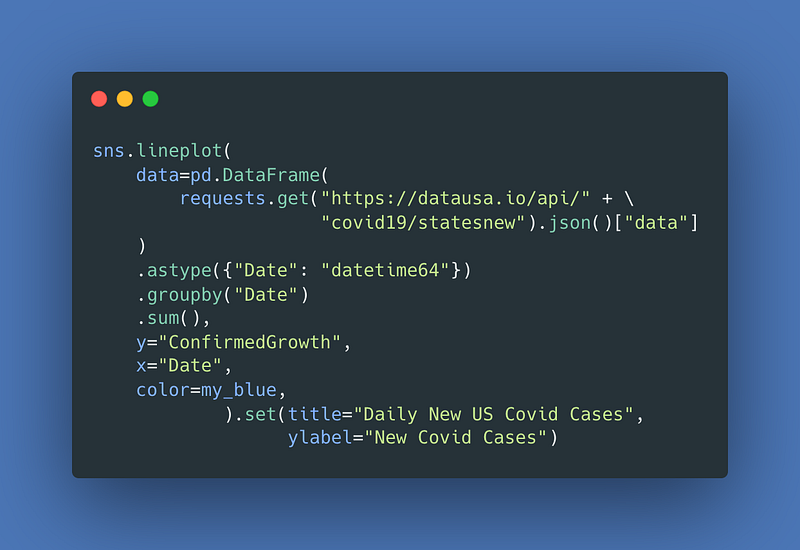
Image Credit: Code From Author. Generated Via carbon.now.sh.

For the result:

Image Credit: Author’s Illustration From This Article’s Code.

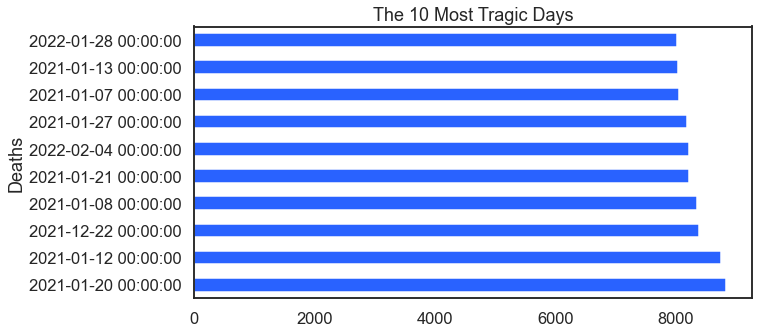
This visualization takes the same Covid data and identifies the 10 most tragic days.
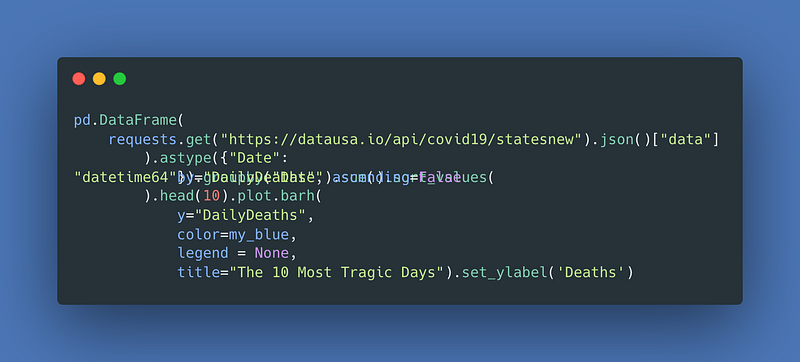
Image Credit: Code From Author. Generated Via carbon.now.sh.

For the result:

Image Credit: Author’s Illustration From This Article’s Code.

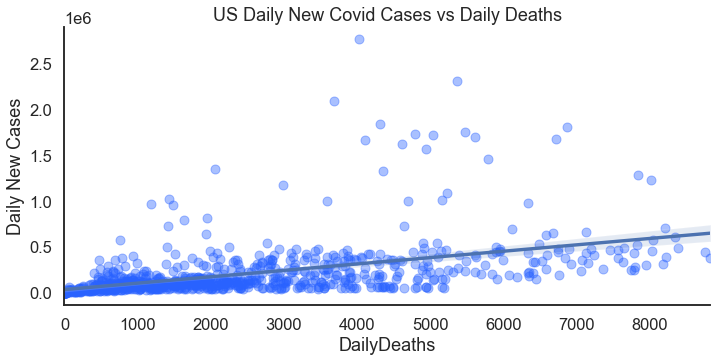
Just a few adjustments lets you compare the relationship between new cases and deaths.
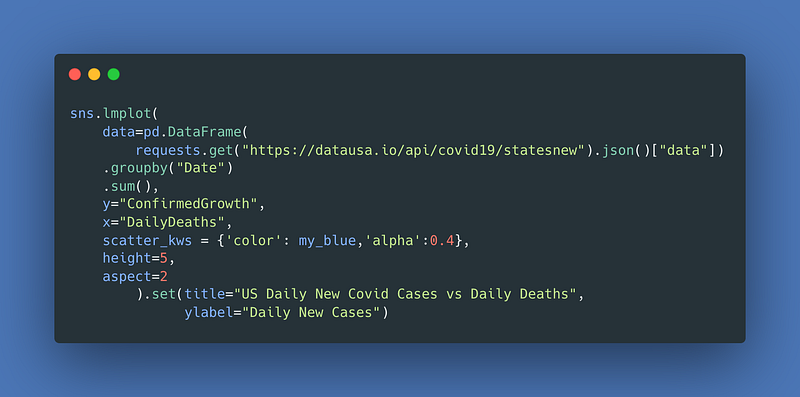
Image Credit: Code From Author. Generated Via carbon.now.sh.

For the result:

Image Credit: Author’s Illustration From This Article’s Code.

15–18 Sports Data

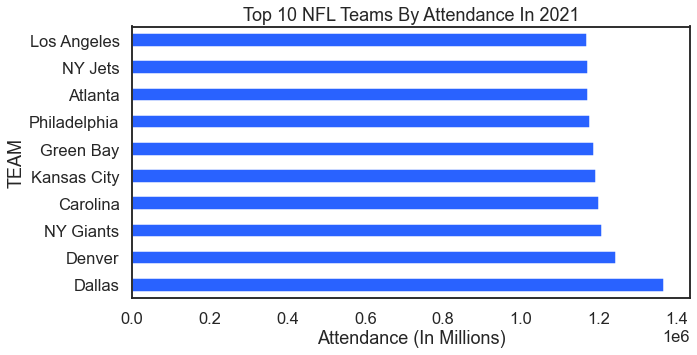
The world of sports is a rich source of data. Grabbing sports data for swift demonstrations, examples, training, and testing purposes is an easy way to go. Here we start with data from ESPN. This first sorts example shows stadium attendance by sports team in 2021. Who wants to cook up a figure that shows the Covid dip?
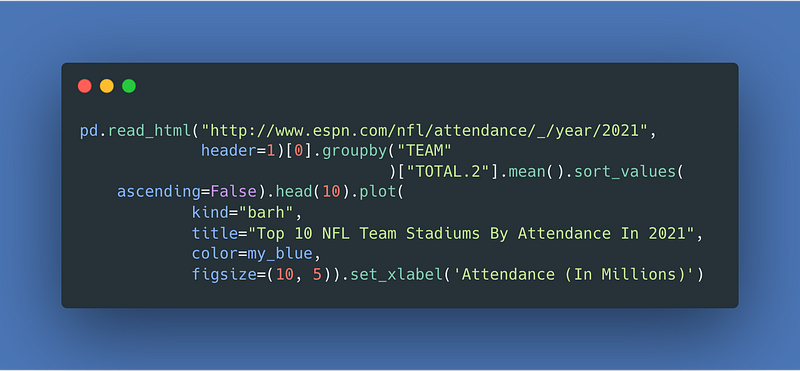
Image Credit: Code From Author. Generated Via carbon.now.sh.

For the result:

Image Credit: Author’s Illustration From This Article’s Code.

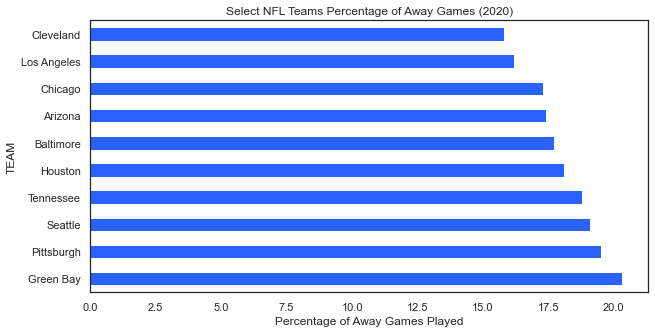
The next example also from ESPN shows the proportion of games played away for each NFL team.
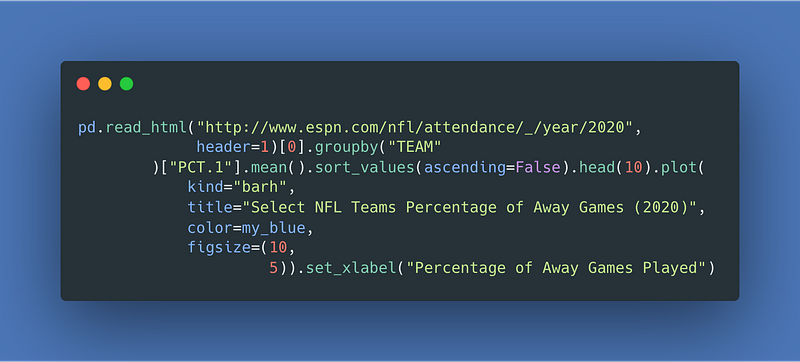
Image Credit: Code From Author. Generated Via carbon.now.sh.

For the result:

Image Credit: Author’s Illustration From This Article’s Code.

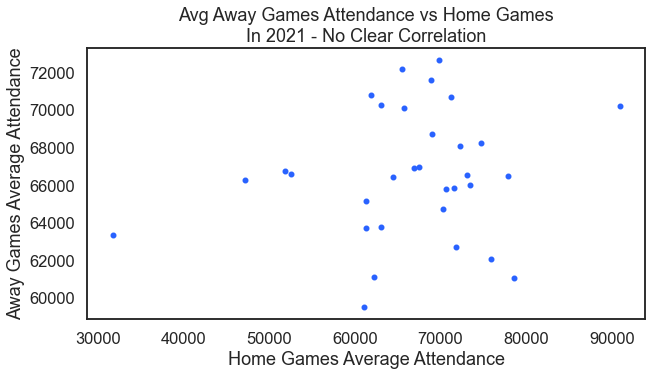
Could there be a correlation between average attendance at away games and the average attendance at home games? It seems no there is not.
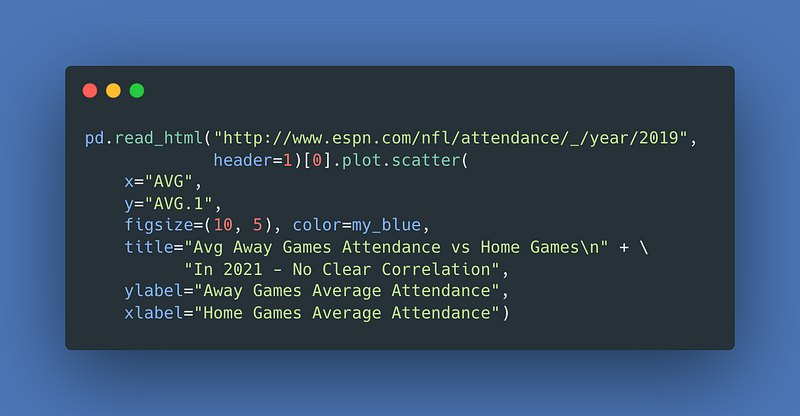
Image Credit: Code From Author. Generated Via carbon.now.sh.

For the result:

Image Credit: Author’s Illustration From This Article’s Code.

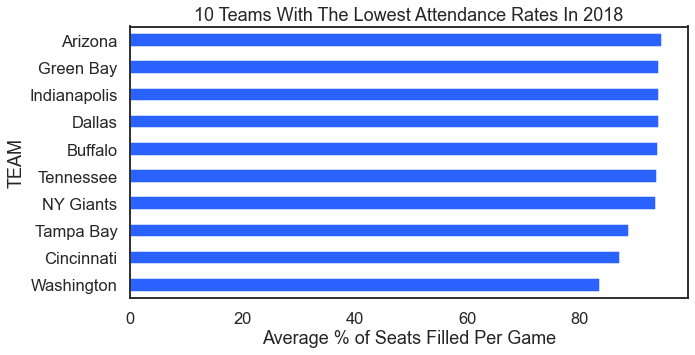
On the other end of the analysis are teams with low attendance. Here we look at the ten teams with the lowest attendance rages in 2018.
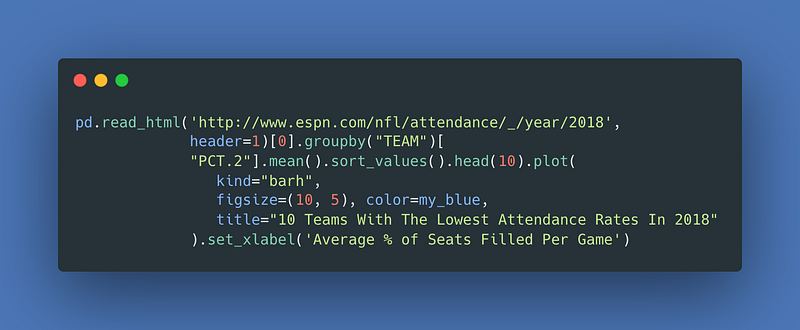
Image Credit: Code From Author. Generated Via carbon.now.sh.

For the result:

Image Credit: Author’s Illustration From This Article’s Code.

19–21 Politics Data

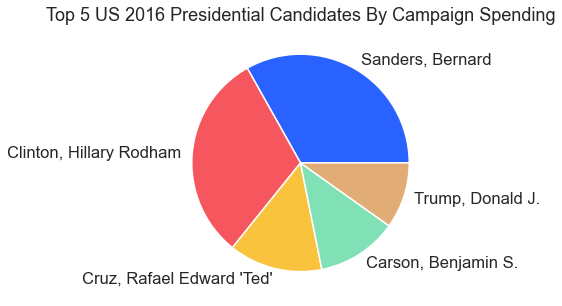
This article wouldn’t be complete without some visuals from politics. Not unlike sports, politics provide a rich data source, too. Here we start with data from Tableau and visualize spending in presidential campaigns.
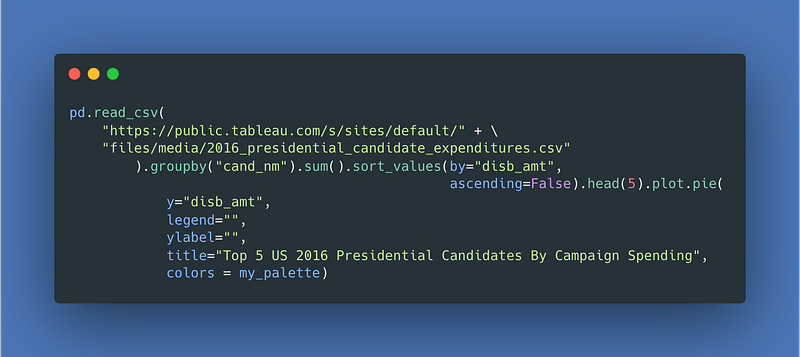
Image Credit: Code From Author. Generated Via carbon.now.sh.

For the result:

Image Credit: Author’s Illustration From This Article’s Code.

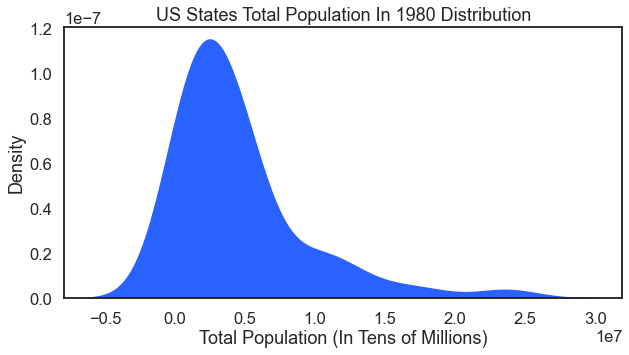
Under politics data I include a visual from U.S. Census data. This one is nice to have in the library because it shows how to do a kde plot as an area plot.
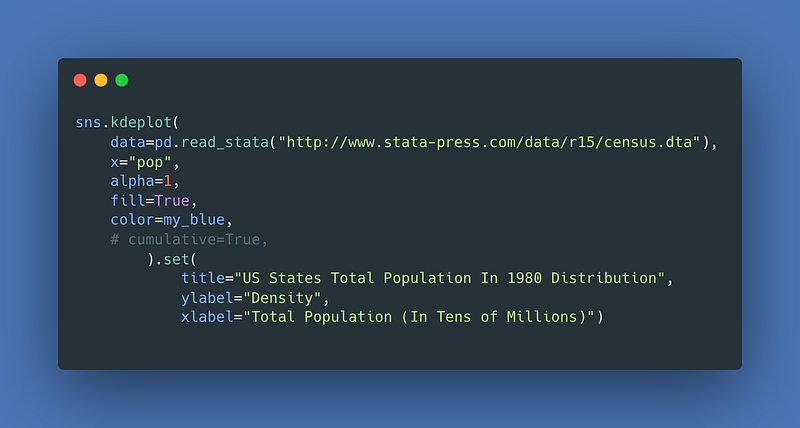
Image Credit: Code From Author. Generated Via carbon.now.sh.

For the result:

Image Credit: Author’s Illustration From This Article’s Code.

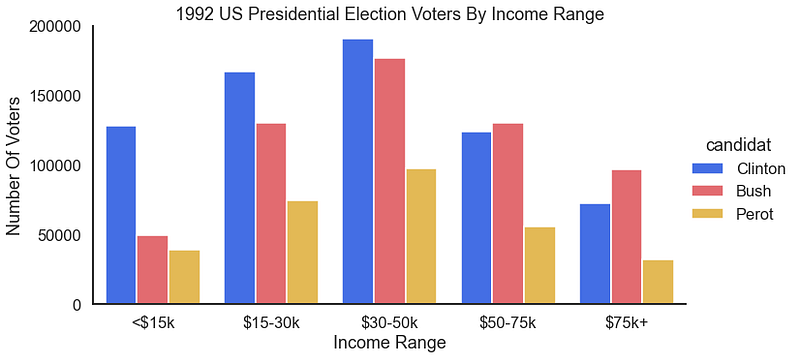
How about a look at what age groups vote for which candidates. This simple bar chart does that for us.
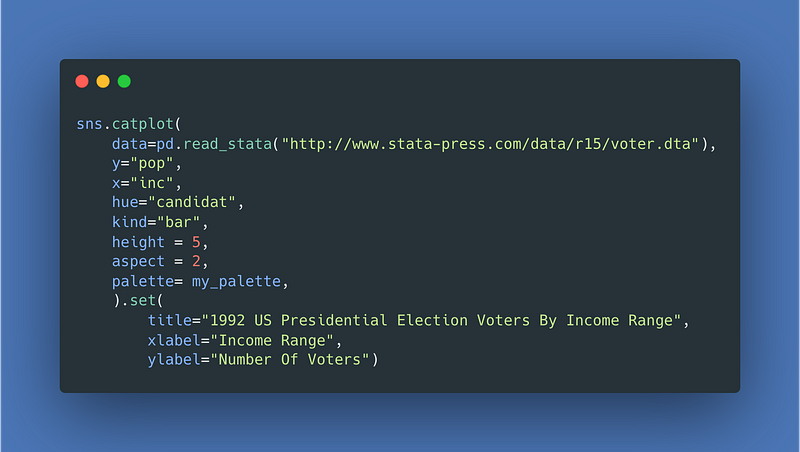
Image Credit: Code From Author. Generated Via carbon.now.sh.

For the result:

Image Credit: Author’s Illustration From This Article’s Code.

22–29 Fake Bird & Real Penguins Data Visualizations

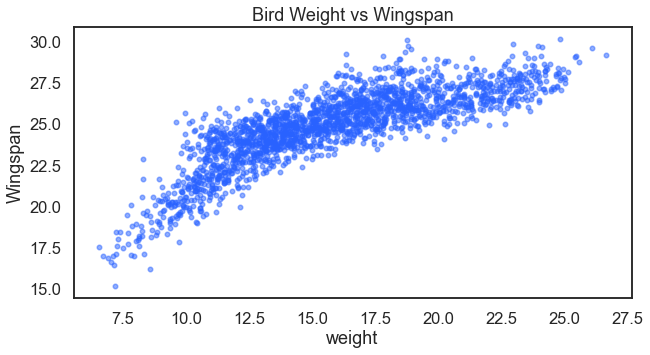
I’ve previously written about making these fake birds data. I also used these fake bird data to demonstrate k-nearest neighbors. Here is another opportunity to explore the data more visually. Note: the relationships in these fake data are exaggerated (because it is fake data). First let us look at if there is a potential relationship between a bird’s weight and its wingspan.
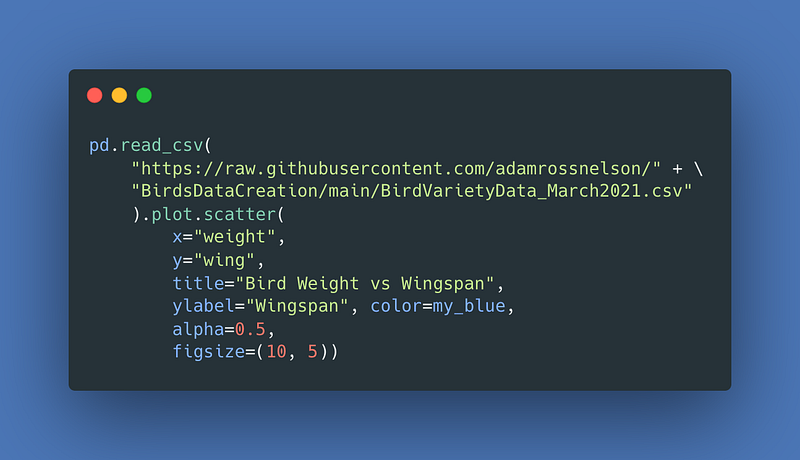
Image Credit: Code From Author. Generated Via carbon.now.sh.

For the result:

Image Credit: Author’s Illustration From This Article’s Code.

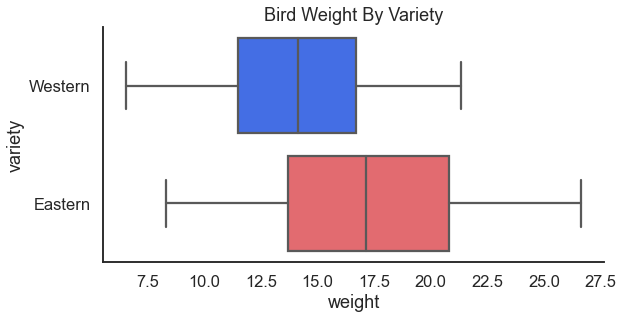
Next we can see if birds differ in weight by region. I love love love a good categorical box plot, personally!
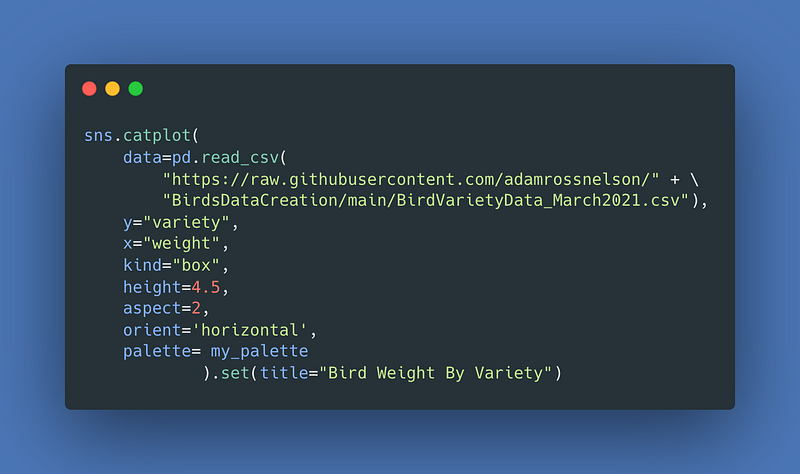
Image Credit: Code From Author. Generated Via carbon.now.sh.

For the result:

Image Credit: Author’s Illustration From This Article’s Code.

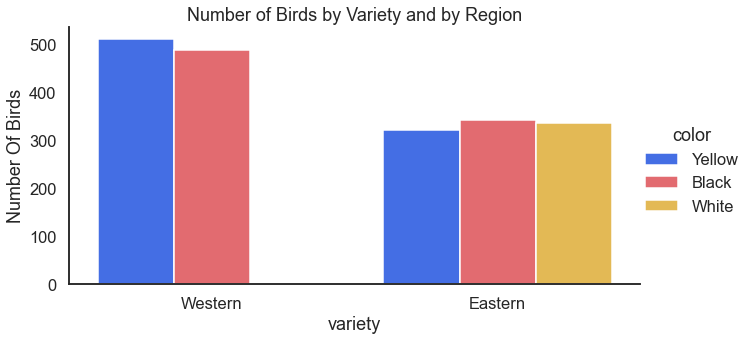
This regional difference looks interesting. Are there other differences? Perhaps the distribution of variety differs by region, too?
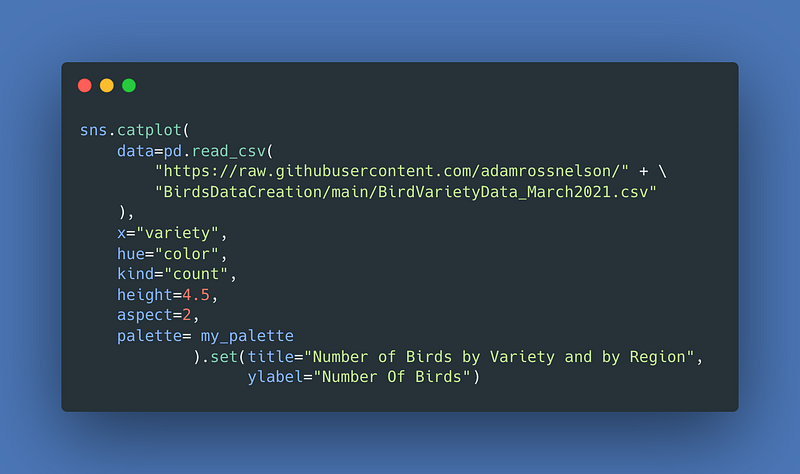
Image Credit: Code From Author. Generated Via carbon.now.sh.

For the result:

Image Credit: Author’s Illustration From This Article’s Code.

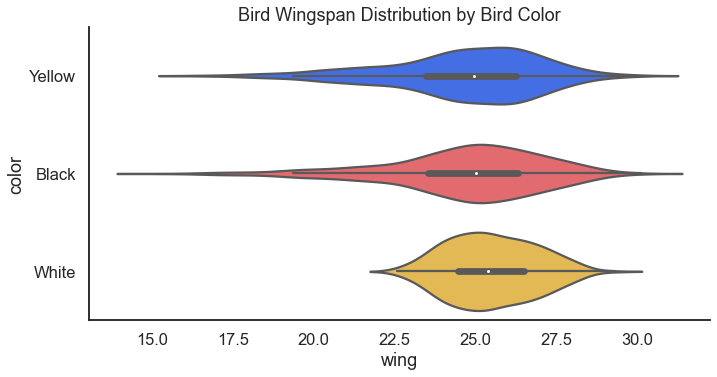
Taking a closer look at the wingspan, it might be interesting to see if the wingspans differ by variety. Spoiler alert: I bet they do! Almost as much as a good horizontal box plot, I also love a good violin plot.
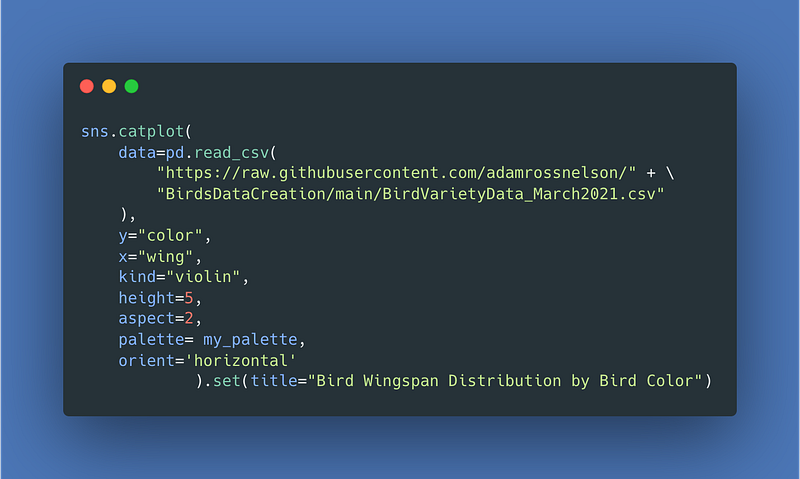
Image Credit: Code From Author. Generated Via carbon.now.sh.

For the result:

Image Credit: Author’s Illustration From This Article’s Code.

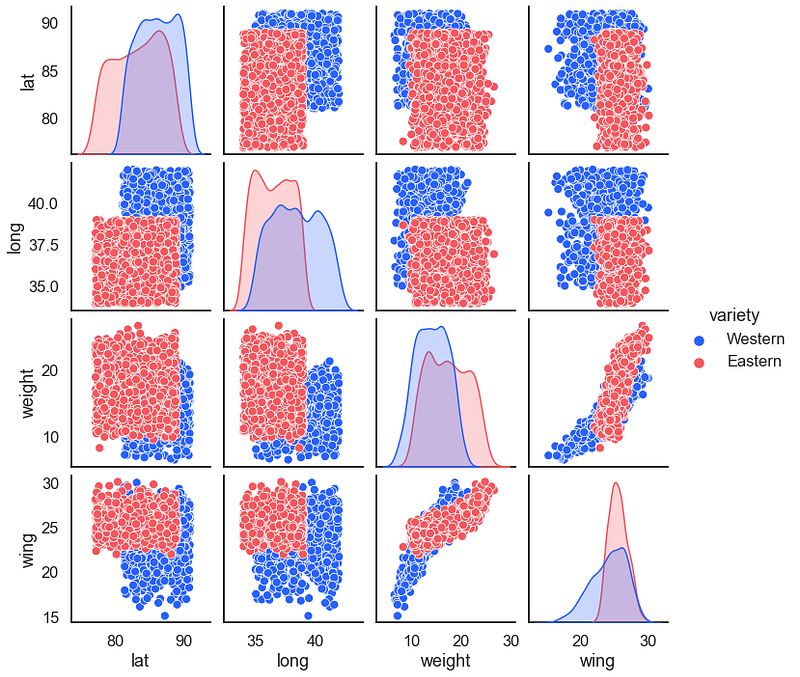
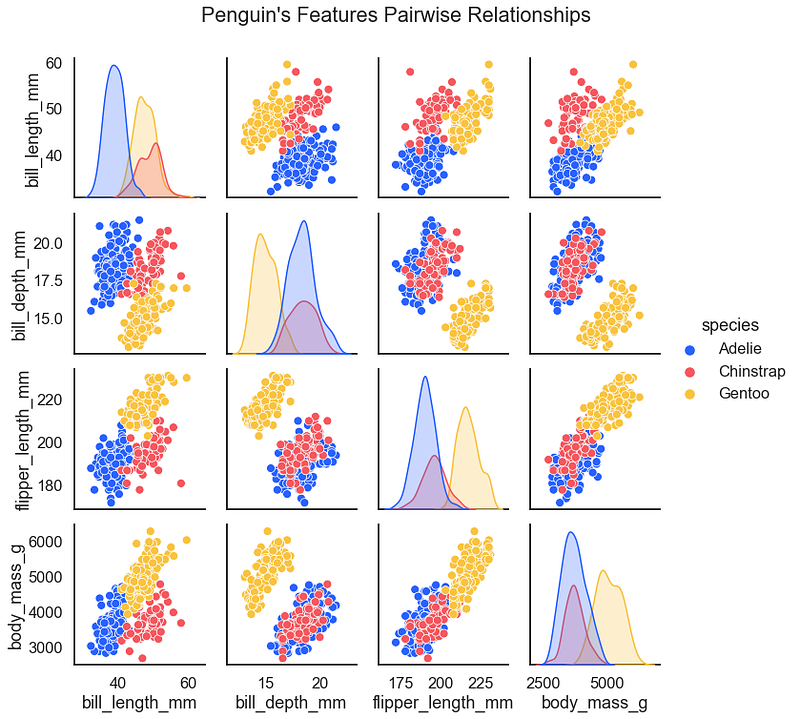
The Seaborn Penguins is similar to the fake birds data. Both work well as testing data for classification problems. One of the first steps in classification machine learning or artificial intelligence is to examine a hued pair plot. First, a pairplot for the fake birds.
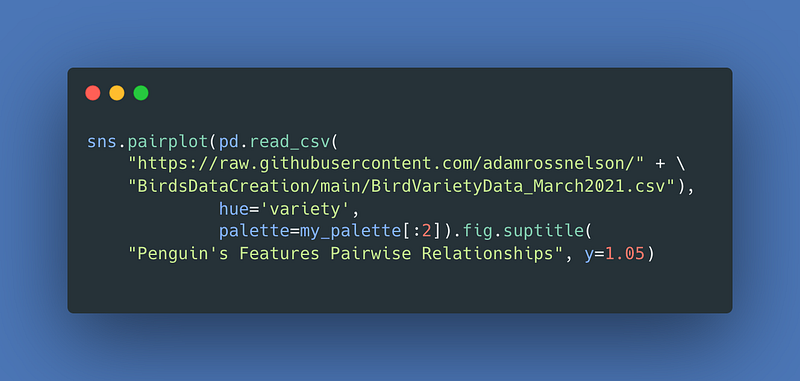
Image Credit: Code From Author. Generated Via carbon.now.sh.

For the result:

Image Credit: Author’s Illustration From This Article’s Code.

Next, as promised is the pairplot for the adorable penguins.
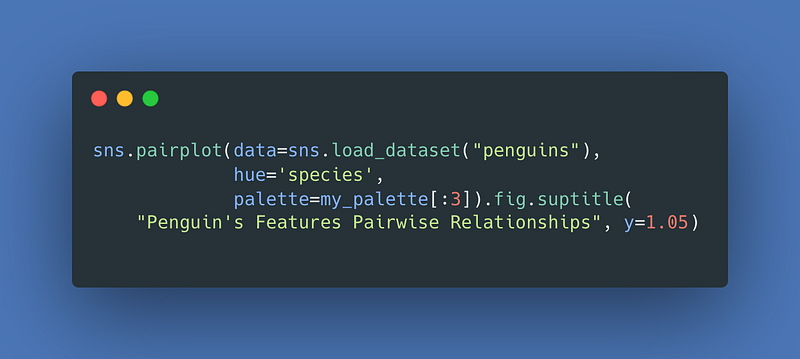
Image Credit: Code From Author. Generated Via carbon.now.sh.

For the result:

Image Credit: Author’s Illustration From This Article’s Code.

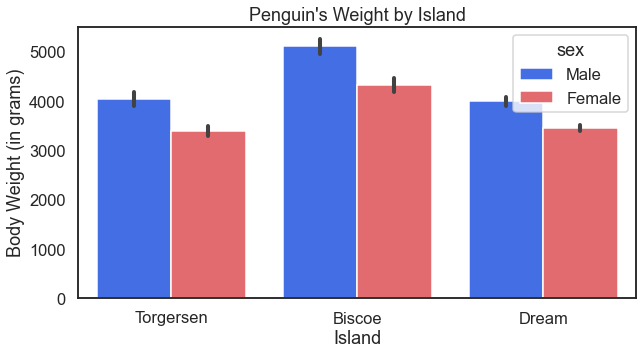
For some more fun with the penguins we can also look at how their body weight may differ based on the island they call home.
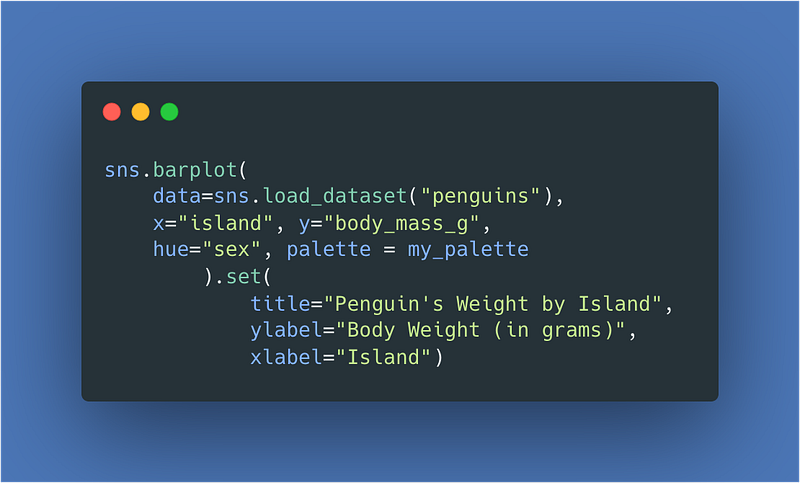
Image Credit: Code From Author. Generated Via carbon.now.sh.

For the result:

Image Credit: Author’s Illustration From This Article’s Code.

The orient = 'h' option changes the orientation for the result:
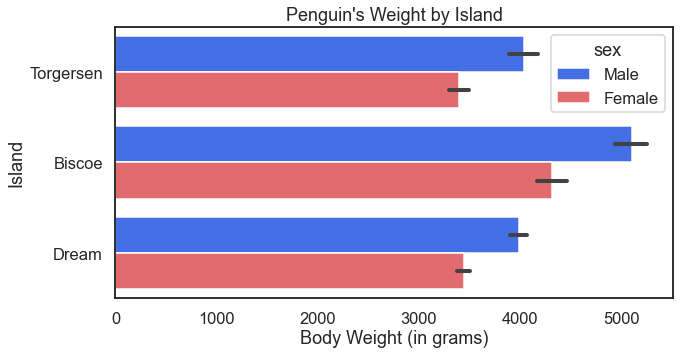
Image Credit: Author’s Illustration From This Article’s Code.

30–35 Air Travel & Automobile Data

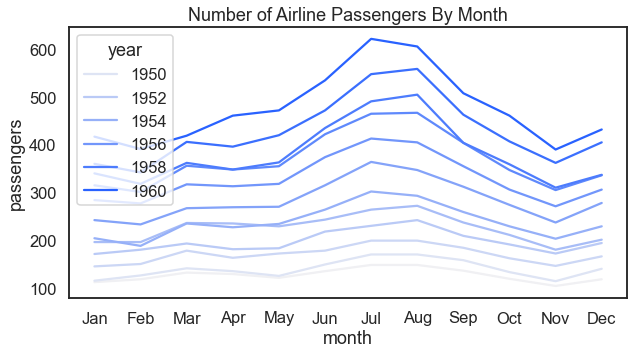
Before moving on to more extensive automobile examples below, here we look at a visual that examines how the number of passengers changes over the course of a year and also over the course of several years.
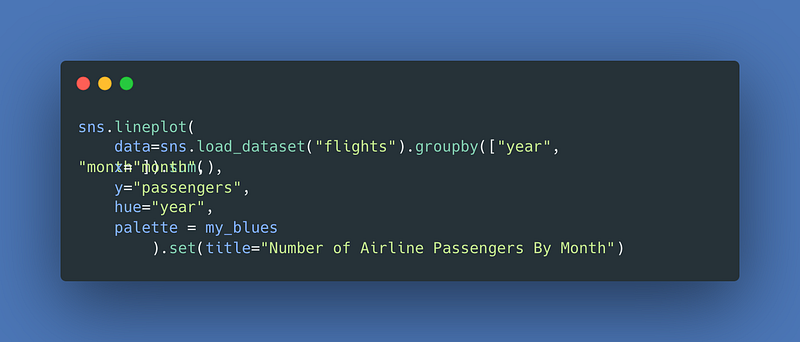
Image Credit: Code From Author. Generated Via carbon.now.sh.

For the result:

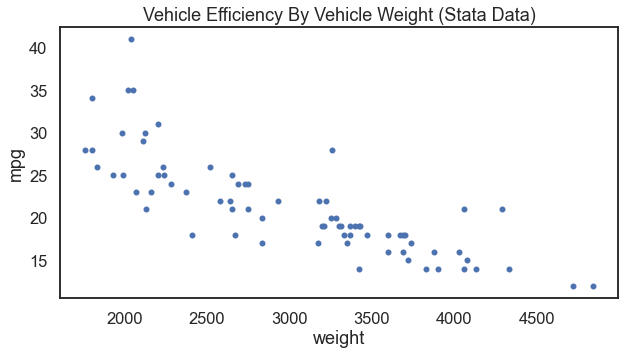
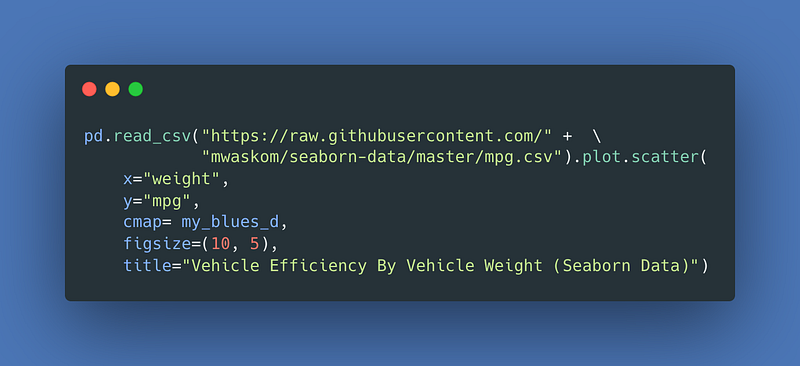
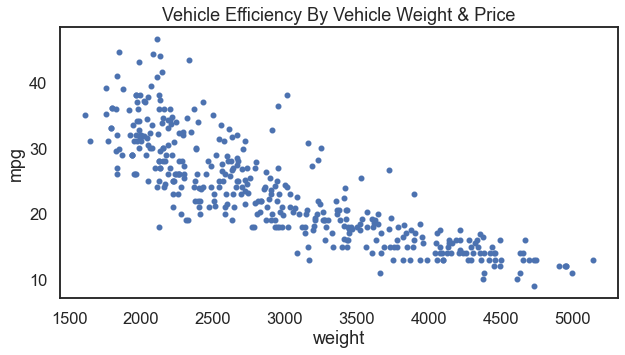
For anyone who has studied statistics with me, one of my favorite data visualizations is to scatter vehicle weight and vehicle efficiency. Where we set vehicle efficiency as the outcome variable on the y-axis and vehicle weight as the input variable on the x-axis. The functional form of these data make sense to me (and I hope it makes sense to others). That makes a go-to for me when teaching many analytical techniques.

There are at least two data sources that can do this for us. First, I will show the result with Stata’s auto.dta data. Further below you can see the result with Seaborn’s mpg.csv data.
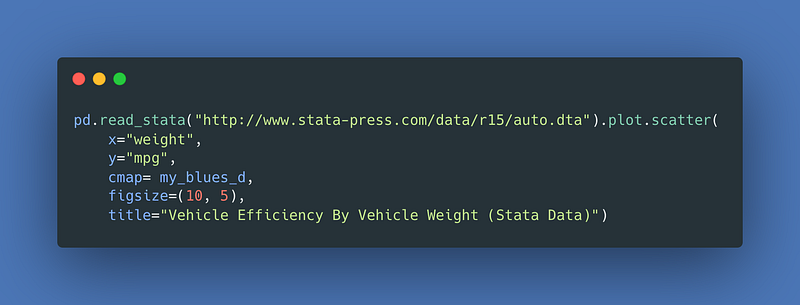
Image Credit: Code From Author. Generated Via carbon.now.sh.

For the result:

Image Credit: Author’s Illustration From This Article’s Code.

Now with Seaborn instead.

Image Credit: Code From Author. Generated Via carbon.now.sh.

For the result:

Image Credit: Author’s Illustration From This Article’s Code.

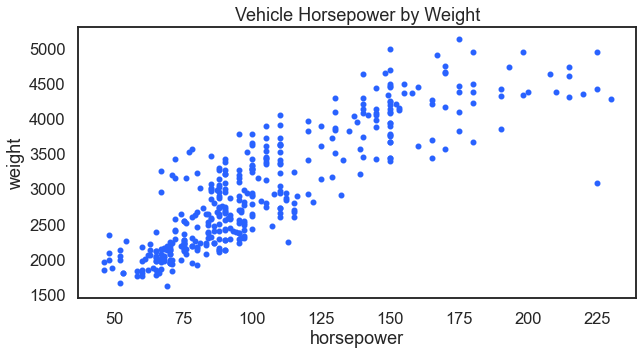
Related, it makes sense that a vehicles horsepower would also relate to its weight. A vehicle will need more power as it gets heavier.
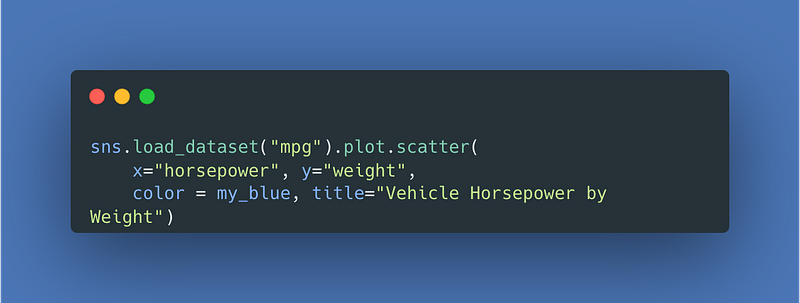
Image Credit: Code From Author. Generated Via carbon.now.sh.

For the result:

Image Credit: Author’s Illustration From This Article’s Code.

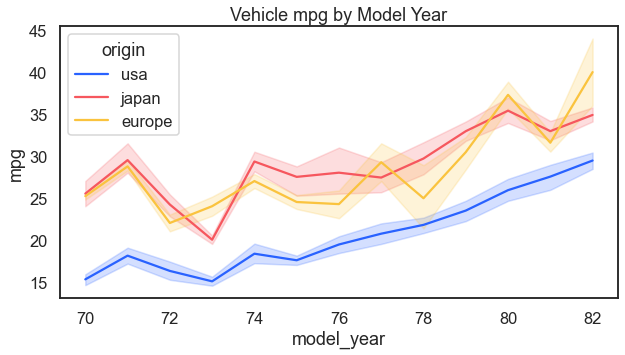
Another question could be whether efficiency has improved over time. It has.
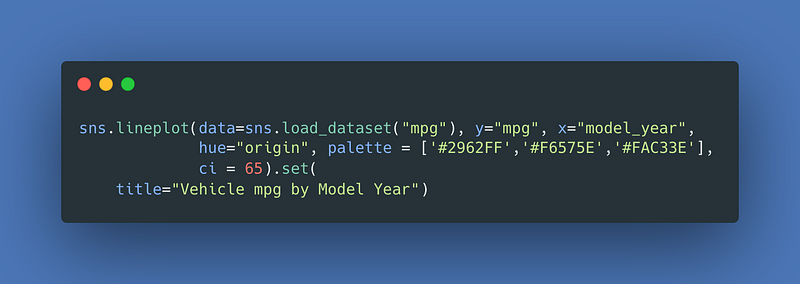
Image Credit: Code From Author. Generated Via carbon.now.sh.

For the result:

Image Credit: Author’s Illustration From This Article’s Code.

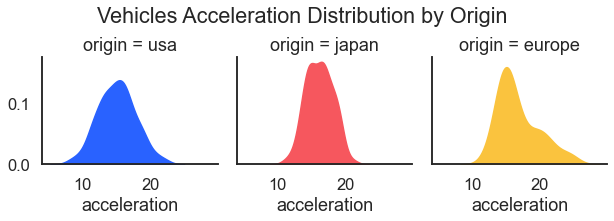
Before moving onto health data, just a bit more with autos. Here we look at how acceleration differs by source of manufacture.
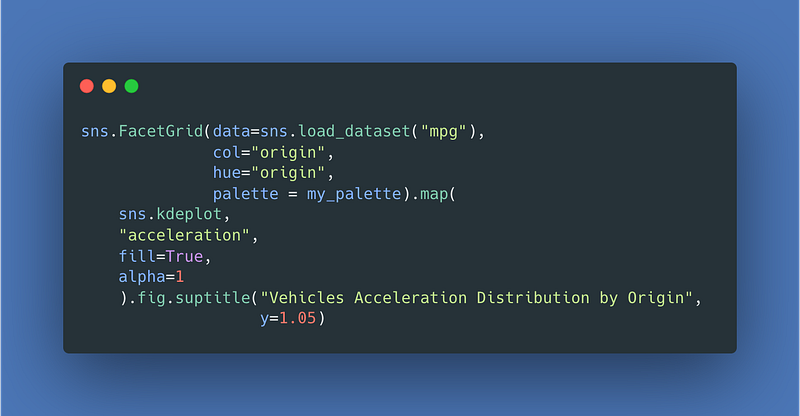
Image Credit: Code From Author. Generated Via carbon.now.sh.

For the result:

Image Credit: Author’s Illustration From This Article’s Code.

36–43 Health Data

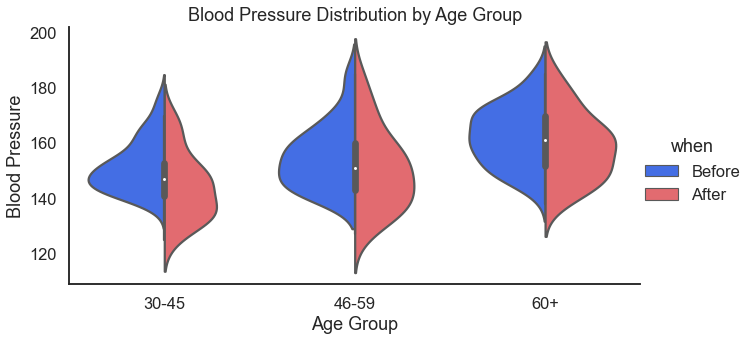
Health is a good place to go for demonstration, example, testing, and training data. Here we kick the health category off with blood pressure data. We use violin plots to look at blood pressure by age group and also by gender.
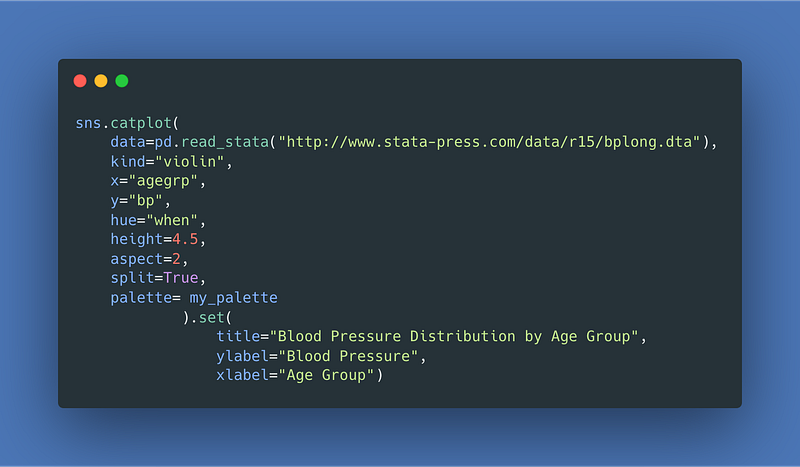
Image Credit: Code From Author. Generated Via carbon.now.sh.

For the result:

Image Credit: Author’s Illustration From This Article’s Code.

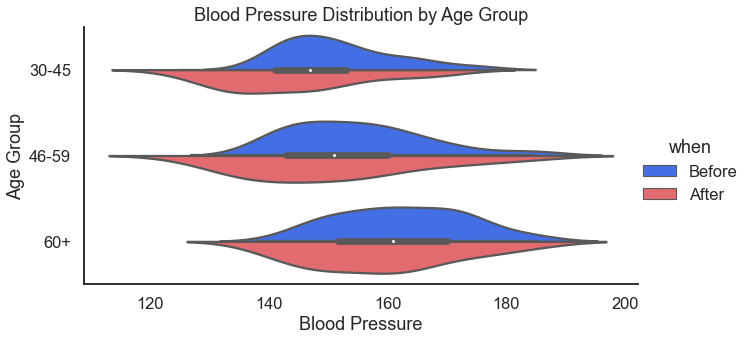
For those that prefer the horizontal orientation. I usually do prefer horizontal because I read left to right — just seems more intuitive to me. I also like horizontal because I think it fits better in documents and presentations.

Do this by adding the orient='horizontal' argument.
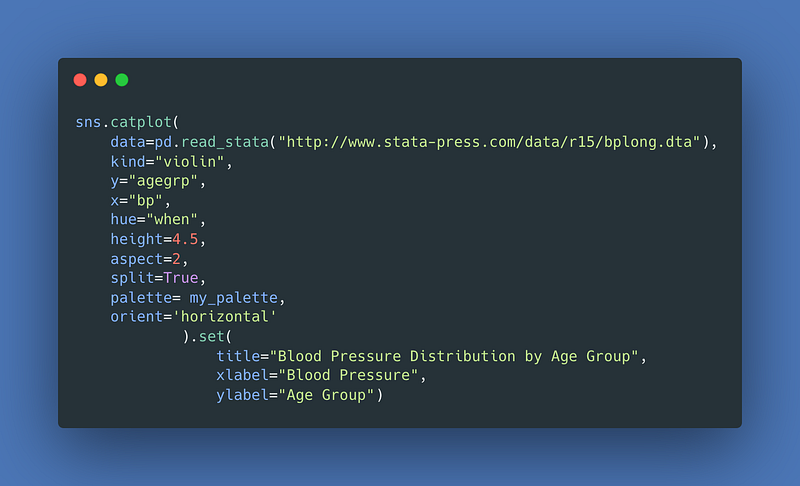
Image Credit: Code From Author. Generated Via carbon.now.sh.

For the result:

Image Credit: Author’s Illustration From This Article’s Code.

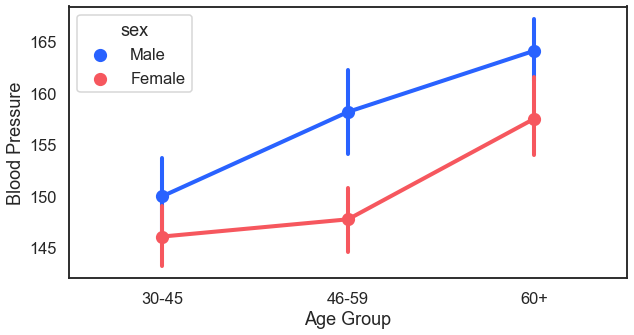
Another way to look at blood pressure by age would be to do a margin plot. Sometimes this is called point plot. Essentially, in this plot we plot the average (with confidence intervals) of blood pressure by age and then connect it with a trend line.
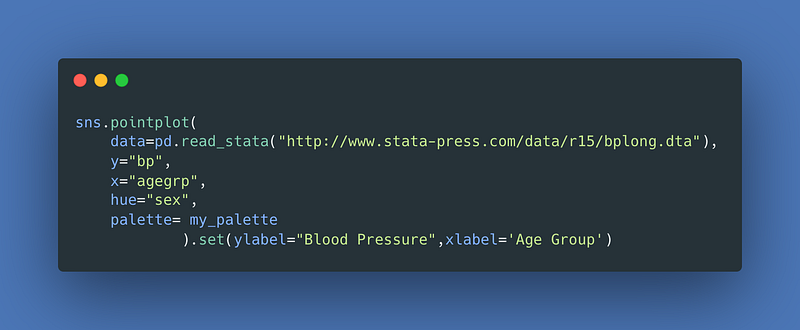
Image Credit: Code From Author. Generated Via carbon.now.sh.

For the result:

Image Credit: Author’s Illustration From This Article’s Code.

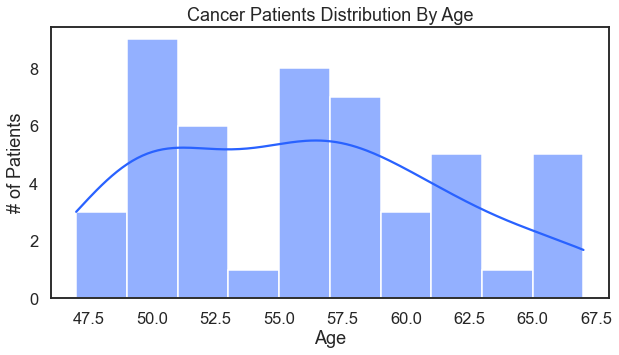
Cancer patients by age (with the assist of a trusty histogram). That includes a kde density line.
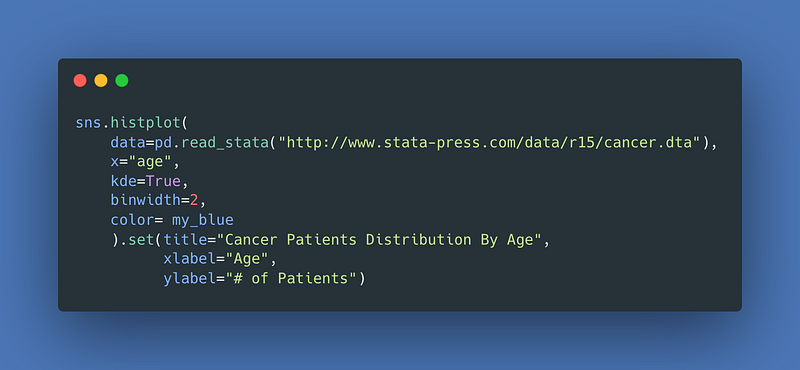
Image Credit: Code From Author. Generated Via carbon.now.sh.

For the result:

Image Credit: Author’s Illustration From This Article’s Code.

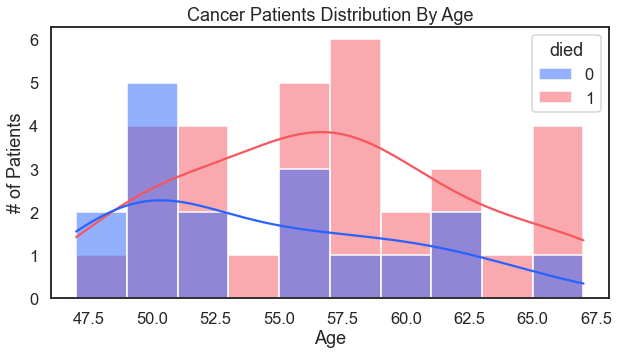
Add survival to the hue argument for a more nuanced analysis.
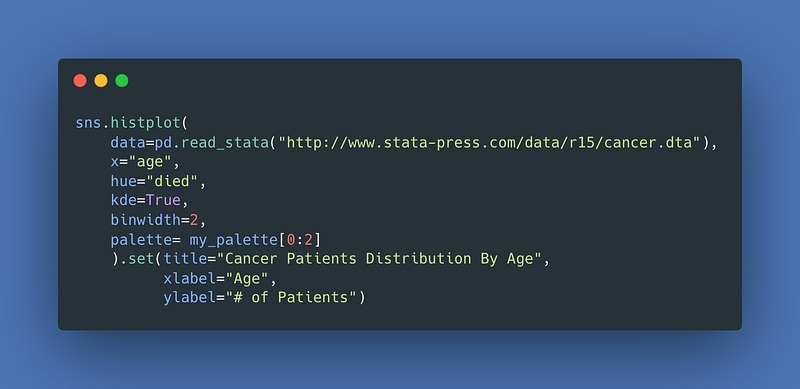
Image Credit: Code From Author. Generated Via carbon.now.sh.

For the result:

Image Credit: Author’s Illustration From This Article’s Code.

Another look at cardiovascular health could be to look over heart rates by diet types.
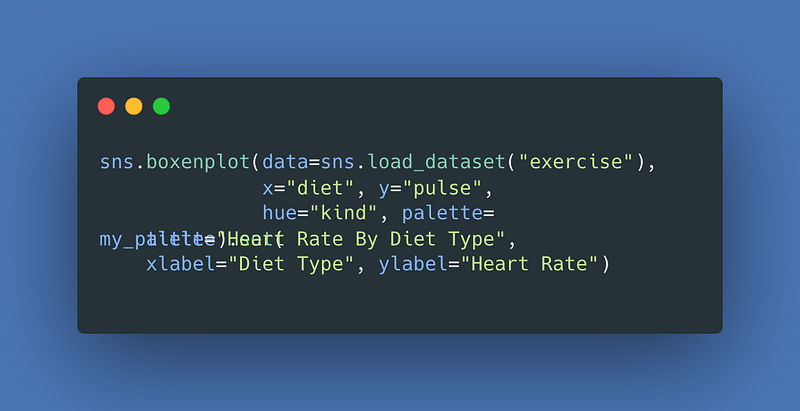
Image Credit: Code From Author. Generated Via carbon.now.sh.

For the result (I’m going to start eating less fat):
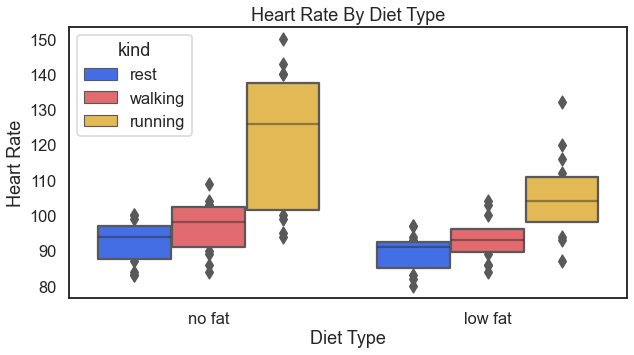
Image Credit: Author’s Illustration From This Article’s Code.

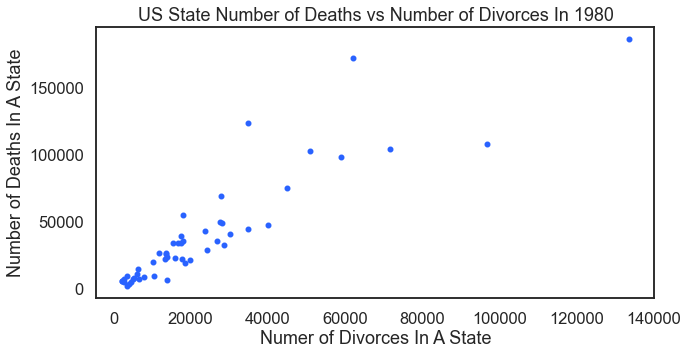
To continue with the health examples, this plot that looks at a state’s number of deaths and that state’s number of divorces. Misleading visual alert: Of course this visual shows a relationship — because as population increases in any state — so too will the number of deaths and divorces. Look below for a hacked up solution that produces a proper analysis.
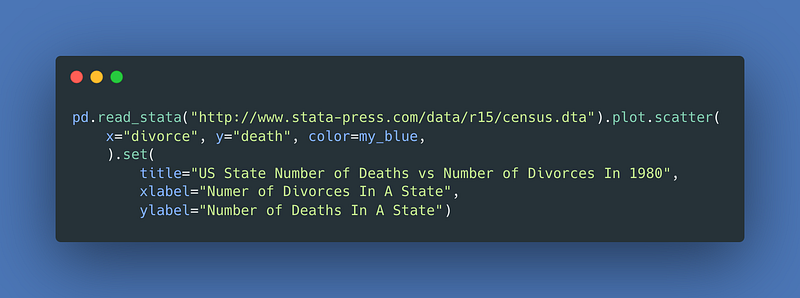
Image Credit: Code From Author. Generated Via carbon.now.sh.

For the result:

Image Credit: Author’s Illustration From This Article’s Code.

For a proper analysis, we need death and divorce rates. We need to normalize the data by dividing by the state’s population. The following code example (not pretty — not good code) does the job in one line. This visual is probably this article’s best example of how not to code. In actual practice the coding techniques here have serious limitations. Its one (and really only) benefit is that it produces the visual in one line of code.
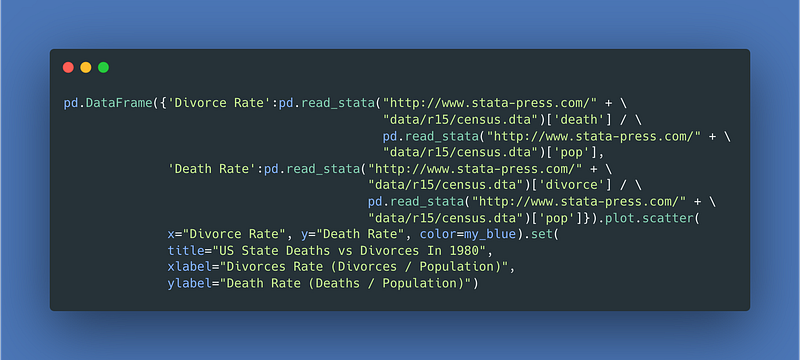
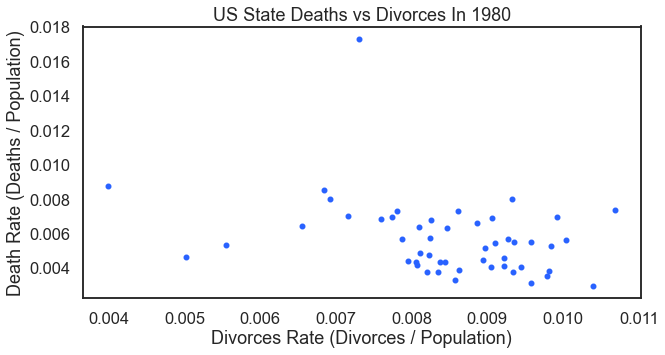
Image Credit: Code From Author. Generated Via carbon.now.sh.
Image Credit: Author’s Illustration From This Article’s Code.

44 Marriage Data

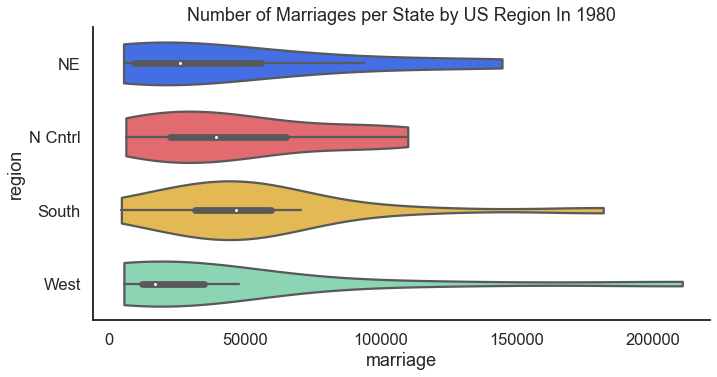
Moving a way from health data in the previous section, but making a connection to the divorce data that we compared with death rates, how about we look at marriages. Also returning to the census data introduced above in the sections on politics we look at the number of marriages U.S. States but by region.
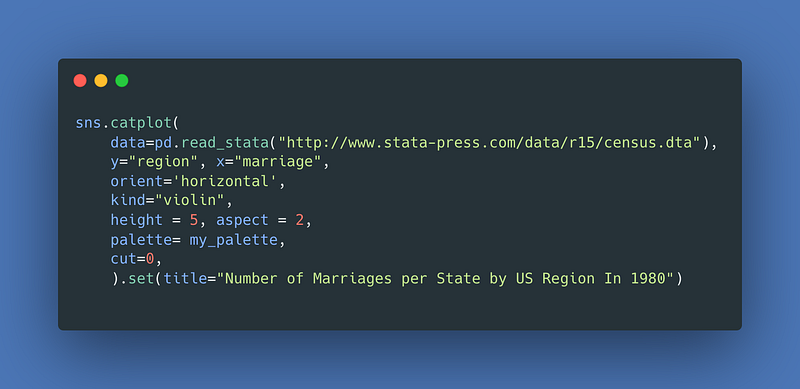
Image Credit: Code From Author. Generated Via carbon.now.sh.

For the result:

Image Credit: Author’s Illustration From This Article’s Code.

45–47 Employment Data

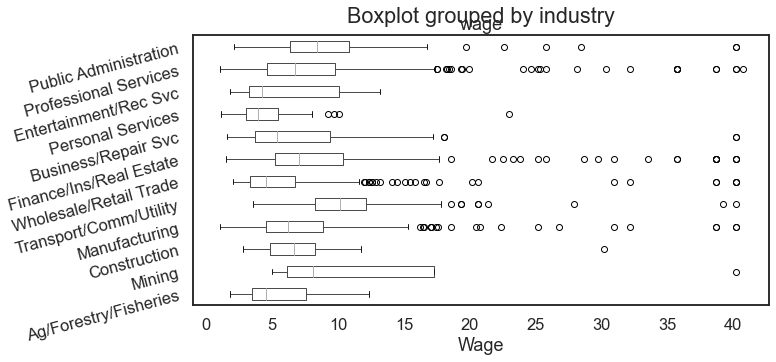
The popular National Longitudinal Survey of Women 1988 data provides a good source of data for a boxplot chart that helps examine how wages differ across industries.
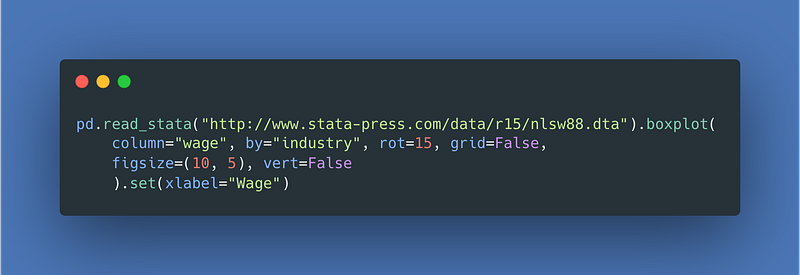
Image Credit: Code From Author. Generated Via carbon.now.sh.

For the result:

Image Credit: Author’s Illustration From This Article’s Code.

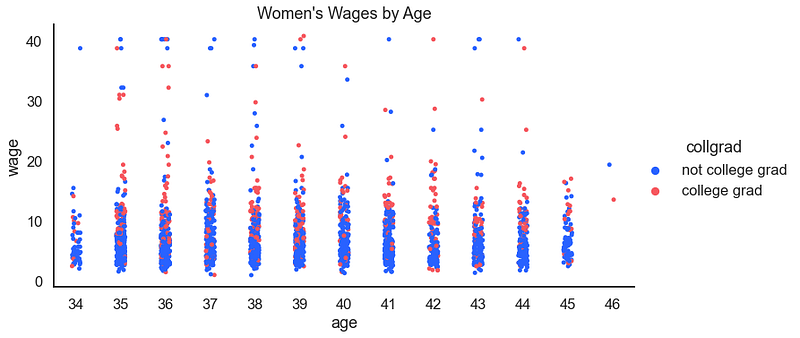
Continuing with the employment data comes this article’s first look at a strip plot. Some find strip plots hard to understand. They’re not so tough. A strip plot is a scatter plot but where one of the two variables is categorical. I particularly find strip plots where the x variable is ordinal and the range of that ordinal is small (less than 15–20 points). For example:
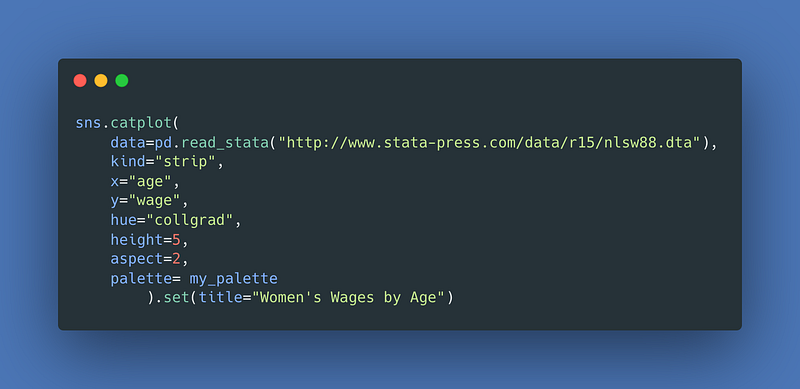
Image Credit: Code From Author. Generated Via carbon.now.sh.

For the result:

Image Credit: Author’s Illustration From This Article’s Code.

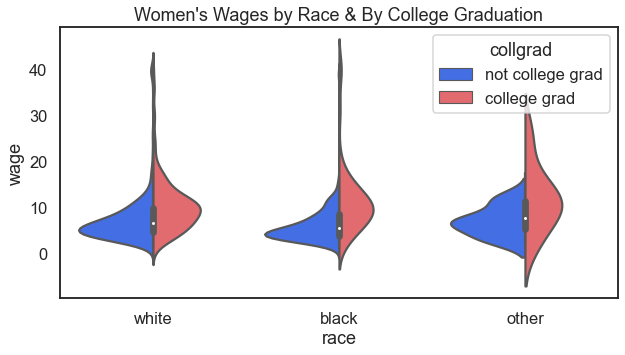
How about the distribution of wages, by race, and also by college graduation status?
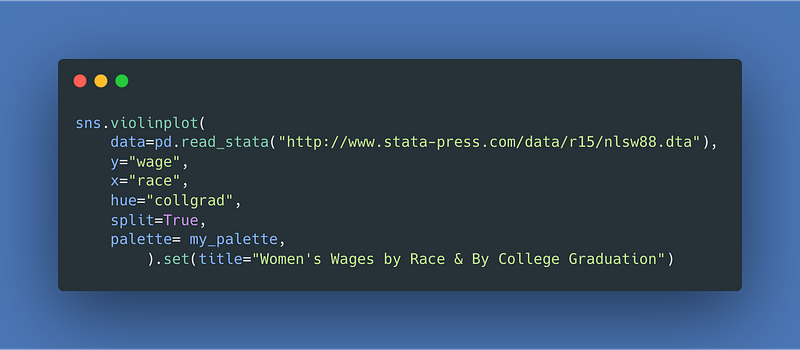
Image Credit: Code From Author. Generated Via carbon.now.sh.

For the result:

Image Credit: Author’s Illustration From This Article’s Code.

48 Finance Data

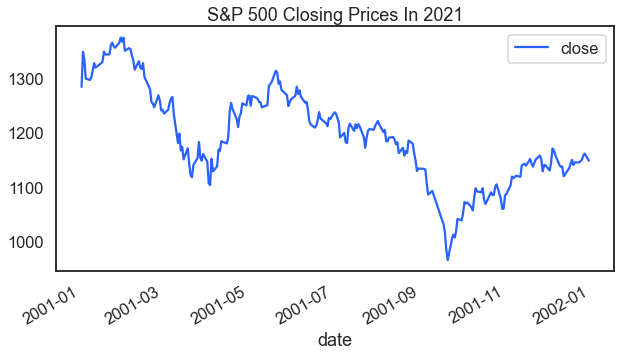
A library of data visualizations that didn’t include a reference to finance, economic, of stock data would be sad. Here is a look at S&P 500 index closing prices over time.
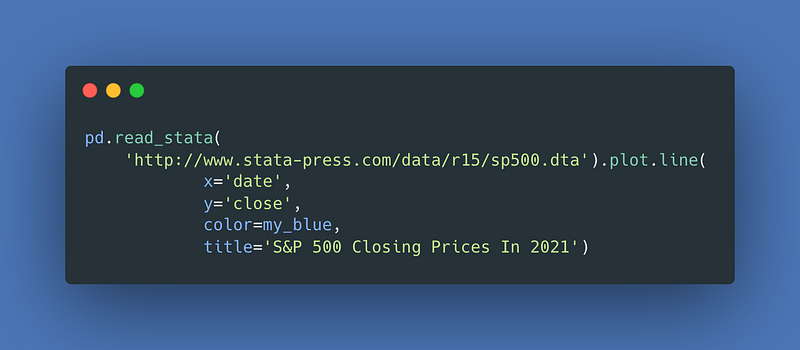
Image Credit: Code From Author. Generated Via carbon.now.sh.

For the result:

Image Credit: Author’s Illustration From This Article’s Code.

Limitations

This article has a few limitations and caveats.

Style

The code examples in this article break many coding style conventions. Do not use this article as a model for style.

Line Continuation

For a few examples this article uses line continuation. In Python the backslash \accomplishes line continuation. Line wrap (or line continuation), for purposes of this article, does not count as a second line of code.

String Concatenation

In order to make the code look good here on the Medium platform and to avoid odd line-wrapping the article also uses string concatenation in a few places.

Indexing Lists Tables Lists

As you can read in the documentation for pd.read_html()this code returns a list of Pandas data frames. The list index in square brackets following pd.read_html()[i], here where i represents an index on the list is what finds the data frame of interest.

This article also uses requests.get().json() or requests.get().json()[data] to grab and identify json data from online. In a few examples above, the square bracket notation isolates the data of interest.

Thanks For Reading

Are you ready to learn more about careers in data science? I perform one-on-one career coaching and have a weekly email list that helps data professional job candidates. Contact me to learn more.

Send me your thoughts and ideas. You can write just to say hey. And if you really need to tell me how I got it wrong I look forward to chatting soon. Twitter: @adamrossnelson LinkedIn: Adam Ross Nelson.

Data Science
Data Visualisation
Data Visualization
Python
Seaborn
Recommended from ReadMedium