
Rich CSS : A CLEAN CSS FRAMEWORK
Rich CSS — Rich Object Oriented CSS.
Updated: As of March 27, 2016 there is now an official website for RichCSS. I recommend to go directly to the website to learn more about the framework. Visit the website at RichCSS.com
RichCSS is a CSS framework providing default structures for reusable css element. It’s built around an Architectural Style that organizes your code in a way that allows: reusability of your css, versioning, the use of plugins and the ease of using it. RichCSS is bringing convention and organization to CSS that anyone can understand and use. RichCSS uses SASS to extend its capabilities but it can work independently from it.
Note: This article is out of date. If yo want an up to date version of the Rich CSS Documentation; you can visit the google doc page of the documentation:
https://docs.google.com/document/d/1vT3Zpnll7OJV-TLhKijk5KVQdVTiFnUAiuAgoFPVHCM/edit?usp=sharing
Why Now?
Everything is evolving on the web in terms of: speed , organization, community contribution except CSS. Even though framework like SASS or LESS are enhancing it, the biggest pain with CSS remains figuring out how you're going to organize your CSS code so that it makes sense for yourself and others to take over and reuse your classes. Although most front-end developer write their CSS with the intention to reuse classes, the codebase becomes rapidly big and confusing and it’s easy to forget that some classes were already put in place so that you can reuse them. Event worse; it’s harder for someone else to take over your code and figure out what classes they could reuse. In short most CSS only make sense to the person who wrote it; everybody else is merely trying to resolve the puzzle and fix things bit per bit.
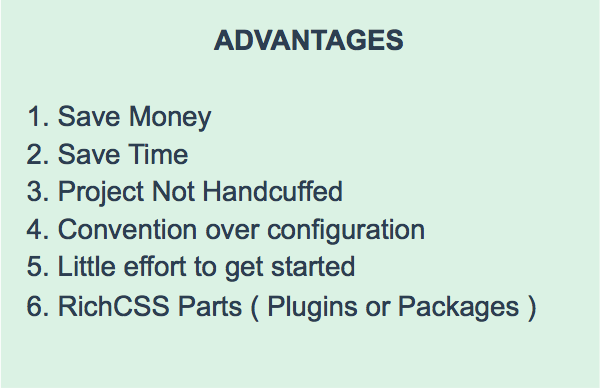
Having Convention means:
- Rapidly take over someone’s else CSS code
- Easily figure out all the classes available in a mater of minutes and reuse them
- Not having to explain how you organized your CSS to someone else
- Faster team implementation : because everyone follows the same organization
- Save more time
Why You’ll love RichCSS
RichCSS is for CSS what Rails is for Ruby: It’s a framework that allows you to build website faster. In this context: Implementing design into code faster in a sustainable way that will allow anyone else to take over your CSS code easily, and reuse your CSS .class more intuitively with no confusion.
What’s a Rich Object Oriented CSS?
Nicole Sullivan from Yahoo invented the concept of Object Oriented CSS.
The Object Oriented CSS framework is based on 2 main principles: Separation of structure from skin and separation of containers and content.
RichCSS differs from OOCSS in many aspects. The separation is extended to the way folders and files are organized and it’s not limited to the grid system. The definition of the “Object” in RichCSS is also very different.
As Nicole explains on her the wiki; In Object Oriented CSS a CSS object consists of four things:
- HTML, which can be one or more nodes of the DOM,
- CSS declarations about the style of those nodes all of which begin with the class name of the wrapper node
- Components like background images and sprites required for display, and
- JavaScript behaviours, listeners, or methods associated with the object.
“This can be confusing because each CSS class is not necessarily an object in its own right, but can be a property of a wrapper class.”
There is no confusion In RichCSS because in this framework Everything is an object.
The Philosophy
RichCSS was inspired by Ruby on Rails so the philosophy it follows comes from Rails:
- Everything is an object
- Convention over configuration
- Stay DRY ( Don’t Repeat Yourself )
How it works
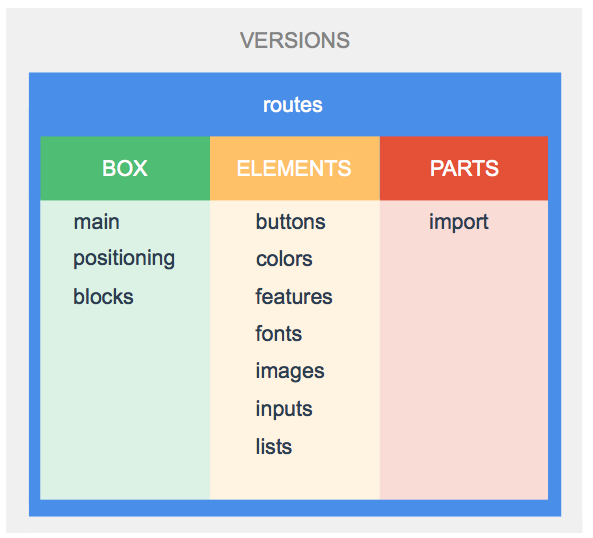
RichCSS gives you a set of convention on how to organize your folders and css files. The folders are Versions (optional), Box, Elements and Parts.
Box
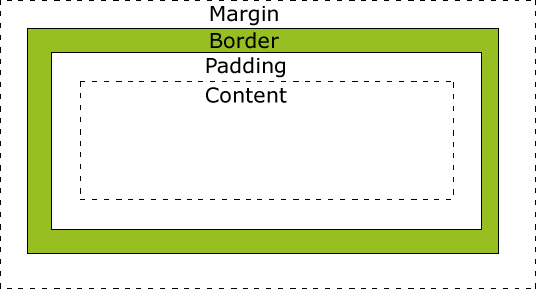
In CSS, every content is a box.
Main & Blocks
The Main file contains all the core setup of your webpage. That could include CSS Reset or other basic configuration that will never need to be changed for your website. It should only contains: Any CSS Reset, body{}, header{}, row{} and footer{} configuration.
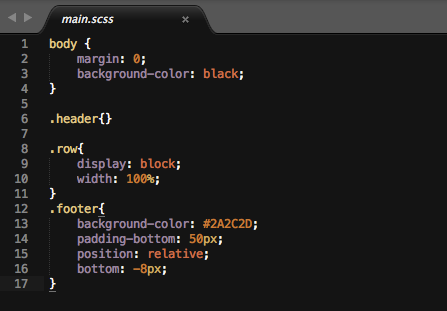
RichCSS divides your page in 2 simple categories: Rows and Blocks. The Header & Footer are rows and every single content on your page is on a row. Since blocks are containers, they allow you to to define how elements appears next to each other on these rows.
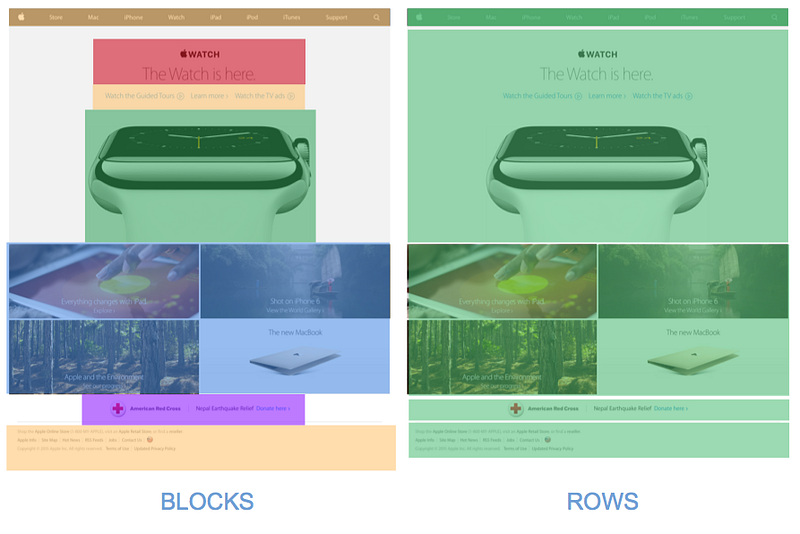
Rows are blocks containers and Blocks are element containers. In order to make the different part of the site reusable we group them in categories.
Positioning
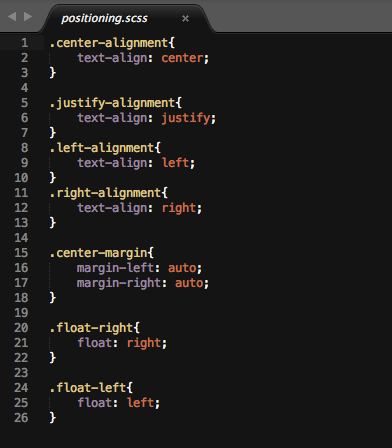
The Positioning file contains any common position that would allow you to easily add a class to an element or block and position it on the page (left, right, center).
Elements
All the styling for your element goes into the elements folder. Each element is stylize in a specific category that are called guides.
There are 7 Guides in RichCSS:
- The Buttons Guide
- The Colors Guide
- The Fonts Guide
- The Image Guide
- The Inputs Guide
- The Lists Guide
- The Feature Guide
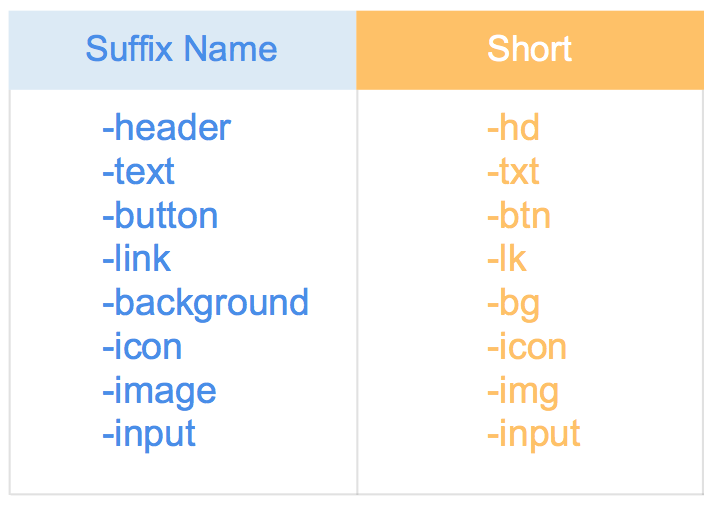
Some guides have -Suffix groups: They are a naming convention on how css style in these guides should be named. Some guides have more than one suffix group.
Buttons
Buttons Guide contain CSS for elements that can be actual
Colors
Suffix Group: -header, -text, -button, -link, -background
Fonts
Suffix Group: -header, -subheader, -text, -label
Images
Suffix Groups: -icon and -image
Inputs
Suffix Group: -input
Lists
ul, ol and li elements
Features
A feature is a group of element on your page that only appear in group and have elements that depend from each others.
In the example bellow. The Feature has 3 input box and a button that only appears in the feature across the website..

Parts
Part are plugins or packages that you’ve imported from another sources. If you like the Apple.com website for instance and Apple were to share their CSS Part you could easily implement it in RichCSS by downloading their CSS Parts and moving it into your Parts folder.
The import file is a core file of the framework that usually contains css code used to enhance the style of a javascript plugins. If you’re using a slider from another site for instance and you would like to edit the css of that slider, you would put it in the import file.
Any css you’re bringing from elsewhere goes into the Parts folder.
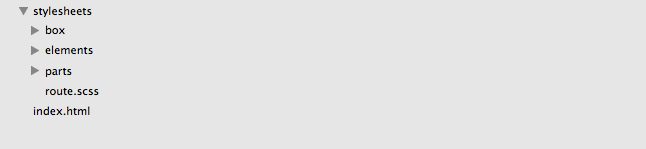
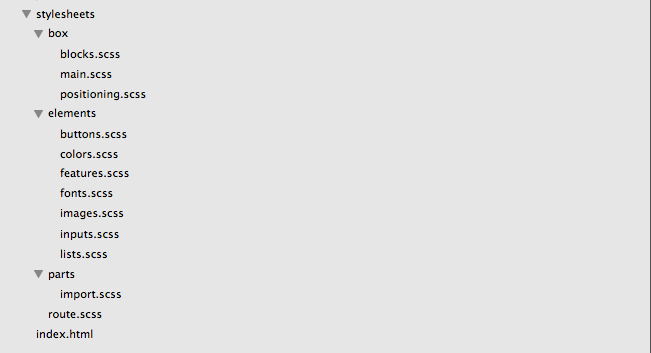
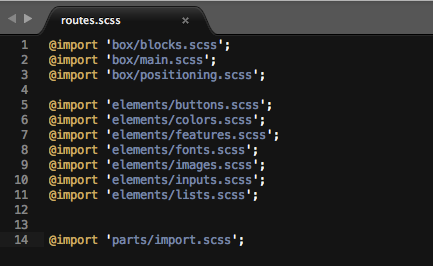
The routes file load configuration files, guides and parts. This is the only file you have to load from your html:

Inside the routes.scss file:
Versioning
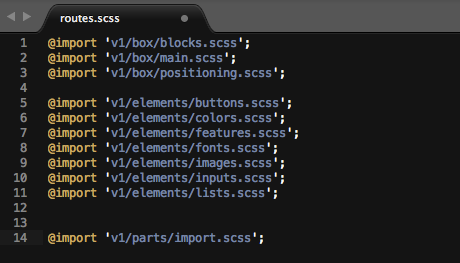
Versioning is setup in term of a folder hierarchy. That makes your CSS really simple to follow and update via the route.scss file:
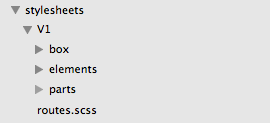
You can specify what version you would like to load. This is a great way to keep your version organized (event if you’re using Git) and easily switch between them.
Responsive Websites and Media Queries
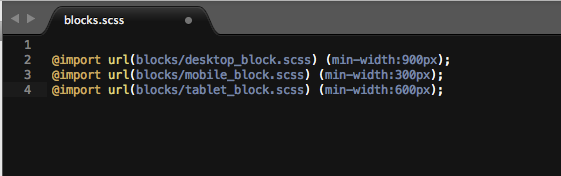
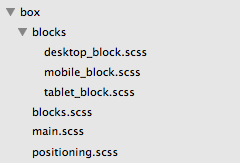
Building Responsive Website with RichCSS is also much more organized. You can put all your rules inblocks.scss then create an additional block folder where you add your additional rules for tablet and mobile in the respective files tablet_block.scss and mobile_block.scss, then import those files in yourblocks.scss.
Flexible & Open
The power of the block is that it allows you to easily copy some html somewhere in your code and paste it somewhere else without having that html code look and feel affected by other html elements in the target page.
RichCSS block system doesn’t follow the grid system but it doesn’t limit you to not using another framework or grid. You can easily use bootstrap or a grid system with it. All you have to do is put those files in your import folder but this is not recommended. I would only recommend user of the framework to use Part that were built following the RichCSS conventions. This way it will be easy to maintain and follow for anyone. With the help of the web community I am sure that we will rapidly have a RichCSS version of Twitter Boostrap and so on.. that you will be able to easily implement into your website. Event better, every website could one day share their CSS code into Parts that you could re-use in your own code.
CSS PARTS — The gems of CSS
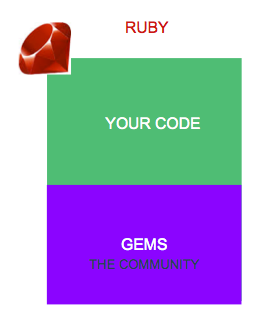
The most amazing thing about most web development framework today is the community around them. The ruby on rails community in particular has a very vibrant and contributing community. Following the mantra Stay DRY( Don’t Repeat Yourself), most rails developers used Gems (plugins) in their app so that they don’t have to redo something that someone else already built for them. This is one of the reason why it’s so fast to build application with Rails. You can use the thing that is already available for you so that you can focus on the big picture. In the front-end community there are a lot of resources out there for content such as icons, and for javascript. Most of the resources available for the community in CSS are frameworks like SASS, LESS, Twitter Boostrap, Compass, etc..
A lot of developer uses site like themeforest because they want to same time.
“Bad artists copy. Good artists steal. ”” — Pablo Picasso
When I write CSS from scratch I always look for inspiration elsewhere. So that I can improve my own work. The best artists steal and improve upon it. RichCSS encourages you to reuse Parts made by other Front-end developers and allows you to create your own CSS Parts that you can share with a community. You can create CSS Parts for buttons, colors, features, fonts, images, inputs, lists or share your favourite box setups as a CSS parts that other developer can reuse.
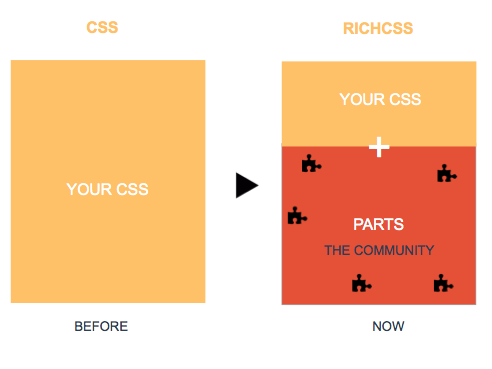
The reasons I encourage people to share their CSS code in CSS Parts that follows the RichCSS conventions is because it’s a framework that any front-end developer will understand. They’ll know how to implement your parts and how to use them.
Download a theme from a theme marketplace and try to update the CSS; good luck figuring that out. It always take some times because you have to get in the mind of the developer and figure out how he did things. The difference between a community of CSS parts and a theme marketplace is that: The content on the CSS parts community will always follow the same convention.
RichCSS Command Line Interface and RichCSS Parts — created by Waterloo University Students
For their fourth-year graduation project, computer science students at Waterloo decide to create a package manager for RichCSS and a website to manage and browse the different RichCSS parts. They built a website for Rich CSS Parts and Rich CSS CLI (Command Line Interface) for the package manager using ruby. The CLI allows users to create RichCSS projects, package RichCSS parts and allow users to upload them onto the RichcSS open server for others to download.
Start using it
I’ve created an uploaded 2 sample projects using RichCSS on Github that you can use for your next or current project.
Sample App 1 — RichCSS without Sass
Github: https://github.com/RichCSS/sample-app-1
Sample App 2 — RichCSS with Sass
You’ll need SASS : http://sass-lang.com/install
Github: https://github.com/RichCSS/sample-app-2
Contribute
I am still working on the official website for the framework where the documentation and the CSS Parts community will be available. In the meantime I would really appreciate your support. If you’ve used the framework I would like to know what you thought of it, how it is improving your workflow and what can be improved. The best way to contribute is by sharing project you’ve built using Rich CSS and sending me your PROS and CONS about the framework.
Ask Questions
Asking the right questions always help. I’m sure there is a lot of things I didn’t think about and that there is room for improvement this is why I need your help. I am trying to make this framework better for everyone but I can’t do this alone: Let’s do it together!
Share your links
I would love to see and share anything built with RichCSS.
- Share your website built using RichCSS
- Send pull request for the sample apps
- Share your CSS parts
If you’ve built a website using RichCSS tweet me a link at @Richardsondx
Send me feedback
I’d love to read your feedback. Email me at [email protected].
If you like this post it would mean a lot to me if you hit the “recommend” button below. Feel free to send me a tweet: @Richardsondx


