
40 Python Apps You Should Know Megapack EP1
I’m sharing 40 awesome Python, open source projects for you!
Attention! I need nine more people to become members to write next article! Join now: https://medium.com/membership/@tomaszs2
1. Fooocus — Offline AI Image Generator

AI generated elves, source: https://github.com/lllyasviel/Fooocus
After describing Rust projects in the last series, writing about AI is relief to the Web3 blabbing.
Foocus is an easy to use AI you can download to your computer and start. It will generate images based on your prompts. The installation procedure seems to be very easy.
If we’ll believe to the description it’s pretty fast too:
Below is a test on a relatively low-end laptop with 16GB System RAM and 6GB VRAM (Nvidia 3060 laptop). The speed on this machine is about 1.35 seconds per iteration. Pretty impressive — nowadays laptops with 3060 are usually at very acceptable price.
It’s written in Python!
2. ComfyUI — Blender like AI Configurator
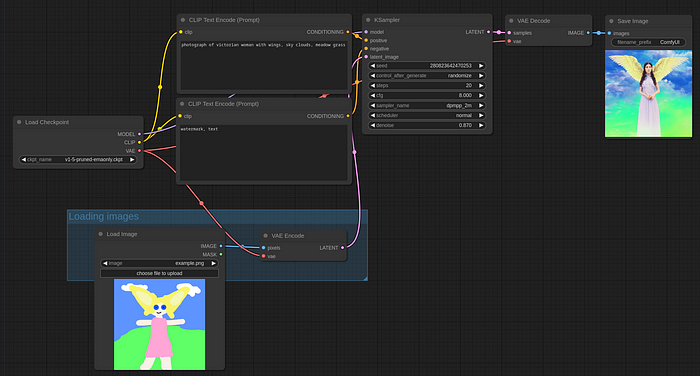
Image to image generator, source: https://comfyanonymous.github.io/ComfyUI_examples/img2img/
Comfy is what I need. ComfyUI is a UI to configure AI workflows with a Blender like style where you add modules and connect their inputs and outputs to achieve your result.
It’s a good moment to subscribe!
There is already several examples to start with the process. The project also contains of course the backend, so the promise is to have a set up AI tool.
It can be installed on Windows, Linux and MacOS. Interestingly enought it will run Stable Diffusion also on CPU with a special flag and does some nice tricks to save time when playing with it:
Only parts of the graph that change from each execution to the next will be executed, if you submit the same graph twice only the first will be executed. If you change the last part of the graph only the part you changed and the part that depends on it will be executed.
Another great example of Python project !
3. Frigade — Local AI Object Detector Integrated With Home Assistant
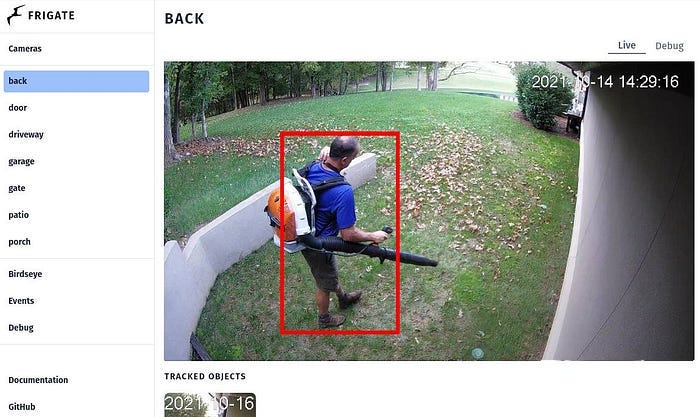
A camera detecting a person, source: https://github.com/blakeblackshear/frigate
So when you set up your home automation there’s a lot of options. You can for example install cameras, connect them to your server via WiFi, and do some magic.
Frigade is like a missing puzzle between your server receiving video footage and Home Assistant software. It will detect stuff on your cameras, so you can get alarms etc.
Merry Christmas, and subscribe!
It can also work with Google Coral AI. Under the name you can buy hardware accelerators that boost object classification on images. There’s even a USB dongle for 60 dollars. Nice actually.
It has a realistic approach, so it may fit into real life footage handling:
Designed to minimize resource use and maximize performance by only looking for objects when and where it is necessary
Another win for Python!
4. LaTeX-OCR — Scan Formulas To LaTeX
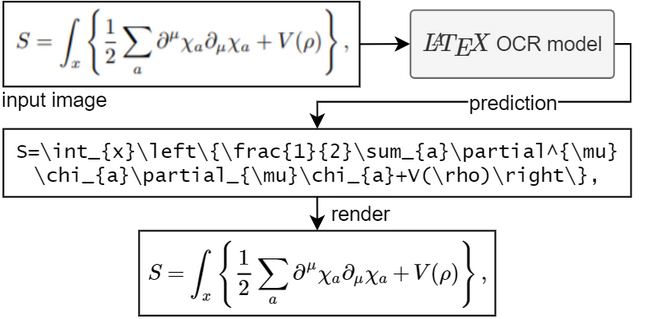
Math formula converted to LaTeX, source: https://github.com/lukas-blecher/LaTeX-OCR
I don’t know how many people know what LaTeX is. It’s mostly used in the academic world.
I’d say it’s like Word, but for research papers and publications. It generates stunning PDFs with math formulas, citations etc. It just feels different.
So imagine you wrote a formula on a piece of paper. Now, you’d like to have it in your publication. You could make a photo with your smartphone and paste it into your work like a XVI century peasant.
Do you like the article? Clap!
Or, you could rewrite it manually with the LaTeX syntax. You can see an example of the syntax above to recognize comfy is the last word that comes to the mind.
So what LaTeX OCR does is it converts a photo of a math formula into LaTeX formula for you. It’s kind of fun way of using all the AI advancement.
It’s written in Python!
5. Gradio — Demo Your AI Models
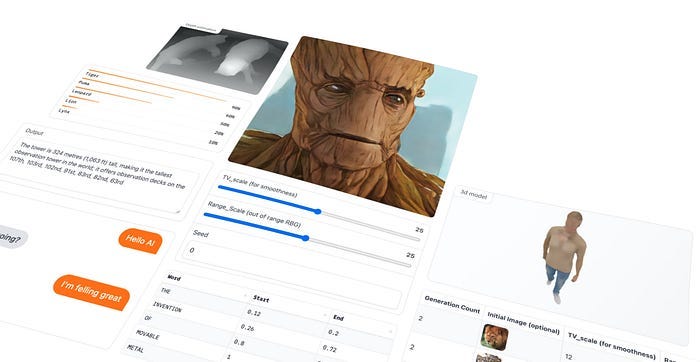
Example of AI UI, source: https://gradio.app/
With a Gradio 4.0 release made lately, we can look at the AI demo tool written in Python. It lets you write easily UI for your models to showcase them to people.
Follow me on social media!
You can host them, add to your notebooks or upload:
Once you’ve created an interface, you can permanently host it on Hugging Face.
Hugging Face Spaces will host the interface on its servers and provide you with a link you can share.
Gradio really takes the heat of UI dev if you’re not a frontend developer.
6. Whisper-standalone-win — Transcribe Videos With One Command
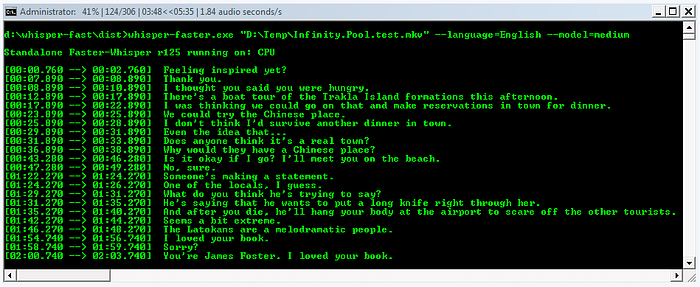
Transcription process, source: https://github.com/Purfview/whisper-standalone-win
The great thing about Python in AI is that nothing can stop it. Over the last year, literally over several months we move with lightspeed from research papers to end user apps.
The mentioned repository contains a Python based app that will transcribe your video. You don’t need to train AI, configure it etc. Just click and run. I see a lot of potential in transcription done fast, and it’s based on faster-whisper thats 4 times faster than original whisper and, as I assume, can run on CPU as well.
Follow me on Medium!
It supports also various systems:
Faster-Whisper executables are compatible with Windows 7 x64, Linux v5.4, macOS v10.15 and above.
The usage is quite simple:
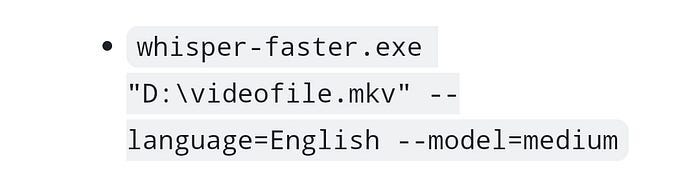
A command to run transcription, source: https://github.com/Purfview/whisper-standalone-win
7. Zulip — An Open Source Teams Chat
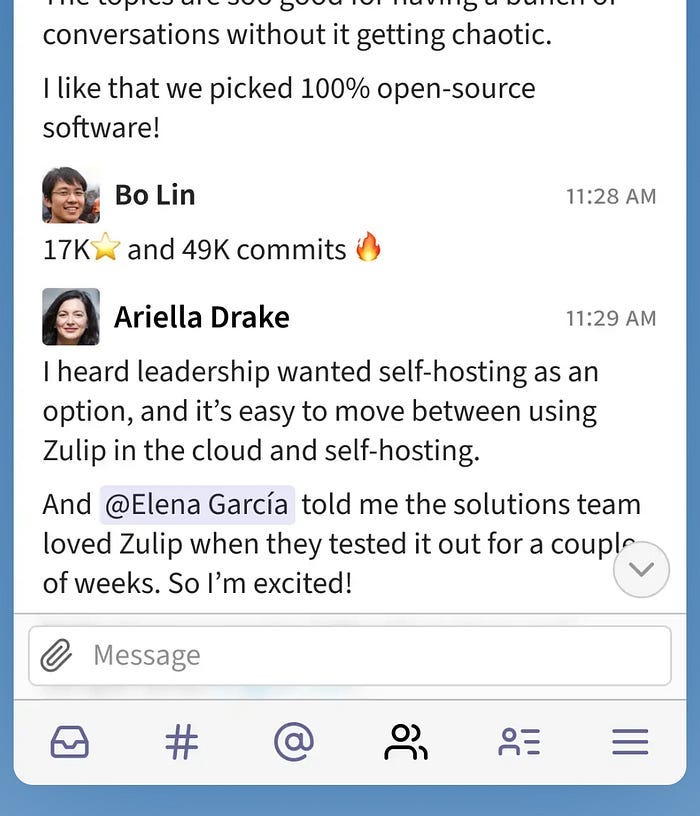
People talking in Zulip, source: https://zulip.com/
Zulip is obviously written in Python, and it’s like Microsoft Teams but open source and decluttered.
It helps track conversations between team members on different topics what is important when working with a lot of people.
Here’s how it’s described: Zulip helps teams of all sizes be more productive together, from a few friends hacking on a new idea, to globally distributed organizations with hundreds of people tackling the world’s hardest problems.
Nice, I really like open source team chats. They have more to offer than corporate ones. Especially Microsoft suite is so confusing and limited.
Send me a donation :)
8. SuperDuperDB — An AI For Your Database
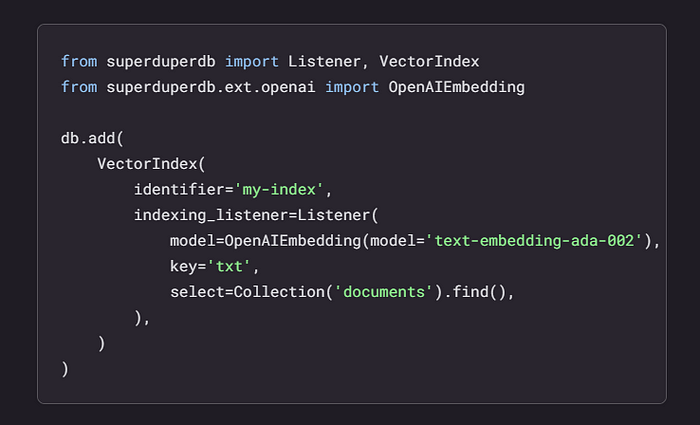
Code doing AI stuff with your database, source: https://superduperdb.com/
So imagine that your database is an apple, and AI is the pen. You have an applepen :) I can’t walk by the name of this project. Imagine these serious manager meetings where someone asks for a way to extend the company serious database with serious AI. And a senior developer tells: I have an idea, fiddling with his pen. What is it? Tell us! — SuperDuperDB :)
Share the article with your team!
The name is fully deserved however, because SuperDuperDB integrates with your database, it can be MySQL or any other sibling. It understands the schema of your database, including columns. It means you can make AI queries to your database directly. You can also store intelligent data in your database next to your “dumb” data.
9. Threestudio — Generate 3D Models From Images
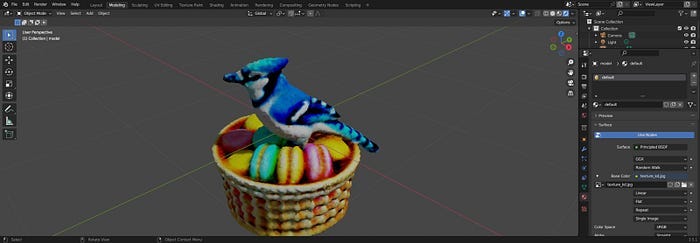
A bird in a nest, source: https://github.com/threestudio-project/threestudio
Threestudio is a unified framework to build all sorts of 3D models from prompts, single images etc. It offers various methods of achieving the results. What made me cry is that it requires NVIDIA with 6GB of VRAM and CUDA. I don’t know how I can add this card to my laptop.
Go check their website, there are a lot of examples. For example, almost real Elon Musk :)
10. SuperVision — OpenSource Computer Vision
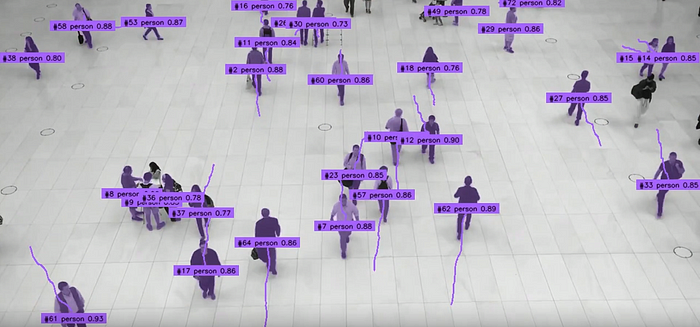
People identified on a video frame, source: https://github.com/roboflow/supervision
That’s pretty nice. You can install the project, and use it to track stuff on videos. For example, people or cars. Every “item” has a unique ID, so you can count them, and track their movement.
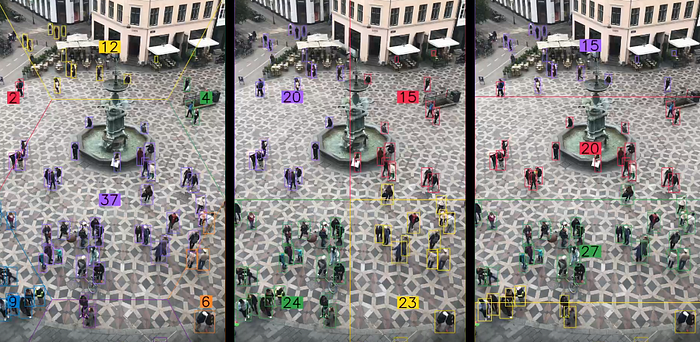
People in colorful rectangles, source: https://github.com/roboflow/supervision
On their page is way more, for example dog’s nose detection. Since the project is open source, it opens a lot of new creative avenues for tracking stuff. Again, it’s step closer to be possible to be used by no-AI people.
11 Bokeh
Bokeh is a user-friendly library that lets you create interactive visuals, including plots, dashboards, and data applications, without any hassle. It works seamlessly with modern web browsers and performs exceptionally well, even with large datasets or real-time streams.
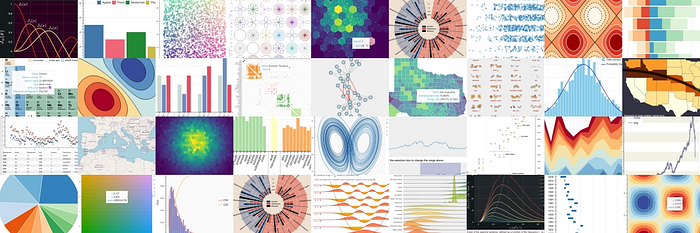
Bokeh makes it simple to create plots and allows users to interact with their data.
Subscribe!
For advanced or specialized cases, you can also add custom javascript to support them.
The best thing is its shareability. You can easily publish plots, dashboards, and apps on web pages or Jupyter Notebooks.
For me, Bokeh has been a lifesaver.
12 EasyOCR
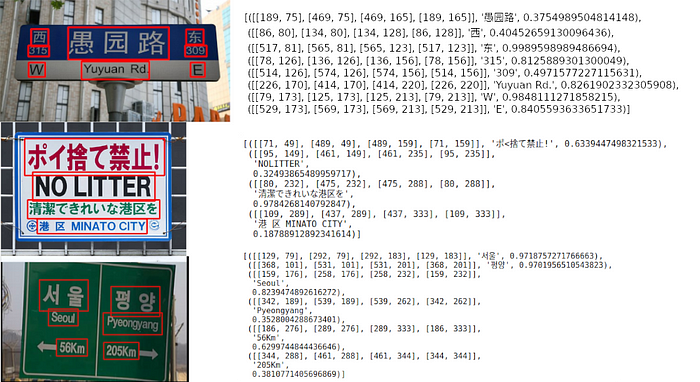
EasyOCR, developed by JaidedAI, is an open-source optical character recognition (OCR) library that has gained attention in the developer community.
OCR technology has paved the way for computers to extract text from images and documents, and EasyOCR aims to make this process more accessible and user-friendly.
Clap the article!
With support for over 80 languages and the power of deep learning, EasyOCR provides developers with a lightweight and efficient solution for integrating OCR capabilities into their projects.
EasyOCR’s user-friendly API and detailed documentation make it an attractive choice for developers.
Its lightweight nature not only optimizes memory usage but also speeds up processing time, providing efficient text recognition capabilities.
13 Paperless-ng
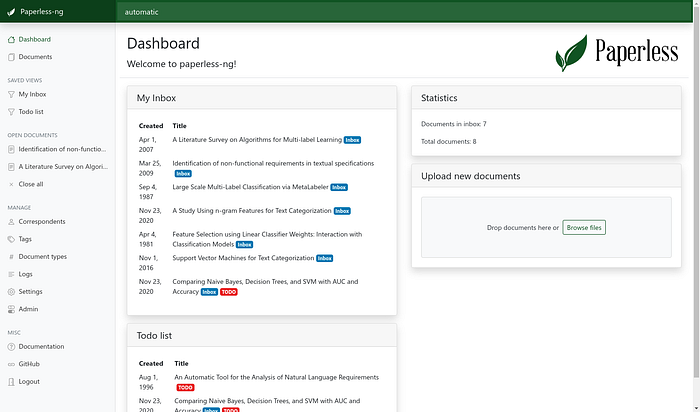
Do you struggle with paper document management? Paperless-ng, an open-source project is revolutionizing the way we handle documents.
By providing individuals and organizations with an efficient and sustainable approach to organizing, searching, and accessing their documents.
The key features are, it performs OCR on your documents, supports multiple file formats including pdf, images, text files, or office documents.
Don’t forget to subscribe!
Easy to use user interface, full detailed text search allows you to find what you need, document matching, email processing and much more.
In short, Paperless-ng is a powerful document management system that streamlines OCR, tagging, and organization while offering a user-friendly interface aligned with many advanced features.
14 Dash
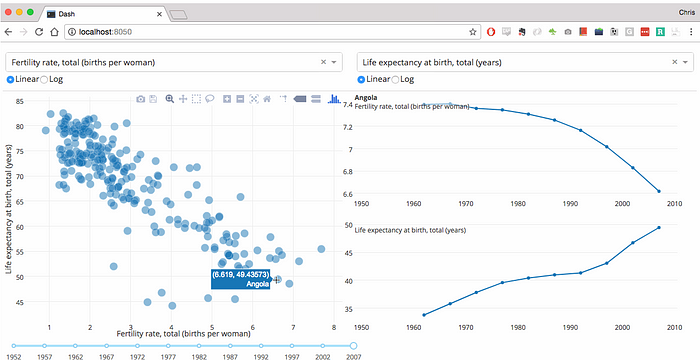
Building web apps for machine learning and data science is no longer a difficult task.
Dash is a powerful Python framework that allows users to create interactive web applications for data visualization and analysis. With its extensive set of components, Dash allows developers to effortlessly build and deploy data-driven applications with ease.
With Dash Open Source, you can only run the Dash apps locally on your machine. However, with Dash Enterprise, you can scale up your app for wider consumption and benefit from ML Ops features such as scalable hosting, deployment, and authentication without the need for IT or DevOps.
To conclude, Dash provides a powerful platform for transforming data into compelling visualizations and unlocking the full potential of your projects.
15 Mlc-llm
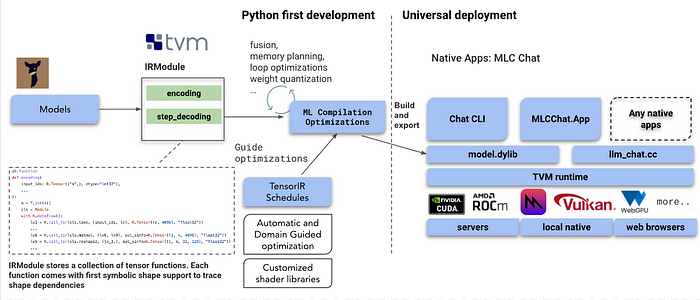
Lately, there has been a boom in language models like ChatGPT. But the problem with models like ChatGPT is that you need very powerful hardware to develop and run these models.
But with MLC LLM, anyone can develop, optimize and deploy AI models natively on their devices.
MLC LLM is a versatile solution that enables the deployment of language models on various hardware backends and native applications.
Additionally, it provides a user-friendly framework for optimizing model performance according to individual requirements.
16 Roop
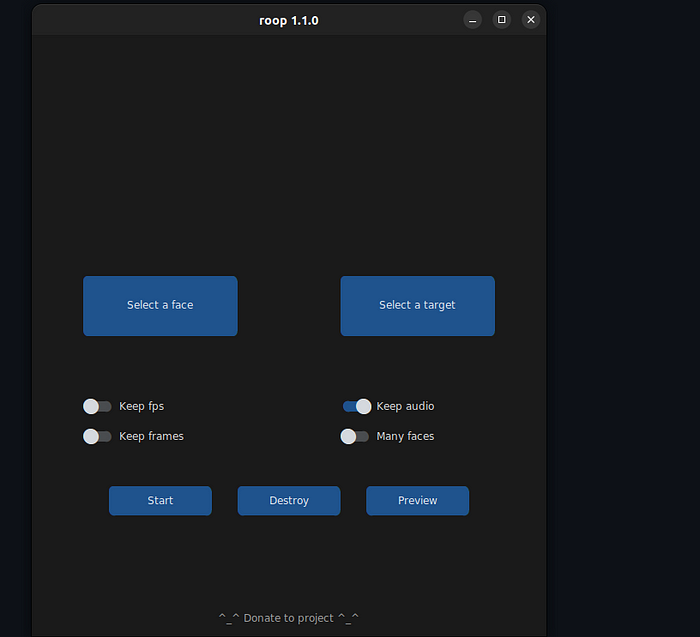
Roop is an amazing Python-based open-source tool that allows users to swap faces in videos using just one clear image of the desired face. It does not require any dataset or training. This project/tool serves as a valuable asset for artists and creators in the AI-generated media industry.
The developers of this tool acknowledge the ethical concerns and have included a built-in check to prevent the tool from being applied to inappropriate or sensitive content, such as nudity, graphic material, or incriminating material.
I found out that some interesting use cases for this application include creative content production, virtual try-on, film, and video production, etc.
17 Video Composer
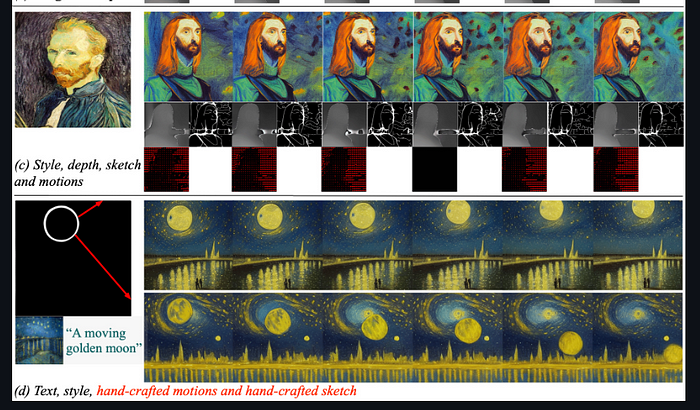
Video Composer is an advanced video synthesis model that offers its users flexible control over both spatial and temporal patterns within synthesized videos. This control can be exercised through various forms of input that include text description, reference videos, sketch sequences, or handcrafted motions and hand drawings. Users can easily manipulate the visual and temporal aspects of their videos and create highly customizable and visually captivating videos by putting Video Composer to use.
I like that the project’s experimental results demonstrate the effectiveness of the tool in controlling the spatial and temporal aspects of the synthesized videos. It demonstrates the ability to create videos that are true to specific conditions and maintain consistent temporal progression.
18 Super Gradients
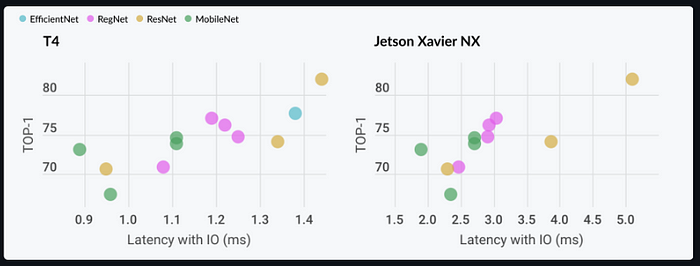
Super Gradients is a project developed by DeciAI. It is aimed at optimizing deep learning models and accelerating their inference time on various hardware platforms. It focuses on making use of neural network quantization techniques to reduce the memory footprint and computational requirements of deep learning models.
All Super Gradients models are pre-trained models focused on achieving the best-in-class accuracy. These models are production ready and can be easily integrated with deployment tools such as Intel’s OpenVINO and Nvidia’s TensorRt.
Super Gradients’ models can be employed in time-sensitive applications where low latency is critical to the system’s performance. It can also be used for optimizing deep learning models for mobile applications and for numerous other applications.
19 Stable Diffusion WebUI
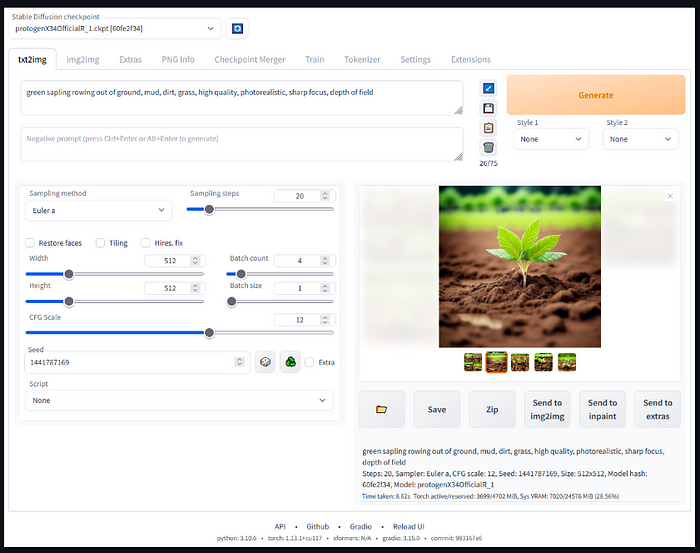
The stale Diffusion WebUI project provides a browser-based interface powered by the Gradio library for stable diffusion. Stable Diffusion is a powerful algorithm for image generation and manipulation. Its primary purpose is to generate detailed images based on text prompts.
This project aims to simplify the usage of stable diffusion by providing an accessible web interface for using stable diffusion.
By using this project, you can access the state-of-the-art stable diffusion models without the need of using intricate command-line setups or having programming knowledge. This project provides a highly user-friendly interface where one can simply upload images, specify desired parameters, and easily generate or manipulate images using the stable diffusion algorithm.
20 MMagic
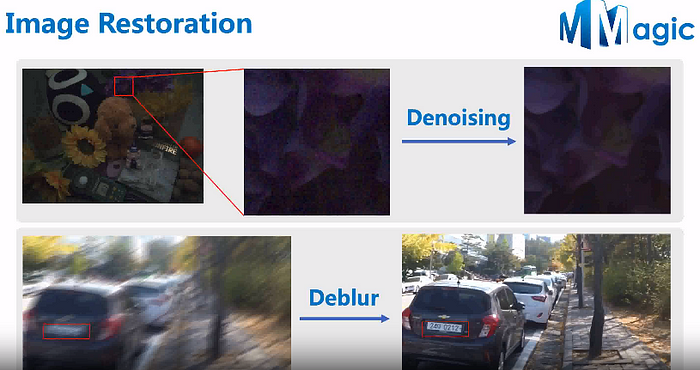
MMagic is a powerful and versatile toolkit that offers advanced capabilities for image and video editing, synthesis, and generation. It includes a wide range of state-of-the-art models and algorithms to enable its users to process, edit, and synthesize images and videos with exceptional quality.
MMagic’s key features include image generation, fine-tuning and output control, and video generation. It supports various image and video generation tasks.
21 Paperless-ngx
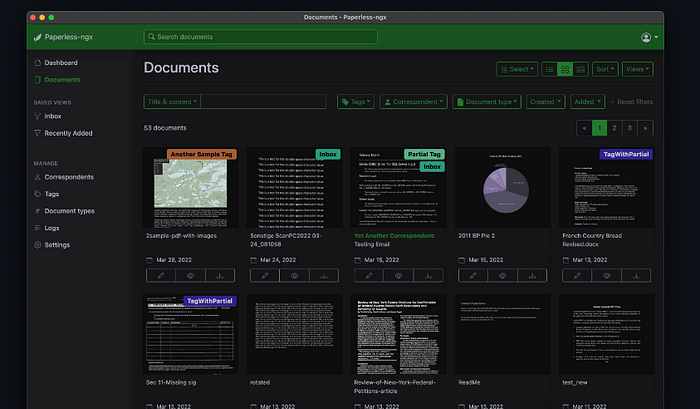
Society is becoming increasingly digitized by the second and the need for paperless solutions has never been more apparent. Paperless-ngx offers a comprehensive platform for organizations to transition from paper-based documentation to digital workflows.
Paperless-ngx creates a huge environmental impact by reducing paper consumption and helping companies reduce their ecological footprint. It also helps enhance the efficiency of organizations since the need for manual retrieval and physical storage is removed.
Key features of paperless-ngx include document management, workflow automation, electronic signatures, and integration with existing systems.
What reeled me in is that it offers use cases like digital document management, electronic signatures, workflow automation, and secure data storage.
22 System design premier
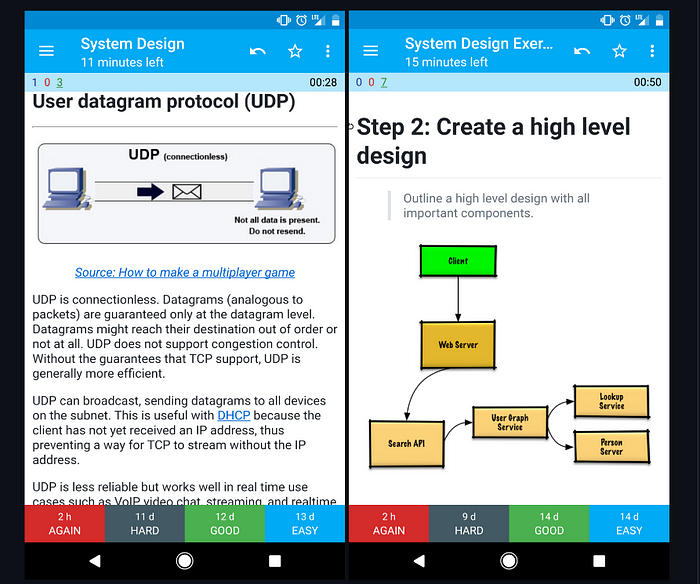
System Design Premier is a comprehensive resource that provides a structured approach to designing scalable and reliable systems. Businesses rely heavily on technology in today’s digital landscape. This makes it necessary to have a solid understanding of system design.
For me, effective system design is crucial for building scalable and reliable software systems. This process includes making informed decisions about various components and modules of your system to make it fault-tolerant and foolproof.
23 LMFlow
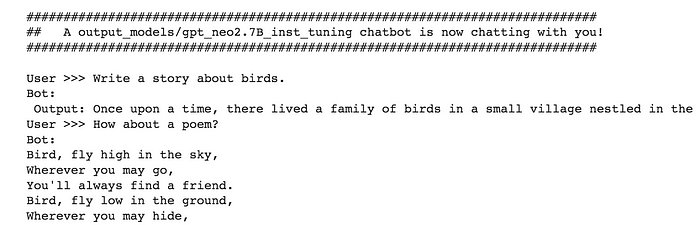
LMFlow is a powerful open-source platform designed to simplify and streamline the machine learning workflow. It provides a comprehensive set of tools and features that enable data scientists and machine learning engineers to manage, track, and collaborate on their experiments and models effectively.
LMFlow provides a high-level interface to define and execute complex ML workflows, allowing users to easily orchestrate data processing, model training, and evaluation tasks. It supports versioning and artifact management, enabling reproducibility and collaboration. LMFlow integrates with popular ML frameworks and provides seamless integration with cloud platforms. What fascinates me is that it also offers features like automatic parallelism, caching, and incremental computation to optimize workflow execution. With its comprehensive set of features, LMFlow simplifies and streamlines the end-to-end ML workflow process.
It facilitates the management of machine learning workflows, automates experimentation, and enables collaboration among data scientists. With features like version control, reproducibility, and scalability, LMFlow empowers efficient and effective machine learning development and deployment.
24 Ask Multiple PDFs
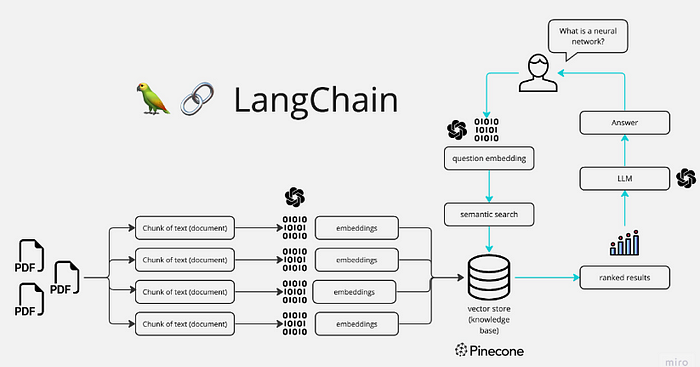
Ask Multiple PDFs is a powerful tool that simplifies the processing and extraction of data from PDF documents. Ask Multiple PDFs is like having a superpowered assistant that takes care of all your PDF processing needs. We all know that PDFs are widely used for document sharing, archiving, and data storage. However, manually processing and extracting information from multiple PDFs can be time-consuming, error-prone, and simply inefficient. Ask Multiple PDFs is a solution to all these problems.
What I like is that Ask Multiple PDFs offers functionalities like PDF parsing and extraction, bulk processing, metadata extraction, customizable workflows, and automated text recognition.
25 DeepSpeed
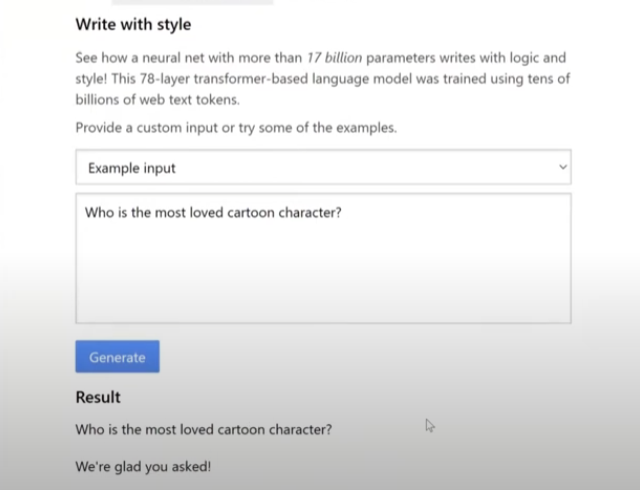
Deep Speed, developed by Microsoft, is an open-source library designed to accelerate deep learning training at scale. It addresses the challenges of training large-scale models efficiently, reducing memory consumption, and optimizing performance.
Deep Speed accelerates deep learning training at scale. But wait, there’s more! Deep Speed doesn’t stop at just giving you a speed boost — it’s like a whole package deal. It introduces model parallelism and tensor fusion, supercharging your GPU utilization and reducing memory consumption. Additionally, it supports large batch training and implements gradient compression techniques for efficient distributed training. These features make In my opinion, Deep Speed a powerful tool for enhancing deep learning performance and scalability.
It accelerates deep learning training, improves memory efficiency, and supports larger model sizes. DeepSpeed enhances distributed training, reduces training time, and enables efficient model optimization, making it a valuable tool for deep learning practitioners.
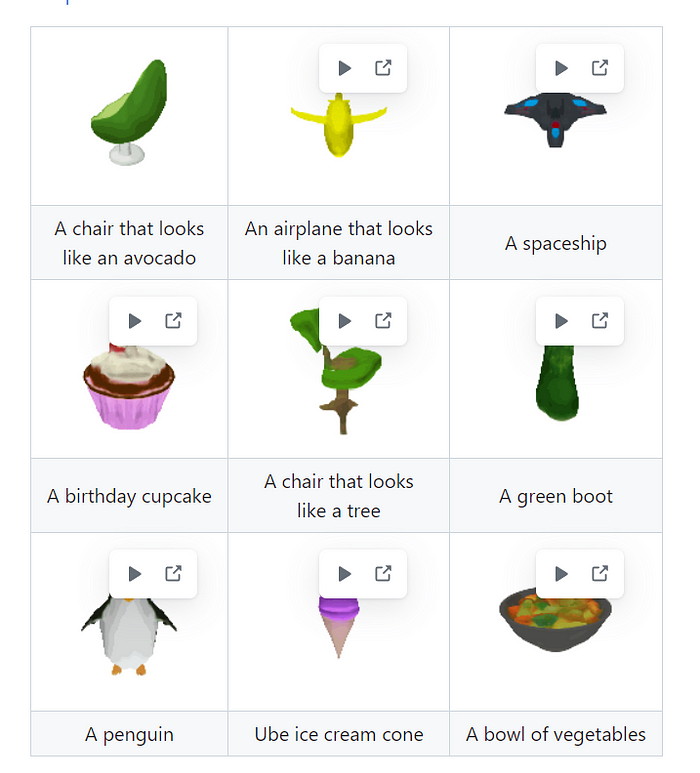
26. Shap-E — Generate 3D Models
A Python open source code and model from OpenAI to generate conditional 3D implicit functions:
27. PandasAI — Pandas + AI
The Python library extends Pandas with AI capabilities.

28. BackgroundRemover — Console Background Removing Tool
A nice, Python command line tool, to remove background

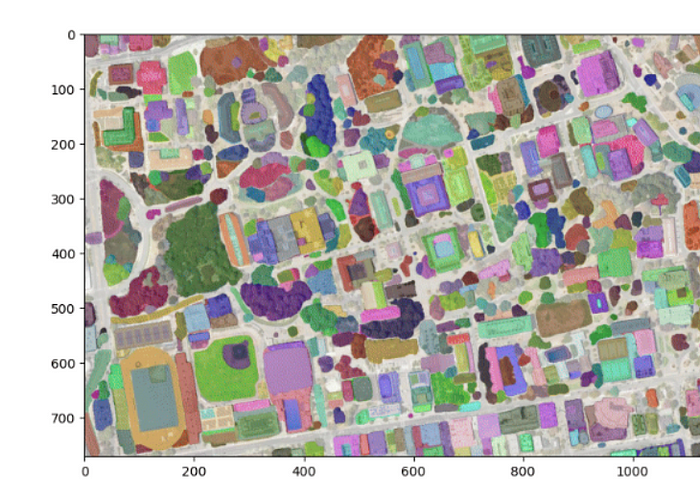
29. segment-geospatial — Mark Segments On A Map
It’s a Python tool to mark segments on a map making it very easy with provided intelligent features.
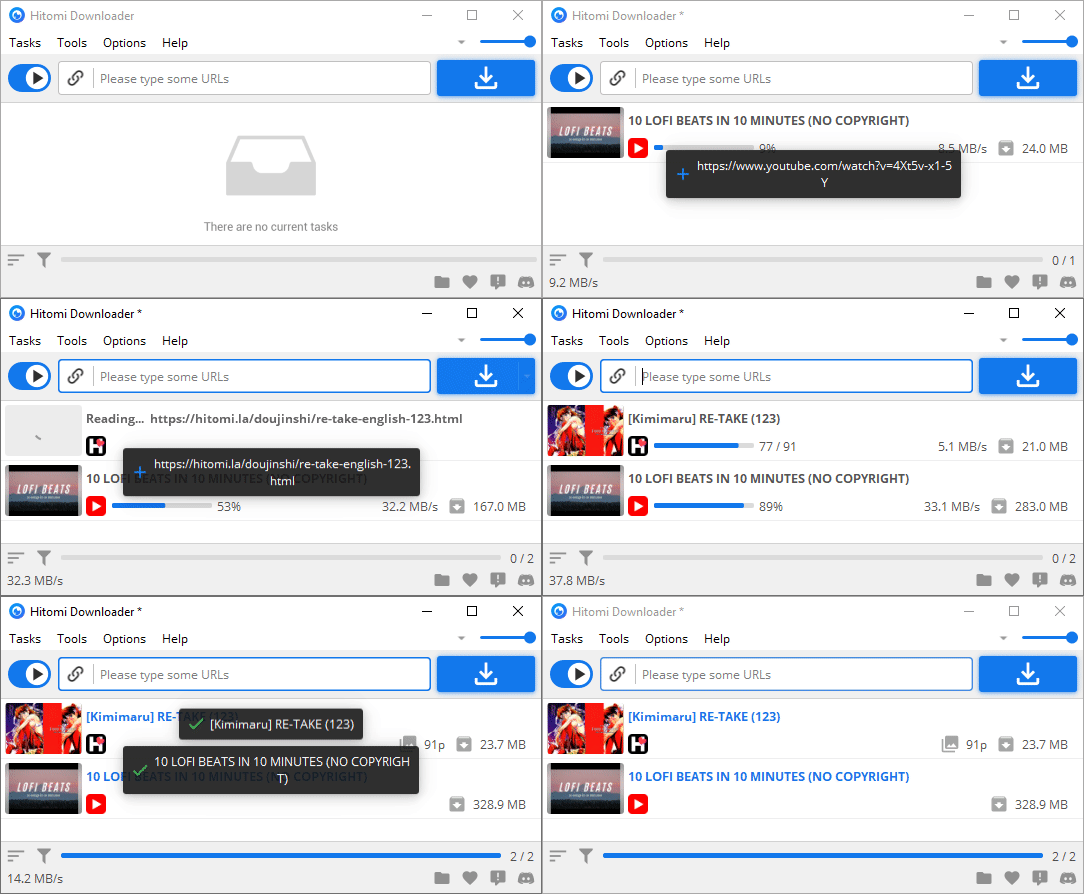
30. Hitomi Downloader — Download Any File
It’s a Python handy desktop tool to download files from various sources.
31 🤬 TheF*** — An Uno Card For The Console
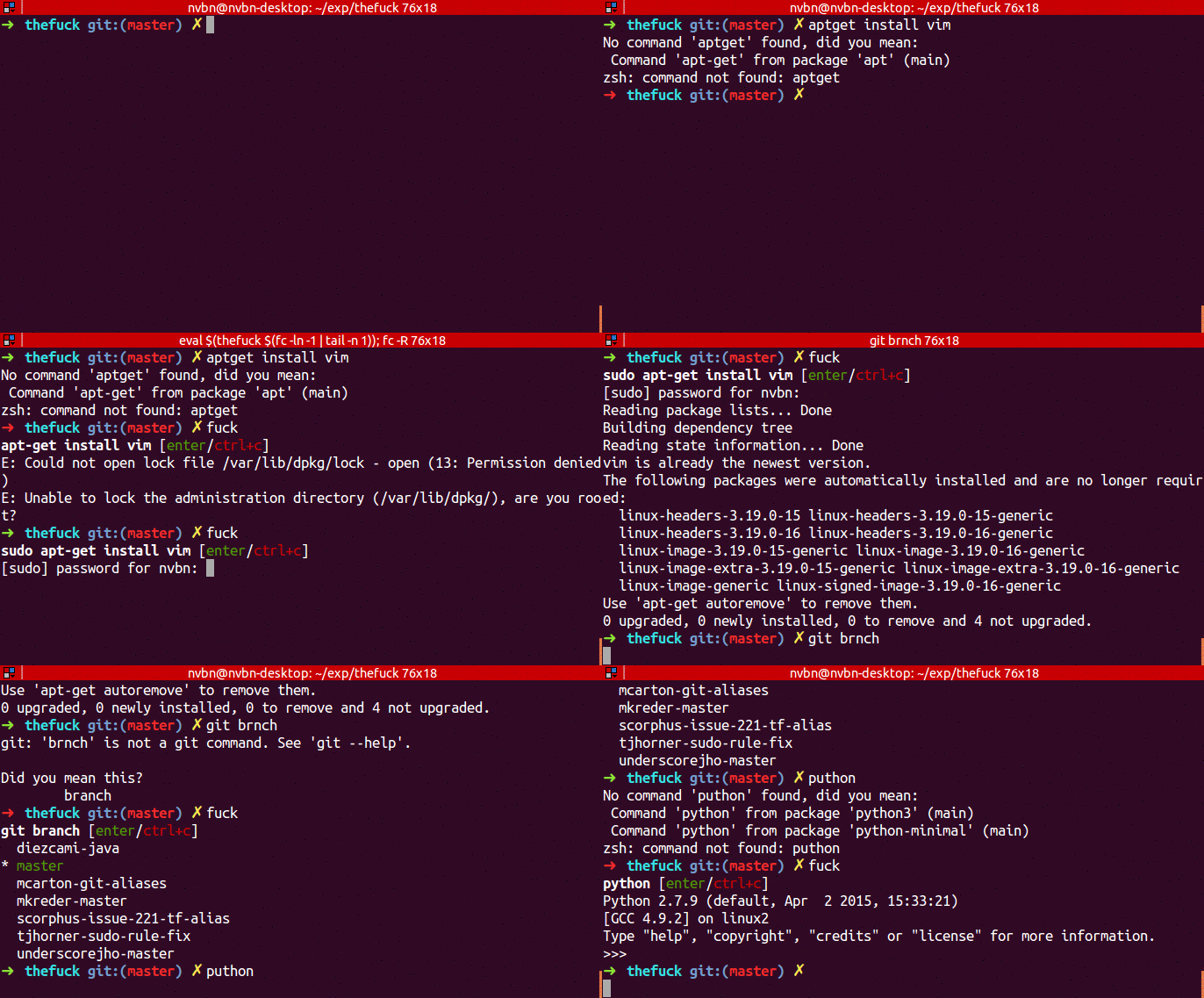
The first project is actually a console tool written in Python based on a tweet.
You surely can recall a situation when you entered a command and the terminal started to do some sketchy stuff you didn’t intend to do. Sometimes all it takes is a typo or just thinking before typing (really bad habit of mine).
TheF*** is a console tool that is like an uno card for your previously executed command.
You just type f*** into the console and it reverts your previous command.
I find this tool pretty entertaining and useful at the same time.
32 🏡 Home Assistant — Open Source Home Automation
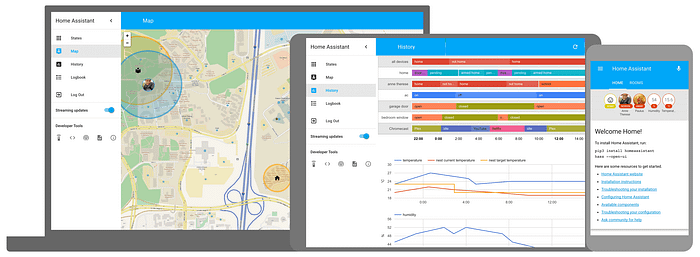
Home automation is a nice thing to have. I’d love to be able to open my door automatically when I am near, or open windows automatically.
What stopped me from getting into it, among others, is that it is extremely expensive and risky.
Like, I am not an expert. But there does not seem to be a standard between manufacturers. So, similarly to Apple products, if you buy one, you have to buy everything from them.
It makes sense for the business. But if you have a home equipped with some really expensive mechanisms that work together, you don’t want to risk it all becomes trash when your manufacturer decides he stops operations, or support for your system.
Now I discovered there is a project called Home Assistant. It is an open source project to run your house written in Python. It’s quite popular actually. I imagine using it for my purposes not having to worry about formerly mentioned issues as well as my privacy.
33 📊 SuperSet — Visualize Your Data
If you are a data scientist, or artificial intelligence expert you must have heard about it. But I think this project is worth mentioning for the wider audience of Python coders because Apache did a really good work making visualizations of the data for the client much easier. I like how the graphs look like, how they work, definately a plus from me.
34 ➗ Manim — Generate Math Videos
Numbers, formulas and graphs. All of these things are nice to look at in a mathematical book. Rarely, videos about math are animated by the fact its very hard to do it.
The 3Blue1Brown is one of the pioneers in explaining math with animations. Behind the scenes is the Manim animation engine that helps them achieve their results.
It’s open source so you can play with it too.
35 🕸️ Scrapy — Web Scraper

We obtain more and more data online. But there is no requirement to out them out in an API, so to gather them you have to scrape the web and extract data.
It’s fun to visualise such data, for example there is a page that track egg prices in Walmart in the US.
I don’t know if the author did use Scrapy, but if you want to achieve such results Scrapy is a nice tool written in Python just for that purpose.
36 Twitter Archive Parser
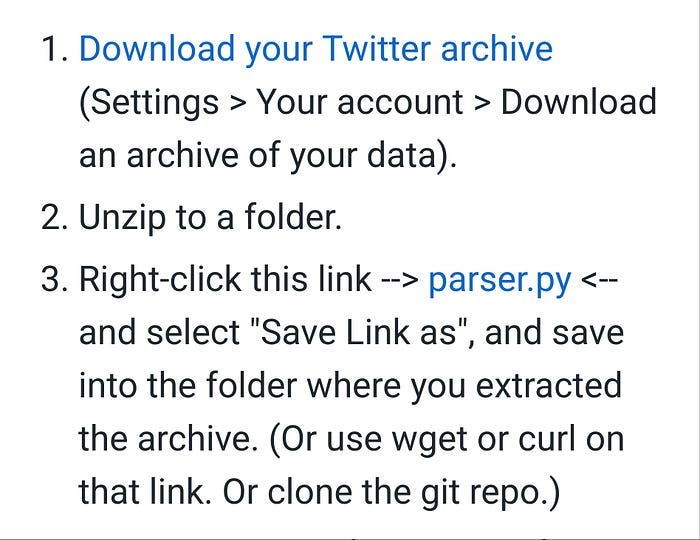
The recent turmoil around Twitter has made people more interested in keeping their activity from this social networking site.
While Twitter allows you to export your activity, it tries to make it useless by providing links to your photos that stop working when you delete your account. Or reducing their quality. It also replaces shared links with shortened ones, which will stop working whenever Twitter wants.
Twitter Archive Parser aims at fixing what Twitter broke. It grabs high quality images, frees the links from the URL shortener vulnerability and more. It is written in Python.
37 OpenCLIP
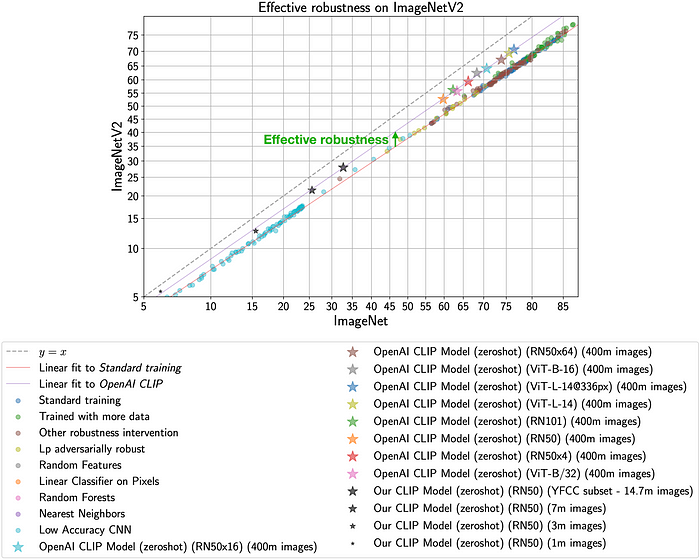
Two years ago, OpenAI announced a new AI called CLIP that can better recognize objects in photos. OpenCLIP is an open source Python implementation of this method that is even better in some cases.
38 AutoCut
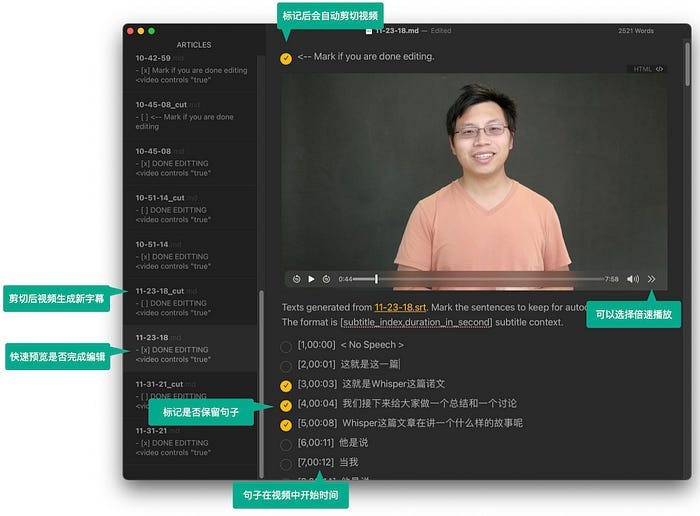
AutoCut is an application written in Python that you will love if you record videos. When you record a video and you say something wrong, you repeat the line and later in post-production you remove the defective part. AutoCut makes it easy.
Well, this brilliant system recognizes speech and generates a file with subtitles. Then you can open this file and delete selected fragments. When you restart the application, it recognizes which lines you cut and cuts the specified part from the recording as well.
39 Diffusers

Huggingface released some time ago a set of diffusers. These are specialized AIs used to generate random faces or art based on a sentence and more. The library is written in Python and uses PyTorch.
40 OpenPilot
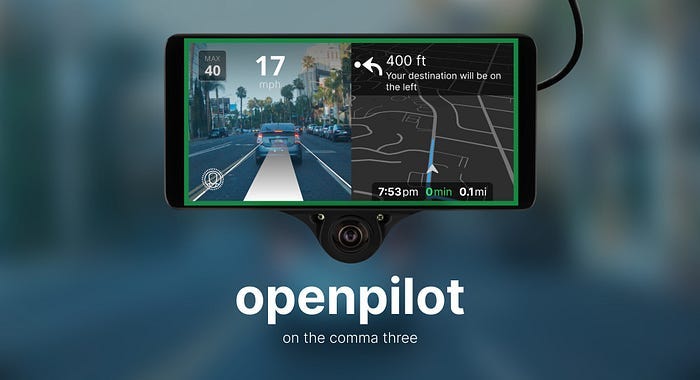
The last project is one I learned about a month ago, and it blew my mind. You probably are familiar with Tesla autopilot right? So, imagine there is an autopilot that can be added to a number of various cars. It can connect with the car through the standard interface and control aspects of driving according to the conditions on the road. Imagine it is open source. OpenPilot is exactly that. An open source autopilot for various cars written in Python.
Only 1% of people read such long articles to the end. Congrats! It must be a pleasure to talk with you about coding. You are my favorite people, I hope you will connect by subscribing!
BTW. WOW. You are really interested in Python! I’ve designed Python card game called Summon The JSON: Python. What a coincidence! You can order them now!
Do you like Python? Clap, subscribe, like and share in your social media!
Join 11 000 developers who follow Tom Smykowski! For $5 per month you will have access to all Medium articles and Tom will get a part of it, so he will write more about Python! Become a member now!
Also join the new Python Programming Guild group on Linkedin that welcomes all Python enthusiasts and creators!


